purview
294 TopicsOnboarding Devices to Purview
I am not clear on how can I onboard devices to MDE so that I can enforce EDLP policies. We have CrowdStrike as Primary AV and other policies. Devices are managed through Intune for Bitlocker encryption and all the other settings except they don't have Defender. These devices are not showing up in Purview nor under "Endpoint detection and response" location under Endpoint Security. If we create an EDR onboarding policy and deploy to devices, then it shows the devices and says that AMRUnningMode is Passive, but Antivirus is true. Which I feel like Defender is taking over CrowdStrike? or am I wrong. My goal is to make sure CrowdStrike still primary AV and devices should be onboarded to MDE and then to Purview so that we can scope EDLP policies properly. Can anyone help me to understand or provide right steps?32Views0likes1CommentConfusion around Purview Definitions and Risk Scoring
In the early days of implementation and we've done our 'Quick setup' of Insider Risk Management which created our Adaptive Protection Policy for IRM, two IRM DLP policies (Endpoint & Teams/Exchange) and the Conditional Access policy. My question is around 'Triggering events', Indicators and Insider Risk Levels. To my understanding, a triggering event is the event that decides when the policy will start assigning risk scores to user activity which will then allow us to then give users risk levels. We have the option to either set this triggering event to either the DLP policies, or when a user performs an exfiltration activity/ sequence. The DLP policies only match activity when a user has a defined risk level and attempts to perform a specific activity i.e. sharing M365 with people outside the organisation. I'm not sure if I'm thinking about this backwards, but if I set my Adaptive protection policy to only start assigning risk scores to user activity when they match a DLP policy, how can they trigger a DLP policy if they wont be assigned a risk level until that scoring begins to happen? Should I be setting my triggering events to be "User performs an Exfiltration Activity" instead of "User Matches a DLP policy"?37Views0likes1CommentManaged VNET Integration Runtime failing with 502 error.
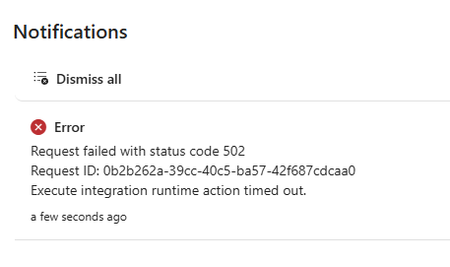
Good afternoon everyone. I'm a DevOps Engineer who is new to Purview. I used Terraform to deploy a Purview account for a POC for a client, however, I'm having a real issue creating a Managed VNET IR. The private endpoints are all visible and approved and if I check in the shell I can see the IR and the Managed VNET both exist (names sanitized). { "name": "SAMPLENAME", "properties": { "managedVirtualNetwork": { "referenceName": "ManagedVnet-name" }, "typeProperties": { "computeProperties": { "location": "WestEurope" } } } } But in the Purview portal the status shows as failed and if I try update it, I get a popup notification stating that the process timed out due to a 502 error. The URL in the error is " https://api.purview-service.microsoft.com/scan/integrationRuntimes/{NAME}?api-version=2022-02-01-preview" I thought this might be an issue with permissions or that I'm not in the admin role group in my client environment so I did the same process in my local purview account (where I'm global admin and in the Purview Administrators role group) and I'm having exactly the same problem. The managed vnet and IR exist when queried in the cloud shell but the state in the portal shows as failed. I am a "Data source Admin" in both purview accounts but I'm wondering if there's some other role assignment or role group assignment that I'm missing? Thanks in advance. Devon Britton.38Views0likes1CommentAnthropic Claude Purview Data Connector showing all users as Guests..
It appears this connector is not mapping fields properly causing internal users to be mapped as "guests", and since prompts/data isn't maintained for guest users the connector is effectively not gathering anything but noise. Unlike the other data connectors, one cannot create field mappings. Also the app being named using the guid of Microsoft's own "dataassessments" service principal I don't think is intended either. Has anybody else experienced this? See below for an example.350Views2likes7CommentsEnhancements to Device Status API & Logged-In User Email in Endpoint DLP
1. The Real‑World Problem Endpoint DLP analyst Faced (What Was Missing Earlier) Before the introduction of the Device Status API enhancements and logged‑in user visibility, Endpoint DLP teams consistently struggled in below discussed areas: Device Visibility Was Fragmented and Manual - Customers repeatedly told us: We know some devices are unhealthy, but we don’t know who owns them. We export the onboarding table to Excel every week just to understand drift. By the time we detect a policy issue, the user is already blocked or impacted. In practice, this meant: Device onboarding views were static snapshots, not operationally actionable. Admins relied on manual Excel exports to track onboarding, drift, and health. Reporting pipelines were brittle and always out of date. 2. Device Status API: Why Customers Asked for This (Beyond “Reporting”) The Hidden Cost of Excel‑Driven Operations as earlier, customers had to: Export device onboarding data manually. Rebuild dashboards every time they needed updated insight. Repeat this process weekly or even daily for compliance and SOC reviews. This approach failed at scale and created blind spots during incidents. When a device policy sync failed or appeared unhealthy, admins had no real‑time, view to answer basic questions like: Is this device configured correctly? Is the OS or Defender version lagging? Is the issue widespread or isolated? 3. What the Improvement Unlocks (New Operational Reality) From Static Views to Continuous Monitoring with the Device Status API: Device health, configuration status, policy sync state, OS version, and Defender version become query able signals Customers can power custom reporting and Advanced Hunting queries that are always current SOC and Endpoint teams finally share a single source of device truth This fundamentally changes how customers monitor Endpoint DLP not as a setup task, but as a living control plane. The Device Status API directly addresses this gap by making device‑level status continuously available through Advanced Hunting, allowing customers to build living dashboards instead of static reports. 4. The Old Workflow (Customer Pain) Historically, when a device showed: Policy Sync Failed Unhealthy Configuration mismatch Admins had to: Leave the Purview console Open Microsoft Defender for Endpoint or Intune Correlate device IDs or names Identify the user Start remediation This context‑switching cost time, accuracy, and confidence. 5. The New Reality: User Context Where It Matters Admins can now see who is logged in directly on the device onboarding page, aligning Windows with the macOS experience like: Immediate user context during device issues. Faster outreach and remediation. One unified investigative surface. What used to require three portals and multiple teams now happens in One Place. 6. When Customers Actually Needed This Data (But Didn’t Have It) This improvement wasn’t driven by curiosity it was driven by failure points in production. Some of the common customer scenarios listed below: Scenario Before Now / After Improvement Scenario 1: Quarterly Compliance Reviews Teams exported Excel files days before audits, resulting in stale data. Auditors questioned the reliability of reports. Advanced Hunting queries power live compliance dashboards. Reports are defensible because the data is always current. Scenario 2: Incident Post‑Mortems Teams struggled to answer whether devices were healthy at the time of the incident or if policies were enforced versus just configured. Reviews relied on assumptions. Device status, policy sync state, and OS/Defender versions are query able facts. Incident reviews shift from guesswork to evidence‑based analysis. Scenario 3: Silent Policy Drift Devices drifted due to OS updates, sensor lag, or configuration changes. Issues surfaced only after a DLP violation occurred. Policy drift becomes detectable before enforcement failures. Endpoint DLP acts as a reliability signal rather than a last‑line alarm. 7. New enhancement on Device Status API Device status API provides admins with access to device level information to integrate onboarded device information to custom reporting or use in advanced hunting queries. It has helped admins track down users associated with devices instead reaching out to Entra, on-premises Active Directory, or Intune team. During troubleshooting, if a device is not receiving policies on time, the device API allows quick identification of the device owner and assists in enabling always-on diagnostics or collecting logs directly from the device via Purview console. 8. Steps to capture User UPN Admin can find the device status by login to Security.microsoft.com as security admin. Click on Investigation and responses > Hunting > Advanced hunting. Device data can be found under DLPInfo JSON Column in the Deviceinfo table 3. Once we run above or any custom query as per requirement, you would see below as response. 4. Click on the loggedonuser field and expand the right-side information and look for DLPUPN under inspect record. 9. User login details on the Purview onboarding page Admins now can see who is currently logged in on the device onboarding page. This update aligns the Windows experience with macOS, allowing admins to respond quickly if necessary. In the past, when a device displayed a "Policy Sync Failed" or "Unhealthy" status, it was necessary to switch to Microsoft Defender for Endpoint (MDE) or Intune to identify the affected user. With this update, all relevant information is now accessible in a single view, streamlining the process. Benefits - Admins gain faster confirmation of device ownership and user context without extra investigation. It simplifies troubleshooting onboarding or policy issues by surfacing the user alongside other device insights like status and IP. No impact on users or DLP policies occurs, and it's enabled by default with no action required. 10.Steps to find User UPN on Purview admin console Login to Purview.microsoft.com with compliance admin > Select settings > Device onboarding > Select device Final Takeaway: Why This Matters More Than It First Appears "These enhancements evolve Endpoint DLP from a static, deployment‑centric control into a continuously observable, user‑context aware security signal, significantly reducing investigation time, operational overhead, and trust gaps at scale"225Views0likes0CommentsExtend Microsoft Purview data protection to AWS Bedrock agents for cross-cloud AI governance
Organizations are moving fast with AI, and many of those AI workloads are not staying in one cloud. A team might use Microsoft 365 and Microsoft Purview for governance and in addition to Microsoft Foundry they may still choose to run an AI agent on AWS Bedrock or on the Google Cloud Platform. The technical challenge is straightforward: how do you keep one consistent set of data security, governance, and compliance controls when the agent itself runs outside Microsoft Azure? This is where Microsoft Purview becomes the central policy engine for your data estate. In this post, we show why that matters and then walk through a practical example: an expense approval agent running on Amazon Bedrock, protected by Microsoft Purview Data Loss Prevention (DLP) policies. ExpenseApprovalAgent" details of the Agent blade Why Purview should be the central policy engine Most organizations do not want separate policy stacks for every cloud, every model endpoint, and every app team. That leads to duplicated controls, inconsistent enforcement, and audit gaps. The better model is to separate where workloads run from where policy decisions are made. That is the value proposition for Microsoft Purview in cross-cloud AI scenarios. Purview gives you: A consistent policy layer for sensitive information types such as credit card numbers, Social Security numbers, financial data, and other regulated content. A governance plane that can extend beyond Microsoft-hosted workloads into multi-cloud environments. A compliance framework with auditability, policy traceability, and a familiar operational model for security and compliance teams. A way to apply data-aware controls to AI interactions, not just to storage locations. In practical terms, that means the same organization that already trusts Purview to govern Exchange, SharePoint, Teams, and Copilot can use Purview to govern prompts and responses in a Bedrock-based agent as well. The key architectural shift is this: your app does not need to invent its own data policy engine. It can call Purview at the points where risk exists. What this Bedrock agent demonstrates The sample solution in this blog is a cross-cloud AI pattern: The frontend is a single-page browser-based chat app. Users authenticate with Microsoft Entra ID via MSAL. The backend runs in AWS Lambda. The model is Amazon Bedrock using Nova 2 Lite. Microsoft Purview evaluates prompts and model responses for DLP policy violations. This matters because it proves a broader point: Microsoft Purview can govern AI interactions even when the model and compute are not running in Azure. The core architecture As shown above the end-to-end flow follows this pattern: A user signs in through Microsoft Entra ID from the frontend. The frontend sends the user's access token and prompt to an API endpoint in AWS. The Lambda function exchanges that token using the On-Behalf-Of flow so Purview can evaluate under the signed-in user's identity. Purview scans the full prompt for sensitive information before the model is called. If the prompt is allowed, the Lambda function sends the request to Amazon Bedrock. Purview scans the model response before it is returned to the user. The frontend shows the result along with a Purview evaluation badge. That gives you two strong governance controls: In-line data loss prevention enforcement, which can block risky requests before they ever reach the model. Response-time enforcement, which can stop sensitive data from being returned even if a model generates it. The implementation also uses the user's identity for policy evaluation. That is important because governance decisions should reflect who is asking, not just what application is running. Why this pattern is useful for security, governance, and compliance teams There are three reasons this pattern is worth paying attention to. First, it aligns policy with risk rather than with hosting location. The compute might run in Lambda and the model might be in Bedrock, but Purview still remains the policy decision point. Second, it improves operational clarity. Security teams do not have to learn a different governance toolchain for each AI stack. They can keep using Purview concepts, policy models, and audit workflows. Third, it supports real-world adoption. Most large enterprises are hybrid and multi-cloud already. A governance pattern that only works for one vendor's runtime is not enough. Policy definition in Purview Two polices are needed to enforce DLP-a collection policy for Enterprise AI Apps and a DLP policy Collection policy 2. DLP policy Follow the steps outlined here to create the DLP policy for Enterprise AI Apps. Sample provided: purview-api-samples/DLPforCustomAIApps at main · microsoft/purview-api-samples To replicate this scenario, follow this link to the official GitHub repo: purview-api-samples/AWSBedrock at main · microsoft/purview-api-samples Once deployed, you will have: An AWS Lambda function that calls Amazon Bedrock. A browser frontend that authenticates with Microsoft Entra ID. Microsoft Purview evaluating both prompts and responses. A demo flow where safe prompts succeed and sensitive prompts are blocked. With the App and agent deployed, now comes the moment when the architectural value becomes clear. The model runtime is AWS Bedrock, but the policy decision is still coming from Microsoft Purview. Below screenshot shows the prompt containing sensitive information being blocked based on the policy evaluation by Purview. Minimal code integration requirements using the SDK Below is the code needed to perform the integration between Purview and Bedrock to perform the in and outbound inspection of content destined to and from the Bedrock model. Results of Purview’s verdict presented to user in the App UI Review governance evidence in Purview Data Security Posture Management Summary The bigger story here is not just that Microsoft Purview can protect an Amazon Bedrock agent. It is that organizations can centralize data security, governance, and compliance policy even while their AI architecture becomes more distributed across multiple clouds. That is the operational win. Developers keep the freedom to choose the best runtime and model platform. Security and compliance teams keep a central policy engine they already understand and trust. AI applications can be multi-cloud, but your data protection model does not have to be fragmented. Additional resources Configure Microsoft Purview - purview-sdk | Microsoft Learn Microsoft Purview Developer Platform Documentation - purview-sdk | Microsoft Learn514Views1like1CommentData System Wide Lineage via API Request
I'm struggling with finding a solution. My goal is to identify all existing lineage relationships for any data objects within a specific data system they belong to. I've been using the Purview REST API (Datamap Dataplane) but I haven't found an endpoint returning data system side lineage/relationships. For my scenario I have a Databricks metastore and need to know the existing lineage relationships of those data objects within Purview so I can purge them out when we are doing our scheduled lineage refresh.Solved127Views1like3CommentsMicrosoft 365 E7 & Agent365: From Where You Are to Enterprise AI at Scale
Introduction As organizations move beyond AI experimentation and begin operationalizing agent-based AI workloads, a new set of challenges is emerging governance, visibility, and control. Microsoft’s response to this shift is Microsoft 365 E7, introduced on May 1, 2026. It bundles: Microsoft 365 E5 Microsoft 365 Copilot Microsoft Entra Suite Microsoft Agent 365 This represents Microsoft’s strategic direction toward a human-led, agent-operated enterprise. However, a key pattern is emerging: Many organizations deploy Agent 365 and assume governance is complete. It isn’t. Understanding Agent 365: Control Plane, Not Control Source Agent 365 is not a standalone security solution, it is a control plane for AI agents. It provides: Agent registry and discovery Blueprint governance and lifecycle control Observability across agents Aggregation of signals from Entra, Defender and Purview Simple analogy Agent 365 is like a dashboard in a car It shows status It aggregates signals But it does not generate signals Without identity, data and threat signals → governance visibility is incomplete. The Key Gap: “Enabled” vs “Governed” Agent 365 can be enabled standalone but governance requires: Identity signals (Entra) Threat signals (Defender) Data risk signals (Purview) This gap between “enablement” and “full governance” is where most deployments fall short. Agent 365 Governance Maturity Heatmap The following heatmap summarizes how governance capabilities evolve as you layer the Microsoft stack: Capability Agent 365 on E3 + Defender Suite + Purview Suite + Entra Suite E7 (Full) Agent registry / inventory ✅ Full ✅ ✅ ✅ ✅ Shadow agent discovery ✅ Full ✅ ✅ ✅ ✅ Blueprint governance / kill-switch ✅ Full ✅ ✅ ✅ ✅ First-party agent observability ✅ Full ✅ ✅ ✅ ✅ Conditional Access for agents (P1) ✅ Already in BP/E3 ✅ ✅ ✅ ✅ ID Governance for agents (P1) ✅ Already in BP/E3 ✅ ✅ ✅ ✅ Risk-based CA / ID Protection (P2) ❌ ✅ ❌ ✅ ✅ MDA behavioral risk detection ❌ ✅ ❌ ❌ ✅ Risks column fully populated ⚠️ Entra only ⚠️ Entra + Defender ⚠️ Entra + Purview ⚠️ Entra + Network ✅ All signals Purview DLP for agent interactions ⚠️ Basic only ⚠️ Basic only ✅ Full ⚠️ Basic only ✅ Full DSPM for AI ❌ ❌ ✅ ❌ ✅ Shadow AI discovery (external tools) ❌ ❌ ❌ ✅ ✅ Security Copilot SCUs ❌ ❌ ❌ ❌ ✅ (via E5) 🔍 Interpretation of the Heatmap Key insight: Agent 365 on its own provides visibility and governance scaffolding, but true governance maturity emerges only when identity (Entra) threat (Defender), and data (Purview) signals are combined. Microsoft 365 E7 is the only SKU that delivers all signals, identity, security, compliance and AI governance in a single integrated model. What Works with Agent 365 Alone On Business Premium or E3 + Agent 365, you still get meaningful capabilities: Agent registry (full visibility) Shadow agent discovery Blueprint governance and kill-switch Entra Agent ID (identity registration) Conditional Access for agents (via Entra P1) ID Governance (via Entra P1) First-party agent observability This provides a strong governance foundation, especially for early-stage adoption. What’s Missing Without the Full Stack Without Defender, Purview, and Entra Suite key capabilities are limited: Risk-based Conditional Access (requires Entra P2) Behavioral threat detection (Defender) Data interaction governance (Purview DLP) AI data security posture (DSPM for AI) External shadow AI discovery (Entra Internet Access) Result: You can see agents exist but you cannot fully assess risk, behavior or data exposure. What changes across layers: Layer Added What Improves Defender Threat detection, behavioral risk Purview Data protection, AI data governance Entra Suite Network + identity-level AI control E7 Full integration across all layers Licensing Model: Clarifying Agent 365 Agent 365 licensing is simple but often misunderstood: Licensed per user (not per agent) Covers all agents owned or managed by that user Agents do not need individual licenses This eliminates agent sprawl licensing concerns and anchors governance to the user identity. Upgrade Math by Starting Point This is where architecture meets commercial reality. 📍 Business Premium Starting point: $22/user Step Add-on Total Step 1 Agent 365 ($15) $37 Step 2 Defender + Purview Combo ($15) $52 Step 3 Entra Suite ($12) $64 Step 4 Copilot + Intune Suite ~$95 👉 Full E7 Parity: ~$95/user 👉 E7: $99/user At this stage: Minimal price difference E7 adds Security Copilot + removes 300-user limit ✅ This is where consolidation becomes compelling. 📍 E3 Starting point: $39/user Component Cost E3 Base $39 Agent 365 $15 Defender Suite $12 Purview Suite $12 Entra Suite $12 Intune Suite $10 Copilot $30 Total $130/user 👉 E7: $99/user 💥 Delta: $31/user 💥 ~$74K/year extra for 200 users ✅Use Agent 365 for visibility if needed ✅Avoid building full add-on stack ✅Move to E5 or E7 early 📍 E5 Starting point: $60/user Remaining gaps: Copilot ($30) Entra Suite ($12) Agent 365 ($15) 👉 Total: $117/user 👉 E7: $99/user 💥 Savings: $18/user 💥 ~$108K/year for 500 users ✅ ~15% savings ✅ Simplified licensing ✅ This becomes a strong renewal conversation driver. Architectural Perspective AI governance requires layered architecture: Layer Function Agent 365 Control plane Entra Identity + access Defender Threat detection Purview Data protection Governance is not a feature, it is a system built on continuous signals across identity, security and data. How to Position This in Customer Conversations For Business Premium Start with Agent 365 Add Defender + Purview for maximum value For E3 Avoid incremental add-ons Move to E5/E7 For E5 Position E7 as cost optimization + simplification Final Thought Agent 365 is a foundational capability but it is not a complete solution. On its own, it gives you visibility and a governance layer. But enterprise AI governance is not just about seeing and managing agents it’s about understanding what they’re doing, what they’re accessing and whether they should be doing it at all. A simple way to think about it: Deploying Agent 365 alone is like setting up a badge system in your building you can track who is inside and control access. But without the broader security stack, you still can’t: Detect risky or unusual behavior Protect sensitive data from overexposure Enforce governance consistently across the environment Bottom Line Agent 365 provides the control plane Security and compliance services provide the signals Microsoft 365 E7 brings these together into a unified governance model The Strategic Shift Organizations are moving from: AI as tools → isolated productivity gains AI as systems → integrated workflows and automation AI as governed ecosystems → secure, compliant, and scalable operations Sustainable AI adoption is not defined by capability alone it is defined by how effectively that capability is governed at scale. E7 is not just a licensing evolution it represents a shift to an integrated AI operating model, where governance is embedded by design, not added as an afterthought.1.3KViews2likes1CommentGet-AdaptiveScopeMembers doesn't show the SiteURL for OneDrive
I am working through reporting for Adaptive Scopes and Adaptive Retention policies. I'm so close. But I discovered a problem with my script in that when people return to the company after their account has been deleted, they get a new OneDrive URL. This is expected. While they can have the same email address as an inactive mailbox, they cannot have the same OneDrive URL as an inactive URL. Since we keep all data for a minimum of 7 years, it is possible for a UPN to be the "owner" of 2 or more OneDrive URLs (one active and the others are from previous accounts). I have no easy way of seeing which OneDrive URL is active short of looking for digits at the end of the URL and taking the highest digit. But, what I want to know, is why isn't it here? Why doesn't "Get-AdaptiveScopeMember" return the SiteURL for the user? I thought maybe it was because my test user didn't have a OneDrive site when the account was added to the scope, so I added my actual user account to the scope and it shows the same thing. Is SiteURL only for SharePoint sites and not OneDrive sites? This makes no sense. Does it just take more time to show up? what's the time frame on that?106Views0likes2Comments