prompt engineering
21 Topics
One agent, three runtimes: porting a CSA agent to Microsoft Scout and Foundry Local
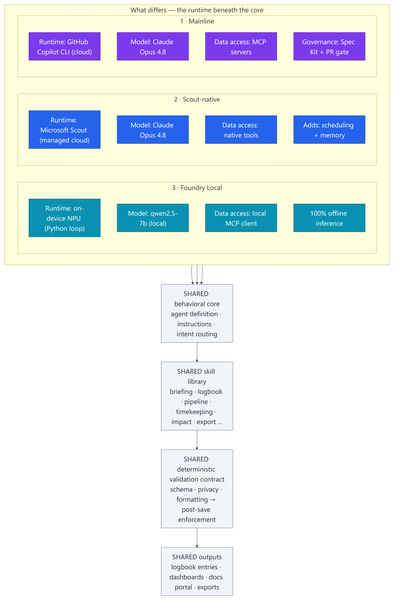
Most of my posts here are about Azure infrastructure lessons from customer engagements. This one is a little different — it's a real‑world engineering lesson from something I built to run my own practice. In my role as a Senior Cloud Solution Architect (CSA), I'm part of a grass-roots organic development team for an internal persona‑driven productivity agent called CSA‑Sherpa. It runs my daily rhythm: a morning briefing, a running logbook of wins and blockers, pipeline and timekeeping summaries, and reporting/exports. It started life in the GitHub Copilot CLI. But over the last few months two things changed the ground under it: Microsoft Scout arrived as a managed cloud agent with native tooling, scheduling, and memory; and Foundry Local made it realistic to run a capable model entirely on‑device on a Copilot+ PC's NPU — no cloud round‑trip at all. That raised a question I think a lot of people building agents will eventually ask: If I designed the framework well, can I change how the model runs without rewriting the agent? To find out, I stood the same agent up in three runtimes, then wrote a whitepaper and a comparison deck measuring what actually changed. This post explains: How one shared, deterministic core made three very different runtimes comparable What the three ports — Copilot CLI, Scout‑native, and Foundry Local (on‑device NPU) — actually took What the analysis showed, and a simple decision framework for which runtime to use when The part that stayed the same: a deterministic core The whole exercise only works because all three implementations load the same behavioral core: Agent definition — persona, behavioral rules, intent routing, workflow dispatch Instructions — conventions, session bootstrap, change‑management rules Skill library — one procedure file per workflow (morning briefing, logbook, pipeline, timekeeping, impact, ops, export…) A deterministic validation contract — schema, formatting, and privacy validators plus a post‑save enforcement chain That last point is the whole thesis: reliability belongs in code, not in the prompt. Rather than asking the model to "remember" to validate its output, a real gate (a validation step → a post‑save enforcement chain → index regeneration) enforces it every single run. This wasn't my idea in a vacuum — it follows the enterprise prompt‑engineering principles Kathiravan Thangavelu lays out in his article Prompt Engineering for Enterprise AI: Why Reliability Matters: keep deterministic logic in code, prefer schema‑driven / structured output over prompt‑enforced formatting, and replace "before you answer, verify that…" mental checklists with real machine validation. My validation gate is that principle in practice. And because that contract is identical across all three runtimes, I'm comparing three ways to execute one product — not three different products. The deterministic payoff: faster and cheaper Retrofitting those principles into the agent — moving work out of the model and into deterministic scripts — is the single change that paid off the most, on two axes at once: Faster. Letting code (not the model) gather and aggregate history cut the average model round‑trips per workflow from ~8.7 to ~5.5 — roughly a third fewer turns. Fewer turns means less waiting on generation and less back‑and‑forth to finish a task. Cheaper. The same change cut usage‑based cost ~24% — and, more importantly, held it flat as the logbook grew to hundreds of entries, because scripts carry the history the model used to re‑read every run. That's the quiet lesson: the reliability work I did for correctness turned out to be the same work that made the agent quicker and less expensive. Determinism isn't a tax on speed — here it bought all three. The work: three repositories, three runtimes Everything below the core — runtime, data access, governance, file layout — is where the effort went. 1 · Mainline — Copilot CLI + MCP. The upstream, most feature‑complete build. Runs as a primary agent in the GitHub Copilot CLI on Claude Opus 4.8; data services are discovered through MCP. It carries the heaviest governance: a Spec Kit layer (spec‑driven‑development agents, a constitution + templates, and 50+ per‑feature spec artifacts gated at PR time) plus an add‑on framework. The richest architecture — and the most complex to operate. 2 · Scout‑native. A thin wrapper loads the exact same core onto Microsoft Scout — again on Claude Opus 4.8 — but data access is re‑platformed onto Scout's native tooling instead of MCP subprocesses. No broker to configure; native tools negotiate their own auth. It adds two things the CLI can't do as cleanly: ✅ Scheduled automations — my morning briefing fires automatically on weekday mornings ✅ Cross‑session memory in place of hand‑off files The deterministic finalize gate stays fully intact. 3 · Foundry Local — on‑device NPU. The genuine outlier and the most involved port: a Python re‑implementation that runs the model — qwen2.5‑7b, an open ~7‑billion‑parameter model — 100% locally on the device's NPU (a Snapdragon X Elite Copilot+ PC) via Foundry Local's OpenAI‑compatible server. The agent loop, an MCP client, skill loading, and a distinct finalize pipeline all had to be rebuilt outside the CLI. The model never leaves the machine; only data connectors reach out when connected. The trade‑offs are real — modest throughput and a fixed context window — but so is the payoff: offline, private, near‑zero marginal cost. The effort This wasn't a weekend spike. Across the three code bases (plus a clean isolation clone I kept as an A/B baseline): ~340–380 commits per repository, three versions maintained in parallel 17 skills in each cloud build; 18 in the Foundry port ~37 scripts in the streamlined Scout build, up to ~97 in the governed Mainline build A Spec Kit governance layer with 50+ feature specs on Mainline A four‑part cost study and two written deliverables: an architecture whitepaper and a 20‑slide comparison deck The analysis and reporting The whitepaper and deck do two jobs. First, they document each runtime as a layered diagram — runtime, core, skills, scripting/validation, external services — so the differences are visible at a glance. Second, they convert the architecture fork into economics: a study that measured the actual token footprints of each repo and priced runs across billing models and hardware. The four dimensions: per‑skill cost, optimized‑vs‑out‑of‑the‑box, Copilot CLI vs Scout, and cloud vs local NPU. By the numbers The study priced measured token footprints at frontier‑model rates (treat the dollars as ±30% — the relative conclusions are far more robust than the absolute figures): Per skill: roughly $0.6–$1.4 per run usage‑based — or a single flat "premium request" under request‑based billing The determinism dividend: optimized, script‑driven skills cut model round‑trips ~8.7 → ~5.5 and usage‑based cost ~24% — and held cost flat as the logbook grew Scout vs CLI: Scout ran ~37% cheaper across a five‑command session and consumed none of the premium‑request allowance Cloud vs local: on‑device NPU inference came in 50–3,400× cheaper in cash than cloud — at the cost of throughput, context, and first‑pass reliability A full active day (~4 runs) landed around a few dollars usage‑based The headline isn't any single figure — it's the shape: cloud cents buy first‑pass reliability, on‑device near‑zero cost trades your time, and determinism makes either one cheaper and steadier. What held up The core is portable. The same agent, skills, and validation gate ran under all three runtimes. Good separation of concerns paid off. Determinism pays three ways — faster, cheaper, and more reliable (detailed above). It was the highest‑leverage change I made. Managed cloud wins the day job. Scout is the best daily driver: reliability gate intact, lower setup friction, scheduling + memory, and cheaper across a multi‑command session because it caches the bootstrap. On‑device is strategic — but reliability is the tax. Local NPU inference is dramatically cheaper in cash. We ran an in‑depth test pass across every function and closed the gaps it surfaced — yet the smaller model that makes Foundry Local possible still hallucinates and drops instructions often enough on the first pass to matter. Each re‑run is nearly free in dollars, but it costs real time to catch and correct. The winning pattern is hybrid. Draft and triage locally for ~nothing; escalate the correctness‑critical steps to cloud Opus 4.8, paying only where it buys first‑pass reliability. Three runtimes, side by side Figure: Three runtimes, one shared core. Only the top rows — runtime, model, data access, and governance — differ; the behavioral core, skill library, validation gate, and outputs are identical across all three. Capability Mainline (Copilot CLI) Scout‑native Foundry Local (NPU) Runtime Copilot CLI (cloud) Scout (cloud, managed) On‑device NPU Model Claude Opus 4.8 Claude Opus 4.8 qwen2.5‑7b (open, ~7B) Data access MCP Native tools MCP via local client Governance Spec Kit + PR gate Behavioral rules Behavioral rules Scheduling + memory ❌ ✅ ❌ Runs fully offline ❌ ❌ ✅ Marginal cost / run cloud per‑token cloud per‑token (cheaper/session) ≈ free Best for Framework development Daily production Offline / privacy / bulk When to use each Daily CSA workflows → Scout‑native. Managed, cheaper across a session, reliable, and it doesn't burn your Copilot request allowance. Building or versioning the framework → Mainline. Spec Kit governance and the add‑on system earn their keep here. Offline, air‑gapped, or sensitive data → Foundry Local. 100% on‑device inference. Bulk / high‑volume / non‑critical → Foundry Local. Zero marginal cost. Must be right on the first pass → Cloud Opus 4.8. The cents are worth it. Mixed, cost‑sensitive workload → Hybrid. Local draft → cloud escalate. Closing Thoughts The most useful reframe from this work: the three architectures aren't competitors — they're a portfolio. A managed cloud daily‑driver (Scout), a governed development platform (Mainline), and a sovereign on‑device runtime (Foundry Local). The job is to match the runtime to the task, not to crown one winner. And the same lesson that applies to Azure infrastructure applies to agents: build reliability into the system, not into good intentions. Because CSA‑Sherpa keeps its guarantees in code, I could change the entire execution model underneath it — cloud CLI, managed cloud, on‑device NPU — and the agent still behaved the same way. That portability is the dividend of a deterministic design. These workflows are genuinely complex, and that's exactly where the small model shows its limits: even after closing the gaps our testing surfaced, it still hallucinates and drops instructions often enough on the first pass to be a real cost. That's the honest trade‑off — near‑zero dollars, paid back in review‑and‑retry time — and it's why my recommendation lands on hybrid: let the small model draft where it's cheap and low‑risk, and escalate anything that has to be right the first time to cloud Opus 4.8. I use the agent in Microsoft Scout daily, as part of my personal production process. I did use AI to help draft and format this post — fittingly, the very agent it describes. The architecture, the analysis, and the conclusions are my own. Thanks for reading.373Views1like1Comment
🚀 Prompt Tuesday | Write Prompts Like a Pro
Prompt Tuesday | PT-002 | A small change in your prompt can dramatically improve AI responses. Instead of asking: ❌ "Summarize this document." Try this: ✅ "Summarize this document into 5 key points. Highlight risks, action items, and decisions. Keep the response under 200 words and format it as a table." 💡 Prompt Formula Role + Task + Context + Constraints + Output Format Example: Act as a Microsoft Solutions Architect. Review the following Azure migration proposal. Identify technical risks, suggest improvements, and present the findings in a table with Risk, Impact, and Recommendation. Why it works ✔ Gives AI a clear role ✔ Provides context ✔ Defines expectations ✔ Specifies the output format The more specific your prompt, the better the results. 💬 Challenge: Share one prompt that saves you time at work. Let's learn from each other!76Views0likes0CommentsEmbracing Responsible AI: A Comprehensive Guide and Call to Action
In an age where artificial intelligence (AI) is becoming increasingly integrated into our daily lives, the need for responsible AI practices has never been more critical. From healthcare to finance, AI systems influence decisions affecting millions of people. As developers, organizations, and users, we are responsible for ensuring that these technologies are designed, deployed, and evaluated ethically. This blog will delve into the principles of responsible AI, the importance of assessing generative AI applications, and provide a call to action to engage with the Microsoft Learn Module on responsible AI evaluations. What is Responsible AI? Responsible AI encompasses a set of principles and practices aimed at ensuring that AI technologies are developed and used in ways that are ethical, fair, and accountable. Here are the core principles that define responsible AI: Fairness AI systems must be designed to avoid bias and discrimination. This means ensuring that the data used to train these systems is representative and that the algorithms do not favor one group over another. Fairness is crucial in applications like hiring, lending, and law enforcement, where biased AI can lead to significant societal harm. Transparency Transparency involves making AI systems understandable to users and stakeholders. This includes providing clear explanations of how AI models make decisions and what data they use. Transparency builds trust and allows users to challenge or question AI decisions when necessary. Accountability Developers and organizations must be held accountable for the outcomes of their AI systems. This includes establishing clear lines of responsibility for AI decisions and ensuring that there are mechanisms in place to address any negative consequences that arise from AI use. Privacy AI systems often rely on vast amounts of data, raising concerns about user privacy. Responsible AI practices involve implementing robust data protection measures, ensuring compliance with regulations like GDPR, and being transparent about how user data is collected, stored, and used. The Importance of Evaluating Generative AI Applications Generative AI, which includes technologies that can create text, images, music, and more, presents unique challenges and opportunities. Evaluating these applications is essential for several reasons: Quality Assessment Evaluating the output quality of generative AI applications is crucial to ensure that they meet user expectations and ethical standards. Poor-quality outputs can lead to misinformation, misrepresentation, and a loss of trust in AI technologies. Custom Evaluators Learning to create and use custom evaluators allows developers to tailor assessments to specific applications and contexts. This flexibility is vital in ensuring that the evaluation process aligns with the intended use of the AI system. Synthetic Datasets Generative AI can be used to create synthetic datasets, which can help in training AI models while addressing privacy concerns and data scarcity. Evaluating these synthetic datasets is essential to ensure they are representative and do not introduce bias. Call to Action: Engage with the Microsoft Learn Module To deepen your understanding of responsible AI and enhance your skills in evaluating generative AI applications, I encourage you to explore the Microsoft Learn Module available at this link. What You Will Learn: Concepts and Methodologies: The module covers essential frameworks for evaluating generative AI, including best practices and methodologies that can be applied across various domains. Hands-On Exercises: Engage in practical, code-first exercises that simulate real-world scenarios. These exercises will help you apply the concepts learned tangibly, reinforcing your understanding. Prerequisites: An Azure subscription (you can create one for free). Basic familiarity with Azure and Python programming. Tools like Docker and Visual Studio Code for local development. Why This Matters By participating in this module, you are not just enhancing your skills; you are contributing to a broader movement towards responsible AI. As AI technologies continue to evolve, the demand for professionals who understand and prioritize ethical considerations will only grow. Your engagement in this learning journey can help shape the future of AI, ensuring it serves humanity positively and equitably. Conclusion As we navigate the complexities of AI technology, we must prioritize responsible AI practices. By engaging with educational resources like the Microsoft Learn Module on responsible AI evaluations, we can equip ourselves with the knowledge and skills necessary to create AI systems that are not only innovative but also ethical and responsible. Join the movement towards responsible AI today! Take the first step by exploring the Microsoft Learn Module and become an advocate for ethical AI practices in your community and beyond. Together, we can ensure that AI serves as a force for good in our society. References Evaluate generative AI applications https://learn.microsoft.com/en-us/training/paths/evaluate-generative-ai-apps/?wt.mc_id=studentamb_263805 Azure Subscription for Students https://azure.microsoft.com/en-us/free/students/?wt.mc_id=studentamb_263805 Visual Studio Code https://code.visualstudio.com/?wt.mc_id=studentamb_263805967Views0likes0Comments
## Advanced Copilot Prompt for High‑Fidelity Teams Meeting Analysis (v1.5)
## Advanced Copilot Prompt for High‑Fidelity Teams Meeting Analysis (v1.5) I’ve been working on a structured Copilot prompt designed to dramatically improve the quality of meeting analysis inside **Microsoft Teams**, especially when the default Intelligent Recap doesn’t capture enough nuance, decisions, or actionable follow‑ups. This prompt produces a detailed, repeatable output that includes: - TL;DR executive summary - Meeting quality assessment - Prioritized action items table - Confirmed vs. tentative decisions - Open questions & risks - Mind‑map style outline - Timeline of key moments - Confidence & source citations - Tech jargon glossary - Planner‑ready task export It’s now at **version 1.5**, and I’m sharing it publicly for anyone who wants deeper meeting insights or more reliable task handoff into Planner. --- ### Why I Built This In many engineering, security, and cross‑functional meetings, clarity is everything. The default recap is helpful, but sometimes too generic. I wanted something that: - Reduces ambiguity - Surfaces decisions clearly - Highlights risks and open questions - Produces actionable, Planner‑ready tasks - Works consistently across different meeting types - Enforces strict inference rules to avoid hallucinations If your team relies heavily on Teams + Copilot, this can significantly improve meeting outcomes. --- ### What’s Included The full prompt includes: - Strict ordering rules - Anti‑hallucination constraints - Fallback rules for missing data - TL;DR section - Speaker‑labeling rules - Timestamp restrictions - Bullet‑length limits - Planner task title constraints - Deduplication rules - Tone consistency - Signal‑to‑noise filtering I’ve included the complete prompt below for anyone who wants to use or adapt it. --- ### How to Use It 1. Open the **Recap** tab of any Teams meeting with transcription enabled. 2. Click **Open Copilot**. 3. Paste the entire prompt into the Copilot compose box. 4. Wait for the structured output (usually 30–120 seconds). 5. Copy the Planner tasks section directly into Planner or Copilot for Planner. --- ### Looking for Feedback If you try this prompt, I’d love to hear: - What worked well - What didn’t - What you’d like added in v1.6 - Any edge cases or meeting types where it struggled I’m planning to maintain this as a community resource, so suggestions are welcome. Thanks to everyone experimenting with Copilot in Teams — the creativity in this community is incredible. --- ### Full Prompt (v1.5) ````markdown ```markdown # ============================================================ # PROMPT NAME: Advanced Teams Meeting Analyst (Copilot Enhancement) # ============================================================ # Version: 1.5 # Author: Scott M # Last Updated: 2026-01-14 # # Goal: # Use Microsoft Copilot in Teams (Recap tab or live meeting) to generate a highly structured, # high-signal meeting analysis that goes far beyond the default Intelligent Recap output. # Produce executive summary with TL;DR, prioritized action items table, confirmed/tentative decisions, # risks/open questions, mind-map outline, timeline, quality assessment, confidence/sources, # tech jargon glossary, and Planner-ready task export—all derived strictly from the transcript, # shared screens, chat, and attachments. # # Why This Is Superior to Default Teams/Copilot Processing: # - Default Recap: Basic chapters, highlights, simple tasks, attendance—often generic and misses nuance. # - This custom prompt: Forces strict inference rules (no hallucinations), adds confidence labeling, # decision status, risks section, mind-map structure, quality flags, source citations, # jargon glossary, and direct Planner integration for seamless task handoff. # Delivers scannable, professional-grade notes + actionable tasks for tech/engineering teams. # # Audience: # Microsoft 365 Copilot users in Teams-heavy environments who want deeper analysis # and direct bridge to Planner for follow-up execution. # # Non-Goals: # - This is NOT a replacement for legal/compliance-grade minutes. # - This is NOT verbatim transcription (use the native transcript for that). # - Relies on Teams transcription quality (enable Intelligent Speakers if available). # # Usage Instructions: # 1. Prerequisites: # - Ensure the meeting had transcription enabled (Meeting options → Record & transcribe → Allow transcription). # - For best speaker attribution: Enable Intelligent Speakers (if your org supports it) or have participants use their names clearly. # - Copilot license required (M365 Copilot or Teams Premium for full Recap features). # # 2. Post-Meeting (Recommended – Recap Tab): # - Go to the Teams meeting chat → Click the Recap tab (appears after meeting ends and processing finishes). # - Click Open Copilot (or the Copilot icon in the top-right of Recap). # - In the Copilot pane compose box, paste this ENTIRE prompt and press Enter/Send. # - Wait 30–120 seconds (longer for 60+ min meetings) for the full structured output. # # 3. During Live Meeting (Quick Catch-Up): # - While the meeting is active → Click the Copilot icon in the meeting controls. # - Paste the prompt (or a shortened version if time-sensitive) and ask for real-time summary/actions so far. # # 4. After Output Appears: # - Review the markdown sections—copy any part (e.g., Action Items table, Planner tasks) directly. # - For Planner handoff: # - Copy the entire "10. Planner Integration" section. # - Open Planner (in Teams app or planner.microsoft.com). # - Option A: Manually create tasks by pasting titles/descriptions. # - Option B: In Planner's Copilot pane (if available): Paste the tasks list and say "Create these tasks in my [plan name] plan". # - Save/export: Copy full output to OneNote, Word, or email for sharing. # # 5. Refinement & Follow-Ups (Highly Recommended): # - In the same Copilot pane, type targeted follow-ups like: # - "Expand the Risks section with mitigation ideas" # - "Draft a professional follow-up email to attendees including the summary and action table" # - "Create these tasks in Planner plan 'Engineering Syncs'" # - "Explain [specific jargon term] in more detail" # - "Prioritize the action items by impact" # - Iterate until satisfied—Copilot remembers context in the session. # # 6. Tips & Troubleshooting: # - If output is incomplete: Re-paste the prompt or say "Regenerate full analysis". # - Short meetings (<15 min): Output may be concise—ask for more detail if needed. # - No Recap tab? Ensure recording/transcription was on; wait 5–10 min post-meeting. # - Sensitive meetings: Redaction is automatic per rules, but double-check output. # # Changelog: # v1.0 - Initial release # v1.1 - Added confidence/sources + follow-up suggestions # v1.2 - Added Tech Jargon Glossary # v1.3 - Added Planner Integration section # v1.4 - Expanded Usage Instructions into detailed, step-by-step guide with prerequisites, live/post options, refinement examples, and troubleshooting # v1.5 - Added strict ordering rules, anti-hallucination constraints, fallback rules for missing data, TL;DR section, speaker-labeling rules, timestamp restrictions, bullet-length limits, Planner title constraints, deduplication rules, tone consistency, and signal-to-noise filtering # # ============================================================ # CRITICAL INSTRUCTIONS (STRICT) # ============================================================ - Do NOT summarize, restate, or comment on this prompt. Produce only the meeting analysis. - Follow the numbered sections in the exact order shown. Do not omit, reorder, merge, or rename sections. - If any section lacks sufficient evidence, include the header and write: **“No reliable data found.”** - Derive ALL content ONLY from the Teams transcript, shared content, chat, and attachments. - NEVER invent details. If unclear, mark as “Unclear” or “TBD.” - Use neutral labels (Speaker A, Speaker B, etc.) if speaker names are not confidently identified. - Assign deterministic speaker labels based on first appearance. - Redact sensitive info as [REDACTED] and flag in Risks. - Include inline citations [Transcript HH:MM, Slide X] where possible. - Keep bullet points ≤ 20 words unless quoting transcript evidence. - Exclude small talk, greetings, jokes, or irrelevant chatter unless they directly impact decisions or tasks. - Only include timestamps if explicitly present in the transcript. Never estimate or invent them. - Deduplicate action items, decisions, and risks before final output. - Maintain a professional, concise, cross-functional technical PM tone. - Planner task titles must be ≤ 10 words and start with a verb. # ============================================================ # OUTPUT FORMAT (USE EXACTLY) # ============================================================ **TL;DR (1–2 sentences)** A concise, high-level summary of why the team met and what was resolved. --- 1. **Meeting Quality Assessment** - Clarity: [Good | Fair | Poor — brief explanation] - Speaker overlap / noise: [Low | Medium | High] - Estimated accuracy: [High | Medium | Low — justification] 2. **Executive Summary** Start with 1–2 sentence overview. Then provide 5–8 bullets covering: - Purpose - Attendees (names or count if unclear) - Key topics - Outcomes - Next steps 3. **Action Items** | Priority | Owner | Task Description | Due Date | Timestamp | Dependencies | Status | Notes | |----------|-------|------------------|----------|-----------|--------------|--------|-------| **Rules:** - Sort by Priority (High → Medium → Low), then Due Date. - Infer owners/dates ONLY if explicitly stated or clearly volunteered. - Default Priority: Medium; Status: Open. - Titles ≤ 10 words, start with a verb. - Deduplicate similar tasks. 4. **Key Decisions** - **DECISION:** [What was decided] - Status: [Confirmed | Tentative | Disputed] - Confidence: [High/Medium/Low — reason] - Rationale: [Why] - Impacted: [Who] - Evidence: [Transcript HH:MM or Slide reference] 5. **Open Questions & Risks** **Open Questions** - [Unresolved or unclear items] **Risks** - [Ambiguity, missing owners, conflicting views, scope creep, technical risks, etc.] 6. **Mind Map Outline (Hierarchical Outline)** - Main Topic 1 - Subtopic A - Action / Decision / Fact - Subtopic B **Rules:** - Max 5 main topics - Max 3 levels deep - ≤ 8 words per node - Prune low-signal branches 7. **Timeline of Key Moments** - HH:MM – [Brief one-line description] - HH:MM – [etc.] *Only include if timestamps exist; otherwise write “No reliable data found.”* 8. **Confidence & Sources Summary** - Overall confidence: XX/100 - Key sources: [Transcript HH:MM, Slide X, Chat message, etc.] 9. **Tech Jargon Glossary** - TERM: Definition (1–2 sentences) *Include only if relevant terms appear.* 10. **Planner Integration: Ready-to-Create Tasks** Numbered list, each formatted as: 1. **Task Title:** [≤10 words, verb-led] - Assigned to: [Owner or TBD] - Due: [Date or TBD] - Priority: [High/Medium/Low] - Description: [Brief details + dependencies/notes] - Labels/Buckets: [Suggested grouping] **Rules:** - Only include items with clear action/owner potential. - Group related tasks under consistent buckets. - Deduplicate tasks. --- **Follow-Up Prompts (suggest 3–5)** - “Create these tasks in Planner plan ‘X’.” - “Expand the Risks section with mitigation strategies.” - “Draft a follow-up email summarizing this meeting.” - “Prioritize action items by impact and urgency.” - “Clarify ambiguous decisions and propose next steps.”3.4KViews1like2CommentsCreating a Fun Multi-Agent Content Strategy System with Microsoft Agent Framework
This tutorial walks you through building a multi-agent content strategy system using Microsoft's AutoGen framework. Three specialised AI agents — a Content Creator, an Algorithm Simulator, and an Audience Persona — collaborate to help gaming content creators pressure-test their social media posts before publishing. Using live Google Trends data and platform-specific scoring rubrics for TikTok, Twitter/X, YouTube, and Instagram, the system generates content, predicts how each platform's algorithm would distribute it, and simulates authentic audience reactions. The tutorial covers core multi-agent patterns including role specialisation, structured evaluation, iterative feedback loops, and resilient tool integration — all running on GitHub Models' free tier.1KViews0likes0CommentsAI Agents in Production: From Prototype to Reality - Part 10
This blog post, the tenth and final installment in a series on AI agents, focuses on deploying AI agents to production. It covers evaluating agent performance, addressing common issues, and managing costs. The post emphasizes the importance of a robust evaluation system, providing potential solutions for performance issues, and outlining cost management strategies such as response caching, using smaller models, and implementing router models.1.7KViews3likes1Comment
Operationalize your Prompt Engineering Skills with Azure Prompt Flow
In today’s AI-driven world, prompt engineering is a game-changing skill for developers and professionals alike. With Azure Prompt Flow, you can harness the power of open-source LLMs to solve real-world operational challenges! This article guides you through using Azure’s robust tools to build, deploy, and refine your own LLM apps—from chatbots to data extraction tools and beyond. Whether you're just starting or looking to sharpen your AI expertise, this guide has everything you need to unlock new possibilities with prompt engineering. Dive in and take your tech journey to the next level!1.7KViews5likes3CommentsExploring Generative AI: A Hands-on Course on Prompt Engineering for non-tech students - Part 1
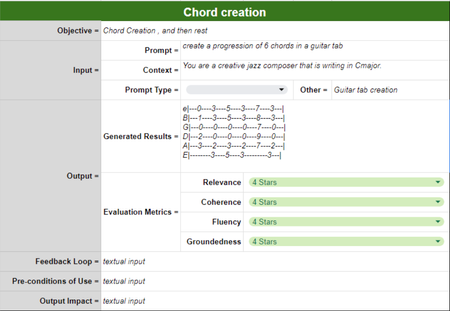
Introduction Generative Artificial Intelligence (AI) has transformed the digital landscape through "intent-based outcome specification," a paradigm where users describe desired outcomes via detailed prompts instead of traditional commands. This course - targeting a non-developer audience - delved into the foundational principles of Generative AI and Large Language Models (LLMs), focusing on their core mechanisms and capabilities. Students learned and practiced effective prompting techniques, essential for navigating this powerful yet complex method. The course included the analysis and discussion of recent research on prompt engineering, keeping students abreast of the latest developments. The structure of the course balanced theoretical understanding and practical application, with 30% dedicated to traditional lectures and 70% to hands-on workshops and collaborative group projects. Practical exercises using models like GPT allowed students to apply their theoretical knowledge in real-world scenarios. Group projects focused on specific application domains – including music, literature and cuisine - leading to presentations, peer reviews, and instructor feedback. The course - comprising 20 hours of direct instruction - was conducted at the Fondazione Bruno Kessler (FBK) campuses in Povo. Instructors Antonio Bucchiarone and Nadia Mana guided the learning journey. Additionally, Carlotta Castelluccio from Microsoft conducted a seminar on Responsible AI, emphasizing ethical considerations in AI applications. In this first part of the blog series, we are going to present the methodological framework and the tools used throughout the course. In the second part, we are going to cover the student projects’ main outcomes and key takeaways. The Card Model Template and the Flow of Cards One of the primary goals of the course was to provide a clear and comprehensive understanding of prompt engineering. This was achieved by introducing a structured framework known as the "Card Model" to define and organize generative AI tasks. In the context of this course, a card refers to a structured format or template used to define a specific task or objective for generating content or output using generative AI techniques. The Card Model serves as a conceptual framework that outlines the structure, components, and relationships involved in generating content or output using generative AI techniques. It provides a high-level abstraction of the task, capturing its essential elements and defining their interactions. Here’s a simplified model of a generative AI task: Objective: This is the overarching goal or purpose of the generative AI task, defining what needs to be achieved through the content generation process. Input: Information provided to the generative AI technique to guide the content generation process. This includes: Prompt: A starting point or stimulus to generate content, such as a partial sentence, a question, an instruction, or other forms of input. Context: Additional information or constraints that provide context for the generation task, such as background knowledge, relevant data sources, or specific requirements. Generative Model: The AI model responsible for generating content based on the input provided. Examples include pre-trained language models like OpenAI GPT-3.5Turbo, neural network architectures for text generation, or other generative AI systems. Output: The generated content produced by the generative model in response to the input, including: Generated Text: The actual output, which could be in the form of text, images, or other media. Evaluation Metrics: Criteria used to assess the quality and relevance of the generated content, including measures of coherence, relevance, fluency, and other factors depending on the specific task requirements. Feedback Loop: A mechanism for iteratively improving the generative AI model based on feedback from users or evaluators. This may involve refining the input prompts, adjusting model parameters, or incorporating additional training data to enhance performance. The Card Model helps define the key components involved in the task and their relationships, facilitating the design, execution, and evaluation of generative AI tasks in various applications. Cards Flow Model The concept of flow was also introduced in the course to provide a formal representation of the relationships between different cards composing a generative AI task. This flow model helps in visualizing and understanding the sequential and conditional transitions between different stages of a generative AI task, ensuring a structured and systematic approach to designing, executing, and evaluating generative AI processes. In more details, cards can be combined together to create complex workflows by defining specific transitions and dependencies between them. By linking these cards through directed edges, students can create intricate flows that mirror real-world applications. This pattern also helps students to break down complex tasks into smaller subtasks, described through detailed prompts and potentially addressed by different specialized models, generally leading to a more accurate final outcome. For example, a card flow might begin with a card that generates an initial story prompt. The output of this card could then flow into a card that adds contextual details, which in turn flows into another card responsible for generating the story based on the enhanced prompt. Subsequent cards could be used to evaluate the generated content, refine the prompt based on evaluation metrics, and iterate the process. To ensure a thorough understanding of these flows, students were asked to evaluate different paths within a flow. This involved analyzing how changes in one card could affect the overall output and exploring alternative pathways to achieve the desired outcome. Students were tasked with: Mapping Out Flows: Students mapped out various flows, identifying all possible paths and transitions between cards. Evaluating Paths: They evaluated each path to understand how different sequences and combinations of tasks impacted the final output. Comparing Outcomes: Students compared outcomes from different paths to determine which flow produced the most coherent, relevant, and high-quality results. Feedback and Iteration: They incorporated feedback into their flows, refining cards and transitions to optimize the generative process. By engaging in these activities, students gained hands-on experience in managing complex generative AI tasks, learning to anticipate and handle the dependencies and contingencies that arise in practical applications. This exercise not only reinforced their understanding of prompt engineering but also highlighted the importance of structured planning and iterative improvement in generative AI projects. The Azure AI Proxy Playground Students learned to interact with OpenAI models through the GUI offered by the Azure AI Proxy Playground. The service is an open-source solution which provides a Playground-like experience to explore the Azure OpenAI chat completions using a time-bound event code with different models and parameters. It’s designed for educational scenarios (e.g., a course, a hackathon, or a workshop) where students might not have access to an Azure subscription enabled with Azure OpenAI service and/or are not familiar with the Azure ecosystem and how to provision and consume Azure AI resources. By leveraging this solution, we were able to provide students with a simplified lab environment, where all the complexity related to the Cloud resources provisioning and model deployments was hidden to the final user and managed through a single Azure subscription, connected to the Proxy Playground. This was particularly helpful in the context of a course whose audience was non-technical and whose focus was learning to interact with large language models through prompt engineering techniques. For the sake of the course, we provisioned a gpt-3.5 turbo instance, so all the students’ interactions via the playground happened with that specific model. Tool GUI and Card Model mapping The Playground GUI is composed of several elements. Most of them can be directly mapped with the Card Model components, ensuring consistency between the theoretical concepts and the actual experimentations. User prompt: free-form text field used to enter the user request to the model. It’s the prompt component of the input in the card model. System message: free-form text field used to enter additional information to use in responses, data sources and/or tone and style specifications. It maps with the context component of the input in the card model. Configuration: parameters to tune the degree of randomness of the responses. It also includes a dropdown menu to select the model to use as chat engine, what we call generative model in the card template. Assistant response: in the chat session the user can read the model’s response, aka the generated text component of the output in the card model. Summary In this article, we covered the methodological framework and tools used in the Prompt Engineering course at Fondazione Bruno Kessler, to teach non-tech students to effectively interact with generative AI models. We explored the "Card Model" - a structured approach to define and organize generative AI tasks - and the concept of the "flow", which further structures the relationships between tasks, aiding in the creation of complex workflows. Students utilized the Azure AI Proxy Playground, an open-source GUI, to interact with OpenAI models like GPT-3.5 Turbo, applying their theoretical knowledge in practical scenarios without needing extensive technical skills. In the second part of the blog series, we will delve into the main outcomes of the students' projects and the key takeaways from their practical applications.5.6KViews1like0Comments