Excel Print Preview not matching the actual printed document
Hey there, My Excel print preview and printer seem to be out of sync. I keep my excel worksheets in "Page Layout" mode when I work, I find it best when I plan to print the document in the end. In the last 2 weeks, none of the documents I've printed are coming out the way they appear on the workbook. I have a workbook that should be 23 pages but it prints 26 instead. The rows are extending over into other pages. Please help!!Solved438KViews6likes66Comments
Introducing Windows Ready Print and Modernized Driver Selection
Windows Ready Print: A clearer path to modern printing on Windows Printing on Windows is evolving. As printing environments modernize, customers and partners are asking for solutions that are reliable, secure, and easy to manage across today’s devices. To reflect this shift and make the value of our platform clearer, we are evolving the Modern Print Platform under a new name: Windows Ready Print. Windows Ready Print highlights what matters most: a streamlined, dependable printing experience built for modern Windows environments. It represents our commitment to simplifying printing, aligning modern standards, and delivering consistent, forward-looking experiences for users, IT admins, and partners. Driving the transition to Windows Ready Print with driver selection controls At the core of Windows Ready Print is a transition away from legacy, third party drive-based workflows toward modern, standards-based printing with IPP (Internet Printing Protocol) using the Windows inbox IPP printer driver. Starting in July 2026, new printer installations will default to Windows Ready Print where supported, enabling a simpler and more reliable setup experience. This change reduces the need for traditional driver management and lays the foundation for a more scalable and predictable print experience. However, we recognize that not all environments can move to Windows Ready Print immediately. To ensure a smooth and flexible transition, we are introducing the ability for users to configure Windows to install their printers using Windows Ready Print (if supported) or the OEM printer driver during installation. You can find this setting under Settings > Bluetooth & Devices > Printers & Scanners > Default install printer using Windows Ready Print. This feature enables users and IT admins to control how Windows selects drivers when installing printers: When “Default install printers using Windows Ready Print” is enabled, Windows Ready Print installation is preferred When “Default install printers using Windows Ready Print” is disabled, default driver selection is used The configuration applies to new printer installations only, without affecting existing devices. To enable/disable this feature via group policy, go to: Launch Group Policy Editor Navigate to Local Computer Policy -> Administrative Templates -> Printers Find and select 'Configure Windows Ready Print driver ranking' -> double click to open it Select 'Enabled' (if you wish to enable Windows Ready Print driver selection) or 'Disabled' (if you wish to explicitly disable Windows Ready Print driver selection). Select Apply Select OK How driver selection configuration works with Windows protected print mode When you enable "Default install printers using Windows Ready Print”, new printer installations will default to Windows inbox IPP printer driver when supported. When you enable Windows protected print mode, printers are exclusively installed with Windows Ready Print. Devices that do not support Windows Ready Print cannot be installed. Note: When you’ve enabled Windows protected print mode, you cannot disable "Default install printers using Windows Ready Print".13KViews1like3Comments
Printing based on Cell value - VBA???
Hello All - first time post. Not a rookie to Excel, but no expert either. I am stuck trying to automate a print function. I have a table which is 4 columns as follows: Full Name | Rating | Comments | Performed By In the "Preformed by" field, i have my staff, and there are repeats of staff. So this column (column D) has repeats of "John Smith" (3x), Sam Jones (4x), Mike Adams (1x). Each of the other columns, while there may be repeating information, should be treated as independent data (so a name of Sue Smith, which may repeat once or twice is not related to the important column of "Performed By"). I want to print each range of values for a particular staff person on an individual page (or pages if necessary) to hand out to that person individually. So is staff person John Smith has 5 reviews, that the customer name, the rating and comments all print on a single page, in a table format in the same manner as though I manually selected that range of values and printed using the "Print Selected" function. I have attached a sample spreadsheet to demonstrate. I need each staff person's reviews, customer name and rating to print on a single page based on the staff persons name. ONE CLICK or FUNCTION I have 30 staff, each with more than a few ratings to print for them, so I am looking for a way to automate this in some way, and I figure VBA is probably the best option..? I am open to providing more input as needed. Feel free to ask. Thanks so Much Justin Michigan5KViews1like4CommentsUniversal Print Connector unable to registert
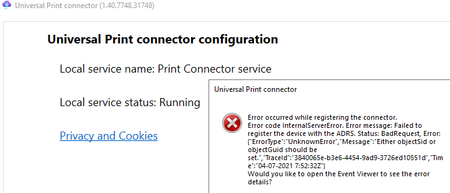
Hi, today i wanted to make some first steps with the Universal Print Feature. Therefore i've read through the prerequisites and tried to install the Universal Print Connector onto a machine. (I've tried different ones). The installation was working fine, afterwards i've started the software, logged in with administrative credentials, typed in a Connector name and hit "register". Now the following error popped up: The last Eventlog item stated the following error: EventID 8 Register connector start: LMPrint Sending connector registration request... Done Checking Registration status... StatusCode: 500, ReasonPhrase: 'Internal Server Error', Version: 1.1, Content: System.Net.Http.StreamContent, Headers: { Transfer-Encoding: chunked X-Content-Type-Options: nosniff X-MSEdge-Ref: Ref A: 9E743355D74C45BE9F8B05C81A343E73 Ref B: VIEEDGE1913 Ref C: 2021-04-07T07:53:52Z Cache-Control: no-store, must-revalidate, no-cache, max-age=0 Date: Wed, 07 Apr 2021 07:53:52 GMT Content-Type: application/json; charset=utf-8 } Before this there were some other error entrys. (EventID 8, 1 & 2) The first EventID8 Failed to get valid connector registration status StatusCode: 500, ReasonPhrase: 'Internal Server Error', Version: 1.1, Content: System.Net.Http.StreamContent, Headers: { Transfer-Encoding: chunked X-Content-Type-Options: nosniff X-MSEdge-Ref: Ref A: 46482393AAE84754943C880672969CAF Ref B: VIEEDGE1913 Ref C: 2021-04-07T07:52:36Z Cache-Control: no-store, must-revalidate, no-cache, max-age=0 Date: Wed, 07 Apr 2021 07:52:35 GMT Content-Type: application/json; charset=utf-8 } {"error":"service_error","error_description":"Failed to register the device with the ADRS. Status: BadRequest, Error: {\"ErrorType\":\"UnknownError\",\"Message\":\"Either objectSid or objectGuid should be set.\",\"TraceId\":\"3840065e-b3e6-4454-9ad9-3726ed10551d\",\"Time\":\"04-07-2021 7:52:32Z\"}","registration_id":"47f13c65-d2b0-46b5-904e-3b57d8af0886","http_status_code":500} One of the EventdIDs 1 Retry 4 Exception: StatusCode: 500, ReasonPhrase: 'Internal Server Error', Version: 1.1, Content: System.Net.Http.StreamContent, Headers: { Transfer-Encoding: chunked X-Content-Type-Options: nosniff X-MSEdge-Ref: Ref A: 05C88060B428496A8BFDCF20FAD5FEB9 Ref B: VIEEDGE1913 Ref C: 2021-04-07T07:53:27Z Cache-Control: no-store, must-revalidate, no-cache, max-age=0 Date: Wed, 07 Apr 2021 07:53:26 GMT Content-Type: application/json; charset=utf-8 } And the #2 Retry Failure: StatusCode: 500, ReasonPhrase: 'Internal Server Error', Version: 1.1, Content: System.Net.Http.StreamContent, Headers: { Transfer-Encoding: chunked X-Content-Type-Options: nosniff X-MSEdge-Ref: Ref A: 9E743355D74C45BE9F8B05C81A343E73 Ref B: VIEEDGE1913 Ref C: 2021-04-07T07:53:52Z Cache-Control: no-store, must-revalidate, no-cache, max-age=0 Date: Wed, 07 Apr 2021 07:53:52 GMT Content-Type: application/json; charset=utf-8 } At this moment i absolutely don't know why this happen. DotNet is up to date. (on some devices 4.7.2, on another device 4.8) Server 2019, Windows 10 20H2 Server was onprem joined, Win10 Client was AAD Only The User is licensed with Office E5 and Win10 E5 (In the service plan details is no "Universal Print" visible, is this correct?) The Azure Universal Print Portal shows, that we have a number of printjobs available, so this should work. Any help is highly appreciated. 🙂9.4KViews1like5Comments
Printing of PDF's broken in DEV build 80.0.345.0
When printing certain graphical PDF's from Edge buildin PDF viewer in build 80.0.345.0, the graphic is never printed, but an error is printed instead. The error shown on the paper is: "ERROR: typecheck OFFENDING COMMAND: setlinecap" In the BETA build 79.0.309.43 there is no problem with the same PDF.936Views1like1Comment