ppm
38 TopicsData access after Project Online (PWA) retirement
As the retirement of Project Online (PWA) approaches, some questions have come up regarding what will happen to the data and related content. I’d like to ask if anyone has information or guidance on the following points: What happens to the data currently stored in Project Online after the retirement date? Will this data still be available for viewing, export, or migration after that date? If so, for how long? Regarding the SharePoint sites linked to PWA, will they remain available? Will it still be possible to access or modify their content? Does Microsoft plan to publish official guidance on this transition? Any references or practical experiences on this topic would be greatly appreciated.4.4KViews1like16Comments
Improve Resource Capacity and Baseline Governance in Planner Premium
Microsoft Planner Premium works well for assigning individual users to tasks within a single plan. However, significant limitations appear when organizations move from managing isolated plans to managing programs and portfolios. For Planner Premium to become a truly enterprise-ready project and portfolio management solution, Microsoft should urgently address the following three areas. 1. Cross-plan resource capacity management When a person is assigned to several tasks or multiple plans, Planner Premium can accumulate more work than the person’s actual daily, weekly, or monthly capacity. Although effort can be adjusted manually in the Assignments view, this becomes extremely difficult when managing many tasks, resources, projects, and concurrent assignments. Organizations need a consolidated capacity management capability across all plans, programs, and portfolios. Planner Premium should allow organizations to: Define each person’s available capacity. Allocate people using percentages, such as 20%, 50%, or 75%. Consolidate assignments across multiple plans. Detect overallocations before they affect delivery. Compare demand versus capacity by day, week, and month. Consider vacations, absences, calendars, and reduced availability. Generate warnings or optionally prevent assignments that exceed capacity. Support resource-leveling and workload redistribution. The People view is useful within an individual plan, but portfolio managers need visibility across the entire portfolio. Without cross-plan capacity management, portfolio planning remains incomplete because organizations cannot reliably determine whether they have enough available resources to deliver their commitments. 2. Generic resources and role-based planning Project plans are often created before the final team members are known. At the planning stage, organizations may know that they need a SAP consultant, solution architect, developer, business analyst, or infrastructure specialist, but they may not yet know the specific person who will perform the work. Planner Premium should support generic resources or role-based placeholders that can be assigned to tasks before a named person is confirmed. These resources should include information such as: Required role or profile. Skills and experience level. Required capacity. Planned participation period. Estimated cost or rate. Business unit or location. Staffing status. Once the appropriate person is identified, the generic resource should be replaceable without losing the planned tasks, dates, effort distribution, cost information, or dependencies. This is essential for resource forecasting, staffing requests, project approval, and early-stage portfolio planning. 3. Baseline security and separation of duties The project baseline is the approved reference used to measure schedule and effort deviations. For this reason, baseline creation, replacement, and deletion should not remain freely available to every user who can edit the plan. In many organizations, the project manager maintains the schedule, while the PMO, portfolio administrator, sponsor, or governance committee controls baseline approval. Allowing the same person to modify both the current schedule and the baseline against which performance is measured creates a clear conflict of interest. Planner Premium should introduce optional baseline governance capabilities, including: A dedicated Portfolio Administrator or PMO role. Separate permissions to create, replace, or delete baselines. A baseline change request and approval workflow. Mandatory justification for baseline changes. Complete audit history. Protection or locking of approved baselines. Comparison between the original baseline, current approved baseline, and current schedule. Integration with formal project change-management processes. This should be configurable. Smaller organizations may prefer a simple model, while organizations with mature governance processes need stronger controls and separation of duties. Why this is urgent Microsoft Planner Premium is increasingly being positioned as a solution for project and portfolio management. However, portfolio management requires more than consolidating project status, dates, and progress. It also requires: Visibility of resource demand and availability across multiple plans. The ability to plan resources before individual people are confirmed. Governance controls that protect approved project baselines. These are not minor enhancements. They are foundational capabilities for enterprise project, program, and portfolio management. Microsoft has a major opportunity to make Planner Premium considerably more valuable for PMOs and organizations managing multiple concurrent projects. I strongly encourage the Microsoft Planner product team to prioritize: Enterprise resource capacity management. Percentage-based allocation. Generic resources. Cross-plan workload consolidation. Portfolio-level resource forecasting. Controlled baseline permissions and approvals. These improvements would significantly reduce manual work, prevent resource overcommitment, strengthen governance, and make Planner Premium a much more credible enterprise PPM platform.371Views5likes0Comments
Project online REST API for Project Manager approval on Task status update
Hi all, I am currently working on a custom solution that integrates multiple functionalities interacting with Project Online data. As part of a new requirement, whenever a team member submits a task update in timesheet, I aim to provide Project Managers with the ability to approve task updates directly from a custom page. My initial approach was to utilize the Project REST API (_api/ProjectServer), but I have not been able to locate an appropriate endpoint that supports this functionality. Could anyone kindly guide me to the specific REST API endpoint (if available) that can be used to approve task updates? Any insights or alternative approaches would be greatly appreciated. Thanks in advance. Regards Shruti Vyas384Views0likes1Comment
Project Online - Business Drivers matrix table in Power BI
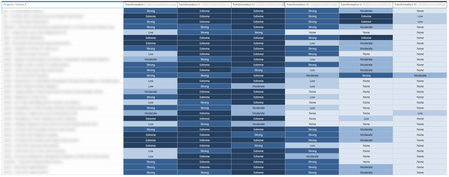
Hi! After classifying our ongoing projects we could get to this matrix table in Project Online: There are 6 Business Drivers where each project contributes on a rating scale (None, Low, Moderate, Strong, Extreme) I am stuck on Power BI to find the relation between each Project, the rating scale and each Business Driver to be able to build the same matrix table in Power BI: Any help would be much appreciated!811Views0likes6CommentsLink two projects in Project online using REST API
Hi All, I have a requirement where I need to link multiple projects to a master project programmatically in Project Online. I've explored several options but haven't had any success so far. I'm looking for guidance or best practices to accomplish this task. I have the option to use either Python or Power Automate, so any insights or solutions using these tools would be greatly appreciated. Thanks in advance for your help.416Views0likes2Comments
Actual Task Hours "Auto-populating" in Resource Timesheet
Hello! I have a question about tasks that seem to have time actual values "auto-populate" in them on an employee's timesheets. Basically, when looking at a timesheet in Project Online (PWA), what causes some tasks to automatically show an hour value, when the resource has not yet entered anytime? Where-as other tasks on the same project will not show this automatically populated time, even though they are assigned to the same resource and still have time remaining? I have an example below. Of the three tasks below, all 3 were still active, but only the "Project Management" task is displaying values in the "Actual" field that the resource did not enter? Looking at the task details in the Project Desktop application, all of the tasks are very similar in the Assignment Information. They are all assigned to the same resource, they are all manually scheduled, etc. The only difference that I can see is the "Work Contour" field show as "Contoured" on the task that is auto-populating time values. Whereas the other tasks are set as "Flat". Project Management Task Info: Other Task Info: Would this "Work Contour" field be having the impact described above on the employees' hours on the Timesheet? If so, how/where is "Work Contour" being determined? If something else may be causing the auto-populating values on the Timesheet, I would be happy for any additional information. Thanks! ChrisSolved2.3KViews0likes13CommentsPublishing updates in Sub Projects does not reflect it in the Master Project through EPM PWA
Hello, We have couple of projects under a Master project in Project Server 2019 (on-premises). However when we update the sub-projects, the updates does not reflect in the Master Project. Than youSolved1.9KViews0likes12Comments
Problem: Project Accelerator Power app "Tasks" tab connected to P4TW UI
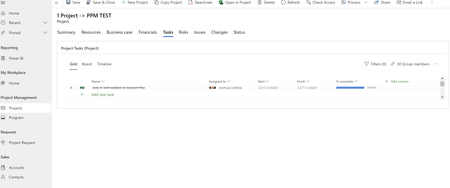
Hello, I have been dealing with an issue for over a month now where the embedded Web Control on the Power App that compliments project 4 the web will not expand even to the point where I can see one task in a project schedule. It is making the app very frustrating to use. Does anyone out there have experience with this type of issue or are you facing the same problem? As you can see in the photo you can barely see one task in a project. I have tried the new and the classic designer to change the size on this box and I cannot. Specifically, it seems like an issue with the resizing of the PexWebControl in the project form under the tasks tab. The control does not even load in the designer. There is no way to resize it! PexWebControl is "control to host the modern project UI inside project form". I have opened a ticket with Microsoft and it has not been helpful. I have been bounced around and no one seems to know anything about this issue. This is also probably due to the fact P4TW is very new and not many people are allocated to it maybe. Either way I need help! Please community help me! 🙂Solved2.8KViews0likes1Comment
P4W competing with PWA
Project for the Web (P4W) and Project Web App (PWA) cover (today) very different needs. P4W has a more modern approach, technologically, but with a fairly superficial functional coverage. PWA uses legacy technologies but has hundreds of features that P4W doesn't, such as program and portfolio management, better resource management, and more progress measurement options. Sadly, Microsoft seems to be making efforts to get users to switch to P4W, without yet providing P4W with all the necessary functionality. Recently the PWA project center starts showing an icon to create new projects. New projects remain in P4W, without them being able to be managed properly from PWA, creating great confusion and problems among PWA users. Even Project Professional Desktop (part of PWA) has begun to show a decline in the quality of the application. All this would not be a problem if P4W had the depth of functionality of PWA. Do you think it is a correct strategy to start affecting PWA, to ensure a possible migration to P4W?1.4KViews0likes2Comments