postgresql on azure
26 TopicsTop 10 Performance Optimization Techniques for Azure Database for PostgreSQL Flexible Server
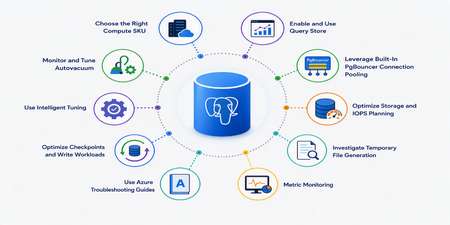
Introduction Performance optimization is one of the most common challenges faced by organizations running business-critical workloads on Azure Database for PostgreSQL flexible server. As your workloads grow it’s common to encounter high CPU utilization, storage bottlenecks, autovacuum issues, excessive temporary file generation, and connection saturation. The good news is that Azure PostgreSQL flexible server provides several built-in capabilities to help optimize performance, improve scalability, and reduce operational overhead. This article explores ten practical techniques that can significantly improve database performance and reliability. 1. Choose the Right Compute SKU Performance starts with selecting the appropriate compute tier. Azure PostgreSQL flexible server offers: Pricing tier Target workloads Burstable Designed for workloads that don't require full CPU performance continuously. Best suited for proof-of-concept environments, and development builds. Not recommended for production workloads. General Purpose Provides a balance between CPU and memory with scalable I/O throughput, making it suitable for most production workloads. Examples include servers for hosting web applications, mobile apps, and enterprise applications. Memory Optimized Suitable for high-performance database workloads that require in-memory performance for larger buffer cache sets, and higher concurrency. Examples include servers for processing real-time data and high-performance transactional or analytical apps. Learn more about Compute Tiers here. 2.Enable and Use Query Store Query Store is one of the most powerful performance tools available. Query Store automatically captures the following and keeps them available for review: Query execution statistics Runtime metrics Wait event information Historical execution trends It organizes the data into time windows, so you can spot database usage patterns. Data for all users, databases, and queries is stored in a database named azure_sys in the Azure Database for PostgreSQL instance. It’s generally recommended to monitor query store from Azure tools, KQL, etc. Learn more about Query store here. You can also view some useful scenario for query store and some Best Practices for Query store 3.Leverage Built-In PgBouncer Connection Pooling PostgreSQL uses a process-per-connection model, which means every connection consumes memory and CPU resources. Azure PostgreSQL flexible server provides built-in PgBouncer support for eligible SKUs . PgBouncer allows multiple application sessions to reuse open backend connections and significantly reduces overhead. Benefits include: Lower memory consumption Faster connection handling Improved application scalability Reduced CPU overhead Learn more about PgBouncer here 4.Use Azure Troubleshooting Guides One underutilized feature is the built-in troubleshooting experience available directly in the Azure portal. Guides are available for: CPU troubleshooting Memory troubleshooting IOPS analysis Temporary files Autovacuum monitoring Autovacuum blockers These tools provide actionable recommendations and visualizations without requiring external monitoring solutions. Learn more about Troubleshooting Guides here. 5. Monitor and Tune Autovacuum Autovacuum is critical for maintaining PostgreSQL performance. Without proper vacuuming: Dead tuples accumulate Table bloat increases Statistics are not refreshed regularly Query performance degrades Transaction ID wraparound risks emerge Use Azure's built-in Autovacuum Monitoring TroubleshootingGuides to identify: Vacuum lag Blocked autovacuums Table bloat Inefficient cleanup operations Azure now also offers adaptive tuning capabilities to optimize maintenance behavior. Learn more about Autovacuum tuning here 6.Optimize Storage and IOPS Planning Many performance incidents originate from insufficient storage planning rather than inefficient SQL. In Azure PostgreSQL flexible server: Storage and baseline IOPS are closely related. Learn more here. Larger storage allocations provide higher baseline IOPS. Auto-grow prevents storage-related outages Note: Storage can only be scaled up and will always be double in size. SSDv2 auto-grow will allow customized growth settings in future release. For write-heavy workloads, monitoring storage utilization and IOPS is essential. Best practice: Enable Storage Auto-Grow Monitor Read/Write IOPS regularly Scale storage proactively 7.Investigate Temporary File Generation Large sorts and hash operations that exceed available memory spill to disk and generate temporary files. Symptoms include: Sudden Latency Spikes Increased IOPS Slower query execution Azure TroubleshootingGuides provide dedicated temporary-file analysis capabilities that help identify offending queries. Frequent temp file generation often indicates: Missing indexes Undersized work_mem Large sorting operations 8.Use Intelligent Tuning Azure PostgreSQL flexible server includes Intelligent Tuning capabilities. The service continuously observes workload behavior and automatically optimizes parameters related to write operations. Examples of tuning include: checkpoint_completion_target max_wal_size min_wal_size bgwriter settings This reduces administrative effort while helping maintain consistent performance. Learn more about Intelligent Tuning here. 9.Optimize Checkpoints and Write Workloads Checkpoint spikes frequently appear in escalations involving high IOPS and latency. Aggressive checkpoint activity can: Generate excessive disk writes Increase latency Consume IOPS capacity Monitoring checkpoint behavior and ensuring WAL parameters are properly configured can significantly improve write-intensive workloads. Azure intelligent tuning can assist in this area as well. 10.Metric Monitoring Optimization should always be data-driven. You should track the following: CPU utilization Memory pressure Active Connections Oldest Query IOPS consumption Combining Azure Metrics, Query Store, and PostgreSQL statistic views allows teams to distinguish between normal workload spikes and true performance degradation. PostgreSQL statistics views provide valuable workload insights. For example, pg_stat_activity can be used to identify long-running or blocking queries, pg_stat_user_tables helps track dead tuples, vacuum activity, and statistics refreshes, while pg_stat_statements (if enabled) help identify the most resource-intensive queries by execution time and frequency. Learn more about Metric here Conclusion Performance optimization in Azure Database for PostgreSQL flexible server is not just about changing a few parameters and hoping for better results. It requires a structured approach that combines workload understanding, proactive monitoring, proper sizing, query optimization, and platform-native capabilities. By leveraging Query Store, PgBouncer, Intelligent Tuning, Autovacuum Monitoring, Azure Metrics, and Troubleshooting Guides, you can significantly improve database efficiency while reducing operational effort. References Compute Options - Azure Database for PostgreSQL | Microsoft Learn Query Store in Azure Database for PostgreSQL Flexible Server - Azure Database for PostgreSQL | Microsoft Learn PgBouncer in Azure Database for PostgreSQL Flexible Server - Azure Database for PostgreSQL | Microsoft Learn Autovacuum Tuning - Azure Database for PostgreSQL | Microsoft Learn Intelligent Tuning in Azure Database for PostgreSQL Flexible Server - Azure Database for PostgreSQL | Microsoft Learn2.3KViews2likes0Comments
Postgres MCP Server: Connect AI coding agents to PostgreSQL
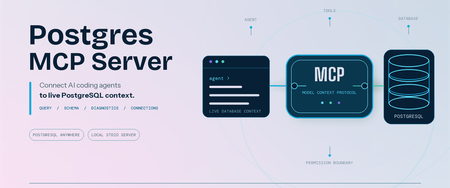
Coding agents can write SQL, troubleshoot applications, and reason about data. Useful database work starts with your schema and environment context. We are pleased to announce that Microsoft has open-sourced the Postgres MCP Server under the MIT License. Built entirely in Rust for fast, resource-efficient operation, it connects Model Context Protocol (MCP) compatible coding agents to PostgreSQL, so your agent can inspect real database context and run permitted operations. The server works with PostgreSQL locally, on-premises, on Azure, AWS, GCP, or through another PostgreSQL-compatible service. It is built for anyone who works with PostgreSQL through a coding agent, including application developers, database administrators, data professionals, platform engineers, and PostgreSQL enthusiasts. Give AI agents live PostgreSQL context The Postgres MCP Server exposes PostgreSQL operations as tools that your coding agent can call. After connecting to a profile, ask: "List the tables in my PostgreSQL database." "Show me the ten most recent orders." "Generate the schema for these tables and indexes." "What is slowing down my PostgreSQL server?" The tools let your agent: Generate queries and run analytics. Run read-only SQL or use separate tools for data and schema changes. Explore and design schemas. Inspect tables, indexes, functions, sequences, and other database objects before generating database changes. Diagnose performance. Detect server capabilities and collect focused performance metrics for the server and its queries. Manage connections. Create named connection profiles, connect to the right database, and switch between environments without placing credentials in the MCP client configuration. Install and connect securely Prerequisites: Node.js 22 or later, which includes npm and npx. Linux x64 or arm64, macOS x64 or arm64, or Windows x64. Windows on Arm uses x64 emulation. An MCP-compatible coding agent or client. A reachable PostgreSQL or wire-compatible database and a database role with the permissions needed for your intended tasks. No separate installation is required when you use npx; it downloads and runs the package for you. If you prefer the postgres-mcp command to be available globally, install the package: npm install --global @Microsoft/postgres-mcp The examples use npx. With a global installation, replace npx -y Microsoft/postgres-mcp with postgres-mcp. Create a profile and store its password: npx -y @Microsoft/postgres-mcp connection add local \ "postgresql://postgres@localhost:5432/postgres" npx -y @Microsoft/postgres-mcp connection set-password local The server stores the password in your operating system keyring, separate from the profile. For headless or CI environments without a keyring, use the environment-based connection option. Add the server to clients that use the mcpServers configuration: { "mcpServers": { "postgres": { "command": "npx", "args": ["-y", "@microsoft/postgres-mcp", "run"] } } } Configuration formats and file locations differ by client. The Postgres MCP usage guide includes examples for supported clients. For Azure Database for PostgreSQL, the server can use Microsoft Entra ID when a saved profile does not contain a password. PostgreSQL role permissions remain the security boundary. New profiles permit write tools unless you set access_mode: ro. For exploration, combine that setting with a read-only database role. Your MCP client controls approval prompts, and CSV tools can read only from approved local paths. Add expert PostgreSQL skills The open-source Postgres Skills repository complements the MCP server with expert guidance for query performance, indexing, vector search, security, operations, Azure workflows, and AI and knowledge graph scenarios. These reusable instructions help coding agents apply PostgreSQL best practices when investigating an issue or completing a task, while the MCP server supplies the live database context and permitted operations needed to act on that guidance. Next steps Explore the Postgres MCP Server repository. Review the Postgres MCP usage and security guide. Follow the Postgres Skills plugin setup guide. Share feedback or contribute through Postgres MCP GitHub issues. Thank you!1.6KViews0likes1CommentJune 2025 Recap: Azure Database for PostgreSQL
Hello Azure Community, We have introduced a range of exciting new features and updates to Azure Database for PostgreSQL in June. From general availability of PG 17 to public preview of the SSD v2 storage tier for High Availability, there have been some significant feature announcements across multiple areas in the last month. Stay tuned as we dive deeper into each of these feature updates. Before that, let’s look at POSETTE 2025 highlights. POSETTE 2025 Highlights We hosted POSETTE: An Event for Postgres 2025 in June! This year marked our 4th annual event featuring 45 speakers and a total of 42 talks. PostgreSQL developers, contributors, and community members came together to share insights on topics covering everything from AI-powered applications to deep dives into PostgreSQL internals. If you missed it, you can catch up by watching the POSETTE livestream sessions. If this conference sounds interesting to you and want to be part of it next year, don’t forget to subscribe to POSETTE news. Feature Highlights General Availability of PostgreSQL 17 with 'In-Place' upgrade support General Availability of Online Migration Migration service support for PostgreSQL 17 Public Preview of SSD v2 High Availability New Region: Indonesia Central VS Code Extension for PostgreSQL enhancements Enhanced role management Ansible collection released for latest REST API version General Availability of PostgreSQL 17 with 'In-Place' upgrade support PostgreSQL 17 is now generally available on Azure Database for PostgreSQL flexible server, bringing key community innovations to your workloads. You’ll see faster vacuum operations, richer JSON processing, smarter query planning (including better join ordering and parallel execution), dynamic logical replication controls, and enhanced security & audit-logging features—backed by Azure’s five-year support policy. You can easily upgrade to PostgreSQL 17 using the in-place major version upgrade feature available through the Azure portal and CLI, without changing server endpoints or reconfiguring applications. The process includes built-in validations and rollback safety to help ensure a smooth and reliable upgrade experience. For more details, read the PostgreSQL 17 release announcement blog. General Availability of Online Migration We're excited to announce that Online Migration is now generally available for the Migration service for Azure Database for PostgreSQL! Online migration minimizes downtime by keeping your source database operational during the migration process, with continuous data synchronization until cut over. This is particularly beneficial for mission-critical applications that require minimal downtime during migration. This milestone brings production-ready online migration capabilities supporting various source environments including on-premises PostgreSQL, Azure VMs, Amazon RDS, Amazon Aurora, and Google Cloud SQL. For detailed information about the capabilities and how to get started, visit our Migration service documentation. Migration service support for PostgreSQL 17 Building on our PostgreSQL 17 general availability announcement, the Migration service for Azure Database for PostgreSQL now fully supports PostgreSQL 17. This means you can seamlessly migrate your existing PostgreSQL instances from various source platforms to Azure Database for PostgreSQL flexible server running PostgreSQL 17. With this support, organizations can take advantage of the latest PostgreSQL 17 features and performance improvements while leveraging our online migration capabilities for minimal downtime transitions. The migration service maintains full compatibility with PostgreSQL 17's enhanced security features, improved query planning, and other community innovations. Public Preview of SSD v2 High Availability We’re excited to announce the public preview High availability (HA) support for the Premium SSD v2 storage tier in Azure Database for PostgreSQL flexible server. This support allows you to enable Zone-Redundant HA using Premium SSD v2 during server deployments. In addition to high availability on SSDv2 you now get improved resiliency when using Premium SSD v2 with zone-redundant HA, helping customers build resilient, high-performance PostgreSQL applications with minimal overhead. This feature is particularly well-suited for mission-critical workloads, including those in financial services, real-time analytics, retail, and multi-tenant SaaS platforms. Key Benefits of Premium SSD v2: Flexible disk sizing: Scale from 32 GiB to 64 TiB in 1-GiB increments Fast failovers: Planned or unplanned failovers typically around 10 seconds Independent performance configuration: Achieve up to 80,000 IOPS and 1,200 Mbps throughput without resizing your disk. Baseline performance: Free throughput of 125 MB/s and 3,000 IOPS for disks up to 399 GiB, and 500 MB/s and 12,000 IOPS for disks 400 GiB and above at no additional cost. For more details, please refer to the Premium SSD v2 HA blog. New Region: Indonesia Central New region rollout! Azure Database for PostgreSQL flexible server is now available in Indonesia Central, giving customers in and around the region lower latency and data residency options. This continues our mission to bring Azure PostgreSQL closer to where you build and run your apps. For the full list of regions visit: Azure Database for PostgreSQL Regions. VS Code Extension for PostgreSQL enhancements The brand-new VS code extension for PostgreSQL launched in mid-May and has already garnered over 122K installs from the Visual Studio Marketplace! And the kickoff blog about this new IDE for PostgreSQL in VS Code has had over 150K views. This extension makes it easier for developers to seamlessly interact with PostgreSQL databases. We have been committed to make this experience better and have introduced several enhancements to improve reliability and compatibility updates. You can now have better control over service restarts and process terminations on supported operating systems. Additionally, we have added support for parsing additional connection-string formats in the “Create Connection” flow, making it more flexible and user-friendly. We also resolved Entra token-fetching failures for newly created accounts, ensuring a smoother onboarding experience. On the feature front, you can now leverage Entra Security Groups and guest accounts across multiple tenants when establishing new connections, streamlining permission management in complex Entra environments. Don’t forget to update to the latest version in the marketplace to take advantage of these enhancements and visit our GitHub repository to learn more about this month’s release. If you learn best by video, these 2 videos are a great way to learn more about this new VS Code extension: POSETTE 2025: Introducing Microsoft’s VS Code Extension for PostgreSQL Demo of using VS code extension for PostgreSQL Enhanced role management With the introduction of PostgreSQL 16, a strict role hierarchy structure has been implemented. As a result, GRANT statements that were functional in PostgreSQL 11-15 may no longer work in PostgreSQL 16. We have improved the administrative flexibility and addressed this limitation in Azure Database for PostgreSQL flexible server across all PostgreSQL versions. Members of ‘azure_pg_admin’ can now manage, and access objects owned by any role that is non-restricted, giving control and permission over user-defined roles. To learn more about this improvement, please refer to our documentation on roles. Ansible collection released for latest REST API version A new version of Ansible collection for Azure Database for PostgreSQL flexible server is now released. Version 3.6.0 now includes the latest GA REST API features. This update introduces several enhancements, such as support for virtual endpoints, on-demand backups, system-assigned identity, storage auto-grow, and seamless switchover of read replicas to a new site (Read Replicas - Switchover), among many other improvements. To get started with using please visit flexible server Ansible collection link. Azure Postgres Learning Bytes 🎓 Using PostgreSQL VS code extension with agent mode The VS Code extension for PostgreSQL has been trending amongst the developer community. In this month's Learning Bytes section, we want to share how to enable the extension and use GitHub Copilot to create a database in Agent Mode, add dummy data, and visualize it using the Agent Mode and VS Code extension. Step 1: Download the VS code Extension for PostgreSQL Step 2: Check GitHub Copilot and Agent mode is enabled Go to File -> Preferences -> Settings (Ctrl + ,). Search and enable "chat.agent.enabled" and "pgsql copilot.enable". Reload VS Code to apply changes. Step 3: Connect to Azure Database for PostgreSQL Use the extension to enter instance details and establish a connection. Create and view schemas under Databases -> Schemas. Step 4: Visualize and Populate Data Right-click the database to visualize schemas. Ask the agent to insert dummy data or run queries. Conclusion That's all for the June 2025 feature updates! We are dedicated to continuously improve Azure Database for PostgreSQL with every release. Stay updated with the latest updates to our features by following this link. Your feedback is important and helps us continue to improve. If you have any suggestions, ideas, or questions, we’d love to hear from you. Share your thoughts here: aka.ms/pgfeedback We look forward to bringing you even more exciting updates throughout the year, stay tuned!1KViews3likes0CommentsPostgres Skills: Give Your AI Agent PostgreSQL Expertise
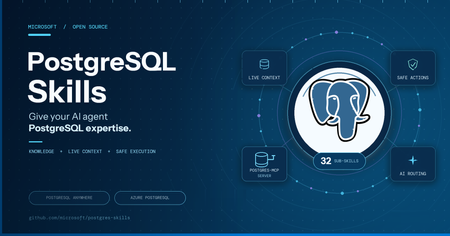
Modern application development increasingly relies on AI agents to generate code, configure services, and accelerate delivery. But generic agents often stop at plausible SQL or broad recommendations. They do not reliably inspect the live database, account for PostgreSQL versions and extensions, distinguish self-hosted from managed environments, apply production guardrails, or verify that a change actually works. That gap matters when database decisions affect security, performance, availability, and customer experience. A syntactically correct query can still create an isolation issue, use an incompatible feature, recommend an unsupported managed-service command, or leave an application with a design that does not scale. The solution: PostgreSQL Skills PostgreSQL Skills closes this gap by giving agents the PostgreSQL expertise, live context, execution tools, and validation workflow needed to turn a generic answer into a safe, production-ready outcome that solves the application’s business problem. Its 32 expert sub-skills support PostgreSQL running locally, self-hosted, or on any cloud; Azure Database for PostgreSQL and HorizonDB. The plugin includes postgres-mcp for live database access and Azure CLI integration for managed-service operations. One install works across GitHub Copilot CLI, VS Code, Claude Code, and Codex CLI. Domain What you can do PostgreSQL Anywhere Build vector search, partition tables, implement row-level security, index JSONB data, and analyze query regressions on local, self-hosted, or cloud deployments Azure Database for PostgreSQL & HorizonDB Provision and scale servers, configure HA/DR and PITR, use Entra ID authentication, plan major-version upgrades, and get HorizonDB (Preview) guidance You do not need to choose a sub-skill or tell the agent which rules apply. The plugin checks your environment and routes each request to the guidance that fits your deployment. Live database context and PostgreSQL expertise, together The included postgres-mcp server gives your agent structured access to the database you are using. It can inspect schemas, roles, extensions, and server capabilities, run queries, and apply changes you approve. This grounds the work in live database state instead of assumptions. The sub-skills guide how the agent uses that access. They define what to check, which rules apply to your deployment, when to ask for confirmation, and how to validate the outcome. Together, postgres-mcp and the sub-skills help the agent move from a generic answer to a change that fits your database and has been verified. Try it yourself Choose a host and follow the setup path for your operating system. Install your host Add the marketplace and install PostgreSQL Skills GitHub Copilot CLI copilot plugin marketplace add microsoft/postgres-skills copilot plugin install postgres-skills@postgres-skills copilot plugin list # confirm postgres-skills is active Claude Code /plugin marketplace add microsoft/postgres-skills /plugin install postgres-skills@postgres-skills /plugin # confirm the plugin appears as installed Codex CLI codex plugin marketplace add microsoft/postgres-skills codex plugin add postgres-skills codex plugin list # confirm postgres-skills is active See it work: three developer scenarios PostgreSQL anywhere: enforce tenant isolation Prompt: "Add row-level security so each tenant can only access its own data." A generic agent with SQL access can write a CREATE POLICY statement. But it may not inspect table ownership, BYPASSRLS roles, existing policies, or how your application establishes tenant context. The policy can look correct while still leaving an isolation gap. With PostgreSQL Skills, the agent inspects the live schema and role model, identifies the tenant key, accounts for owner bypass behavior, and proposes the policy against your actual tables. It asks before enabling RLS, then tests allowed and denied access with representative roles. You get a verified security boundary, not just policy syntax. PostgreSQL application development: build hybrid search Prompt: "Add semantic and keyword search to my product catalog." A generic agent can generate a pgvector query and a full-text search query. It still leaves you to reconcile two result sets, choose compatible indexes, and adapt the example to your schema and PostgreSQL version. With PostgreSQL Skills, the agent inspects your catalog schema and extension availability, designs the embedding and text-search columns, creates the appropriate indexes, and combines both signals with reciprocal rank fusion. It runs the search against your data and verifies the result before calling the implementation complete. Azure PostgreSQL: connect an application without passwords or public access Prompt: "Connect my application to Azure Database for PostgreSQL without passwords or public internet access." A generic agent with Azure CLI access may provide the right ingredients: Entra authentication, a managed identity, and a private endpoint. It may not check which server is targeted, whether private networking is already configured, how the application identity maps to PostgreSQL, or whether disabling an existing authentication path will break deployed applications. With PostgreSQL Skills, the agent confirms the Azure connection and discovers the server, subscription, resource group, networking mode, and current authentication configuration. It identifies the application identity, proposes a private and passwordless connection plan, and explains every Azure and PostgreSQL object that will change. It asks before modifying identity, authentication, or network access, validates token-based connectivity, and leaves existing access in place until you confirm it can be removed. Guardrails for safe execution Acting on a database is only useful if it is safe on any host. One rule is universal: Every destructive or non-reversible action is confirmed with you first. This applies without exception on self-hosted and Azure deployments. If you're connected to Azure, three more rules kick in automatically: Azure guidance uses `azure_pg_admin`, never `SUPERUSER`. It never assumes access that the managed service does not grant. No `ALTER SYSTEM` and no OS-level access on Flexible Server. Azure changes go through az ... parameter set, matching how the service actually works. Connection-aware gating. Azure-only guidance loads only after the live connection confirms isAzure: true. It never guesses your environment or applies Azure rules to a database that is not one. Get started Repo: github.com/microsoft/postgres-skills. Visit the PostgreSQL Skills repository for installation commands, usage examples, and contribution guidance. Explore the open-source collection of PostgreSQL skills for AI coding agents, including installation commands, usage examples, and contribution guidance. Contribute: Follow CONTRIBUTING.md to add a reference file, register its triggers in the routing table, run the validation checks, and submit a pull request. Feedback: open an issue on the repo with what you tried and what broke The takeaway: generic agents can produce plausible database code, but solving real application problems requires PostgreSQL expertise, live environment context, production guardrails, and validation. PostgreSQL Skills brings those capabilities together so your agent can move beyond suggesting an answer to delivering a safe, deployment-aware, and verified outcome.900Views2likes0Comments
Rethinking Memory Management for Azure HorizonDB on Disaggregated Storage
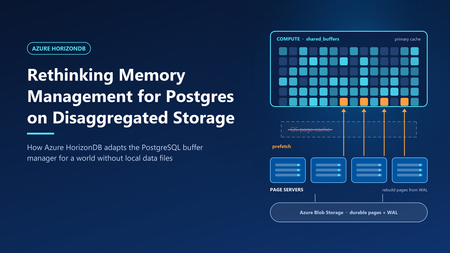
In Smarter Storage for Azure HorizonDB, we described how HorizonDB moves durability, replication, checkpointing, and recovery out of PostgreSQL and into a purpose-built storage layer. The compute node writes only the write-ahead log (WAL). Data pages are rebuilt and stored by remote page servers. That design raises an obvious question: if PostgreSQL no longer reads and writes its own data files, what happens to its memory management? PostgreSQL's buffer manager was built around a specific partner: the operating system's page cache. Many of its defaults and heuristics only make sense because the kernel is quietly doing a lot of work underneath. HorizonDB removes that partner. This post explains which assumptions broke, and the changes we made to the PostgreSQL engine, so memory works well on disaggregated storage. What PostgreSQL assumes about the kernel PostgreSQL stores each table and index as ordinary files and accesses them with buffered I/O. Every page therefore can live in two places in memory: in PostgreSQL's own buffer pool (shared_buffers) and in the operating system's page cache. This "double buffering" is a deliberate part of the design, and it shapes several behaviors. A modest buffer pool. The PostgreSQL documentation suggests starting shared_buffers at about 25% of system memory. Much of the rest is expected to act as kernel file cache. A page evicted from shared_buffers is often still in the kernel cache, so reading it back costs a memory copy rather than a disk read. Prefetching is a hint to the kernel. When PostgreSQL knows it will need a page soon—during a bitmap heap scan, for example—it calls posix_fadvise with POSIX_FADV_WILLNEED. The kernel starts reading the page into its cache. A later read finds it there. PostgreSQL itself never allocates a buffer for the prefetched page. Sequential scans rely on kernel readahead. For sequential access, the kernel detects the pattern and reads ahead automatically, so PostgreSQL can issue fewer explicit hints. Ring buffers protect the cache. Large sequential scans, VACUUM, and bulk writes such as COPY use a small private ring of buffers—from a few hundred kilobytes to a few megabytes—instead of the whole buffer pool. A scan of a table much larger than memory therefore cannot push the working set out of shared_buffers. This is safe because a page that cycles through the ring is usually still in the kernel cache if it is needed again. Writes are cheap and deferred. When a dirty buffer is evicted, PostgreSQL writes it to the kernel cache, which flushes it to disk later. The background writer cleans buffers ahead of eviction so that queries rarely wait for a write. Checkpoints write all dirty pages and call fsync to make them durable. Each of these behaviors assumes that a miss in shared_buffers is usually cheap, and that writing a page means writing it to a local file. What changes in HorizonDB Figure 1. Compute memory layout: Community PostgreSQL vs. Azure HorizonDB. In HorizonDB, permanent tables and indexes do not exist as local files on the compute node. There is no kernel page cache holding database pages. A miss in shared_buffers must be served by the remote storage layer: Tier Where it lives Typical role Shared buffers Compute memory Working set; all pages are read and modified here SSD cache Compute local disk Extends shared buffers; holds cached copies of pages Page servers Remote storage fleet Page cache of the current version of every page Azure Blob Storage Remote, zone-redundant Durable backing store for pages and WAL A page that falls out of memory no longer drops into a free kernel cache. It may require a network round trip to a page server, which is much more expensive than a memory read. Writes change too. Because page servers rebuild pages from WAL, "writing" a dirty page on the compute node does not mean copying it anywhere. PostgreSQL only has to make sure the WAL describing the change is durable - a rule it already enforces before any page write. Taken together, this inverts the trade-offs behind PostgreSQL's defaults. Memory is no longer one of two caches. It is the primary cache. Design principle: shared buffers are the primary cache We organized the engine changes around one principle. shared_buffers is the primary cache, eliminating the memory overhead of double buffering and improving memory efficiency. Every page that is about to be needed should arrive in memory before the query asks for it. The following sections describe the engine changes that implement it. 1. Size shared buffers for the machine Without a kernel cache to share memory with, leaving 75% of RAM to the operating system would waste most of it. HorizonDB sizes shared_buffers automatically at 60–70% of the compute node's memory, depending on the size of the instance. The remaining memory is left for connections, query execution memory such as sorts and hashes, and the operating system. 2. Retire ring buffers Ring buffers exist so that a large scan can use a few megabytes of memory and rely on the kernel cache for anything it needs again. In HorizonDB, there is no such safety net. Recycling a small ring means that every page the scan touches is read, used once, and discarded—and a second scan of the same table must fetch everything again from storage. Ring buffers also exist to limit write traffic: a bulk operation that dirties pages in a small ring must write them out quickly. HorizonDB doesn't need to write dirty data pages back to disk at all, so that motivation disappears as well. HorizonDB therefore disables buffer ring strategies. Sequential scans, VACUUM, and bulk loads use the shared buffer pool like any other query. This is a trade-off, not a free win. A very large scan can now displace pages from shared_buffers that other queries were using. Two factors limit the cost. First, clock-sweep replacement tracks how often each buffer is used, so frequently accessed pages outlive pages a scan touched only once—and buffer replacement is an area we continue to improve. Second, pages that leave shared_buffers are not simply lost: HorizonDB can keep them close by in the local SSD cache. How it decides and what goes there is a story for a separate post. 3. Prefetch directly into shared buffers On a local disk, a prefetch miss costs a disk seek. On disaggregated storage, it costs a network round trip. Hiding that latency matters even more, so HorizonDB makes prefetching explicit, aggressive, and memory aware. Prefetch requests go to the page servers. When PostgreSQL issues a prefetch, HorizonDB sends a read request for the page to the page server that owns it, and does not wait for the answer. Each backend keeps a set of outstanding requests by default, so dozens of page reads overlap instead of running one after another. Sequential scans prefetch explicitly. PostgreSQL's read stream mechanism, which drives sequential scans and other block-range reads, normally avoids prefetching sequential blocks because it expects kernel readahead to cover them. HorizonDB turns that assumption off, so sequential reads are prefetched like any other access pattern. Responses land in their final buffer. In stock PostgreSQL, a prefetch only warms the kernel cache, so the later read still has to copy the page into shared_buffers. In HorizonDB, the page server's response goes straight into a shared buffer. When the query asks for the page, it is already in memory, with no extra copy and no second request to storage. These are only some of the prefetch optimizations we have built into the engine. Others use custom prefetch implementations and logic that tunes how far ahead each query reads. All of them share one goal: hiding storage latency so queries spend less time waiting on I/O and more time doing useful work. What this means for you As a fully managed service, our goal is to delight customers with a best-in-class PostgreSQL experience. You shouldn't have to think about kernel caches, buffer rings, or prefetch windows—that is our job. HorizonDB retains full PostgreSQL compatibility, so applications keep the familiar Postgres programming interface while the engine is tuned to deliver predictable performance on the storage underneath699Views5likes1Comment
Better Price Performance: Azure Postgres V3 & V5 Compute Compared
Azure customers can select newer compute options and scale resources in real time with minimal disruption to business operations. This flexibility allows you to scale capacity as demand changes, match compute and memory profiles to each workload, and test new hardware configurations before moving production workloads. Using this opportunity to improve workload performance and cost efficiency over time results in real improvements to both price and performance. New Compute Can Change Workload Economics A newer compute generation is not merely a different SKU name. Changes in processor architecture, clock speed, memory bandwidth, storage throughput, and virtualization can materially affect application performance. Azure Database for PostgreSQL offers multiple options across General Purpose and Memory Optimized tiers. Customers can change the compute size and move between hardware generations without rebuilding the database platform. Reviewing these options regularly ensures that workloads are optimized and able to maximize performance and cost investments. A workload that was appropriately sized when deployed may no longer be running on the most cost-effective infrastructure. Periodic evaluation of newer compute generations can reveal opportunities to improve throughput, latency, or capacity without increasing spend. The opportunity to upgrade Azure Postgres workloads while maintaining the same operating costs presents a valuable option for anyone currently consuming V3 family compute. Take advantage of these capabilities by scaling your Azure Postgres workloads today: Scale Compute in Azure Database for PostgreSQL Flexible Server - Azure Database for PostgreSQL | Microsoft Learn Benchmarking V3 and V5 PostgreSQL Compute To measure the potential impact, we compared two Azure Database for PostgreSQL servers. Each server was provisioned with 4 General Purpose vCores, 16 GiB memory, and SSD Storage with 7500 IOPS. We ran the same CPU-intensive workload under identical test conditions with increasingly concurrent client workloads. Across repeated test runs, the V5 server processed approximately 40% more transactions than the comparable V3 configuration at effectively the same price. Benchmark resources and provisioning steps are included in the appendix. (Higher is better) The result represents approximately 40% more transaction throughput for the same spend in this specific benchmark. (Lower is better) The V5 configuration completed the workload in less time, indicating lower overall execution latency in this benchmark. For CPU-intensive workloads, this improvement translates to higher transaction volumes, reduced processing backlogs and latency, and provides additional capacity for future growth at approximately the same cost. Database performance also depends on memory, storage, I/O latency, concurrency, query design, indexing, PostgreSQL configuration, and application behavior. This result should therefore be treated as a workload-specific reference benchmark rather than a universal performance claim. The most meaningful comparison is one performed with a representative version of your own workload. Infrastructure should be reviewed continuously Cloud optimization is not a one-time sizing exercise. A server selected several years ago may continue to operate reliably while missing newer price-performance improvements. Regular infrastructure reviews help teams identify opportunities before older choices become unnecessary cost or capacity constraints. Teams should periodically review: Available compute family options in their Azure regions CPU, memory, storage, and I/O utilization Current and projected workload demands Transactions or queries completed per unit of cost Performance under representative load Migration requirements and expected downtime For additional guidance on optimizing Azure Database for PostgreSQL workloads, see Plan Azure Database for PostgreSQL flexible server deployments for operational performance on Microsoft Learn. Azure’s continued investment in regions, datacenters, and compute infrastructure gives customers new ways to improve their workloads. Realizing that value requires regularly reviewing what has become available, measuring it against real application behavior, and adopting it where the business case makes sense. The combination of continued platform investment from Microsoft and your active optimization becomes an ongoing partnership focused on helping your businesses perform, scale, and succeed. Appendix This appendix provides the resources and provisioning steps used for the benchmark. Benchmark Resources The benchmark was deployed using the following bicep file definition, named “postgres-flex-compute-benchmarks.bicep”: param administratorLogin string = 'benchAdmin' @secure() param administratorLoginPassword string = '' param serverEdition string = 'GeneralPurpose' type serverConfiguration = { serverName: string skuName: string } param storageSizeGB int = 32 param storageTier string = 'P40' //7500 IOPS param location string = 'canadacentral' param haMode string = 'Disabled' param availabilityZone string = '2' param serverConfigs serverConfiguration[] = [ { serverName: 'bench-standard-d4s-v3' skuName: 'Standard_D4s_v3' // 4 vCores, 16 GiB memory, 6400 Max IOPS } { serverName: 'bench-standard-d4s-v5' skuName: 'Standard_D4s_v5' // 4 vCores, 16 GiB memory, 6400 Max IOPS } ] resource servers 'Microsoft.DBforPostgreSQL/flexibleServers@2025-08-01' = [for serverConfig in serverConfigs: { location: location name: serverConfig.serverName properties: { createMode: 'Default' version: '18' administratorLogin: administratorLogin administratorLoginPassword: administratorLoginPassword availabilityZone: availabilityZone storage: { storageSizeGB: storageSizeGB autoGrow: 'Disabled' type: 'Premium' tier: storageTier } network: { publicNetworkAccess: 'Enabled' } backup: { backupRetentionDays: 7 geoRedundantBackup: 'Disabled' } highAvailability: { mode: haMode } } sku: { name: serverConfig.skuName tier: serverEdition } }] // Create the firewall rule on every server. resource serverFirewallRules 'Microsoft.DBforPostgreSQL/flexibleServers/firewallRules@2025-08-01' = [ for (serverConfig, i) in serverConfigs: { name: 'AllowAll' parent: servers[i] properties: { startIpAddress: '0.0.0.0' endIpAddress: '255.255.255.255' } } ] The following plpgsql function was created to prioritize CPU operations: CREATE OR REPLACE FUNCTION leibniz_pi(iterations integer) RETURNS double precision LANGUAGE plpgsql AS $$ DECLARE i integer; result double precision := 0; sign double precision := 1; BEGIN FOR i IN 0..iterations - 1 LOOP result := result + sign / (2 * i + 1); sign := -sign; END LOOP; RETURN 4 * result; END; $$; Provisioning Steps Provision two Azure Database for PostgreSQL flexible servers using comparable V3 and V5 compute configurations using the following CLI command: $password = Read-Host "Password" -MaskInput az deployment group create ` --resource-group <your_resource_group_name> ` --template-file ./postgres-flex-compute-benchmarks.bicep ` --parameters administratorLoginPassword="$password" Once the servers have been provisioned, create the “leibniz_pi” function on each server. Use containerized environments to execute a pgbench while passing in the custom plpgsql function: 'SELECT leibniz_pi(10000000);' | docker run --rm -i ` -e PGPASSWORD="<YOUR_PG_PASSWORD>" ` postgres:18 ` pgbench -n -c 8 -j 8 -T 300 -f - ` "host=<V3_OR_V5_SERVER_NAME>.postgres.database.azure.com port=5432 dbname=postgres user=benchAdmin sslmode=require" Repeat the test runs and record transaction throughput, execution time, and relevant resource metrics. Compare the results while accounting for workload variability and any differences in the underlying compute architecture.600Views2likes0CommentsOracle to PostgreSQL in VS Code: Assessment, Conversion, and Validation
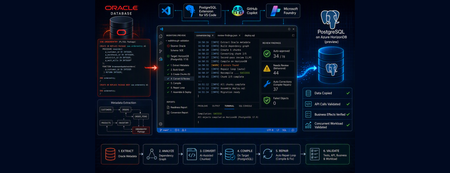
This article explores the possibilities opened by the schema conversion workflow. It is an early evaluation: I used HorizonDB as a target, which is in preview and not a supported target yet, and Oracle Database 26ai as a source which has not been validated yet. Early tests and feedbacks are welcome. If you encounter any issue, please open an issue (https://github.com/microsoft/vscode-pgsql/issues) or a discussion (https://github.com/Azure-Samples/postgres-hub/discussions) The goal is to evaluate how AI assistance changes the first phases of a migration: assessing the effort, creating a first working prototype, and making the remaining technical gaps visible. This is where an integrated development environment is particularly effective. Source artifacts, generated PostgreSQL code, reports, database connections, tests, findings, and repairs can remain in one reproducible VS Code workspace. Migrating a database is not finished when the tables compile. A useful test must also answer three harder questions: Was the reference data copied correctly? Were the application-facing stored routines actually deployed? Do those routines produce the same business effects under a realistic load? This is particularly important when business logic is embedded in proprietary database constructs such as PL/SQL packages, which are in scope for this migration. Swingbench Order Entry is a good example. It has two versions: one uses pure JDBC, with the business logic in Java, and the other places the logic in a PL/SQL package that uses advanced Oracle Database features. The server-side version illustrates the migration challenges found in many critical legacy applications. In this article, I walk through those questions using Swingbench's Sales Order Entry (SOE) schema. I ran Oracle Database and Swingbench in Docker containers and used the PostgreSQL extension for Visual Studio Code to convert the schema against an Azure HorizonDB (preview) scratch database. I then used GitHub Copilot to build the data-copy, workload-emulation, and validation programs needed to test PostgreSQL. This article follows the migration end to end. Readers can use individual sections independently, but I keep the complete sequence because each stage exposed issues that schema conversion alone could not reveal. Throughout this project, I made the architectural decisions, directed the investigation, and validated results. The migration extension performed the model-assisted schema and PL/SQL conversion, while GitHub Copilot generated supporting code and tests under my direction. PostgreSQL compilation and the executable tests provided the evidence. Instead of replacing deterministic extraction, dependency analysis, and type mappings, AI participated in the iterations that traditionally follow them: contextual translation, review, diagnosis, repair, and validation. GitHub Copilot also produced the first draft of this article, which I reviewed and refined so it accurately describes what I ran, observed, and concluded. What was migrated Swingbench SOE is a compact but realistic migration target. It includes: customers, addresses, cards, products, inventory, orders, and order items primary keys, foreign keys, checks, indexes, and sequences views and analytical queries the Oracle SOE.ORDERENTRY PL/SQL package used by Swingbench, with all the application logic, leaving only the presentation layer to the frontend package state, collection types, helper routines, random choices, sleeps, transaction control, and business transactions The test environment was: Component Version or image Oracle Database 26ai gvenzl/oracle-free:slim (23.26.2) Swingbench domgiles/swingbench:latest (2.6.1118) PostgreSQL Azure HorizonDB (PostgreSQL 17.9) PostgreSQL extension for Visual Studio Code 1.27.3 Foundry model gpt-5.2 1. Build the Oracle source environment I used the following docker-compose.yaml to start Oracle and keep a Swingbench container available for schema creation and testing: services: oracle: image: gvenzl/oracle-free:slim environment: ORACLE_PASSWORD: "<oracle-system-password>" ports: - "1521:1521" healthcheck: test: ["CMD", "healthcheck.sh"] interval: 10s timeout: 5s retries: 30 swingbench: image: domgiles/swingbench:latest platform: linux/amd64 depends_on: oracle: condition: service_healthy entrypoint: ["sleep", "infinity"] I started both containers with: docker compose up -d Once Oracle was healthy, I created a small SOE database with Swingbench's command-line wizard. I chose scale 0.1 : large enough to exercise the relationships while remaining convenient for repeated migrations. docker compose exec swingbench oewizard -cl -create \ -cs //oracle:1521/FREEPDB1 \ -dba "sys as sysdba" -dbap '<oracle-system-password>' \ -df /opt/oracle/oradata/FREE/FREEPDB1/soe01.dbf \ -u soe -p '"<soe-password>"' \ -scale 0.1 -tc 1 -v Swingbench substitutes the SOE password into CREATE USER ... IDENTIFIED BY . A password containing characters that require Oracle's quoted-password syntax must be passed with the literal double quotes expected by that SQL statement. Before migrating anything, I compiled the source package and checked for Oracle errors: docker compose exec -T oracle \ sqlplus -s / as sysdba <<'SQL' alter session set container=FREEPDB1; alter package SOE.ORDERENTRY compile; alter package SOE.ORDERENTRY compile body; show errors package body SOE.ORDERENTRY SQL I then tested the environment to be migrated by running the original Swingbench application for one minute: docker compose exec -it swingbench charbench \ -cs //oracle:1521/FREEPDB1 \ -dbau system -dbap '<oracle-system-password>' \ -u soe -p '<soe-password>' \ -rt 00:01:00 -c ../configs/SOE_Server_Side_V2.xml 2. Prepare VS Code, HorizonDB, and Foundry I installed VS Code and the PostgreSQL extension for Visual Studio Code, authored by Microsoft. The migration workflow is exposed under Migrations (Preview) in the PostgreSQL view: I opened Migrations (Preview) and created a project. The first step was to name the migration project. I generated all screenshots while reviewing this article and replaying the walkthrough, so the project identifier for this run was walkthrough-validation : The second step was to connect to the source Oracle Database as a user with the DBA role and select the schema: The third step was to define the destination PostgreSQL database: The migration tool executes generated DDL there, so this must not be an application or production database. At the time of this test, the migration workflow expected an Azure PostgreSQL connection for compilation, either Flexible Server or HorizonDB. I used an Azure HorizonDB (preview) database as a dedicated scratch target. This was an exploratory use of the preview workflow, not a statement of official HorizonDB support. The generated code targets PostgreSQL rather than HorizonDB-specific APIs; portability to another PostgreSQL deployment still depends on its PostgreSQL version, available features, and managed-service restrictions. I created the database service beforehand from VS Code: The conversion also needed a Microsoft Foundry resource and a deployed model. I created the resource, opened Foundry, deployed gpt-5.2 , and recorded the resource endpoint and deployment name. I created the resource from the Azure portal: I noted its endpoint and key: From VS Code, I opened the Foundry portal: I selected GPT-5.2: I chose to use the selected model: I deployed the model (I used the model name as the deployment name here): The fourth configuration step was to select the model deployment using its name, endpoint, and API key: The migration project was created: All files, configuration, logs, and reports were stored under .github/postgres-migrations. 3. Run the migration project The migration workflow extracted Oracle metadata, created a dependency graph, divided the objects into dependency-aware chunks, converted each chunk, reviewed the generated SQL, compiled it against PostgreSQL, and assembled deployment artifacts. The process resembles a compiler pipeline more than a text translator: It started by extracting the metadata into artifacts/oracle/SOE/extract/ddl: A report provides all details when completed: It then started the conversion, one chunk at a time: The conversion log shows the cycle of conversion, compilation, review, test, and validation using the LLM. Here is an example showing the level of detail the log provides: 16:50:16 [INFO] ossdbtoolsservice.conversion_v2.pipeline.chunk_converter.package_converter: Package ORDERENTRY: member processOrders -> converted in 80.0s (tokens=5232, notes=Oracle ROWNUM < 10 translated to LIMIT 9 (no ORDER BY in source, so row choice remains arbitrary).; Oracle (+) outer joi) This is a good example because it goes beyond syntax, where ROWNUM < 10 translates to LIMIT 9 . It warns that a LIMIT without ORDER BY has a nondeterministic result that can differ between Oracle and PostgreSQL. Applications should not rely on physical row order, but a migration must still consider behavior validated by years of production use, even when that behavior originated as a side effect of an application bug. The PostgreSQL DDL goes into artifacts/oracle/SOE/convert/sessions. A report provides all details: Simple objects can follow deterministic paths, while complex PL/SQL receives model-assisted conversion and review. PostgreSQL compilation, rather than the model, is intended to be the final syntax and dependency check. Once the migration is complete, it lists the review tasks. The counts and classifications shown here are observations from version 1.27.3 of an evolving preview workflow. Future versions may present fewer review tasks as their focus evolves in response to feedback, including a stronger emphasis on syntax and conversion completeness: The summary also lists extensions that should be installed in the target database: The orafce extension implements many functions familiar to Oracle users, including functions from Oracle DBMS packages. It can reduce the amount of code that must change during a migration. Extensions such as orafce and plpgsql_check can improve conversion and validation when they are available. For this experiment, however, I deliberately used a vanilla PostgreSQL target without them. I wanted to see what the workflow could produce without tying the converted application to extensions that may not be available from every managed PostgreSQL service. This makes portability a design goal of the prototype, not a claim that every PostgreSQL deployment is identical or that omitting extensions always produces the most accurate conversion. Before proceeding to the manual review, I inspected the fresh conversion log to separate what the pipeline had repaired automatically from what it had only flagged for attention. 4. What the migration workflow corrected, and what it could not prove I used GitHub Copilot to parse the conversion log and distinguish initial conversion, model review, compiler-driven repair, and warnings left for application review. The analysis found 37 automatic correction events: 33 during the second-pass review and four after PostgreSQL rejected generated SQL during compilation. The run finished with zero failed objects and zero fallback objects. The second-pass reviewer corrected 20 of the 35 generated package artifacts. The interesting changes included: guarding current_setting() results against missing or empty values before casting them changing the DML counter helpers from transaction-local to session-level GUC writes so their state can survive a commit on the same connection replacing invalid Oracle %TYPE references in PostgreSQL signatures and expressions replacing invalid PERFORM * FROM and Oracle cursor syntax schema-qualifying table references and limiting a SELECT INTO that could otherwise return multiple rows repairing an incomplete generated type-creation block These were code changes, not only warnings. This is where model-assisted conversion goes beyond a fixed syntax rulebook: it reviews generated code in context and revises interactions between types, state, queries, and control flow. PostgreSQL compilation then found four remaining defects. The repair loop removed unsupported DEFERRABLE clauses from two check constraints and repaired two routines before recompiling them. This is an important distinction: model review can anticipate defects, while the target database provides the exact SQLSTATE and failing statement. The pipeline then fixes and retries, much like a developer working until the code compiles. Chunking did not leave dependencies to the user. When a referenced table, index, or routine was produced by another chunk, the pipeline deferred the dependent operation and retried it after the required object existed. All such operations completed automatically in this run. Structural translations The conversion itself also made deliberate structural changes that were not compiler repairs: Oracle behavior PostgreSQL translation Package members Schema routines named orderentry$<member> (PostgreSQL has no packages) Package records and collections Composite types, array domains, and set-returning functions Package variables Custom settings accessed through set_config() and current_setting() DBMS_RANDOM.VALUE random() with range arithmetic (without the DBMS_RANDOM emulation provided by orafce ) DBMS_LOCK.SLEEP pg_sleep() DBMS_APPLICATION_INFO application_name or custom settings BULK COLLECT RETURNS TABLE , SETOF , or RETURN QUERY ROWNUM < n LIMIT n - 1 or row_number() CONNECT BY row generation Recursive CTE FORALL inventory updates Row-by-row PL/pgSQL loop (PostgreSQL runs PL and SQL in the same engine) SYSDATE and SYSTIMESTAMP CURRENT_TIMESTAMP , clock_timestamp() , and date_trunc() Package procedures Functions returning void Package overloads PostgreSQL overloads with the same flattened name What still requires attention Successful compilation proves syntax and dependency consistency, not behavioral equivalence. The fresh review report classifies 34 of 78 objects as auto-approved and leaves 44 non-blocking behavioral divergences for application review. The most important are: Oracle ENABLE NOVALIDATE primary keys do not validate existing rows, while PostgreSQL primary-key creation does. Eight tables therefore require clean source data before deployment. Five Oracle reverse-key indexes became normal PostgreSQL btree indexes, which can change insertion hot spots and access behavior. Package state is stored as text in custom GUCs. Although the reviewer changed the counter helpers to session-level writes, the emitted routines still use different key prefixes and a mixture of session-level and transaction-local settings. Initialization, pooling, commits, and casts need runtime tests. PostgreSQL functions cannot reproduce Oracle package-side COMMIT . The caller must own transaction boundaries. ROWNUM conversions without ORDER BY preserve nondeterministic selection, but they do not guarantee that Oracle and PostgreSQL choose the same rows. BULK COLLECT collections became row sets, and FORALL became a loop. Empty collection behavior, ordering, locking, and performance can differ. Random-number boundaries, numeric casts, exception behavior, and SYSDATE / SYSTIMESTAMP timing and timezone semantics remain database-specific. None of these 44 findings blocked deployment in this run. They define the work for the runtime validation in the following sections rather than automatic fixes that the migration report can prove. 5. Examples from the generated ORDERENTRY package The package conversion shows why this is more than syntax replacement. The pipeline emitted all 34 executable package-body members, including private helpers, and represented Oracle procedures as PostgreSQL functions returning void . Because PostgreSQL has no equivalent of package visibility, every member became a schema routine named orderentry$<member> . Applications should keep calling only the former public API, with privileges used to preserve the old visibility boundary. The harder transformations preserved the shape of the business logic without pretending that Oracle and PostgreSQL use the same programming model. For example, BULK COLLECT collections became set-returning functions. Indexed collection access became operations over those row sets. The FORALL inventory update in orderentry$neworder became a PL/pgSQL loop, and the CONNECT BY row generator used for warehouse activity became a recursive CTE. Package helpers using DBMS_RANDOM , DBMS_LOCK.SLEEP , and DBMS_APPLICATION_INFO became calls to random() , pg_sleep() , and PostgreSQL settings. A small conversion with a large consequence I verified that from_mills_to_secs was already a private Oracle function rather than a helper invented during migration: function from_mills_to_secs(value integer) return float is real_value float := 0; begin real_value := value/1000; return real_value; exception when zero_divide then real_value := 0; return real_value; end from_mills_to_secs; Despite the shortened name, “mills” means milliseconds here. The ZERO_DIVIDE branch is defensive but cannot normally be reached because the divisor is the constant 1000. I compared it with the generated PostgreSQL function, which keeps the operation but explicitly converts to floating point to avoid integer division: CREATE OR REPLACE FUNCTION soe.orderentry$from_mills_to_secs(value integer) RETURNS double precision LANGUAGE plpgsql IMMUTABLE AS $$ DECLARE real_value double precision := 0; BEGIN real_value := value::double precision / 1000.0; RETURN real_value; EXCEPTION WHEN division_by_zero THEN real_value := 0; RETURN real_value; END; $$; orderentry$sleep calls this helper for the fixed or randomly selected delay, maps DBMS_LOCK.SLEEP to pg_sleep , and updates a package counter. Here the review found a subtle semantic issue: the generated helper calculates elapsed milliseconds but adds the selected delay in seconds to the counter. The supplied workload uses zero delays, so it did not affect this run. With nonzero delays, the code could compile and execute while returning the wrong value. This is the kind of small conversion detail that is easy to miss and appears much later as an application error. Transaction control changes ownership The largest architectural difference is transaction control. In Oracle Database, oecommit can issue COMMIT from inside the package when the session-level PLSQLCOMMIT flag is true. The package therefore decides when its changes become durable and increments its own commit counter at that point. The converter represented the package procedures as PostgreSQL functions to preserve their callable API, but a PostgreSQL function cannot commit or roll back its surrounding transaction. The generated oecommit can preserve the instrumentation, not the transaction boundary. PostgreSQL procedures invoked with CALL can perform transaction control in specific contexts, but changing these package entry points into procedures would also change how the application calls them and how return values are handled. For this migration, I chose to disable package-side commits. The Python driver calls orderentry$setplsqlcommit('false') , commits each successful mutating call, and rolls back a failed call. Transaction ownership therefore moved from the stored package to the application. That is an intentional adaptation, not an equivalent syntax translation. Multi-call atomicity, retries, error handling, and connection-pool behavior must be reviewed with that new boundary in mind. 6. Copy the reference data separately Without leaving VS Code, I first checked the migrated schema, including its tables, views, and converted ORDERENTRY routines: The migration extension converted the schema and code but did not copy the Swingbench data. For this small, specific task, it was faster to guide GitHub Copilot to generate a Python program than to switch to another migration tool. The script stayed in the repository with the connection setup and commands, making the copy reproducible and documented rather than a one-time manual operation. I installed its dependencies (Python 3.10 or later required) and exposed connection information through environment variables rather than embedding credentials: python3 -m pip install -r scripts-postgres/requirements.txt export ORACLE_DSN='localhost:1521/FREEPDB1' export ORACLE_USER='soe' export ORACLE_PASSWORD='<soe-password>' export PG_DSN='host=<host> port=5432 dbname=<db> user=<user> sslmode=require' export PG_SCHEMA='_mig_scratch_soe' The PG_SCHEMA variable names the PostgreSQL schema created by the migration extension during validation. The scripts set search_path to this schema automatically before executing any SQL. I ran a clean copy with: bash scripts-postgres/copy_soe_data.sh --truncate The program uses dependency order and PostgreSQL binary COPY . It also handles Oracle intervals and numeric values, preserves the intent of ENABLE NOVALIDATE checks, and advances the PostgreSQL sequences after loading. I then verified that the Oracle and PostgreSQL row counts matched: The complete implementation is available in copy_soe_data.py. 7. Recover and reproduce the Swingbench workload Swingbench is a free load generator, but it is not open source. It is distributed as compiled Java, so porting its client to PostgreSQL was neither practical nor the goal. For this server-side workload, the business logic is in the SOE.ORDERENTRY package. The Java client primarily chooses transactions, generates parameters, and calls the package. Calling the migrated routines with arbitrary values would test invocation, but not the real workload. I guided GitHub Copilot to inspect the files in the Swingbench container. The XML configuration provided the enabled transactions, weights, user count, delays, and timeout. I used javap to confirm the externally observable call signatures and runtime behavior needed to build a compatible validation workload. GitHub Copilot documented those findings under my direction in scripts-postgres/swingbench_calls.md. I then guided GitHub Copilot to create run_swingbench_workload.py. It follows the same weighted transaction selection with four persistent user connections, a start barrier, copied customer data, and the configured timeout. It reports throughput, latency, and errors without trying to reproduce the Swingbench GUI or Oracle-specific connection pool. As described in Section 5, transaction ownership had to change. The driver disables package-side commits, commits successful mutating calls through Psycopg, and rolls back failed calls. I ran it with: export PG_DSN='host=<host> port=5432 dbname=<db> user=<user> sslmode=require' export PG_SCHEMA='_mig_scratch_soe' bash scripts-postgres/run_swingbench_workload.sh --duration 300 Before creating load, the program verifies that the public workload API is complete. It exits early rather than report misleading performance results for an incomplete deployment. 8. Validate in layers Validation is part of the migration, not a final smoke test. Compilation proves that PostgreSQL accepts the generated objects, but not that they return the right results or preserve business effects. I directed GitHub Copilot to build four validation layers so each failure could be isolated before adding more workload complexity. Layer 1: catalog and query validation The rollback-safe test harness begins with a preflight that checks the PostgreSQL version, required tables, five sequences, and all public workload routines. It also submits the two analytical queries to PostgreSQL with EXPLAIN before proceeding to routine calls. I separately ran those two analytical queries with EXPLAIN ANALYZE against 106,583 customers, 160,684 orders, and 482,752 order items. Both executed successfully. The top-customer query completed in 424 ms. Its sequential scans were reasonable because it consumed almost all orders and items, although the aggregate spilled to temporary disk: Sort (actual time=423.274..423.277 rows=20 loops=1) Sort Key: (rank() OVER (?)) Sort Method: quicksort Memory: 26kB Buffers: shared hit=11220, temp read=1792 written=1953 -> WindowAgg (actual time=423.242..423.255 rows=20 loops=1) Run Condition: (rank() OVER (?) <= 20) -> Sort (actual time=423.236..423.240 rows=21 loops=1) Sort Key: sum(oi.quantity * oi.unit_price) DESC Sort Method: quicksort Memory: 1929kB -> HashAggregate (actual time=402.740..415.533 rows=24968 loops=1) Group Key: c.customer_id Batches: 9 Memory Usage: 8273kB Disk Usage: 1480kB -> Hash Join (actual time=60.363..279.582 rows=482718 loops=1) Hash Cond: (o.customer_id = c.customer_id) -> Hash Join (actual time=34.192..176.799 rows=482752 loops=1) Hash Cond: (oi.order_id = o.order_id) -> Seq Scan on order_items oi (rows=482752 loops=1) -> Hash -> Seq Scan on orders o (rows=160684 loops=1) -> Hash -> Seq Scan on customers c (rows=106583 loops=1) Planning Time: 0.742 ms Execution Time: 423.895 ms VS Code with the PostgreSQL extension can visualize the plan, including buffers read by each node and the flow of rows between nodes: The monthly revenue query completed in 627 ms. Its aggregate spilled into 33 batches before two in-memory window sorts, making work_mem the first tuning candidate rather than an index: WindowAgg (actual time=615.702..626.031 rows=27472 loops=1) Buffers: shared hit=11211, temp read=1965 written=2208 -> Sort (actual time=615.698..617.253 rows=27472 loops=1) Sort Key: customer_sales.customer_id, customer_sales.month_start Sort Method: quicksort Memory: 2352kB -> WindowAgg (actual time=600.739..610.404 rows=27472 loops=1) -> Sort (actual time=600.708..602.149 rows=27472 loops=1) Sort Key: customer_sales.month_start, customer_sales.revenue Sort Method: quicksort Memory: 2137kB -> Subquery Scan on customer_sales (actual time=570.611..587.861 rows=27472 loops=1) -> HashAggregate (actual time=570.610..586.090 rows=27472 loops=1) Group Key: c.customer_id, date_trunc('month', o.order_date) Batches: 33 Memory Usage: 8209kB Disk Usage: 2040kB -> Hash Join (actual time=54.823..392.870 rows=482718 loops=1) Hash Cond: (o.customer_id = c.customer_id) -> Hash Join (actual time=31.672..208.840 rows=482752 loops=1) Hash Cond: (oi.order_id = o.order_id) -> Seq Scan on order_items oi (rows=482752) -> Hash -> Seq Scan on orders o (rows=160684) -> Hash -> Seq Scan on customers c (rows=106583) Planning Time: 0.266 ms Execution Time: 627.065 ms These execution plans establish a PostgreSQL baseline and identify possible tuning work, such as aggregate spills and work_mem pressure. I kept those observations for the physical-design review after correctness and concurrent workload validation rather than tuning from isolated queries too early. Layer 2: call every public workload routine After the preflight, the same harness discovers viable values and calls all nine workload transactions plus setPLSQLCOMMIT : bash scripts-postgres/run_orderentry_tests.sh Each call is isolated and reports its SQLSTATE on failure. The first run exposed defects that compilation could not: composite return types did not match some rows, internal and public customer-ID types differed, package settings lacked defaults, and newOrder retained an Oracle %TYPE cast. GitHub Copilot generated schema-relative repairs, which I reviewed and applied. The implementation is available in apply_orderentry_runtime_fixes.py: bash scripts-postgres/apply_orderentry_runtime_fixes.sh I then ran the harness again, and all ten checks passed. Layer 3: verify business effects A successful call does not prove the correct business effect. GitHub Copilot generated a rollback-safe order workflow: bash scripts-postgres/run_swingbench_workload.sh --verify-only It creates two orders for a copied customer, verifies their fields and item rows, then checks that browseandupdateorders changes one item quantity and the matching order total together. It rolls back, reconnects, and proves that both orders are absent. Only sequence values may advance because PostgreSQL sequences are nontransactional. Layer 4: weighted concurrent load Only after the first three layers passed did I run concurrent load. Four users executed 287 calls across all nine transaction types with zero errors. This ordering separated migration defects from performance observations and avoided assuming that copied customer IDs were contiguous. After validation: review physical design After validating the migration and ensuring data accuracy, it is time to look at the physical layer, using the execution plans captured in Layer 1 together with observations from the concurrent workload. Oracle and PostgreSQL handle data patterns differently, so blindly copying Oracle optimizations can degrade performance. PostgreSQL's MVCC architecture adds write overhead to updates, so the table FILLFACTOR strategy needs a fresh look compared with Oracle's PCTFREE . PostgreSQL also provides different tuning options, including partial indexes, specialized index types, and incremental sorting. Reproduce the complete validation At the end of my run, the test setup contained: all ten workload tables populated all five required sequences deployed and advanced two analytical queries accepted by PostgreSQL under EXPLAIN a complete invocation harness a weighted Swingbench-like concurrent driver a rollback-safe semantic order test After deploying the converted schema and its ORDERENTRY routines, I applied the reviewed runtime fixes and ran the checks in increasing order of scope: bash scripts-postgres/apply_orderentry_runtime_fixes.sh bash scripts-postgres/run_orderentry_tests.sh bash scripts-postgres/run_swingbench_workload.sh --verify-only bash scripts-postgres/run_swingbench_workload.sh --duration 300 Conclusion AI did not make this migration a one-click operation. The Oracle application combined packages, private helpers, collections, package state, bulk operations, transaction control, and behavior that only appears under realistic calls. A credible migration had to understand those interactions rather than only produce PostgreSQL syntax. The useful change is that the migration can be approached as an integrated project from one place. In VS Code, the migration extension converted and compiled the schema. I inspected the generated code and reports, directed GitHub Copilot to generate the supporting data-copy and workload programs, reviewed and applied runtime fixes, and validated data, API calls, business effects, and concurrent load. The model accelerated code conversion and the creation of focused tools, while PostgreSQL, executable tests, and my knowledge of the application provided the evidence. This is the method I would carry from assessment into a real migration: use AI to drive more of the conversion, diagnosis, repair, and validation iterations, not to hide complexity. Keep source behavior, converted code, data movement, test programs, findings, and fixes together in a reproducible workspace. This makes the first prototype useful evidence for estimating the remaining effort. A migration report measures one pipeline stage; the application is migrated only when its data, transactions, business effects, and workload work together on PostgreSQL. This validation is necessary but not sufficient for production. A real go-live also requires review of edge cases, collation, NULL handling, error paths, security, and sustained performance under representative data volumes. Because this walkthrough exercises preview functionality, experience reports are especially valuable. Readers trying it on other Oracle applications or PostgreSQL targets can share what converts well, what requires intervention, and which findings would make the assessment more useful in the PostgreSQL Hub Developer Forum599Views0likes0CommentsPostgreSQL on Azure: Two services, one future-proofed ecosystem
At Microsoft Build 2026, the Azure Databases team announced the public preview of Azure HorizonDB, a new powerhouse for PostgreSQL in the cloud. It’s a fully managed, PostgreSQL-compatible cloud database service that delivers sub-millisecond latency, rapid read scale-out, and seamless integration with Microsoft Foundry to empower teams to build secure, compliant and high-performing applications with confidence. At the same event, we also announced several enhancements to the existing managed PostgreSQL offering, Azure Database for PostgreSQL flexible server, boosting performance, analytics and security, and expanding tooling for migration scenarios. Where there was one, now there’s two Now our customers have two strong options to choose from. Azure Database for PostgreSQL remains a reliable, cost-effective, fully open-source compatible workhorse for most users’ everyday needs. Azure HorizonDB is the new PostgreSQL-compatible service with an elastic scale-out architecture built on a highly optimized shared storage system that unlocks 3x faster OLTP performance and other cloud-native advantages for the most demanding workloads. With this new service, you might be wondering which service is the best fit. Let’s take a closer look at these options and explore where they align and differ and what you might want to consider when making your choice. Azure Database for PostgreSQL: Enterprise ready, managed open source Microsoft is one of the largest contributors to the open-source Postgres project and has also invested heavily in PostgreSQL managed services on Azure. Microsoft engineers have authored or co-authored hundreds of code commits and provided extensive reviews, and, to date, have made more than 345 commits and changed more than 64K lines of code for PostgreSQL 19. In the cloud, Azure Database for PostgreSQL is built on the open-source ecosystem, sharing the same extensions and experience that developers and DBAs know and love. Patching, backups, scaling, and monitoring are all simple, one-click operations. If you have an app that already uses a PostgreSQL database, in another cloud or on-premises, migrating to Azure for the added benefits is an easy lift and shift. Inside Azure Database for PostgreSQL Azure Database for PostgreSQL is a mature, feature-rich service already battle-tested by thousands of applications and being used by Fortune 500s across sectors. Enterprise-grade performance: Compute tiers can scale up to 192 vCores with features like read replicas and elastic clusters, which is based on the open-source Citus extension and unique to this class of service, make it easy to right-size workloads and optimize performance by offloading read-heavy traffic or sharding data across nodes. Reliability and security: Backed by Azure’s robust infrastructure, Azure Database for PostgreSQL comes equipped with high availability and zone-redundant options, point-in time restore and security features, including data encryption, network isolation, and Entra ID for enterprise identity. Frictionless migrations: Migrating existing PostgreSQL workloads to Azure Database for PostgreSQL is very straightforward thanks to built-in migration tooling. We’ve even launched AI-assisted tooling for Oracle to PostgreSQL migrations in VS Code, which leverages GitHub Copilot AI to handle app and schema conversions and pre-migration validations. From incorporating cutting-edge hardware, horizontal scaling and Microsoft Fabric and Microsoft Foundry integrations, to supporting 90+ open-source extensions and counting, we continue to optimize the service to meet the needs of our customers building on open-source Postgres. Azure HorizonDB: Next-gen engine to build what’s next Azure HorizonDB was designed and purpose-built to meet the needs of modern AI-native applications and large-scale enterprise migrations. Shireesh Thota, Azure Databases CVP, describes it as the database of choice for workloads that need “a lot of storage, want really fast latencies and significantly higher IOPS.” The service offers faster throughput than open-source PostgreSQL and rapid compute scale-out to support the performance and availability needs of your most demanding applications. Inside Azure HorizonDB Azure HorizonDB is where performance meets possibility, empowering teams to build intelligent apps to scale, modernize, and innovate without compromise. Cloud-tuned performance: The cloud-native architecture of Azure HorizonDB fully decouples compute and storage, enabling users to scale database resources independently. The service can support deployments up to 3,072 vCores and 128 TB of shared storage for a single workload, and provides a single endpoint for read replicas with transparent load balancing to deliver massive read throughput seamlessly to the application. Reliability and security: Azure HorizonDB comes standard with features to support production-level, mission-critical enterprise workloads. Built-in multi-availability zone (AZ) replication reduces failover time to less than 5 seconds, and native integration with Microsoft Entra ID and private endpoint networking ensures Azure HorizonDB meets the Azure-standard enterprise-grade security from day one. Tailored for AI and next-gen apps: Azure HorizonDB provides an extensive set of AI features for building modern applications. In comparison to similar PostgreSQL services in the cloud, IDC described Azure HorizonDB as having "fewer moving parts and a straighter path to AI features.” Azure HorizonDB ships with Microsoft’s latest version of DiskANN vector indexing, which includes advanced filtering that delivers up to 3x faster vector search than traditional pgvector indexes. It also comes with built-in AI Model Management for native integration to Microsoft Foundry models, AI Functions to invoke models from SQL, and AI Pipelines to provide durable orchestration of data modification. Developer productivity: Along with building the best Postgres service, Microsoft is committed to delivering the best Postgres developer tools to the entire community. The Microsoft PostgreSQL extension for Visual Studio (VS) Code makes the coding environment Postgres-aware to help optimize queries, schemas and query performance using AI. Azure HorizonDB is the next-generation of PostgreSQL on Azure for mission-critical, high-throughput, and data-intensive workloads. For everything else, Azure Database for PostgreSQL remains a strong choice. Making your selection Adopting technology should always be driven by a real need. Having two choices is great, but it raises the logical question: “which one is right for me and when?” Choose Azure Database for PostgreSQL when: You’re migrating existing Postgres databases as-is. You can migrate seamlessly to Azure Database for PostgreSQL with minimal tweaks or reconfigurations. You require full open-source compatibility, including rapid adoption of new community versions. Azure Database for PostgreSQL now ships major versions on the same day as the community release. You want to start now and decide later. Azure Database for PostgreSQL is generally available in 60+ regions today. Later, if your project requires greater scale, you can upgrade to Azure HorizonDB, and the migration process will be quick and easy. Choose Azure HorizonDB when: You’re migrating tier-1 workloads to the cloud that already have critical scale, performance, and availability requirements. Up to 128 TB of storage and 3,072 vCores for a single workload makes Azure HorizonDB the ideal destination for these workloads. You anticipate requirements that go beyond Azure Database for PostgreSQL’s capabilities. Azure HorizonDB expands on the capabilities of Azure Database for PostgreSQL, so you’ll be future proofed for scale and reliability. You are focused on building next-gen intelligent apps. Azure HorizonDB is optimized for building new AI applications, enabling developers to ship faster with fewer moving parts. Both services are built on the core Postgres engine, and upgrading to Azure HorizonDB is easy. If your scenario changes, your toolkit can change too. Azure offers the managed service to support you either way. Choose the cloud with the deepest Postgres expertise The PostgreSQL ecosystem on Azure is richer than ever. With both Azure Database for PostgreSQL and Azure HorizonDB, Azure covers the spectrum from steady, everyday workloads to cutting-edge, innovative ones. Whether you’re in a two-person startup or a Fortune 500 enterprise, PostgreSQL on Azure can meet your business’ needs. Now is the perfect time to make a move to Postgres on Azure: Learn more about Azure Database for PostgreSQL Learn more about Azure HorizonDBAI-assisted Oracle-to-PostgreSQL schema conversion in Visual Studio Code
By AI Omar Rajawat, Pranay Lohia, Gautam Juneja, Vikas Nimmagadda, Anil Dogra, Aditya Duvuri We’re seeing significant interest in migrating database workloads from Oracle to Azure Database for PostgreSQL. Historically, schema conversion has been one of the most technically challenging and expensive steps in that journey, demanding specialist knowledge of both engines and stretching migration timelines before a single row of data moves. Recent advances in AI-assisted schema conversion are changing that, turning what used to be a long, manual effort into a faster, more accessible, and lower-cost proposition. This post looks at what that shift means in practice for teams moving to Azure Database for PostgreSQL flexible server. Oracle schema conversion is where the complexity of translating schema and code objects to PostgreSQL becomes visible. Packages, procedures, triggers, custom types, and dependencies built up over years must be mapped to PostgreSQL-compatible definitions while preserving the relationships that make the schema work. Generally available since May 2026, the feature is built into the PostgreSQL extension for Visual Studio Code, published by Microsoft. It helps teams convert Oracle schema and code objects — tables, views, constraints, packages, procedures, functions, and triggers — into PostgreSQL-compatible definitions for Azure Database for PostgreSQL flexible server, with no separate conversion utility to install and no disconnected workflow to manage. It brings schema discovery, conversion, compile validation, and review into one project-based experience. Teams can connect to Oracle, select schemas, and configure a Microsoft Foundry connection in the same project. The extension then translates Oracle-specific constructs, compiles and syntax-checks converted DDL into scratch schemas on Azure Database for PostgreSQL flexible server and surfaces unresolved items as review tasks that teams can work through with GitHub Copilot agent mode. Why schema conversion deserves a better workflow Traditional conversion tools can produce a useful first pass, but the long tail of the process is rarely solved by generating replacement DDL alone. Teams still need clear answers to practical questions: What converted successfully? What needs attention? Which Oracle constructs require a PostgreSQL design decision? Which items should be reviewed first? We designed the schema conversion experience around those questions. The goal is not to hide complexity behind a single score. It is to help teams make steady progress while keeping the work visible and reviewable. What the schema conversion experience provides The experience guides teams through a schema conversion project rather than a collection of separate scripts. It discovers the selected Oracle schemas and converts both the relational model and the code that runs on it: tables, indexes, sequences, primary key, unique, check and foreign key constraints, views and materialized views, synonyms, and Oracle object types — along with the PL/SQL that is usually the hardest part of the migration. Packages and package bodies, package-level state, standalone procedures and functions, and triggers are translated into PostgreSQL functions, procedures, and trigger functions. Oracle-specific constructs are mapped to PostgreSQL equivalents rather than dropped or stubbed out. REF CURSOR and SYS_REFCURSOR become PostgreSQL refcursor; CLOB and BLOB columns become text and bytea ; and NUMBER and VARCHAR2 are mapped by precision and length to their closest PostgreSQL types. Oracle date functions such as ADD_MONTHS, LAST_DAY, MONTHS_BETWEEN, and TRUNC are resolved through the orafce extension, which the project detects and flags for you before deployment. Every converted definition is compiled against scratch schemas on Azure Database for PostgreSQL flexible server, so the deployment script you end up with is an organized, dependency-ordered set of PostgreSQL SQL artifacts that has already been proven to build. Objects that still require human judgment are surfaced as review tasks. Teams can inspect the source and converted definitions side by side, work through the remaining items, and use GitHub Copilot agent mode for guided assistance — keeping automation and human review in the same workflow. How it works: the system architecture Under the hood, the conversion engine follows one principle — the language model is a single, bounded stage; it never has the first or the last word. Deterministic steps decide what the model sees and what it is allowed to produce. Deterministic in. Rule-based extraction reads the Oracle DDL and metadata, then a dependency-graph decomposition splits the estate into bounded, dependency-ordered chunks — so every object is converted in the context that keeps it correct. Bounded conversion. A tiered model strategy through the Microsoft Foundry connection translates each chunk with structured, contract-wrapped input and output. Even very large PL/SQL packages are split and converted member by member, so nothing is trusted as a monolith. Deterministic out. Converted objects pass through review, then compile-and-verify against scratch schemas on Azure Database for PostgreSQL flexible server, and finally dependency-ordered deploy assembly. Unresolved items become review tasks, and every object carries a per-object audit trail. A continuous-improvement loop closes the system: the engineering team maintains a versioned regression suite of supported conversion patterns, and an executable benchmark tracks regressions as the pipeline evolves. Proven in production The approach has been exercised on real enterprise estate. Across representative production runs totaling more than 60,000 schema objects; conversion reached roughly 98% overall — with several schemas converting at a full 100%. The hardest tail, PL/SQL package members, now compiles at 96% across more than 20,000 members thanks to targeted coverage and a resilient compile stage. Conversion outcome and review status are separate measures. Objects that convert and compile cleanly are safe to deploy as they are; the rest are deliberately routed into a prioritized review queue rather than silently accepted. In a representative single-schema run, no object ended in a hard conversion failure, and a cleanly generated object can still involve a PostgreSQL design decision. That is the workflow operating as intended: automation absorbs the volume, and review tasks to keep the remaining judgment calls visible, ordered, and auditable. Measured, not asserted: the SchemaBench eval Quality is verified by running it. SchemaBench, the evaluation framework, deploys each converted schema to a live PostgreSQL database and probes real behavior — whether constraints still fire and whether objects still resolve — rather than comparing DDL text. It scores seven weighted dimensions: semantic fidelity, structure, constraints, completeness, performance, target idioms, and maintainability, behind hard gates. On the e-commerce benchmark, the strongest model scored 96.1 overall with 100% semantic fidelity and a ~98% behavioral-probe pass rate. Every failure a migration hits becomes a permanent regression test the next run has to pass. Learn more: Oracle to Azure Database for PostgreSQL schema conversion overview499Views5likes0Comments