postgresql on azure
40 TopicsHorizonDB: PostgreSQL for enterprises, developers, and agents on Azure and Fabric
Today at Microsoft Ignite, we’re thrilled to announce the general availability of Azure HorizonDB and the public preview of Microsoft Fabric HorizonDB, expanding what’s possible with PostgreSQL on Azure. HorizonDB brings a new cloud-native architecture to PostgreSQL, delivering new levels of performance, scalability, and availability for building AI-powered applications or modernizing demanding enterprise workloads. The role of PostgreSQL is growing, and so is the range of users and companies that depend on it. Enterprises are standardizing on it for critical workloads, developers are choosing it to build new applications, and AI agents are increasingly using it to create, retrieve, and act on data. Each brings different needs, from resilience and security to instant provisioning, developer flexibility, and agent-driven workflows. We built HorizonDB to meet those needs, on Azure and in Microsoft Fabric. Built for mission-critical enterprise workloads Azure HorizonDB is built for the most demanding PostgreSQL workloads, where performance and availability matter most. It delivers up to 8x faster OLTP performance than self-managed PostgreSQL* and supports databases up to 128 TB. Every database is resilient across availability zones by default, with sub-millisecond commit latency and failover in under five seconds, providing high availability without impacting application performance. * Based upon internal, standardized benchmarking, running on high availability and on comparable hardware. HammerDB TPROC-C workload, 95K Warehouses, 512 Users, Azure Edsv6 Virtual Machines with 64 vCores, PostgreSQL 17.11, Korea Central, Availability Zone 1 and 2 HorizonDB integrates with Azure security controls for identity, networking, and data protection. Microsoft Entra ID authentication centralizes identity-based access to the database, helping teams apply consistent identity governance across their Azure environment. Private endpoints provide database connectivity through Azure virtual networks, keeping those connections within the enterprise network boundary. Customer-managed keys give organizations control over the encryption keys that protect their data, in line with their key management policies. Together, these capabilities support sensitive workloads on Azure while preserving the security practices already in place. “Our AI ambitions depend on secure, reliable, high-performance API access to LSEG’s data. Azure HorizonDB meets our enterprise security requirements while providing a PostgreSQL foundation for our existing API services and the MCP layer powering new AI experiences.” – Grzegorz Giedrojc, Director of Engineering, London Stock Exchange Group Serverless PostgreSQL in Fabric, from first query to OneLake Developers have always built applications on databases, but agents are now building them at an entirely different speed. Agents spin up databases for prototypes, experiments, and short-lived tasks, then drop them when the work is done. Most of these workloads start small, run in bursts, and sit idle between uses, which makes their compute needs hard to predict and inefficient to run continually. Microsoft Fabric HorizonDB is serverless and built for exactly these scenarios, with: Rapid provisioning: Databases provision in seconds so developers and agents can start building immediately. Automatic pause: Compute pauses after five minutes of inactivity to avoid keeping resources running between tasks. On-demand resume: Compute resumes when the next query arrives without manual intervention. Fabric HorizonDB is also the default database for Fabric apps, where the Rayfin SDK brings PostgreSQL, data APIs, authentication, functions, storage, and observability together in a managed application backend. Instead of assembling and connecting these services separately, developers and agents can focus on application logic and the data it needs, moving from first idea to a running application without operating the backend underneath it. Once those applications are running, they need more than their own operational data. Fabric HorizonDB now supports translytical capabilities on OneLake to operationalize lake data, bringing the scale and performance of Fabric's analytical engines to live transactions through: Translytical queries: PostgreSQL queries are transparently converted to run on Fabric Data Warehouse, using distributed, scale-out execution on CPU- or GPU-powered processing. Analytical queries can run an order of magnitude faster than they would natively in PostgreSQL. Full and partial pushdowns are supported, so a single query can efficiently join PostgreSQL tables with data in OneLake. Mirroring: Fabric HorizonDB tables are replicated into OneLake by default and are automatically converted to Delta format, so data is ready for translytical application workloads and large-scale analytics across Fabric without building data integration pipelines. Synced Tables: Enriched data from Fabric Data Warehouse flows back into HorizonDB (reverse ETL) for low-latency, high-concurrency serving to applications and agents. Snapshot sync handles periodic refreshes such as daily scores or aggregates, while the continuous sync option keeps tables current as source data changes. Together, serverless compute and translytical capabilities on OneLake enable developers and agents to build Fabric apps that start small, scale with demand, and act on live transactions and analytical insights in the same application, all through one PostgreSQL API. With no pipelines to build or infrastructure to manage, every application can use the full value of data in OneLake from day one. “As settlement cycles shorten and financial services become more automated, resolving payment and trade exceptions requires more than the current transaction state. Fabric HorizonDB enables us to connect operational data with historical insights in OneLake to provide firms with the broader business context to resolve exceptions faster and make more informed decisions.” – Jennings Balavari, Founder and CEO of Opsen AI Build retrieval, reasoning, and AI workflows, all in PostgreSQL AI agents need more than a place to store data. They need a data platform that combines relevant context and relationship-based reasoning with integrated AI workflows and tools designed for agents. HorizonDB consolidates these capabilities in PostgreSQL so applications can do more with operational data without stitching together specialized databases and disparate services. Retrieve the right context. HorizonDB combines vector and full-text search to capture both semantic meaning and precise keyword matches. Applications can retrieve relevant context directly in PostgreSQL without separate search or vector databases. pgvector support: Existing vector applications work as they are. DiskANN indexing: Embedding search scales with up to 1.5x higher throughput than HNSW at comparable recall and up to 5x smaller indexes, reducing storage and memory requirements. BM25 ranking: pg_textsearch ranks text results by keyword relevance to find exact names, identifiers, and technical terms. Hybrid search with RRF: Reciprocal Rank Fusion functions combine vector and keyword results based on their positions in each ranked list. This helps retrieve relevant context that either search method alone might miss. “HorizonDB is changing how we think about the boundary between operational data and intelligence. Instead of creating another datastore for every new capability, we’re exploring how relational state, relationships, semantic retrieval, and AI can coexist around the same trusted operational truth.” - Dylan Addington, Enterprise Architect, Pediatric Associates Family of Companies Reason across relationships. HorizonDB supports graph modeling and traversal through Apache AGE, with significant new optimizations to this extension for faster queries and more efficient graph updates. The AGE extension API is unchanged, so existing applications can run on HorizonDB and just work without code changes. Compared with community Apache AGE: Simple reads: Resolve direct dependencies, linked entities, and ownership up to 3,900x faster (LDBC SNB Interactive workload). Complex reads: Run multi-hop queries across connected data up to 512x faster (LDBC SNB Interactive workload). Graph builds and refreshes: Run MERGE and batch upserts up to 190x faster with about 6x lower peak memory (internal Microsoft testing). Faster graph queries reduce the time agents spend following relationships across connected data. A supply chain agent can trace a delayed component through suppliers, shipments, and affected orders. A support agent can connect a customer’s case to related accounts, products, and known issues. By combining graph traversal with vector search and relational queries, agents can reason over how data is connected as well as what it contains. Integrate models and scale AI workflows. Building scalable AI applications requires models and data processing to work together without a separate orchestration layer. HorizonDB integrates model access and AI execution with operational data through: AI Model Management: Connect applications to the models they need and manage model access from the database. AI Functions: Invoke models from PostgreSQL for tasks such as embedding generation, extraction, and content generation. AI Pipelines: Compose these functions into durable, asynchronous workflows that scale AI processing across data. For example, a pipeline can call external models to enrich new rows as they arrive or keep a knowledge graph current as the underlying data changes. “Our team built an entire RAG retrieval pipeline in Azure HorizonDB without an application tier. Chunking through reranking all ran in SQL.” - Brian Steele, Chief AI Officer – Field, Coretek Connect agents to HorizonDB with tools and skills: Microsoft’s PostgreSQL MCP Server and PostgreSQL Skills combine database connectivity with task-specific guidance for agents. PostgreSQL MCP Server: Provides a standard way to discover and invoke HorizonDB capabilities through the Model Context Protocol. PostgreSQL Skills: Supply reusable knowledge and instructions for common database tasks. Modern developer tools for HorizonDB, powered by VS Code More than 70% of developers already work in Visual Studio Code, according to the 2026 Stack Overflow Developer Survey. The PostgreSQL extension for VS Code brings HorizonDB development, management, and troubleshooting into the editor, so teams can understand their cluster, tune queries, and inspect data and AI workflows without switching tools. Cluster topology: A clear view of each HorizonDB cluster shows its pools and nodes, including the writer and read-only nodes, their availability zones, compute configuration, high availability status, and parameter group sync state. AI-assisted query optimization: Query plans render as interactive graphs with performance hotspots highlighted. Developers can ask GitHub Copilot to analyze a plan or individual operator and suggest optimizations, using live database schema context. Monitoring and debugging: Metrics, wait events, top queries, and active sessions are available alongside cluster topology, helping developers investigate slow queries and blocking relationships. Queries can be opened directly in the SQL editor or plan visualizer for deeper analysis. Knowledge graph visualization: Apache AGE Cypher results render as interactive node-edge graphs, making relationships in the data easier to explore. AI pipeline visualization: Developers can follow AI workflows from source data through chunking, embedding, extraction, generation, and ranking. Modernize Oracle and PostgreSQL workloads on HorizonDB For existing PostgreSQL workloads, the path to HorizonDB is direct. The new Azure Database Migration Service moves PostgreSQL databases from AWS, Google Cloud, on-premises, and Azure virtual machines to HorizonDB, with online migration of schema and data plus built-in validation and monitoring. Oracle migrations are a different challenge. Beyond moving the data, teams have to convert schemas, PL/SQL packages, and the application code that depends on them, then prove the result behaves the same. That makes an Oracle migration a software engineering project, not a database task. That's why we built the tooling into the PostgreSQL extension for VS Code, where migration teams already have version control, code review, and CI/CD pipelines. Schema and application changes stay in lockstep, with every conversion versioned, reviewed, and regression-tested on each commit. The extension brings AI-assisted conversion into that workflow with: Schema conversion: Reads the Oracle data dictionary and uses models in Microsoft Foundry to generate PostgreSQL DDL. It then compiles the results against a PostgreSQL database and flags objects that need manual changes in a conversion report. Application conversion: AI-assisted conversion identifies Oracle-specific dependencies in SQL scripts, stored procedure calls, and Java code, then proposes changes for PostgreSQL compatibility. It builds on the output of schema conversion, so the updated code matches the converted object names and types. Developers review and validate each change before accepting it in VS Code, GitHub Copilot CLI, or existing modernization workflows such as Modernize CLI. Data movement: Once the converted schema is deployed, Azure Database Migration Service moves the Oracle data into HorizonDB. Offline migration is now in preview, and online migration is coming soon. The tools handle the repetitive conversion work, so engineers can focus on review, testing, and the business logic that needs human judgment. Ready to get started with HorizonDB? Azure HorizonDB is generally available today in 13 Azure regions across the Americas, Europe, and Asia Pacific, with more regions coming online soon. Microsoft Fabric HorizonDB is available in public preview across Fabric regions worldwide. You can get started today by creating a new HorizonDB instance using the Azure portal, API’s, or the Visual Studio Code extension for PostgreSQL to begin exploring these capabilities firsthand. Azure HorizonDB Documentation: Microsoft Azure HorizonDB Documentation Additional Ignite Content For a closer look at the capabilities in this post, see our companion blogs on AI with Azure HorizonDB, covering hybrid search, graph, and AI pipelines, and migrating to HorizonDB, covering the new Azure Database Migration Service and Oracle migration in VS Code. HorizonDB AI: Azure HorizonDB: Data, Transactions, and AI in One Postgres Database HorizonDB Migrations: Complete Oracle to PostgreSQL Migration: Move Your Schema, Data, and Application Code HorizonDB is one part of our PostgreSQL investment on Azure. To see what else is new, read the Azure Database for PostgreSQL Ignite blog, and for the full set of database announcements, read the Azure Databases Ignite blog. Azure Database for PostgreSQL: More power, more resilience, better value: Azure Database for PostgreSQL at Ignite 2026 Azure Databases: Every intelligent experience starts with data
Postgres MCP Server: Connect AI coding agents to PostgreSQL
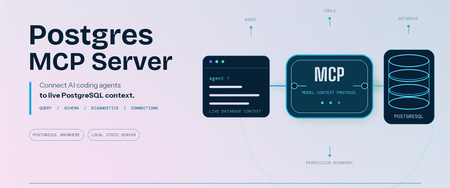
Coding agents can write SQL, troubleshoot applications, and reason about data. Useful database work starts with your schema and environment context. We are pleased to announce that Microsoft has released the Postgres MCP Server under the MIT License. Built entirely in Rust for fast, resource-efficient operation, it connects Model Context Protocol (MCP) compatible coding agents to PostgreSQL, so your agent can inspect real database context and run permitted operations. The server works with PostgreSQL locally, on-premises, on Azure, AWS, GCP, or through another PostgreSQL-compatible service. It is built for anyone who works with PostgreSQL through a coding agent, including application developers, database administrators, data professionals, platform engineers, and PostgreSQL enthusiasts. Give AI agents live PostgreSQL context The Postgres MCP Server exposes PostgreSQL operations as tools that your coding agent can call. After connecting to a profile, ask: "List the tables in my PostgreSQL database." "Show me the ten most recent orders." "Generate the schema for these tables and indexes." "What is slowing down my PostgreSQL server?" The tools let your agent: Generate queries and run analytics. Run read-only SQL or use separate tools for data and schema changes. Explore and design schemas. Inspect tables, indexes, functions, sequences, and other database objects before generating database changes. Diagnose performance. Detect server capabilities and collect focused performance metrics for the server and its queries. Manage connections. Create named connection profiles, connect to the right database, and switch between environments without placing credentials in the MCP client configuration. Install and connect securely Prerequisites: Node.js 22 or later, which includes npm and npx. Linux x64 or arm64, macOS x64 or arm64, or Windows x64. Windows on Arm uses x64 emulation. An MCP-compatible coding agent or client. A reachable PostgreSQL or wire-compatible database and a database role with the permissions needed for your intended tasks. No separate installation is required when you use npx; it downloads and runs the package for you. If you prefer the postgres-mcp command to be available globally, install the package: npm install --global @microsoft/postgres-mcp The examples use npx. With a global installation, replace npx -y Microsoft/postgres-mcp with postgres-mcp. Create a profile and store its password: npx -y @microsoft/postgres-mcp connection add local \ "postgresql://postgres@localhost:5432/postgres" npx -y @microsoft/postgres-mcp connection set-password local The server stores the password in your operating system keyring, separate from the profile. For headless or CI environments without a keyring, use the environment-based connection option. Add the server to clients that use the mcpServers configuration: { "mcpServers": { "postgres": { "command": "npx", "args": ["-y", "@microsoft/postgres-mcp", "run"] } } } Configuration formats and file locations differ by client. The Postgres MCP usage guide includes examples for supported clients. For Azure Database for PostgreSQL, the server can use Microsoft Entra ID when a saved profile does not contain a password. PostgreSQL role permissions remain the security boundary. New profiles permit write tools unless you set access_mode: ro. For exploration, combine that setting with a read-only database role. Your MCP client controls approval prompts, and CSV tools can read only from approved local paths. Add expert PostgreSQL skills The open-source Postgres Skills repository complements the MCP server with expert guidance for query performance, indexing, vector search, security, operations, Azure workflows, and AI and knowledge graph scenarios. These reusable instructions help coding agents apply PostgreSQL best practices when investigating an issue or completing a task, while the MCP server supplies the live database context and permitted operations needed to act on that guidance. Next steps Explore the Postgres MCP Server repository. Review the Postgres MCP usage and security guide. Follow the Postgres Skills plugin setup guide. Share feedback or contribute through Postgres MCP GitHub issues. Thank you!2.6KViews0likes2CommentsTop 10 Performance Optimization Techniques for Azure Database for PostgreSQL Flexible Server
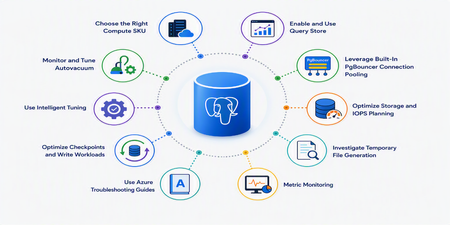
Introduction Performance optimization is one of the most common challenges faced by organizations running business-critical workloads on Azure Database for PostgreSQL flexible server. As your workloads grow it’s common to encounter high CPU utilization, storage bottlenecks, autovacuum issues, excessive temporary file generation, and connection saturation. The good news is that Azure PostgreSQL flexible server provides several built-in capabilities to help optimize performance, improve scalability, and reduce operational overhead. This article explores ten practical techniques that can significantly improve database performance and reliability. 1. Choose the Right Compute SKU Performance starts with selecting the appropriate compute tier. Azure PostgreSQL flexible server offers: Pricing tier Target workloads Burstable Designed for workloads that don't require full CPU performance continuously. Best suited for proof-of-concept environments, and development builds. Not recommended for production workloads. General Purpose Provides a balance between CPU and memory with scalable I/O throughput, making it suitable for most production workloads. Examples include servers for hosting web applications, mobile apps, and enterprise applications. Memory Optimized Suitable for high-performance database workloads that require in-memory performance for larger buffer cache sets, and higher concurrency. Examples include servers for processing real-time data and high-performance transactional or analytical apps. Learn more about Compute Tiers here. 2.Enable and Use Query Store Query Store is one of the most powerful performance tools available. Query Store automatically captures the following and keeps them available for review: Query execution statistics Runtime metrics Wait event information Historical execution trends It organizes the data into time windows, so you can spot database usage patterns. Data for all users, databases, and queries is stored in a database named azure_sys in the Azure Database for PostgreSQL instance. It’s generally recommended to monitor query store from Azure tools, KQL, etc. Learn more about Query store here. You can also view some useful scenario for query store and some Best Practices for Query store 3.Leverage Built-In PgBouncer Connection Pooling PostgreSQL uses a process-per-connection model, which means every connection consumes memory and CPU resources. Azure PostgreSQL flexible server provides built-in PgBouncer support for eligible SKUs . PgBouncer allows multiple application sessions to reuse open backend connections and significantly reduces overhead. Benefits include: Lower memory consumption Faster connection handling Improved application scalability Reduced CPU overhead Learn more about PgBouncer here 4.Use Azure Troubleshooting Guides One underutilized feature is the built-in troubleshooting experience available directly in the Azure portal. Guides are available for: CPU troubleshooting Memory troubleshooting IOPS analysis Temporary files Autovacuum monitoring Autovacuum blockers These tools provide actionable recommendations and visualizations without requiring external monitoring solutions. Learn more about Troubleshooting Guides here. 5. Monitor and Tune Autovacuum Autovacuum is critical for maintaining PostgreSQL performance. Without proper vacuuming: Dead tuples accumulate Table bloat increases Statistics are not refreshed regularly Query performance degrades Transaction ID wraparound risks emerge Use Azure's built-in Autovacuum Monitoring TroubleshootingGuides to identify: Vacuum lag Blocked autovacuums Table bloat Inefficient cleanup operations Azure now also offers adaptive tuning capabilities to optimize maintenance behavior. Learn more about Autovacuum tuning here 6.Optimize Storage and IOPS Planning Many performance incidents originate from insufficient storage planning rather than inefficient SQL. In Azure PostgreSQL flexible server: Storage and baseline IOPS are closely related. Learn more here. Larger storage allocations provide higher baseline IOPS. Auto-grow prevents storage-related outages Note: Storage can only be scaled up and will always be double in size. SSDv2 auto-grow will allow customized growth settings in future release. For write-heavy workloads, monitoring storage utilization and IOPS is essential. Best practice: Enable Storage Auto-Grow Monitor Read/Write IOPS regularly Scale storage proactively 7.Investigate Temporary File Generation Large sorts and hash operations that exceed available memory spill to disk and generate temporary files. Symptoms include: Sudden Latency Spikes Increased IOPS Slower query execution Azure TroubleshootingGuides provide dedicated temporary-file analysis capabilities that help identify offending queries. Frequent temp file generation often indicates: Missing indexes Undersized work_mem Large sorting operations 8.Use Intelligent Tuning Azure PostgreSQL flexible server includes Intelligent Tuning capabilities. The service continuously observes workload behavior and automatically optimizes parameters related to write operations. Examples of tuning include: checkpoint_completion_target max_wal_size min_wal_size bgwriter settings This reduces administrative effort while helping maintain consistent performance. Learn more about Intelligent Tuning here. 9.Optimize Checkpoints and Write Workloads Checkpoint spikes frequently appear in escalations involving high IOPS and latency. Aggressive checkpoint activity can: Generate excessive disk writes Increase latency Consume IOPS capacity Monitoring checkpoint behavior and ensuring WAL parameters are properly configured can significantly improve write-intensive workloads. Azure intelligent tuning can assist in this area as well. 10.Metric Monitoring Optimization should always be data-driven. You should track the following: CPU utilization Memory pressure Active Connections Oldest Query IOPS consumption Combining Azure Metrics, Query Store, and PostgreSQL statistic views allows teams to distinguish between normal workload spikes and true performance degradation. PostgreSQL statistics views provide valuable workload insights. For example, pg_stat_activity can be used to identify long-running or blocking queries, pg_stat_user_tables helps track dead tuples, vacuum activity, and statistics refreshes, while pg_stat_statements (if enabled) help identify the most resource-intensive queries by execution time and frequency. Learn more about Metric here Conclusion Performance optimization in Azure Database for PostgreSQL flexible server is not just about changing a few parameters and hoping for better results. It requires a structured approach that combines workload understanding, proactive monitoring, proper sizing, query optimization, and platform-native capabilities. By leveraging Query Store, PgBouncer, Intelligent Tuning, Autovacuum Monitoring, Azure Metrics, and Troubleshooting Guides, you can significantly improve database efficiency while reducing operational effort. References Compute Options - Azure Database for PostgreSQL | Microsoft Learn Query Store in Azure Database for PostgreSQL Flexible Server - Azure Database for PostgreSQL | Microsoft Learn PgBouncer in Azure Database for PostgreSQL Flexible Server - Azure Database for PostgreSQL | Microsoft Learn Autovacuum Tuning - Azure Database for PostgreSQL | Microsoft Learn Intelligent Tuning in Azure Database for PostgreSQL Flexible Server - Azure Database for PostgreSQL | Microsoft Learn2.4KViews2likes0CommentsWhy Microsoft contributes to Postgres: What I tell people
Last week at PGConf.EU in Valencia, I gave a talk about the Postgres work being done at Microsoft (slides here). Getting ready for that talk, I kept noticing how much has changed in the Postgres team at Microsoft in the last 8 years. When I joined Microsoft through the Citus Data acquisition in early 2019, Microsoft contributed to Postgres in only one of the 9 ways it does today: our Azure Database for PostgreSQL managed service. We weren't sponsoring Postgres community conferences. We weren't sharing our expertise via blog posts and conference talks. We didn't have a Postgres open source contributors team. We didn't have a monthly podcast. And POSETTE: An Event for Postgres didn’t exist yet. It's heartwarming to see how far we've come. But sometimes, when I'm meeting people new to open source—especially those with a more proprietary software background—they will ask: “Why does Microsoft contribute to the Postgres open source project?” And when they learn my job is to lead our Postgres community efforts, they'll ask: “How do you know your open source work drives revenue?” Here's what I tell people about why Microsoft contributes to Postgres. Contributing upstream makes Postgres better for everyone, including Azure customers In my PGConf.EU 2026 talk, I used a slide like the one below to show how upstream and downstream fit together. Open source people use the “upstream” and “downstream” terms all the time, but they're not obvious to everyone. Quick definition: the upstream project is the Postgres open source project itself. Downstream services, like Azure Database for PostgreSQL and Azure HorizonDB, are built on top of it. Figure 1: Slide from my talk at PGConf.EU 2026, depicting the upstream Postgres open source project and our downstream managed services on Azure. If you run a Postgres managed service, you depend on Postgres—and we believe that means you have a responsibility to give back. So since 2019, we’ve been building a Postgres open source contributors team, to do our part to keep Postgres healthy for the long haul. And our upstream work benefits everyone who uses Postgres, including our downstream Azure customers. What might not be obvious: the things we learn running a Postgres service on Azure help the Postgres project too. When our engineers find a bug in Postgres while running it on Azure, they fix it upstream, which benefits Postgres users everywhere. Even open source developers need to eat Back in 2023 I wrote a meaty treatise of a blog post (complete with a hand-drawn infographic) about all the Postgres work happening at Microsoft. In that post, I included a section on why Microsoft has been building a team of Postgres contributors whose main focus is the upstream project. My answer to “why” hasn’t changed—I’ve included it in every edition of the annual what’s new blog post since, including the 2026 edition of What’s new with Postgres at Microsoft: In order to thrive, an open source ecosystem needs commercial support as well as volunteer efforts. Even open source developers need to eat! For the Postgres open source ecosystem to flourish, companies like Microsoft need to support the project by funding development in the Postgres core. Which we do. PostgreSQL is a complex piece of software that runs mission-critical workloads across the globe. To provide the best possible experience on Azure, it follows that we need to thoroughly understand how it works. By having PostgreSQL committers and contributors on our team, they can share knowledge internally across different orgs, or directly answer internal questions regarding incidents or extension development. Because today's cloud operates at a scale most on-prem solutions never encountered, unique cloud data center problems, often relating to performance, now require special attention. Our in-house team of deep Postgres experts are focused on tackling these cloud-scale issues upstream, in the Postgres core. Another benefit: our team's Postgres expertise gives Azure customers confidence in our cloud database services, too. Commercial funding of PostgreSQL developers has another benefit: it gives developers the long-term stability to pursue the big things, the groundbreaking changes that are super important to the future. In particular, the Postgres contributor team at Microsoft is focused on some big architectural changes (example: Asynchronous IO) that you wouldn’t be able to do without the funding for a full-time, multi-year effort. Example: one of those groundbreaking Postgres changes I mentioned landed last year: Asynchronous IO shipped in Postgres 18 and continues to evolve in Postgres 19 on forward. If I were writing those 2023 words above fresh today, I’d add one more reason: The Postgres project is about more than code. The project also runs on docs, the build farm, web infrastructure, packaging, translations, mentoring, conferences, trademark protection, the extension ecosystem, meetups, and more. That’s why our Postgres team contributes to the project in all sorts of ways beyond code. Nine ways Microsoft contributes to Postgres When explaining to people why we have a team dedicated to the upstream Postgres project, it helps to see how we contribute to the broader Postgres ecosystem—both our work on the Postgres code and community, and our managed services on Azure. So let’s walk through nine of the ways our team is contributing today. Figure 2: Infographic of 9 of the ways our team at Microsoft is contributing to the Postgres ecosystem. Clockwise, starting with our code contributions: Upstream Contributions to Postgres: Microsoft employs a dedicated team of Postgres committers and contributors working directly on upstream Postgres—plus a team working on open-source extensions such as Citus. While many of us believe commits are not a perfect measure of impact, they are a metric we have and they do give you a feel for scope. In the first release candidate of Postgres 19 (RC1), Microsoft’s team contributed 15% of the author commits (631 out of 4,098) and 17% of patch reviews (1,232 out of 7,240). The Microsoft team’s work spans performance, query planner, Async IO, security, and more. (Postgres 19 release notes) Supporting Postgres Events: Microsoft sponsors, and helps to organize, PostgreSQL community conferences and user groups worldwide. In the last year we sponsored 16 Postgres conferences, including PGConf.EU, PGConf.dev, PGConf India, and Postgres Summit US. Our team also shows up as speakers and program committee members. And several people on our team volunteer their time to co-organize conferences too: Daniel Gustafsson with Nordic PGDay; Melanie Plageman with PGConf.dev; Tomas Vondra with Prague PostgreSQL Developers Day (P2D2); and Cornelia Biacsics with PostgreSQL Conference Germany. Benefactor Sponsor of PGCA & the PostgreSQL project: Earlier this year, Microsoft made a benefactor donation to the PostgreSQL Community Association (PGCA), a non-profit chartered by the PostgreSQL core team in 2011 to protect and defend the Postgres trademarks. Full disclosure: I wear two hats here: I serve on the PGCA Board of Directors, and I work at Microsoft. With my PGCA hat on, I’m so appreciative of Microsoft’s support for the PGCA mission. (PGCA Sponsors) Visual Studio Code Extension for PostgreSQL: Lets you work with Postgres right inside VS Code. Over 785K installs, and it works with any Postgres database, not just Azure. (aka.ms/pgsql-vscode) POSETTE: An Event for Postgres: Free and virtual developer event with expert speakers from the Postgres ecosystem, now in its 6 th year. POSETTE 2027 will happen on 30 and 31 March 2027. (PosetteConf.com/2027) Azure Database for PostgreSQL: Our fully-managed database as a service, supporting the latest releases of Postgres open source. One thing I’m particularly happy to see: we supported Postgres 17 within 3 days of its release, and Postgres 18 on release day. With Postgres 19, we expect to support it on release day for both new servers and Major Version Upgrade. (aka.ms/azure-postgres-docs) Azure HorizonDB: Currently in preview, Azure HorizonDB is a new PostgreSQL-compatible database service built on a shared storage architecture, for applications that need to scale. (aka.ms/azure-horizondb-docs) Microsoft Blog for PostgreSQL: Our blog about Postgres, Azure, and our Postgres community initiatives. (aka.ms/microsoft-blog-postgres) Talking Postgres podcast: A monthly podcast about the people who work on Postgres and why they do what they do. I have the privilege of hosting it, and it’s so much fun. 44 episodes to date. (TalkingPostgres.com) And there’s more! Beyond the nine, our team keeps releasing new open-source tools for the Postgres community. Two recent ones: pghacker-mcp: This open-source MCP server lets you get answers to questions about Postgres’s design history and source code, with citations. Ask why a feature works the way it does, and an agent finds the relevant pgsql-hackers mailing list threads, commits, and code that answer it, and quotes them. (pghacker-mcp.dev) pg_durable: An open-source Postgres extension that lets you write long-running, fault-tolerant SQL functions, with retries and scheduling built in. It’s handy for things like ETL, database maintenance, and AI apps. Our team uses pg_durable in AI pipelines, Oracle to Postgres migrations, and pg_textsearch. (aka.ms/pg_durable) The revenue impact of upstream work is indirect—but it’s real Which brings me back to the question new hires ask me the most, especially if they come from a proprietary software background: Question: “How do we know our work on the upstream Postgres project moves the needle on Azure revenue?” My answer: The revenue impact of our open source work is indirect. And while it can't easily be measured, it's real. That's true of the patches our engineers write, and it's true of the podcast, POSETTE, and the conferences we sponsor. You can't trace most commits to a dollar of revenue, any more than you can trace a conference talk to one. Here's the thing: Azure Database for PostgreSQL and Azure HorizonDB are built on Postgres. As the Postgres project continues to thrive and grow, so do our Azure services. It all starts with people When we help make Postgres better, everyone who uses Postgres benefits, including our Azure customers. On the Talking Postgres podcast we sometimes talk about the toothbrush test: when you brush your teeth in the morning, are you looking forward to the work you'll be doing that day? My work leading our Postgres community efforts at Microsoft definitely passes the toothbrush test. 😊 And the biggest reason is the people. In my talk at PGConf.EU I said that Microsoft’s investment in the Postgres project starts with people. And the inspiration for my Postgres community work also starts with people: the people in the broader Postgres open source community, and my Postgres teammates at Microsoft. : Slide from my talk at PGConf.EU 2026 about Microsoft’s work with Postgres, with headshots of the people contributing to the upstream Postgres open source project—who inspire me every day. About Microsoft's Perspectives on PostgreSQL Perspectives on PostgreSQL is a monthly blog series featuring insights from Microsoft engineers, contributors, and builders working with PostgreSQL. Explore more articles on the Microsoft for PostgreSQL blog.Postgres Skills: Give Your AI Agent PostgreSQL Expertise
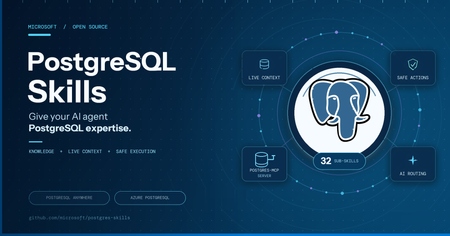
Modern application development increasingly relies on AI agents to generate code, configure services, and accelerate delivery. But generic agents often stop at plausible SQL or broad recommendations. They do not reliably inspect the live database, account for PostgreSQL versions and extensions, distinguish self-hosted from managed environments, apply production guardrails, or verify that a change actually works. That gap matters when database decisions affect security, performance, availability, and customer experience. A syntactically correct query can still create an isolation issue, use an incompatible feature, recommend an unsupported managed-service command, or leave an application with a design that does not scale. The solution: PostgreSQL Skills PostgreSQL Skills closes this gap by giving agents the PostgreSQL expertise, live context, execution tools, and validation workflow needed to turn a generic answer into a safe, production-ready outcome that solves the application’s business problem. Its 32 expert sub-skills support PostgreSQL running locally, self-hosted, or on any cloud; Azure Database for PostgreSQL and HorizonDB. The plugin includes postgres-mcp for live database access and Azure CLI integration for managed-service operations. One install works across GitHub Copilot CLI, VS Code, Claude Code, and Codex CLI. Domain What you can do PostgreSQL Anywhere Build vector search, partition tables, implement row-level security, index JSONB data, and analyze query regressions on local, self-hosted, or cloud deployments Azure Database for PostgreSQL & HorizonDB Provision and scale servers, configure HA/DR and PITR, use Entra ID authentication, plan major-version upgrades, and get HorizonDB (Preview) guidance You do not need to choose a sub-skill or tell the agent which rules apply. The plugin checks your environment and routes each request to the guidance that fits your deployment. Live database context and PostgreSQL expertise, together The included postgres-mcp server gives your agent structured access to the database you are using. It can inspect schemas, roles, extensions, and server capabilities, run queries, and apply changes you approve. This grounds the work in live database state instead of assumptions. The sub-skills guide how the agent uses that access. They define what to check, which rules apply to your deployment, when to ask for confirmation, and how to validate the outcome. Together, postgres-mcp and the sub-skills help the agent move from a generic answer to a change that fits your database and has been verified. Try it yourself Choose a host and follow the setup path for your operating system. Install your host Add the marketplace and install PostgreSQL Skills GitHub Copilot CLI copilot plugin marketplace add microsoft/postgres-skills copilot plugin install postgres-skills@postgres-skills copilot plugin list # confirm postgres-skills is active Claude Code /plugin marketplace add microsoft/postgres-skills /plugin install postgres-skills@postgres-skills /plugin # confirm the plugin appears as installed Codex CLI codex plugin marketplace add microsoft/postgres-skills codex plugin add postgres-skills codex plugin list # confirm postgres-skills is active See it work: three developer scenarios PostgreSQL anywhere: enforce tenant isolation Prompt: "Add row-level security so each tenant can only access its own data." A generic agent with SQL access can write a CREATE POLICY statement. But it may not inspect table ownership, BYPASSRLS roles, existing policies, or how your application establishes tenant context. The policy can look correct while still leaving an isolation gap. With PostgreSQL Skills, the agent inspects the live schema and role model, identifies the tenant key, accounts for owner bypass behavior, and proposes the policy against your actual tables. It asks before enabling RLS, then tests allowed and denied access with representative roles. You get a verified security boundary, not just policy syntax. PostgreSQL application development: build hybrid search Prompt: "Add semantic and keyword search to my product catalog." A generic agent can generate a pgvector query and a full-text search query. It still leaves you to reconcile two result sets, choose compatible indexes, and adapt the example to your schema and PostgreSQL version. With PostgreSQL Skills, the agent inspects your catalog schema and extension availability, designs the embedding and text-search columns, creates the appropriate indexes, and combines both signals with reciprocal rank fusion. It runs the search against your data and verifies the result before calling the implementation complete. Azure PostgreSQL: connect an application without passwords or public access Prompt: "Connect my application to Azure Database for PostgreSQL without passwords or public internet access." A generic agent with Azure CLI access may provide the right ingredients: Entra authentication, a managed identity, and a private endpoint. It may not check which server is targeted, whether private networking is already configured, how the application identity maps to PostgreSQL, or whether disabling an existing authentication path will break deployed applications. With PostgreSQL Skills, the agent confirms the Azure connection and discovers the server, subscription, resource group, networking mode, and current authentication configuration. It identifies the application identity, proposes a private and passwordless connection plan, and explains every Azure and PostgreSQL object that will change. It asks before modifying identity, authentication, or network access, validates token-based connectivity, and leaves existing access in place until you confirm it can be removed. Guardrails for safe execution Acting on a database is only useful if it is safe on any host. One rule is universal: Every destructive or non-reversible action is confirmed with you first. This applies without exception on self-hosted and Azure deployments. If you're connected to Azure, three more rules kick in automatically: Azure guidance uses `azure_pg_admin`, never `SUPERUSER`. It never assumes access that the managed service does not grant. No `ALTER SYSTEM` and no OS-level access on Flexible Server. Azure changes go through az ... parameter set, matching how the service actually works. Connection-aware gating. Azure-only guidance loads only after the live connection confirms isAzure: true. It never guesses your environment or applies Azure rules to a database that is not one. Get started Repo: github.com/microsoft/postgres-skills. Visit the PostgreSQL Skills repository for installation commands, usage examples, and contribution guidance. Explore the open-source collection of PostgreSQL skills for AI coding agents, including installation commands, usage examples, and contribution guidance. Contribute: Follow CONTRIBUTING.md to add a reference file, register its triggers in the routing table, run the validation checks, and submit a pull request. Feedback: open an issue on the repo with what you tried and what broke The takeaway: generic agents can produce plausible database code, but solving real application problems requires PostgreSQL expertise, live environment context, production guardrails, and validation. PostgreSQL Skills brings those capabilities together so your agent can move beyond suggesting an answer to delivering a safe, deployment-aware, and verified outcome.1.5KViews2likes0CommentsJune 2025 Recap: Azure Database for PostgreSQL
Hello Azure Community, We have introduced a range of exciting new features and updates to Azure Database for PostgreSQL in June. From general availability of PG 17 to public preview of the SSD v2 storage tier for High Availability, there have been some significant feature announcements across multiple areas in the last month. Stay tuned as we dive deeper into each of these feature updates. Before that, let’s look at POSETTE 2025 highlights. POSETTE 2025 Highlights We hosted POSETTE: An Event for Postgres 2025 in June! This year marked our 4th annual event featuring 45 speakers and a total of 42 talks. PostgreSQL developers, contributors, and community members came together to share insights on topics covering everything from AI-powered applications to deep dives into PostgreSQL internals. If you missed it, you can catch up by watching the POSETTE livestream sessions. If this conference sounds interesting to you and want to be part of it next year, don’t forget to subscribe to POSETTE news. Feature Highlights General Availability of PostgreSQL 17 with 'In-Place' upgrade support General Availability of Online Migration Migration service support for PostgreSQL 17 Public Preview of SSD v2 High Availability New Region: Indonesia Central VS Code Extension for PostgreSQL enhancements Enhanced role management Ansible collection released for latest REST API version General Availability of PostgreSQL 17 with 'In-Place' upgrade support PostgreSQL 17 is now generally available on Azure Database for PostgreSQL flexible server, bringing key community innovations to your workloads. You’ll see faster vacuum operations, richer JSON processing, smarter query planning (including better join ordering and parallel execution), dynamic logical replication controls, and enhanced security & audit-logging features—backed by Azure’s five-year support policy. You can easily upgrade to PostgreSQL 17 using the in-place major version upgrade feature available through the Azure portal and CLI, without changing server endpoints or reconfiguring applications. The process includes built-in validations and rollback safety to help ensure a smooth and reliable upgrade experience. For more details, read the PostgreSQL 17 release announcement blog. General Availability of Online Migration We're excited to announce that Online Migration is now generally available for the Migration service for Azure Database for PostgreSQL! Online migration minimizes downtime by keeping your source database operational during the migration process, with continuous data synchronization until cut over. This is particularly beneficial for mission-critical applications that require minimal downtime during migration. This milestone brings production-ready online migration capabilities supporting various source environments including on-premises PostgreSQL, Azure VMs, Amazon RDS, Amazon Aurora, and Google Cloud SQL. For detailed information about the capabilities and how to get started, visit our Migration service documentation. Migration service support for PostgreSQL 17 Building on our PostgreSQL 17 general availability announcement, the Migration service for Azure Database for PostgreSQL now fully supports PostgreSQL 17. This means you can seamlessly migrate your existing PostgreSQL instances from various source platforms to Azure Database for PostgreSQL flexible server running PostgreSQL 17. With this support, organizations can take advantage of the latest PostgreSQL 17 features and performance improvements while leveraging our online migration capabilities for minimal downtime transitions. The migration service maintains full compatibility with PostgreSQL 17's enhanced security features, improved query planning, and other community innovations. Public Preview of SSD v2 High Availability We’re excited to announce the public preview High availability (HA) support for the Premium SSD v2 storage tier in Azure Database for PostgreSQL flexible server. This support allows you to enable Zone-Redundant HA using Premium SSD v2 during server deployments. In addition to high availability on SSDv2 you now get improved resiliency when using Premium SSD v2 with zone-redundant HA, helping customers build resilient, high-performance PostgreSQL applications with minimal overhead. This feature is particularly well-suited for mission-critical workloads, including those in financial services, real-time analytics, retail, and multi-tenant SaaS platforms. Key Benefits of Premium SSD v2: Flexible disk sizing: Scale from 32 GiB to 64 TiB in 1-GiB increments Fast failovers: Planned or unplanned failovers typically around 10 seconds Independent performance configuration: Achieve up to 80,000 IOPS and 1,200 Mbps throughput without resizing your disk. Baseline performance: Free throughput of 125 MB/s and 3,000 IOPS for disks up to 399 GiB, and 500 MB/s and 12,000 IOPS for disks 400 GiB and above at no additional cost. For more details, please refer to the Premium SSD v2 HA blog. New Region: Indonesia Central New region rollout! Azure Database for PostgreSQL flexible server is now available in Indonesia Central, giving customers in and around the region lower latency and data residency options. This continues our mission to bring Azure PostgreSQL closer to where you build and run your apps. For the full list of regions visit: Azure Database for PostgreSQL Regions. VS Code Extension for PostgreSQL enhancements The brand-new VS code extension for PostgreSQL launched in mid-May and has already garnered over 122K installs from the Visual Studio Marketplace! And the kickoff blog about this new IDE for PostgreSQL in VS Code has had over 150K views. This extension makes it easier for developers to seamlessly interact with PostgreSQL databases. We have been committed to make this experience better and have introduced several enhancements to improve reliability and compatibility updates. You can now have better control over service restarts and process terminations on supported operating systems. Additionally, we have added support for parsing additional connection-string formats in the “Create Connection” flow, making it more flexible and user-friendly. We also resolved Entra token-fetching failures for newly created accounts, ensuring a smoother onboarding experience. On the feature front, you can now leverage Entra Security Groups and guest accounts across multiple tenants when establishing new connections, streamlining permission management in complex Entra environments. Don’t forget to update to the latest version in the marketplace to take advantage of these enhancements and visit our GitHub repository to learn more about this month’s release. If you learn best by video, these 2 videos are a great way to learn more about this new VS Code extension: POSETTE 2025: Introducing Microsoft’s VS Code Extension for PostgreSQL Demo of using VS code extension for PostgreSQL Enhanced role management With the introduction of PostgreSQL 16, a strict role hierarchy structure has been implemented. As a result, GRANT statements that were functional in PostgreSQL 11-15 may no longer work in PostgreSQL 16. We have improved the administrative flexibility and addressed this limitation in Azure Database for PostgreSQL flexible server across all PostgreSQL versions. Members of ‘azure_pg_admin’ can now manage, and access objects owned by any role that is non-restricted, giving control and permission over user-defined roles. To learn more about this improvement, please refer to our documentation on roles. Ansible collection released for latest REST API version A new version of Ansible collection for Azure Database for PostgreSQL flexible server is now released. Version 3.6.0 now includes the latest GA REST API features. This update introduces several enhancements, such as support for virtual endpoints, on-demand backups, system-assigned identity, storage auto-grow, and seamless switchover of read replicas to a new site (Read Replicas - Switchover), among many other improvements. To get started with using please visit flexible server Ansible collection link. Azure Postgres Learning Bytes 🎓 Using PostgreSQL VS code extension with agent mode The VS Code extension for PostgreSQL has been trending amongst the developer community. In this month's Learning Bytes section, we want to share how to enable the extension and use GitHub Copilot to create a database in Agent Mode, add dummy data, and visualize it using the Agent Mode and VS Code extension. Step 1: Download the VS code Extension for PostgreSQL Step 2: Check GitHub Copilot and Agent mode is enabled Go to File -> Preferences -> Settings (Ctrl + ,). Search and enable "chat.agent.enabled" and "pgsql copilot.enable". Reload VS Code to apply changes. Step 3: Connect to Azure Database for PostgreSQL Use the extension to enter instance details and establish a connection. Create and view schemas under Databases -> Schemas. Step 4: Visualize and Populate Data Right-click the database to visualize schemas. Ask the agent to insert dummy data or run queries. Conclusion That's all for the June 2025 feature updates! We are dedicated to continuously improve Azure Database for PostgreSQL with every release. Stay updated with the latest updates to our features by following this link. Your feedback is important and helps us continue to improve. If you have any suggestions, ideas, or questions, we’d love to hear from you. Share your thoughts here: aka.ms/pgfeedback We look forward to bringing you even more exciting updates throughout the year, stay tuned!1.1KViews3likes0Comments
Rethinking Memory Management for Azure HorizonDB on Disaggregated Storage
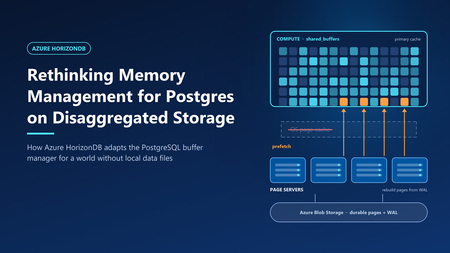
In Smarter Storage for Azure HorizonDB, we described how HorizonDB moves durability, replication, checkpointing, and recovery out of PostgreSQL and into a purpose-built storage layer. The compute node writes only the write-ahead log (WAL). Data pages are rebuilt and stored by remote page servers. That design raises an obvious question: if PostgreSQL no longer reads and writes its own data files, what happens to its memory management? PostgreSQL's buffer manager was built around a specific partner: the operating system's page cache. Many of its defaults and heuristics only make sense because the kernel is quietly doing a lot of work underneath. HorizonDB removes that partner. This post explains which assumptions broke, and the changes we made to the PostgreSQL engine, so memory works well on disaggregated storage. What PostgreSQL assumes about the kernel PostgreSQL stores each table and index as ordinary files and accesses them with buffered I/O. Every page therefore can live in two places in memory: in PostgreSQL's own buffer pool (shared_buffers) and in the operating system's page cache. This "double buffering" is a deliberate part of the design, and it shapes several behaviors. A modest buffer pool. The PostgreSQL documentation suggests starting shared_buffers at about 25% of system memory. Much of the rest is expected to act as kernel file cache. A page evicted from shared_buffers is often still in the kernel cache, so reading it back costs a memory copy rather than a disk read. Prefetching is a hint to the kernel. When PostgreSQL knows it will need a page soon—during a bitmap heap scan, for example—it calls posix_fadvise with POSIX_FADV_WILLNEED. The kernel starts reading the page into its cache. A later read finds it there. PostgreSQL itself never allocates a buffer for the prefetched page. Sequential scans rely on kernel readahead. For sequential access, the kernel detects the pattern and reads ahead automatically, so PostgreSQL can issue fewer explicit hints. Ring buffers protect the cache. Large sequential scans, VACUUM, and bulk writes such as COPY use a small private ring of buffers—from a few hundred kilobytes to a few megabytes—instead of the whole buffer pool. A scan of a table much larger than memory therefore cannot push the working set out of shared_buffers. This is safe because a page that cycles through the ring is usually still in the kernel cache if it is needed again. Writes are cheap and deferred. When a dirty buffer is evicted, PostgreSQL writes it to the kernel cache, which flushes it to disk later. The background writer cleans buffers ahead of eviction so that queries rarely wait for a write. Checkpoints write all dirty pages and call fsync to make them durable. Each of these behaviors assumes that a miss in shared_buffers is usually cheap, and that writing a page means writing it to a local file. What changes in HorizonDB Figure 1. Compute memory layout: Community PostgreSQL vs. Azure HorizonDB. In HorizonDB, permanent tables and indexes do not exist as local files on the compute node. There is no kernel page cache holding database pages. A miss in shared_buffers must be served by the remote storage layer: Tier Where it lives Typical role Shared buffers Compute memory Working set; all pages are read and modified here SSD cache Compute local disk Extends shared buffers; holds cached copies of pages Page servers Remote storage fleet Page cache of the current version of every page Azure Blob Storage Remote, zone-redundant Durable backing store for pages and WAL A page that falls out of memory no longer drops into a free kernel cache. It may require a network round trip to a page server, which is much more expensive than a memory read. Writes change too. Because page servers rebuild pages from WAL, "writing" a dirty page on the compute node does not mean copying it anywhere. PostgreSQL only has to make sure the WAL describing the change is durable - a rule it already enforces before any page write. Taken together, this inverts the trade-offs behind PostgreSQL's defaults. Memory is no longer one of two caches. It is the primary cache. Design principle: shared buffers are the primary cache We organized the engine changes around one principle. shared_buffers is the primary cache, eliminating the memory overhead of double buffering and improving memory efficiency. Every page that is about to be needed should arrive in memory before the query asks for it. The following sections describe the engine changes that implement it. 1. Size shared buffers for the machine Without a kernel cache to share memory with, leaving 75% of RAM to the operating system would waste most of it. HorizonDB sizes shared_buffers automatically at 60–70% of the compute node's memory, depending on the size of the instance. The remaining memory is left for connections, query execution memory such as sorts and hashes, and the operating system. 2. Retire ring buffers Ring buffers exist so that a large scan can use a few megabytes of memory and rely on the kernel cache for anything it needs again. In HorizonDB, there is no such safety net. Recycling a small ring means that every page the scan touches is read, used once, and discarded—and a second scan of the same table must fetch everything again from storage. Ring buffers also exist to limit write traffic: a bulk operation that dirties pages in a small ring must write them out quickly. HorizonDB doesn't need to write dirty data pages back to disk at all, so that motivation disappears as well. HorizonDB therefore disables buffer ring strategies. Sequential scans, VACUUM, and bulk loads use the shared buffer pool like any other query. This is a trade-off, not a free win. A very large scan can now displace pages from shared_buffers that other queries were using. Two factors limit the cost. First, clock-sweep replacement tracks how often each buffer is used, so frequently accessed pages outlive pages a scan touched only once—and buffer replacement is an area we continue to improve. Second, pages that leave shared_buffers are not simply lost: HorizonDB can keep them close by in the local SSD cache. How it decides and what goes there is a story for a separate post. 3. Prefetch directly into shared buffers On a local disk, a prefetch miss costs a disk seek. On disaggregated storage, it costs a network round trip. Hiding that latency matters even more, so HorizonDB makes prefetching explicit, aggressive, and memory aware. Prefetch requests go to the page servers. When PostgreSQL issues a prefetch, HorizonDB sends a read request for the page to the page server that owns it, and does not wait for the answer. Each backend keeps a set of outstanding requests by default, so dozens of page reads overlap instead of running one after another. Sequential scans prefetch explicitly. PostgreSQL's read stream mechanism, which drives sequential scans and other block-range reads, normally avoids prefetching sequential blocks because it expects kernel readahead to cover them. HorizonDB turns that assumption off, so sequential reads are prefetched like any other access pattern. Responses land in their final buffer. In stock PostgreSQL, a prefetch only warms the kernel cache, so the later read still has to copy the page into shared_buffers. In HorizonDB, the page server's response goes straight into a shared buffer. When the query asks for the page, it is already in memory, with no extra copy and no second request to storage. These are only some of the prefetch optimizations we have built into the engine. Others use custom prefetch implementations and logic that tunes how far ahead each query reads. All of them share one goal: hiding storage latency so queries spend less time waiting on I/O and more time doing useful work. What this means for you As a fully managed service, our goal is to delight customers with a best-in-class PostgreSQL experience. You shouldn't have to think about kernel caches, buffer rings, or prefetch windows—that is our job. HorizonDB retains full PostgreSQL compatibility, so applications keep the familiar Postgres programming interface while the engine is tuned to deliver predictable performance on the storage underneath899Views5likes1Comment
Better Price Performance: Azure Postgres V3 & V5 Compute Compared
Azure customers can select newer compute options and scale resources in real time with minimal disruption to business operations. This flexibility allows you to scale capacity as demand changes, match compute and memory profiles to each workload, and test new hardware configurations before moving production workloads. Using this opportunity to improve workload performance and cost efficiency over time results in real improvements to both price and performance. New Compute Can Change Workload Economics A newer compute generation is not merely a different SKU name. Changes in processor architecture, clock speed, memory bandwidth, storage throughput, and virtualization can materially affect application performance. Azure Database for PostgreSQL offers multiple options across General Purpose and Memory Optimized tiers. Customers can change the compute size and move between hardware generations without rebuilding the database platform. Reviewing these options regularly ensures that workloads are optimized and able to maximize performance and cost investments. A workload that was appropriately sized when deployed may no longer be running on the most cost-effective infrastructure. Periodic evaluation of newer compute generations can reveal opportunities to improve throughput, latency, or capacity without increasing spend. The opportunity to upgrade Azure Postgres workloads while maintaining the same operating costs presents a valuable option for anyone currently consuming V3 family compute. Take advantage of these capabilities by scaling your Azure Postgres workloads today: Scale Compute in Azure Database for PostgreSQL Flexible Server - Azure Database for PostgreSQL | Microsoft Learn Benchmarking V3 and V5 PostgreSQL Compute To measure the potential impact, we compared two Azure Database for PostgreSQL servers. Each server was provisioned with 4 General Purpose vCores, 16 GiB memory, and SSD Storage with 7500 IOPS. We ran the same CPU-intensive workload under identical test conditions with increasingly concurrent client workloads. Across repeated test runs, the V5 server processed approximately 40% more transactions than the comparable V3 configuration at effectively the same price. Benchmark resources and provisioning steps are included in the appendix. (Higher is better) The result represents approximately 40% more transaction throughput for the same spend in this specific benchmark. (Lower is better) The V5 configuration completed the workload in less time, indicating lower overall execution latency in this benchmark. For CPU-intensive workloads, this improvement translates to higher transaction volumes, reduced processing backlogs and latency, and provides additional capacity for future growth at approximately the same cost. Database performance also depends on memory, storage, I/O latency, concurrency, query design, indexing, PostgreSQL configuration, and application behavior. This result should therefore be treated as a workload-specific reference benchmark rather than a universal performance claim. The most meaningful comparison is one performed with a representative version of your own workload. Infrastructure should be reviewed continuously Cloud optimization is not a one-time sizing exercise. A server selected several years ago may continue to operate reliably while missing newer price-performance improvements. Regular infrastructure reviews help teams identify opportunities before older choices become unnecessary cost or capacity constraints. Teams should periodically review: Available compute family options in their Azure regions CPU, memory, storage, and I/O utilization Current and projected workload demands Transactions or queries completed per unit of cost Performance under representative load Migration requirements and expected downtime For additional guidance on optimizing Azure Database for PostgreSQL workloads, see Plan Azure Database for PostgreSQL flexible server deployments for operational performance on Microsoft Learn. Azure’s continued investment in regions, datacenters, and compute infrastructure gives customers new ways to improve their workloads. Realizing that value requires regularly reviewing what has become available, measuring it against real application behavior, and adopting it where the business case makes sense. The combination of continued platform investment from Microsoft and your active optimization becomes an ongoing partnership focused on helping your businesses perform, scale, and succeed. Appendix This appendix provides the resources and provisioning steps used for the benchmark. Benchmark Resources The benchmark was deployed using the following bicep file definition, named “postgres-flex-compute-benchmarks.bicep”: param administratorLogin string = 'benchAdmin' @secure() param administratorLoginPassword string = '' param serverEdition string = 'GeneralPurpose' type serverConfiguration = { serverName: string skuName: string } param storageSizeGB int = 32 param storageTier string = 'P40' //7500 IOPS param location string = 'canadacentral' param haMode string = 'Disabled' param availabilityZone string = '2' param serverConfigs serverConfiguration[] = [ { serverName: 'bench-standard-d4s-v3' skuName: 'Standard_D4s_v3' // 4 vCores, 16 GiB memory, 6400 Max IOPS } { serverName: 'bench-standard-d4s-v5' skuName: 'Standard_D4s_v5' // 4 vCores, 16 GiB memory, 6400 Max IOPS } ] resource servers 'Microsoft.DBforPostgreSQL/flexibleServers@2025-08-01' = [for serverConfig in serverConfigs: { location: location name: serverConfig.serverName properties: { createMode: 'Default' version: '18' administratorLogin: administratorLogin administratorLoginPassword: administratorLoginPassword availabilityZone: availabilityZone storage: { storageSizeGB: storageSizeGB autoGrow: 'Disabled' type: 'Premium' tier: storageTier } network: { publicNetworkAccess: 'Enabled' } backup: { backupRetentionDays: 7 geoRedundantBackup: 'Disabled' } highAvailability: { mode: haMode } } sku: { name: serverConfig.skuName tier: serverEdition } }] // Create the firewall rule on every server. resource serverFirewallRules 'Microsoft.DBforPostgreSQL/flexibleServers/firewallRules@2025-08-01' = [ for (serverConfig, i) in serverConfigs: { name: 'AllowAll' parent: servers[i] properties: { startIpAddress: '0.0.0.0' endIpAddress: '255.255.255.255' } } ] The following plpgsql function was created to prioritize CPU operations: CREATE OR REPLACE FUNCTION leibniz_pi(iterations integer) RETURNS double precision LANGUAGE plpgsql AS $$ DECLARE i integer; result double precision := 0; sign double precision := 1; BEGIN FOR i IN 0..iterations - 1 LOOP result := result + sign / (2 * i + 1); sign := -sign; END LOOP; RETURN 4 * result; END; $$; Provisioning Steps Provision two Azure Database for PostgreSQL flexible servers using comparable V3 and V5 compute configurations using the following CLI command: $password = Read-Host "Password" -MaskInput az deployment group create ` --resource-group <your_resource_group_name> ` --template-file ./postgres-flex-compute-benchmarks.bicep ` --parameters administratorLoginPassword="$password" Once the servers have been provisioned, create the “leibniz_pi” function on each server. Use containerized environments to execute a pgbench while passing in the custom plpgsql function: 'SELECT leibniz_pi(10000000);' | docker run --rm -i ` -e PGPASSWORD="<YOUR_PG_PASSWORD>" ` postgres:18 ` pgbench -n -c 8 -j 8 -T 300 -f - ` "host=<V3_OR_V5_SERVER_NAME>.postgres.database.azure.com port=5432 dbname=postgres user=benchAdmin sslmode=require" Repeat the test runs and record transaction throughput, execution time, and relevant resource metrics. Compare the results while accounting for workload variability and any differences in the underlying compute architecture.700Views2likes0CommentsBuilding an Azure architecture that’s ready for every signature
At Exclaimer, we help organizations manage email signatures at scale, so every message can carry a consistent, compliant, on-brand signature without IT teams manually updating thousands of mailboxes. This is more difficult than it may seem, especially when you're doing it for more than 80,000 customers, around 9.6 million seats, and more than 21 billion emails a year. Every signature must show up in the right place, with the right details, for the right sender, recipient, device, and business rule. Behind that are constantly changing employee records, customer-specific policies, email chains, recipient lists, regional disclaimers, and brand requirements. Because our platform sits directly in the email flow, availability is critical. And because many of our customers operate in regulated industries, they also need confidence that data stays in-region and configured signatures are applied consistently. To support that level of scale and reliability, we’ve spent the last several years evolving our architecture on Microsoft Azure. Today, Azure Kubernetes Service (AKS), Azure SQL Database, Azure Database for PostgreSQL, Azure Cosmos DB, Azure Data Explorer, and Azure Databricks help us run a global platform that’s more responsive, more resilient, and more cost-efficient. Reading the signs that our architecture needed to change In the beginning, our cloud product ran more like a multi-server, on-premises product hosted on Azure Virtual Machines (VMs). The platform was split into a smaller number of core services, and the team relied heavily on VM-based infrastructure to keep those services running. As Exclaimer grew, our architecture had to keep pace with higher volumes, more regions, and more complex customer requirements. Regional demand shifted throughout the day, but scaling infrastructure up and down still relied on scripts, pre-baked VMs, and operational coordination. That created more risk during maintenance and failover. We run parallel data centers in regional pairs so we can move traffic away from one site when needed. But when traffic moves, the receiving environment has to be ready to handle the full load. In the VM world, that meant someone or something had to remember to scale up standby resources at the right moment. At the same time, our product was becoming more service-oriented. We were moving away from a smaller set of larger services toward well over 100 microservices. Every new service created more conversations about VM sizing, images, patching, and operational overhead. It was time for a model that could scale faster, run more efficiently, and reduce the amount of infrastructure work required to ship and operate the product. Signing on to AKS for faster, more efficient scaling By moving many workloads to Linux containers on AKS, we gained a smaller footprint, faster startup times, and a more consistent way to package and deploy services. AKS also gave us a managed Kubernetes foundation for running those containers at global scale, with autoscaling capabilities that better matched our traffic patterns. With Horizontal Pod Autoscaler, services can react to load in seconds rather than minutes. With Cluster Autoscaler, we can add or remove node capacity based on what the platform actually needs. That means we can pack workloads onto nodes more efficiently, scale down during quiet periods, and scale up quickly when demand returns. The operational difference is just as important. During an incident, maintenance event, or regional failover, our teams have fewer manual steps to think about. If traffic shifts, the platform can scale with it. That takes away one more thing for engineers to worry about when they should be focused on keeping the customer experience steady. The move to containers and a more streamlined CI/CD workflow also improved our deployment cadence by making it easier to build, test, and deploy changes across the platform. In 2021, we deployed 285 changes, features, and fixes to production over the course of the entire year. Today, we deploy that many every few days. Cost has improved, too. Since 2024, when the bulk of our migration to containerized services took place, we’ve reduced our average cost per user by about 39 percent, even as the product has grown more complex and we’ve added more capabilities for customers. We achieved that through a combination of containerized architecture, AKS autoscaling, and expanded reservations across compute and storage technologies. Choosing the right database for the right kind of data We started with a strong Microsoft SQL Server foundation, and Azure SQL Database remains core to our platform today. It stores critical customer configuration data and continues to give us the reliability, replication, resizing flexibility, and regional scale we need. But not every workload belongs in the same database. Customer configuration, relational service data, key-value storage, usage events, and business intelligence (BI) all have different access patterns. That principle led us to Azure Database for PostgreSQL flexible server for one of our most important migrations. We had used Azure Table storage for a core service that needed to retrieve customer data quickly. It was cost-effective and stable for a long time, but as the product evolved, the data became more relational, and we found ourselves adding complexity in application code that a relational database could handle more naturally. Azure Database for PostgreSQL gave us that relational model with low management overhead, fast read replicas, reserved instances for predictable workloads, and a path to future scale. After the migration, average request time for a critical service dropped from 18.6 milliseconds to 1.79 milliseconds. That’s a 90 percent improvement across a service that handles around 9 billion requests each month. Azure Cosmos DB plays a different role, supporting key-value and document storage where we need scale, availability, low latency, encryption at rest, and straightforward dev/test support. Optimized for unstructured data and high-performance reads and writes, it gives us a highly scalable foundation for workloads that don't fit a traditional relational model. We use it to store customer assets for signatures and video branding, high-volume metadata for internal message-processing operations, audit events that help customers track account changes, and tokens used to collect data from third-party systems on behalf of customers. It also gives us a clean way to keep data and services aligned. Azure Data Explorer solved another scaling challenge: usage and billing data. We need to be able to audit the number of messages we process for our customers so we can bill accurately, and at more than 20 billion emails a year, our previous SQL-based usage pipeline became difficult to manage. With Azure Data Explorer, we can ingest massive volumes of event data at low storage cost, connect to Azure Event Hubs, and avoid maintaining custom plumbing. That move reduced the cost of the system by around 70 percent. Azure Databricks rounds out the picture as our BI and data platform, giving our teams a shared foundation for transformations, analysis, and reporting across product and business data. Keeping every region ready for business Our customers are everywhere, so our platform has to be, too. Exclaimer runs in seven distinct geographic locations: Australia, Canada, Europe, Germany, the United Arab Emirates, the United Kingdom, and the United States. That global footprint helps us meet customer expectations around availability and data residency. Many organizations want their data to stay in-region, and Azure gives us the coverage we need to support that. Availability is especially important because our platform is part of a live communication flow. When someone sends an email, they expect it to keep moving. Our Azure architecture helps us support that expectation across the stack. AKS lets compute scale with regional demand. Azure SQL and Azure Database for PostgreSQL support critical relational workloads. Azure Cosmos DB gives us scalable, low-latency storage for document and key-value patterns. Azure Data Explorer handles very high-volume usage ingestion without the complexity of our former custom pipeline. Across the board, these managed Azure services reduce the amount of operational work our engineers have to carry. We can spend less time maintaining the basics and more time tuning performance, improving stability, and building the capabilities our customers need next. Building for the future on a stronger foundation The biggest sign that our architecture is working may be how little we have to reinvent when we build something new. As we develop upcoming product capabilities, we already have many of the foundational pieces in place: AKS for compute, Azure Cosmos DB for state, and Azure Service Bus for messaging. We also have Azure SQL for core data, Azure Database for PostgreSQL where relational service data needs room to scale, Azure Data Explorer for high-volume event analysis, and Azure Databricks for BI tooling. Together, these services make our platform faster, more efficient, and more resilient. Email signatures may look simple on the surface. Behind every one, there’s a set of decisions about performance, scale, data, availability, and trust. With Azure, we’ve built an architecture that helps us keep every signature moving, wherever our customers do business. About the authors Phil Vetter started in engineering at Exclaimer as a developer at the start of 2013, and now sits at the helm as VP of Engineering. Lee Jones started at Exclaimer in 2013 in the IT department, and now serves as Director of Platform Engineering, managing the infrastructure and resilience of Exclaimer Cloud.700Views1like0Comments