postgresql on azure
15 TopicsMonitoring and using pg_repack in Azure Database for PostgreSQL flexible server
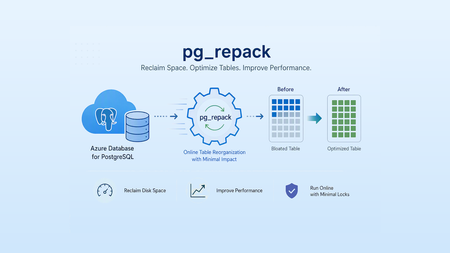
In this post: we will walk through how to configure and use the pg_repack extension in Azure Database for PostgreSQL flexible server. We will also cover how to run pg_repack on a table, monitor the progress during execution, and validate the results after the repack operation is completed. Why Monitor pg_repack During Execution? While running pg_repack is straightforward, administrators often need visibility into what is happening behind the scenes, especially when working with large tables in production environments. Monitoring the operation provides several benefits: Verify that pg_repack is actively running and has not stalled. Identify the current phase of the operation, such as table copying, index rebuilding, or final table swap. Understand resource usage and the impact on the database. Before you start: Before performing this lab, ensure the following prerequisites are met: Azure Resources: An active Azure subscription An Azure Database for PostgreSQL flexible server instance Database Requirements: A table with a PRIMARY KEY or UNIQUE NOT NULL index (required by pg_repack) Linux Machine: I have used an Ubuntu Linux Virtual Machine SSH connectivity to the VM using PuTTY Configuring and using pg_repack in Azure Database for PostgreSQL Step 1: Allow list and create the pg_repack Extension Before using pg_repack, the extension must be allowlisted and created in the target database. Navigate to your Azure Database for PostgreSQL flexible server and add pg_repack to the allow list of extensions. Once the server configuration is updated, connect to the database and create the extension. Step 2: Create and connect to a Linux Virtual Machine Since pg_repack is a client-side utility, a Linux virtual machine was created to install and run the pg_repack client against Azure Database for PostgreSQL flexible server. Step 3: Connect to the Linux Virtual Machine Before running pg_repack, I connected to the Linux virtual machine that would be used to install and execute the pg_repack client. In the Azure portal, navigate to the Linux Virtual Machine. Open PuTTY and enter the VM's IP Address. Select SSH (Port 22) as the connection type and click Open. Enter the VM username and password when prompted. After successful authentication, a terminal session is established The following output confirms that the connection was successful and that the Ubuntu operating system is ready for further configuration. Step 4: Update Package Repositories on the Linux Virtual Machine Before installing the pg_repack client, update the package repositories on the Ubuntu virtual machine to ensure the latest package information is available. Please run the following command and provide the password for the linux virtual machine when prompted. sudo apt update Step 5: Download the pg_repack Important: If you face any version mismatch issue or errors then you can use the below command to resolve After preparing the test environment and generating table bloat, the next step was to download the pg_repack source code to the Linux virtual machine. The git clone command downloads the pg_repack source code from the official GitHub repository to the Linux virtual machine. This source code is later used to build and install the pg_repack client utility required to perform table reorganization operation. After downloading the repository, the cd pg_repack command changes the current directory to the downloaded project folder. git clone https://github.com/reorg/pg_repack.git cd pg_repack Step 6: Install PostgreSQL Client Packages After updating the package repositories, the next step was to install the PostgreSQL client packages on the Linux virtual machine. The PostgreSQL package installs the PostgreSQL client tools, including psql, which is used to connect to Azure Database for PostgreSQL flexible server. sudo apt install postgresql postgresql-contrib When the command is executed, Ubuntu displays a summary of the packages that will be installed along with their dependencies. To proceed with the installation, type Y and press Enter. Step 7: Connect to Azure Database for PostgreSQL flexible server After installing the PostgreSQL client packages on the Linux virtual machine, the next step is to establish a connection to the Azure Database for PostgreSQL flexible server using the psql client. Please update the following command with your server details and execute it and enter your PostgreSQL server user password to establish the connection. Note: Make sure your Linux machine network is allowed to connect on your Azure Database for PostgreSQL flexible server. psql -h <Hostname> -p 5432 -U <username> postgres Step 8: Create a Test Database After successfully connecting to Azure Database for PostgreSQL flexible server, a dedicated database was created to perform the pg_repack lab activities as shown below: Step 9: Connect to the Newly Created Database After creating the repack_lab database, connect to it before proceeding with the pg_repack activities. \c repack_lab Step 10: Create a Sample Table for pg_repack Testing After connecting to the repack_lab database, I created a sample table that would be used throughout the lab to test the functionality of pg_repack. CREATE TABLE test_table ( id SERIAL PRIMARY KEY, name TEXT, created_at TIMESTAMP DEFAULT NOW() ); Step 11: Insert Sample Data into the Test Table After creating the test_table, the next step was to populate it with sample data. This helps simulate a realistic workload and provides enough records to demonstrate how pg_repack works. The following command was used to insert 100,000 rows into the table: INSERT INTO test_table(name) SELECT md5(random()::text) FROM generate_series(1,100000); Step 12: Create an Index on the Test Table After populating the test_table with 100,000 records, an index was created as shown below: CREATE INDEX idx_test_name ON test_table(name); Step 13: Check the Initial Table Size Before generating table, bloat and running pg_repack, it is useful to capture the current size of the table. This serves as a baseline for comparing storage consumption before and after the repack operation. SELECT pg_size_pretty(pg_total_relation_size('test_table')); Step 14: Generate Table Bloat Using UPDATE Operations To demonstrate how pg_repack reorganizes a table and reclaims unused space, the next step was to generate table bloat by repeatedly updating all rows in the table. The following command was executed multiple times: UPDATE test_table SET name = md5(random()::text); Step 15: Disable Autovacuum on the Test Table To clearly observe table bloat and demonstrate the effectiveness of pg_repack, autovacuum was temporarily disabled on the test table. This prevents Azure Database for PostgreSQL flexible server from automatically cleaning up dead tuples generated by the previous UPDATE and DELETE operations. ALTER TABLE test_table SET (autovacuum_enabled = false); Step 16: Analyze Live and Dead Tuples Before Running pg_repack After generating table bloat through multiple UPDATE and DELETE operations and disabling autovacuum, the next step was to measure the number of live and dead tuples in the table. Step 17: Execute pg_repack to Reorganize the Table The pg_repack utility was executed against the test table to reclaim unused space and reorganize the table structure. The pg_repack utility reorganizes tables and indexes online while minimizing locking and application downtime. Unlike VACUUM FULL, pg_repack performs the reorganization in the background and requires only a brief lock during the final table swap operation. Command executed: pg_repack \ --host=myflexibleserver.postgres.database.azure.com \ --port=5432 \ --username=dbadmin \ --dbname=repack_lab \ --table=test_table \ --jobs=2 \ --no-kill-backend \ --no-superuser-check Monitoring pg_repack Execution Once the pg_repack operation was initiated, the next step was to monitor its execution and identify the activities being performed by the utility in the background: To track active pg_repack sessions, the following query was executed: SELECT pid, usename, application_name, state, wait_event_type, wait_event, now() - query_start AS running_for, query FROM pg_stat_activity WHERE application_name ILIKE '%repack%' OR query ILIKE '%repack%' ORDER BY query_start; After starting the pg_repack operation, I monitored the active sessions by querying the pg_stat_activity system view. This helped me understand the current stage of the operation and verify that the process was executing successfully. The query returned multiple sessions created by pg_repack, indicating that the utility was actively processing the table. Session 1 - Lock Acquisition LOCK TABLE public.test_table IN SHARE UPDATE EXCLUSIVE MODE This session acquired a SHARE UPDATE EXCLUSIVE lock on the target table. This lock prevents conflicting schema changes while still allowing normal read and write operations during most of the repack process. Session 2 - Temporary Repack Table Creation SELECT 'repack.table_24861'::regclass::oid At this stage, pg_repack was working with an internal temporary table created to hold the reorganized data. This table acts as a replacement for the original table during the repack operation. Session 3 - Creating Primary Key Index CREATE UNIQUE INDEX index_24869 ON repack.table_24861 USING btree(id) This session shows pg_repack rebuilding the primary key index on the new table structure. Session 4 - Creating Secondary Index CREATE INDEX index_24873 ON repack.table_24861 USING btree(name) This indicates that additional indexes are being recreated on the temporary table to match the original table definition. Based on the output, the operation had successfully moved past the initialization phase and was actively rebuilding indexes on the temporary table. This is one of the final stages before pg_repack performs the table swap and completes the reorganization process. Conclusion In summary, monitoring pg_repack execution is essential for ensuring a smooth and efficient table reorganization process. Proper visibility into progress and resource consumption helps administrator complete maintenance tasks confidently while maintaining optimal database performance and availability. References Optimize by using pg_repack - Azure Database for PostgreSQL | Microsoft Learn PostgreSQL: Documentation: 18: 27.4. Progress Reporting pg_repack 1.5.3 -- Reorganize tables in PostgreSQL databases with minimal locks420Views7likes0CommentsAI-assisted Oracle-to-PostgreSQL schema conversion in Visual Studio Code
By AI Omar Rajawat, Pranay Lohia, Gautam Juneja, Vikas Nimmagadda, Anil Dogra, Aditya Duvuri We’re seeing significant interest in migrating database workloads from Oracle to Azure Database for PostgreSQL. Historically, schema conversion has been one of the most technically challenging and expensive steps in that journey, demanding specialist knowledge of both engines and stretching migration timelines before a single row of data moves. Recent advances in AI-assisted schema conversion are changing that, turning what used to be a long, manual effort into a faster, more accessible, and lower-cost proposition. This post looks at what that shift means in practice for teams moving to Azure Database for PostgreSQL flexible server. Oracle schema conversion is where the complexity of translating schema and code objects to PostgreSQL becomes visible. Packages, procedures, triggers, custom types, and dependencies built up over years must be mapped to PostgreSQL-compatible definitions while preserving the relationships that make the schema work. Generally available since May 2026, the feature is built into the PostgreSQL extension for Visual Studio Code, published by Microsoft. It helps teams convert Oracle schema and code objects — tables, views, constraints, packages, procedures, functions, and triggers — into PostgreSQL-compatible definitions for Azure Database for PostgreSQL flexible server, with no separate conversion utility to install and no disconnected workflow to manage. It brings schema discovery, conversion, compile validation, and review into one project-based experience. Teams can connect to Oracle, select schemas, and configure a Microsoft Foundry connection in the same project. The extension then translates Oracle-specific constructs, compiles and syntax-checks converted DDL into scratch schemas on Azure Database for PostgreSQL flexible server and surfaces unresolved items as review tasks that teams can work through with GitHub Copilot agent mode. Why schema conversion deserves a better workflow Traditional conversion tools can produce a useful first pass, but the long tail of the process is rarely solved by generating replacement DDL alone. Teams still need clear answers to practical questions: What converted successfully? What needs attention? Which Oracle constructs require a PostgreSQL design decision? Which items should be reviewed first? We designed the schema conversion experience around those questions. The goal is not to hide complexity behind a single score. It is to help teams make steady progress while keeping the work visible and reviewable. What the schema conversion experience provides The experience guides teams through a schema conversion project rather than a collection of separate scripts. It discovers the selected Oracle schemas and converts both the relational model and the code that runs on it: tables, indexes, sequences, primary key, unique, check and foreign key constraints, views and materialized views, synonyms, and Oracle object types — along with the PL/SQL that is usually the hardest part of the migration. Packages and package bodies, package-level state, standalone procedures and functions, and triggers are translated into PostgreSQL functions, procedures, and trigger functions. Oracle-specific constructs are mapped to PostgreSQL equivalents rather than dropped or stubbed out. REF CURSOR and SYS_REFCURSOR become PostgreSQL refcursor; CLOB and BLOB columns become text and bytea ; and NUMBER and VARCHAR2 are mapped by precision and length to their closest PostgreSQL types. Oracle date functions such as ADD_MONTHS, LAST_DAY, MONTHS_BETWEEN, and TRUNC are resolved through the orafce extension, which the project detects and flags for you before deployment. Every converted definition is compiled against scratch schemas on Azure Database for PostgreSQL flexible server, so the deployment script you end up with is an organized, dependency-ordered set of PostgreSQL SQL artifacts that has already been proven to build. Objects that still require human judgment are surfaced as review tasks. Teams can inspect the source and converted definitions side by side, work through the remaining items, and use GitHub Copilot agent mode for guided assistance — keeping automation and human review in the same workflow. How it works: the system architecture Under the hood, the conversion engine follows one principle — the language model is a single, bounded stage; it never has the first or the last word. Deterministic steps decide what the model sees and what it is allowed to produce. Deterministic in. Rule-based extraction reads the Oracle DDL and metadata, then a dependency-graph decomposition splits the estate into bounded, dependency-ordered chunks — so every object is converted in the context that keeps it correct. Bounded conversion. A tiered model strategy through the Microsoft Foundry connection translates each chunk with structured, contract-wrapped input and output. Even very large PL/SQL packages are split and converted member by member, so nothing is trusted as a monolith. Deterministic out. Converted objects pass through review, then compile-and-verify against scratch schemas on Azure Database for PostgreSQL flexible server, and finally dependency-ordered deploy assembly. Unresolved items become review tasks, and every object carries a per-object audit trail. A continuous-improvement loop closes the system: the engineering team maintains a versioned regression suite of supported conversion patterns, and an executable benchmark tracks regressions as the pipeline evolves. Proven in production The approach has been exercised on real enterprise estate. Across representative production runs totaling more than 60,000 schema objects; conversion reached roughly 98% overall — with several schemas converting at a full 100%. The hardest tail, PL/SQL package members, now compiles at 96% across more than 20,000 members thanks to targeted coverage and a resilient compile stage. Conversion outcome and review status are separate measures. Objects that convert and compile cleanly are safe to deploy as they are; the rest are deliberately routed into a prioritized review queue rather than silently accepted. In a representative single-schema run, no object ended in a hard conversion failure, and a cleanly generated object can still involve a PostgreSQL design decision. That is the workflow operating as intended: automation absorbs the volume, and review tasks to keep the remaining judgment calls visible, ordered, and auditable. Measured, not asserted: the SchemaBench eval Quality is verified by running it. SchemaBench, the evaluation framework, deploys each converted schema to a live PostgreSQL database and probes real behavior — whether constraints still fire and whether objects still resolve — rather than comparing DDL text. It scores seven weighted dimensions: semantic fidelity, structure, constraints, completeness, performance, target idioms, and maintainability, behind hard gates. On the e-commerce benchmark, the strongest model scored 96.1 overall with 100% semantic fidelity and a ~98% behavioral-probe pass rate. Every failure a migration hits becomes a permanent regression test the next run has to pass. Learn more: Oracle to Azure Database for PostgreSQL schema conversion overview410Views5likes0CommentsFaster, Safer Version Upgrades for Databases with Large Objects
By Varun Dhawan, Ilan Benschikovski, and Alexander Kukushkin - Azure PostgreSQL, Microsoft Faster, Safer Upgrades for Databases with Large Objects TL;DR: We improved major version upgrades for PostgreSQL databases with very high large-object counts. For upgrades targeting PostgreSQL 15 and later, large-object metadata is now handled more efficiently, reducing memory/temp-space pressure and helping previously risky upgrades complete more reliably. Why this matters Some PostgreSQL workloads store documents, images, PDFs, scanned files, or attachments as large objects (LOBs). In normal operations this is fine. But during a major version upgrade, very high LOB counts could make the schema dump step slow, memory-heavy, or fail. This improvement is about making that upgrade path safer and more predictable for Azure Database for PostgreSQL flexible server customers. What changed? During a major version upgrade, PostgreSQL uses pg_upgrade , which internally runs pg_dump to move schema and metadata into the new version. For databases with millions of large objects, the older upgrade path handled large-object metadata one object at a time. That created high memory and temporary-space pressure during the schema dump phase. This fix changes the upgrade path. Instead of processing large-object metadata one object at a time, PostgreSQL now transfers that metadata in bulk. The actual large-object data is not changed; only the upgrade metadata handling is improved. Why this is different This improvement builds on upstream PostgreSQL work that makes large-object metadata handling more efficient during upgrades. We brought that benefit into Azure Database for PostgreSQL flexible server for supported PostgreSQL 15+ upgrade targets, so customers with large-object-heavy workloads can benefit without waiting for a future PostgreSQL major version. Before vs after Area Before After Metadata handling One operation per large object Bulk metadata transfer Memory/temp pressure Grew heavily with LOB count Much flatter and more predictable High LOB counts Risk of OOM or temp-space failure Completes more reliably for PostgreSQL 15+ targets Customer workaround vacuumlo + scale-up often needed Less reliance on LOB-specific workarounds for PostgreSQL 15+ targets In plain English: the upgrade no longer has to carry paperwork for every large object one by one. It moves the metadata in bulk, which makes the upgrade faster, safer, and less likely to fail at very high LOB counts. The numbers We tested upgrades from PostgreSQL 13 with large-object counts ranging from 10M to 500M. The older path is represented by PostgreSQL 13 → 14. The improved path is represented by PostgreSQL 13 → 15. Note: These figures come from a multi-database test where large objects were spread across 100 databases. Because pg_dump runs per database, single-database workloads with the same total large-object count may see different runtimes. Cap Outcome summary Large objects Older path Improved path What changed 10M 48 min 16 min 3x faster 20M 1h 02m 18 min 3.4x faster 30M 2h 41m 21 min 7.6x faster 50M Failed at higher scale 26-30 min Now completes 100M Failed 54 min Now completes 500M Failed 4h 01m Now completes Key takeaway: this is not just faster. At higher LOB counts, the improvement changes the outcome from upgrade fails to upgrade completes. Who benefits from this? You should care if your database stores large binary content using PostgreSQL large objects. Workload pattern Why it matters Document management PDFs, contracts, scans, and archived files Attachment-heavy apps Files stored inside PostgreSQL instead of external storage Legacy apps using lo APIs LOBs may have accumulated for years Image/archive systems Millions of binary objects can build up quietly Previous upgrade failures Failures during schema dump may map to this scenario Copy/paste: check your large-object count Run these checks in each database you plan to upgrade. 1. Count large objects in the current database -- Count PostgreSQL large objects in the current database SELECT current_database() AS database_name, count(*) AS large_object_count FROM pg_largeobject_metadata; 2. Check large-object storage footprint -- Estimate large-object data and metadata size SELECT pg_size_pretty(pg_total_relation_size('pg_largeobject'::regclass)) AS large_object_data_size, pg_size_pretty(pg_total_relation_size('pg_largeobject_metadata'::regclass)) AS large_object_metadata_size; 3. Understand ownership and ACL shape -- Inspect large-object metadata shape SELECT count(*) AS total_large_objects, count(lomacl) AS large_objects_with_custom_acl, count(DISTINCT lomowner) AS distinct_large_object_owners FROM pg_largeobject_metadata; 4. Find top large-object owners -- Top large-object owners SELECT lomowner::regrole AS owner, count(*) AS large_object_count FROM pg_largeobject_metadata GROUP BY lomowner ORDER BY large_object_count DESC LIMIT 10; What should I do before my next major version upgrade? If your situation is... Recommended action Target is PostgreSQL 15 or later Target PostgreSQL 15 or later to benefit from improved large-object metadata handling. Target is PostgreSQL 14 or earlier Prefer PostgreSQL 15+ where possible; very high LOB counts may still hit older-path limitations. Very large or unusual database Restore a copy and rehearse the upgrade before production. Suspected orphan LOBs Consider vacuumlo only after testing. It can delete valid LOBs if your app uses custom references. Any major version upgrade Keep healthy free space and leverage pre-upgrade validation checks to validate extension/schema compatibility first. Bottom line If large objects were making your PostgreSQL upgrade risky, this improvement makes the upgrade path safer and more predictable. For large-object-heavy databases, upgrades targeting PostgreSQL 15 and later now show faster runtime, lower memory/temp-space pressure, and successful validation up to 500M large objects. Learn more Major version upgrades in Azure Database for PostgreSQL flexible server How to perform a major version upgrade PostgreSQL vacuumlo documentation293Views3likes0CommentsMultitude builds resilient banking platform with PostgreSQL and MySQL on Azure
Expanding into new markets is usually a sign that things are going well. For digital banking platforms, however, growth brings a different kind of challenge - more customers, more data, and stricter expectations around availability, security, and regulatory compliance. At Multitude, we operate across 17 countries and deliver digital banking, credit services, payment processing, and regulatory reporting through a platform composed of more than 400 microservices. Each service encapsulates a defined business capability, including onboarding, risk assessment, collections, and compliance workflows. Historically, our services relied on on-premises PostgreSQL and MySQL environments deployed within our own data centers, where capacity scaled vertically on shared compute and storage resources. This model created contention between unrelated workloads and limited their ability to scale independently. Expanding capacity required adding or upgrading physical hardware, which involved demand forecasting, procurement, delivery coordination, and installation within the data center. Over time, continued growth amplified these architectural constraints. The database engines themselves remained reliable, but the surrounding infrastructure limited elasticity and domain-level isolation. As a result, sustained growth began to expose structural limits in the underlying infrastructure. "In a regulated financial environment, those constraints carried broader implications. Frameworks such as DORA and GDPR require predictable availability, controlled recovery procedures, and governed access to sensitive data. As workload demands increased, sustaining both growth and compliance required structural changes at the database layer. We decided that redesigning our data architecture was necessary to improve workload isolation, scalability, and governance alignment. Rearchitecting data boundaries with Azure Databases We initiated our architectural redesign by migrating database workloads to Microsoft Azure and standardizing on Azure Database for PostgreSQL and Azure Database for MySQL for core application services. Central to this redesign was the adoption of bounded contexts. Each bounded context represents a logical business domain and encapsulates the services and schemas required to support that capability. Each domain is owned and managed by a single team, aligning technical boundaries with team responsibility and accountability. Rather than maintaining a small number of large, shared database instances, we provisioned dedicated database instances aligned to defined business domains, establishing domain-level isolation at the database layer. Today, approximately 35 database instances support more than 400 microservices across the platform. Each instance may host multiple schemas serving related services within the same domain, while cross-domain database dependencies are intentionally avoided. This structure limits the blast radius of configuration changes or workload spikes and allows scaling adjustments to be applied within clearly defined domain boundaries. While the bounded context model was a strategic architectural decision, leveraging managed database services helped us implement it by drastically reducing the operational overhead of provisioning, scaling, and maintaining independent instances across domains. Azure Database for PostgreSQL and Azure Database for MySQL provide the managed capabilities required to sustain this model. Instances are provisioned according to the performance and storage requirements of each domain and can be adjusted as workload characteristics evolve. Compute and storage resources are scaled at the instance level, allowing capacity changes to be applied to a specific bounded context without affecting unrelated domains. Altogether, these architectural decisions balance domain-level isolation with operational manageability. A database-per-microservice pattern would significantly increase provisioning, monitoring, and lifecycle overhead without materially improving data ownership boundaries. By grouping related services within bounded contexts, we maintain clear domain alignment while keeping the number of database instances practical to operate. As a result, data boundaries, scaling behavior, and operational controls remain consistent with business domain structures across the platform. Operationalizing high availability and backup strategy To support availability, we deploy Azure Database for PostgreSQL and Azure Database for MySQL with zone-redundant high availability, placing primary and standby replicas in separate availability zones within the same Azure region. Replication preserves transactional consistency, and zone separation reduces exposure to localized infrastructure failures. We periodically exercise failover procedures as part of operational validation to confirm recovery behavior under defined conditions. Availability controls are complemented by a layered backup strategy. Azure Database for PostgreSQL and Azure Database for MySQL provide automated backups with a retention window of up to 35 days and point-in-time restore capabilities. These features allow us to restore a database to a specific timestamp within the retention window, supporting recovery from application-level errors or unintended data modifications without custom snapshot orchestration. Together, operational backups and governed archival retention address both short-term recovery and long-term compliance obligations. Restore operations require documented justification and follow established approval workflows, ensuring that recovery actions remain controlled, traceable, and auditable. We also enforce consistency through lifecycle management. Azure’s managed service model standardizes engine patching and version updates across environments, reducing configuration drift and minimizing manual coordination. By operating within the managed service boundary, the database team can focus on workload analysis, performance tuning, and capacity planning. For migration and synchronization scenarios, we use Azure Data Migration Service to orchestrate controlled cutovers between database environments. Engineers validate configuration and readiness before initiating synchronization, after which Azure-managed replication then maintains data alignment until final switchover. Provisioning decisions and structural modifications remain subject to internal governance approvals to preserve change control and oversight. By combining zone-redundant availability, structured recovery workflows, governed retention policies, and standardized lifecycle management, we operate a database layer engineered for resilience, auditability, and regulatory alignment at scale. Compliance as an architectural property For us, governance is embedded directly into how the platform operates, beginning at the identity layer. Access to Azure Database for PostgreSQL and Azure Database for MySQL integrates with Microsoft Entra ID, aligning database authentication with centrally managed corporate identities. Role-based access control is enforced through enterprise identity policies, providing centralized visibility into access assignments and authentication events across environments. These controls extend into production access management. Privileged access is approval-based and time-bound, and administrative roles are not permanently assigned. Access requests follow defined workflows, and all privileged actions are logged for review under established oversight procedures, ensuring traceability of operational interventions. Database isolation reinforces these identity controls. By aligning database instances with bounded contexts, each business domain maintains a discrete data boundary at the database layer. This structure limits lateral access across domains and confines sensitive data to clearly defined ownership scopes, simplifying monitoring and audit review. In a regulated financial environment, these architectural controls also support compliance requirements under frameworks such as DORA and GDPR. By embedding identity integration, domain isolation, and lifecycle controls directly into the platform architecture, governance becomes an operational property of the system rather than a separate procedural layer. The simplicity of this architecture is a strong driver for both auditability and security of the whole platform. Measurable impact across engineering teams and business outcomes Beyond improved stability, our ability to respond to growth has changed significantly since moving to Azure. In the past, expanding database capacity meant procuring hardware and planning installation in the data center. Now, capacity adjustments happen directly within Azure and can be applied to individual databases instances, allowing us to scale in near real time as workload demands change. Maintenance effort has also decreased. Managed patching, version alignment, and automated backups have reduced the need for manual coordination and reactive capacity management. Infrastructure-level tasks that once required continuous oversight are now handled within the managed service boundary. Our DBAs are now focused on improving performance and stability. We spend far less time maintaining the basics. Resilience by design The structural changes behind these results reflect a deliberate long-term strategy. Our database architecture now aligns with the operating model we expect to sustain over the next five years and beyond. Bounded contexts define discrete data domains, while Azure Database for PostgreSQL and Azure Database for MySQL provide managed high availability, scaling controls, and standardized lifecycle management across those domains. Identity integration and governed recovery procedures operate consistently across environments. With this architecture in place, Multitude scales responsibly in regulated markets while maintaining strict governance and availability standards. Expanding into new markets still means more customers and more data - but now our platform is designed to handle that success.514Views3likes0CommentsJune 2025 Recap: Azure Database for PostgreSQL
Hello Azure Community, We have introduced a range of exciting new features and updates to Azure Database for PostgreSQL in June. From general availability of PG 17 to public preview of the SSD v2 storage tier for High Availability, there have been some significant feature announcements across multiple areas in the last month. Stay tuned as we dive deeper into each of these feature updates. Before that, let’s look at POSETTE 2025 highlights. POSETTE 2025 Highlights We hosted POSETTE: An Event for Postgres 2025 in June! This year marked our 4th annual event featuring 45 speakers and a total of 42 talks. PostgreSQL developers, contributors, and community members came together to share insights on topics covering everything from AI-powered applications to deep dives into PostgreSQL internals. If you missed it, you can catch up by watching the POSETTE livestream sessions. If this conference sounds interesting to you and want to be part of it next year, don’t forget to subscribe to POSETTE news. Feature Highlights General Availability of PostgreSQL 17 with 'In-Place' upgrade support General Availability of Online Migration Migration service support for PostgreSQL 17 Public Preview of SSD v2 High Availability New Region: Indonesia Central VS Code Extension for PostgreSQL enhancements Enhanced role management Ansible collection released for latest REST API version General Availability of PostgreSQL 17 with 'In-Place' upgrade support PostgreSQL 17 is now generally available on Azure Database for PostgreSQL flexible server, bringing key community innovations to your workloads. You’ll see faster vacuum operations, richer JSON processing, smarter query planning (including better join ordering and parallel execution), dynamic logical replication controls, and enhanced security & audit-logging features—backed by Azure’s five-year support policy. You can easily upgrade to PostgreSQL 17 using the in-place major version upgrade feature available through the Azure portal and CLI, without changing server endpoints or reconfiguring applications. The process includes built-in validations and rollback safety to help ensure a smooth and reliable upgrade experience. For more details, read the PostgreSQL 17 release announcement blog. General Availability of Online Migration We're excited to announce that Online Migration is now generally available for the Migration service for Azure Database for PostgreSQL! Online migration minimizes downtime by keeping your source database operational during the migration process, with continuous data synchronization until cut over. This is particularly beneficial for mission-critical applications that require minimal downtime during migration. This milestone brings production-ready online migration capabilities supporting various source environments including on-premises PostgreSQL, Azure VMs, Amazon RDS, Amazon Aurora, and Google Cloud SQL. For detailed information about the capabilities and how to get started, visit our Migration service documentation. Migration service support for PostgreSQL 17 Building on our PostgreSQL 17 general availability announcement, the Migration service for Azure Database for PostgreSQL now fully supports PostgreSQL 17. This means you can seamlessly migrate your existing PostgreSQL instances from various source platforms to Azure Database for PostgreSQL flexible server running PostgreSQL 17. With this support, organizations can take advantage of the latest PostgreSQL 17 features and performance improvements while leveraging our online migration capabilities for minimal downtime transitions. The migration service maintains full compatibility with PostgreSQL 17's enhanced security features, improved query planning, and other community innovations. Public Preview of SSD v2 High Availability We’re excited to announce the public preview High availability (HA) support for the Premium SSD v2 storage tier in Azure Database for PostgreSQL flexible server. This support allows you to enable Zone-Redundant HA using Premium SSD v2 during server deployments. In addition to high availability on SSDv2 you now get improved resiliency and 10 second failover times when using Premium SSD v2 with zone-redundant HA, helping customers build resilient, high-performance PostgreSQL applications with minimal overhead. This feature is particularly well-suited for mission-critical workloads, including those in financial services, real-time analytics, retail, and multi-tenant SaaS platforms. Key Benefits of Premium SSD v2: Flexible disk sizing: Scale from 32 GiB to 64 TiB in 1-GiB increments Fast failovers: Planned or unplanned failovers typically around 10 seconds Independent performance configuration: Achieve up to 80,000 IOPS and 1,200 Mbps throughput without resizing your disk. Baseline performance: Free throughput of 125 MB/s and 3,000 IOPS for disks up to 399 GiB, and 500 MB/s and 12,000 IOPS for disks 400 GiB and above at no additional cost. For more details, please refer to the Premium SSD v2 HA blog. New Region: Indonesia Central New region rollout! Azure Database for PostgreSQL flexible server is now available in Indonesia Central, giving customers in and around the region lower latency and data residency options. This continues our mission to bring Azure PostgreSQL closer to where you build and run your apps. For the full list of regions visit: Azure Database for PostgreSQL Regions. VS Code Extension for PostgreSQL enhancements The brand-new VS code extension for PostgreSQL launched in mid-May and has already garnered over 122K installs from the Visual Studio Marketplace! And the kickoff blog about this new IDE for PostgreSQL in VS Code has had over 150K views. This extension makes it easier for developers to seamlessly interact with PostgreSQL databases. We have been committed to make this experience better and have introduced several enhancements to improve reliability and compatibility updates. You can now have better control over service restarts and process terminations on supported operating systems. Additionally, we have added support for parsing additional connection-string formats in the “Create Connection” flow, making it more flexible and user-friendly. We also resolved Entra token-fetching failures for newly created accounts, ensuring a smoother onboarding experience. On the feature front, you can now leverage Entra Security Groups and guest accounts across multiple tenants when establishing new connections, streamlining permission management in complex Entra environments. Don’t forget to update to the latest version in the marketplace to take advantage of these enhancements and visit our GitHub repository to learn more about this month’s release. If you learn best by video, these 2 videos are a great way to learn more about this new VS Code extension: POSETTE 2025: Introducing Microsoft’s VS Code Extension for PostgreSQL Demo of using VS code extension for PostgreSQL Enhanced role management With the introduction of PostgreSQL 16, a strict role hierarchy structure has been implemented. As a result, GRANT statements that were functional in PostgreSQL 11-15 may no longer work in PostgreSQL 16. We have improved the administrative flexibility and addressed this limitation in Azure Database for PostgreSQL flexible server across all PostgreSQL versions. Members of ‘azure_pg_admin’ can now manage, and access objects owned by any role that is non-restricted, giving control and permission over user-defined roles. To learn more about this improvement, please refer to our documentation on roles. Ansible collection released for latest REST API version A new version of Ansible collection for Azure Database for PostgreSQL flexible server is now released. Version 3.6.0 now includes the latest GA REST API features. This update introduces several enhancements, such as support for virtual endpoints, on-demand backups, system-assigned identity, storage auto-grow, and seamless switchover of read replicas to a new site (Read Replicas - Switchover), among many other improvements. To get started with using please visit flexible server Ansible collection link. Azure Postgres Learning Bytes 🎓 Using PostgreSQL VS code extension with agent mode The VS Code extension for PostgreSQL has been trending amongst the developer community. In this month's Learning Bytes section, we want to share how to enable the extension and use GitHub Copilot to create a database in Agent Mode, add dummy data, and visualize it using the Agent Mode and VS Code extension. Step 1: Download the VS code Extension for PostgreSQL Step 2: Check GitHub Copilot and Agent mode is enabled Go to File -> Preferences -> Settings (Ctrl + ,). Search and enable "chat.agent.enabled" and "pgsql copilot.enable". Reload VS Code to apply changes. Step 3: Connect to Azure Database for PostgreSQL Use the extension to enter instance details and establish a connection. Create and view schemas under Databases -> Schemas. Step 4: Visualize and Populate Data Right-click the database to visualize schemas. Ask the agent to insert dummy data or run queries. Conclusion That's all for the June 2025 feature updates! We are dedicated to continuously improve Azure Database for PostgreSQL with every release. Stay updated with the latest updates to our features by following this link. Your feedback is important and helps us continue to improve. If you have any suggestions, ideas, or questions, we’d love to hear from you. Share your thoughts here: aka.ms/pgfeedback We look forward to bringing you even more exciting updates throughout the year, stay tuned!981Views3likes0Comments
More Performance, Same Price: Azure Postgres V3 & V5 Compute Compared
Azure customers can select newer compute options and scale resources in real time with minimal disruption to business operations. This flexibility allows you to scale capacity as demand changes, match compute and memory profiles to each workload, and test new hardware configurations before moving production workloads. Using this opportunity to improve workload performance and cost efficiency over time results in real improvements to both price and performance. New Compute Can Change Workload Economics A newer compute generation is not merely a different SKU name. Changes in processor architecture, clock speed, memory bandwidth, storage throughput, and virtualization can materially affect application performance. Azure Database for PostgreSQL offers multiple options across General Purpose and Memory Optimized tiers. Customers can change the compute size and move between hardware generations without rebuilding the database platform. Reviewing these options regularly ensures that workloads are optimized and able to maximize performance and cost investments. A workload that was appropriately sized when deployed may no longer be running on the most cost-effective infrastructure. Periodic evaluation of newer compute generations can reveal opportunities to improve throughput, latency, or capacity without increasing spend. The opportunity to upgrade Azure Postgres workloads while maintaining the same operating costs presents a valuable option for anyone currently consuming V3 family compute. Take advantage of these capabilities by scaling your Azure Postgres workloads today: Scale Compute in Azure Database for PostgreSQL Flexible Server - Azure Database for PostgreSQL | Microsoft Learn Benchmarking V3 and V5 PostgreSQL Compute To measure the potential impact, we compared two Azure Database for PostgreSQL servers. Each server was provisioned with 4 General Purpose vCores, 16 GiB memory, and SSD Storage with 7500 IOPS. We ran the same CPU-intensive workload under identical test conditions with increasingly concurrent client workloads. Across repeated test runs, the V5 server processed approximately 40% more transactions than the comparable V3 configuration at effectively the same price. Benchmark resources and provisioning steps are included in the appendix. (Higher is better) The result represents approximately 40% more transaction throughput for the same spend in this specific benchmark. (Lower is better) The V5 configuration completed the workload in less time, indicating lower overall execution latency in this benchmark. For CPU-intensive workloads, this improvement translates to higher transaction volumes, reduced processing backlogs and latency, and provides additional capacity for future growth at approximately the same cost. Database performance also depends on memory, storage, I/O latency, concurrency, query design, indexing, PostgreSQL configuration, and application behavior. This result should therefore be treated as a workload-specific reference benchmark rather than a universal performance claim. The most meaningful comparison is one performed with a representative version of your own workload. Infrastructure should be reviewed continuously Cloud optimization is not a one-time sizing exercise. A server selected several years ago may continue to operate reliably while missing newer price-performance improvements. Regular infrastructure reviews help teams identify opportunities before older choices become unnecessary cost or capacity constraints. Teams should periodically review: Available compute family options in their Azure regions CPU, memory, storage, and I/O utilization Current and projected workload demands Transactions or queries completed per unit of cost Performance under representative load Migration requirements and expected downtime For additional guidance on optimizing Azure Database for PostgreSQL workloads, see Plan Azure Database for PostgreSQL flexible server deployments for operational performance on Microsoft Learn. Azure’s continued investment in regions, datacenters, and compute infrastructure gives customers new ways to improve their workloads. Realizing that value requires regularly reviewing what has become available, measuring it against real application behavior, and adopting it where the business case makes sense. The combination of continued platform investment from Microsoft and your active optimization becomes an ongoing partnership focused on helping your businesses perform, scale, and succeed. Appendix This appendix provides the resources and provisioning steps used for the benchmark. Benchmark Resources The benchmark was deployed using the following bicep file definition, named “postgres-flex-compute-benchmarks.bicep”: param administratorLogin string = 'benchAdmin' @secure() param administratorLoginPassword string = '' param serverEdition string = 'GeneralPurpose' type serverConfiguration = { serverName: string skuName: string } param storageSizeGB int = 32 param storageTier string = 'P40' //7500 IOPS param location string = 'canadacentral' param haMode string = 'Disabled' param availabilityZone string = '2' param serverConfigs serverConfiguration[] = [ { serverName: 'bench-standard-d4s-v3' skuName: 'Standard_D4s_v3' // 4 vCores, 16 GiB memory, 6400 Max IOPS } { serverName: 'bench-standard-d4s-v5' skuName: 'Standard_D4s_v5' // 4 vCores, 16 GiB memory, 6400 Max IOPS } ] resource servers 'Microsoft.DBforPostgreSQL/flexibleServers@2025-08-01' = [for serverConfig in serverConfigs: { location: location name: serverConfig.serverName properties: { createMode: 'Default' version: '18' administratorLogin: administratorLogin administratorLoginPassword: administratorLoginPassword availabilityZone: availabilityZone storage: { storageSizeGB: storageSizeGB autoGrow: 'Disabled' type: 'Premium' tier: storageTier } network: { publicNetworkAccess: 'Enabled' } backup: { backupRetentionDays: 7 geoRedundantBackup: 'Disabled' } highAvailability: { mode: haMode } } sku: { name: serverConfig.skuName tier: serverEdition } }] // Create the firewall rule on every server. resource serverFirewallRules 'Microsoft.DBforPostgreSQL/flexibleServers/firewallRules@2025-08-01' = [ for (serverConfig, i) in serverConfigs: { name: 'AllowAll' parent: servers[i] properties: { startIpAddress: '0.0.0.0' endIpAddress: '255.255.255.255' } } ] The following plpgsql function was created to prioritize CPU operations: CREATE OR REPLACE FUNCTION leibniz_pi(iterations integer) RETURNS double precision LANGUAGE plpgsql AS $$ DECLARE i integer; result double precision := 0; sign double precision := 1; BEGIN FOR i IN 0..iterations - 1 LOOP result := result + sign / (2 * i + 1); sign := -sign; END LOOP; RETURN 4 * result; END; $$; Provisioning Steps Provision two Azure Database for PostgreSQL flexible servers using comparable V3 and V5 compute configurations using the following CLI command: $password = Read-Host "Password" -MaskInput az deployment group create ` --resource-group <your_resource_group_name> ` --template-file ./postgres-flex-compute-benchmarks.bicep ` --parameters administratorLoginPassword="$password" Once the servers have been provisioned, create the “leibniz_pi” function on each server. Use containerized environments to execute a pgbench while passing in the custom plpgsql function: 'SELECT leibniz_pi(10000000);' | docker run --rm -i ` -e PGPASSWORD="<YOUR_PG_PASSWORD>" ` postgres:18 ` pgbench -n -c 8 -j 8 -T 300 -f - ` "host=<V3_OR_V5_SERVER_NAME>.postgres.database.azure.com port=5432 dbname=postgres user=benchAdmin sslmode=require" Repeat the test runs and record transaction throughput, execution time, and relevant resource metrics. Compare the results while accounting for workload variability and any differences in the underlying compute architecture.294Views2likes0CommentsTop 10 Performance Optimization Techniques for Azure Database for PostgreSQL Flexible Server
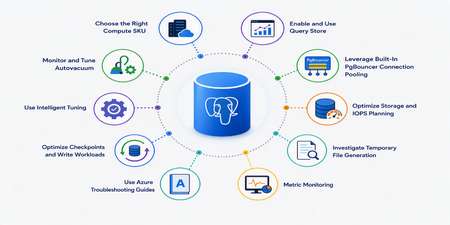
Introduction Performance optimization is one of the most common challenges faced by organizations running business-critical workloads on Azure Database for PostgreSQL flexible server. As your workloads grow it’s common to encounter high CPU utilization, storage bottlenecks, autovacuum issues, excessive temporary file generation, and connection saturation. The good news is that Azure PostgreSQL flexible server provides several built-in capabilities to help optimize performance, improve scalability, and reduce operational overhead. This article explores ten practical techniques that can significantly improve database performance and reliability. 1. Choose the Right Compute SKU Performance starts with selecting the appropriate compute tier. Azure PostgreSQL flexible server offers: Pricing tier Target workloads Burstable Designed for workloads that don't require full CPU performance continuously. Best suited for proof-of-concept environments, and development builds. Not recommended for production workloads. General Purpose Provides a balance between CPU and memory with scalable I/O throughput, making it suitable for most production workloads. Examples include servers for hosting web applications, mobile apps, and enterprise applications. Memory Optimized Suitable for high-performance database workloads that require in-memory performance for larger buffer cache sets, and higher concurrency. Examples include servers for processing real-time data and high-performance transactional or analytical apps. Learn more about Compute Tiers here. 2.Enable and Use Query Store Query Store is one of the most powerful performance tools available. Query Store automatically captures the following and keeps them available for review: Query execution statistics Runtime metrics Wait event information Historical execution trends It organizes the data into time windows, so you can spot database usage patterns. Data for all users, databases, and queries is stored in a database named azure_sys in the Azure Database for PostgreSQL instance. It’s generally recommended to monitor query store from Azure tools, KQL, etc. Learn more about Query store here. You can also view some useful scenario for query store and some Best Practices for Query store 3.Leverage Built-In PgBouncer Connection Pooling PostgreSQL uses a process-per-connection model, which means every connection consumes memory and CPU resources. Azure PostgreSQL flexible server provides built-in PgBouncer support for eligible SKUs . PgBouncer allows multiple application sessions to reuse open backend connections and significantly reduces overhead. Benefits include: Lower memory consumption Faster connection handling Improved application scalability Reduced CPU overhead Learn more about PgBouncer here 4.Use Azure Troubleshooting Guides One underutilized feature is the built-in troubleshooting experience available directly in the Azure portal. Guides are available for: CPU troubleshooting Memory troubleshooting IOPS analysis Temporary files Autovacuum monitoring Autovacuum blockers These tools provide actionable recommendations and visualizations without requiring external monitoring solutions. Learn more about Troubleshooting Guides here. 5. Monitor and Tune Autovacuum Autovacuum is critical for maintaining PostgreSQL performance. Without proper vacuuming: Dead tuples accumulate Table bloat increases Statistics are not refreshed regularly Query performance degrades Transaction ID wraparound risks emerge Use Azure's built-in Autovacuum Monitoring TroubleshootingGuides to identify: Vacuum lag Blocked autovacuums Table bloat Inefficient cleanup operations Azure now also offers adaptive tuning capabilities to optimize maintenance behavior. Learn more about Autovacuum tuning here 6.Optimize Storage and IOPS Planning Many performance incidents originate from insufficient storage planning rather than inefficient SQL. In Azure PostgreSQL flexible server: Storage and baseline IOPS are closely related. Learn more here. Larger storage allocations provide higher baseline IOPS. Auto-grow prevents storage-related outages Note: Storage can only be scaled up and will always be double in size. SSDv2 auto-grow will allow customized growth settings in future release. For write-heavy workloads, monitoring storage utilization and IOPS is essential. Best practice: Enable Storage Auto-Grow Monitor Read/Write IOPS regularly Scale storage proactively 7.Investigate Temporary File Generation Large sorts and hash operations that exceed available memory spill to disk and generate temporary files. Symptoms include: Sudden Latency Spikes Increased IOPS Slower query execution Azure TroubleshootingGuides provide dedicated temporary-file analysis capabilities that help identify offending queries. Frequent temp file generation often indicates: Missing indexes Undersized work_mem Large sorting operations 8.Use Intelligent Tuning Azure PostgreSQL flexible server includes Intelligent Tuning capabilities. The service continuously observes workload behavior and automatically optimizes parameters related to write operations. Examples of tuning include: checkpoint_completion_target max_wal_size min_wal_size bgwriter settings This reduces administrative effort while helping maintain consistent performance. Learn more about Intelligent Tuning here. 9.Optimize Checkpoints and Write Workloads Checkpoint spikes frequently appear in escalations involving high IOPS and latency. Aggressive checkpoint activity can: Generate excessive disk writes Increase latency Consume IOPS capacity Monitoring checkpoint behavior and ensuring WAL parameters are properly configured can significantly improve write-intensive workloads. Azure intelligent tuning can assist in this area as well. 10.Metric Monitoring Optimization should always be data-driven. You should track the following: CPU utilization Memory pressure Active Connections Oldest Query IOPS consumption Combining Azure Metrics, Query Store, and PostgreSQL statistic views allows teams to distinguish between normal workload spikes and true performance degradation. PostgreSQL statistics views provide valuable workload insights. For example, pg_stat_activity can be used to identify long-running or blocking queries, pg_stat_user_tables helps track dead tuples, vacuum activity, and statistics refreshes, while pg_stat_statements (if enabled) help identify the most resource-intensive queries by execution time and frequency. Learn more about Metric here Conclusion Performance optimization in Azure Database for PostgreSQL flexible server is not just about changing a few parameters and hoping for better results. It requires a structured approach that combines workload understanding, proactive monitoring, proper sizing, query optimization, and platform-native capabilities. By leveraging Query Store, PgBouncer, Intelligent Tuning, Autovacuum Monitoring, Azure Metrics, and Troubleshooting Guides, you can significantly improve database efficiency while reducing operational effort. References Compute Options - Azure Database for PostgreSQL | Microsoft Learn Query Store in Azure Database for PostgreSQL Flexible Server - Azure Database for PostgreSQL | Microsoft Learn PgBouncer in Azure Database for PostgreSQL Flexible Server - Azure Database for PostgreSQL | Microsoft Learn Autovacuum Tuning - Azure Database for PostgreSQL | Microsoft Learn Intelligent Tuning in Azure Database for PostgreSQL Flexible Server - Azure Database for PostgreSQL | Microsoft Learn2.2KViews2likes0CommentsPostgreSQL on Azure: Two services, one future-proofed ecosystem
At Microsoft Build 2026, the Azure Databases team announced the public preview of Azure HorizonDB, a new powerhouse for PostgreSQL in the cloud. It’s a fully managed, PostgreSQL-compatible cloud database service that delivers sub-millisecond latency, rapid read scale-out, and seamless integration with Microsoft Foundry to empower teams to build secure, compliant and high-performing applications with confidence. At the same event, we also announced several enhancements to the existing managed PostgreSQL offering, Azure Database for PostgreSQL flexible server, boosting performance, analytics and security, and expanding tooling for migration scenarios. Where there was one, now there’s two Now our customers have two strong options to choose from. Azure Database for PostgreSQL remains a reliable, cost-effective, fully open-source compatible workhorse for most users’ everyday needs. Azure HorizonDB is the new PostgreSQL-compatible service with an elastic scale-out architecture built on a highly optimized shared storage system that unlocks 3x faster OLTP performance and other cloud-native advantages for the most demanding workloads. With this new service, you might be wondering which service is the best fit. Let’s take a closer look at these options and explore where they align and differ and what you might want to consider when making your choice. Azure Database for PostgreSQL: Enterprise ready, managed open source Microsoft is one of the largest contributors to the open-source Postgres project and has also invested heavily in PostgreSQL managed services on Azure. Microsoft engineers have authored or co-authored hundreds of code commits and provided extensive reviews, and, to date, have made more than 345 commits and changed more than 64K lines of code for PostgreSQL 19. In the cloud, Azure Database for PostgreSQL is built on the open-source ecosystem, sharing the same extensions and experience that developers and DBAs know and love. Patching, backups, scaling, and monitoring are all simple, one-click operations. If you have an app that already uses a PostgreSQL database, in another cloud or on-premises, migrating to Azure for the added benefits is an easy lift and shift. Inside Azure Database for PostgreSQL Azure Database for PostgreSQL is a mature, feature-rich service already battle-tested by thousands of applications and being used by Fortune 500s across sectors. Enterprise-grade performance: Compute tiers can scale up to 192 vCores with features like read replicas and elastic clusters, which is based on the open-source Citus extension and unique to this class of service, make it easy to right-size workloads and optimize performance by offloading read-heavy traffic or sharding data across nodes. Reliability and security: Backed by Azure’s robust infrastructure, Azure Database for PostgreSQL comes equipped with high availability and zone-redundant options, point-in time restore and security features, including data encryption, network isolation, and Entra ID for enterprise identity. Frictionless migrations: Migrating existing PostgreSQL workloads to Azure Database for PostgreSQL is very straightforward thanks to built-in migration tooling. We’ve even launched AI-assisted tooling for Oracle to PostgreSQL migrations in VS Code, which leverages GitHub Copilot AI to handle app and schema conversions and pre-migration validations. From incorporating cutting-edge hardware, horizontal scaling and Microsoft Fabric and Microsoft Foundry integrations, to supporting 90+ open-source extensions and counting, we continue to optimize the service to meet the needs of our customers building on open-source Postgres. Azure HorizonDB: Next-gen engine to build what’s next Azure HorizonDB was designed and purpose-built to meet the needs of modern AI-native applications and large-scale enterprise migrations. Shireesh Thota, Azure Databases CVP, describes it as the database of choice for workloads that need “a lot of storage, want really fast latencies and significantly higher IOPS.” The service offers faster throughput than open-source PostgreSQL and rapid compute scale-out to support the performance and availability needs of your most demanding applications. Inside Azure HorizonDB Azure HorizonDB is where performance meets possibility, empowering teams to build intelligent apps to scale, modernize, and innovate without compromise. Cloud-tuned performance: The cloud-native architecture of Azure HorizonDB fully decouples compute and storage, enabling users to scale database resources independently. The service can support deployments up to 3,072 vCores and 128 TB of shared storage for a single workload, and provides a single endpoint for read replicas with transparent load balancing to deliver massive read throughput seamlessly to the application. Reliability and security: Azure HorizonDB comes standard with features to support production-level, mission-critical enterprise workloads. Built-in multi-availability zone (AZ) replication reduces failover time to less than 5 seconds, and native integration with Microsoft Entra ID and private endpoint networking ensures Azure HorizonDB meets the Azure-standard enterprise-grade security from day one. Tailored for AI and next-gen apps: Azure HorizonDB provides an extensive set of AI features for building modern applications. In comparison to similar PostgreSQL services in the cloud, IDC described Azure HorizonDB as having "fewer moving parts and a straighter path to AI features.” Azure HorizonDB ships with Microsoft’s latest version of DiskANN vector indexing, which includes advanced filtering that delivers up to 3x faster vector search than traditional pgvector indexes. It also comes with built-in AI Model Management for native integration to Microsoft Foundry models, AI Functions to invoke models from SQL, and AI Pipelines to provide durable orchestration of data modification. Developer productivity: Along with building the best Postgres service, Microsoft is committed to delivering the best Postgres developer tools to the entire community. The Microsoft PostgreSQL extension for Visual Studio (VS) Code makes the coding environment Postgres-aware to help optimize queries, schemas and query performance using AI. Azure HorizonDB is the next-generation of PostgreSQL on Azure for mission-critical, high-throughput, and data-intensive workloads. For everything else, Azure Database for PostgreSQL remains a strong choice. Making your selection Adopting technology should always be driven by a real need. Having two choices is great, but it raises the logical question: “which one is right for me and when?” Choose Azure Database for PostgreSQL when: You’re migrating existing Postgres databases as-is. You can migrate seamlessly to Azure Database for PostgreSQL with minimal tweaks or reconfigurations. You require full open-source compatibility, including rapid adoption of new community versions. Azure Database for PostgreSQL now ships major versions on the same day as the community release. You want to start now and decide later. Azure Database for PostgreSQL is generally available in 60+ regions today. Later, if your project requires greater scale, you can upgrade to Azure HorizonDB, and the migration process will be quick and easy. Choose Azure HorizonDB when: You’re migrating tier-1 workloads to the cloud that already have critical scale, performance, and availability requirements. Up to 128 TB of storage and 3,072 vCores for a single workload makes Azure HorizonDB the ideal destination for these workloads. You anticipate requirements that go beyond Azure Database for PostgreSQL’s capabilities. Azure HorizonDB expands on the capabilities of Azure Database for PostgreSQL, so you’ll be future proofed for scale and reliability. You are focused on building next-gen intelligent apps. Azure HorizonDB is optimized for building new AI applications, enabling developers to ship faster with fewer moving parts. Both services are built on the core Postgres engine, and upgrading to Azure HorizonDB is easy. If your scenario changes, your toolkit can change too. Azure offers the managed service to support you either way. Choose the cloud with the deepest Postgres expertise The PostgreSQL ecosystem on Azure is richer than ever. With both Azure Database for PostgreSQL and Azure HorizonDB, Azure covers the spectrum from steady, everyday workloads to cutting-edge, innovative ones. Whether you’re in a two-person startup or a Fortune 500 enterprise, PostgreSQL on Azure can meet your business’ needs. Now is the perfect time to make a move to Postgres on Azure: Learn more about Azure Database for PostgreSQL Learn more about Azure HorizonDBConnecting Azure PostgreSQL to Oracle Autonomous with ORACLE_FDW
When migrating databases to PostgreSQL, not all data transitions happen immediately. Applications often need to keep accessing legacy databases for reading or writing, whether during a phased migration, for reporting, or because certain data still lives in another system. PostgreSQL implements parts of the SQL/MED standard via Foreign Data Wrappers (FDW), enabling queries against tables stored in external systems as if they were local. Instead of building ETL pipelines or copying data periodically, PostgreSQL can access remote data directly and let the query planner decide what to execute remotely. In this article, I'll connect Azure Database for PostgreSQL Flexible Server to an Oracle Autonomous Database using oracle_fdw, a Foreign Data Wrapper maintained by Laurenz Albe. I'll show how to: connect PostgreSQL to Oracle over TLS (Transport Layer Security) discover the outbound IP address used by Azure Database for PostgreSQL import Oracle tables as PostgreSQL foreign tables examine how filters and join operations are pushed down to Oracle perform INSERT, UPDATE, and DELETE operations on Oracle tables from PostgreSQL migrate from Oracle to PostgreSQL with a Create Table As Select over FDW run hybrid queries to compare remote and local tables after migration The goal is not to build a distributed database or a distributed transaction system. The goal is to access Oracle data from PostgreSQL with minimal setup while letting each database do the work it can do most efficiently. Enable the Foreign Data Wrapper To enable ORACLE_FDW, I selected it in the server parameters allowed extensions: Another option is to include it in the ServerParameter entry of an ARM template. In both cases, it is easy to check: postgres=> \dconfig azure.extensions List of configuration parameters Parameter | Value ------------------+------------------------------------------------- azure.extensions | ORACLE_FDW (1 row) Open the firewall and get the connection string I will connect to the Oracle Autonomous Database over the public internet. The security measures include user-password authentication, an encryption certificate, and a firewall with an IP whitelist. Since I am unsure which IP address Azure Database for PostgreSQL will use when connecting, I currently permit connections from any IP to my Oracle Autonomous Database: I didn’t select “Secure access from everywhere” because it requires mutual TLS (mTLS) with client certificates stored in a wallet on the client device. Since the client is an Azure PostgreSQL managed service and I can’t install a custom wallet, I chose one-way TLS (encryption without a client wallet), which is a practical option in this setup, as Oracle server certificates chain to public CAs trusted by Azure/PostgreSQL trust stores. This approach requires whitelisting IP addresses or a CIDR range. For testing, I temporarily allowed 0.0.0.0/0 to connect and capture the real source IP address for future adjustments. I did this only to identify the source IP used by Azure Database for PostgreSQL. In sensitive database environments, avoid allowing 0.0.0.0/0 even for a short time. Instead, use an ephemeral Oracle Autonomous test instance to identify the PostgreSQL server’s source IP address. You will need a username and password to connect, along with the connection string shown in the database connection details: I recommend using the TP or LOW services because MEDIUM and HIGH are intended for data warehouse workloads, which can cause unexpected locking behavior or resource usage. In my case, the connection string is: (description=(retry_count=20)(retry_delay=3)(address=(protocol=tcps)(port=1521)(host=adb.eu-madrid-1.oraclecloud.com))(connect_data=(service_name=g230b6bb64a62e6_mad_tp.adb.oraclecloud.com))(security=(ssl_server_dn_match=yes))) That's everything I need on the Oracle side. I have all the information needed to connect from PostgreSQL. Declare the Foreign Data Wrapper server I connect to the Azure PostgreSQL server with psql and enable the ORACLE_FDW extension: postgres=> create extension oracle_fdw; CREATE EXTENSION I declare the connection string for the foreign data wrapper server: postgres=> create server oracle_autonomous foreign data wrapper oracle_fdw options (dbserver '(description=(retry_count=20)(retry_delay=3)(address=(protocol=tcps)(port=1521)(host=adb.eu-madrid-1.oraclecloud.com))(connect_data=(service_name=g230b6bb64a62e6_mad_tp.adb.oraclecloud.com))(security=(ssl_server_dn_match=yes)))'); CREATE SERVER I declare the Oracle username and password to be used by my current user: postgres=> create user mapping for current_user server oracle_autonomous options (user 'ADMIN', password '<password on Oracle Autonomous>'); CREATE USER MAPPING To check if the connection is correct, I call oracle_diag(), which shows the client-side versions as well as the major version of the server: postgres=> select oracle_diag('oracle_autonomous') ; oracle_diag ---------------------------------------------------------------------------------------- oracle_fdw 2.8.0, PostgreSQL 18.4, Oracle client 23.26.0.0.0, Oracle server 23.0.0.0.0 (1 row) As the server version is returned, I know that I'm connected. If it cannot connect, you must verify the connection string, the IP allow list, and the credentials. Discover the public outbound IP address Since I don't want to keep the firewall open to 0.0.0.0/0 indefinitely, and rely solely on password-based protection, I first identify the IP address I'm connected from to narrow down the allowed IP list: postgres=> select oracle_execute('oracle_autonomous',$$ begin -- PL/SQL block to raise an exception that carries the IP address information raise_application_error( -20999, 'Hello ' || user||'@'||sys_context('userenv','ip_address') ); end; $$); ERROR: error executing statement: OCIStmtExecute failed to execute query DETAIL: ORA-20999: Hello ADMIN@4.203.152.223 ORA-06512: at line 3 The error message is expected because I used raise_application_error() to return a message to oracle_execute(), which does not accept statements that return a result. Now I can replace CIDR 0.0.0.0/0 with the IP address of the Azure PostgreSQL server I'm connecting from: Note that Azure does not guarantee that this public address remains static, so this rule may need updating after maintenance or failover. For production where such FDW access is long-term and highly available, use an architecture that provides controlled egress IPs (for example via NAT) that you can allowlist, or private connectivity where available. Since ORACLE_FDW allows me to connect and perform DML on the Oracle side, I have no other tasks on the Oracle side. PostgreSQL is my Oracle client. Import Oracle table metadata Back at my psql prompt, I can import the metadata for the Oracle schema "SH" into the PostgreSQL schema "fdw_sh": postgres=> create schema fdw_sh ; CREATE SCHEMA postgres=> import foreign schema "SH" from server oracle_autonomous into fdw_sh ; IMPORT FOREIGN SCHEMA I can describe what is imported: postgres=> set search_path TO fdw_sh, public ; postgres=> \d List of relations Schema | Name | Type | Owner --------+----------------------------+---------------+-------- fdw_sh | channels | foreign table | franck fdw_sh | costs | foreign table | franck fdw_sh | countries | foreign table | franck fdw_sh | customers | foreign table | franck fdw_sh | products | foreign table | franck fdw_sh | promotions | foreign table | franck fdw_sh | sales | foreign table | franck fdw_sh | supplementary_demographics | foreign table | franck fdw_sh | times | foreign table | franck (9 rows) Those are the tables imported from the "SH" schema of the Oracle database. ORACLE_FDW has automatically mapped the data types to PostgreSQL data types: postgres=> \d fdw_sh.countries Foreign table "fdw_sh.countries" Column | Type | Collation | Nullable | Default | FDW options ----------------------+-----------------------+-----------+----------+---------+-------------- country_id | numeric | | not null | | (key 'true') country_iso_code | character(2) | | not null | | country_name | character varying(40) | | not null | | country_subregion | character varying(30) | | not null | | country_subregion_id | numeric | | not null | | country_region | character varying(20) | | not null | | country_region_id | numeric | | not null | | country_total | character varying(11) | | not null | | country_total_id | numeric | | not null | | country_name_hist | character varying(40) | | | | Server: oracle_autonomous FDW options: (schema 'SH', "table" 'COUNTRIES') It is recommended to run ANALYZE to ensure the PostgreSQL query planner knows the cardinalities. Note that foreign tables are not automatically analyzed by auto-analyze. postgres=> select format('analyze verbose %I.%I;', table_schema, table_name) from information_schema.tables where table_schema = 'fdw_sh' \gexec PostgreSQL doesn't automatically collect statistics on foreign tables. Without running ANALYZE, the optimizer might misjudge row counts, resulting in suboptimal join plans and fewer pushdown opportunities. By default, ANALYZE reads 100% of the table but it can be lowered for large table by setting the sample percentage beforehand: postgres=> alter foreign table fdw_sh.sales options (set sample_percent '5') ; ALTER FOREIGN TABLE Query the foreign tables I can query foreign tables just like local ones. For example, to find the total customer credit exposure by country for certain regions, I run the following: postgres=> -- explain (analyze, verbose, buffers) select co.country_name, sum(cu.cust_credit_limit) as total_credit from fdw_sh.customers cu join fdw_sh.countries co on co.country_id = cu.country_id where co.country_region in ('Europe') group by co.country_name having sum(cu.cust_credit_limit) > 1e7 order by total_credit desc ; country_name | total_credit ----------------+-------------- Germany | 49579000 United Kingdom | 45205500 Italy | 44844500 France | 23987000 Spain | 12170000 (5 rows) The execution plan indicates the operations that have been delegated to the foreign database: Sort (cost=253237.64..253237.64 rows=3 width=41) (actual time=10348.498..10348.500 rows=5.00 loops=1) Output: co.country_name, (sum(cu.cust_credit_limit)) Sort Key: (sum(cu.cust_credit_limit)) DESC Sort Method: quicksort Memory: 25kB -> GroupAggregate (cost=253056.49..253237.61 rows=3 width=41) (actual time=10343.320..10348.489 rows=5.00 loops=1) Output: co.country_name, sum(cu.cust_credit_limit) Group Key: co.country_name Filter: (sum(cu.cust_credit_limit) > '10000000'::numeric) Rows Removed by Filter: 3 -> Sort (cost=253056.49..253116.81 rows=24130 width=14) (actual time=10342.473..10343.918 rows=30564.00 loops=1) Output: co.country_name, cu.cust_credit_limit Sort Key: co.country_name Sort Method: quicksort Memory: 1783kB -> Foreign Scan (cost=10000.00..251300.00 rows=24130 width=14) (actual time=51.461..10333.852 rows=30564.00 loops=1) Output: co.country_name, cu.cust_credit_limit Oracle query: SELECT /*47caada6fd16dcb0*/ r2."COUNTRY_NAME", r1."CUST_CREDIT_LIMIT" FROM ("SH"."CUSTOMERS" r1 INNER JOIN "SH"."COUNTRIES" r2 ON (r1."COUNTRY_ID" = r2."COUNTRY_ID") AND (r2."COUNTRY_REGION" = 'Europe')) Oracle plan: SELECT STATEMENT Oracle plan: HASH JOIN (condition "R1"."COUNTRY_ID"="R2"."COUNTRY_ID") Oracle plan: TABLE ACCESS FULL COUNTRIES (filter "R2"."COUNTRY_REGION"='Europe') Oracle plan: TABLE ACCESS FULL CUSTOMERS Query Identifier: -2654414372183047898 Planning Time: 152.202 ms Execution Time: 10348.595 ms The most important line in the execution plan is the generated Oracle query. It shows exactly which operations PostgreSQL delegated to Oracle and how many rows were returned across the network. In this example, the join and filter were pushed down: it executed a hash join with the COUNTRIES table as the build table and the CUSTOMERS table as the probe table, returning 30564 rows. The aggregation happened in PostgreSQL. Here is the visualization in the VS Code extension for PostgreSQL: Checking the execution plan is essential because remote calls introduce latency. We should minimize roundtrips and avoid reading excessive rows that will be discarded later. Execute DML (read and write) Unlike many federation technologies, oracle_fdw supports direct INSERT, UPDATE, and DELETE operations on Oracle tables from PostgreSQL. I use oracle_execute() to create a new table on the remote Oracle Database: postgres=> select oracle_execute( 'oracle_autonomous', $$ create table "REGIONS" ( ID number primary key, NAME varchar2(100) unique ) $$ ); oracle_execute ---------------- (1 row) postgres=> select oracle_close_connections() ; oracle_close_connections -------------------------- (1 row) After executing DDL through oracle_execute(), I close the cached Oracle connection because, in my tests, Oracle’s implicit DDL commit left oracle_fdw’s transaction state out of sync, causing subsequent queries on the same remote session to fail with ORA-08177 ("can't serialize access for this transaction"). I am able to declare the foreign table and insert rows through it: postgres=> create foreign table regions ( id numeric options (key 'true'), name text ) server oracle_autonomous options (schema 'ADMIN', table 'REGIONS') ; CREATE FOREIGN TABLE postgres=> insert into regions (name, id) select distinct country_region, country_region_id from fdw_sh.countries ; INSERT 0 6 To demonstrate that DML occurs on the Oracle Database, I attempt to insert a duplicate, which results in an Oracle error: postgres=> insert into regions values (1,'Europe') ; ERROR: error executing query: OCIStmtExecute failed to execute remote query DETAIL: ORA-00001: unique constraint (ADMIN.SYS_C0035974) violated on table ADMIN.REGIONS columns (NAME) ORA-03301: (ORA-00001 details) row with column values (NAME:'Europe') already exists Help: https://docs.oracle.com/error-help/db/ora-0000 Remote queries are supported for transactions: postgres=> begin; BEGIN postgres=*> delete from regions; DELETE 6 postgres=*> select * from regions; id | name ----+------ (0 rows) postgres=*> rollback; ROLLBACK postgres=> select * from regions; id | name -------+------------- 52800 | Africa 52801 | Americas 52802 | Asia 52803 | Europe 52804 | Middle East 52805 | Oceania (6 rows) The remote delete was executed but later reversed through a rollback in the local transaction. You can check when the remote transaction starts and ends by setting client_min_messages to debug. You can query both local and remote tables within a single local transaction (without two-phase commit or distributed transaction guarantees). However, this does not provide consistent guarantees for distributed transactions. Hybrid queries An SQL statement can involve local and remote tables. Here is an easy way to import data from Oracle to PostgreSQL: postgres=> create table local_customers as select * from fdw_sh.customers ; CREATE TABLE postgres=> alter table local_customers add primary key (cust_id) ; ALTER TABLE postgres=> vacuum analyze local_customers ; VACUUM A SQL statement can join local and remote tables. Here is an easy way to compare two tables: postgres=> select l.cust_id, r.cust_id -- full outer join to read all rows from both tables from local_customers l -- push down order by to favor merge join full outer join ( select * from fdw_sh.customers order by cust_id ) r using (cust_id) -- eliminate the same rows where -- one cust_id row doesn't exist in the other l.cust_id is null or r.cust_id is null -- or it exists in both but with difference values or l is distinct from r ; To compare them, all rows must be read, but this execution plan is efficient, using a sort-merge join that compares rows without buffering them into a temporary table. This comparison is long and may produce false positives if concurrent DML operations occur while logical replication runs during the migration. Nevertheless, since both databases utilize multi-version concurrency control snapshots and their transactions started nearly simultaneously when using autocommit or serializable transactions, the likelihood of false positives is low. To deal with transient differences, you can quiesce writes, compare only a known past time window, or recheck reported rows after replication catches up. Limitations The foreign data wrapper is not a distributed query engine. It pushes only certain operations when it improves performance. For example, in the previous case, Oracle performed the join and filter, but PostgreSQL executed the GROUP BY. Operation Pushdown WHERE ✅ Yes (only expressions that can be safely translated) JOIN ✔️ Yes, between two foreign tables on the same foreign server when the join conditions and filters can be translated ORDER BY ✔️ Yes, except for string-based sort and when a join is pushed down GROUP BY ❌ (no aggregation pushdown in oracle_fdw 2.8.0) INSERT/UPDATE/DELETE ✅ Joins over 3 foreign tables ❌ No PostgreSQL functions ❌ No, except now(), transaction_timestamp(), current_timestamp, current_date, localtimestamp which are translated and pushed down Queries continue to be transmitted over the network. If pushdown isn't feasible, large result sets can slow down performance. Foreign tables are not automatically analyzed. Cross-database transactions are not managed as distributed transactions. oracle_fdw is ideal for access, reporting, and migration, but it does not substitute for physically transferring heavily used data into PostgreSQL. Conclusion ORACLE_FDW is simple to enable on Azure Database for PostgreSQL Flexible Server and provides a simple way to access Oracle data from PostgreSQL without introducing a separate replication or ETL layer. Oracle tables appear as PostgreSQL foreign tables, can join with local tables, and support read-write operations. The key feature is visibility. PostgreSQL's execution plan shows not only local operations but also the SQL sent to Oracle, along with the Oracle execution plan. This helps users easily see which parts are executed remotely and which stay on PostgreSQL. As with all Foreign Data Wrappers, performance depends on how much work you delegate to the remote database. Pushdown candidates typically include filters, joins, and sorting. PostgreSQL executes aggregation locally rather than delegating it to Oracle. Network latency and data transfer costs also play a significant role. For migrations, reporting, data validation, or gradual application modernization, oracle_fdw provides an effective solution to connect PostgreSQL and Oracle while using standard SQL on both platforms. It does not try to treat multiple databases as a single distributed system. If you used the Oracle Foreign Data Wrapper, please share your questions, comments, and feedback in the PostgreSQL Hub Developer Forum.141Views1like0Comments