poll
133 TopicsExport to Excel - wrong and shortened titles
Hi all, we want to get rid of other polling tools and recommend Forms for broader usage. We now had a "Likert" poll that caused the Excel export to be unusable. The questions were not in the same order as they were in the Form (deleted the Excel from Onedrive and let it recreate did not solve this) Also some titles were shortened like: Likert topic: Share your event feedback (e.g. how was the food, the beverages and so on) Food: Great, Ok, i was hungry But in the excel export the title of this row was: Share your event feedback (e.g. how was the food, the beverages and soFormsID4 So it was impossible to see what statement was answered to. What are the limitations here? BR Stephan263Views0likes1Comment
Problems sharing results
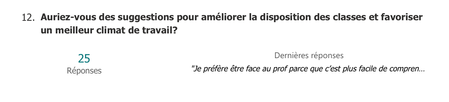
Hi! I need to share the results of a Microsoft Forms survey, and the Summary link doesn't include the written answers to one of my questions. As you can see, I have 25 written responses that I’d like to share along with the graphs, but those answers are missing: Additionally, is there a way to customize the appearance of the shared responses? Thank you! Chris.227Views0likes1Comment
Branching based on a date of birth
Is it possible to do some branching based on a date of birth? i.e. I ask them how old there are, if they are over 18 then they are good to carry on with the rest of the survey, if not then I need to ask them some additional questions. Is this doable?2.1KViews0likes1CommentRecurring employee survey that goes out multiple times in a single day.
As the subject line suggests, is there a way to have a survey go out several times throughout a single employee shift? Our people work 12-hr shifts in order to maintain a 24/7/365 operation. We are looking to conduct workload & stress-level assessments at specific times throughout the employees' shift. For example: the survey would go out to the employee at 6am, 11am, and 4pm for a dayshift worker and then 6pm, 11pm, 4am for our nightshift folks. It would be the same questions each time in order to trend the differences.574Views0likes4Comments
"Scheduling Poll" unintentionally pitted against "Scheduling Assistant ... Why not both?
As a guest invited to a fellow outlook user's scheduling poll, it is unnecessarily difficult to propose additional times that make any sense. It's a strong start towards solving the scheduling problem it's intended to, but it doesn't usually hit the mark, and that's a missed opportunity. Several times, I received a scheduling poll, and each proposed time has already been rejected by one or more required attendees. This is where the "Propose another time" button at the bottom of the poll should help us, . . . Well it's not actually helpful, and will likely generate a lot of email traffic with low chances of helping. I'll explain. The first part of the problem is that there is just no information available about everyone else's schedule. So, how should we expect attendees to propose a reasonable suggestion, even if they are in the same organization and could have had that Free/busy information they need, elsewhere? Going across domains, it makes sense that the information isn't available. But 9 times out of 10, it actually is, because people are using this with people at their workplace. I just would have had to just start over from scratch, although that's bad form because the poll is already in play and this would nominally appear as a conflict. It's also pretty obvious duplicate effort. There just needs to be a better transition between meeting poll and a standard meeting invitation's scheduling assistant view. A person doing that would have to log in if they weren't already, but that seems perfectly fine. Perhaps more importantly, I've got to point out that this is a side-effect of the organizer-as-dictator problem that has been endemic to Outlook & exchange for decades. "FindTime"/"Scheduling Poll" has its place among cross-domain internet email users, but within a work or school environment, it's just good code thrown after bad. The fact that we sometimes need to do a poll before putting any info on the actual calendar is just silly. That's what the calendar is supposed to be for, but locking in the times and making yourself "organizer" just makes the work more awkward. And one last thing, I think it's a mistake that each "Propose another time" sends out another reply-all message. Considering how I described above that we're left just guessing what time could be any good, then sending two or three suggestions in as many separate email messages seems very wasteful. We should be able to set up a few times before saving them and having the poll email re-sent only one more time.1.2KViews1like1Comment
Forms not loading while presenting PPT in Teams
I created a PowerPoint presentation and added a couple of polls by selecting the Forms tab in PPT. The polls appear correctly in the slides and the polling function works when not presenting live in Teams, but once I select Present in Teams, the polling slides only show blue boxes with no other content.1.3KViews2likes2Comments
MS Forms polls/quizzes: live presentation
HI there Is it possible to create a poll/quiz with multiple questions but where the presenter has control as to when to progress through the quiz? I.e. all respondents answer q1, presenter presents results, then everyone moves onto q2 etc. Thanks Joe946Views2likes3Comments