performance
11 TopicsSystem Windows Ram Problem Fix
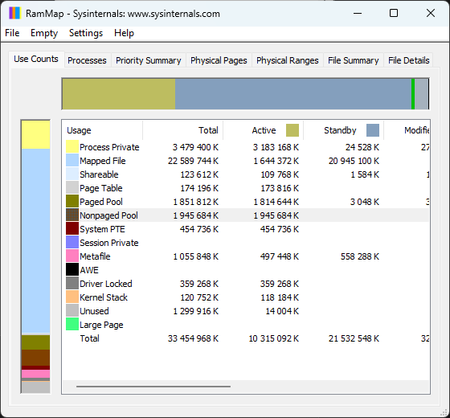
You’ve probably seen this happen — you leave your desktop or laptop running, and after a while the system starts eating a huge chunk of your RAM, even on modern hardware. Today I’m bringing a fix that removes this issue permanently and gives Windows back the speed, stability, and clean behavior it should have. By disabling two legacy predictive mechanisms (SysMain + Prefetch), the system stops aggressively caching applications, idle RAM usage drops significantly, and micro‑lags disappear. The attached screenshots show the system before and after applying the fix. This solution works on both Windows 10 and Windows 11, and it’s safe, reversible, and the improvement is immediate. System Ram Before: System Ram After: Step‑by‑step guide (Windows 10 / 11 RAM issue fix) Note: This is a safe and fully reversible system tweak. You’re simply disabling two legacy predictive mechanisms that no longer make sense on modern hardware. 1️⃣ Disable the SysMain service Press Win + R Type services.msc → press Enter Find SysMain in the list Double‑click it Set Startup type to Disabled Click Stop if the service is running Confirm with Apply and OK 2️⃣ Disable Prefetch in the Registry Press Win + R Type regedit → press Enter Navigate to: HKEY_LOCAL_MACHINE\SYSTEM\CurrentControlSet\Control\Session Manager\Memory Management\PrefetchParameters Find the value EnablePrefetcher Double‑click it and set the value to: 0 Confirm with OK 3️⃣ Restart your system After rebooting, your RAM usage in idle should drop noticeably, and the system will feel cleaner, faster, and more responsive. 4️⃣ How to revert (optional) If you ever want to undo the changes: SysMain: set Startup type back to Automatic and start the service EnablePrefetcher: set the value back to 3 (default) With my regular applications open, RAM usage dropped from 60–70% to just 33%. This is how Windows should have behaved from the beginning. On top of that, overall system responsiveness improved by roughly 50% — even weaker hardware feels noticeably faster almost immediately. This RAM regression has been around since Windows 7. After the kernel overhaul in Windows 8.1 it actually got worse, and it has followed every version of Windows all the way to today. RAM stability after - optimization results: RAM stability after 21 hours uptime – optimization results | Microsoft Community Hub2.6KViews0likes3Comments
KB5089573 forced install + Lenovo network stack degradation (HTTPS latency, build 26200.8524)
KB5089573 installed automatically on a Lenovo system despite updates being paused and no preview updates enabled. After installation, the system jumped to build 26200.8524 and the network stack degraded severely. Heavy HTTPS sites (LinkedIn, Google Finance, YouTube) take 20–60 seconds to load across all browsers. Speedtest is normal, other devices on the same network are unaffected, and both Edge and Chrome show identical latency. DISM shows no package for KB5089573 and the update cannot be uninstalled. Looking for correlation data from other Lenovo users.237Views0likes3CommentsWhy Windows Should Adopt ReFS as a Bootable Filesystem
ReFS could become a bootable filesystem — it only needs a few missing layers. No need to copy NTFS, just implement what the Windows boot process requires. Key missing pieces: System‑level journaling (not only metadata) Full hardlink + extended attribute support EFS, ACLs, USN Journal for security + Windows Update Boot‑critical atomicity for safe system file updates Bootloader‑compatible APIs (BCD, BitLocker pre‑boot, WinRE, Secure Boot) Goals: Use NTFS as a reference map, add the missing capabilities to ReFS, and optimize them using ReFS features (copy‑on‑write, integrity streams, block cloning). Result: A modern, resilient filesystem that can finally boot Windows - without losing its benefits.342Views1like7CommentsNative Vulkan in Windows System Manifest
Vulkan’s been in Windows for ages as a loader and runtime, but the OS still doesn't use it as a native backend. It's wild because so many studios start with Vulkan now and only port to DirectX later, which just adds a ton of extra work for no reason. If Windows actually supported Vulkan natively, we’d get rid of those translation layers that cause CPU overhead and shaky frame times. In CPU-bound games, we’re talking 20–30% more performance just by cutting out the middleman. Plus, it would mean consistent performance across NVIDIA, AMD, and Intel. I really think Vulkan should be a priority in Windows, not just an add-on. What do you guys think? Is it worth pushing Microsoft on this, or are they too locked into DX12?" Community Call to Action If you believe Windows deserves a modern, efficient graphics backend — If you’ve ever seen performance lost to translation layers — If you want Vulkan to be treated as a first-class citizen inside Windows — Then speak up. Share your thoughts. Test, compare, and challenge the status quo. This isn’t just about games. It’s about the future of UI, recovery, and system performance. Let’s show Microsoft that the community is ready for native Vulkan. No translation. No compromise.290Views0likes3Comments
0.011W Power Floor on i7-1255U: A Step Toward Microsoft’s Sustainability Vision
It is inspiring to see Microsoft leading the tech industry toward a greener future. Initiatives such as the Carbon Negative 2030 goal and the Energy Saver features in Windows 11 are important steps in environmental stewardship. These efforts show that software and hardware can work in harmony to preserve our planet. As a researcher, I have spent 18 months exploring how to further support this vision by identifying the absolute efficiency “floors” of the Intel Core i7-1255U (Alder Lake). My study focuses on a configuration that enhances Microsoft’s energy-saving protocols to achieve maximum hardware longevity. Key Technical Findings (18-Month Case Study): Dynamic Power Floors: Through precise optimization, I observed CPU power draw dropping to a floor of 0.011W at 1.8MHz during deep idle/sleep states, with the GPU reaching a 0W floor. Efficiency in Motion: During active productivity tasks, the system can reach 0.4W – 0.5W at a voltage range of 0.6V – 0.8V, demonstrating impressive scaling flexibility. Thermal Performance: The system consistently operates between 25°C – 35°C. In cooler ambient environments (15°C – 25°C), hardware can maintain 16°C – 20°C, virtually eliminating thermal stress. Battery Endurance: Using a standard 3-cell battery with 5% wear (originally marketed for 6 hours), these optimizations enabled up to 10 hours of continuous video playback. Uncompromised Stability: Over 18 months of daily usage, the system has encountered zero Blue Screen of Death (BSOD) events. This confirms that pushing efficiency boundaries can be done while maintaining the rock-solid reliability expected of the Windows platform. This study is a tribute to the versatility of Windows 11 and the engineering behind modern silicon. By maximizing the life of the devices we already own, we contribute directly to reducing global e-waste. Detailed technical logs (HWiNFO) and configuration data are available for verification here: 👉 [[Intel 12th] 0.011W Package Power Floor via Custom Optimization | Microsoft Community Hub] I look forward to discussing these efficiency milestones with the community and Microsoft engineers.204Views0likes0Comments
FPS drop or Stutter after every 1 min because of background wallpaper settings.
Check my thread for more details: https://community.amd.com/thread/243194 Issue Video: https://www.youtube.com/watch?v=f6CS8GTBLU0&t=37s (Notice at 0:42, 1:42, 2:42, 3:42 time) During the gameplay, any game mostly FPS game, it was observed that FPS drops after every 1min(that is from 250 in CS: GO it dropped to 80-90 for 1 sec and the come back to normal 250 or so). I tried everything like any other user. Tried changing my hardware, updated drivers and changed many setting, etc. blah blah blah. But, none of that helped me even a professional person was unable to solve my problem. After 4 months of struggle, I found the issue that is very common and because of this PC suffers from a performance issue. I was using 25-30 wallpapers and changed my Background settings in the Personalize section. I turned on Shuffle and wallpaper change after every 1 min. Because of that, I was getting that FPS drop issue, which means while playing the game, whenever Windows changes the next wallpaper automatically after 1min, it was observed that OS encountered a sudden stutter and FPS drop for 1 second for a moment and then FPS comes back to normal. This is not just my PC, I have checked 3 other gaming PC's and found the same issue on every system. Combination of AMD/Intel CPU's + Nvidia/AMD GPU's etc. I tried everything and found the same issue on all 4 PCs. So, my point is can you please fix this issue as I love to keep my wallpapers changing. Please give a new update for this because it was not a problem before. I think a new Windows 10 update in early 2019 started this issue. I hope this will reach many gamers who are encountering the same issue while playing FPS games like CS: GO, PUBG, Apex, Dota 2, etc. Solution: Keep 1 wallpaper for your background.29KViews3likes7Comments