outlook
33 Topics
OneDrive Shows 6.5 GB Used Despite Empty Storage | Storage Management Issues
Hello, My Microsoft account appears to have a problem with OneDrive storage management. OneDrive continuously shows 6.5 GB used out of 5 GB (130%), even though: My Files is empty The Recycle Bin is empty Personal Vault is empty Searches do not find any large files In addition, the "Manage Storage" page fails to load and displays an "Unknown Rendering Error". The issue persists after: Signing out and back in Using Incognito/Private mode Testing on different pages and services There are also related Outlook issues: Outlook on the web reports that there is not enough storage available I can no longer send emails The Outlook desktop app fails when trying to add or configure the account At this point, neither OneDrive nor Outlook shows what is actually using the reported 6.5 GB of storage. Has anyone experienced this issue before, or does anyone know how I can get the storage usage or account data checked when the storage management page itself is broken? Thank you for any help.121Views0likes1Comment
Opening .msg files from sharepoint natively in Outlook
Hi I am wondering if there is a method of opening .msg files in a similar manner to .xls and .docx, where you can open them natively. The current way sharepoint opens .msg files does not allow access to the attachments in the emails, nor can the message be forwarded unless explicitly downloaded. Classic sharepoint immediately downloads the file, so it does not mitigate the issue experienced here.21KViews0likes10Comments
Add to Calendar Link from SharePoint List View Not working
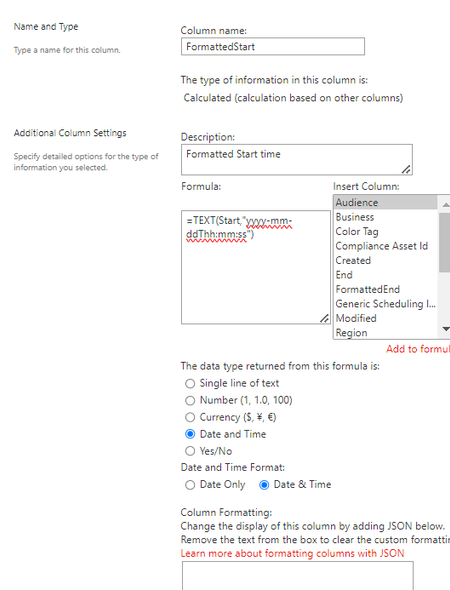
Dear SharePoint gurus- I am trying to create an "add to calendar" link that will add a Teams meeting / session to a user's calendar from a SharePoint List that I'm displaying as in a custom gallery view. I've been trying lots of ways to do this, with none of them working. Most recently I've tried to implement this https://github.com/pnp/List-Formatting/tree/master/column-samples/generic-scheduling-link from Github but I'm missing something because although the icon display works fine, the h refs/"deep links" that are meant to open Outlook and/or Teams to create events, instead return an error with my list url plus Invalid%20Date at the end. I'm not totally sure if my problem is in the Formatted Date field, or in the Start and End fields themselves. Also, the "deep links" contain + symbols. Is that an issue? I've read that it's supposed to contain %20.... I'm feeling totally lost. Can anyone help? This seems like a simple thing but I guess not??1.2KViews0likes1Comment
Need to append Excel data from daily email attachment into a single Excel sheet in Sharepoint
Each morning, I receive an email with an Excel attachment that includes our sales data for the previous day. There is only 1 tab. The email always has the same number of columns, with headers, but there are a dynamic number of rows. I manually open the Excel attachment, and copy all of the data - excluding the header row - and then paste those results into an Excel sheet in Sharepoint. This provides me a running total for historical reporting. How can I go about automating this process so when the email is received, the data within the attachment is automatically appended to the central sheet in Sharepoint? Thanks for your time!5.5KViews0likes2CommentsNo verification code when external recipients access shared secure links
Hello, I have a user that is experiencing the issue outlined in the URL below where the receiver of the OneDrive/SharePoint shared files/folder emails don't receive the code and says it's not showing up in their junk email mailbox. Any ideas on what I can check beyond that? I don't think this is something on the sender side but the receiver side. I tested with my own account and was able to get the code just fine. https://docs.microsoft.com/en-us/sharepoint/troubleshoot/sharing-and-permissions/no-verification-code-to-access-shared-secure-link4.5KViews0likes5Comments
Flow to transfer email attachments to SP site
I've created a flow to save all email attachments received in a shared mailbox to a sharepoint folder. But the thing is I want all those attachments to take storage space in SharePoint and not outlook. I can do that by deleting the email attachments from the mail once they're saved in SharePoint library. But I don't want to follow that approach. So the overall need is to make the email attachments take the storage space in SharePoint and not Outlook's with Power automate. Sharing the knowledge if you know would be really appreciable.
Outlook signature keeps repeating
Hi, Our internal e-mails have a footer, but it gets copied EVERY time e-mail is sent. This results in the below : I’ve never seen another company have this problem, is it possible to investigate to make this only occur once and not hundreds of times? Our signature has been created on the exchange admin center. Thanks593Views0likes0CommentsPulling in Date Columns into Outlook
Appreciate all following help on the issue I am dealing with in trying to rewrite JSON: I have a SharePoint form in which employee upload PTO...once they fill out the subject field on the SharePoint form, a link populates within the footer of my SharePoint form that opens up this link: https://outlook.office.com/calendar/deeplink/compose This link allows them to add their time off to their own personal outlook calendar. (it copies the title field over from the SharePoint form). In the SharePoint form, I have a StartDate field and an EndDate field (they are both date and time columns, with the date only). I want to take those field's in SharePoint and copy its' value to their respective fields in the outlook deep url interface (just like I am with the title field). This is the current code I have right now in which I want to add the new functionality to: { "elmType": "div", "style": { "width": "100%", "display": "=if([$Title], 'block', 'none')", "padding-top": "10px", "border-top": "1px solid" }, "attributes": { "class": "ms-fontColor-neutralSecondary" }, "children": [ { "elmType": "a", "attributes": { "target": "_blank", "href": { "operator": "+", "operands": [ "https://outlook.office.com/calendar/deeplink/compose", "?subject=", "[$Title]" ] }, "class": "ms-fontColor-themePrimary" }, "children": [ { "elmType": "span", "txtContent": "Post PTO on Individual Outlook Calendar" }, { "elmType": "span", "style": { "margin-left": "8px", "vertical-align": "middle" }, "attributes": { "iconName": "OutlookLogo", "class": "ms-fontColor-themePrimary ms-fontSize-xl" } } ] } ] }561Views0likes0Comments
Drag-drop *.msg into document library: cannot open attachments. Nor copy e-mail from OWA to library.
I was glad to see that, if I first drag an e-mail from desktop Outlook to the file system, I could then drag and drop the message from the file system into a SPO document library. The operation takes barely seconds. However... it seems that I cannot open attachments. The e-mail identifies the attachments, but there are no links. Is this in development? Is there a workaround? Did I miss something? It also seems like there is no way to copy an e-mail from O365 Outlook Web App to SharePoint Online within the same tenant. That seems like a basic and necessary function. Again--Is this in development? Is there a workaround? Did I miss something?Solved8.5KViews1like7Comments
Filing emails from Outlook to SharePoint libraries
Is there an out-of-the-box integration that allows copy of emails from Outlook to SharePoint libraries? I know user can open Outlook and SharePoint library side by side and drag an email from Outlook to library. However, is there a better way? Similar to how we can send an email to Microsoft Teams from within Outlook itself.Solved4.1KViews0likes2Comments