outlook
17 TopicsApp Assure Powers Seamless Transitions for the new Outlook
Microsoft is continually evolving its products to deliver greater functionality, stronger security, and better experiences for users. That evolution is now underway for Outlook as we transition from classic Outlook to the new Outlook for Windows, a move that accelerates access to innovations like Copilot and other AI-native tools essential for success in today’s business landscape. Users are already asking for their most critical productivity apps to be ready for this change. And just as App Assure helped software companies transition from Exchange Tokens to Nested App Authentication earlier this year, we now stand ready to help you make the transition to new Outlook seamless and worry-free. Benefits of new Outlook Outlook is your organization’s hub for communication and collaboration. With the transition from COM add-ins to Web add-ins, new Outlook for Windows empowers both customers and partners alike. Customers receive a streamlined interface that provides a consistent user experience across devices and AI-native tools built directly into Outlook, all while benefiting from a lower total cost of ownership and quicker access to new features. Partners benefit from Microsoft’s deep investment in extensibility, allowing them to reach the entire Outlook audience whether those users are working via Windows, Mac, Mobile, or web. This is why App Assure has been working proactively with the most popular add-ins, collaborating with software companies to update, test, validate, and publish their solutions for the new Outlook. Our goal is simple: when customers make the switch, their essential tools are ready to go, with no disruption and no surprises. Most of the 14 most common scenarios for COM add-ins, those that make up 95% of how COM add-ins are actually used, can already be handled by web add-in APIs either fully or at a basic “minimum viable product” (MVP) level. Ecosystem Readiness for our Customers One such app beloved by customers is Applications for Administrative Solutions (AFAS), whose Outlook add-in helps streamline Enterprise Resource Planning (ERP) workflows by integrating email-driven tasks directly into daily operations. To ensure a smooth transition to the new Outlook, AFAS partnered with App Assure to modernize their add-in using Graph API to facilitate moving from COM add-ins to web add-ins, aligning with enterprise-grade security and Microsoft Entra policies. Through collaborative testing, technical validation, and direct support from App Assure engineers, AFAS was able to update and publish their add-in with confidence, ensuring that customers won’t miss a beat when they move to new Outlook. But AFAS is just one example. Many software companies have been preparing their mission critical apps for new Outlook with App Assure’s guidance. Here are a number of the most recent software companies we’ve worked with (with many more on the way): Many of our partners remark on how streamlined their updates are with App Assure’s collaboration and how easy it is to work with our team. Here are a couple of their recent comments: AFAS: GnuPG: New Outlook has great momentum with users, and organizations want to ensure that the add-ins that are an essential part of their daily workflows continue to work. App Assure stands ready to assist. Many software companies are already taking advantage of our no-cost service providing guidance on how to transition from COM add-ins to web add-ins. Reach out at achelp@microsoft.com and let’s make your add-in ready for the future!1.1KViews4likes0CommentsSupercharge Your Business. Getting Small Businesses Ready for 2025 with Microsoft 365
How Microsoft 365 is Empowering Small Businesses In the ever-changing world of productivity and collaboration tools, Microsoft 365 continues to shine as a vital tool for small businesses. With a treasure trove of applications designed to boost efficiency, security, and innovation, Microsoft 365 rolled out some game-changing features in 2024, earning high praise from industry experts. Last year was a rollercoaster for business owners and their customers. They faced rising inflation, tighter budgets, and the AI revolution. Through it all, Microsoft 365 was the trusty partner that helped businesses run smoothly and operate productively. The suite introduced exciting new features, integrated smart AI capabilities, and laid out a promising roadmap to tackle current trends and challenges. Recapping An Exciting 2024 Here are some notable new features we released in Microsoft 365 -- starting with Teams and Teams Phone: We introduced the Queues App in the fall, a Teams-native solution designed to empower organizations to manage Teams Phone engagements directly from within Teams. With it, they can manage call queues, auto attendants, get real-time metrics, and see reporting – to ensure they’re conducting customer engagement efficiently. We introduced Shared Calling, which makes a single phone number and calling plan sharable by a group, so teams can better manage calls in coordination. We enhanced survivable calling with the Survivable Branch Appliance (SBA), a backup solution designed to keep your phone services running smoothly, even during network outages. It now supports call transfer, forwarding, and incoming calls during network outages. In Microsoft Excel, we added some powerful updates: The ability to automatically sync data from Forms to Excel for the web. In real-time, responses can be synced between the two apps, ensuring data is always up-to-date. There’s seamless integration so if you go to an active Form and the Responses page, you can click “Open results in Excel” to create an Excel worksheet in OneDrive to do deeper manipulation of your data. The addition of checkboxes that can drive and be driven by existing Excel functions. With Interactive Checkboxes, they automatically check or uncheck based on the value of another cell. And finally, we integrated Python into Excel for users to have the ability to manipulate data in the familiar Excel environment but now with access to powerful Python's libraries and plots to make even deeper analysis possible. We made generally available a brand new Outlook: It has an exciting, newly redesigned interface, new productivity features, and integration with Copilot. Small and medium-sized businesses currently on Microsoft 365 are already moving to it but the choice to keep using classic Outlook will still be available. To help small businesses conserve their marketing budget, we introduced Microsoft Clipchamp in the fall of 2023 and Microsoft Designer in the summer of 2024. Clipchamp is a user-friendly video editor for creating professional-quality videos without needing technical skills. In Clipchamp, we rolled out over 100 pre-built templates, transitions, noise-suppression, background removal, auto-compose, and text-to-speech – saving users tons of time in making videos that may have taken many hours to do before. Designer is a powerful, AI image-generating and graphic design tool that can help any small business create professional-quality visuals with ease – without needing technical skills. Key updates were: We integrated Designer into Word and PowerPoint so users can generate images and use those images within these apps. In addition, Designer will suggest design templates for your slides. A Microsoft 365 Copilot subscription is needed and unlocks the use of Copilot in Microsoft 365 apps. And lastly, in 2024, we empowered SMBs to see how AI could make them more productive by expanding Microsoft Copilot into our popular apps like Outlook, Word, Excel, and Teams. Users can now summarize emails, generate insights in Word and Excel, and unlock powerful meeting insights in Teams. Among many new AI-powered features, we introduced Intelligent Call Recap in Teams which serves up AI-powered insights and recaps for your VoIP and PSTN calls in Teams, helping you stay on top of important details. Microsoft’s Continued Recognitions With Analysts and Customers As a testament to our excellence, Microsoft was once again crowned a Leader in the 2024 Gartner Magic Quadrant for Unified Communications for the sixth year in a row! Here’s what Gartner called out: Microsoft Teams is the top pick for businesses, especially when using it for internal collaboration. With a super reliable 99.999% uptime, it has solid telephony services to keep you connected. Teams is perfect for global cloud telephony, offering flexible PSTN options. Plus, Gartner called out our Operator Connect feature, which allows businesses to connect their existing telephony services directly to Teams, is now available in over 96 countries, including India. Copilot in Teams and Teams Premium brings cutting-edge AI features to meetings, chats, and calls. Gartner said that for those seeking the latest in AI, Microsoft is rapidly innovating. Teams now has over 350 million monthly active users. This growth highlights the platform’s continued popularity and widespread adoption among businesses worldwide. If you haven’t tried running your meetings on Teams, there’s no better time to. And over on G2 Reviews, Microsoft 365 currently has 4.6 out of 5 stars. Users like its ease of use, seamless integrations, and the extensive suite of tools it offers. Small businesses have praised the platform’s ability to streamline workflows and supercharge productivity. TechRadar also recognized Microsoft 365 as “the original and best office productivity suite” in December 2024, giving it 4.5 out of 5 stars. We’re thrilled that they said: “What ensured that MS Office became a market leader is the comprehensive way data can be covered by different applications and moved between them, making working more efficient and hassle-free.” Transforming Operations: How ICG Build Scaled with Microsoft 365 ICG, a startup construction firm, has successfully leveraged Microsoft 365 to establish and streamline its entire operations from day one. By utilizing Excel for budgeting, Word and PowerPoint for creating branded templates, Outlook for managing emails, Power BI for data visualization, and Teams for communication and collaboration, ICG has been able to scale its business efficiently. Here are some insights from their experience: Nick Masci, Principal & Co-Founder at ICG, shares: “Having everything in Microsoft 365 makes finding information fast and easy. Microsoft 365 has been instrumental in setting up our entire operations, from budgeting in Excel to managing emails in Outlook.” Melissa McEwen, Principal & Co-founder at ICG, adds, “Using Microsoft 365, we’ve been able to create branded templates in Word and PowerPoint, which has streamlined our client presentations and enhanced our professional image.” These testimonials highlight the transformative impact of Microsoft 365 on ICG’s operational efficiency and client engagement. Navigating 2025 Together Small businesses are in for another exciting ride in 2025 as they face trends like the continued integration of AI into our lives, a shift to returning to the office, and the continued need to be as efficient as possible. Microsoft 365 is here to support you with tools that boost productivity like Copilot; Teams and Teams Phone to support all work models, and powerful features that come included in our core apps like Design Ideas in PowerPoint that gives you multiple layout and design options to help you get your new slide started. Curious to learn more? You can read more about how to choose the right plan here. Are you a small or medium business owner/decision maker currently using Microsoft 365? We'd like to hear from you! We invite you to apply to join the Microsoft 365 SMB Customer Advisory Board. Applications accepted until February 28th, 2025. See aka.ms/SMBCAB for more details.1.2KViews2likes0CommentsAdaptive Card-based Loop components – Now in developer preview!
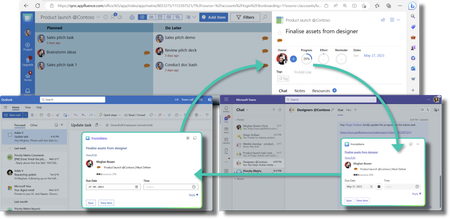
We're thrilled to announce developer public preview for Adaptive Card-based Loop components - which are live and actionable units of productivity that always stay in sync and can move freely across Microsoft 365 apps, starting with Microsoft Teams and Outlook.9.3KViews6likes0Comments