operating system deployment
33 Topics
Upgrade task sequence skipping locations and failing
Upgrade task sequence using Operating System upgrade skipping http(s) paths Hi All SCCM Experts, I have an Upgrade to Windows 11 25H2 Task sequence which was working fine until lately. Now all devices on other networks outside my IT network. When it reaches the upgrade operating system step fails and does not download the content. Everything is fine with iis, and package is distributed successfully. The TS was working fine 3 weeks ago. I had success with a collection of devices. Boundary groups are still the same fine too. CAS log is fine no issues either. There is lots of disk space and the cache max size is good too. 1 primary site server which is the DP. *Has anybody encountered this happening with an in place upgrade ts before? If so what was the fix? It should not be skipping and the content should start to download because it does resolve and see the OS Upgrade Image package. The message in smsts.log is as follows: Package location: \_SMSTSCM100465, ://\*\*\*\*\*\*/sms\_dp\_smspkg$/cm100465,https://\*\*\*\*\*/ccmtokenauth\_sms\_dp\_smspkg$/cm100465 OSDUpgradeWindows 01/10/2026 09:06:18 28116 (0x6DD4) Skipping http(s) path: :/\*\*\*\*\*\*/sms\_dp\_smspkg$/cm100465 OSDUpgradeWindows 01/10/2026 09:06:18 28116 (0x6DD4) Skipping http(s) path: ://\*\*\*\*\*\*\*/ccmtokenauth\_sms\_dp\_smspkg$/cm100465 OSDUpgradeWindows 01/10/2026 09:06:18 28116 (0x6DD4)148Views0likes5Comments
WinPE network adapter only works after manual drvload, despite driver present in SCCM boot image
Below are three sanitised versions suitable for an SCCM community forum. They retain the technical evidence needed for troubleshooting without disclosing internal server names, domains, IP addresses, MAC addresses, package IDs, or the organisation’s identity. Hi, I am building an SCCM OSD environment and have encountered an issue where the wired network adapter is not initialised automatically after WinPE loads. Environment Microsoft Configuration Manager Current Branch 2603 Current Windows ADK and WinPE add-on x64 WinPE boot image PXE-enabled Distribution Point Lenovo ThinkBook 14-IIL, Type 20SL Realtek PCIe GbE network adapter Realtek driver: rt640x64.inf Driver version: 10.43.723.2020 Symptoms The device successfully: Contacts the correct PXE server Downloads the x64 boot image Starts WinPE Reaches the Configuration Manager screen However, the Task Sequence Wizard does not continue. The task-sequence log shows that WinPE repeatedly fails to download the PXE variable file from the PXE server: Unable to download PXE variable file. Exit code=14. Failed to download PXE variable file after 6 retries. PxeGetPxeData failed with 0x8004016c. Running ipconfig at this point shows no active Ethernet adapter. Troubleshooting completed I have: Imported the Realtek PCIe GbE driver into SCCM Added the driver to the x64 boot image Confirmed the driver is listed under the boot image’s Drivers tab Reloaded the boot image using the current Windows ADK Updated the Distribution Point Confirmed the boot image is distributed successfully Confirmed the PXE copy of the WIM has a current timestamp Mounted the distributed WIM and confirmed the driver is present: Driver: oem5.inf OriginalFileName: rt640x64.inf ProviderName: Realtek ClassName: Net Version: 10.43.723.2020 The driver does not appear to bind or initialise automatically during WinPE startup. Manual workaround If I copy the complete Realtek driver folder to a USB drive and run: drvload "D:\LAN_V02\rt640x64.inf" wpeutil InitializeNetwork`` The driver loads successfully, the device receives a valid DHCP address, and it can reach the SCCM server. The task sequence then proceeds successfully if the driver is loaded before the PXE variable-file retries expire. Question Why would a network driver work correctly when loaded manually with drvload, but not initialise automatically when the same driver is confirmed as present in the distributed WinPE boot image? Is there a recommended way to make this driver load automatically that will scale across multiple laptop and desktop models? I would prefer to avoid: A model-specific prestart command Manually loading drivers from USB Adding complete model driver packs to the boot image Any advice on WinPE driver ranking, Plug and Play initialisation, driver versions, or recommended SCCM boot-image practices would be appreciated.164Views0likes1Comment
Updates Not Installing by Install Deadline
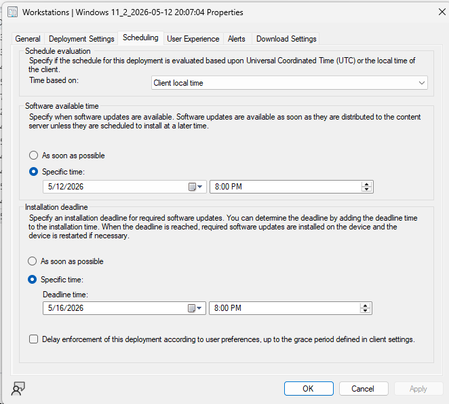
Hello all! We have an organization with about 12,000 Windows 11 Workstations. I'm noticing that even though install deadline is set, and updates are allowed to be installed before install deadline hits, we are noticing in Software Center that updates say "will install after _____" (deadline date). How can I change this? I want updates to install during the maintenance window as well as a reboot. What am I missing? Connor365Views0likes2Comments
SCCM PXE Boot Deep Dive – Backend Flow & DP Migration
SCCM PXE Boot Deep Dive – Backend Flow & DP Migration I recently worked on a Distribution Point migration and noticed PXE requests were still routing to the old DP due to DHCP/IP helper configuration. I put together a deep dive explaining: PXE flow (DHCP and TFTP sequence) Role of Distribution Points What changes during DP migration Common failure points One key takeaway: PXE issues are almost always network and routing related, not SCCM itself. Curious how others are handling PXE in large environments. Are you standardizing on IP helpers or still using DHCP options? Full article: http://SCCM%20PXE%20Boot%20Deep%20Dive%20–%20Backend%20Flow%20&%20DP%20Migration414Views0likes1CommentMECM OSD TS Application Installations fail randomly to download content.
We are experiencing a persistent and well-documented issue with MECM OSD Task Sequences where Applications randomly fail to install after the MECM client has been installed. This behavior seems to affect many environments and has been an ongoing problem for years, yet a definitive solution remains elusive. In our case, we have over 30 Applications included in the OSD Task Sequence. Despite implementing all commonly recommended mitigations—such as inserting an additional restart after the MECM client installation and including a two-minute delay before the Application install task group begins—we still encounter random failures. The issue is not limited to any specific Application; it can be any one of the 30+ Apps, and the failure to download appears to occur entirely at random. Occasionally, most of the Applications install successfully, and only one will fail, which subsequently causes the entire Task Sequence to fail with the same error. Importantly, all of these Applications install without any issues post-OSD, further confirming that the problem lies not with the Applications themselves but with the process during the Task Sequence. The randomness of which App fails also suggests an underlying process, feature, or timing issue—not an App configuration problem. We have thoroughly validated all related infrastructure settings: Boundaries and boundary groups have been triple-checked. No boundary is assigned to multiple groups. Site system assignments are correct. We are using PKI certificates and HTTPS, and the client authentication certificate is present on the device at the time of failure. The issue has been replicated across both Windows 10 and Windows 11, ruling out any specific cumulative updates or OS version anomalies. No additional language packs are being installed—only language fallback is applied via the "Apply Windows Settings" step. One suspicious observation is the lack of any reference to our local Distribution Point in the LocationServices or CAS logs during failure events. Initially, this pointed to a possible boundary misconfiguration, but after multiple checks, no issues have been identified. Unfortunately, we are unable to use the common workaround of converting Applications to Packages, due to internal policies and deployment requirements. Therefore, we need to resolve this while continuing to use Applications in the Task Sequence. Given the number of years this issue has persisted across customer environments, it's surprising there isn’t more formal guidance or documentation available to help isolate the root cause. If anyone has encountered a similar scenario or has any advanced troubleshooting tips, we would greatly appreciate your insight.629Views0likes2Comments
Issues with OSD in secondary MCM 2509 site
Hi, having upgraded primary and secondary MCM site to version 2509 I cannot perform OSD anymore on secondary site location - errors: Failed to query Management Point locator QueryMPLocator: no valid MP locations are received Boundary Group in secondary site does have assigned MP and that is secondary MCM site server - however I get this as well: <MPLocation SiteCode="" AssignedSiteCode="" MP="" MPCertificatesEx="" x86UnknownMachineGUID="" x64UnknownMachineGUID=""/> Any help would be highly appreciated.179Views1like0CommentsSCCM - 23/24H2 to 25H2 Upgrade
Hello SCCM Community! Having an issue with upgrading devices from 23 and 24H2 to 25H2, I am downloading the newest version in SCCM under Windows Servicing and Feature Upgrades and deploying it to the targeted collection, but nothing shows in Software Center. Upon checking the UpdatesDeployment log, it shows Actionable Updates = 0 in one of the lines, but I'm wondering why WUA is determining updates do not apply to the machine. I believed this could be a GPO restriction but I've confirmed that there are no conflicting GPOs or Registry Edits. Any suggestions? Thanks!2.2KViews1like1Comment
SYSTEM CENTER IMPLEMENTATION & LICENSING Guide
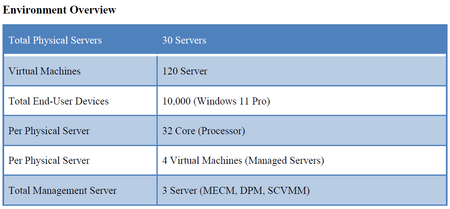
Dear Microsoft Community, Our organization is planning to deploy a comprehensive IT management solution using the Microsoft System Center Suite. The goal is to streamline infrastructure operations, enhance backup and recovery, manage both virtual and physical resources, oversee endpoints, and maintain security and compliance. We need guidance regarding the number and type of licenses required, specifically Client Management Licenses (CML), Server Management Licenses (ML), and System Center Suite licenses.1.3KViews0likes5Comments
Issues with Capturing Windows11 25H2
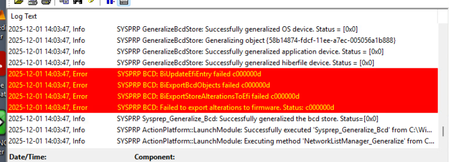
I have been trying to capture an updated image from vsphere8 and sccm. I had zero issues with 22H2 and 23H2 but now I cannot get sysprep to pass generalizing. This error keeps coming up but I have tried most things the great Google had to offer. Any one else running into this issue?2.7KViews0likes1CommentUsing REST API to get / set device variables
Hi, I'm trying to set a couple of variables against a machine name, through using the REST API. These are the variables that are set that you can see in the console if you right click properties on a device and go to the 'Variables' tab. These are handy because they can later be referenced during Task Sequences / OSD. I just can't figure out how to do it with the REST API. I have no issues doing it with the powershell module using the 'New-CMDeviceVariable' command, but my solution i'm building at the moment requires the solution to be done with rest api, not with ps modules... I can connect to REST API using powershell using commands such as the below. This all works fine. $ConfigMgrServerURL = "https://SCCMserver.domain.local" $MachineName = "MachineName1" # Following command is a sample GET request, which works. (Invoke-RestMethod -Method Get -Uri "$ConfigMgrServerURL/AdminService/wmi/SMS_R_System?`$filter=Name eq '$MachineName'" -Credential $Credential) #I can also fetch "Custom Properties" via this command (Invoke-RestMethod -Method Get -Uri "$ConfigMgrServerURL/AdminService/v1.0/Device($ResourceID)/AdminService.GetExtensionData" -Credential $Credential) Now i just can't see where i can go to set a variable on the machine. Does anyone have any ideas ? Thanks!153Views0likes0Comments