onedrive
21 Topics
Why is Microsoft 365 setup (Groups + SharePoint + Domains) still so complex?
Microsoft 365 Setup Feedback Summary Summary of Experience: Setting up two small business workspaces (Cork & Clarity and Stone Clarity Consulting) in Microsoft 365 required navigating multiple disconnected systems including the Admin Center, Outlook, SharePoint, and an external DNS provider. The process was significantly more complex than expected and not intuitive for a non-technical user. Key Issues Encountered: 1. Identity and Account Confusion - Unclear whether to create separate users or use one account with aliases - Creating multiple users caused login confusion, broken permissions, and access issues 2. Domain and DNS Setup Complexity - Required switching between Microsoft and external DNS (Looka) - Instructions were unclear and required manual troubleshooting - No clear distinction between required and optional DNS records 3. Default Domain Confusion - New groups defaulted to the wrong domain - No visible option to change domain during group creation - Required changing global default domain (non-intuitive) 4. Inconsistent Group Behavior - Outlook groups and Teams-backed groups behave differently - No indication of differences or consequences - Groups appeared in some places but not others 5. Membership and Ownership Issues - Group creator was not consistently added as member - Ownership did not always persist after changes - Groups existed but were inaccessible or invisible 6. Outlook UI Limitations - Groups not visible despite existing and being correctly configured - No clear instructions on how to 'activate' or 'follow' groups 7. SharePoint Site Not Created Automatically - SharePoint sites were not created when groups were created - Required hidden steps: Outlook → Files → Open in SharePoint - No indication that the site did not exist yet 8. SharePoint Discovery Issues - Sites do not appear until manually accessed or followed - No onboarding or guidance for discovering sites 9. Ghost/Deleted Items Still Visible - Deleted group (Cork & Clarity Hub) remained visible - No clear distinction between deleted vs followed sites 10. Fragmented User Experience - Required switching between multiple platforms - No single place to manage or understand setup status - High cognitive load for basic configuration Conclusion: While Microsoft 365 is a powerful platform, the initial setup experience is overly complex and fragmented, especially for small businesses. Simplifying group creation, making SharePoint provisioning automatic and visible, and improving UI consistency across apps would significantly improve usability and adoption.118Views0likes1Comment
Onedrive sharing not working for one user
There is only one user who cannot share with anyone external or internal. I have checked everything, they are a site owner, a site admin, a site member, we have no restrictions on sharing, it works for others. I made a new site just for them as the only admin, they still cannot share. They have been removed and re-added 5 times. We have a microsoft support ticket and they don't even seem to know the issue. What can I do?238Views0likes1Comment
Extend M365 Archive Quota capacity
In my organization, we are currently on the O365 E5 License with default 100GB mailbox size per user and 1.5TB archive quota. However, due to organizational policy and regulatory requirements, we are expected to keep all the data from inception. Hence, the requirement for a solution to extend our archive size from 1.5TB. From the official Microsoft documentation, https://learn.microsoft.com/en-us/office365/servicedescriptions/exchange-online-archiving-service-description/exchange-online-archiving-service-description#archive-storage-quota the maximum expansion of the archive mailbox is 1.5TB. Is it possible to extend the archive storage to an Azure blob? Like an automated script that moves the data from the Archive mailbox for each user to the Azure blob or any other storage service that does not have storage size limitation. I am open to suggestions. Thanks905Views1like2Comments
OneDrive for Business Offline folder issue
I have a series of left over OneDrive business offline folders from the companies that I were associated with before. My access were removed and I do not need them now. Yet I am not able to remove them off from my PC. My respective company ITs do not know what they need to do to allow me the deletion on my PC. The problems of these folders have componded to an extent that it started to conflict with my personal OneDrive. Now I cannot open any file or folder on my offline folder using explorer. Something terrible must have happened to that Cloud module that appears on the top ribbon of File explorer. On taking this issue with L1 they did a W10 update. after which other cloud services as dropbox have started to malfunction the same way as OneDrive. Later from the OneDrive forum, https://answers.microsoft.com/en-us/msoffice/forum/all/onedrive-offline-file-explorer-window-hangs/ed575ad0-54b1-45c5-8318-9ff943e2f819?page=2 I found that by creating a new profile that is an escape. Only I notice that is short lived. As there are differences in the folders synched to offline. I am trying out with the admin center for a solution other than having to format my hard disk and reinstall everything.455Views0likes1CommentRequest to Reactivate Microsoft 365 E5 Developer Subscription (Subscription ID: sparkyy)
Dear Microsoft Support Team, My Microsoft 365 E5 Developer Subscription recently expired(2/22/2025 (UTC) due to an oversight during a busy work period. However, the subscription has been actively used for the following development activities: Microsoft Graph API Integration: Developed internal collaboration tools leveraging Microsoft Graph API . Critical Project Files: Stored core project documents, including key deliverables, in OneDrive/SharePoint. Automation Workflows: Utilized Power Automate for data synchronization tasks. I kindly request the reactivation of my subscription and commit to implementing automated renewal tools (e.g., GitHub Actions) to ensure compliance moving forward. I have use it over 4years that is very helpful for my work and Team, hope it 's able to back, I tried to send mail support@email address removed for privacy reasons, but didn't any message back.due to now already close 30days, I worry my project and files will be delete,Would you please help to me for the E5 account,Thanks for you all help. my admin account email address removed for privacy reasons my domain admin account email address removed for privacy reasons Subscription domain name: sparkyy Best Regards, Spark.Yuan316Views0likes0Comments
Sending OneDrive Files Externally is not working correctly
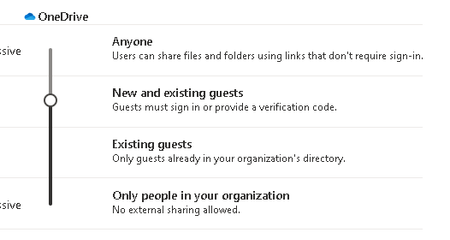
We send OneDrive file links to external partners. I setup a test account with F3 licensing which is what these users have. Sending from my test account to a Gmail account, the Gmail account receives the email, clicks the link and enters the email address and one time passcode.... no issues opening and downloading the files. For other users, when they send, the link forces them to login into our tenant to download the file. The external user doesn't have a guest account in our tenant so they have an error. I don't understand why it's doing this for the other users and not my test account. All settings are the same for both users. Below are the default sharing settings in SharePoint admin. How can I fix this quickly? Thanks1.2KViews0likes5CommentsLooking to confirm effects of "Sign out inactive users" setting in Sharepoint admin center
Hi. I'm a MS global admin for my company (and quite new to it). Our security center is recommending enabling "Idle session sign-out" in the Sharepoint admin center (setting http://yourcompanynamehere-admin.sharepoint.com/_layouts/15/online/AdminHome.aspx#/accessControl/IdleSession, documentation https://learn.microsoft.com/en-us/sharepoint/sign-out-inactive-users?WT.mc_id=365AdminCSH_spo) The documentation says the article is for "admins wanting to control user access to SharePoint and OneDrive (business) data on unmanaged devices". What about Windows devices that are managed in Intune, does it not affect them? (we only allow Intune-managed company-purchased computers to access 365 resources) Before I enable it, I want to confirm this setting only applies to the web-app/browser versions Sharepoint and OneDrive, that it doesn't cause the desktop version of OneDrive to sign out. Also, if someone is using the browser version of OneDrive and it does sign out, will it affect other people accessing shared files in said OneDrive?967Views0likes2CommentsDisable OneDrive Retention Policy for One User Account
We have one OneDrive default retention policy for all staff in M365. We have one user, because of the work they do, has one file that is rewritten many times during the day which creates an incredibly huge version history. I can't delete the version history because of the retention policy. I don't need more than a day or two retention. It looks like I can create an exclusion by going to Admin portal --> Compliance --> Data Lifecycle Mgmt --> Microsoft 365 --> Retention Polices --> I keep clicking Next till I get to "Choose Where to Apply This Policy" then I select OneDrive accounts. Under Included we have "All user accounts". Under Excluded we currently have "None". In order to exclude someone I need "remove all the included ones". In order to include someone it looks like I have to remove all the excluded ones. Clearly I am either misreading this or just not understanding. I need to exclude this one user or be able to delete the many 100's of versions of this one file. Your help is appreciated.8.2KViews0likes6CommentsDoes setting a password on an excel file encrypt the file? Cannot Autosave
I have an Excel file that will not let me set it to autosave because it wants me to turn off the encryption. I don't know that I ever turned it on. It is a year old file I use occasionally so who knows what I might have done in any particular session of using it - although I am too ignorant to ever do that intentionally. Does setting a password make the file encrypted?2.8KViews0likes3Comments