onedrive
218 Topics
How do I stop onedrive from being my default directory
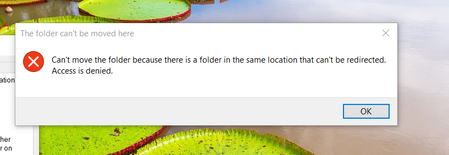
I am trying to setup an external hard drive as my default directory for pictures but my computer is forcing me to use onedrive. How can I disable this feature? I am using windows 10. This is what happens. There are no folders in any of the directories.23KViews3likes5CommentsDetect File Attribute for files on demand (PINNED/UNPINNED)
We try to work with the attributes of files in OneDrive for Business on Windows 10 (1709). This article ha a great overview: https://www.petri.com/managing-onedrive-files-demand-windows-10-fall-creators-update This is a link that documents the attributes flags: https://msdn.microsoft.com/en-us/library/windows/desktop/gg258117(v=vs.85).aspx I don't find an exact representation of the pinned and unpinned attribute: C:\Users\marcoscheel\OneDrive - Glück & Kanja Consulting AG\Transfer> attrib /? Displays or changes file attributes. ATTRIB [+R | -R] [+A | -A] [+S | -S] [+H | -H] [+O | -O] [+I | -I] [+X | -X] [+P | -P] [+U | -U] [drive:][path][filename] [/S [/D]] [/L] + Sets an attribute. - Clears an attribute. R Read-only file attribute. A Archive file attribute. S System file attribute. H Hidden file attribute. O Offline attribute. I Not content indexed file attribute. X No scrub file attribute. V Integrity attribute. P Pinned attribute. U Unpinned attribute. B SMR Blob attribute. [drive:][path][filename] Specifies a file or files for attrib to process. /S Processes matching files in the current folder and all subfolders. /D Processes folders as well. /L Work on the attributes of the Symbolic Link versus the target of the Symbolic Link We want to interact with the files in C and/or C#. This is a sample directory with files and the three states: This is a LS on a folder with different files Directory: C:\Users\marcoscheel\OneDrive - Glück & Kanja Consulting AG\Transfer Mode LastWriteTime Length Name ---- ------------- ------ ---- -----l XX.XX.XXX 11:09 5386058 o365api.pbix -----l XX.XX.XXX 21:25 18325 test.docx -----l XX.XX.XXX 16:25 (3631219) When-To-Use-What-In-Office-365.pdf This is the attribute as an int: C:\Users\marcoscheel\OneDrive - Glück & Kanja Consulting AG\Transfer> get-item *.* | % { $_.Attributes } ReparsePoint 525312 4199936 C:\Users\marcoscheel\OneDrive - Glück & Kanja Consulting AG\Transfer> get-item *.* | % { [int]$_.Attributes } 1024 525312 4199936 The system is capable to represent the cloud only file as a ReparsePoint, but the pinned and unpinned file are not matched. Is there an offical documentation regarding these "missing" flags.11KViews3likes4Comments
Script to get EmailID and Force OneDrive Signin
Hello Team, In my Organization we have rolled out OneDrive for Business. We are controlling the OneDrive silent Login using GPOs. There are 1000+ users having different samaccount and EmailID, so Single sign on is not working. We used a Powershell script to fetch the emailID and force the OneDrive login which was working fine, but Powershell is restircted for a OU where we unable to use this PS script. Query: Anyone have VB script or Batch file to fetch the current logged on user email ID and force the OneDrive to Login? Kindly assit.8.4KViews0likes4CommentsHow to generate a direct download link from the shared OneDrive link
Dear Experts and Supporters I'm a developer working on an issue related to downloading files from OneDrive. Everything was running fine until a few days ago when I reopened my app Here are my lines // shared OneDrive link example // https://1drv.ms/u/s!Atj71Lw5QEdsrQnTRHMj-fjGc49N?e=hOB5gO if (string.IsNullOrWhiteSpace(sharingURL)) return string.Empty; var base64Value = Convert.ToBase64String(Encoding.UTF8.GetBytes(sharingURL)); var encodedUrl = "u!" + base64Value.TrimEnd('=').Replace('/', '_').Replace('+', '-'); var directlyUrl = $"https://api.onedrive.com/v1.0/shares/{encodedUrl}/root/content"; And now when I cannot download from OneDrive, I have debugged and realized that there was a 401 Unauthorized exception But the file has been shared for Everyone with Edit permissions. I thought Microsoft had changed something about the shared link recently and the current way to get the direct download link as it is now is not possible. The shared link I see it's longer than before and different in format (no s!, no ?e=) So please kindly help me to solve this case. Thanks in advance! Henry Tien (email address removed for privacy reasons)6.9KViews2likes7Comments
Listing Files form OneDrive Using Python
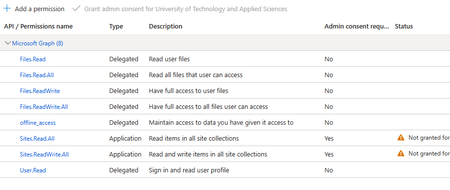
Hello, I am trying to build an App in Python that automate files creation and deletion in OneDrive. I decided to use Microsoft Graph API for this. I wrote the following script to get started. import msal import requests import json # Define the MSAL application configuration client_id = 'XXXXXXXXXXXXXXXXXXXXXXXXXXXXXXX' authority = 'https://login.microsoftonline.com/common' scope = ['https://graph.microsoft.com/.default'] # Create a PublicClientApplication object app = msal.PublicClientApplication(client_id=client_id, authority=authority) # Check if the user has already signed in accounts = app.get_accounts() if accounts: # Get an access token silently result = app.acquire_token_silent(scope, account=accounts[0]) else: # Sign in and get an access token interactively result = app.acquire_token_interactive(scope) # Get the access token from the result access_token = result['access_token'] headers = {'Authorization': 'Bearer ' + access_token, 'Content-Type': 'application/json'} # url = "https://graph.microsoft.com/v1.0/me" # works just fine url = "https://graph.microsoft.com/v1.0/me/drive/root/children" # send a request response = requests.get(url,headers=headers) # check the status code of the response if response.status_code == requests.codes.ok: print(response.json()) else: # Print the error message if the request failed print(f'Request failed with status code: {response.status_code}') print(response.json()) Fetching the profile information using the URL in line 27 works as expected. However, listing the drive items using the URL in Line 28 gives the following error: {'error': {'code': 'itemNotFound', 'message': 'Item not found', 'innerError': {'date': '2023-04-07T11:58:04', 'request-id': '.........', 'client-request-id': '.........'}}} This is the App permission: Any idea what is going on?6.5KViews0likes1Comment
How to enable "Create a link to view and edit user OneDrive files" of all MS365 users on Azure
How to enable "Create a link to view and edit user OneDrive files" for all users in bulk through the shell? We also want a particular user account to access the one drive shared link of all users as that account will post multiple files on users' shared drive on a daily basis. Kindly advise how to give a particular user read/write access to all users' one drive shared link.6.2KViews0likes1CommentSharing Folders with External Users spams Organization Login Prompts
In OneDrive, I can create a sharing link for a folder and set the link so "Anyone with the link can edit". I assume this means that even users outside my organization can edit the folders and files within the shared folder. If I test this with an external account, I'm able to edit the files and folders. However, I'm periodically prompted with a Microsoft login pop-up window. I can ignore/close the login prompt and continue editing the files. However, the login prompt keeps popping up periodically, including every time I refresh the screen. If I try to log in with the external user account, it gives me an error saying I'm not part of the tenant and I need to be added as an external user to the tenant. But then I can still close that and continue editing the files. If I send the invite link for a folder via a graph API call, I'm forced to set the "requireSignIn" property to True in the body of the request. If I set it to False, I get an error: RequireSignIn cannot be false for folders I do not run into the same issue when sharing files. Whether I create the link in OneDrive UI or via the API, the external user does not get hit repeatedly with login prompts. Am I doing something wrong or is this a bug? If sharing a folder is not allowed outside an organization, why does it allow me to create a sharing link where "Anyone with the link can edit"? And why is the external user still able to edit the files despite the repeated login prompts?5KViews0likes14Comments