onedrive for business
2140 Topics
OneDrive just opens JPG files others get error 0x80070185 cloud operation was unsuccessful
Hello everyone, we have a problem on a Windows Server 2022 RDS Server with OneDrive. I can login to OneDrive and see all my files. When I try to open the files (e.g. PDF/Word/TXT) I get an error 0x80070185 the cloud operation was unsuccessful When I try to open JPG files its working. I can create folders and move files to this folder. The sync to my local notebook is ok. I tried to reset OneDrive, no success I installed the latest version of OneDrive, we checked the firewall (sophos) no blocked connections, we disabled the local AV software (sophos) to make sure it does not block anything, no success. I reset OneDrive, deleted the App Data folder for OneDrive, deleted the OneDrive folder within my User Account. It is still the same situation, login works I can see all my files and folders I can open JPG files but now word or PDF documents. I can create new folders and TXT files, fill them with content and its synced to OneDrive. Suggested solutions found on the internet are all the same, using reset onedrive and re/install latest version. We had version 26.119.0622.0003 and updated to 26.145.0728.0011 Has anybody another solution for that? Best regards500Views0likes4Comments
OneDrive from Windows Server 2025 for remote users
I have a client that, when I started working with them, had a small staff that kept regular business hours. I set them up with a Windows Server with Active Directory and File and Print Services as well as secure internet access. Over the years, the staff has gotten smaller, and currently consists of the two partners who split their time between working in the office on workstations on their domain and from remote locations on laptop computers connected via WiFi or their cellular provider to the internet. Previously, I had their workstations using OneDrive to store the contents of the server's shared volumes in the cloud so they could be accessed from their laptops. Unfortunately, this didn't work very well presumably because the workstations in the office had to be on in order to update the contents in OneDrive. I upgraded their server to Windows Server 2025 and created an account for the server to directly use OneDrive to store the contents of its shared volumes, and shared those resources in OneDrive with the partners' laptops. Since the server is always on, I presumed that OneDrive would stay up to date. Unfortunately, the shared volumes in OneDrive are still not up to date with the contents of those volumes on the server. What am I missing? Can someone explain the nuts and bolts to me so I can compare them with what I've already done, so I can fix this lag?482Views0likes4Comments
Local OneDrive does not seem to be syncing
Good morning, We have a user who is having an issue when she launches OneDrive locally, she is asked to login and where to create the folder, but then it will error out. What she sees in OneDrive on the web is not syncing with what she sees in the her current OneDrive folder. There is an existing folder in C:\Users\UserLogin, and it was renamed to old and we did a complete rename to see if it would create a new one, and it did not. Windows stating Sorry, OneDrive can't add your folder right now. Please contact support. We have had someone run through the steps contained in this article: https://support.microsoft.com/en-us/onedrive/reset-onedrive He reports the issue is still occurring. Looking to see if there is anything else we can try. She can access her OneDrive data on the web with no issues. Thank YouSolved199Views0likes4CommentsOneDrive Login Issue Persisting for Over 2 Weeks
Hello Community, We are experiencing an issue where a user is unable to sign in to OneDrive. The problem has been ongoing for more than two weeks, and despite extensive troubleshooting, the issue remains unresolved (error screenshot attached). Troubleshooting performed so far: Unassigned and reassigned the Microsoft 365/OneDrive licence. Re-granted the required permissions. Attempted sign-in using an InPrivate/Incognito browser session. Reset the user's device. Cleared browser and OneDrive application cache. Unfortunately, the user continues to receive the same error after performing all the above steps. Has anyone encountered a similar issue or can suggest additional troubleshooting steps? Any guidance would be greatly appreciated, as the issue is impacting the user's ability to access OneDrive. Thank you in advance for your support.273Views0likes3CommentsOneDrive won't allow installation on fixed D: drive
Since 24 Sep 2026, OneDrive refuses to use my internal D:\ drive, even though the OneDrive build and Windows haven't changed. This applies to my Personal OneDrive and institutional OneDrive accounts. Build 26.168.0830.0006 (per-machine install, installed 20 Sep 2026) synced both of my accounts to D:\ normally from 20 to 23 Sep. At the 24 Sep morning boot, OneDrive could not find either folder. Setup now rejects D:\ with "Your OneDrive folder can't be created in the location you selected," and Learn More links to the article on external drives. The rejection persists with my existing folders (after renaming them) and with a brand-new empty folder (D:\ODTest). E:\, an identical Crucial T500 4TB NVMe in the motherboard's native M.2 slot, is accepted. The only difference is that D:\ is attached through an M.2-to-PCIe adapter card in an internal PCIe 4.0 slot (in place since Nov 2025). Windows reports D:\ as Fixed and NTFS (Get-Volume, DriveInfo, Win32_DiskDrive), and it does not appear in Safely Remove Hardware. Dropbox on the same drive is unaffected. With the build unchanged and Windows Update paused, this looks like a server-side change in how OneDrive classifies drives. Please restore support for internal NVMe drives attached through PCIe adapter cards.523Views2likes2Comments
OneDrive for macOS - SharePoint synced folders in Finder lose AutoSave functionality
Hi, We're experiencing a recurring issue across multiple customers using OneDrive on macOS and would like to know if anyone else has seen similar behavior. Issue description Users sync SharePoint document libraries to Finder using the OneDrive sync client for macOS. Initially everything works as expected, including AutoSave in Microsoft 365 desktop apps such as: Excel Word PowerPoint However, after a few days, AutoSave stops working for files located in the synced SharePoint folders. Users may receive synchronization-related messages, version conflicts, or notice that changes are no longer saved seamlessly to SharePoint. Troubleshooting already performed We have tested the following multiple times: Reset OneDrive (using resetonedriveapp.command) Clear OneDrive credentials from Keychain Access Unlink OneDrive Remove all locally synced OneDrive/SharePoint content Re-sync SharePoint libraries from scratch Uninstall OneDrive and reinstalling OneDrive (Standalone version) After doing this, the issue is typically resolved temporarily, but it returns again after a few days. Additional observations The issue has been observed across several different customers and environments (some just using security defaults and some with custom configurations). We have not identified any common denominator regarding SharePoint libraries, tenant configuration, or Microsoft 365 apps. OneDrive synchronization generally continues to work, but AutoSave integration with Office applications eventually breaks down. The problem appears specific to macOS. Questions Has anyone else experienced this issue? Is there a known bug affecting OneDrive for macOS and SharePoint-synced libraries? Have you found a permanent solution or root cause? Is Microsoft currently investigating similar reports? Any insights, workarounds, or references to known issues would be greatly appreciated.156Views0likes0CommentsMCP Integration for OneDrive/SharePoint
Hi OneDrive Team, I'm reaching out to explore Model Context Protocol (MCP) server integration for OneDrive and SharePoint. I am looking to integrate OneDrive/SharePoint data access into ThoughtSpot application using MCP solution. Are there existing MCP server implementations (official or community-driven) for OneDrive/SharePoint? If available, what are the connection endpoints and authentication details needed to set up the MCP server? If no MCP server currently exists, are there any upcoming plan on this and is there any alternate recommended approach present. Also could you please provide a SPOC from your team who can support further discussions and technical guidance on this integration? I'd like to schedule a follow-up conversation to explore the best path forward and discuss the use case. Thanks in advance for your help.216Views0likes0Comments
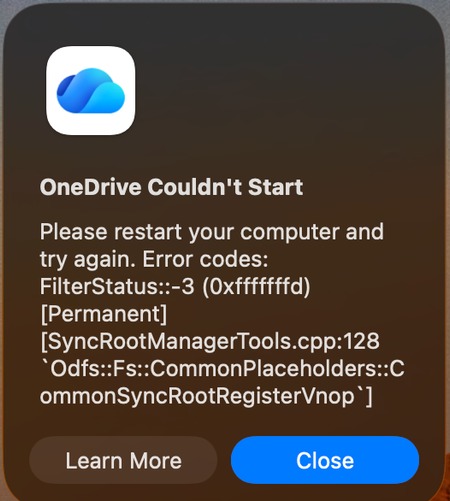
Mac: OneDrive Couldn't Start: Please restart your computer and try again
When OneDrive updated on 9/11, with build 26158.0816, I started to get this error: OneDrive Couldn't Start: Please restart your computer and try again. Error codes: FilterStatus::-3 (0xfffffffd) [Permanent] [SyncRootManagerTools.cpp:128 `Odfs::Fs::CommonPlaceholders::CommonSyncRootRegisterVnop`] I have powered off my Mac and rebooted. Restarting OneDrive does nothing. It keeps giving me this error and as a result, I also cannot live edit docs using the thick clients (Word, Excel, etc). Files I have modified with them are stuck on my Mac. I am looking for tips. Please do not ask me to unlink/de-register all of my Onedrive sync'd shares.6.2KViews12likes29Comments
OneDrive desktop client continues to experience authentication problems
We're currently investigating a widespread OneDrive desktop client authentication issue affecting many users. Initially, users experienced continuous login prompt loops. In cases where authentication succeeded, OneDrive would repeatedly connect and disconnect, asking users to re-enter their credentials multiple times. We've already attempted: Resetting OneDrive Uninstalling and reinstalling the client Removing and recreating Windows Credential Manager entries Signing users out and back into Microsoft 365 None of these steps resolved the issue. A key finding is that OneDrive Online (browser access) works normally while connected to the corporate network. Users can access their files through the web without issue. However, the OneDrive desktop client continues to experience authentication problems. Today we identified an interesting workaround: when users connect through an external network (such as a mobile hotspot), OneDrive immediately authenticates and syncs successfully. Once we go back on the corporate network and reset OneDrive, the issue returns. No firewall, VPN, or known network configuration changes have been made, and current reviews have not shown any obvious blocked traffic. Given that: OneDrive Online works internally The desktop client fails internally The desktop client works externally (hotspot) We're trying to determine what network, authentication, proxy, DNS, SSL inspection, Conditional Access, or Microsoft 365 endpoint-related issue could be impacting the OneDrive desktop client specifically. Has anyone encountered similar behavior or have recommendations on where to investigate next?638Views0likes2Comments