onboarding
225 Topics
Power BI, PL-300
I am new to this program, creating a community college level course on Power BI. I have accessed the downloads; however, I do not see the actual content anywhere. I even found best practices for 12 modules, but I can't find the modules/course materials for students anywhere. Can you please provide a link or instructions on where to go. Thank you!Solved208Views0likes2Comments
MSLE Onboarding Session — English
✨ Ready to take your teaching to the next level? Join Carlos, our MSLE Community Manager (English), for an exclusive induction session on the MSLE Program for Educators! ✅ Discover the benefits and scope of the program ✅ Explore the two main portals you’ll have access to ✅ Get your questions answered in a collaborative environment This is your first step toward an enriching experience where knowledge, innovation, and community come together to empower you. 📅 Don’t miss it—your journey starts here! MSLE Onboarding Session — English | Meeting-Join | Microsoft Teams
Institution verification blocked by AVE, and support case form is failing
Hello, I am unable to complete institution verification for Microsoft Learn for Educators, and both documented support channels are currently failing for me. What is happening: 1. My institution verification was rejected with a "Blocked" response from AVE. 2. The in-portal Create a Case form returns "An error has occurred while processing your request. Please try again later" every time I submit, so I cannot raise a ticket through the documented route. I understand at least one other educator has reported this same combination recently, so I am writing directly in the hope this can be routed manually. I believe the AVE block is because our institutional domain is pathfinderfoundation.co.in rather than a .edu or .ac.in domain. In India, a large proportion of accredited private higher education institutions operate on .co.in and .org domains, so the suffix is not an indicator of accreditation status here. AICTE records are the authoritative source. Institution details: Name: Pathfinder Research and Training Foundation (PRTF) Website: https://pathfinderfoundation.co.in/ Accreditation: Approved by the All India Council for Technical Education (AICTE), the statutory national regulator for technical and management education in India, under the Ministry of Education, Government of India. AICTE Permanent Institution ID: 1-43701706366 AISHE Code: C-72792 Programmes offered: 1. Post Graduate Diploma in Management (PGDM), AICTE approved, two-year full-time, 120 students per batch. The programme is AI-centric by design, with Year 2 specialisation tracks in AI and Data Sciences, and Marketing and Finance. 2. Professional certification programmes in cloud and AI, delivered on campus as continuing education alongside the PGDM. Both fall within the Educational Institution Option scope, which covers accredited degree, diploma, certificate, and continuing or further education programmes. Faculty verification: I am Associate Professor in the AI and Data Science department. My profile, showing my institutional email address, is published at https://pathfinderfoundation.co.in/mentor-and-guest-faculty/ Domain ownership: pathfinderfoundation.co.in is owned and operated by the institution.. Intended use: Microsoft Official Curriculum maps onto our existing teaching plan. AI-900 and AI-102 into the AI and Data Sciences track, PL-300 and MB-220 into Marketing and Finance, AZ-900 and DP-900 as core digital foundations. Could someone please complete verification manually, or advise on an alternative route while the case form is unavailable? I am happy to provide any further documentation. Thank you, Aayan Kumar Associate Professor, AI and Data Science Department Pathfinder Research and Training Foundation (PRTF) email address removed for privacy reasonsSolved590Views1like2CommentsIntegrating Proofpoint and Mimecast Email Security with Microsoft Sentinel
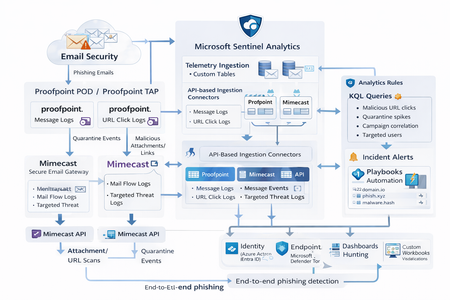
Microsoft Sentinel can ingest rich email security telemetry from Proofpoint and Mimecast to power advanced phishing detection. The Proofpoint On Demand (POD) Email Security and Proofpoint Targeted Attack Protection (TAP) connectors pull threat logs (quarantines, spam, phishing attempts) and user click data into Sentinel. Similarly, the Mimecast Secure Email Gateway connector ingests detailed mail flow and targeted-threat logs (attachment/URL scans, impersonation events). These integrations use Azure-hosted ingestion (via Logic Apps or Azure Functions) and the new Codeless Connector framework to call vendor APIs on a schedule. The result is a consolidated dataset in Sentinel’s Log Analytics, enabling correlated alerting and hunting across email, identity, and endpoint signals. Figure: Phishing emails are processed by Mimecast’s gateway and Proofpoint POD/TAP services. Security logs (delivery/quarantine events, malicious attachments/links, user clicks) flow into Microsoft Sentinel. In Sentinel, these mail signals are correlated with identity (Azure AD), endpoint (Defender) and network telemetry for end-to-end phishing detection. Proofpoint POD (Email Protection) Connector The Proofpoint POD connector ingests core email protection logs. It creates two tables, ProofpointPODMailLog_CL and ProofpointPODMessage_CL. These logs include per-message metadata (senders, recipients, subject, message size, timestamps), threat scores (spamScore, phishScore, malwareScore, impostorScore), and attachment details (number of attachments, names, hash values and sandbox verdicts). Quarantine actions are recorded (quarantine folder/rule) and malicious indicators (URL or file hash) and campaign IDs are tagged in the threatsInfoMap field. For example, each ProofpointPODMessage_CL record may carry a sender_s (sender email domain hashed), recipient list, subject, and any detected threat type (Phish/Malware/Spam/Impostor) with associated threat hash or URL. Deployment: Proofpoint POD uses Sentinel’s codeless connector (an Azure Function behind the scenes). You must provide Proofpoint API credentials (Cluster ID and API token) in the connector UI. The connector periodically calls the Proofpoint SIEM API to fetch new log events (typically in 1–2 hour batches). The data lands in the above tables. (Older custom logic-app approaches similarly parse JSON output from the /v2/siem/messages endpoints.) Proofpoint TAP (Targeted Attack Protection) Connector Proofpoint TAP provides user-click and message-delivery events. Its connector creates four tables: ProofPointTAPMessagesDeliveredV2_CL, ProofPointTAPMessagesBlockedV2_CL, ProofPointTAPClicksPermittedV2_CL, and ProofPointTAPClicksBlockedV2_CL. The message tables report emails with detected threats (URL or attachment defense) that were delivered or blocked by TAP. They include the same fields as POD (message GUID, sender, recipients, subject, threat campaign ID, scores, attachments info). The click tables log when users click on URLs: each record has the URL, click timestamp (clickTime), the user’s IP (clickIP), user-agent, the message GUID, and the threat ID/category. These fields allow you to see who clicked which malicious link and when. As the connector description notes, these logs give “visibility into Message and Click events in Microsoft Sentinel” for hunting. Deployment: The TAP connector also uses the codeless framework. You supply a TAP API service principal and secret (proofpoint SIEM API credentials) in the Sentinel content connector. The function app calls TAP’s /v2/siem/clicks/blocked, /permitted, /messages/blocked, and /delivered endpoints. The Proofpoint SIEM API limits queries to 1-hour windows and 7-day history, with no paging (all events in the interval are returned). (A Logic App approach could also be used, as shown in the Tech Community blog: one HTTP GET per event type and a JSON Parse before sending to Log Analytics.) Mimecast Secure Email Gateway Connector The Mimecast connector ingests the Secure Email Gateway (SEG) logs and targeted-threat (TTP) logs. Inbound, outbound and internal mail events from the Mimecast MTA (receipt, processing, delivery stages) are pulled via the API. Typical fields include the unique message ID (aCode), sender, recipient, subject, attachment count/names, and the policy actions or holds (e.g. spam quarantine). For example, the Mimecast “Process” log shows AttCnt, AttNames, and if the message was held (Hld) for review. Delivery logs include the success/failure and TLS details. In addition, Mimecast TTP logs are collected: URL Protect logs (when a user clicks a blocked URL) include the clicked URL (url), category (urlCategory), sender/recipient, and block reason. Impersonation Protect logs capture spoofing detections (e.g. if an internal name is impersonated), with fields like Sender, Recipient, Definition and Action (hold/quarantine). Attachment Protect logs record malicious file detections (filename, hash, threat type). Deployment: Like Proofpoint, Mimecast’s connector uses Azure Functions via the Sentinel content hub. You install the Mimecast solution, open the connector page, then enter Azure app credentials and Mimecast API keys (API Application ID/Key and Access/Secret for the service account). As shown in the deployment guide, you must provide the Azure Subscription, Resource Group, Log Analytics Workspace and the Azure Client (App) ID, Tenant ID and Object ID of the admin performing the setup. On the Mimecast side, you supply the API Base URL (regional), App ID/Secret and user Access/Secret. The connector creates a Function App that polls Mimecast’s SIEM APIs on a cron schedule (default every 30 minutes). You can optionally specify a start date for backfilling up to 7 days of logs. The default tables are MimecastSIEM_CL (for email flow logs) and MimecastDLP_CL (for DLP/TTP events), though custom names can be set. Ingestion Considerations Data Latency: All these connectors are pull-based and typically run on a schedule (often 30–60 minutes). For example, the Proofpoint POD docs note hourly log increments, and Mimecast logs are aggregated every 30 minutes. Expect a delay of up to an hour or more from event occurrence to Sentinel ingestion. Schema Nuances: The APIs often return nested arrays and optional fields. For instance, the Proofpoint blog warns that some JSON fields can be null or vary in type, so the parse schema should account for all possibilities. Similarly, Mimecast logs come in pipe-delimited or JSON format, with values sometimes empty (e.g. no attachments). In KQL, use tostring() or parse_json() on the raw _CL columns, and mv-expand on any multivalue fields (like message parts or threat lists). Table Names: Use the connector’s tables as listed. For Proofpoint: ProofpointPODMailLog_CL and ProofpointPODMessage_CL; for TAP: ProofPointTAPMessagesDeliveredV2_CL, ProofPointTAPMessagesBlockedV2_CL, ProofPointTAPClicksPermittedV2_CL, ProofPointTAPClicksBlockedV2_CL. For Mimecast SEG/TTP: MimecastSIEM_CL (seg logs) and MimecastDLP_CL (TTP logs). API Behavior: The Proofpoint TAP API has no paging. Be aware of timezones (Proofpoint uses UTC) and use the Sentinal ingestion TimeGenerated or event timestamp fields for binning. Detection Engineering and Correlation To detect phishing effectively, we correlate these email logs with identity, endpoint and intel data: Identity (Azure AD): Mail logs contain recipient addresses and (hashed) sender user parts. A common tactic is to correlate SMTP recipients or sender domains with Azure AD user records. For example, join TAP clicks by recipient to the user’s UPN. The Proofpoint logs also include the clicker’s IP (clickIP); we can match that to Azure AD sign-in logs or VPN logs to find which device/location clicked a malicious link. Likewise, anomalous Azure AD sign-ins (impossible travel, MFA failure) after a suspicious email can strengthen the case. Endpoints (Defender): Once a user clicks a bad link or opens a malicious attachment (captured in TAP or Mimecast logs), watch for follow-on behaviors. For instance, use Sentinel’s DeviceSecurityEvents or DeviceProcessEvents to see if that user’s machine launched unusual processes. The threatID or URL hash from email events can be looked up in Defender’s file data. Correlate by username (if available) or IP: if the email log shows a link click from IP X, see if any endpoint alerts or logon events occurred from X around the same time. As the Mimecast integration touts, this enables “correlation across Mimecast events, cloud, endpoint, and network data”. Threat Intelligence: Use Sentinel’s ThreatIntelligenceIndicator tables or Microsoft’s TI feeds to tag known bad URLs/domains in the email logs. For example, join ProofPointTAPClicksBlockedV2_CL on the clicked url against ThreatIntelligenceIndicator (type=URL) to automatically flag hits. Proofpoint’s logs already classify threats (malware/phish) and provide a threatID; one can enrich that with external intel (e.g. check if the hash appears in TI feeds). Mimecast’s URL logs include a urlCategory field, which can be mapped to known malicious categories. Automated playbooks can also pull Intel: e.g. use Sentinel’s TI REST API or Azure Sentinel watchlists containing phishing domains to annotate events. In summary, a robust detection strategy might look like: (1) Identify malicious email events (high phish scores, quarantines, URL clicks). (2) Correlate these events by user with Azure AD logs (did the user log in from a new IP after a phish click?). (3) Correlate with endpoint alerts (Defender found malware on that device). (4) Augment with threat intelligence lookups on URLs and attachments from the email logs. By linking the Proofpoint/Mimecast signals to identity and endpoint events, one can detect the full attack chain from email compromise to endpoint breach. KQL Query Here are representative Kusto queries for common phishing scenarios (adapt table/field names as needed): Malicious URL Click Detection: Identify users who clicked known-malicious URLs. For example, join TAP click logs to TI indicators:This flags any permitted click where the URL matches a known threat indicator. Alternatively, aggregate by domain: let TI = ThreatIntelligenceIndicator | where Active == true and _EntityType == "URL"; ProofPointTAPClicksPermittedV2_CL | where url_s != "" | project ClickTime=TimeGenerated, Recipient=recipient_s, URL=url_s, SenderIP=senderIP_s | join kind=inner TI on $left.URL == TI._Value | project ClickTime, Recipient, URL, Description=TI.Description This flags any permitted click where the URL matches a known threat indicator. Alternatively, aggregate by domain: ProofPointTAPClicksPermittedV2_CL | extend clickedDomain = extract(@"https?://([^/]+)", 1, url_s) | summarize ClickCount=count() by clickedDomain | where clickedDomain has "maliciousdomain.com" or clickedDomain has "phish.example.com" Quarantine Spike (Burst) Detection: Detect sudden spikes in quarantined messages. For example, using POD mail log:This finds hours with an unusually high number of held (quarantined) emails, which may indicate a phishing campaign. You could similarly use ProofPointTAPMessagesBlockedV2_CL. ProofpointPODMailLog_CL | where action_s == "Held" | summarize HeldCount=count() by bin(TimeGenerated, 1h) | order by TimeGenerated desc | where HeldCount > 100 Targeted User Phishing: Find if a specific user received multiple malicious emails. E.g., for user email address removed for privacy reasons:This lists recent phish attempts targeting Username. You might also join with TAP click logs to see if she clicked anything. ProofpointPODMessage_CL | where recipient has "email address removed for privacy reasons" | where array_length(threatsInfoMap) > 0 and threatsInfoMap_classification_s == "Phish" | project TimeGenerated, sender_s, subject_s, threat=threatsInfoMap_threat_s Campaign-Level Analysis: Group emails by Proofpoint campaign ID to see scope of each campaign:This shows each campaign ID with how many unique recipients were hit and one example subject. Combining TAP and POD tables on GUID_s or QID_s can further link click events back to the originating message/campaign. ProofpointPODMessage_CL | mv-expand threatsInfoMap | summarize Recipients=make_set(recipient), Count=dcount(recipient) by CampaignID=threatsInfoMap_campaignId_s | project CampaignID, RecipientCount=Count, Recipients, SampleSubject=any(subject_s) Each query can be refined (for instance, filtering only within a recent time window) and embedded in Sentinel Analytics rules or hunting. The key is using the connectors’ fields – URLs, sender/recipient addresses, campaign IDs – to pivot between email data and other security signals.2.2KViews8likes1Comment📣 MSLE Onboarding Session — Português
Olá, 👋 Espero que estejam bem! ✨Participe da sessão de introdução ao programa MSLE para Educadores! Nesta sessão: ✅ Vamos explorar os benefícios e o alcance do programa ✅ Conhecer em detalhe os dois portais principais aos quais você terá acesso ✅ Esclarecer todas as suas dúvidas em um ambiente colaborativo Este é o seu primeiro passo rumo a uma experiência enriquecedora, onde conhecimento, inovação e comunidade se unem para impulsionar você ao próximo nível. No horário indicado, favor realizar acesso ao link.MSLE: verification link expired, institution address validation also fails (UNYT)
I am registering as an Individual Educator in Microsoft Learn for Educators (MSLE) for University of New York Tirana, Albania. Timeline: Completed initial profile with institution email ******@unyt.edu.al Institution address field consistently rejected with this exact error: "Please enter proper address as the Address is incorrect or the Address was not able to be sent through the validation process." I tried multiple verified address formats for the institution, including: "Ish-shkolla e mesme elektrike, Rruga e Kavajës, pranë 21 Dhjetorit (Sheshi Ataturk), Tiranë" (official registered address) "Rruga e Kavajës, Tiranë 1000" "21 Dhjetori, Tirana" "Rruga Kavajes" (without Albanian diacritics, in case of character encoding issues) All combinations were tried with City: Tirana, Country: Albania, Zip code: both 1000 and 1001 - all rejected with the same error. Received "Action needed: Verify your email account" email from Microsoft Vetting Services (email address removed for privacy reasons) on 24 July 2026 Clicking the verification link now redirects back to the profile creation page instead of confirming status - link appears expired (5-day window stated in the email had passed) The in-portal "Create a Case" support form returns "An error has occurred while processing your request" The msacademicverify.com/Contact page (linked from the verification email for further questions) does not load at all Could someone from the Microsoft Learn for Educators team help me complete verification manually, or resend a working link, and clarify what address format is expected for Albania?Solved776Views0likes8CommentsMSLE Onboarding Session — English
✨ Ready to take your teaching to the next level? Join Carlos, our MSLE Community Manager (English), for an exclusive induction session on the MSLE Program for Educators! ✅ Discover the benefits and scope of the program ✅ Explore the two main portals you’ll have access to ✅ Get your questions answered in a collaborative environment This is your first step toward an enriching experience where knowledge, innovation, and community come together to empower you. 📅 Don’t miss it—your journey starts here! MSLE Onboarding Session — English | Meeting-Join | Microsoft Teams
Is "Endpoint Security Policies" available to us? (error getting Intune policies)
Question We'd like to use Defender \ Endpoint Security Policies. Is that possible for my tenant's environment? Getting below error on "Defender \ Endpoint Security Policies" page "There seems to be an issue getting your Intune policies" Details of our environment Purpose of defender To protect our server fleet that's running outside of Azure Tenant GCC - Moderate Scoped Region Commercial Azure East US 2 Subscription Microsoft Defender for Servers Plan 1 (No other subscription, etc.) Defender Client OS Windows 2016, 2019, 2022 RHEL8, 9 (No desktops\laptops) Agents installed on each Windows and Linux server Defender is onboarded Arc is onboarded Configured Settings and Errors Defender \ Settings \ Configuration management \ Enforcement scope https://security.microsoft.com/securitysettings/endpoints/configuration_management2 Error at top of page "Intune is not configured to allow Microsoft Defender for Endpoint to manage security configuration settings." Use MDE to enforce security configuration settings from Intune Set to ON Enable configuration management Windows Server devices On tagged devices Windows Server Domain Controller devices On tagged devices Linux devices On tagged devices Security settings management for Microsoft Defender for Cloud onboarded devices. Set to ON Manage Security settings using Configuration Manager Set to OFF Defender \ Settings \ Configuration management \ Intune Permissions https://security.microsoft.com/securitysettings/endpoints/intune_permissions Getting error "Access needed You don't have the right permissions in AAD to view this information (in addition to those you already have in MDE). To adjust your permissions, go to the AAD portal." Defender \ Endpoint Security Policies https://security.microsoft.com/policy-inventory On main page, getting below error There seems to be an issue getting your Intune policies If I try to make a new policy There seems to be an issue loading the policy authoring wizard. Intune \ Endpoint security https://intune.microsoft.com/#view/Microsoft_Intune_Workflows/SecurityManagementMenu Getting Error You don't have access Intune roles | My permissions https://intune.microsoft.com/#view/Microsoft_Intune_DeviceSettings/RolesLandingMenuBlade/~/myPermissions You're an administrator with full permissions to all Microsoft Intune resources. Intune roles | Administrator Licensing https://intune.microsoft.com/#view/Microsoft_Intune_DeviceSettings/RolesLandingMenuBlade/~/administratorLicensing Allow admins without an Intune license to access Intune. Their scope of access is determined by the Intune roles you've assigned them. I've clicked the box "Allow access to unlicensed admins" Alternatives If Defender \ Endpoint Security Policies isn't available, as alternatives, I guess we could use SCCM Antimalware policies to manage Windows servers Deploying a central mdatp_managed.json to manage Linux servers However, it would be greatly preferred to use the Defender \ Endpoint Security Policies feature for Windows and Linux695Views0likes4Comments
Looking for a simple deployment guide
MS Learn is a great starting point, but it just doesn't seem to cover the steps needed to get up and running safely. I have concerns about adding or setting something that suddenly creates a vulnerability or exposure. Where is the installation guide that installs and configures the solution then tells you, "You are now protected". Do I really want to set my own policies? Why aren't the default set of rules good enough, safe enough. I can't have a solution that is so complicated I need to hire a team to manage it 24 hours a day. I am okay investigating an alert and helping a user solve a pop-up question. Why is every major corporation around the world required to re-invent the same or similar policies the company next door is creating to make this tool work? I want to onboard all of our Intune devices and monitor anything that CAN'T be stopped by default security measures. Just the fact that Sentinel appears to be changing as an embedded tool within Defender gives me hope that this will be getting closer to a more manageable tool. But that still seems a way off. I am ready to do the reading and research to get this set up but I am hoping for a guide that is specific enough to achieve a final result. Thank for understanding my challenges here.510Views1like2Comments