on-premises
25 Topics
Azure AD Health Failing
I am on the latest version of Azure AD Connect (2.5.79.0)... There are no network/DNS/connectivity issues at our site, it seems to me that Azure AD Health Service is having trouble because the endpoint is experiencing a service issue.. Is anyone else having the same problem with failure alerts/etc? I checked by running "Test-MicrosoftEntraConnectHealthConnectivity -Role SYNC" command, the stack trace throws an undocumented error number and complains of rate limiting issues... smells like the server is being overwhelmed or there are other issues slowing down the endpoint/service with the consequence that connections are piling up causing this error: Connectivity Test Step 1 of 2: Testing dependent service endpoints begins ... AAD CDN connectivity is skipped. Connecting to endpoint https://login.microsoftonline.com Endpoint validation for https://login.microsoftonline.com is Successful. Connecting to endpoint https://s1.adhybridhealth.azure.com/providers/Microsoft.ADHybridHealthService/diagnostics/version Endpoint validation for https://s1.adhybridhealth.azure.com/providers/Microsoft.ADHybridHealthService/diagnostics/version is Successful. Connectivity Test Step 1 of 2 - Testing dependent service endpoints completed successfully. Connectivity Test Step 2 of 2 - EventHub data upload procedure begins ... Tenant Id is successfully collected during agent registration. Server rejected Eventhub data upload, here is the exception: Microsoft.ServiceBus.Messaging.ServerBusyException: The request was terminated because the entity is being throttled. Error code : 50002. Sub error : 101. Please wait 4 seconds and try again. To know more visit https://aka.ms/sbResourceMgrExceptions and https://aka.ms/ServiceBusThrottlingS:N:ADHSPRODWUSEHSYNCIA:EVENTHUB:ADHSPRODWUSEHSYNCIA~22527,CL:30,CC:32,ACC:356250,LUR:WinEnd,LUT:2025-10-08T03:03:12.2035867Z,RC:1 TrackingId:<<< anonymized tracking ID>>> 0, SystemTracker:adhsprodwusehsyncia:eventhub:adhsprodwusehsyncia~22527, Timestamp:2025-10-08T03:03:13 at Microsoft.ServiceBus.Common.ExceptionExtensions.ThrowException(Exception exception) at Microsoft.ServiceBus.Common.AsyncResult.End[TAsyncResult](IAsyncResult result) at Microsoft.ServiceBus.Messaging.EventHubSender.Send(EventData data) at Microsoft.Identity.Health.AgentV1.ConfigurationPowerShell.TestAzureADConnectHealthConnectivity.TestInsightServiceDataUploadProcedure() Azure AD Connect Health agent could not communicate to the Health Service using port 5671. As a result, agent communication will fall back to use port 443, but use of port 5671 is recommended. Please allow outbound communication using port 5671. Tenant Id is successfully collected during agent registration. Server rejected Eventhub data upload, here is the exception: Microsoft.ServiceBus.Messaging.ServerBusyException: The request was terminated because the entity is being throttled. Error code : 50002. Sub error : 101. Please wait 4 seconds and try again. To know more visit https://aka.ms/sbResourceMgrExceptions and https://aka.ms/ServiceBusThrottlingS:N:ADHSPRODWUSEHSYNCIA:EVENTHUB:ADHSPRODWUSEHSYNCIA~22527,CL:30,CC:32,ACC:356837,LUR:IncomingUsage_ADHSPRODWUSEHSYNCIA-5,LUT:2025-10-08T03:03:54.9448143Z,RC:1 TrackingId:<<< anonymized tracking ID>>>, SystemTracker:adhsprodwusehsyncia:eventhub:adhsprodwusehsyncia~22527, Timestamp:2025-10-08T03:04:00 at Microsoft.ServiceBus.Common.ExceptionExtensions.ThrowException(Exception exception) at Microsoft.ServiceBus.Common.AsyncResult.End[TAsyncResult](IAsyncResult result) at Microsoft.ServiceBus.Messaging.EventHubSender.Send(EventData data) at Microsoft.Identity.Health.AgentV1.ConfigurationPowerShell.TestAzureADConnectHealthConnectivity.TestInsightServiceDataUploadProcedure() Azure AD Connect Health agent could not communicate to the Health Service using port 5671. As a result, agent communication will fall back to use port 443, but use of port 5671 is recommended. Please allow outbound communication using port 5671.
Microsoft Entra Connect sync stopped, request upgrade and library not found
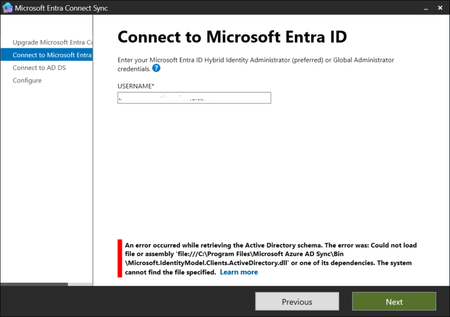
Hello, I have the latest (for our company, present on Entra blade) version of Microsoft Entra Connect Sync: 4 days ago I noticed on Synchronization Service Manager that there is no sync of data; I have started the Microsoft Entra Connect Sync and found a big button with "Upgrade" word; I tried to execute the upgrade but when the it arrives to the Connect to Microsoft Entra ID step, I fill with my global administrator account but found a stop error: An error occured while retrieving the Active Directory schema. The error was: Could not load file or assembly 'file:///C:\Program Files\Microsoft Azure AD Sync\Bin\Microsoft.IdentityModel.Clients.ActiveDirectory.dll' or one of its dependencies. The system cannot find the file specified. and when I click again on Next I have the same request of global administrator user and password and the same error. Now, the library is not present but I verified, in a test tenant where I have a working Entra Connect Sync system, that the files is not present even there (and also when I start Microsoft Connect Entra Sync I haven't the upgrade button there); I also tried to repair the installation, but obviously the file is no there. What can I do? Are there other people with the same issue? Any idea is appreciated.1.1KViews0likes3Comments
NgcSet stays NO despite working WHFB setup - RPC 0x800706ba error
Hi everyone, I need help with a Windows Hello for Business certificate trust deployment that's almost working but stuck on the final step. **What's Working:** - Manual certificate enrollment works perfectly: `certreq -enroll -user -config "MyCA.domain.local\MyCA-CA" "MyWHFBTemplate"` - TPM 2.0 is ready, enabled, and functional - All Group Policies applied correctly (computer and user) - CA server healthy, templates published **What's NOT Working:** - `dsregcmd /status` shows `NgcSet : NO` (should be YES) - `NgcSvc` (Microsoft Passport) service is stopped on client - Getting error: "RPC server is unavailable (0x800706ba)" during automatic certificate enrollment - PIN setup fails because NGC containers won't create **The Strange Part:** Manual certificate enrollment works perfectly, but automatic enrollment fails with RPC errors. Both should use the same communication path to the CA. **Environment:** - On-premises certificate trust deployment (no Azure AD) - Domain-joined Windows 11 clients - Windows Server 2019/2022 infrastructure **Questions:** 1. Should NgcSvc start automatically when WHFB policies are applied? 2. Why would manual cert enrollment work but automatic fail with RPC errors? 3. Is there a difference in how system context vs user context accesses the CA? Has anyone seen this specific combination before? Any ideas what could cause this behavior? Thanks for any help!612Views0likes4Comments
Support tickets unresolved after 11 months; escalation requests ignored; stuck in a feedback loop
Hello, We have been unable to update O365 applications for close to a year now. When we update the applications, our end-users are unable to authenticate and receive 1001 errors. We have had a support ticket open now for 11 months. We are stuck in a loop where support asks us to demonstrate the issue. I can consistently reproduce this issue. This is a cry for help. Thanks to anyone who has any suggestions.87Views0likes0CommentsWindows Hello for Business Configuration Issue with multiple Devices
Hello everyone, We are currently facing an issue with our Windows Hello for Business configuration for Multiple Users/Devices, and I'd like to seek your assistance and insights on this matter. We've implemented Windows Hello for Business through Group Policy (User Configuration) and deployed it within our User Organizational Unit (OU). Initially, everything seemed to be working seamlessly. Users were able to log in to their devices, set up Windows Hello for Business, and use it without any problems. However, a problem arises when the same user attempts to log in from another device. Ideally, we expect the same behavior, where the user gets the Windows Hello configuration, successfully sets up their PIN, and can use it for subsequent logins. However, after a reboot, the user is prompted to log in with their password only, and the Windows Hello Sign-in option does not appear. What's even more concerning is that this issue has now started affecting the user's ability to log in with a PIN on their initial device as well. We would greatly appreciate your insights and suggestions on how to troubleshoot and resolve this issue. If anyone has encountered a similar situation or has any guidance on resolving Windows Hello for Business configuration problems, please share your expertise. Thank you in advance for your assistance. Best regards, Rashad Bakirov836Views0likes0Comments
AzureAD Joined Device and onprem w/ PIN
I am working on a scenario where we want to move to Azure ADDS, we still have some need for LDAP/S, Unix, etc but want on prem to go away. Endpoints are already azure AD Joined to the 365 Tenant. Tenant is insync with onprem w/ Azure AD Connect w/ password hash as well... here is where it gets fun...endpoint with password login has no problem accessing onprem file server, but as you know Azure Join Devices force pin enrollment and default to it. When user logs in with PIN, I get cred prompt...eventually this box will goto azure, but I suspect this will occur when it gets out there also... I have attempted AzureAdKerberosServer, oneway trust with AADDS/Local and domain certificate avenue, no love...has anyone gone down this rabbit hole?3.2KViews0likes3CommentsWindows AD account password expired but user can still send/receive email and use Teams
Hi. I recently discovered that some users with expired AD passwords are still working as if nothing has changed, which caught me by surprise. All the users affected do not use the VPN on a regular basis, or sign into Office 365. They all use desktop office for their email (Outlook) and chats (Teams). We are all still working from home. It appears as if a user is only challenged to update their expired password once they physically authenticate against the domain controller(s). But what if they never do? This means a user with an expired password will continue to send/receive emails and send chats in Teams regardless of when their password expired, unless they perform some form of "logon". I ran a PowerShell script to elucidate more and found that we have dozens of users in this boat. Some users have passwords that expired YEARS ago! Is this by design? In that the password expiration attribute is pointless until said account actively connects or authenticates to the domain? Why is the "expiration" attribute not part of the user SID? I'm baffled. We have on premise domain controllers which syncs out to Office 365 via ADSync and this is syncing fine with no errors, including password sync. Any help appreciated.Solved33KViews0likes2Comments
AD Sync removal
Hi, Currently working on a local AD forest / domain tear down process and looking to remove the current AD synch process. The forest is currently synchronizing to a multi domain O365 tenant which also has AD Sync running from other domains in a different forest. What is the best safest way to remove AD sync from the legacy Forest / Domain with out impacting the other forest / domains synch process? Looking forward to you advise. Cheers2.5KViews0likes2CommentsAzure AD SSPR Password write back issue
Hi all, A company I work for have issues with the reset password function with AD Connect. In the SSPR audit logs in Azure AD, we face on 'Reset password (self-service)' the status reason 'OnPremisesAdminActionRequired', with a follow up event log within the AD connect server: event ID: 33004 with error "hr=80230626, message=The password could not be updated because the management agent credentials were denied access" I face this issue before and this was causing because the AD DS connector account did not have the right permissions. In this case this is not. What I have done so far: - Updated AD Connect from 2.0.89.0 to 2.0.91.0 - enforced TLS 1.2: https://docs.microsoft.com/en-us/azure/active-directory/hybrid/reference-connect-tls-enforcement - Checked AD DS connecter account 'MSOL_xxxxxxxx' permissions: https://docs.microsoft.com/en-us/azure/active-directory/authentication/troubleshoot-sspr-writeback#verify-that-azure-ad-connect-has-the-required-permissions - the user do not have the options 'password never expires' or 'user cannot change password' configured - Let AD connect talk to another DC dc02 instead of dc01 - Checked connection to SSPR service from DC's : Test-NetConnection -ComputerName ssprdedicatedsbprodscu.servicebus.windows.net -Port 443 - The action 'Change password (self-service)' are successful (via my account portal) , only action 'Reset password (self-service)' face this issue (via passwordreset.microsoftonline.com) -- both use the same OnPremisesAgent ->> AADConnect Have anyone a idea what else I can try more? Regards, RicardoSolved27KViews0likes13CommentsSelf Service Password Reset with Password Writeback
I am looking into exploring the option for Self Service Password Resets on Office 365, and since this is a hybrid I am going to enable password writeback. Everything works great but I have a question regarding the password writeback. What I have found is that once Password Writeback is enabled you don't necessarily need to be in the group to allow for SSPR. Therefore if you are able to logon to the account successfully, you can reset the password without answering any security questions, MFA, etc. I know you can restrict who can use SSPR, but is there a way to restrict who can reset their password via the portal? A few additional notes: Most (but not all) accounts are using an E3 license. Some only have a basic e-mail only license, or no license at all. MFA will be enabled but there are accounts where this won't work being a shared account. Those are the accounts I am concerned where someone can logon reset the password and have access to the local domain. Any thoughts or feedback would be appreciated.2KViews0likes3Comments