on-premises
330 Topics
Office365 Migration
Hello, On Friday December 28th we started our Office365 tenant to tenant migration. On the old tenant we disabled dirsyn (Azure AD Connect) and then uninstalled the tool altogether from our on-prem domain controller. On Saturday December 29th we installed the Azure AD connect again and connected it to the new tenant once we have the domain verified to do SMTP matching to the on-prem AD accounts. Fast forward to this week and we have most users online, however we have a small amount that continually get password prompts in Outlook. On the problem users we've reinstalled Office, Wiped out Outlook profiles, etc. We've also noticed on these machines (we are 100% Windows 10 Pro) that under the Windows 10 Settings > System> Shared Experiences it's showing Fix me on some of the workstations but not all of the problem ones show this. Under Windows 10 Settings > Accounts >Email & App Accounts/Access Work or School sometimes shows the old tenant name. It's almost like some of these accounts are connecting to the new tenant properly, or there something lingering in either our AD our on these workstations that is pointing to the old tenant still. We've also now tried importing the ADMX templates for Office 2016 and disable previous Autodiscover settings in GPO.Solved2.6KViews1like7Comments
Tenant to Tenant Migration from Existing Hybrid Model
Our company was recently acquired, and the desire is to migrate our tenant into theirs. - we are in a Hybrid deployment (1 remaining OnPrem Exchange server** and using AzureAD Sync) - we are a relatively small shop (~51 accounts w/<400GB total in mailboxes, 200GB in OneDrive, very little in SharePoint) - we create users and mailboxes OnPrem and migrate them to O365 and manage them OnPrem **In preparation and testing for this, I have taken our OnPrem Exchange server out of the mailflow, pointed the MX records to O365, disabled the connectors, etc and mail flows perfectly fine. I also created a test user in our LocalAD and synced that account to O365 (didn't create a mailbox on the local Exchange server), assigned licensing and let it create an ExchangeOnline mailbox and that mail flows fine as well. - they are not hybrid - they are using Azure AD Sync. They create and manage users in their local AD and sync them to O365 (same as we do) - they do not have any OnPrem Exchange, so all of their users mailboxes are created in the cloud automatically as licenses are applied. The question is, what is the best approach? We've looked at some third party utilities for the migration that look good, but the concern with that method is what happens then to my local AD and AzureAD Sync; managing the existing users that were created, synced and then migrated; and my local users authenticating to it, etc? Are we going to be able to fully decommission the last Exchange server and not lose the ability to manage our folks. I need them to authenticate to our Local AD so do I then point AzureAD Sync to the domain in the new tenant? We talked about the possibility of simply creating the users manually in the other tenant, then exporting/importing their data to their new accounts (instead of migrating the account itself) to remove the need to maintain an OnPrem Exchange server if the users weren't created locally then migrated. How then does that affect them authenticating to our local AD since as I understand it, you cant sync from AzureAD back to a local AD. What about the possibility (same as what I wrote in BOLD above) of recreating all of the users in my local AD (with a different UPN), not creating mailboxes locally, syncing them to 0365, assigning licensing and letting the ExchangeOnline mailbox be created automatically (no mailbox migration like we are currently doing). Then we could import their PST to their new mailbox. Now, the users WOULD exist in our localAD and when we migrate that new batch of users to the new tenant, we could point AzureAD Sync to the new tenant and it should sync. AND since they never had a mailbox on our OnPrem Exchange server, there would be no need to maintain it. Appreciate any help on working through this!5.6KViews0likes5Comments
Planning a Google Workspace to Microsoft 365 Migration? What Should You Consider?
Hi everyone, Has anyone recently migrated from Google Workspace to Microsoft 365? I’m interested in knowing what challenges you faced during the migration, especially around mailbox data, calendars, contacts, user mapping, or the final cutover process. For those planning the migration, what are the key things you recommend preparing before getting started? Would like to hear your experiences and suggestions.335Views0likes4CommentsAzure AD SSPR Password write back issue
Hi all, A company I work for have issues with the reset password function with AD Connect. In the SSPR audit logs in Azure AD, we face on 'Reset password (self-service)' the status reason 'OnPremisesAdminActionRequired', with a follow up event log within the AD connect server: event ID: 33004 with error "hr=80230626, message=The password could not be updated because the management agent credentials were denied access" I face this issue before and this was causing because the AD DS connector account did not have the right permissions. In this case this is not. What I have done so far: - Updated AD Connect from 2.0.89.0 to 2.0.91.0 - enforced TLS 1.2: https://docs.microsoft.com/en-us/azure/active-directory/hybrid/reference-connect-tls-enforcement - Checked AD DS connecter account 'MSOL_xxxxxxxx' permissions: https://docs.microsoft.com/en-us/azure/active-directory/authentication/troubleshoot-sspr-writeback#verify-that-azure-ad-connect-has-the-required-permissions - the user do not have the options 'password never expires' or 'user cannot change password' configured - Let AD connect talk to another DC dc02 instead of dc01 - Checked connection to SSPR service from DC's : Test-NetConnection -ComputerName ssprdedicatedsbprodscu.servicebus.windows.net -Port 443 - The action 'Change password (self-service)' are successful (via my account portal) , only action 'Reset password (self-service)' face this issue (via passwordreset.microsoftonline.com) -- both use the same OnPremisesAgent ->> AADConnect Have anyone a idea what else I can try more? Regards, RicardoSolved26KViews0likes13CommentsPlanning to Migrate OST Files to Microsoft 365 - Need Some Guidance Before I Start
Hey folks, I have a task coming up where I need to migrate OST files into Office 365 mailboxes. A few of the OST files I'm dealing with are orphaned or corrupted which is making me a bit nervous about the whole process. A couple of things I'm unsure about: How to handle OST files that are no longer linked to an active profile Whether corrupted OST files can still be migrated to Office 365 without major data loss Best way to verify data integrity after migration Haven't started yet and want to make sure I'm going in the right direction before I begin. Has anyone migrated corrupted or orphaned OST files to Office 365? What approach worked best for you?198Views1like2Comments
Migration from Hosted Exchange (Hybrid) to M365 Classic Outlook Client Problems and Solutions
Hello Everyone, I'm a tech who started on a 8088 processor in the 80's. Not mentioning the Vic20 and C64 since that hardly seem relevant! I'm posting here to hopefully help the next person with the issues I've had over the last few weeks. My client had to port his email from a provider with an on-perm Exchange server in a Hybrid setup with M365 to his own M365 environment. I expected this was to be about 3 hours of work for me - setup M365 environment, plan the cut-over window, update the Outlook clients on each PC. It ended up being roughly 20 hours of my time and at least 10 hours of dedicated time for my client. For those wanting to jump directly to what mostly fixed it use this link, it should get you past the dreaded "an encrypted connection to your mail server is not available" when trying to add the mail account into a clean profile. Use https://support.microsoft.com/en-us/windows/classic-outlook-troubleshooters-086e3d66-5404-4034-9cc5-545909dcc166 and pick "Classic Outlook Profile Setup Troubleshooter" Most hits are going to tell you its an autodiscovery issue, but if you're reading this I'm going to assume you've already confirmed that. Our issue was some ghost configuration, only on the PCs previously setup for mail on the old server. A new PC could add the same account without issue. Some of the research suggested this would not happen if the proper Microsoft migration process is followed to move the account - but in our case the previous provider was unable to perform the migration. I'll skip over the research we tried along the way, such as New Outlook Profiles, Registry entry changes, MS Personal users with the same email as MS Business Users, Autodiscover problems (including concerns that the base website for the client was offering invalid data), and so on. After each hit where we applied a fix we again had to try adding the mail to the profile, and each time we sat watching the little circle for up to 5 minutes only to get the same error. Now, once we found the link above - which did not come up in most searches - things got better, but not 100%. We added the profile ok but then Outlook gave a permission error while starting. To fix that, the user signed in must have administrative access and you use File Explorer to navigate to the folder identified in the error. In our case it was in folders kept under \Windows\System32\. When prompted that we need to grant permanent access we said yes. In our case this is where Outlook was storing the ost files. That worked for most of the clients, but we had one additional issue where the error was pointing to a folder that didn't exist. Just creating the folder was not enough, the final fix was to hold CTRL-SHIFT down while opening Outlook to start in administrative mode to allow it to create the ost file in the newly created folder. Finally 3 weeks after our cut over window, while the client had to use OWA, we were able to get outlook running. This was critical for my client because they did not have access to the mail history since the migration didn't happen - they had to open a copy of their PST in Outlook and use mail in OWA and constantly bounce back and forth. I hope this helps someone avoid the pain we went though!90Views0likes0Comments
NgcSet stays NO despite working WHFB setup - RPC 0x800706ba error
Hi everyone, I need help with a Windows Hello for Business certificate trust deployment that's almost working but stuck on the final step. **What's Working:** - Manual certificate enrollment works perfectly: `certreq -enroll -user -config "MyCA.domain.local\MyCA-CA" "MyWHFBTemplate"` - TPM 2.0 is ready, enabled, and functional - All Group Policies applied correctly (computer and user) - CA server healthy, templates published **What's NOT Working:** - `dsregcmd /status` shows `NgcSet : NO` (should be YES) - `NgcSvc` (Microsoft Passport) service is stopped on client - Getting error: "RPC server is unavailable (0x800706ba)" during automatic certificate enrollment - PIN setup fails because NGC containers won't create **The Strange Part:** Manual certificate enrollment works perfectly, but automatic enrollment fails with RPC errors. Both should use the same communication path to the CA. **Environment:** - On-premises certificate trust deployment (no Azure AD) - Domain-joined Windows 11 clients - Windows Server 2019/2022 infrastructure **Questions:** 1. Should NgcSvc start automatically when WHFB policies are applied? 2. Why would manual cert enrollment work but automatic fail with RPC errors? 3. Is there a difference in how system context vs user context accesses the CA? Has anyone seen this specific combination before? Any ideas what could cause this behavior? Thanks for any help!553Views0likes4CommentsMoving Exchange Account Source Account
I have a very complex environment I'm hoping someone might jump start my search. We have two domains syncing to Entra ID. One domain is a resource forest where our Exchange environment sits. That domain contains disabled stub accounts synced to our primary domain where the actual user accounts sit. The source for all EXO mailboxes are the stubs in the resource forest. Those accounts are kept in sync using FIM 2008. We're wanting to decom that entire resource environment and move all of the attributes to the primary domain. The resource domain schema is the last version of Ex 2016. The primary domain schema is Ex 2010 SP1. I know my first step is to update the primary schema, however, has anyone encountered a situation like this? Any help would be greatly appreciated.147Views0likes1Commentschedule recurring Out of Office
Hi All I want to schedule recurring out of office every day. i have shared mailbox and i want to set out of office for shared mailbox for every email which is received from 9PM to 6AM as the users who have access to this shard mailbox works from 6AM to 9PM. Is this possible to set on exchange as OWA is disabled in my environment. Please guide me on thisSolved7.1KViews1like3Comments
Microsoft Entra Connect sync stopped, request upgrade and library not found
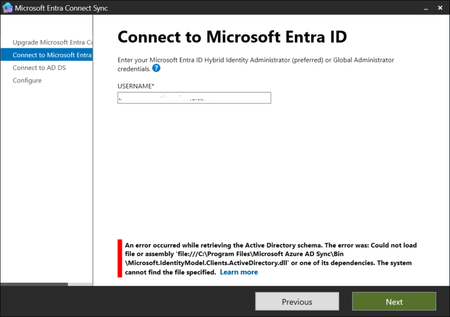
Hello, I have the latest (for our company, present on Entra blade) version of Microsoft Entra Connect Sync: 4 days ago I noticed on Synchronization Service Manager that there is no sync of data; I have started the Microsoft Entra Connect Sync and found a big button with "Upgrade" word; I tried to execute the upgrade but when the it arrives to the Connect to Microsoft Entra ID step, I fill with my global administrator account but found a stop error: An error occured while retrieving the Active Directory schema. The error was: Could not load file or assembly 'file:///C:\Program Files\Microsoft Azure AD Sync\Bin\Microsoft.IdentityModel.Clients.ActiveDirectory.dll' or one of its dependencies. The system cannot find the file specified. and when I click again on Next I have the same request of global administrator user and password and the same error. Now, the library is not present but I verified, in a test tenant where I have a working Entra Connect Sync system, that the files is not present even there (and also when I start Microsoft Connect Entra Sync I haven't the upgrade button there); I also tried to repair the installation, but obviously the file is no there. What can I do? Are there other people with the same issue? Any idea is appreciated.1.1KViews0likes3Comments