office scripts
503 TopicsAnnouncing buttons for Office Scripts: Run scripts with a workbook button
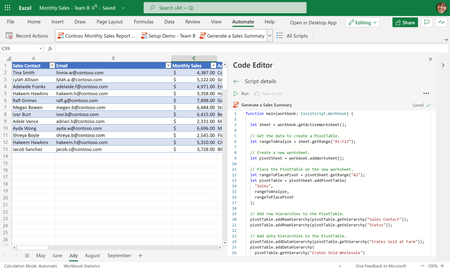
Starting today, you—and your colleagues—can run Office Scripts by pressing a button within a workbook. This highly requested feature introduces a new way to share scripts with colleagues, making it easier for users to find and run your scripts.22KViews8likes27CommentsAutomate your tasks with the Automate tab—now in Excel for Windows and Mac
The Automate tab is growing beyond your web browser and onto your desktop! Starting today, the Automate tab is now available for all eligible users in Excel for Windows and Mac. Previously, this tab was only available in Excel on the web.306KViews5likes49CommentsOffice Scripts is now available for Office 365 Enterprise E1 and Office 365 F3 licenses
We are happy to announce that Office Scripts in Excel is now available for customers with Office 365 Enterprise E1 and Office 365 F3! Starting today you can find the Office Scripts feature set in the Automate tab on the Excel ribbon.22KViews4likes5Comments
Office Scripts does not refresh Power BI Query live connections in Excel Online
Hello everyone, I've got the following problem and am nearly going insane because it's causing so much problems 🥲 Summary The Office Scripts method workbook.refreshAllDataConnections() no longer refreshes a live connection to a Power BI Semantic Model in Excel Online. Environment Excel Online Office Scripts Power Automate ("Recurrence" + "Run Office Script") Live connection to a Power BI Semantic Model (Analyze in Excel) Expected behavior Calling workbook.refreshAllDataConnections(); should trigger the same refresh as manually selecting Data → Refresh All in Excel Online. Actual behavior The script completes successfully without any error, but the workbook does not requery the Power BI Semantic Model. Additional observations The same workbook worked correctly for approximately two years. The issue started around mid-July 2026. Manual Data → Refresh All in Excel Online refreshes successfully. Refreshing in Excel Desktop also works correctly. The problem occurs both: when running the Office Script manually from the Automate tab in Excel Online when running the same Office Script from Power Automate ("Run Office Script") This suggests the issue is specific to the Office Scripts implementation of refreshAllDataConnections() rather than the workbook, authentication, or the Power BI connection itself. Steps to reproduce Create an Excel workbook with a live connection to a Power BI Semantic Model. Confirm that manual Data → Refresh All refreshes the data successfully. Create an Office Script containing only: function main(workbook: ExcelScript.Workbook) { // Refresh all data connections workbook.refreshAllDataConnections(); } Run the script. Result The script finishes successfully but no refresh is performed. Expected result The workbook should requery the Power BI Semantic Model exactly as when using the manual Refresh All button in Excel Online.471Views2likes2Comments
Shared office scripts - Needs premission everytime it's executed
I wrote some office scripts in some excel workbooks. Those scripts are executed by pressing a button created with what excel provides. Co-workers in my company are supposed to use these scripts frequently. Whenever they execute any script they are being asked if they trust the author, then they press allow and the scripts executes. As far as I can tell this message (of trust) is supposed to be asked just for the first time any script is executed or after anything changed with a script. However in my company they are being asked everything single time (even after nothing changed or repeating executions after another with any same script). We already tested some stuff in the Trust Center but no success yet. What can I do to just get the message once or after every update of the script? Note: This behavior even takes place with scripts that just print "Hello World" in the console.3.7KViews2likes2Comments
Office Excel Scripts needs interactive debugging capabilities
Office Excel Scripts needs interactive debugging capabilities, including breakpoints, watch variables, step-through execution, and inspection of worksheet state. These features would significantly improve development productivity and eliminate the need for workarounds such as temporary Return statements, logging to cells, or artificial delays. Debugging complex scripts involving row insertions, looping logic, and worksheet modifications is unnecessarily difficult without modern debugging tools. I love Scripts, but it needs to be debugged. We have debugging capabilities in VBA, but NOT Office Scripts. Please Help.201Views1like3Comments