office for the web
43 Topics
Cannot install addins
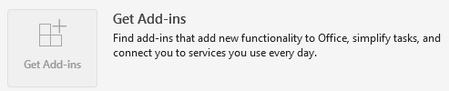
I am a Microsoft 365 Personal user. When I try to add the Claude for Excel Addin (for the Desktop version of Excel), I get an error: "Error loading add-ins. One or more add-ins failed to load. See your add-ins.". However, this is not specific to the Claude addin, since every addin gives the same error. When I click on the My-Addins option and then "refresh", I get another error: "Access denied to catalog." Signing in and out of Office does not fix the issue. Clearing the Office 365 cache did not fix the problem. The issue extends to Powerpoint and Word as well. I cannot add any addins to the web versions of Office either. Interestingly, if I download an XML manifest file, I can use the "Manage my addins" option in the web versions of Office 365 to manually add the addins. But still no luck with the Desktop versions. Anyone have any thoughts on how to fix this? Do I need to manually reinstall Office 365? I also noticed that the "Get Add-ins" button in "Account" settings is disabled.1.4KViews1like2CommentsNew Landing Pages for Word, Excel and PowerPoint (rant)
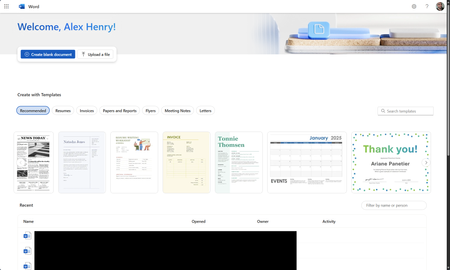
So I found out this week that MS is piloting new landing pages for the core Office apps (again). Instead of loading in the M365 Home page, they now load in an entirely new page. Why was this necessary? We've already been here before and MS spent years moving everything to the Home app. The dust has finally settled and things are working great. Why move things out again?431Views1like3Comments
Disable incessant nagware popups
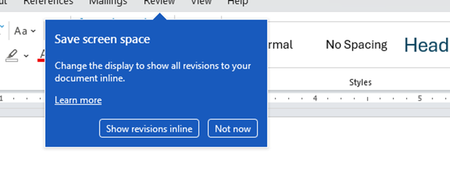
I don't know about everyone else, but I am sick and tired of the nagware pop ups in Word, Excel, PowerPoint, Outlook, etc. Every single product harasses me with pop ups trying to tell me "hey, did you know this feature was here?", "you can do this if you click that", "let me hold your hand through using products you've used for decades even though you don't want daddy Microslop to do that". This is a prime example. I keep getting the same ones again and again and again and everything I've read indicates they should only appear once. But they don't. They keep coming back like a psychotic stalker ex who wants alimony even though you were never married. How do I get this nagware to stop?!384Views1like1CommentWhy is my create file from OneDrive for Business node isn't working?
I have a power automate cloud flow that, in some point, gets a word .docx from my sharepoint site, then it creates the same document in onedrive so that I can convert it to PDF then returns it to sharepoint. This idea came from the necessity of converting a .docx to .pdf without the need of premium conectors. I have 2 scenarios: 1° Scenario: Flow: I get the data from the word that I need > I create the same file on OneDrive > I convert the file to .pdf > then I create the file on Sharepoint. Problem: When I run my flow, it gets a 404 error: "message": "File Not Found\r\nclientRequestId: y-f695-48b1-9556-xc\r\nserviceRequestId: x-e051-b000-efc3-y" Error image: 2° Scenario: Flow: The same as the above, the only thing I did after research, is that the node that I get content from file from my sharepoint site also returns the "$content-type", so I specified that for the create file from OneDrive I'll only want the "$content" attribute. In resume, it creates the file in onedrive but I can't open it, it appears to be corrupted, at first I thought my sharepoint file was also broken, but then I could open it with no errors as on OneDrive. Problem: When I run my flow, it gets the error that it can't convert that kind of file (as I wrote above, the file creates corrupted), the main problem is understanding why it gets corrupted, it even returs the content-type that I'm not passing anymore. Error image: Message: "message": "Error from microservice: {\"status\":406,\"message\":\"Não há suporte para a conversão desse arquivo para PDF. (cannotOpenFile / Error from Office Service. Url=https://wordcs.officeapps.live.com/document/export/pdf HttpCode=BadRequest)\",\"source\":\"api.connectorp.svc.ms\"}\r\nclientRequestId: y-13f3-4e1a-a77a-x\r\nserviceRequestId: y-a09f-b000-f272-x" NB: This flow actually worked for more than 1 year with no problems like that, the last time it ran without errors was last week (6-7 days from today).Solved756Views0likes2Comments
Publish an Excel Add-in by just submitting the add-in manifest to Microsoft Marketplace
I am working on Excel Add-in built using the react template. We are planning to host the add-in code on our domain and update the manifest to point to the URL for our domain. Can I just submit the add-in manifest to Microsoft to publish it in Microsoft Marketplace?329Views0likes1Comment
Shortcuts appearing when using Option+arrow in Outlook on Chrome in Mac
luse Outlook on Chrome in my MacBook Pro. While typing an email, though, if I use Option tarrow left or right (to go back or forth between words), after a few words, the shortcut letters for the menus pop up, and stop what I'm doing. (See image.) It doesn't happen in any other window on Chrome. So it's not a Chrome thing. It's only when Outlook 365 is loaded. (Don't know if it happens in other 365 apps, as I only use Outlook, really.) Anyone experienced that? And, if so, is there a solution? I tried Outlook 365's setting, but nothing there. Thanks!232Views0likes2Comments
What's going on with office.com / web apps?
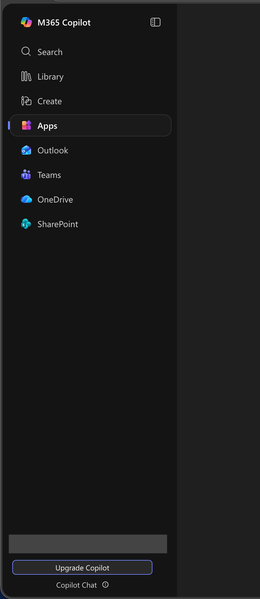
I'm aware that Microsoft had already chosen to upend usability once by changing office.com into 😡m365.cloud.microsoft😡 and make accessing web apps more difficult. This week I found they're hidding applications even further by burying them at the bottom of the page behind another menu - even when "pinned". Below are two screenshots of the 😡m365.cloud.microsoft😡 portal from different accounts that were created on the same day and accessed from the same computer and web browser via admin priveledges. I have observed this discrepency more than once with various accounts. Can someone explain the rational for Microsoft continuing to further bury office applications from users? Am I unaware of a new portal to access the Office applications our users rely upon every day?298Views1like1Comment
Third-party access via Organisational Link
Hi, Previously when logging into my personal account on a Web Browser, it flashed up with what is the typically an organisational message about an IT administrator. After being ping-ponged back and forth from the Microsoft Support teams, it's been suggested there is an organisational link with my personal email account, which absolutely should NOT be the case. My concern is if someone has linked my email with an organisational account, then they are privy to a lot sensitive information from personal finances to healthcare (this has also correlated with some odd behaviour on certain devices). The agents that I have spoke to have not yet provided me with a viable solution to removing any links to an organisational account, nor getting a list of any organisations or entities that have been linked to my personal account. Does anyone have any ideas as to a way around this? Many thanks.227Views0likes2CommentsHow to Backup Emails in Outlook?
If you want to backup emails in Outlook, the easiest and most reliable way is by using the Mails.Daddy Email Backup Tool. I’ve used it personally to export my Outlook.com emails to formats like PST, EML, and MBOX with zero data loss. It connects via IMAP and lets you back up selective folders or the entire mailbox. Whether you're planning to backup Outlook emails to a hard drive or migrate them to another email client, this tool is fast, secure, and beginner-friendly. For anyone asking how to backup emails in Outlook, I strongly recommend trying this — it’s a smooth experience and saves a lot of time.445Views0likes1Comment