office for the web
65 Topics
Cannot install addins
I am a Microsoft 365 Personal user. When I try to add the Claude for Excel Addin (for the Desktop version of Excel), I get an error: "Error loading add-ins. One or more add-ins failed to load. See your add-ins.". However, this is not specific to the Claude addin, since every addin gives the same error. When I click on the My-Addins option and then "refresh", I get another error: "Access denied to catalog." Signing in and out of Office does not fix the issue. Clearing the Office 365 cache did not fix the problem. The issue extends to Powerpoint and Word as well. I cannot add any addins to the web versions of Office either. Interestingly, if I download an XML manifest file, I can use the "Manage my addins" option in the web versions of Office 365 to manually add the addins. But still no luck with the Desktop versions. Anyone have any thoughts on how to fix this? Do I need to manually reinstall Office 365? I also noticed that the "Get Add-ins" button in "Account" settings is disabled.1.4KViews1like2Comments
Store-published Word add-in can't read or write the open document
We published a Word add-in to the Microsoft Store and ran into something odd that I'm hoping someone here has seen before. The add-in installs and opens fine. Signing in, the chat assistant, browsing our documents, moving between tabs ; all of that works. The problem is anything that has to actually read or change the open Word document. Pulling a doc in from our Sync tab, dropping in a template, running a compliance check on the current document ; none of it does anything. No error, no message, it just doesn't happen. So basically if a feature only shows stuff or talks to our own server it's fine, but the second it needs the actual document, nothing. A few things I'm trying to figure out: - Is this a known thing with Store-installed add-ins vs when you're just testing it? - Any good way to see why those actions are failing when nothing shows up on screen? Happy to share more detail. Thanks in advance.
Apply sensitivity labels with custom permissions in Office for the web
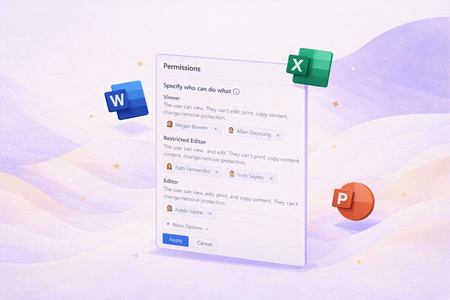
We’re excited to announce that support for applying sensitivity labels with user-defined permissions is now rolling out in Word, Excel, and PowerPoint for the web. In the past, users were limited to opening and editing files with existing custom permissions in the web apps; applying new sensitivity labels configured for user-defined permissions or modifying permissions always required switching to the desktop versions. Now, all these actions – applying labels and managing permissions for specific users or domains – can be completed entirely within Word, Excel, or PowerPoint on the web. How the Permissions dialog works in Office for the web When a user applies a sensitivity label that is configured for user-defined permissions in Word, Excel, or PowerPoint on the web, the Permissions dialog opens to let them choose who can access the file and what each person or domain is allowed to do. This is the same modernized experience that previously shipped in the Windows apps, now available in the browser. Apply a label configured for user-defined permissions. From the Sensitivity menu in the toolbar, the file name flyout, or other entry points your organization uses, the user selects a label that their tenant admin has configured in the Purview portal with the option to let users assign permissions. Specify users and domains. In the Permissions dialog, the user adds individual people (for example, someone@example.com) or whole domains (for example, example.com) who should have access to the file. Choose permission levels. For each person or domain, the user chooses from clear permission levels such as Viewer, Editor, or Owner, which correspond to underlying Rights Management usage rights. Use advanced options when needed. The user can expand additional settings to configure options such as a contact email for access requests. Note that web apps do not currently support setting a custom expiration date for permissions. Apply and update permissions. After saving, the selected sensitivity label is applied to the file with the specified permissions. Users with appropriate rights can reopen the Permissions dialog later from the web apps to add or remove people or domains, or adjust permission levels, without switching to the desktop client. The Permissions dialog in Office for the web is designed to be consistent with the experience in the Windows apps, so users see the same permission levels and terminology wherever they work. All enforcement continues to respect your organization’s existing sensitivity label policies, encryption configurations, and Rights Management Service (RMS) settings. What this means for admins This feature enables organizations using sensitivity labels configured in the Microsoft Purview portal with encryption and user-defined permissions to apply these labels and manage permissions directly in the web versions of Word, Excel, and PowerPoint. Users can now stay within the browser to classify and protect content, eliminating the need to switch to desktop apps for applying or updating labels and permissions. As support for applying these labels becomes available in Office for the web, consider reviewing your existing sensitivity labels that are configured for user-defined permissions. You may want to update internal guidance and training materials to reflect that users can now complete these workflows entirely in the browser and ensure that security operations and compliance teams are prepared to monitor usage through existing Purview auditing and reporting capabilities. Admin considerations and scenarios Many organizations use user-defined permissions for scenarios where central policies cannot realistically predefine every individual who should have access to a file. For example, you might publish labels that require users to specify recipients for documents that contain deal-specific financials, M&A data, or sensitive HR information. In these cases, granting permissions at the time of labeling helps reduce oversharing and keeps access tightly scoped to the people who genuinely need it. Licensing and configuration requirements To use sensitivity labels with user-defined permissions in Office for the web, your organization must have licensing that supports configuring Purview sensitivity labels, have sensitivity labeling enabled for files stored in SharePoint and OneDrive, and have configured at least one sensitivity label for user-defined permissions. The licensing requirements for applying sensitivity labels with user-defined permissions in the Office web apps is that same as for using sensitivity labels that apply encryption in the Office desktop apps. For more information on licensing requirements, see Microsoft 365 licensing guidance for security & compliance. See Enable sensitivity labels for files in SharePoint and OneDrive for more information about enabling application of sensitivity labels to files stored in the cloud.1.8KViews2likes0CommentsNew Landing Pages for Word, Excel and PowerPoint (rant)
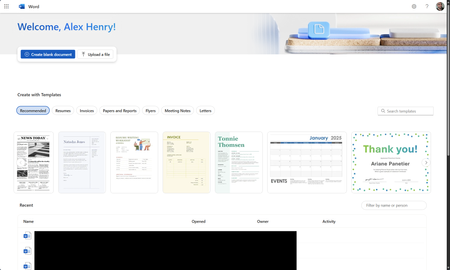
So I found out this week that MS is piloting new landing pages for the core Office apps (again). Instead of loading in the M365 Home page, they now load in an entirely new page. Why was this necessary? We've already been here before and MS spent years moving everything to the Home app. The dust has finally settled and things are working great. Why move things out again?433Views1like3CommentsDisable incessant nagware popups
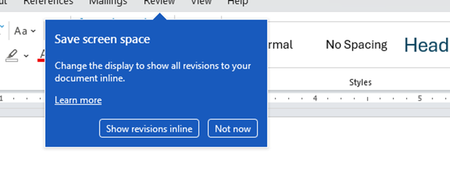
I don't know about everyone else, but I am sick and tired of the nagware pop ups in Word, Excel, PowerPoint, Outlook, etc. Every single product harasses me with pop ups trying to tell me "hey, did you know this feature was here?", "you can do this if you click that", "let me hold your hand through using products you've used for decades even though you don't want daddy Microslop to do that". This is a prime example. I keep getting the same ones again and again and again and everything I've read indicates they should only appear once. But they don't. They keep coming back like a psychotic stalker ex who wants alimony even though you were never married. How do I get this nagware to stop?!387Views1like1CommentWhy is my create file from OneDrive for Business node isn't working?
I have a power automate cloud flow that, in some point, gets a word .docx from my sharepoint site, then it creates the same document in onedrive so that I can convert it to PDF then returns it to sharepoint. This idea came from the necessity of converting a .docx to .pdf without the need of premium conectors. I have 2 scenarios: 1° Scenario: Flow: I get the data from the word that I need > I create the same file on OneDrive > I convert the file to .pdf > then I create the file on Sharepoint. Problem: When I run my flow, it gets a 404 error: "message": "File Not Found\r\nclientRequestId: y-f695-48b1-9556-xc\r\nserviceRequestId: x-e051-b000-efc3-y" Error image: 2° Scenario: Flow: The same as the above, the only thing I did after research, is that the node that I get content from file from my sharepoint site also returns the "$content-type", so I specified that for the create file from OneDrive I'll only want the "$content" attribute. In resume, it creates the file in onedrive but I can't open it, it appears to be corrupted, at first I thought my sharepoint file was also broken, but then I could open it with no errors as on OneDrive. Problem: When I run my flow, it gets the error that it can't convert that kind of file (as I wrote above, the file creates corrupted), the main problem is understanding why it gets corrupted, it even returs the content-type that I'm not passing anymore. Error image: Message: "message": "Error from microservice: {\"status\":406,\"message\":\"Não há suporte para a conversão desse arquivo para PDF. (cannotOpenFile / Error from Office Service. Url=https://wordcs.officeapps.live.com/document/export/pdf HttpCode=BadRequest)\",\"source\":\"api.connectorp.svc.ms\"}\r\nclientRequestId: y-13f3-4e1a-a77a-x\r\nserviceRequestId: y-a09f-b000-f272-x" NB: This flow actually worked for more than 1 year with no problems like that, the last time it ran without errors was last week (6-7 days from today).Solved762Views0likes2Comments
Publish an Excel Add-in by just submitting the add-in manifest to Microsoft Marketplace
I am working on Excel Add-in built using the react template. We are planning to host the add-in code on our domain and update the manifest to point to the URL for our domain. Can I just submit the add-in manifest to Microsoft to publish it in Microsoft Marketplace?332Views0likes1Comment
Shortcuts appearing when using Option+arrow in Outlook on Chrome in Mac
luse Outlook on Chrome in my MacBook Pro. While typing an email, though, if I use Option tarrow left or right (to go back or forth between words), after a few words, the shortcut letters for the menus pop up, and stop what I'm doing. (See image.) It doesn't happen in any other window on Chrome. So it's not a Chrome thing. It's only when Outlook 365 is loaded. (Don't know if it happens in other 365 apps, as I only use Outlook, really.) Anyone experienced that? And, if so, is there a solution? I tried Outlook 365's setting, but nothing there. Thanks!232Views0likes2Comments
What's going on with office.com / web apps?
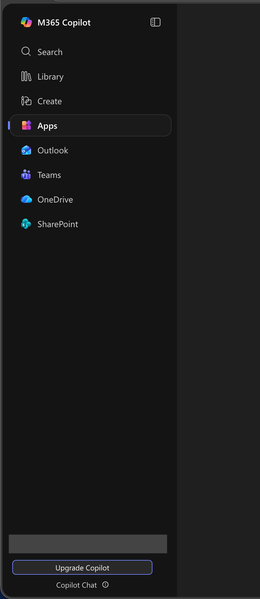
I'm aware that Microsoft had already chosen to upend usability once by changing office.com into 😡m365.cloud.microsoft😡 and make accessing web apps more difficult. This week I found they're hidding applications even further by burying them at the bottom of the page behind another menu - even when "pinned". Below are two screenshots of the 😡m365.cloud.microsoft😡 portal from different accounts that were created on the same day and accessed from the same computer and web browser via admin priveledges. I have observed this discrepency more than once with various accounts. Can someone explain the rational for Microsoft continuing to further bury office applications from users? Am I unaware of a new portal to access the Office applications our users rely upon every day?300Views1like1Comment
Third-party access via Organisational Link
Hi, Previously when logging into my personal account on a Web Browser, it flashed up with what is the typically an organisational message about an IT administrator. After being ping-ponged back and forth from the Microsoft Support teams, it's been suggested there is an organisational link with my personal email account, which absolutely should NOT be the case. My concern is if someone has linked my email with an organisational account, then they are privy to a lot sensitive information from personal finances to healthcare (this has also correlated with some odd behaviour on certain devices). The agents that I have spoke to have not yet provided me with a viable solution to removing any links to an organisational account, nor getting a list of any organisations or entities that have been linked to my personal account. Does anyone have any ideas as to a way around this? Many thanks.228Views0likes2Comments