office 365
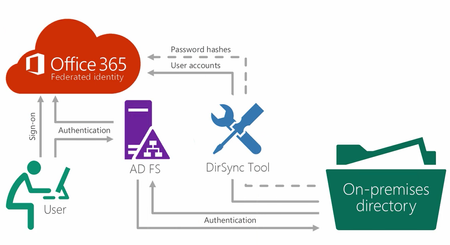
27 TopicsStep-By-Step: Setting up AD FS and Enabling Single Sign-On to Office 365
This is a typical highly available setup into Office 365. Ideally this server will be installed as virtual servers on multiple Hyper-V hosts. Think about redundancy, not only in the virtual servers, but in the Hyper-V servers as well. Install one AD FS and one AD FS Proxy on one Hyper-V host and the other AD FS and AD FS Proxy on another Hyper-V host. This prevents loss of service from a hardware failure. Keep in mind that once you are using Single Sign-on with Office 365, you rely on your local Active Directory for authentication. Both video and printed steps have provided to ease your implementation of AD FS and SSO.101KViews3likes8CommentsStep-by-Step: Blocking Data Downloads via Microsoft Cloud App Security
By using Azure AD conditional access policies, we can define who have access to what applications from where. This is purely control the access to your app. Microsoft Cloud App Security (MCAS) allow us to extend these capabilities further into session level. Using MCAS, we can examine each session to the app in real-time to protect information further.34KViews3likes6CommentsPowerShell Basics: Want to Use Exchange Online in Azure Cloud PowerShell?
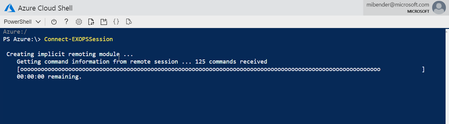
Since rollout in Exchange 2007, PowerShell and Exchange have been partners in helping administrators everywhere manage their environments. Whether on-premises or in the cloud, PowerShell is a powerful tool for working with Exchange. Now the cmdlets for managing Exchange Online are available in Azure Cloud Shell. In this post, I'll show you how to access the Exchange Online module easily, and begin working with your Exchange Online resources in Azure Cloud Shell.28KViews8likes5CommentsCountdown to End of Support 2020!
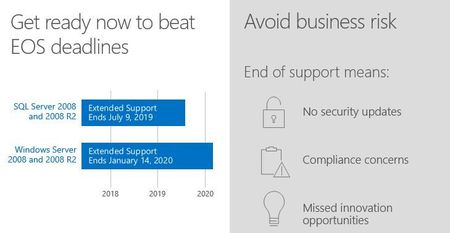
The support countdown clock is ticking. On January 14, 2020, support for several Microsoft products will end. That's 5 short months away when the end of regular security updates begins. Don't let your infrastructure and applications go unprotected.23KViews3likes0CommentsHow to Manage SharePoint via PowerShell - Part 1
In this two-part series, we're going to look at how we can manage SharePoint using PowerShell. This is highly focused on SharePoint Online, but if the cmdlets are available, it also applies to SharePoint on-premises. We'll start with the basics, and then get some real-world scenarios scripts in part 2 to get you started with your daily management tasks. I'll also you give some tips along the way to make your life easier.18KViews7likes0Comments