new
141 Topics
Troubleshooting audio stream background process limits on Windows Subsystem fordesktop wrappers
Hi everyone, I've been testing how various media streaming applications and background audio hooks behave when running through mobile compatibility layers or optimized desktop wrappers on Windows builds. Sometimes, aggressive background resource suspension or audio buffer dropouts can occur if the application lifecycle isn't handled cleanly during heavy multi-tasking. For power users and developers looking into how common media playback glitches and background service interruptions are resolved, you can check out this optimized desktop web wrappers and playback troubleshooting guides for a technical breakdown. Has anyone here experienced similar audio caching or background process termination on recent Insider builds? Would love to hear your troubleshooting steps. Thanks!40Views0likes1Comment
Face recognition is not working
Dear Windows Insider Community Members, I use a Lenovo Yoga Laptop and am part of the Windows Insider Release Preview, having recently moved from the Beta Program. I am having issues with the Windows Hello face recognition system. The camera isn't working for face recognition; it worked one month ago. The camera was working without issues for meetings and other uses. I contacted Lenovo and Microsoft support, but neither could help because I am part of the Windows Insider program. It would be helpful if someone could help me. Thanks in advance.73Views0likes2CommentsNew Account is blocked
Hi everyone, I wanted to create a new email address because I changed my lastname. Unfortunately, the process is being blocked due to alleged unusual activity. ?! I’ve already tried using other devices and networks. The technical support agent cannot help me in the Chat. Please help me. Thanks...396Views0likes3Comments
MyASUS settings issue
hi, I got a message when I went to MyASUS. The message is: MyASUS AiSense camera option is grayed out This function is not available now. Make sure that your camera is working properly and has allowed MyASUS access to it. I reinstalled Windows and the option was not grayed out. Yet, after installing the Windows Insider build, the issue came back. Anyone facing the issue?367Views0likes2Comments
CRITICAL REGRESSION: Build 26200 broke Mic, Game FPS & Cursors!
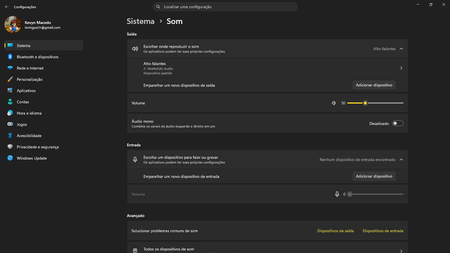
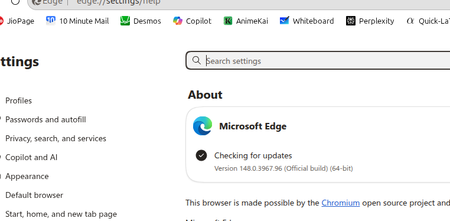
System Specifications: Device: Acer Aspire 5 A515-57 Memory: 16GB RAM Storage: 2x 250GB SSDs OS Build: Windows Insider Preview Build 26200 (KB5120998) Edição Windows 11 Home Single Language Versão 25H2 Instalado em 18/07/2026 Compilação do SO 26200.9278 Pacote de recursos Pacote de Experiência de Recursos do Windows 1000.26100.360.0 Issue 1: Integrated Microphone Failure Immediately after installing this build, the integrated microphone completely stopped working and disappeared from the system inputs. The audio jack still accepts headset microphones, but the internal laptop mic is dead and undetected. Issue 2: Severe Performance/FPS Drop in Gaming Game performance has been severely crippled. In Dragon Quest X S Definitive Edition (Steam), I consistently reached 40 to 50 FPS prior to this update. Post-update, the game is heavily bottlenecked, only reaching 20 to 30 FPS. This feels like a major regression in GPU scheduling, driver compatibility, or background AI/VBS overhead introduced in this preview build. Issue 3: Custom Cursors (.cur, .ani, .ini) Blocked Applying custom cursors manually no longer works. Even after moving the custom cursor files directly into the official C:\Windows\Cursors directory, the system refuses to apply .ini, .ani, or .cur files. This feature worked perfectly prior to the update. Please investigate and fix these regressions in the 26200 flight. Attached are screenshots demonstrating the update build and the issues.595Views0likes2CommentsCan we get Microsoft to make the CorePC modular OS into a windows 12 smooth experience?
Guys I was thinking microsoft should change the software architecture for windows on ARM devices since they chose to use a unified memory architecture and ram consumption is nuts, I thought we could maybe convince them into making it so that the Os they seem to be planning to make for arm devices is rlly lightweight and modular, if compatibility was an issue they could maybe make a wine-like compatibility layer that doesnt run unless the program is categorized as x64 rather than arm, like a "better prism" which is the current compatibility layer, and maybe make better use of the npu so it actually helps the OS rather than just idling there, unmenacingly, MICROSOFT TEAM IF U SEE THIS PLEASE DO I NEED THIS, THESE ARM DEVICES HAVE SO MUCH POTENTIAL BUT RIGHT NOW THEY ARE KINDA BAD PLEASEEEEEE, GET EM BOYS377Views0likes2CommentsWindows 12 Is Not a Rumor. It’s Already in Your System
The new build 29558 reveals way more than most people think. If you know where to look, you’ll see that the next Windows release is already very close. Side‑by‑Side Winners now includes new versions of core system modules Startup‑task‑data is updated across all architectures Defender and Networking UI have new branding resource packages ShellCompatibility is already using version 12.\* GDI+ and the Search engine have new generations of libraries These are not “small tweaks”. This is the groundwork for a new shell and a new UI that is already physically present in the system — just not unlocked yet. Don’t follow YouTube “tech enthusiasts” — they spread rumors and don’t know how to look for real evidence inside the system. Windows is not analyzed through thumbnails, but through the registry, WinSxS and shell layers. 😎✌️ Winners sample: offlinefiles-ui is now running on version 29558.1000. This is one of many modules that indicate the presence of a new shell layer in the system.1.9KViews1like4Comments
Windows 12 Concept
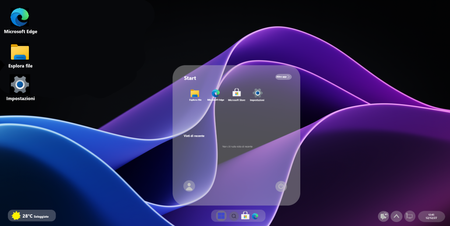
Questo progetto è un concept creativo di windows 12, sviluppato come esercizio di immaginazione e design. L'immagine allegata rappresenta una visione personale di come potrebbe evolvere l'esperienza utente, con particolare attenzione a: -Interfaccia di vetro moderna e fluida -Nuovi spazi per la produttività e la creatività -Simboli e dettagli che evocano continuità con la storia di Windows Non si tratta di un prodotto ufficiale ma di un contributo visionario alla discussione sul futuro dei sistemi operativi. L'intento è stimolare idee, dialogo e ispirazione tra la community e i team di sviluppo Microsoft. Grazie per l'attenzione. michaelhope1311.1KViews0likes1CommentTouchpad not working after Windows 11 Insider Preview Update
Feature Update: Windows 11 Insider Preview 10.0.26220.6690 (ge_release_upr) Quality Update: Windows 11 Insider Preview Quality Update (26220.7271) Since installing these updates, my laptop’s trackpad (touchpad) has completely stopped working. I tried uninstalling the update, but the issue persists. In Device Manager → Human Interface Devices, the driver (I2C HID Device) shows the following error: Device status: This device cannot start. (Code 10) A request for the HID descriptor failed. I attempted updating/uninstalling the driver, but the error remains. Keyboard shortcut keys to enable/disable the touchpad also do not work. I had contacted Microsoft Support and even allowed remote access, but they were unable to resolve the issue. This problem started months ago after the Insider Preview update and has not been fixed yet. Requesting guidance or a fix for this issue.559Views0likes1Comment