need help
1741 Topics
Thumbnails in Explorer.exe Using Up Significant Memory
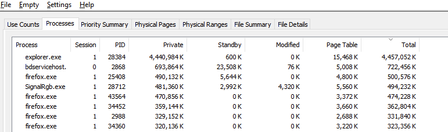
It seems that there is an issue with explorer with storing thumbnail cache for folders containing 6k to 8k resolution videos. For context, I keep virtual reality videos in one folder and every single time I open this folder and browse through all other files and sub folders, the memory usage for explorer spikes up. I need help on how to fix this issue. Any workarounds such as storing thumbnail cache on the drive instead of the RAM would help. I'm using Windows 10 22H225Views0likes0Comments
is a payment method now mandatory for all newly provisioned E5 Instant Sandboxes?
I have an active Visual Studio Professional subscription and can successfully link it to the Microsoft 365 Developer Program. During E5 Instant Sandbox provisioning, the setup requires creation of a Billing Account and entry of a credit card/payment method. The documentation states the E5 Developer subscription is free and billing is used for verification. Is there an alternative verification process for Visual Studio subscribers that does not require a credit card, or is a payment method now mandatory for all newly provisioned E5 Instant Sandboxes?389Views0likes1Comment
Sandbox subscription issue: "You don't currently qualify" for M365 Developer
Hello Microsoft Community Support Team, I am currently taking an training course on Microsoft Power Platform, with a special focus on building chatbots using Microsoft Copilot Studio (formerly Power Virtual Agents), Power Automate, and Power Apps. I wanted to set up a dedicated environment to practice the modules, configure cloud flows, and test the integrations. However, when I joined the Microsoft 365 Developer Program using my personal account, I encountered the following message: "Thank you for joining. You don't currently qualify for a Microsoft 365 Developer Program sandbox subscription." I do not intend to use this for commercial purposes; my sole objective is learning, studying the curriculum, and practicing developer scenarios for my training. Unfortunately, my university's IT administrator has disabled trial features on our student accounts, so creating my own developer sandbox is my only viable path to complete the practical exercises. Could you please assist me in manually reviewing my profile or enabling the M365 E5 developer sandbox subscription for my account so I can continue with my Power Platform learning journey? Thank you very much for your time and support. Best regards, Pablo377Views0likes1CommentCan't get a new subscription again
I has a problem for get new subscription. Detailed my case: - In Apr 19, i deleted profile (my subscription expired in Apr 19, 2024). - Got email confirm for deleted and Invite to Dev Program. - Today (Jun 20), after wait 60 days for delete current profile. - I visit join developer page and join again. - But, I got same screen in Apr 19, it include a old subscription expried and no any button for register new subscription/subscriptions. - I deleted profile again (Jun 20)... Also, i read all document and faq in Microsoft Learn for Microsoft 365 Dev Program but can't help more. I try click to Support in Navigation(Menu) bar in top of page, redirect to Microsoft ServicesHub and can't use my account for login. And my question: How can register subscription again, and how can contact to support via email?421Views0likes2CommentsHow do I manage my Microsoft Project? (notifications, deletion, and more)...
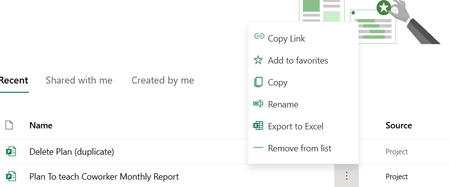
I finally got a license for Microsoft Project (instead of silly Planner which I cannot use for Agile Framework). However, I am still having some basic functionality issues with Microsoft Project Online. I am honestly trained on 2010 version of Microsoft Project, so a lot of these feature changes 1) How do I control notifications for Microsoft Project Online? First, I discovered there is these new notifications feature for Microsoft Project that sends out an email every time a even a sub-subtask (aka an action instance) is assigned. I do not want my coworker or the entire department to receive emails every time I edit a plan. (I mean 1 email is ok) but with how I work it can lead to like 60 emails.... So naturally I binged it which gave me this result.... https://answers.microsoft.com/en-us/msteams/forum/all/turn-off-sending-out-notification-to-all-members/84653dd8-187a-4178-9a94-96e96b86fca4 1. From the planning board, select the 3 dots (. . .) to the right of the plan's name. 2. Choose Plan Settings from the menu There are no settings under any of the 3 dots menu. So where are the notification settings for an entire project? 2) What is needed to access actual Microsoft Project Online? Normally I click on a project and simply edit it, but in the desperate search for the actual settings for a Microsoft Project.... I discovered today that I have a weird error. Something about permission to a SharePoint site. It did not give me this error before. I suspect that I might have to make my own PWA site. Can someone explain to me what this error is about and why the day before I could access Microsoft Project Online but now cannot? 3) How to delete a project? So, I was able to find a tutorial on this one, but I wanted to ask if there was a better way. https://answers.microsoft.com/en-us/msoffice/forum/all/deleting-a-project-from-project-for-the-web/a73789ef-b8be-4eb7-ba42-a9b2aaffe54b 4) How to control users that are part Microsoft Project Online? Because how many documents talk about need to be owner to control emails... I tried to make own group in hopes that will give me better control over notifications. But this led to a discovery that I am in like 15 different groups all with the exact same name as my section and members. So What settings in Groups are for a Microsoft Project Plan? Just an old fashion Project Plan user trying to understand how to use this confusing new Project version.383Views0likes1CommentViva Glint Partner Office Hours: EMEA
We invite you to our weekly Office Hours, a safe space to ask any questions related to Glint – Platform, Programs and Best Practices. Come prepared with questions or feel free to just pop in to learn from others’ questions. Presence is optional but would love to see you there! NOTE: Other companies may be on the line so please use your discretion before sharing sensitive information about your company. Use this link to join the Viva Glint Partners Office Hours event.89Views0likes1CommentViva Glint Partner Office Hours: EMEA
We invite you to our weekly Office Hours, a safe space to ask any questions related to Glint – Platform, Programs and Best Practices. Come prepared with questions or feel free to just pop in to learn from others’ questions. Presence is optional but would love to see you there! NOTE: Other companies may be on the line so please use your discretion before sharing sensitive information about your company. Use this link to join the Viva Glint Partners Office Hours event.40Views0likes0CommentsViva Glint Partner Office Hours: EMEA
We invite you to our weekly Office Hours, a safe space to ask any questions related to Glint – Platform, Programs and Best Practices. Come prepared with questions or feel free to just pop in to learn from others’ questions. Presence is optional but would love to see you there! NOTE: Other companies may be on the line so please use your discretion before sharing sensitive information about your company. Use this link to join the Viva Glint Partners Office Hours event.36Views0likes0CommentsViva Glint Partner Office Hours: EMEA
We invite you to our weekly Office Hours, a safe space to ask any questions related to Glint – Platform, Programs and Best Practices. Come prepared with questions or feel free to just pop in to learn from others’ questions. Presence is optional but would love to see you there! NOTE: Other companies may be on the line so please use your discretion before sharing sensitive information about your company. Use this link to join the Viva Glint Partners Office Hours event.56Views0likes0CommentsViva Glint Partner Office Hours: EMEA
We invite you to our weekly Office Hours, a safe space to ask any questions related to Glint – Platform, Programs and Best Practices. Come prepared with questions or feel free to just pop in to learn from others’ questions. Presence is optional but would love to see you there! NOTE: Other companies may be on the line so please use your discretion before sharing sensitive information about your company. Use this link to join the Viva Glint Partners Office Hours event.51Views0likes0Comments