msignite
5 Topics
New Azure API management service limits
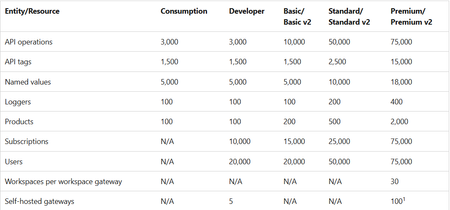
Azure API Management operates on finite physical infrastructure. To ensure reliable performance for all customers, the service enforces limits calibrated based on: Azure platform capacity and performance characteristics Service tier capabilities Typical customer usage patterns Resource limits are interrelated and tuned to prevent any single aspect from disrupting overall service performance. Changes to service limits - 2026 update Starting March 2026 and over the following several months, Azure API Management is introducing updated resource limits for instances across all tiers. The limits are shown in the following table. Entity/Resource Consumption Developer Basic/ Basic v2 Standard/ Standard v2 Premium/ Premium v2 API operations 3,000 3,000 10,000 50,000 75,000 API tags 1,500 1,500 1,500 2,500 15,000 Named values 5,000 5,000 5,000 10,000 18,000 Loggers 100 100 100 200 400 Products 100 100 200 500 2,000 Subscriptions N/A 10,000 15,000 25,000 75,000 Users N/A 20,000 20,000 50,000 75,000 Workspaces per workspace gateway N/A N/A N/A N/A 30 Self-hosted gateways N/A 5 N/A N/A 100 1 1 Applies to Premium tier only. What's changing Limits in the classic tiers now align with those set in the v2 tiers. Limits are enforced for a smaller set of resource types that are directly related to service capacity and performance, such as API operations, tags, products, and subscriptions. Rollout process New limits roll out in a phased approach by tier as follows: Tier Expected rollout date Consumption Developer Basic Basic v2 March 15, 2026 Standard Standard v2 April 15, 2026 Premium Premium v2 May 15, 2026 Limits policy for existing classic tier customers After the new limits take effect, you can continue using your preexisting API Management resources without interruption. Existing classic tier services, where current usage exceeds the new limits, are "grandfathered" when the new limits are introduced. (Instances in the v2 tiers are already subject to the new limits.) Limits in grandfathered services will be set 10% higher than the customer's observed usage at the time new limits take effect. Grandfathering applies per service and service tier. Other existing services and new services are subject to the new limits when they take effect. Guidelines for limit increases In some cases, you might want to increase a service limit. Before requesting a limit increase, note the following guidelines: Explore strategies to address the issue proactively before requesting a limit increase. See the article here Manage resources within limits. Consider potential impacts of the limit increase on overall service performance and stability. Increasing a limit might affect your service's capacity or increase latency in some service operations. Requesting a limit increase The product team considers requests for limit increases only for customers using services in the following tiers that are designed for medium to large production workloads: Standard and Standard v2 Premium and Premium v2 Requests for limit increases are evaluated on a case-by-case basis and aren't guaranteed. The product team prioritizes Premium and Premium v2 tier customers for limit increases. To request a limit increase, create a support request from the Azure portal. For more information, see Azure support plans. Documentation For more information, please see documentation hereAnnouncing the General Availability (GA) of the Premium v2 tier of Azure API Management
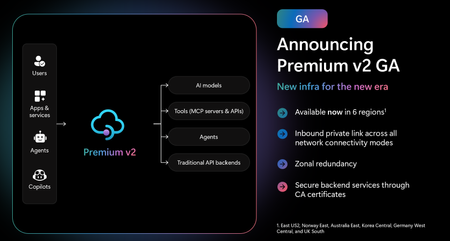
Superior capacity, highest entity limits, unlimited included calls, and the most comprehensive set of features set the Premium v2 tier apart from other API Management tiers. Customers rely on the Premium v2 tier for running enterprise-wide API programs at scale, with high availability, and performance. The Premium v2 tier has a new architecture that eliminates management traffic from the customer VNet, making private networking much more secure and easier to setup. During the creation of a Premium v2 instance, you can choose between VNet injection or VNet integration (introduced in the Standard v2 tier) options. In addition, today we are also adding three new features to Premium v2: Inbound Private Link: You can now enable private endpoint connectivity to restrict inbound access to your Premium v2 instance. It can be enabled along with VNet injection or VNet integration or without a VNet. Availability zone support: Premium v2 now supports availability zones (zone redundancy) to enhance the reliability and resilience of your API gateway. Custom CA certificates: Azure API management v2 gateway can now validate TLS connections with the backend service using custom CA certificates. New and improved VNet injection Using VNet injection in Premium v2 no longer requires configuring routes or service endpoints. Customers can secure their API workloads without impacting API Management dependencies, while Microsoft can secure the infrastructure without interfering with customer API workloads. In short, the new VNet injection implementation enables both parties to manage network security and configuration settings independently and without affecting each other. You can now configure your APIs with complete networking flexibility: force tunnel all outbound traffic to on-premises, send all outbound traffic through an NVA, or add a WAF device to monitor all inbound traffic to your API Management Premium v2—all without constraints. Inbound Private Link Customers can now configure an inbound private endpoint for their API Management Premium v2 instance to allow your API consumers securely access the API Management gateway over Azure Private Link. The private endpoint uses an IP address from an Azure virtual network in which it's hosted. Network traffic between a client on your private network and API Management traverses over the virtual network and a Private Link on the Microsoft backbone network, eliminating exposure from the public internet. Further, you can configure custom DNS settings or an Azure DNS private zone to map the API Management hostname to the endpoint's private IP address. With a private endpoint and Private Link, you can: Create multiple Private Link connections to an API Management instance. Use the private endpoint to send inbound traffic on a secure connection. Apply different API Management policies based on whether traffic comes from the private endpoint. Limit incoming traffic only to private endpoints, preventing data exfiltration. Combine with inbound virtual network injection or outbound virtual network integration to provide end-to-end network isolation of your API Management clients and backend services. More details can be found here Today, only the API Management instance’s Gateway endpoint supports inbound private link connections. Each API management instance can support at most 100 Private Link connections. Availability zones Azure API Management Premium v2 now supports Availability Zones (AZ) redundancy to enhance the reliability and resilience of your API gateway. When deploying an API Management instance in an AZ-enabled region, users can choose to enable zone redundancy. This distributes the service's units, including Gateway, management plane, and developer portal, across multiple, physically separate AZs within that region. Learn how to enable AZs here. CA certificates If the API Management Gateway needs to connect to the backends secured with TLS certificates issued by private certificate authorities (CA), you need to configure custom CA certificates in the API Management instance. Custom CA certificates can be added and managed as Authorization Credentials in the Backend entities. The Backend entity has been extended with new properties allowing customers to specify a list of certificate thumbprints or subject name + issuer thumbprint pairs that Gateway should trust when establishing TLS connection with associated backend endpoint. More details can be found here. Region availability The Premium v2 tier is now generally available in six public regions (Australia East, East US2, Germany West Central, Korea Central, Norway East and UK South) with additional regions coming soon. For pricing information and regional availability, please visit the API Management pricing page. Learn more API Management v2 tiers FAQ API Management v2 tiers documentation API Management overview documentation
Moving the Logic Apps Designer Forward
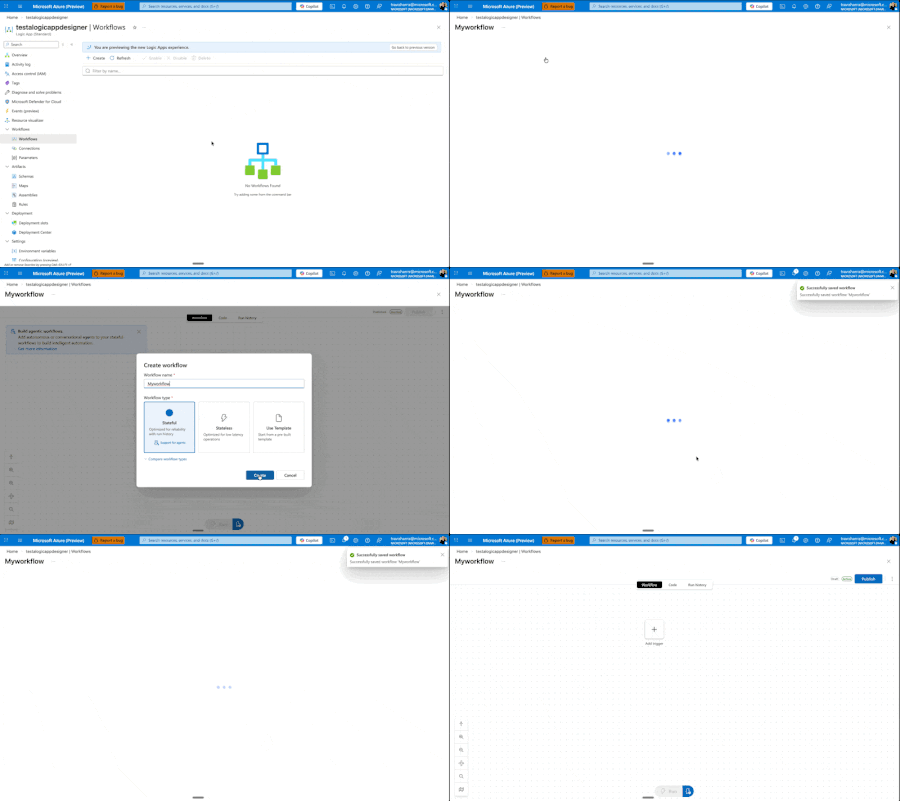
Today, we're excited to announce a major redesign of the Azure Logic Apps designer experience, now entering Public Preview for Standard workflows. While these improvements are currently Standard-only, our vision is to quickly extend them across all Logic Apps surfaces and SKUs. ⚠️ Important: As this is a Public Preview release, we recommend using these features for development and testing workflows rather than production workloads. We're actively stabilizing the experience based on your feedback. This Is Just the Beginning This is not us declaring victory and moving on. This is Phase I of a multi-phase journey, and I'm committed to sharing our progress through regular blog posts as we continue iterating. More importantly, we want to hear from you. Your feedback drives these improvements, and it will continue to shape what comes next. This redesign comes from listening to you—our customers—watching how you actually work, and adapting the designer to better fit your workflows. We've seen the pain points, heard the frustrations, and we're addressing them systematically. Our Roadmap: Three Phases Phase I: Perfecting the Development Loop (What we're releasing today) We're focused on making it cleaner and faster to edit your workflow, test it, and see the results. The development loop should feel effortless, not cumbersome. Phase II: Reimagining the Canvas Next, we'll rethink how the canvas works—introducing new shortcuts and workflows that make modifications easier and more intuitive. Phase III: Unified Experiences Across All Surfaces We'll ensure VS Code, Consumption, and Standard all deliver similarly powerful flows, regardless of where you're working. Beyond these phases, we have several standalone improvements planned: a better search experience, streamlined connection creation and management, and removing unnecessary overhead when creating new workflows. We're also tackling fundamental questions that shouldn't be barriers: What do stateful and stateless mean? Why can't you switch between them? Why do you have to decide upfront if something is an agent? You shouldn't. We're working toward making these decisions dynamic—something you can change directly in the designer as you build, not rigid choices you're locked into at creation time. We want to make it easier to add agentic capabilities to any workflow, whenever you need them. What's New in Phase I Let me walk you through what we're shipping at Ignite. Faster Onboarding: Get to Building Sooner We're removing friction from the very beginning. When you create a new workflow, you'll get to the designer before having to choose stateful, stateless, or agentic. Eventually, we want to eliminate that upfront choice entirely—making it a decision you can defer until after your workflow is created. This one still needs a bit more work, but it's coming soon. One View to Rule Them All We've removed the side panel. Workflows now exist in a single, unified view with all the tooling you need. No more context switching. You can easily hop between run history, code view, or visual editor, and change your settings inline—all without leaving your workflow. Draft Mode: Auto-Save Without the Risk Here's one of our biggest changes: draft mode with auto-save. We know the best practice is to edit locally in VS Code, store workflows in GitHub, and deploy properly to keep editing separate from production. But we also know that's not always possible or practical for everyone. It sucks to get your workflow into the perfect state, then lose everything if something goes wrong before you hit save. Now your workflow auto-saves every 10 seconds in draft mode. If you refresh the window, you're right back where you were—but your changes aren't live in production. There's now a separate Publish action that promotes your draft to production. This means you can work, test your workflow against the draft using the designer tools, verify everything works, and then publish to production—even when editing directly on the resource. Another benefit: draft saves won't restart your app. Your app keeps running. Restarts only happen when you publish. Smarter, Faster Search We've reorganized how browsing works—no more getting dropped into an endless list of connectors. You now get proper guidance as you explore and can search directly for what you need. Even better, we're moving search to the backend in the coming weeks, which will eliminate the need to download information about thousands of connectors upfront and deliver instant results. Our goal: no search should ever feel slow. Document Your Workflows with Notes You can now add sticky notes anywhere in your workflow. Drop a post-it note, add markdown (yes, even YouTube videos), and document your logic right on the canvas. We have plans to improve this with node anchoring and better stability features, but for now, you can visualize and explain your workflows more clearly than ever. Unified Monitoring and Run History Making the development loop smoother means keeping everything in one place. Your run history now lives on the same page as your designer. Switch between runs without waiting for full blade reloads. We've also added the ability to view both draft and published runs—a powerful feature that lets you test and validate your changes before they go live. We know there's a balance between developer and operator personas. Developers need quick iteration and testing capabilities, while operators need reliable monitoring and production visibility. This unified view serves both: developers can test draft runs and iterate quickly, while the clear separation between draft and published runs ensures operators maintain full visibility into what's actually running in production. New Timeline View for Better Debugging We experimented with a timeline concept in Agentic Apps to explain handoff—Logic Apps' first foray into cyclic graphs. But it was confusing and didn't work well with other Logic App types. We've refined it. On the left-hand side, you'll now see a hierarchical view of every action your Logic App ran, in execution order. This makes navigation and debugging dramatically easier when you're trying to understand exactly what happened during a run. What's Next This is Phase I. We're shipping these improvements, but we're not stopping here. As we move into Phase II and beyond, I'll continue sharing updates through blog posts like this one. How to Share Your Feedback We're actively listening and want to hear from you: Use the feedback button in the Azure Portal designer Join the discussion in GitHub/Community Forum – https://github.com/Azure/LogicAppsUX Comment below with your thoughts and suggestions Your input directly shapes our roadmap and priorities. Keep the feedback coming. It's what drives these changes, and it's what will shape the future of Azure Logic Apps. Let's build something great together.2KViews5likes3Comments
Announcing Public Preview of Agent Loop in Azure Logic Apps Consumption
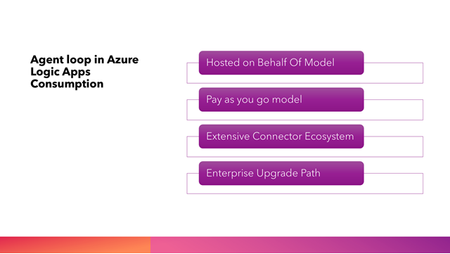
We’re excited to announce a major leap forward in democratizing AI-powered business process automation: Agent Loop is now available in Azure Logic Apps Consumption, bringing advanced AI agent capabilities to a broader audience with a frictionless, pay-as-you-go experience. NOTE: This feature is being rolled out and is expected to be in all planned regions by end of the week What’s New? Agent Loop, previously available only in Logic Apps Standard, is now available in Consumption logic apps, providing developers, small and medium-sized businesses, startups, and enterprise teams with the ability to create autonomous and conversational AI agents without the necessity of provisioning or managing dedicated AI infrastructure. With Agent Loop, customers can develop both autonomous and conversational agents, seamlessly transforming any workflow into an intelligent workflow using the agent loop action. These agents are powered by knowledge and tools through access to over 1,400 connectors and MCPs (to be introduced soon). Why Does This Matter? By extending Agent Loop to Logic Apps Consumption, we’re making AI agent capabilities accessible to everyone—from individual developers to large enterprises—without barriers. This move supports rapid prototyping, experimentation, and production workloads, all while maintaining the flexibility to upgrade as requirements evolve. Key highlights: Hosted on Behalf Of (HOBO) Model: With this model, customers can harness the power of advanced Foundry models directly within their Logic Apps, without the need to provision or manage AI resources themselves. Microsoft handles all the underlying large language model (LLM) infrastructure, preserving the serverless, low-overhead nature of Consumption Logic Apps that lets you focus purely on building intelligent workflows. Frictionless Entry Point: With Microsoft hosting and managing the Foundry model, customers only need an Azure subscription to set up an agentic workflow. This dramatically reduces entry barriers and enables anyone with access to Azure to leverage powerful AI agent automation right away. Pay-As-You-Go Billing: You’re billed based on the number of tokens used for each agentic iteration, making experimentation and scaling cost-effective. No fixed infrastructure costs or complex setup. Extensive Connector Ecosystem: Provides access to an extensive ecosystem of over 1,400 connectors, facilitating seamless integration with a broad range of enterprise systems, APIs, and data sources. Enterprise-Grade Upgrade Path: As your needs grow—whether for higher performance, compliance, or custom model hosting—you can seamlessly graduate to Logic Apps Standard, bringing your own model and unlocking advanced features like VNET support and local development. Refer https://learn.microsoft.com/en-us/azure/logic-apps/clone-consumption-logic-app-to-standard-workflow Security and Tenant Isolation: The HOBO model ensures strong tenant isolation and security boundaries, so your data and workflows remain protected. Chat client Authentication: Setting up the chat client is straightforward, with built-in security provided using OAuth policies. How to Get Started? Check out the video below to see examples of conversational and autonomous agent workflows in Consumption Logic Apps. For detailed instructions on creating agentic workflows, visit Overview | Logic Apps Labs. Refer the official documentation for more information on this feature- Workflows with AI Agents and Models - Azure Logic Apps | Microsoft Learn. Limitations: Local development capabilities and VNET integration are not supported with Consumption Logic Apps. Regional data residency isn't guaranteed for the agentic actions. If any GDPR (General Data Protection Regulation) concerns, use Logic Apps Standard. Nested agents and MCP tools are currently unavailable but will be added soon. If you need these features, refer Logic Apps Standard. Currently, West Europe and West US are supported regions; additional regions will be available soon.AI Gateway in Azure API Management Is Now Available in Microsoft Foundry (Preview)
For more than a decade, Azure API Management has been the trusted control plane for API governance, security, and observability on a global scale supporting more than 38,000 customers, almost 3 million APIs, and 3 trillion API requests every month. AI Gateway builds on this foundation, extending API Management’s proven governance, security, and observability model to AI workloads, including models, tools, and agents. Today, more than 1,200 enterprise customers use AI Gateway to safely operationalize AI at scale. As customers accelerate AI adoption, the need for consistent, centralized governance becomes even more critical. AI systems increasingly rely on a mix of models, tools, and agents, each introducing new access patterns and governance requirements. Enterprises need a unified way to ensure all this AI traffic remains secure, compliant, and cost-efficient without slowing down developer productivity. Today, we’re making that significantly easier. AI Gateway is now integrated directly into Microsoft Foundry. This gives Foundry users a simple way to govern, observe, and secure their AI workloads with the same reliability and trust as Azure API Management. This integration brings enterprise-grade AI governance directly into Microsoft Foundry right where teams design, build, and operate their AI applications and agents. It provides a streamlined experience that helps organizations adopt strong governance from day one while keeping full API Management capabilities available for advanced configuration. Governance for models With this integration, customers can create a new AI Gateway instance (powered by API Management Basic v2) or associate an existing API Management resource into their Foundry resource. Once configured, all model deployments in the Foundry resource can be accessed through the AI Gateway hostname, ensuring that calls to models, whether to Azure OpenAI or other models, flow through consistent governance and usage controls. Long-term token quotas and short-term token limits can be managed directly within the Foundry interface, enabling teams to set and adjust usage boundaries without leaving the environment where they build and deploy AI applications and agents. Learn more here. Governance for agents The integration also introduces a unified way to govern agents. Organizations can register agents running anywhere — in Azure, other clouds, or on-premises — into the Foundry Control Plane. These agents appear alongside Foundry-native agents for centralized inventory, monitoring, and governance. Teams can view telemetry collected by AI Gateway directly in Foundry or in Application Insights without any reconfiguration of agents at source. Administrators can block agents posing security, compliance, or cost risks within Foundry or apply advanced governance policies, like throttling or content safety, in Azure API Management. Learn more here. Governance for tools Tools benefit from the same consistent governance model. Foundry users can register Model Context Protocol (MCP) tools hosted across any environment and have them automatically governed through the integrated AI Gateway. These tools appear in the Foundry inventory, making them discoverable to developers and ready for consumption by agents. This reduces the operational overhead of securing and mediating tools, simplifying the path to building agentic applications that safely interact with enterprise systems. Learn more here. Unified governance across Foundry and API Management Together, these capabilities bring the power of AI Gateway directly into Microsoft Foundry removing barriers to adoption while strengthening governance. The experience is streamlined with simple setup, intuitive controls, and immediate value. At the same time, customers retain full access to the breadth and depth of API Management capabilities. When advanced policies, enterprise networking, federated gateways, or fine-grained controls are required, teams can seamlessly shift into the API Management experience without losing continuity. With AI Gateway now part of Microsoft Foundry, teams can build and scale AI applications with confidence knowing that consistent governance, security, and observability are built in from the start. AI Gateway in Microsoft Foundry gives every organization a consistent way to govern AI - models, tools, and agents - with the reliability of API Management and the velocity of Foundry. Getting started To set up and use AI Gateway in Foundry, follow the steps in this article. A new AI Gateway deploys an API Management Basic v2 instance for free for the first 100,000 calls. Explore these new capabilities in depth at Microsoft Ignite. Join the Azure API Management and Microsoft Foundry sessions. If attending the conference in person try the hands-on labs to experience how AI Gateway and Foundry help deliver secure and scalable AI applications and stop by our booths to meet the product teams behind these innovations. Session Speaker(s) Link BRK1706: Innovation Session: Build & Manage AI Apps with Your Agent Factory Yina Arenas, Sarah Bird, Amanda Silver, Marco Casalaina https://ignite.microsoft.com/en-US/sessions/BRK1706?source=sessions BRK113: Upskill AI agents with the Azure app platform Mike Hulme, Balan Subramanian, Shawn Henry https://ignite.microsoft.com/en-US/sessions/BRK113?source=sessions BRK119: Don’t let your AI agents go rogue, secure with Azure API management Anish Tallapureddy, Mike Budzynski https://ignite.microsoft.com/en-US/sessions/BRK119?source=sessions LAB519: Governing AI Apps & Agents with AI Gateway in Azure API Management Annaji sharma Ganti, Galin Iliev https://ignite.microsoft.com/en-US/sessions/LAB519?source=sessions4.6KViews3likes0Comments