msignite
18 TopicsGovern, Secure, and Operate Anywhere with Azure Arc
Over the past year, the way the world does work has shifted significantly. Agents have gone mainstream, infrastructure is being purpose-built for AI inferencing, and expectations around data sovereignty continue to grow. While the goals for our systems are evolving, one need remains constant: centralized visibility and control of your IT infrastructure, wherever your workloads run. Hybrid by default With geopolitical pressures and disaster risks rising, enterprises are increasingly choosing distributed infrastructure deliberately for strategic workloads to meet requirements for latency, data gravity, AI inferencing, resiliency, sovereignty, operational continuity, and regulation. Common drivers include: Unreliable connectivity: Remote sites and factory locations often operate with unreliable connections and high latency. Regulations: State, corporate, and industry rules on sovereignty and data mean some workloads must stay where they are. Acquisitions: Legacy systems and inherited environments from organic growth and team-level choices need to be integrated, not rebuilt. Optimization: Compute and power costs vary by location, so workloads need to be placed with economics in mind. As a result, many customers juggle multiple tools to manage on-premises, multicloud, and multi-OS environments, often from one central operations team. What those teams want most is consistency. One platform for your entire estate Azure Arc extends Azure management to servers and Kubernetes clusters wherever they run, so organizations can unify hybrid, multicloud, and edge estates on one platform for operations, innovation, and insights. That's where cloud-native innovation shows up. Beyond basic health and status monitoring, Azure Arc lets you collect richer operational, security, and configuration data and query it at massive scale. It also centralizes governance with consistent tags and unified identity and access management through RBAC. With centralized insights teams are able to close vulnerabilities faster, fix compliance drift, and maintain day-to-day operations, including modern patching, across hybrid and multicloud estates with better control. At Ignite 2026, we're expanding capabilities to help you see more, control more, and secure more, wherever your infrastructure runs. See Everything- Unify your distributed estate with Azure Arc You can't govern what you can't see, and full visibility used to mean deploying the Azure Arc agent to every machine first. However, at Ignite 2026 we are introducing Improved onboarding and discovery help you understand your estate and extend Azure management where it matters most. Onboarding and discovery: Google Cloud (GCP) connector (generally available): Multicloud shouldn't mean managing in silos. In addition to the AWS connector we announced last Ignite, we now support bringing all your Google Cloud resources into Azure for centralized visibility and control. Kubernetes Onboarding Solutions (Public Preview): Bring Kubernetes clusters running in Google Kubernetes Engine and Amazon EKS under Azure Arc through the Multicloud Connector. Clusters in Google Cloud and AWS join the same inventory and management as the rest of your estate, so platform teams can govern every cluster from one place. Microsoft Endpoint Configuration Manager (MECM) connector enabled by Azure Arc (preview): Bring years of Configuration Manager server inventory into Azure, with visibility into machines, software, and configuration without installing an agent on every machine. Then extend Arc management only where you need it. Visualize inventory and gain insights: Once machines are connected, the next question is what's running on them. Machine Inventory (preview): A central, Azure-native view of what's inside your Azure VMs and Arc-enabled servers, including applications, services, certificates, users, groups, and Windows OS details. Questions like "Which servers still run this app version?" or "Which certificates are about to expire?" no longer require scripts and spreadsheets. Azure Resource Manager MCP server (preview): AI agents are becoming a new way to manage Azure, and the ARM MCP server gives them a governed way to do it. Through the Model Context Protocol, agents can query resources, deploy ARM templates, create or update resources, inspect schemas, and analyze costs. And because Azure Arc-enabled resources appear in Azure Resource Manager, agents can query your hybrid estate the same way they query Azure, turning "Which on-premises servers are missing the latest agent?" into a natural-language request. And with the new Machine Configuration centralized UI (preview), users get a fleet-wide view of posture and compliance, guided setup for scenarios like custom policy and security baselines, and one-step enablement at the subscription scope. Simplify Operations- Manage, govern, operate, & secure Manage, govern and operate: Day-to-day operations are where hybrid estates take the most manual effort. New capabilities reduce that effort so teams can focus on innovation, not upkeep. Essential Machine Management, Day N operations (preview): Enable a subscription, and all its VMs and Arc-enabled servers are automatically enrolled and configured with curated management features, including monitoring, update management, security baseline auditing, and change tracking and inventory. Day N updates go beyond onboarding, with new dashboards that surface top issues at the subscription level and a central view of which subscriptions are onboarded to EMM. VM Applications for Azure Arc-enabled machines (preview): Package and deploy third-party and internal applications, agents, and middleware to Azure VMs and Arc-enabled servers without rebuilding images. Applications are stored centrally and versioned, so software deploys consistently across thousands of servers with less image management overhead. Azure Arc automatic agent upgrade (generally available): With this feature Microsoft automatically manages Azure Connected Machine agent updates, rolling them out in batches across regions during off-peak hours, with no server restart required. Turn it on across your estate with Azure Policy to keep your fleet current with no manual work. Upgrade Insights for Azure Arc-enabled Kubernetes (preview): Kubernetes version upgrades are a common cause of outages. Upgrade Insights checks clusters beforehand and flags deprecated APIs, compatibility issues, readiness problems, and configuration blockers, so platform teams can upgrade with confidence. DISA STIG audit (preview) and CIS Windows audit (generally available): Audit servers against Defense Information Systems Agency Security Technical Implementation Guides (DISA STIGs), and Windows Server 2022 and 2025 against CIS benchmarks, with hybrid support through Azure Arc. Defense, public sector, and other regulated organizations can verify compliance with the standards they're measured against, using one consistent assessment across on-premises, Azure, and other clouds. Secure and remediate: Security has to cover the whole estate, from the hardware up. These announcements strengthen identity, close compliance gaps, and speed recovery when things go wrong. TPM-backed identity for Azure Arc-enabled servers (preview): Instead of storing managed identity credentials on local disk, the Azure Connected Machine agent can now use the machine's physical TPM or virtual TPM (vTPM) as a hardware-backed root of trust. Credentials are protected against exfiltration, including by privileged users, which matters most in regulated and high-security environments. User-assigned managed identity (UAMI) for Azure Arc-enabled machines (preview): Create one identity, grant it access once, and assign it across many machines, instead of relying on per-machine system-assigned identities. This simplifies access management at scale and matches how customers already manage identity for Azure VMs. Microsoft Defender for Cloud + CIS Benchmark remediation (preview): Azure Policy and Machine Configuration assess Windows and Linux servers against CIS benchmarks and Azure security baselines, with findings and remediation in Azure Policy and Defender for Cloud. Azure Arc applies the same assessment on-premises and in other clouds, so you can audit and remediate consistently across your hybrid estate. Windows Recovery Environment (WinRE) with Quick Machine Recovery (preview): When a server can't boot, every minute offline counts, and remote sites are hard to reach. One Azure Policy now turns on WinRE and QMR across eligible Windows Server 2025 Arc-enabled servers, so they can self-repair startup problems and get critical workloads back online faster. A new Windows Recovery tab in the portal shows which servers are protected or recovering. For widespread boot issues, QMR can apply a Microsoft-provided fix through Windows Update. Recovery is best effort, so not every failure has an automated fix. Hotpatch enabled by Azure Arc is now free for Windows Server 2025: Patching shouldn't force a choice between security and uptime. Hotpatch applies updates without restarts, cutting reboots on Windows Server 2025 from roughly monthly to about four planned reboots per year (the quarterly baselines), while security content lands continuously in between. There's no separate SKU and no premium tier, just the Azure Arc onboarding step. Run Apps and Data anywhere- Consistent deployment across boundaries GitOps-based deployments with Azure Kubernetes Fleet Manager and Flux extension (preview): Fleet Manager now integrates with the Flux extension, so platform teams can roll out applications and configurations through GitOps to AKS and Arc-enabled Kubernetes clusters across Azure, on-premises, AWS, and Google Cloud. Manage Kubernetes at scale from a single control plane, with safe upgrades and multi-cluster operations. All centralized for scale Each capability is useful on its own. Together, they let you manage your whole estate the same way, at any size. Azure Arc projects every server, cluster, and cloud resource into Azure Resource Manager, so the same tools work everywhere: Azure Policy, Defender for Cloud, Machine Configuration, Update Manager, and now AI agents through MCP. That holds whether you manage ten servers or a hundred thousand, in a factory, a sovereign datacenter, or a third-party cloud. Hybrid by default doesn't have to mean complex by default. With Azure Arc, you can govern, secure, and operate anywhere, all from a single pane of glass. Want to learn more? Join the Arc Monthly Customer Forum Connect with the Azure Arc product team and hear from other customers on how they use Azure Arc. Azure Arc on Microsoft Learn: Explore documentation, tutorials, and technical guidance. Azure Arc Tech Community blog: Stay up to date on product news and announcements. Azure Arc on Microsoft Azure: Discover how Azure Arc helps simplify hybrid, multicloud, and edge management. FULL SCHEDULE: Explore Azure Arc sessions at Ignite Tuesday, November 17 3:45–5:00 PM | LAB724: Govern your estate with Azure Arc and Azure Resource Manager MCP 4:10–4:55 PM | TT1691: Audit-ready everywhere: Governance for hybrid and edge AI Wednesday, November 18 9:00–9:45 AM | TT1694: Discover everything: Unified hybrid and edge AI asset inventory 10:15–11:00 AM | BRK421: Operate a global AKS fleet across regions, edge, and sovereign clouds 12:00–1:15 PM | LAB724: Govern your estate with Azure Arc and Azure Resource Manager MCP Thursday, November 19 10:45 AM-12:00 PM | LAB724: Govern your estate with Azure Arc and Azure Resource Manager MCP 1:30–2:15 PM | BRK413: Govern, secure, and operate anywhere with Azure Arc (News from Azure Arc) Friday, November 20 9:00–10:15 AM | LAB724: Govern your estate with Azure Arc and Azure Resource Manager MCP489Views1like0CommentsWhat's new with Sovereign Private Cloud at Microsoft Ignite 2026
As organizations are scaling AI adoption at an unprecedented pace, they need to stay in control of their data, operations, and access as regulatory and operational requirements evolve. Microsoft Sovereign Cloud gives them that control, with choice across public and private cloud environments. At Microsoft Frontier Tour last month, we highlighted how Sovereign Private Cloud, built on Azure Local, brings Azure infrastructure, services, and AI capabilities in customer-controlled environments. At Microsoft Ignite 2026, we're building on that foundation with the general availability of Foundry Local, confidential virtual machines, and GitHub Enterprise Local, on Azure Local, along with public previews for agentic AI, connected to disconnected operations, and local data services. These announcements expand what organizations can build and run in their own sovereign environments, while keeping control over where data resides, who can access it, and how systems are operated, even when fully disconnected. Sovereign AI in customer-controlled infrastructure Foundry Local is now generally available on Azure Local. Organizations can deploy and run AI models close to their data, enabling local inference in connected and disconnected environments while maintaining control over their infrastructure, data, and operations. We’re also expanding Foundry Local beyond model inference to support agentic AI scenarios on Azure Local. This release includes: Model catalog: Run AI models locally from an expanding model catalog, keeping inference close to data, applications and operations. Agentic retrieval: Ground AI in local enterprise data with local ingestion, indexing, and search, plus agents, tool calling, a Model Context Protocol (MCP) server, and a built-on chat experience. Agent service (preview): Build and orchestrate agents, even in fully disconnected environments. Guardrails (preview): Apply guardrails using the guardrail model of their choice. Support for NVIDIA HGX B300 systems. As AI workload grow, many organizations need more compute capacity close to their data. Azure Local is expanding hardware support to include NVIDIA HGX B300 systems, so customers can run large-scale, multi-GPU inference, and agentic workloads, including bring-your-own models, on infrastructure they control. Validated systems from Dell, HPE, and Lenovo will give customers a choice of hardware for scaling AI in their own environments. We’ll share more details as these systems become available. Confidential computing on Azure Local Confidential VMs powered by AMD SEV-SNP are now generally available on supported AMD EPYC processors, providing hardware-backed memory encryption and attestation to help protect sensitive workloads while running. We're also expanding hardware choice with Intel TDX-based confidential VMs in preview on Intel Xeon processors. Resilience and operational independence on Azure Local We’re enabling organizations to move their Azure Local management control plane without redeploying infrastructure, migrating data, or interrupting running workloads. Virtual machines, AKS clusters, applications, and storage remain in place while management transitions to a new control plane. The ability to move from connected-to-disconnected deployments (in preview), allows customers to transition existing Azure-connected deployments to locally managed, disconnected environments. Data services on Azure Local Building on SQL Server support, we're expanding local data services for modern applications and AI workloads: SQL Server is generally available on Azure Local: Run enterprise database workloads on customer-controlled infrastructure across connected and disconnected environments. DocumentDB is in preview on Azure Local: Support document-oriented applications with local database capabilities. Blob Storage is in preview on Azure Local: Store and access unstructured data with cloud-native object storage while keeping data local. Together, these services enable organizations to build data-driven and AI-powered applications while keeping sensitive information within their environments. Sovereign developer workflows with GitHub Enterprise Local GitHub Enterprise Local, now generally availability, brings GitHub Enterprise Server into Azure Local as a prebuilt virtual appliance. Repositories, CI/CD workflows, and development artifacts stay within the organization’s infrastructure and security boundaries, in both connected and disconnected environments. In connected environments, developers can use GitHub Copilot with locally hosted repositories. In disconnected environments, Foundry Local enables AI-powered development using locally hosted models. This gives organizations flexibility to develop and manage applications across connectivity scenarios while maintaining control over their code and infrastructure. Read more: GitHub Enterprise Local: Bringing modern development to environments you control. Multitenancy on Azure Local Multitenancy support on Azure Local is coming soon, giving enterprises and service providers more flexibility in how they use and allocate shared infrastructure. Through logical isolation, organizations can consolidate workloads and use capacity more efficiently while maintaining separation across tenants, teams, and workloads. Initial access will be limited to qualified customers. Sign up for the upcoming preview here. Unified and secured migration to Azure Local Azure Local migrations are now part of the modern, unified Azure Catalyst experience, so customers can discover, replicate, and track VMware and Hyper-V migrations all in one place. By the end of the year, we'll have a preview of a new data plane for VMware migrations with Azure Catalyst, formerly known as Azure Migrate to Azure Local, eliminating the dependency on VMware Virtual Disk Development Kit components for supported migration scenarios. Built on VMware SCSI HotAdd, the new data plane will let customers continue using familiar Azure Catalyst workflows while reducing setup and operational complexity. Existing VDDK-based migration projects remain supported. Azure Catalyst enables customers to preserve existing Azure Arc-enabled server resources when migrating supported VMware and Hyper-V workloads to Azure Local, retaining RBAC assignments, policies, tags, monitoring configurations, and extensions. We're expanding Azure Catalyst with private endpoint support, enabling migration-related communication with Azure resources over private connections. General availability is targeted for Q1 CY2027. And we're announcing general availability of Trusted Launch VM migration, enabling eligible workloads to migrate directly into Trusted Launch configurations on Azure Local. Sovereign Private Cloud ecosystem A strong partner ecosystem is essential to helping customers deploy and scale Sovereign Private Cloud. At Ignite, we're expanding partner expertise and application validation to accelerate adoption. We're launching the Azure Local for Hybrid and Sovereign Private Cloud specialization in the Microsoft Cloud Partner Program. This specialization recognizes partners with proven expertise in designing, deploying, and operating Azure Local solutions. The Hybrid and Sovereign Private Cloud Specialization currently includes ten partners: abtis, Acuutech, Dell, HCLTech, Impresoft 4ward, kloud klickers, Lenovo, NTT DATA, PulsivIT, and Twoday. We're also working with independent software vendors and global systems integrators to broaden the portfolio of applications validated for Azure Local, spanning enterprise workloads, data platforms, and sovereign AI. Together, these investments help customers move from initial deployments to production with greater confidence. Explore the full list of validated solutions here. The innovations announced at Microsoft Frontier Tour and Ignite build on our Sovereign Private Cloud vision, extending Azure Local with new capabilities across AI, operational flexibility, confidential computing, data services, and developer workflows. Our vision remains simple: bring the power of Azure wherever customers need it, with the flexibility and control to operate on their terms. Learn more at Microsoft Ignite Sovereign Cloud myth busters: Separating fact from fiction: Framework for evaluating requirements and making informed cloud and AI decisions. Building Sovereign Private Cloud for Mission-Critical Environments: Infrastructure, AI, data, and productivity services in customer-controlled environments. Build Sovereign AI with Azure Local and Foundry Local: Local models, inference, and AI infrastructure. Azure Local Disconnected Operations: Identity and Operator Experience: Identity and management in disconnected environments.2.4KViews5likes1Comment
Simplify Kubernetes operations with Upgrade Insights and GitOps with Azure Kubernetes Fleet Manager
As organizations expand their Kubernetes environments, operating clusters consistently becomes increasingly challenging. Platform teams may be responsible for hundreds or even thousands of clusters distributed across Azure, on-premises datacenters, edge locations, and other clouds. At this scale, two challenges become particularly important: keeping Kubernetes clusters safely up to date and consistently deploying applications and configuration across those clusters. We’re introducing new capabilities to help platform teams address both: Upgrade Insights for Azure Arc-enabled Kubernetes (In public preview), helps teams assess Kubernetes upgrade readiness and identify potential issues before beginning an upgrade. Flux GitOps integration with Azure Kubernetes Fleet Manager (In public preview), brings GitOps together with Fleet Manager workload placement to simplify how applications and configurations are delivered across Kubernetes fleets. Together, these capabilities help platform teams establish a more consistent approach to managing both Kubernetes infrastructure and applications across distributed environments. Understand upgrade risks before you upgrade Kubernetes upgrades can introduce risk when applications still depend on deprecated APIs, cluster components aren't compatible with the target Kubernetes version, or configurations prevent workloads from being safely moved during an upgrade. Upgrade Insights for Azure Arc-enabled Kubernetes helps teams identify these issues earlier by assessing upgrade readiness across three key areas: Deprecated Kubernetes APIs: Identifies workloads and controllers using APIs that may be deprecated or removed in the target Kubernetes version. Component compatibility: Evaluates commonly used Kubernetes components, such as cert-manager, Istio, Cilium, and containerd, for compatibility with the target version. Upgrade readiness: Identifies configuration issues, such as Pod Disruption Budgets, that could interfere with node drains and upgrades. For teams operating Kubernetes at scale, these insights provide a centralized way to understand which clusters are ready to upgrade, and which require remediation first. For Azure Arc-enabled Kubernetes, Upgrade Insights is advisory. It helps operators understand potential upgrade risks while leaving the actual Kubernetes upgrade under the control of the underlying Kubernetes platform. Simplify GitOps across Kubernetes fleets Keeping Kubernetes infrastructure current is only one part of operating at scale. Platform teams also need a consistent way to deploy applications and configuration across many clusters. The Flux extension integration with Azure Kubernetes Fleet Manager brings GitOps together with Fleet Manager's multi-cluster workload placement capabilities. Flux runs on the Fleet Manager hub cluster and reconciles application manifests and Fleet resources from a Git or OCI source. Fleet Manager then evaluates placement policies and distributes the appropriate resources to member clusters. The responsibilities are straightforward: Git or OCI provides the source of truth. Flux provides GitOps reconciliation. Fleet Manager determines where resources should run across the fleet. This means application definitions don't need to identify every destination cluster individually. Teams can define the desired state and placement intent, while Fleet Manager determines which clusters should receive the resources. Author once. Reconcile through GitOps. Place across the fleet. Bringing upgrade readiness and application management together Together, Upgrade Insights and the Flux integration with Fleet Manager address two important challenges for platform teams operating Kubernetes at scale. Upgrade Insights helps teams understand whether their clusters and workloads are ready for Kubernetes upgrades before changes are introduced. Flux and Fleet Manager provide a scalable GitOps model for defining application state and placing those applications consistently across a changing fleet of clusters. As Kubernetes environments grow, platform teams need to understand what is ready to change, where that change should be applied, and how to manage it consistently across the fleet. Upgrade Insights provides visibility before infrastructure changes, while Flux and Azure Kubernetes Fleet Manager provide a scalable foundation for managing applications across the Kubernetes estate. Attending Ignite 2026? See related sessions and resources below. Tuesday, November 17 3:45–5:00 PM | LAB724 | Govern your estate with Azure Arc and Azure Resource Manager MCP 4:10–4:55 PM | TT1691 | Audit-ready everywhere: governance for hybrid and edge AI Wednesday, November 18 9:00–9:45 AM | TT1694 | Discover everything: Unified hybrid and edge AI asset inventory 10:15-11:00 AM | BRK421 | Operate a global AKS fleet across regions, edge, and sovereign clouds 12:00–1:15 PM | LAB724 | Govern your estate with Azure Arc and Azure Resource Manager MCP Thursday, November 19 1:00–2:15 PM | LAB724 | Govern your estate with Azure Arc and Azure Resource Manager MCP 1:30–2:15 PM | BRK413 | Govern, secure, and operate anywhere with Azure Arc Friday, November 20 9:00–10:15 AM | LAB724 | Govern your estate with Azure Arc and Azure Resource Manager MCP Learn more: https://aka.ms/Ignite26/ArcBlog FAQ: 1. How can organizations assess Kubernetes upgrade readiness across hybrid and multicloud environments? Organizations can use Upgrade Insights for Azure Arc-enabled Kubernetes to assess upgrade readiness across Kubernetes clusters running on-premises and in other clouds. Upgrade Insights identifies potential issues, including deprecated Kubernetes APIs, incompatible components, and configuration problems that could disrupt upgrades. These insights help platform teams identify and address risks before initiating Kubernetes version upgrades. 2. What is Upgrade Insights for Azure Arc-enabled Kubernetes? Upgrade Insights for Azure Arc-enabled Kubernetes is a capability in public preview that helps platform teams identify potential Kubernetes upgrade risks before updating cluster versions. It assesses deprecated API usage, component compatibility, and configuration issues such as Pod Disruption Budgets. Upgrade Insights provides advisory recommendations, while the underlying Kubernetes platform remains responsible for executing upgrades. 3. How does Azure Arc help organizations manage Kubernetes clusters across multiple clouds? Azure Arc extends Azure management capabilities to Kubernetes clusters running outside Azure, including on-premises datacenters and other cloud environments. With Azure Arc-enabled Kubernetes, organizations can bring distributed clusters into a common management model. Combined with Azure Kubernetes Fleet Manager, platform teams can coordinate workload placement and apply consistent application configurations across their Kubernetes environments. 4. How does Flux GitOps integration with Azure Kubernetes Fleet Manager simplify application deployment? Flux GitOps integration with Azure Kubernetes Fleet Manager helps platform teams deploy applications and configurations consistently across multiple Kubernetes clusters. Flux reconciles application manifests and Fleet resources from a Git or OCI source on the Fleet Manager hub cluster, while Fleet Manager uses placement policies to determine which member clusters receive those resources. This reduces the need to manage deployment destinations individually and supports a more scalable approach to multi-cluster application management. 5. What is the difference between Azure Arc-enabled Kubernetes and Azure Kubernetes Fleet Manager? Azure Arc-enabled Kubernetes extends Azure management capabilities to Kubernetes clusters running outside Azure, including on-premises and multicloud environments. Azure Kubernetes Fleet Manager focuses on managing groups of Kubernetes clusters together, providing capabilities such as workload placement, coordinated updates, and fleet-level resource management. Together, they help organizations establish a more consistent approach to managing distributed Kubernetes infrastructure and applications.135Views0likes0CommentsAnnouncing General Availability of GCP support in the Azure Arc Multicloud Connector
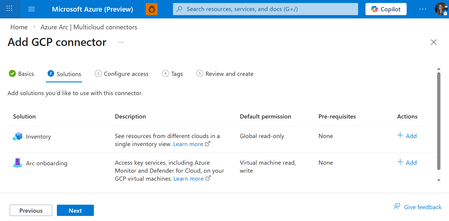
We're excited to announce the general availability of Google Cloud Platform (GCP) support in the Multicloud Connector enabled by Azure Arc! For teams that have been evaluating the GCP connector in Public Preview, you can build on the experience you already know: discover supported Google Cloud resources, maintain a shared inventory in Azure, and onboard eligible virtual machines to Azure Arc without moving your workloads. Integrated Azure Cloud Shell support also simplifies connector setup by letting you authenticate to Google Cloud and run setup commands directly from the Azure portal, reducing context switching and the need to prepare a separate execution environment. Build on your existing Multicloud management experience The core workflow remains familiar: connect your Google Cloud environment, choose your solutions, and define the scope of resources you want to discover and onboard. The Inventory solution maintains Azure representations of supported Google Cloud resources through periodic synchronization. Teams can query those resources alongside Azure and AWS resources through Azure Resource Graph, using imported metadata to understand their connected environments. Azure tags and Azure policies can also be applied to those representations to help organize and govern inventory. With Arc VM onboarding, eligible Google Cloud VMs are connected to Azure Arc through installation of the Azure Connected Machine agent. Supported region and GCP label filters help teams control onboarding scope, while periodic synchronization allows newly discovered machines that meet the prerequisites and configured filters to be onboarded automatically. For Kubernetes workloads, Arc GKE onboarding (Public Preview) is also available now, bringing discovery and Azure Arc onboarding together for eligible Google Kubernetes Engine clusters. Choose the solutions that match your workloads The following Multicloud Connector solutions are available for GCP, covering resource inventory, Azure Arc onboarding, security configuration assessment, licensing, and Extended Security Updates. Supported solution What it enables Inventory View supported Google Cloud resources in a shared inventory and query their Azure representations through Azure Resource Graph. Arc VM onboarding Connect eligible GCP VMs to Azure Arc, enabling access to services such as Azure Monitor and Microsoft Defender for Cloud when configured. Arc GKE onboarding (preview) Discover and connect eligible GKE clusters to Azure Arc-enabled Kubernetes. Security Baselines (preview) Audit connected machines against security baselines, including CIS Benchmarks and the Azure security baseline, powered by Machine Configuration. SQL Server licensing and ESU Manage SQL Server licensing and subscribe to Extended Security Updates for eligible SQL Server instances. Windows Server ESU Attach an Extended Security Updates license to eligible Azure Arc-enabled Windows Server machines. Security Baselines, SQL Server licensing and ESU, and Windows Server ESU require Arc VM onboarding, along with applicable configuration, eligibility, and licensing requirements. For more information about these solutions, their prerequisites, and how to get started, see our companion article: Expanding Multicloud Management with Azure Arc | Microsoft Community Hub. Take the next step Ready to get started? Follow the Multicloud Connector setup documentation to connect your Google Cloud environment.131Views0likes0CommentsBuild intelligent physical systems with Azure Local (preview) on NVIDIA Jetson
Build intelligent physical systems at the edge with Azure Local (preview) and NVIDIA Jetson Thor. Explore what’s new in version 2610 and watch it power a robotics demo featuring partner Universal Robots and manufacturer Danfoss.426Views1like0Comments
Building a Trusted Ecosystem for Sovereign Private Cloud: Azure Local validated partner solutions
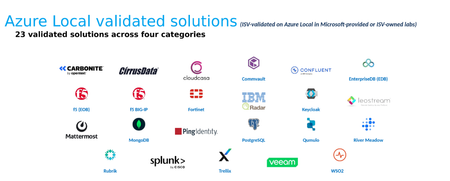
When organizations move critical workloads to Azure Local, the first question usually isn't about the platform. It's about everything that runs on and around it: Will my backup tool work? Can my Security Operations Center (SOC) still see the workloads it needs to monitor? Will my identity provider support authentication if the site loses its cloud connection? The answers can determine how confidently a sovereign or edge deployment moves to production. Customers want to run the independent software vendor (ISV) solutions they already trust, with confidence in how those solutions have been validated for their Azure Local environments. That's why we built the Azure Local Validated ISV Program. Why an ecosystem program, and why now Demand for Sovereign Private Cloud is increasing as organizations look for greater control over where and how their workloads operate. Governments, regulated industries, critical infrastructure providers and telecom operators want cloud-style operations while maintaining control of their data, security, compliance and operational boundaries. Azure Local supports a range of deployment architectures, including connected and disconnected operating models, and hyperconverged, disaggregated and multi-rack configurations. Infrastructure alone, however, does not make a production environment. Customers have invested for years in the tools that run their operations, including monitoring, security, data protection, identity and line-of-business applications. Successful adoption also depends on understanding how existing operational tools integrate with Azure Local and that need is growing now. As more sovereign and regulated workloads move to production on Azure Local, including disconnected and multi-rack deployments, customers need to know before they deploy that their existing tools are supported. That's why we're launching the program at Ignite with a published list of validated solutions and clear validation scope. How we validate We don't treat validation as a logo exercise. Our focus is on technical validation that gives customers greater clarity about supported configurations and integration scenarios. Each partner solution goes through a structured process: Architecture validation: Microsoft and the ISV review the solution architecture for Azure Local, including its deployment pattern, dependencies and integration points. Lab and product validation: Partner solutions undergo testing against defined scenarios and configurations to evaluate their operation on Azure Local. Deployment-specific validation: Validation scope is documented by supported deployment configuration, which may include connected, disconnected operations or multi-rack environments, as applicable. That last point matters. Every validated solution comes with documented information about the capabilities, scenarios and configurations evaluated. We'd rather be precise than broad, because customers make architecture and procurement decisions based on what we publish. Where we are today: 23 validated solutions across four solution categories The solutions are organized into four categories: Category Validated partners Security & Identity f5 BIG-IP, f5 eBPF Observability (EOB), Fortinet, IBM QRadar, Keycloak, Ping Identity, Splunk, Trellix, WSO2 Data Streaming & AI Confluent (Kafka), MongoDB, Qumulo Business Continuity & Migration Carbonite, Cirrus Data, CloudCasa / Catalogic, Commvault, RiverMeadow, Rubrik, Veeam Application Platform & DevOps EnterpriseDB (EDB), Leostream, Mattermost, PostgreSQL A few points stand out: Resiliency where it matters most. Validated backup, disaster recovery, and migration solutions provide customers with additional options for protecting and moving supported workloads. The capabilities available depend on the selected solution and its validated configuration. Identity for connected and disconnected environment: Five identity providers are validated. The five validated identity providers can support local authentication architectures for Azure Local workloads including certain disconnected scenarios where the required identity dependencies are available locally. Security across network and workload environments. F5 and Fortinet offer capabilities for application delivery, firewalling and deep network visibility. F5 EOB, for example, uses extended Berkeley Packet Filter (eBPF) technology to observe traffic in supported workload environments. Trellix provides endpoint security capabilities for supported workloads, subject to validated deployment configurations. Of the four categories, only Business Continuity & Migration provides workload resiliency directly. The other three contribute security, identity, observability, data and application-platform capabilities that support a well-run environment. We describe each category by the role it is validated to support so customers can design with accurate expectations. From validated products to repeatable solutions The next phase of the program goes beyond validating individual products. We're moving toward repeatable customer solutions. Our goal is to develop validated solution patterns that bring together Azure Local and complementary partner technologies for defined customer scenarios, such as a sovereign security operations center (SOC), a resilient manufacturing site, or a disconnected government deployment. The aim is to help customers evaluate solution compatibility and plan production deployments with greater confidence Get involved Customers: Talk to your Microsoft account team about which validated solutions fit your Azure Local deployment and confirm the validation scope for your configuration. Independent software vendors (ISVs): If your solution supports customers operating in sovereign, edge or regulated environments, we'd like to hear from you about joining the validation program. A platform is only as strong as the ecosystem around it. We're grateful to every partner who has invested engineering time to validate on Azure Local, and we're just getting started. Customers looking for help beyond Azure Local platforms or our partner ISV products can also work with global system integrators (GSIs). Your Microsoft account team can share a list of GSIs with specialized Azure Local expertise that offer services across the solution lifecycle, from design, deployment and integration to ongoing operations as a managed services partner. Validation applies to the specific capabilities and deployment configurations documented for each partner solution. Confirm the scope with your Microsoft or partner contact before making architecture or procurement decisions. For more information: Azure local learn page - Validated partner solutions986Views1like1Comment
Workload Orchestration in the Azure portal is now available: Deploy in minutes, scale with ease
Edge deployments rarely stay simple for long. What begins as an application running on a single Kubernetes cluster can quickly expand across stores, factories, branches, or other distributed locations, each having different configuration needs. That is exactly where workload orchestration for Azure Arc comes in. Workload orchestration helps teams manage that complexity by providing a centralized approach to consistently define, configure, and deploy applications across distributed cloud, on-premises, and edge environments, all while catering to custom configuration needs of individual sites and deployment targets. See the experience in action Evaluating a new deployment approach often starts slowly: study the documentation, package an application, complete the setup, and only then decide whether it fits. The Azure portal reverses that order with its jumpstart onboarding experience. Bring your Azure Arc-enabled Kubernetes cluster and deploy a pre-packaged application in minutes. Whether you are validating a proof of concept or introducing the product to your broader team, the new portal onboarding experience turns the end-to-end workflow into something you can quickly try on your own cluster. Scale from first deployment to production Once you have validated the first deployment, you can evolve the same approach for production. Onboard your infrastructure into workload orchestration, organize your deployment sites into hierarchies, and define shared configurations for all deployments – all without leaving the portal. This lets you expand from one cluster to a distributed fleet while retaining centralized governance, repeatability, and site-level flexibility. Ready to try it? Try now by deploying your first application with workload orchestration in the Azure portal. Explore the product documentation for the complete set of capabilities.541Views0likes0CommentsAnnouncing the preview of Azure Local rack aware cluster
As of 1/22/2026, Azure Local rack aware cluster is now generally available! To learn more: Overview of Azure Local rack aware clustering - Azure Local | Microsoft Learn We are excited to announce the public preview of Azure Local rack aware cluster! We previously published a blog post with a sneak peek of Azure Local rack aware cluster and now, we're excited to share more details about its architecture, features, and benefits. Overview of Azure Local rack aware cluster Azure Local rack aware cluster is an advanced architecture designed to enhance fault tolerance and data distribution within an Azure Local instance. This solution enables you to cluster machines that are strategically placed across two physical racks in different rooms or buildings, connected by high bandwidth and low latency within the same location. Each rack functions as a local availability zone, spanning layers from the operating system to Azure Local management, including Azure Local VMs. The architecture leverages top-of-rack (ToR) switches to connect machines between rooms. This direct connection supports a single storage pool, with rack aware clusters distributing data copies evenly between the two racks. Even if an entire rack encounters an issue, the other rack maintains the integrity and accessibility of the data. This design is valuable for environments needing high availability, particularly where it is essential to avoid rack-level data loss or downtime from failures like fires or power outages. Key features Starting in Azure Local version 2510, this release includes the following key features for rack aware clusters: Rack-Level Fault Tolerance & High Availability Clusters span two physical racks in separate rooms, connected by high bandwidth and low latency. Each rack acts as a local availability zone. If one rack fails, the other maintains data integrity and accessibility. Support for Multiple Configurations Architecture supports 2 machines up to 8 machines, enabling scalable deployments for a wide range of workloads. Scale-Out by Adding Machines Easily expand cluster capacity by adding machines, supporting growth and dynamic workload requirements without redeployment. Unified Storage Pool with Even Data Distribution Rack aware clusters offer a unified storage pool with Storage Spaces Direct (S2D) volume replication, automatically distributing data copies evenly across both racks. This ensures smooth failover and reduces the risk of data loss. Azure Arc Integration and Management Experience Enjoy native integration with Azure Arc, enabling consistent management and monitoring across hybrid environments—including Azure Local VMs and AKS—while maintaining the familiar Azure deployment and operational experience. Deployment Options Deploy via Azure portal or ARM templates, with new inputs and properties in the Azure portal for rack aware clusters. Provision VMs in Local Availability Zones via the Azure Portal Provision Azure Local virtual machines directly into specific local availability zones using the Azure portal, allowing for granular workload placement and enhanced resilience. Upgrade Path from Preview to GA Deploy rack aware clusters with the 2510 public preview build and update to General Availability (GA) without redeployment—protecting your investment and ensuring operational continuity. Get started The preview of rack aware cluster is now available to all interested customers. We encourage you to try it out and share your valuable feedback. To get started, visit our documentation: Overview of Azure Local rack aware clustering (Preview) - Azure Local | Microsoft Learn Stay tuned for more updates as we work towards general availability in 2026. We look forward to seeing how you leverage Azure Local rack aware cluster to power your edge workloads!1.6KViews4likes4CommentsExpanding Azure Arc for Hybrid and Multicloud Management
Hybrid and multi-cloud environments are no longer optional—they’re essential for modern enterprises. At Ignite 2025, we are announcing key enhancements to Azure Arc based on your feedback, designed to simplify governance, improve security, and deliver operational consistency across diverse infrastructures. Here’s what’s new: 1. Multicloud Connector for GCP – Public Preview Azure Arc now extends its multicloud reach with Google Cloud Platform (GCP) support in public preview. Customers can now inventory and manage resource and gain a single pane of glass across AWS, GCP, and Azure resources. Learn more https://aka.ms/multicloud-connector-gcp-blog Agentless inventory discovery: Automatically detects GCP resources and projects them into Azure Resource Graph for unified visibility. Arc onboarding for GCP VMs: Bring GCP virtual machines under Azure management to apply monitoring, policy, and security controls. Secure authentication via OIDC federation: Eliminates the need for storing credentials, reducing security risk. 2. Azure virtual desktop for hybrid environments As part of this wave of new releases, Azure Virtual Desktop for hybrid environments is now available in preview through Azure Arc server. Building on the current offering of Azure Virtual Desktop for Azure Local, this capability enables organizations to deliver a rich virtual desktop experience on-premises—without requiring new hardware investments or hypervisor changes. In this release, Azure Virtual Desktop is enabled on Arc connected servers to address scenarios with high-latency, data residency, or application constraints that demand local VDI, while leveraging the Azure management plane for streamlined operations. This expansion provides greater deployment flexibility and supports customers who need both local and cloud-based solutions. To learn more: https://aka.ms/AVDHybridIgnite2025Blog 3. Azure Arc Auto-Agent Upgrades Managing Connected Machine Agents just got easier. With auto agent upgrades we reduce the operational overhead and minimizes downtime risk. Ensures machines stay secure and compliant with the latest features and patches automatically. Learn more Public Preview: Auto agent upgrade for Azure Arc-enabled servers | Microsoft Community Hub Automatic agent upgrade: Keeps agents current without manual intervention. Flexible control: Enable or disable auto-upgrade via Azure Portal, CLI, or PowerShell. Resilience built-in: Includes rollback and retry mechanisms for failed upgrades. 4. Azure Machine Configuration: OS Configuration Editor and Policy The new OS Configuration Editor simplifies compliance at scale. Accelerates compliance initiatives and reduces configuration drift. Non-technical teams can manage OS settings visually, improving agility and reducing errors. Learn more https://aka.ms/MCBaselinesPreviewBlog Visual authoring interface: Create and apply guest configuration policies without writing code. Fleet-wide auditing: Enforce OS settings across Azure and Arc-enabled servers. Integration with Azure Policy: Centralized governance for hybrid environments. 5. Windows Server Recovery Configuration Audit via Arc Part of the Windows Resiliency initiative, Azure Arc now supports recovery audits. Improves disaster recovery preparedness and compliance reporting. Enterprises can proactively identify gaps and reduce downtime during critical incidents. Learn more Audit WinRE policies: Validate Windows Recovery Environment readiness across Arc-enabled servers. Compliance visibility: View recovery status in Azure portal dashboards. Future roadmap: Configure your servers to receive boot critical updates and remote remediation for disaster recovery scenarios. 6. Workload Identity for Arc-enabled Kubernetes – General Availability Secure identity management for Kubernetes workloads is now GA. Strengthens security posture by eliminating secret sprawl. Simplifies identity management for hybrid and edge-native applications, reducing operational risk. Learn more https://aka.ms/workload-identity-arc-for-kubernetes-ga Federated identity integration: Connect workloads to Microsoft Entra without static secrets. Token-based authentication: Pods securely access Azure resources without manual credential rotation. Broad compatibility: Works across multiple Kubernetes distros connected via Azure Arc. 7. Azure Arc Site Manager – Public Preview Refresh Site Manager is a powerful solution designed to streamline site configuration and edge infrastructure observability and management at scale, making it easier to manage distributed environments, apply consistent policies, and streamline workflows across hybrid and edge deployments. Learn more Hierarchical Site Organization: Site creation that mirror an organization’s hierarchical structure Aggregated Monitoring and Insights: Single pane of glass for monitoring distributed environments for Connectivity, Updates, Alerts and Security baseline status Site Configurations: Define configurations at the site level and reuse them across partner solutions 8. Simplified migration journey for Arc customers - Preview Azure Migrate now natively integrates with Azure Arc to simplify the migration journey for Arc customers. Customers can leverage Azure Arc data to generate a comprehensive business case for migration as well as full estate migration readiness assessments with no additional on-premises deployments. Learn more Simple set up: Create a project and scope Arc resources by subscription. Azure Migrate generates business cases and assessments automatically. Optionally deploy the Azure Migrate Collector VM extension to collect additional information to improve the accuracy of business cases and assessments. Comprehensive business case: Compare the Total Cost of Ownership of your current Arc-enabled on-premises estate with that in Azure as well as insights into sustainability improvements of migrating to Azure. Full-estate readiness assessment: Assess the readiness of your workloads to various Azure targets such as Azure VMs, Azure SQL Databases, Azure SQL Managed Instance etc. Get right-sized recommended SKUs as well as potential monthly costs for your workloads in Azure. 9. Azure Key Vault Secret Store Extension – General Availability Azure Key Vault Secret Store Extension (SSE) is now generally available for Arc-enabled on-premises Kubernetes, including clusters that you connect yourself and AKS Arc managed clusters. SSE automatically fetches secrets from an Azure Key Vault to the on-premises cluster for offline access. Learn more Offline Access: With SSE, workloads can access Azure Key Vault secrets from the local Kubernetes secrets store regardless of internet connectivity interruptions. Scalability: SSE helps very large distributed deployments with hundreds or thousands of clusters to work with Azure Key Vault by spreading demand over time. These innovations reinforce Azure Arc’s position as the most comprehensive platform for hybrid and multicloud management. From easy connecting to AWS/GCP to Azure through multicloud connector to enabling secure workload identities and resilient OS configurations, Azure Arc is helping enterprises stay agile, secure, and compliant.3KViews4likes1CommentPublic Preview: Multicloud connector support for Google Cloud
We are excited to announce that the Multicloud connector is now in preview for GCP environments. With the Multicloud connector, you can easily connect your GCP projects and AWS accounts to Azure with the following capabilities: Inventory: Get an up-to-date, comprehensive view of your cloud assets across different cloud providers. Now supporting GCP services (Compute VM, GKE, Storage, Functions, and more), you can now gain insights into your Azure, AWS, and GCP environments in a single pane of glass. The agentless inventory solution will periodically scan your GCP environment, project the discovered resources in GCP as Azure resources, including all of the GCP metadata like GCP labels. Now, you can easily view, query, and tag these resources from a centralized location. Azure Arc onboarding: Automatically Arc-enable your existing and future GCP VMs so you can leverage Azure and Microsoft services, like Azure Monitor and Microsoft Defender for Cloud. Through the multicloud connector, the Azure Arc agent will be automatically installed for machines that meet the prerequisites. How do I get started? You can easily set up the multicloud connector by following our getting started guide which provides step by step instructions on creating the connector and setting up the permissions in GCP which leveraged OIDC federation. What can I do after my connector is set up? With the inventory offering, you can see and query for all of your GCP and Azure resources via Azure Resource Graph. For Azure Arc onboarding, you can apply the Azure management services on your GCP VMs that are Arc-enabled. Learn more here. We are very excited about the expanded support in Google Cloud. Set up your multicloud connector now for free! Please let us know if you have any questions by posting on the Azure Arc forum or via Microsoft support. Here is the mutlicloud capabilities technical documentation. Check out the Ignite session here!878Views0likes0Comments