msignite
1 TopicFrom Events to Decisions: Real-Time Logistics with Microsoft Fabric and Microsoft-Decision-1.1
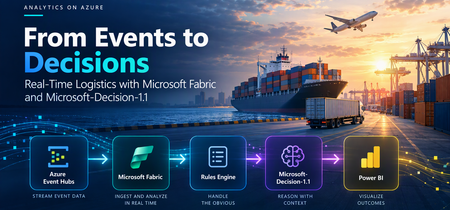
In logistics, every single shipment carries inherent risks. When delivery timelines are tied to contractual outcomes, or regulatory implications, that adds to the complexity of how the shipment provider should handle it. Often, such agencies implement rule-based systems to deal with cases that warrant attention; the primary advantage being that these are fairly deterministic systems, and numerical inputs are easy to transform into a resultant outcome. However, modern systems are a lot more complex: in real-world scenarios, there are often conflicting updates in the form of carrier notes, route constraints that are highly dynamic and the customer's own priorities and needs. Mostly, these arrive in the form of unstructured, textual context. How do we then deal with evaluating such complex cases - in real time and at scale? In this blog, we shall explore a hypothetical workflow for a shipping agency that needs real-time decision making on certain actions ("next steps") for shipments that are at risk. These options can vary from putting the shipment on hold, expediting it, re-routing it, or retaining status-quo (no action). We will solve this challenge utilizing the real-time capabilities of Microsoft Fabric, ingesting streaming data from the shipment source systems, and augmenting the usual rule-based engine with Microsoft's decision model, Microsoft Decision 1.1. Setting up the Workflow First, let's look at the pipeline we will be simulating. Each shipment would come with multiple 'events' - checking into a hub, departing from a terminal, et cetera. These events are streamed live from the producer system via Azure Event Hubs - and consumed via a Fabric Eventstream setup that dumps the incoming data into an eventhouse. The eventhouse has a KQL database which we will query subsequently to perform the necessary screening required. A notebook with relevant transformations processes events - it goes through the rule-based deterministic engine first to handle cases that can be covered normally, and then only forwards complex cases needing an intervention to the decision model. For the purposes of this demonstration, a Power BI report summarizes the outcomes at the end, merging the rule-based track and the decision-model track together for visibility. In Fabric, the event-stream configured starts processing the data as soon as it gets inputs from the source Event Hub, and dumps it into a eventhouse sink. This data can be queried with KQL via the endpoint offered within Fabric. This is how one shipment looks like, with all its events. Note how the shipment notes are also attached as `context_evidence` field. A practical next-step is to look for items that need further attention. The notebook component handles the transformation actions that will be applied on top of the eventhouse dataset. To add a notebook, you can choose to click on the options panel for the KQL DB and then choose Notebook. The Fabric notebook then turns raw Eventhouse telemetry into one shipment state per replay. It uses KQL to read events up to a historical cutoff, deduplicate them by event ID, and keep the highest-sequence event for each shipment, preserving the carrier notes and other evidence attached to that event. It then screens out invalid, stale, and delivered states and applies deterministic rules where the outcome is clear. The Case expression assigns the first matching label to each shipment: Condition Rule outcome Required fields are missing or invalid, or the event time is after the cutoff INVALID The event time is more than five minutes before the cutoff STALE The shipment has been delivered RESOLVED A pharma temperature breach is confirmed HOLD No projected SLA breach, no delay of 60 minutes or more, and no weather or capacity delay NO_ACTION A risk trigger fired and evidence is attached NEEDS_CONTEXT Only at-risk shipments with attached evidence ("NEEDS_CONTEXT") that the rules haven’t resolved go to Microsoft-Decision-1.1 for a recommendation. The notebook writes rule outcomes, model recommendations, and request statuses to separate Lakehouse Delta tables for reporting in Power BI. Bringing in Microsoft Decision-1.1: Foundry Deployment and Integration The Decision-1.1 model, announced in Microsoft Ignite 2026, is Generally Available (GA) now and available on the Foundry platform for deployment basis a Requests-per-Minute (RPM) quota or a dedicated Provisioned Throughput Unit (PTU) quota. For our use-case, let's deploy a GlobalStandard deployment for the model. Once done, the model should be deployed and ready to be accessed via the project endpoint. Given below is a sample POST API call to obtain a structured decision call. Notice how the context is read by the model, and how it picks between the given criterias (as explained at the outset), assigning confidence scores to each outcome. A key advantage of decision models over their LLM counterparts is both in terms of latency, and cost (input tokens are priced at $0.042/M tokens, outputs are not billed - as of this blog's publication). The TypeSafe SDK for system one models is also compatible with Microsoft-Decision-1.1, so interoperability is possible. The notebook makes parallelized calls to the Foundry endpoint to get the decisions made, respecting the quota limits and handling throttling if any. This can be implemented via custom User Defined Functions (UDFs), or native REST queries if designed to process batch-wise. These decision model output logs are saved to a separate destination table in the Lakehouse, as was the outputs from the rule-based setup. Here's a snippet of the cases that needed judgement from the decision model. Notice how all relevant telemetry is captured, alongside the confidence scores in a JSON format within the log table. If provided context is not enough to make a prudent call; in our case, the model does not guess, it explicitly flags it as "INSUFFICIENT_EVIDENCE". Ultimately, a Power Query within Fabric merges the rule-based track and the model outcome track to create a consolidated view, which can be summarized via a dashboard. The 'actions' or outcomes can also be materially amplified by utilizing Fabric Activator, which takes actions based on the configurations made. Reflections and Next Steps Making intelligent judgement calls is an integral part of most business workflows today. While the above demonstration centers on a logistics use case, it can also span across problem statements from other domains. To balance cost and accuracy, a rule engine is not replaced, rather complemented by the use of a decision model - Microsoft-Decision-1.1 in this case. Production implementations of the above design pattern can also ensure relevant evaluation metrics for the Decision model are set up appropriately to help track any possible deviations in model behavior. These are available under the consolidated Foundry platform, where evaluations can be configured with ease, thereby benchmarking performance against your own baselines.58Views0likes0Comments