msignite
14 TopicsGeneral Availability: Granular RBAC in Azure Monitor Logs
We’re excited to announce the general availability of Granular Role-Based Access Control (RBAC) in Azure Monitor Logs! This capability enables you to set fine-grained data access control at the row level, giving you more flexibility and security when managing log data. Back in May 2025, we introduced this feature in public preview. Today, it’s fully available and ready for production use What is Granular RBAC? Organizations often need to segregate and control access to data without trading off the benefits of a centralized logging platform. Granular RBAC builds on existing Azure RBAC capabilities for workspace and table-level access, allowing you to: Apply least privilege access at any level, workspace, table, or row level security. Maintain all your data in a single Log Analytics workspace. Separate data plane and control plane access using Azure Attribute-Based Access Control (ABAC) as part of your RBAC role assignments. With Granular RBAC, you can filter which data each user can view or query based on conditions you define such as organizational roles, geographic regions, or data sensitivity levels. What’s New? Broad Availability: Granular RBAC is now supported in Azure Public Cloud, Azure Government (GCC), and Azure China. New Built-in Role: The Log Analytics Data Reader role now fully supports Granular RBAC for an out-of-the-box experience. Learn more Get Started Learn more about Granular RBAC and how to set it up in Azure Monitor Logs We hope you enjoy this new addition to Azure Monitor Log Analytics.948Views3likes0Comments
Advancing Full-Stack Observability with Azure Monitor at Ignite 2025
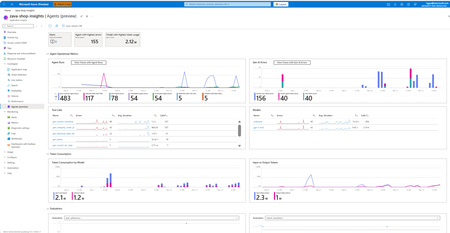
New AI-powered innovations in the observability space First, we’re excited to usher in the era of agentic cloud operations with Azure Copilot agents. At Ignite 2025, we are announcing the preview of the Azure Copilot observability agent to help you enhance full-stack troubleshooting. Formerly “Azure Monitor investigate”, the observability agent streamlines troubleshooting across application services and resources such as AKS and VMs with advanced root cause analysis in alerts, the portal, and Azure Copilot (gated preview). By automatically correlating telemetry across resources and surfacing actionable findings, it empowers teams to resolve issues faster, gain deeper visibility, and collaborate effectively. Learn more here about the observability agent and learn about additional agents in Azure Copilot here. Additionally, with the new Azure Copilot, we are streamlining agentic experiences across Azure. From operations center in the Azure portal, you can get a single view to navigate, operate and optimize your environments and invoke agents in your workflows. You also get suggested top actions within the observability blade of operations center to prioritize, diagnose and resolve issues with support from the observability agent. Learn more here. In the era of AI, more and more apps are now AI apps. That’s why we’re enhancing our observability capabilities for GenAI and agents: Azure Monitor brings agent-level visibility and control into a single experience in partnership with Observability in Foundry Control Plane through a new agent details view (public preview) showcasing success metrics, quality indicators, safety checks, and cost insights in one place. Simplified tracing also transforms every agent run into a reasonable, plan-and-act narrative for faster understanding. On top of these features, the new smart trace search enables faster detection of anomalies—such as policy violations, unexpected cost spikes, or model regressions—so teams can troubleshoot and optimize with confidence. These new agentic experiences build upon a solid observability foundation provided by Azure Monitor. Learn more here. We’re making several additional improvements in Azure Monitor: Simplified Onboarding & More Centralized Visibility Streamlined onboarding: Azure Monitor now offers streamlined onboarding for VMs, containers, and applications with sensible defaults and abstraction layers. This means ITOps teams can enable monitoring across environments in minutes, not hours. Previously, configuring DCRs and linking Log Analytics workspaces was a multi-step process; now, you can apply predefined templates and scale monitoring across hundreds of VMs faster than before. Centralized dashboards: A new monitor overview page in operations center consolidates top suggested actions and Azure Copilot-driven workflows for rapid investigation. Paired with the new monitoring coverage page (public preview) in Azure Monitor, ITOps can quickly identify gaps based on Azure Advisor recommendations, enable VM Insights and Container Insights at scale, and act on monitoring recommendations—all from a single pane of glass. Learn more here. Richer visualizations: Azure Monitor dashboards with Grafana are now in GA, delivering rich visualizations and data transformation capabilities on Prometheus metrics, Azure resource metrics, and more. Learn more here. Cloud to edge visibility: With expanded support for Arc-enabled Kubernetes with OpenShift and Azure Red Hat OpenShift in Container Insights and Managed Prometheus, Azure Monitor offers an even more complete set of services for monitoring the health and performance of different layers of Kubernetes infrastructure and the applications that depend on it. Learn more here. Advanced Logs, Metrics, and Alert Management Logs & metrics innovations: Azure Monitor now supports the log filtering and transformation (GA), as well as the emission of logs to additional destinations (public preview) such as Azure Data Explorer and Fabric—unlocking real-time analytics and more seamless data control. Learn more here. More granular access for managing logs: Granular RBAC for Log Analytics workspaces ensures compliance and least privilege principles across teams, now in general availability. Learn more here. Dynamic thresholds for log search alerts (public preview): Now you can apply the advanced machine learning methods of dynamic threshold calculations to enhance monitoring with log search alerts. Learn more here. Query-based metric alerts (public preview): Get rich and flexible query-based alerting on Prometheus, VM Guest OS, and custom OTel metrics to reduce complexity and unblock advanced alerting scenarios. Learn more here. OpenTelemetry Ecosystem Expansion Azure Monitor doubles down on our commitment to OpenTelemetry with expanded support for monitoring applications deployed to Azure Kubernetes Service (AKS) by using OTLP for instrumentation and data collection. New capabilities include: Auto-instrumentation with the Azure Monitor OpenTelemetry distro for Java and NodeJS apps on AKS (public preview): this reduces friction for teams adopting OTel standards and ensures consistent telemetry across diverse compute environments. Auto-configuration for apps on AKS in any language already instrumented with the open-source OpenTelemetry SDK to emit telemetry to Azure Monitor. Learn more here. Additionally, we are making it easier to gain richer and more consistent visibility across Azure VMs and Arc Servers with OpenTelemetry visualizations, offering standardized system metrics, per-process insights, and extensibility to popular workloads on a more cost-efficient and performant solution. Learn more here. Next Steps These innovations redefine observability from cloud to edge—simplifying onboarding, accelerating troubleshooting, and embracing open standards. For ITOps and DevOps teams, this means fewer blind spots, faster MTTR, and improved operational resilience. Whether you’re joining us at Microsoft Ignite 2025 in-person or online, there are plenty of ways to connect with the Azure Monitor team and learn more: Attend breakout session BRK149 for a deep dive into Azure Monitor’s observability capabilities and best practices for optimizing cloud resources. Attend breakout session BRK145 to learn more about how agentic AI can help you streamline cloud operations and management. Attend breakout session BRK190 to learn about how Azure Monitor and Microsoft Foundry deliver an end-to-end observability experience for your AI apps and agents. Join theater demo THR735 to see a live demo on monitoring AI agents in production. Connect with Microsoft experts at the Azure Copilot, Operations, and Management expert meet-up booth to get your questions answered.2.2KViews3likes0CommentsPUBLIC PREVIEW - Azure Monitor - Collect Azure Resource Platform Logs at Scale with DCRs
PUBLIC PREVIEW - Azure Monitor - Collect Azure Resource Platform Logs at Scale with DCRs. How DCR-based platform logs simplify the telemetry collection for organizations managing 1,000+ resources.1.1KViews2likes1Comment
Introducing Monitoring Coverage: Assess and Improve Your Monitoring Posture at Scale
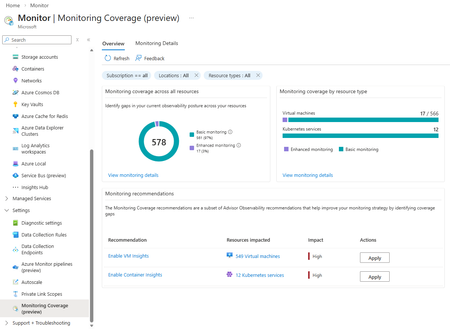
As organizations grow their Azure footprint, ensuring consistent monitoring coverage across resources becomes increasingly important. The new Monitoring Coverage (preview) feature in Azure Monitor provides a single, centralized experience to assess, configure at-scale, and enhance monitoring across your environment with ease. A unified view of your monitoring health Monitoring Coverage consolidates insights from Azure Advisor to highlight where monitoring can be improved. You can see which Azure resources already have basic out-of-box telemetry enabled and which could benefit from additional recommended settings, helping you close gaps in your observability strategy at scale. Key capabilities Comprehensive visibility: Get an overview of monitoring coverage across common Azure resource types. Actionable recommendations: Identify and apply Azure Advisor recommendations at-scale to strengthen your monitoring posture. Centralized configuration: Enable recommended monitoring settings for multiple resources from a single pane of glass. Detailed resource insights: Explore individual resource details to review active monitoring configurations and applicable recommendations. How to access In the Azure portal, open Azure Monitor. Under the Settings section of the left navigation, select Monitoring Coverage (preview). You can scope the view using standard Azure filters; Subscriptions, Resource groups, Tags, Locations, and Resource types, allowing you to focus on the resources you manage. Supported resource types During preview, Monitoring Coverage supports Virtual Machines (VMs) and Azure Kubernetes Service (AKS) clusters. Support for additional Azure services will roll out in future updates. Overview tab The Overview tab provides a snapshot of your overall monitoring landscape, showing which resources have: Basic monitoring: Default metrics and logs enabled upon creation. Enhanced monitoring: Microsoft-recommended configurations for deeper insights and improved observability. This view makes it easy to identify coverage gaps and take quick action to enable enhanced monitoring, which may incur additional cost depending on your configuration. Streamlined enablement experience When you choose to enable monitoring: The Enablement screen lists all resources included in the operation. You can deselect specific resources if needed. Selecting View details and configure allows customization by resource type—for example, selecting a Log Analytics workspace. The Review and Enable tab summarizes all changes before application. Once enabled, data typically begins flowing to the designated workspace within 30–60 minutes. During this preview, you can enable monitoring for up to 100 resources at a time, and an existing Log Analytics workspace or Azure Monitor Workspace is required. Monitoring Details page For a deeper look, the Monitoring Details page lets you: View resources as a list or group them by recommendation. Filter using standard Azure filters. See the Monitoring coverage column summarizing enabled recommendations and data collection rules. Enable individual monitoring settings directly from this view when managing resources one at a time. Share your feedback We’re actively evolving Monitoring Coverage based on user input. To share your feedback or suggest new capabilities, use the Feedback link at the top of the page in the Azure portal. Your insights will help shape the future of Azure Monitor. Try Monitoring Coverage (preview) today in the Azure portal to assess your observability coverage and take the next step toward proactive, consistent monitoring across your Azure environment.778Views2likes0CommentsPublic Preview: Azure Monitor Integration with Fabric Real Time Intelligence Eventhouse
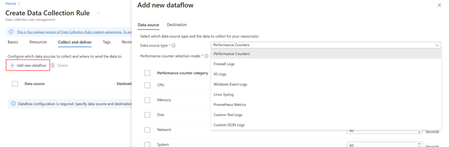
Customers need to enable different scenarios to successfully operate their IT/OT environments and business processes for meeting business objectives. Building solutions to solve these problems requires deriving rich insights from telemetry data emitted by devices, assets, applications, typically, by combining with other data to answer business questions. The common need for the systems that produce the insights is the ability to obtain the data they need within acceptable latency, to process, produce and serve up the insights in the most actionable manner. Integrating Azure Monitor with Fabric Real Time Intelligence Eventhouseenables customers to build solutions to uncover business insights and trends. What's New The demand for leveraging telemetry data beyond observability scenarios is steadily increasing. Some examples include: To drive capacity management processes, utilization telemetry is mapped to inventory data. Correlating support ticket and resolution times with service performance telemetry to estimate engineering hours per dollar. With this new capability, customers can seamlessly leverage telemetry data collected via Azure Monitor for advanced analytics through a Fabric Real Time Intelligence Eventhouse, enabling comprehensive visualization and analysis of such scenarios. This public preview supports various event types from Windows and Linux-based Virtual Machines. Through the use of Data Collection Rules (DCR), customers maintain granular control over sending data to a Fabric Real Time Intelligence Eventhouse. By leveraging these platforms, organizations can monitor and enhance data-driven decision-making, boost operational efficiency, and strengthen business process and insights. Key Benefits Extensive Data Ingestion: Supports a wide range of telemetry types, including Windows event logs, Linux syslog, performance counters, IIS logs, and custom logs. Comprehensive Advanced Analytics: Leverage Fabric Real Time Intelligence Eventhouse for robust querying and visualization capabilities across Azure Monitor collected telemetry and other business data. Seamless Integration: Reduce implementation time by easily connecting existing Azure Monitor setups with Fabric Real Time Intelligence Eventhouse. You can access this feature directly from the Azure Portal in just a few steps: 1. Use the new Data Collection Rule creation experience to add a dataflow for any of the supported telemetry types. 2. Configure an existing Fabric Real Time Intelligence Eventhouse database as your destination. Optionally, you may create a new destination from this UI. 3. Within minutes after your Data Collection Rule (DCR) is deployed, you will see logs in your Fabric environment. From here you can query or build analytics on this and other available datasets. We invite you to explore this new feature in public preview and experience how it can transform your data monitoring and analytics workflows. For more details on getting started, please visit the Azure Monitor documentation.588Views2likes0Comments
Accelerating SCOM to Azure Monitor Migrations with Automated Analysis and ARM Template Generation
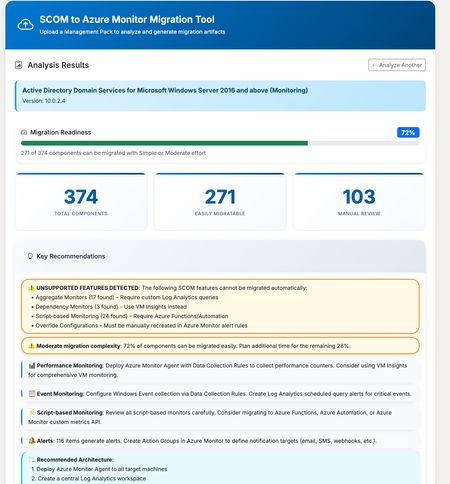
Accelerating SCOM to Azure Monitor Migrations with Automated Analysis and ARM Template Generation Azure Monitor has become the foundation for modern, cloud-scale monitoring on Azure. Built to handle massive volumes of telemetry across infrastructure, applications, and services, it provides a unified platform for metrics, logs, alerts, dashboards, and automation. As organizations continue to modernize their environments, Azure Monitor is increasingly the target state for enterprise monitoring strategies. With Azure Monitor increasingly becoming the destination platform, many organizations face a familiar challenge: migrating from System Center Operations Manager (SCOM). While both platforms serve the same fundamental purpose—keeping your infrastructure healthy and alerting you to problems—the migration path isn’t always straightforward. SCOM Management Packs contain years of accumulated monitoring logic: performance thresholds, event correlation rules, service discoveries, and custom scripts. Translating all of this into Azure Monitor’s paradigm of Log Analytics queries, alert rules, and Data Collection Rules can be a significant undertaking. To help with this challenge, members of the community have built and shared a tool that automates much of the analysis and artifact generation. The community-driven SCOM to Azure Monitor Migration Tool accepts Management Pack XML files and produces several outputs designed to accelerate migration planning and execution. The tool parses the Management Pack structure and identifies all monitors, rules, discoveries, and classes. Each component is analyzed for migration complexity: some translate directly to Azure Monitor equivalents, while others require custom implementation or may not have a direct equivalent. Results are organized into two clear categories: Auto-Migrated Components – Covered by the generated templates and ready for deployment Requires Manual Migration – Components that need custom implementation or review Instead of manually authoring Azure Resource Manager templates, the tool generates deployable infrastructure-as-code artifacts, including: Scheduled Query Alert rules mapped from SCOM monitors and rules Data Collection Rules for performance counters and Windows Events Custom Log DCRs for collecting script-generated log files Action Groups for notification routing Log Analytics workspace configuration (for new environments) For streamlined deployment, the tool offers a combined ARM template that deploys all resources in a single operation: Log Analytics workspace (create new or connect to an existing workspace) Action Groups with email notification All alert rules Data Collection Rules Monitoring Workbook One download, one deployment command — with configurable parameters for workspace settings, notification recipients, and custom log paths. The tool generates an Azure Monitor Workbook dashboard tailored to the Management Pack, including: Performance counter trends over time Event monitoring by severity with drill-down tables Service health overview (stopped services) Active alerts summary from Azure Resource Graph This provides immediate operational visibility once the monitoring configuration is deployed. Each migrated component includes the Kusto Query Language (KQL) equivalent of the original SCOM monitoring logic. These queries can be used as-is or refined to match environment-specific requirements. The workflow is designed to reduce the manual effort involved in migration planning: Export your Management Pack XML from SCOM Upload it to the tool Review the analysis — components are separated into auto-migrated and requires manual work Download the All-in-One ARM template (or individual templates) Customize parameters such as workspace name and action group recipients Deploy to your Azure subscription For a typical Management Pack, such as Windows Server Active Directory monitoring, you may see 120+ components that can be migrated directly, with an additional 15–20 components requiring manual review due to complex script logic or SCOM-specific functionality. The tool handles straightforward translations well: Performance threshold monitors become metric alerts or log-based alerts Windows Event collection rules become Data Collection Rule configurations Service monitors become scheduled query alerts against Heartbeat or Event tables Components that typically require manual attention: Complex PowerShell or VBScript probe actions Monitors that depend on SCOM-specific data sources Correlation rules spanning multiple data sources Custom workflows with proprietary logic The tool clearly identifies which category each component falls into, allowing teams to plan their migration effort with confidence. A Note on Validation This is a community tool, not an officially supported Microsoft product. Generated artifacts should always be reviewed and tested in a non-production environment before deployment. Every environment is different, and the tool makes reasonable assumptions that may require adjustment. Even so, starting with structured ARM templates and working KQL queries can significantly reduce time to deployment. Try It Out The tool is available at https://tinyurl.com/Scom2Azure.Upload a Management Pack, review the analysis, and see what your migration path looks like.1KViews1like0CommentsObservability for the Age of Generative AI
Every generation of computing brings new challenges in how we monitor and trust our systems. With the rise of Generative AI, applications are no longer static code—they’re living systems that plan, reason, call tools, and make choices dynamically. Traditional observability, built for servers and microservices, simply can’t tell you when an AI agent is correct, safe, or cost-efficient. We’re reimagining observability for this new world. At Ignite, we introduced the next wave of Azure Monitor and AI Foundry integration—purpose-built for GenAI apps and agents. End-to-End GenAI Observability Across the AI Stack Customers can see not just whether their systems are up or fast, but also whether their agent responses are accurate. Azure Monitor, in partnership with Foundry, unifies agent telemetry with infrastructure, application, network, and hardware signals—creating a true end-to-end view that spans AI agents, the services they call, and the compute they run on. New capabilities include: Agent Overview Dashboard in Grafana and Azure – Gain a unified view of one or more GenAI agents, including success rate, grounding quality, safety violations, latency, and cost per outcome. Customize dashboards in Grafana or Azure Monitor Workbooks to detect regressions instantly after a model or prompt change—and understand how those changes affect user experience and spend. AI-Tailored Trace View – Follow every AI decision as a readable story: plan → reasoning → tool calls → guardrail checks. Identify slow or unsafe steps in seconds, without sifting through thousands of spans. AI-Aware Trace Search by Attributes – Search, sort, and filter across millions of runs using GenAI-specific attributes like model ID, grounding score, or cost. Find the “needle” in your GenAI haystack in a single query. Foundry Low-Code Agent Monitoring – Agents created through Foundry’s visual, low-code interface are now automatically observable. Without writing a single line of code, you can track reliability, safety, and cost metrics from day one. Full-Stack Visibility Across the AI Stack – All evaluations, traces, and red-teaming results are now published to Azure Monitor, where agent signals correlate seamlessly with infrastructure KPIs and application telemetry to deliver a unified operational view. Check out our get started documentation. Powered by OpenTelemetry Innovation This work builds directly on the new OpenTelemetry extensions announced in our recent Azure AI Foundry blog post. Microsoft is helping define the OpenTelemetry agent specification, extending it to capture multi-agent orchestration traces, LLM reasoning context, and evaluation signals—enabling interoperability across Azure Monitor, AI Foundry, and partner tools such as Datadog, Arize, and Weights & Biases. By building on open standards, customers gain consistent visibility across multi-cloud and hybrid AI environments—without vendor lock-in. Built for Enterprise Scale and Trust With open standards and deep integration between Azure Monitor and AI Foundry, organizations can now apply the same discipline they use for traditional applications to their GenAI workloads, complete with compliance, cost governance, and quality assurance. GenAI is redefining what it means to operate software. With these innovations, Microsoft is giving customers the visibility, control, and confidence to operate AI responsibly, at enterprise scale.1.2KViews1like0Comments
Simplify Application Monitoring for AKS with Azure Monitor (Public Preview)
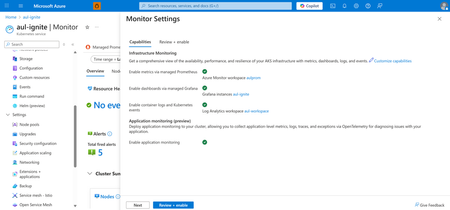
As cloud-native workloads scale, customers increasingly expect application and infrastructure observability to be unified, automated, and devops-friendly. Azure Monitor is advancing this vision with Application Monitoring for Azure Kubernetes Service (AKS). With seamless onboarding and troubleshooting experiences in the Azure Portal, now in Public Preview. This new capability brings first-class OpenTelemetry support, seamless onboarding from the AKS cluster blade, and auto-instrumentation and auto-configuration options that make it easier than ever to collect application performance data into Azure Monitor and Application Insights—without modifying application code or maintaining custom agents. Enable application monitoring for your AKS deployed apps directly from the Azure Portal in two steps: 1. Enable application monitoring for the AKS cluster in Monitor Settings 2. Choose the namespaces for application monitoring and configure namespace-wide onboarding to route application signals to an App Insights resource. Optionally, leverage Custom Resource Definitions (CRDs) for more granular enablement and per-deployment onboarding. Feature Highlights Auto-instrumentation Auto-instrument Java and NodeJS applications without code changes. This approach instruments workloads with the AzureMonitor OpenTelemetry distro and routes telemetry to Application Insights. Now available in both CLI and Azure portal for addon enablement and namespace configuration. Unified Monitoring and Troubleshooting Switch seamlessly between infrastructure and application layers with improved navigation between Container Insights and Application Insights, curated OpenTelemetry workbooks, and Azure-curated Grafana dashboards. When looking into your deployment controllers from Container Insights, you can also see the application performance metrics alongside to identify problematic requests or failures. From there, you can seamlessly transition over to your Application Insights to get a more detailed diagnosis. View your application performance next to your infrastructure metrics in Container Insights Full-Stack Dashboards with Grafana This new application monitoring capability becomes even more powerful when paired with Dashboards with Grafana for Azure Monitor. With curated, Azure-hosted Grafana dashboards built specifically for Application Insights and OpenTelemetry data, teams can extend their AKS application monitoring experience with rich, full-stack visualizations tailored for cloud-native workloads. Application monitoring dashboards available through Dashboards with Grafana These dashboards allow you to: Bring application traces, requests, dependencies, and exception data from Application Insights into Grafana dashboards optimized for app-centric troubleshooting. Correlate application performance with AKS infrastructure metrics, including node, pod, and container health, to rapidly identify cross-layer issues. Visualize OpenTelemetry signals flowing through Azure Monitor in a unified, standards-based format without needing to build dashboards from scratch. Customize and extend dashboards with your own OTel metrics or additional Application Insights dimensions for deeper app performance analytics. By combining Application Monitoring for AKS with Dashboards for Grafana, developers and operators gain a complete, end-to-end view of application behavior, making it faster and easier to diagnose issues, validate deployments, and understand the health of microservices running on AKS. Call to Action Start simplifying application observability today with Azure Monitor for AKS. Unify your metrics, logs, and traces in a single monitoring experience powered by OpenTelemetry and Azure Monitor. Explore the documentation and get started: https://learn.microsoft.com/azure/azure-monitor/app/kubernetes-codeless Learn more about our new features for OpenTelemetry in Azure Monitor: https://aka.ms/igniteotelblog566Views1like0Comments
Announcing public preview of query-based metric alerts in Azure Monitor
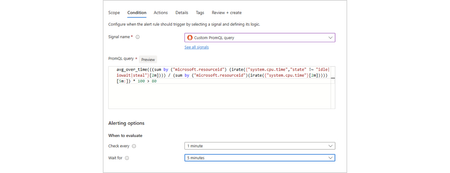
Azure Monitor metric alerts are now more powerful than ever Azure Monitor metric alerts now support all Azure metrics - including platform, Prometheus, and custom metrics - giving you complete coverage for your monitoring needs. In addition, metric alerts now offer powerful query capabilities with PromQL, enabling complex logic across multiple metrics and resources. This makes it easier to detect patterns, correlate signals, and customize alerts for modern workloads like Kubernetes clusters, VMs, and custom applications. Key Benefits Full metrics coverage: metric alerts now support alerting on any Azure metrics including platform metrics, Prometheus metrics and custom metrics. PromQL-Powered Conditions: Use PromQL to select, aggregate, and transform metrics for advanced alerting scenarios. Powerful event detection: Query-based alert rules can now detect intricate patterns across multiple timeseries based on metric change ratio, complex aggregations, or comparison between different metrics and timeseries. You can also analyze metrics across different time windows to identify change in metric behavior over time. Flexible Scoping: For query-based alert rules, choose between resource-centric alerts for granular RBAC or workspace-centric alerts for cross-resource visibility. Alerting at scale: Query-based alert rules allow monitoring metrics from multiple resources within a subscription or a resource group, using a single rule. Managed Identity Support: Securely authorize queries using Azure Managed Identity, ensuring compliance and reducing credential management overhead. Customizable Notifications: Add dynamic custom properties and custom email subjects for faster triage and context-rich alerting. Reuse community alerts: Easily import and re-use PromQL alert queries from the open-source community or from other Prometheus-based monitoring systems. Supported metrics At this time, query-based metric alerts support any metrics ingested into Azure Monitor Workspace (AMW). This currently includes: Metrics collected by Azure Monitor managed service for Prometheus, from Azure Kubernetes Services clusters (AKS) or from other sources. Virtual machine OpenTelemetry (OTel) Guest OS Metrics Other OTel custom metrics collected into Azure Monitor. You can still create threshold-based metric alerts as before on Azure platform metrics. Query-based alerts on platform metrics will be added in future releases. Comparison: Query-based metric alerts vs. Prometheus rule groups alerts Query-based metric alerts serve as an alternative to alerts defined in Prometheus rule groups. Both options remain viable and execute the same PromQL-based alerting logic. However, metric alerts are natively integrated with Azure Monitor, aligning seamlessly with other Azure alert types. They now support all your metric alerting needs within the same rule type. They also offer richer functionality and greater flexibility, making them a strong choice for teams looking for consistency across Azure monitoring solutions. See the table below for detailed comparison of the two alternatives. Stay tuned - additional enhancements to metric alerts are coming in future releases! Feature Azure Prometheus rule groups Query-based metric alerts Alert rule management Part of a rule group resource Independent Azure resource Supported metrics Metrics in AMW (Managed Prometheus) Metrics in AMW (Managed Prometheus, OTel metrics) Condition logic PromQL-based query PromQL-based query Aggregation & transformation Full PromQL support Full PromQL support Scope Workspace-wide Resource-centric or workspace-wide Alerting at scale Not supported Subscription level, Resource-group level Cross-resource conditions Supported Supported RBAC granularity Workspace level Resource or workspace level Managed identity support Not supported Supported Notification customization Supported - Prometheus labels and annotations Advanced - dynamic custom properties, custom email subject Getting Started If you have an Azure Monitor workspace containing Prometheus or OpenTelemetry metrics, you can create query-based metric alert rules today. Rules can be created and managed using the Azure Portal, ARM templates, or Azure REST API. For details, visit Azure Monitor documentation.870Views1like1Comment
Troubleshoot with OTLP signals in Azure Monitor (Limited Public Preview)
As organizations increasingly rely on distributed cloud-native applications, the need for comprehensive standards-based observability has never been greater. OpenTelemetry (OTel) has emerged as the industry standard for collecting and transmitting telemetry data, enabling unified monitoring across diverse platforms and services. Microsoft is among the top contributors to OpenTelemetry. Azure Monitor is expanding its support for the OTel standard with this preview, empowering developers and operations teams to seamlessly capture, analyze, and act on critical signals from their applications and infrastructure. With this limited preview (sign-up here), regardless of where your applications are running, you can channel the OpenTelemetry Protocol (OTLP) logs, metrics and traces to Azure Monitor directly. On Azure compute platforms, we have simpler collection orchestration that also unifies application and infrastructure telemetry collection with the Azure Monitor collection offerings for VM/VMSS or AKS. On Azure VMs/VMSS (or any Azure Arc supported compute), you can use the Azure Monitor Agent (AMA) that you are already using to collect infrastructure logs. On AKS, the Azure Monitor add-ons that orchestrate Container Insights and managed Prometheus, will also auto configure the collection of OTLP signals from your applications (or auto-instrument with Azure Monitor OTel Distro for supported languages). On these platforms or anywhere else, you can choose to use OpenTelemetry Collector, and channel the OTLP signals from your OTel SDK instrumented application directly to Azure Monitor cloud ingestion endpoints. OTLP metrics will be stored in Azure Monitor Workspace, a Prometheus metrics store. Logs and traces will be stored in Azure Monitor Log Analytics Workspace in an OTel semantic conventions-based schema. Application Insights experiences will light up, enabling all distributed tracing and troubleshooting experiences powered by Azure Monitor, as well as out of the box Dashboards with Grafana from the community. With this preview, we are also extending the support for auto-instrumentation of applications on AKS to .NET and Python applications and introducing OTLP metrics collection from all auto-instrumented applications (Java/Node/.NET/Python). Sign-up for the preview here: https://aka.ms/azuremonitorotelpreview.1.3KViews1like0Comments