msignite
12 TopicsMicrosoft 365 Local is Generally Available
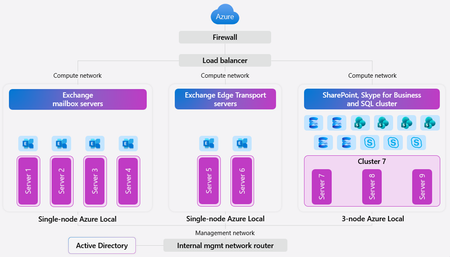
In today’s digital landscape, organizations and governments are prioritizing data sovereignty to comply with local regulations, protect sensitive information, and safeguard national security. This growing demand for robust jurisdictional controls makes the Microsoft Sovereign Cloud offering especially compelling, providing flexibility and assurance for complex requirements. For those with the most stringent needs, Azure Local enables data and workloads to remain within jurisdictional borders, supporting mission-critical workloads and now expanding to include Microsoft’s productivity solutions—so customers can securely collaborate and communicate within a sovereign private cloud environment. Today, we’re excited to announce the general availability of Microsoft 365 Local. Microsoft 365 Local is a deployment framework for enabling core collaboration and communication tools—including Exchange Server, SharePoint Server, and Skype for Business Server—on Azure Local. Built on a validated reference architecture using Azure Local Premier Solutions , it provides compatibility and support for sovereign deployments. Partner-led services provide guidance on sizing and configuration, ensuring a full-stack deployment including best practices for networking and security. Managing infrastructure across a wide range of workloads is simplified with Azure as your control plane, offering cloud-consistent, at-scale management capabilities. In the Azure portal, you get full visibility into your Microsoft 365 Local deployment across the servers and clusters. All hosts and virtual machines (VMs) are Arc-enabled out of the box, providing built-in visibility into connectivity, health, updates, and security alerts and recommendations. Microsoft 365 Local leverages Azure Local’s best-in-class sovereign and security controls, including Network Security Groups managed with Software Defined Networking enabled by Azure Arc, to isolate networks and secure access to infrastructure and workloads. Azure Local also uses a secure by default strategy by applying a security baseline of over 300 settings on both the host infrastructure and the VMs running the productivity workloads. These security baselines incorporate best practices for network security, identity management, privileged access, data protection, and more—helping organizations maintain compliance and reduce risk. Customers who want to take advantage of Azure as the control plane for Microsoft 365 Local can now benefit from a seamless cloud-based infrastructure management experience, including Azure services like Azure Monitor and Microsoft Defender for Cloud—available today with Microsoft 365 Local connected to Azure. For organizations with the most stringent jurisdictional requirements that need to operate Microsoft 365 Local in a fully disconnected environment, support for Azure Local disconnected operations will be available in early 2026. To learn more about Microsoft 365 Local, visit https://aka.ms/M365LocalDocs. If you’d like to connect with an authorized partner for consultation and deployment support, reach out to your Microsoft account team or visit https://aka.ms/M365LocalSignup.22KViews9likes6CommentsExpanding Azure Arc for Hybrid and Multicloud Management
Hybrid and multi-cloud environments are no longer optional—they’re essential for modern enterprises. At Ignite 2025, we are announcing key enhancements to Azure Arc based on your feedback, designed to simplify governance, improve security, and deliver operational consistency across diverse infrastructures. Here’s what’s new: 1. Multicloud Connector for GCP – Public Preview Azure Arc now extends its multicloud reach with Google Cloud Platform (GCP) support in public preview. Customers can now inventory and manage resource and gain a single pane of glass across AWS, GCP, and Azure resources. Learn more https://aka.ms/multicloud-connector-gcp-blog Agentless inventory discovery: Automatically detects GCP resources and projects them into Azure Resource Graph for unified visibility. Arc onboarding for GCP VMs: Bring GCP virtual machines under Azure management to apply monitoring, policy, and security controls. Secure authentication via OIDC federation: Eliminates the need for storing credentials, reducing security risk. 2. Azure virtual desktop for hybrid environments As part of this wave of new releases, Azure Virtual Desktop for hybrid environments is now available in preview through Azure Arc server. Building on the current offering of Azure Virtual Desktop for Azure Local, this capability enables organizations to deliver a rich virtual desktop experience on-premises—without requiring new hardware investments or hypervisor changes. In this release, Azure Virtual Desktop is enabled on Arc connected servers to address scenarios with high-latency, data residency, or application constraints that demand local VDI, while leveraging the Azure management plane for streamlined operations. This expansion provides greater deployment flexibility and supports customers who need both local and cloud-based solutions. To learn more: https://aka.ms/AVDHybridIgnite2025Blog 3. Azure Arc Auto-Agent Upgrades Managing Connected Machine Agents just got easier. With auto agent upgrades we reduce the operational overhead and minimizes downtime risk. Ensures machines stay secure and compliant with the latest features and patches automatically. Learn more Public Preview: Auto agent upgrade for Azure Arc-enabled servers | Microsoft Community Hub Automatic agent upgrade: Keeps agents current without manual intervention. Flexible control: Enable or disable auto-upgrade via Azure Portal, CLI, or PowerShell. Resilience built-in: Includes rollback and retry mechanisms for failed upgrades. 4. Azure Machine Configuration: OS Configuration Editor and Policy The new OS Configuration Editor simplifies compliance at scale. Accelerates compliance initiatives and reduces configuration drift. Non-technical teams can manage OS settings visually, improving agility and reducing errors. Learn more https://aka.ms/MCBaselinesPreviewBlog Visual authoring interface: Create and apply guest configuration policies without writing code. Fleet-wide auditing: Enforce OS settings across Azure and Arc-enabled servers. Integration with Azure Policy: Centralized governance for hybrid environments. 5. Windows Server Recovery Configuration Audit via Arc Part of the Windows Resiliency initiative, Azure Arc now supports recovery audits. Improves disaster recovery preparedness and compliance reporting. Enterprises can proactively identify gaps and reduce downtime during critical incidents. Learn more Audit WinRE policies: Validate Windows Recovery Environment readiness across Arc-enabled servers. Compliance visibility: View recovery status in Azure portal dashboards. Future roadmap: Configure your servers to receive boot critical updates and remote remediation for disaster recovery scenarios. 6. Workload Identity for Arc-enabled Kubernetes – General Availability Secure identity management for Kubernetes workloads is now GA. Strengthens security posture by eliminating secret sprawl. Simplifies identity management for hybrid and edge-native applications, reducing operational risk. Learn more https://aka.ms/workload-identity-arc-for-kubernetes-ga Federated identity integration: Connect workloads to Microsoft Entra without static secrets. Token-based authentication: Pods securely access Azure resources without manual credential rotation. Broad compatibility: Works across multiple Kubernetes distros connected via Azure Arc. 7. Azure Arc Site Manager – Public Preview Refresh Site Manager is a powerful solution designed to streamline site configuration and edge infrastructure observability and management at scale, making it easier to manage distributed environments, apply consistent policies, and streamline workflows across hybrid and edge deployments. Learn more Hierarchical Site Organization: Site creation that mirror an organization’s hierarchical structure Aggregated Monitoring and Insights: Single pane of glass for monitoring distributed environments for Connectivity, Updates, Alerts and Security baseline status Site Configurations: Define configurations at the site level and reuse them across partner solutions 8. Simplified migration journey for Arc customers - Preview Azure Migrate now natively integrates with Azure Arc to simplify the migration journey for Arc customers. Customers can leverage Azure Arc data to generate a comprehensive business case for migration as well as full estate migration readiness assessments with no additional on-premises deployments. Learn more Simple set up: Create a project and scope Arc resources by subscription. Azure Migrate generates business cases and assessments automatically. Optionally deploy the Azure Migrate Collector VM extension to collect additional information to improve the accuracy of business cases and assessments. Comprehensive business case: Compare the Total Cost of Ownership of your current Arc-enabled on-premises estate with that in Azure as well as insights into sustainability improvements of migrating to Azure. Full-estate readiness assessment: Assess the readiness of your workloads to various Azure targets such as Azure VMs, Azure SQL Databases, Azure SQL Managed Instance etc. Get right-sized recommended SKUs as well as potential monthly costs for your workloads in Azure. 9. Azure Key Vault Secret Store Extension – General Availability Azure Key Vault Secret Store Extension (SSE) is now generally available for Arc-enabled on-premises Kubernetes, including clusters that you connect yourself and AKS Arc managed clusters. SSE automatically fetches secrets from an Azure Key Vault to the on-premises cluster for offline access. Learn more Offline Access: With SSE, workloads can access Azure Key Vault secrets from the local Kubernetes secrets store regardless of internet connectivity interruptions. Scalability: SSE helps very large distributed deployments with hundreds or thousands of clusters to work with Azure Key Vault by spreading demand over time. These innovations reinforce Azure Arc’s position as the most comprehensive platform for hybrid and multicloud management. From easy connecting to AWS/GCP to Azure through multicloud connector to enabling secure workload identities and resilient OS configurations, Azure Arc is helping enterprises stay agile, secure, and compliant.2.9KViews4likes1Comment
What’s new in Azure Local: Cloud infrastructure for distributed locations enabled by Azure Arc
Today’s enterprises are navigating competing challenges: delivering AI-enabled digital experiences at the edge while also meeting growing demands for data sovereignty and regulatory compliance. Whether it’s a hospital needing local compute for patient care, or a government agency requiring full control over its infrastructure, the need for flexible, secure, and cloud scale solutions has never been greater. That’s why we introduced Azure Local—Microsoft’s solution for running Azure services and workloads at distributed locations, all managed through Azure Arc. With Azure Local, customers can deploy cloud-native and traditional applications on their own infrastructure while maintaining centralized visibility and control through the Azure portal. This approach is resonating: Microsoft has been named a Leader in the Gartner® Magic Quadrant™ for Distributed Hybrid Infrastructure every year since its inception. Azure Local is the foundation of Microsoft’s Sovereign Private Cloud, delivering Azure consistent services in customer controlled environments which meet strict data residency and compliance requirements. Read more about our recent Sovereign announcements here. See the Sovereign Private Cloud come to life here: Today, we’re so excited to tell you about the incredible new capabilities on Azure Local including support for external SAN storage, rack aware clustering, larger scale deployments, and more. Operate and scale with the power of the cloud Azure Local empowers organizations to operate and scale infrastructure with the power of the cloud, no matter where it’s deployed. From the Azure portal, customers can define and deploy infrastructure across distributed locations, apply one-click updates to entire clusters, and centrally monitor performance, health, and security. This cloud-based control plane ensures consistency and agility across environments—whether in datacenters, branch offices, or sovereign sites. NEW: Local Identity with Azure Key Vault (Preview) Azure Local now supports deployments without Active Directory using local identity with Azure Key Vault, currently in preview. This new option simplifies setup by removing the need for domain controllers, while still providing secure access and centralized secret management through Azure. Read the announcement here. Ready for all your apps, VMs and containers alike Azure Local is built to run all your applications—whether they’re virtual machines, containers, or Azure services. It offers full-featured, general-purpose VMs with cloud-consistent management, and includes Azure Kubernetes Service (AKS) built-in for modern containerized workloads. Customers can also deploy some of Azure’s most popular PaaS services like Azure Virtual Desktop, SQL Managed Instance, and Azure IoT Operations directly on Azure Local. With support for GPU-enabled nodes and Arc VM extensions, Azure Local is ready for everything from legacy line-of-business apps to AI-powered workloads. Migrate from VMware to Azure Local (Generally Available) Azure Migrate from VMware to Azure Local is now generally available, enabling customers to seamlessly move VMware virtual machines into their Azure Local infrastructure. This agentless migration path keeps data flows local, minimizes downtime, and simplifies onboarding with a cloud-consistent experience. Customers can discover, replicate, and migrate workloads using the Azure portal, with support for validated hardware and reference architectures. Azure Migrate unlocks a fast path to modernization for organizations consolidating legacy infrastructure. Read the announcement here. Customer Spotlight: How Publix Employees Federal Credit Union strengthened its disaster recovery strategy with Azure Loc... NEW: Microsoft 365 Local to meet your Private Sovereign Cloud needs (Generally Available) Microsoft 365 Local brings trusted productivity services like Exchange Server, SharePoint Server, and Skype for Business Server into customer-controlled environments, running directly on Azure Local infrastructure. Designed for those who need productivity tools in a private cloud environment, it leverages Azure Arc to provide a unified control plane for easy infrastructure management, simplified deployment, and streamlined updates. The solution features a validated reference architecture with certified hardware to ensure optimal performance and reliability, along with a hardened security baseline and robust controls to safeguard your infrastructure. It’s a key part of Microsoft’s Sovereign Private Cloud strategy, now generally available. Read the announcement here. Flexibility to meet your requirements Azure Local gives customers the flexibility to deploy infrastructure that fits their exact needs—whether that’s choosing from over 100 validated hardware platforms in the Azure Local catalog or operating in fully connected or disconnected environments. You can run Azure Local in public Azure regions or in Azure Government cloud, supporting both commercial and regulated workloads. Azure Local adapts to everything from retail edge sites to sovereign datacenters, disconnected oil rigs to connected manufacturing plants, all while maintaining a consistent Azure management experience. NEW: SAN Support (Preview) Azure Local now delivers greater infrastructure flexibility with expanded support for leading external SAN storage solutions, a capability that customers have long sought. Customers can now integrate their existing Fiber Channel-based SAN storage from leading vendors such as Pure Storage, NetApp, Dell, Lenovo, HPE, and Hitachi directly with Azure Local clusters. External storage support allows organizations to achieve high performance, scalability, and resilience while continuing to use their trusted storage infrastructure. It also enables consistent management across virtual machines, AKS clusters, and Arc-enabled services through the familiar Azure experience. Customers now have the freedom to modernize their environments while maximizing the value of their existing investments. Our customers are already exploring the impact this brings to enterprise customers. “We’re excited to partner with Microsoft and their trusted storage vendors to test external storage support for Azure Local,” said David McKenney, VP of Public Cloud Products at TierPoint. “This milestone gives customers greater flexibility to address performance, scalability, resilience, and investment protection needs. It reflects Microsoft’s ongoing dedication to making Azure Local the leading distributed cloud solution by listening to the needs of their customers and partners.” Support for more Storage protocols and other storage capabilities coming soon. Reach out to Microsoft or our storage partners to be part of this limited preview. NEW: Rack Aware Clusters (Preview) Rack aware clustering is now available in preview for Azure Local, enabling intelligent placement and resiliency across multi-rack deployments using one storage pool. This feature allows Azure Local to detect physical rack boundaries and distribute workloads accordingly, improving fault tolerance and minimizing impact from localized hardware failures. It’s especially valuable for larger deployments where high availability and service continuity are critical. Rack awareness integrates seamlessly with Azure Local’s update orchestration and VM placement logic, helping ensure infrastructure stays resilient at scale. Read the announcement here. NEW: Support for NVIDIA RTX PRO 6000 Blackwell Server Edition GPUs (Generally Available) Azure Local now supports the NVIDIA RTX PRO 6000 Blackwell Server Edition GPU, generally available for high-performance workloads including AI inferencing, simulation, and visualization. This enterprise-grade GPU delivers exceptional compute density and energy efficiency, making it ideal for deployments that require advanced acceleration. Customers can deploy this powerful GPU in new Azure Local solutions—including Dell AX-770, Lenovo ThinkAgile MX650a V4, and HPE ProLiant DL380 Gen 12. Read the announcement here. NEW: Azure Local for larger deployments (Preview) Azure Local now scales further, with instances of up to 10,000+ cores across 100+ nodes delivered as multiple integrated racks with disaggregated storage. This enables customers to run the same familiar Azure Arc-enabled infrastructure and services at significantly larger scale, supporting a greater variety of workloads and scenarios. This new capability is available now in preview. Contact your Azure account representatives to learn more. Secure by default Azure Local is built with security at its core, offering a hardened infrastructure stack aligned with Microsoft’s secure-by-default principles, built-in Microsoft Defender for Cloud integration, and trusted launch VMs. Every VM is Azure Arc-enabled, allowing customers to apply security baselines, monitor threats, and enforce policies using familiar Azure tools. These protections are automatically enabled, so customers can operate confidently from day one. Network segmentation (Generally Available) To protect and isolate your network traffic between VMs or logical networks, Azure Local now supports network security groups (NSGs), generally available as of the 2510 release. NSGs enable precise filtering of network traffic using policy-driven access controls by applying inbound and outbound allow/deny rules. Rules support the full five-tuple of source IP, source port, destination IP, destination port, and protocol, and are enforced within the virtual switch at the virtual port level. NSGs can be applied to both logical networks and individual network interfaces and can be managed using the Azure Portal for centralized policy management of your edge workloads. Read the announcement here. Get Started Today For new production deployments Azure Local is generally available for production use. Explore the solutions catalog to find hardware from your preferred vendor and read the deployment overview to get started today. For evaluation (virtual) Want to try out Azure Local but don’t have hardware? Get a dedicated Azure Local sandbox in one click with Azure Arc Jumpstart. All you need is an Azure subscription to get started. Thank you! As we mark the second year since announcing Azure Local, we want to extend a heartfelt thank you to our customers, partners, and community. It’s incredibly rewarding to see Azure Local continue to be the infrastructure of choice for enterprises seeking flexibility, security, and innovation at the edge. We’re excited to continue delivering the solutions you need to thrive in a rapidly evolving world. Thank you for trusting Azure Local to power your most important workloads—here’s to another year of partnership and progress! If you’re at Ignite this week, please come say hello at: Our session dedicated to Azure Local What’s new in Azure Local Our booth “Azure Arc and Azure Local” in the Cloud and AI Platforms neighborhood See everything going on with Adaptive Cloud on our Ignite website Adaptive Cloud @Ignite 2025 FAQ What is Azure Local? Azure Local is Microsoft’s full-stack infrastructure software that runs on validated hardware in your own facilities. It brings Azure capabilities to distributed or sovereign locations, so you can run virtual machines, containers, and select Azure services locally while maintaining a consistent management experience through Azure Arc. How are Azure Local and Private Sovereign Cloud related? Azure Local is the foundation and core product fueling Microsoft’s Private Sovereign Cloud offering. It enables customers to meet strict data residency and regulatory requirements by hosting workloads on-premises, disconnected or semi-connected, while still benefiting from Azure innovation and security. When should I use Azure Local? Use Azure Local when you need modern cloud capabilities in locations where connectivity is limited, data sovereignty is critical, or latency-sensitive applications must run close to where data is generated. It’s ideal for industries like manufacturing, retail, and government that require local control with Azure consistency.13KViews4likes3CommentsAnnouncing the preview of Azure Local rack aware cluster
As of 1/22/2026, Azure Local rack aware cluster is now generally available! To learn more: Overview of Azure Local rack aware clustering - Azure Local | Microsoft Learn We are excited to announce the public preview of Azure Local rack aware cluster! We previously published a blog post with a sneak peek of Azure Local rack aware cluster and now, we're excited to share more details about its architecture, features, and benefits. Overview of Azure Local rack aware cluster Azure Local rack aware cluster is an advanced architecture designed to enhance fault tolerance and data distribution within an Azure Local instance. This solution enables you to cluster machines that are strategically placed across two physical racks in different rooms or buildings, connected by high bandwidth and low latency within the same location. Each rack functions as a local availability zone, spanning layers from the operating system to Azure Local management, including Azure Local VMs. The architecture leverages top-of-rack (ToR) switches to connect machines between rooms. This direct connection supports a single storage pool, with rack aware clusters distributing data copies evenly between the two racks. Even if an entire rack encounters an issue, the other rack maintains the integrity and accessibility of the data. This design is valuable for environments needing high availability, particularly where it is essential to avoid rack-level data loss or downtime from failures like fires or power outages. Key features Starting in Azure Local version 2510, this release includes the following key features for rack aware clusters: Rack-Level Fault Tolerance & High Availability Clusters span two physical racks in separate rooms, connected by high bandwidth and low latency. Each rack acts as a local availability zone. If one rack fails, the other maintains data integrity and accessibility. Support for Multiple Configurations Architecture supports 2 machines up to 8 machines, enabling scalable deployments for a wide range of workloads. Scale-Out by Adding Machines Easily expand cluster capacity by adding machines, supporting growth and dynamic workload requirements without redeployment. Unified Storage Pool with Even Data Distribution Rack aware clusters offer a unified storage pool with Storage Spaces Direct (S2D) volume replication, automatically distributing data copies evenly across both racks. This ensures smooth failover and reduces the risk of data loss. Azure Arc Integration and Management Experience Enjoy native integration with Azure Arc, enabling consistent management and monitoring across hybrid environments—including Azure Local VMs and AKS—while maintaining the familiar Azure deployment and operational experience. Deployment Options Deploy via Azure portal or ARM templates, with new inputs and properties in the Azure portal for rack aware clusters. Provision VMs in Local Availability Zones via the Azure Portal Provision Azure Local virtual machines directly into specific local availability zones using the Azure portal, allowing for granular workload placement and enhanced resilience. Upgrade Path from Preview to GA Deploy rack aware clusters with the 2510 public preview build and update to General Availability (GA) without redeployment—protecting your investment and ensuring operational continuity. Get started The preview of rack aware cluster is now available to all interested customers. We encourage you to try it out and share your valuable feedback. To get started, visit our documentation: Overview of Azure Local rack aware clustering (Preview) - Azure Local | Microsoft Learn Stay tuned for more updates as we work towards general availability in 2026. We look forward to seeing how you leverage Azure Local rack aware cluster to power your edge workloads!1.5KViews4likes4Comments
Announcing General Availability of the Azure Key Vault Secret Store Extension
We are thrilled to announce Azure Key Vault Secret Store Extension (SSE) is now generally available for Arc-enabled on-premises Kubernetes, including clusters that you connect yourself and AKS Arc managed clusters. SSE automatically fetches secrets from an Azure Key Vault to the on-premises cluster for offline access. This means you can use Azure Key Vault to store, maintain, and rotate your secrets, even when running your Kubernetes cluster in a semi-disconnected state. Key Benefits Offline Access: It’s important that workloads continue even when there are temporary disruptions to connectivity. This includes regular operation as well as the ability to restart pods while there’s a connectivity interruption. With SSE, workloads can access secrets from the local Kubernetes secrets store regardless of connectivity interruptions. Standard K8s Secret Access: Secrets can be accessed via volume mounting, environment variables, or via the Kubernetes API. Workloads and ingress controllers do not need to be customized to access Azure Key Vault and developers have options on how to access secrets. Security: SSE has limited permissions and leverages the latest Kubernetes security features so that cluster admins do not need to configure and limit permissions themselves. Secrets are critical business assets, so the Secret Store helps to secure them through isolated namespaces, role-based access control (RBAC) policies, federated identities for accessing AKV, and limited permissions for the secrets synchronizer. Scalability: SSE helps very large distributed deployments with hundreds or thousands of clusters to work with Azure Key Vault by spreading demand over time. By effectively caching secrets in the Kubernetes secrets store, SSE can also help to lower overall demand on Azure Key Vault instances. Low maintenance: Auto-updates can keep your SSE up to date with security and performance improvements as they are released. Additionally, changes to configured secrets are even easier now with the new simplified configuration experience (in preview). With the simplified configuration style, a single custom resource is all that’s needed, reducing the effort and surface area for misconfigurations. How to Use the Secret Store Extension Install the Secret Store Extension to an Arc-enabled cluster or AKS managed on-premises cluster with configuration parameters such as sync intervals. Configure an Azure managed identity that has permission to read secrets from AKV and federate it with a Kubernetes service account. Configure a secret provider class custom resource (CR) in the cluster with connection details to the Key Vault. Configure a secret sync custom resource (CR) in the cluster for each secret to be synchronized. (Steps 3 and 4 are now even easier with the new simplified configuration!) Apply the CRs in the cluster and secrets will automatically begin syncing to the cluster. Relax knowing that your configured secrets will be kept up to date on the cluster, as frequently as you want. Try out the Secret Store Extension Today! Get started by visiting the SSE documentation Get hands-on even faster with the SSE Jumpstart Drop1.1KViews2likes0CommentsTransforming City Operations: How Villa Park and DataON Deliver Real-Time Decisions with Edge RAG
In today’s connected world, customers expect instant, context-rich interactions- even in environments where cloud connectivity isn’t guaranteed. That’s where Edge Retrieval-Augmented Generation (RAG) at the edge comes in. Edge RAG, enabled by Azure Arc, combining local data retrieval with intelligent reasoning to empowers conversational experiences that are fast, secure, and deeply personalized. Together with our Edge Infrastructure partners, we’re applying this technology to transform customer engagement - enabling real-time insights, autonomous workflows, and resilient operations across industries. Edge RAG is a core part of our Adaptive Cloud pillar for Edge AI, ensuring flexibility, resilience, and intelligence wherever customers operate. It uses Foundry language models and together with Foundry Local shape Microsoft’s Foundry Anywhere commitment. Today we’re excited to announce a public preview refresh of Edge RAG at Ignite 2025, bringing new capabilities to accelerate adoption and unlock even more value at the edge: Production-Class LazyGraph RAG with Industry-leading RAG inferencing quality High-Fidelity Parsing: OCR-enabled support for documents, tables, and images SharePoint Server integration (limited access; to register, click here ) Multimodal search with image retrieval & image-rich outputs Chat UI Upgrades and performance improvements Fully Disconnected scenarios enabled by Azure Local for Disconnected Operations The new features in this release are informed by our engagement with the City of Villa Park, in partnership with DataON, where we’ve applied Edge RAG to improve operational efficiency and deliver smarter, real-time services for urban environments. Together, we pilot compliance assistant agentic workflow with OCR & LLM integration. Villa Park: A Blueprint for Smart Cities The City of Villa Park, California, faced challenges common to many municipalities: complex zoning regulations that slowed approvals, lengthy CEQA compliance processes requiring deep environmental analysis, backlogs in accessory dwelling unit (ADU) permit reviews. Working with DataON, a Microsoft partner, and Microsoft, Villa Park deployed Edge RAG on Azure Local, creating a resilient, intelligent planning system that operates seamlessly; even offline. Environmental assessments that once required days are now completed in minutes. The partnership between the City of Villa Park and DataON is a standout example of how municipalities and technology providers can co-innovate to solve real-world challenges. Ray Pascua, Villa Park’s Planning Manager, has led this transformation: “Having the opportunity to utilize AI to perform research and retrieve large datasets specifically from the California Environmental Quality Act (CEQA) Guidelines (Statutory/Categorical Exemptions), and State law relative to Accessory Dwelling Units (ADUs), has been an overall positive experience. AI algorithm is a revolutionary medium that can streamline and improve workflow efficiencies by automating routine and repetitive planning-related tasks and analysis, and would be of particular value and benefit to local government agencies that have limited personnel and resources. While this cutting-edge technological tool is still evolving and has room to improve accuracy and speed, it certainly has a place in the realm of City Planning, as well as other land use development fields and disciplines.” Howard Lo, VP of Sales & Marketing at DataON, shares: “Our collaboration with Microsoft and the City of Villa Park showcases Azure Local's transformative potential for municipal government AI. As a leading Azure Local partner, DataON has optimized our infrastructure to run Microsoft's Edge RAG solution, enabling Villa Park to address real planning challenges while maintaining data control and security. Working directly with Microsoft's engineering team and a forward-thinking city partner, we've proven that Azure Local delivers practical AI value for government operations. We're excited to help other municipalities achieve similar results on our Azure Local platform.” Villa Park’s deployment leverages DataON’s Azure Local-certified hardware, Microsoft’s Arc-enabled AI stack, and the expertise of city planners to deliver: End-to-end digital workflows for CEQA, zoning, and ADU permitting Conversational AI interfaces that empower staff to ask questions and get cited, regulatory-compliant answers instantly Operational resilience with full offline support, ensuring continuity even during network outages A replicable model for other municipalities seeking to modernize planning and compliance About DataON DataON’s edge infrastructure, combined with Azure Local and Edge RAG, forms the core of this transformation. DataON provides robust hardware and delivers deployment, integration, and training services, ensuring a seamless Azure Local experience. Their close support helps organizations quickly adopt and confidently manage edge solutions, resulting in secure, high-performance, and scalable deployments for multi-site environments. Let’s take a closer look at the features we’re announcing today: Deep Search for Complex Reasoning with LazyGarph RAG With the Ignite release, Edge RAG introduces Deep Search powered by LazyGraph RAG; a dynamic graph-based retrieval method that enables advanced, multi-document reasoning. This means Villa Park planners can now ask complex, multi-part questions that span zoning, CEQA, and ADU regulations, and Edge RAG will synthesize answers by connecting information from multiple sources in real time. Image 1: Deep Search capabilities on Edge RAG The system incrementally explores only the most relevant document chunks, reducing compute cost and latency while delivering comprehensive, cited responses. For Villa Park, this translates to resolving intricate regulatory scenarios, such as “What are the environmental constraints for ADUs in zones X, Y, and Z?”. With answers that reference and link multiple regulatory documents and historical decisions, all in a single query. Advanced Document Parsing for Structured Data Edge RAG’s advanced document parsing, introduced in this release, transforms how Villa Park’s planning documents are utilized. During data ingestion, the system now extracts not only free-form text but also tables, images, headings, and rich metadata. This includes full indexing of multi-page tables, column headers, and section context, with each chunk annotated by page number, section heading, and table index. As a result, planners can search for specific permit statistics, environmental impact scores, or compliance tables and retrieve results directly from structured data within city documents; enabling precise, source-attributed answers that were previously difficult or impossible to obtain. Image 2: Advanced document parsing on Edge RAG Enhanced Chat Experience The new model-only chat mode allows staff to interact directly with the language model, bypassing contextual data for general queries or troubleshooting. This flexibility enables Villa Park staff to quickly switch between knowledge-based chat-grounded in city data, and model-only chat for training, testing, or handling ambiguous queries, streamlining both day-to-day operations and onboarding of new team members. Additional Edge RAG Preview Refresh Updates We also improved Edge RAG based on customer feedback, adding these features: Agentic RAG for autonomous workflows: Systems can reason and act at the edge with less manual work. Full offline support: Operates and accesses data even without a network. SharePoint integration (private preview): users will also be able to query Edge RAG directly over SharePoint, enabling enhanced information retrieval and analysis within their workflows. Image 3: Sharepoint as a data source on Edge RAG Performance optimizations: Query responses for every search type, excluding Deep Search, are now delivered in under 15 seconds on legacy A2 and A16 GPUs; a fivefold speed boost. Additionally, streaming image processing has increased one hundred times, allowing 600 images to be handled continuously in just 36 seconds. Since late May, Edge RAG has supported “bring your own model” (BYOM), allowing organizations to deploy their preferred language models such as OpenAI GPT-4o or other advanced models, directly on their own infrastructure. This capability enables advanced features like deep search and hybrid multimodal search, while ensuring that sensitive data remains on-premises. BYOM empowers organizations to tailor Edge RAG’s AI capabilities to their unique compliance, performance, or customization requirements, maintaining full control over both data and model selection. Security, Compliance, and Sustainability Edge RAG is built for trust: data sovereignty ensures sensitive data remains on-premises, zero-trust architecture integrates with Microsoft security stack, and compliance-ready design supports municipal, state, and industry regulations. Sustainability is also a priority, with energy-efficient edge hardware reducing carbon footprint. Looking Ahead: The Future of Edge Intelligence Edge RAG enables flexible edge intelligence deployment in various environments. Its adaptable design handles dynamic workloads, supporting frontline teams as operations evolve. Instead of just speeding up processes or boosting connectivity, Edge RAG fosters innovative applications and smarter decision-making, helping organizations stay agile amid changing technology and business needs. Resources Explore these resources to learn more about Edge RAG, deployment best practices, customer stories, and technical documentation: Product documentation: Edge RAG Preview, enabled by Azure Arc Documentation | Microsoft Learn Get Started: Quickstart: Install Edge RAG Preview enabled by Azure Arc Release notes: What's New in Edge RAG – Azure Arc Tech Talk Distribution List: EdgeRAGTalk@microsoft.com Join the conversation, ask questions, and connect with the Edge RAG team Recommended Ignite sessions: BRK147: What’s new in Azure Local ODSP1467: Unlock your IT potential with Azure Local & DataON Plus Solutions BRK199: From cloud to edge: Building and shipping Edge AI apps with Foundry537Views1like0CommentsAccelerate your cloud migration journey with Azure Arc resource discovery in Azure Migrate (preview)
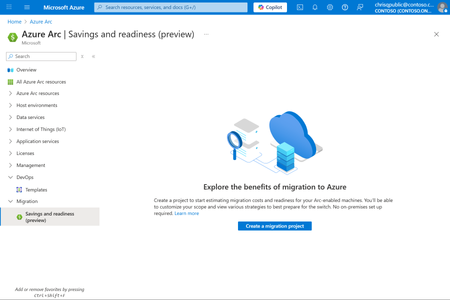
With Azure Migrate's new Arc-based discovery (preview), you can leverage your existing Arc-enabled servers and Arc-enabled SQL Server instances to quickly gain insights into: Migration readiness for Azure targets such as Azure VMs, Azure SQL Database, and Azure SQL Managed Instance. Savings potential for different migration strategies—all without deploying new on-premises infrastructure.618Views1like0CommentsPublic Preview Refresh Announcement - Site Manager
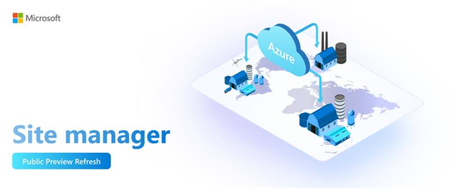
Public Preview Refresh Announcement - Site Manager Introduction: Modern industrial environments—such as factories, manufacturing plants, and distributed infrastructure sites— and retail environments are increasingly hybrid and edge-driven. These sites often run Azure Arc-enabled resources (servers, VMs, Kubernetes clusters, IoT assets) alongside on-prem systems. Managing them at scale introduces unique challenges: Complexity of Distributed Environments, Operational Risk and Downtime, Governance at Scale and Unified Observability. We’re excited to announce the Public Preview Refresh of Azure ARC Site Manager, a powerful solution designed to streamline site configuration and lifecycle observability and management for modern edge and cloud environments. After months of feedback during preview, Site Manager is now ready for production use, delivering enterprise-grade reliability and enhanced capabilities. Site Manager addresses the challenges in managing Azure Edge resources by providing a single pane of glass that aggregates security, alerts, updates and connectivity status across all sites; enabling policy-driven compliance and consistent monitoring; and ensuring streamlined operations, improved reliability, and simplified management at scale. Key features of Site Manager 1. Flexibility of Site Scope with Service Groups Site Manager enables customers to create sites using flexible scopes— Resource Groups, Subscriptions, and Service Groups. The Service Group scope allows organizations to logically group resources across multiple resource groups and subscriptions, such that they reflect real-world operations, making it easier to manage distributed environments, apply consistent policies, and streamline workflows across hybrid and edge deployments. The result is improved scalability, governance, and operational efficiency. 2. Hierarchical Site Organization - a representation of Business Organization Site Manager supports multi-level site hierarchy, including parent sites and subsites, for better representation of physical or logical locations. This hierarchy improves navigation and enables views for distributed infrastructure. Site Manager supports creating sites that mirror an organization’s hierarchical structure, such as Regions, Business Units, Factories, Stores etc. This alignment makes it easier for customers to manage resources in a way that reflects their operational reality, enabling clear visibility and streamlined views across distributed teams and locations. 3. Aggregated Monitoring and Insights Site Manager offers a single pane of glass for monitoring distributed environments. It aggregates Connectivity status, Updates, Alerts and Security status for all resources within a site, enabling quick identification of issues across the hierarchy, efficient prioritization and reduced operational complexity. 4. Site Configurations Site Manager helps define configurations—such as network settings and secrets management—at the site level and reuse them across deployments. This ensures consistency and reduces operational overhead for large-scale environments. The configurations can also be reused across partner solutions like workload orchestration and Zero-Touch Provisioning (ZTP). This approach ensures consistency, accelerates deployments, and reduces manual effort, delivering a more integrated and efficient operational experience across hybrid and edge environments. Architecture & Workflow: Azure Arc Site Manager is a cloud-native service within the Azure Arc suite that empowers customers to manage and monitor their on-premises infrastructure at scale. Its architecture streamlines status aggregation by unifying connectivity, security baseline, alerts, and update data from diverse resource types into a single schema. This aggregated data is surfaced through an extension resource, enabling the Azure portal and other clients to retrieve summary views from a centralized location. Built on Azure Resource Manager, Site Manager benefits from fine-grained Role-Based Access Control (RBAC), ensuring secure and scoped operations across sites. Management actions—such as creating, updating, or querying Arc sites—can be performed through familiar client tools including SDKs, CLI, PowerShell, Terraform, or directly via the Azure portal, offering flexibility and consistency across environments. Important Details & Limitations: Azure Resource Supported: Currently, site manager supports the following Azure resources with the following capabilities: Site manager only provides status aggregation for the supported resource types. Site manager doesn't manage resources of other types that exist in the resource group or subscription, but those resources continue to function normally otherwise. Regions and Availability: Site manager supports resources that exist in supported regions, with a few exceptions. For the following regions, connectivity and update status aren't supported for Arc-enabled machines or Arc-enabled Kubernetes clusters: Brazil South, UAE North, South Africa North Feedback and Engagement We’d love to hear your feedback! As you try out Site Manager, please share your experiences, questions, and suggestions. You can leave a comment below this blog post – our team will be actively monitoring and responding to comments throughout the preview. Let us know what worked well, what could be improved, and any features you’d love to see in the future. Your insights are incredibly valuable to us and will help shape the product as we progress toward General Availability. If you encounter any issues or have urgent feedback, you can also engage with us through the following channels: Please fill up the form at SMfeedback for feedback Contact your Microsoft account representative or support channel and mention “Site Manager Public Preview Refresh” – they can route your feedback to us as well. Occasionally, we may reach out to select customers for deeper feedback sessions or to participate in user research. If you’re interested in that, please mention it in your comment or forum post. We truly consider our users as co-creators of the product. Learn More To help you get started and dive deeper into workload orchestration, we’ve prepared a set of resources: Site Manager Documentation – What is Azure Arc site manager (preview) - Azure Arc | Microsoft Learn CLI Reference – Command reference: Detailed documentation of all site manager CLI commands with examples. Az.Site Module | Microsoft Learn Conclusion: We’re thrilled for you to explore Site Manager and see how it can transform your unified observability strategy at scale. This Public Preview Refresh is a major step towards aggregated status monitoring and site management at edge.783Views1like3Comments