msignite
7 Topics
AI Agents Are Rewriting the App Modernization Playbook
The modernization moment: Why now? Modernizing enterprise applications has historically been slow, manual, and costly. For many IT leaders and developers, it’s meant wrestling with aging frameworks, complex dependencies, and the constant tug-of-war between maintaining legacy systems and driving innovation. The stakes are high: every dollar spent on maintenance is a dollar not invested in the future. But the game is changing. Today, agentic AI is transforming modernization from a months-long slog into a days – or even hours – long process. With GitHub Copilot and Azure, teams can finally break through the three constraints that have held them back: 69% of CIOs are using new-project spend to resolve technical debt. This is due to the fact that upgrades, migrations, and containerization are slow, repetitive, and error-prone.[1] 78% of enterprises cite lack of cloud expertise or resources as a major obstacle for modernization. These legacy estates span uneven documentation and rare skills, making it tough to scale modernization across teams.[2] 40% of development resources are spent on maintaining existing systems. This leads to siloed tools and limited portfolio insights that slow down planning and cross-team execution.[3] The result? Projects stall, costs climb, and innovation takes a back seat. Organizations need a new approach—one that combines technical depth, automation, and collaboration to turn legacy estates into engines for growth. What’s new at Ignite This year at Microsoft Ignite, we’re adding to what we announced earlier this year to make a new generation of agentic AI capabilities in GitHub Copilot and Azure—purpose-built to address the modernization challenges facing IT and dev teams today. Here’s what’s new: Expanded Language and Framework Support: Modernizing legacy apps is no longer a manual slog. With the expanded language support, more teams can benefit from these innovations. For Java applications, we now support J2EE to JakartaEE transformation, IntelliJ integration, General Availability of deployment to Azure, and upgrades to Java 25, delivering better performance, security, and language features. (GA) For .NET workloads, we’re launching migration and deployment to Azure, including Managed Instance on Azure App Service for modernizing legacy Windows apps without code rewrites, and AI assisted upgrade paths from .NET Framework to .NET (GA) For Python, customers can now migrate from semantic kernel to agent framework (Public Preview) Containerization made simple with Containerization Assist Integration (GA): Containerization is often a bottleneck, but not anymore. With containerization assist integration, GitHub Copilot can now automatically update application code and generate Dockerfiles and related artifacts for containerizing and deploying to Azure Kubernetes Service (AKS), AKS Automatic, or Azure Container Apps (ACA), simplifying containerization for legacy apps. Database modernization: Upgrading databases is now faster and less risky. with the latest PostgreSQL extension for seamless PostgreSQL modernization and SQL Server migrations remain supported through the existing Azure Database Migration Service, enabling developers to modernize databases quickly and accurately. For Oracle-to-PostgreSQL migrations, Copilot tracks schema changes and applies informed code updates at the application level for Java apps. (Public Preview) Customization for enterprise-grade modernization: Modernization isn’t one-size-fits-all. With custom tasks, GitHub Copilot app modernization lets organizations define their own logic, enforcing security guardrails, coding standards, or industry-specific frameworks. Tasks can be created from diffs, markdown files, or URLs and shared across teams. Copilot learns from these customizations to apply them consistently, ensuring compliance while accelerating delivery (GA) Portfolio Assessment Integration (Public Preview): Visibility is key to planning, get a unified, actionable view of your entire app landscape with integrations to Azure Migrate, Dr. Migrate, and CAST Highlight, empowering smarter planning and prioritization, all surfaced through GitHub Issues. Autonomous Workflows (Public Preview): With Coding Agent integration and Copilot CLI, you can enable semi- autonomous modernization, freeing up your teams for higher-value work. Run modernization tasks directly from the CLI, or let agents analyze projects, generate plans, and execute upgrades end-to-end. How does this change the game for modernization These new capabilities are designed to directly address the three core blockers of modernization: Eliminating manual toil by automating upgrades, migrations, and containerization. Bridging expertise gaps by embedding AI-powered guidance and custom tasks, so teams can modernize confidently—even without deep legacy skills. Breaking down silos by providing unified visibility and integrated workflows, making it easier for IT and developers to plan, coordinate, and execute together. And beyond solving these pain points, they help your business achieve more. Accelerating time-to-value: Automate repetitive work so teams can focus on innovation, not maintenance. Reducing risk: Standardize modernization with AI-driven guidance, custom tasks, and integrated compliance. Maximizing ROI: Free up budget and talent by reducing manual effort and accelerating cloud adoption. Empowering collaboration: Give IT and developers a unified toolkit and shared visibility, breaking down silos and speeding up delivery. Take a look at how it comes to life! See GitHub Copilot app modernization in action—automating code upgrades, containerization, and database migration, and enabling seamless collaboration across roles. Customer momentum Organizations large and small, including startups, are benefiting from app modernization with GitHub Copilot. Here are just some of the amazing results that we are seeing: Ignite sessions: learn, connect, and build Ready to see these innovations in action? Join us at Ignite for live demos, customer stories, and expert guidance: BRK103: Modernize your apps in days with AI agents in GitHub Copilot BRK100: Best practices to modernize your apps and databases at scale BRK150: From legacy to modern .NET on Azure faster than ever BRK102: Technical Deep Dive on Managed Instance on Azure App Service BRK115: Inside Microsoft’s AI transformation across the software lifecycle BRK1704: Scale Smarter: Infrastructure for the Agentic Era THR700: Modernizing apps for Kubernetes with new agents in GitHub Copilot PBRK151: Agentic AI Tools for Partner-Led Migration and Modernization Success PBRK152: Unlocking Next Wave of Partner Growth LAB502: Migrate to AKS Automatic with GitHub Copilot for App Modernization LAB501: Modernize ASP.NET apps using Managed Instance on Azure App Service Get started today Explore the latest features with GitHub Copilot app modernization: http://aka.ms/GHCP-appmod Download Visual Studio 2026 and try GitHub Copilot app modernization for your .NET apps today https://aka.ms/vs Modernize with confidence, innovate without compromise With GitHub Copilot and Azure, you can maximize ROI, bridge expertise gaps, and give developers time back—turning legacy into a launchpad for AI-powered experiences. The future of app modernization is here. Let’s build it together. [1] McKinsey, Tech debt, Reclaiming tech equity [2] Flexera, Flexera 2023 State of the Cloud [3] McKinsey, Tech debt, Reclaiming tech equity2.2KViews3likes0Comments
Unlocking Client-Side Configuration at Scale with Azure App Configuration and Azure Front Door
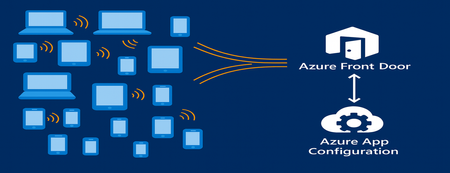
As modern apps shift more logic to the browser, Azure App Configuration now brings dynamic configuration directly to client-side applications. Through its integration with Azure Front Door, developers can deliver configuration to thousands or millions of clients with CDN-scale performance while avoiding the need to expose secrets or maintain custom proxy layers. This capability is especially important for AI-powered and agentic client applications, where model settings and behaviors often need to adjust rapidly and safely. This post introduces the new capability, what it unlocks for developers, and how to start building dynamic, configuration-driven client experiences in Azure. App Configuration for Client Applications Centralized Settings and Feature Management App Configuration gives developers a single, consistent place to define configuration settings and feature flags. Until now, this capability was used almost exclusively by server-side applications. With Azure Front Door integration, these same settings can now power modern client experiences across: Single Page Applications (React, Vue, Angular, Next.js, and others using JavaScript) Mobile/ and desktop applications with .Net MAUI JavaScript-powered UI components or embedded widgets running in browser Any browser-based application that can run JavaScript This allows developers to update configuration without redeploying the client app. CDN-Accelerated Configuration Delivery with Azure Front Door Azure Front Door enables client applications to fetch configuration using a fast, globally distributed CDN path. Developers benefit from: High-scale configuration delivery to large client populations Edge caching for fast, low-latency configuration retrieval Reduced load on your backend configuration store through CDN offloading Dedicated endpoint that exposes only the configuration subset it is scoped for. Secure and Scalable Architecture App Configuration integrates with Azure Front Door to deliver configuration to client-side apps using a simple, secure, and CDN-accelerated flow. How it works The browser calls Azure Front Door anonymously, like any CDN asset. Front Door uses managed identity to access App Configuration securely. Only selected key-values, feature flags or snapshots are exposed through Azure Front Door. No secrets or credentials are shipped to the client. Edge caching enables high throughput and low latency configuration delivery. This provides a secure and efficient design for client applications and eliminates the need for custom gateway code or proxy services. Developer Scenarios: What You Can Build CDN-delivered configuration unlocks a range of rich client application scenarios: Client-side feature rollouts for UI components A/B testing or targeted experiences using feature flags Control AI/LLM model parameters and UI behaviors through configuration Dynamically control client-side agent behavior, safety modes, and guardrail settings through configuration Consistent behavior for clients using snapshot-based configuration references These scenarios previously required custom proxies. Now, they work out-of-the-box with Azure App Configuration + Azure Front Door. End-to-End Developer Journey The workflow for enabling client-side configuration with App Configuration is simple: Define key values or feature flags in Azure App Configuration Connect App Configuration to Azure Front Door in the portal Scope configuration exposed by Front Door endpoint with key value or snapshot filter. Use the updated AppConfig JavaScript or .NET provider to connect to Front Door anonymously. Client app fetches configuration via Front Door with CDN performance Update your configuration centrally, no redeployment required To see this workflow end-to-end, check out this demo video. The video shows how to connect an App Configuration store to Azure Front Door and use the Front Door endpoint in a client application. It also demonstrates dynamic feature flag refresh as updates are made in the store. Portal Experience to connect Front Door Once you create your App Configuration store with key values and/or feature flags, you can configure the Front Door connection directly in the Azure portal. The App Configuration portal guides you through connecting a profile, creating an endpoint, and scoping which keys, labels, or snapshots will be exposed to client applications. A detailed “How-To” guide is available in the App Configuration documentation. Using the Front Door Endpoint in Client Applications JavaScript Provider Minimum version for this feature is 2.3.0-preview, get the provider from here. Add below snippet in your code to fetch the key values and/or feature flags from App Configuration through front door. import { loadFromAzureFrontDoor } from "@azure/app-configuration-provider"; const appConfig = await loadFromAzureFrontDoor("https://<your-afd-endpoint>", { featureFlagOptions: { enabled: true }, }); const yoursetting = appConfig.get("<app.yoursetting>"); .NET Provider Minimum version supporting this feature is 8.5.0-preview, get the provider from here builder.Configuration.AddAzureAppConfiguration(options => { options.ConnectAzureFrontDoor(new Uri("https://<your-afd-endpoint>")) .UseFeatureFlags(featureFlagOptions => { featureFlagOptions.Select("<yourappprefix>"); }); }); See our GitHub samples for JavaScript and .NET MAUI for complete client application setups. Notes & Limitations Feature flag scoping requires two key prefix filters, startsWith(".appconfig.featureflag") and ALL keys. Portal Telemetry feature does not reflect client-side consumption yet. This feature is in preview, and currently not supported in Azure sovereign clouds. Conclusion By combining Azure App Configuration with Azure Front Door, developers can now power a new generation of dynamic client applications. Configuration is delivered at CDN speed, securely and at scale letting you update experiences instantly, without redeployment or secret management on client side. This integration brings App Configuration’s flexibility directly to the browser, making it easier to power AI-driven interfaces, agentic workflows, and dynamic user experiences. Try client-side configuration with App Configuration today and update your apps’ behavior in real time, without any redeployments.1KViews2likes0CommentsAgentic Power for AKS: Introducing the Agentic CLI in Public Preview
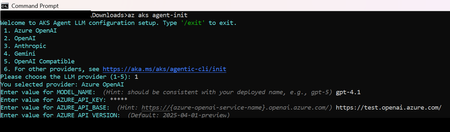
We are excited to announce the agentic CLI for AKS, available now in public preview directly through the Azure CLI. A huge thank you to all our private preview customers who took the time to try out our beta releases and provide feedback to our team. The agentic CLI is now available for everyone to try--continue reading to learn how you can get started. Why we built the agentic CLI for AKS The way we build software is changing with the democratization of coding agents. We believe the same should happen for how users manage their Kubernetes environments. With this feature, we want to simplify the management and troubleshooting of AKS clusters, while reducing the barrier to entry for startups and developers by bridging the knowledge gap. The agentic CLI for AKS is designed to simplify this experience by bringing agentic capabilities to your cluster operations and observability, translating natural language into actionable guidance and analysis. Whether you need to right-size your infrastructure, troubleshoot complex networking issues like DNS or outbound connectivity, or ensure smooth K8s upgrades, the agentic CLI helps you make informed decisions quickly and confidently. Our goal: streamline cluster operations and empower teams to ask questions like “Why is my pod restarting?” or “How can I optimize my cluster for cost?” and get instant, actionable answers. The agentic CLI for AKS is built on the open-source HolmesGPT project, which has recently been accepted as a CNCF Sandbox project. With a pluggable LLM endpoint structure and open-source backing, the agentic CLI is purpose-built for customizability and data privacy. From private to public preview: what's new? Earlier this year, we launched the agentic CLI in private beta for a small group of AKS customers. Their feedback has shaped what's new in our public preview release, which we are excited to share with the broader AKS community. Let’s dig in: Simplified setup: One-time initialization for LLM parameters with ‘az aks agent-init'. Configure your LLM parameters such as API key and model through a simple, guided user interface. AKS MCP integration: Enable the agent to install and run the AKS MCP server locally (directly in your CLI client) for advanced context-aware operations. The AKS MCP server includes tools for AKS clusters and associated Azure resources. Try it out: az aks agent “list all my unhealthy nodepools” --aks-mcp -n <cluster-name> -g <resource-group> Deeper investigations: New "Task List" feature which helps the agent plan and execute on complex investigations. Checklist-style tracker that allows you to stay updated on the agent's progress and planned tool calls. Provide in-line feedback: Share insights directly from the CLI about the agent's performance using /feedback. Provide a rating of the agent's analysis and optional written feedback directly to the agentic CLI team. Your feedback is highly appreciated and will help us improve the agentic CLI's capabilities. Performance and security improvements: Minor improvements for faster load times and reduced latency, as well as hardened initialization and token handling. Getting Started Install the extension az extension add --name aks-agent Set up you LLM endpoint az aks agent-init Start asking questions Some recommended scenarios to try out: Troubleshoot cluster health: az aks agent "Give me an overview of my cluster's health" Right-size your cluster: az aks agent "How can I optimize my node pool for cost?" Try out the AKS MCP integration: az aks agent "Show me CPU and memory usage trends" --aks-mcp -n <cluster-name> -g <resource-group> Get upgrade guidance: az aks agent "What should I check before upgrading my AKS cluster?" Update the agentic CLI extension az extension update --name aks-agent Join the Conversation We’d love your feedback! Use the built-in '/feedback' command or visit our GitHub repository to share ideas and issues. Learn more: https://aka.ms/aks/agentic-cli Share feedback: https://aka.ms/aks/agentic-cli/issues1.1KViews1like0Comments