modern
32 TopicsSharePoint Document Details Path with or without copy path button.
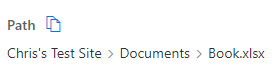
I noticed between SharePoint 2019 and SharePoint Online the Copy Path button ( ) only appears in SharePoint online. Is there a way to make this copy path button appear in the on prem sites too? Examples: (Document Library > Select File > Details panel > Path) SharePoint Online SharePoint 2019588Views0likes0Comments
Can't add Heading (without link) to left Nav in modern Team site anymore?
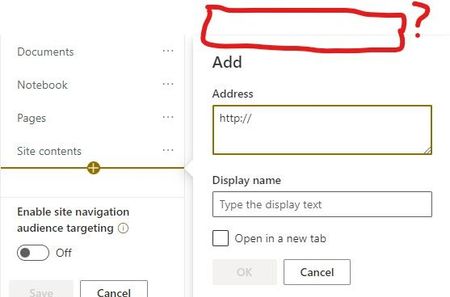
I am no longer able to select whether I want to add a header or a hyper link to my left navigation in a modern team site? I can only add hyperlinks. Has this changed, or do I need to make an adjustment in site settings?3.1KViews0likes7Comments
Auto-append trailing * wildcard to search for substrings in modern sharepoint
I have a modern communication site and if I search a list for 'can', it will not return Canada, or Canadian in my results. but if I search for can*, both items will be returned. I believe it is possible to program classic search to append this wildcard automatically, so I don't need to type the * every time. But does anyone know how I can achieve this with modern search? And please no one reply with, "this isn't possible". It seems to me, that if this isn't possible, why hasn't Microsoft fixed this yet? I've never seen another intranet search engine work this way. Or am I missing a simple solution to this? Any help would be greatly appreciated. It is not natural for end users to have to remember to type a * at the end of their search string, which consequently returns poor results for their searches..2.8KViews0likes5CommentsEvents web part not populating Teams calendar events (Modern Sharepoint)
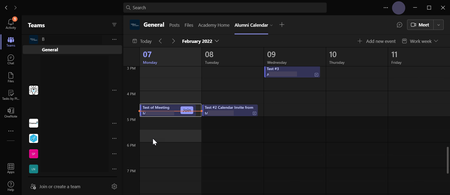
We have a Teams calendar set up and two related modern Sharepoint site pages where we would like to use the Events web part. Please see the attached screenshots. Screenshot 1: Test events have been added to the Teams calendar for this group, "B" (redacted for privacy) Screenshots 2 and 3: In the web part on both site pages, the settings are set up as: Source - "Select sites" Frequent sites - selected "B" (redacted for privacy) Date Range - "All Upcoming Events" As you can see, the events are for the current week, hosted on the team, and with web part settings that seem straightforward. We need this working asap this week. Please help!1.8KViews0likes3Comments
Site Pages Library - No New Button
Hi everyone, We are not able to see the standard or customized content types in "new button" in Site Pages Document Library, in every site of a customer Tenant. This issue disappears setting the classic experience for that library. Is there anyone experiencing the same issue?698Views0likes0Comments
Modern Hybrid with no external access
Hi All. We have an on-prem Exchange 2016 infrastructure with no https connectivity from external. We setup the Hybrid agent in full 'modern' mode for this reason and it seems to work OK. We had to do some adjustments on the Inbound and Outbound connectors to route mail correctly and have successfully done test mailbox migrations to and from O365. We aren't scheduled to move any mailboxes to the cloud at present so everything is staying on-prem. We have also deployed Teams to a pilot group, however there is no Calendar integration and users cannot delegate a Teams meeting on behalf of another. I believe (after many hours reading various posts) that for these to work we need to publish our internal autodiscover and EWS records externally? My question then is can this be worked around using the Hybrid agent somehow or is the above the only option, in which case the Modern Hybrid is not usable and we might as well use Classic Hybrid, assuming we can even get approval to publish these URL's externally. Cheers Peter872Views0likes0CommentsWindows 11: Don't show the same visible options again in "show more options" context menu
When right-clicking on desktop or on a file or inside a folder, there are some options shown in modern UI, and then there is an option at the end to "show more options" which shows a legacy context menu which contains options that were already shown to the user in modern style as well as options that weren't available before. my suggestion is to only show the new options in the context menu, when selecting "show more options". don't show the same options previously shown to the user, again in the more options. upvote this feedback in feedback hub: https://aka.ms/AAd4t7w1.4KViews1like0CommentsWindows 11: Turn the "Show more options" context menu into a slide down menu
Turn the "Show more options" context menu into a slide down menu and show those extra options in modern style Change the Windows 11 context menu so that when user clicks/taps on "show more options", the context menu expands and the rest of the options become visible in the same modern style with a sliding down animation, possibility with the ability for user to scroll up/down through the options (with mouse wheel or touch). Upvote this feedback in feedback hub: https://aka.ms/AAd53qz17KViews5likes4Comments
[Downloads UI] Legacy UI is used when a download comes from a pop-up window
What is the issue? Edge now uses a modern-UI for handling downloads: an icon on the toolbar, just after the end of the Address Bar, which shows a vertical-list of downloads. However, when a download starts from a pop-up window, such as from the Microsoft Update Catalog site, the old-UI is used instead, which feels a bit inconsistent! Expected outcome That only the modern-UI will be used. Proposed solutions My preferred-solution would be to add a setting into Edge where the user can ask for pop-ups to load into a new tabs, instead of separate windows -- Internet Explorer 11 had such a setting. This would then mean pop-up content gets treated like any-other tab, and so would use the modern-UI. Alternatively, when a download starts from a pop-up window, the parent-window should come to the foreground, and the download then begin in that window. Before posting here, have you submitted feedback via the "Send Feedback" feature in Edge? Yes Browser and Operating System Edge 90.0.818.62 (Official build) (64-bit) Windows 10 Home (64-bit) Version 20H2 (Build 19042.985; May 2021 update-level)1KViews0likes0CommentsColumn Default Value Based on Root URL
I have a tab in an MS Teams team where users can view our upcoming corporate training sessions (i.e. Events). In each event description, I am putting a link to a sign up form. The sign up form is a list in MS SharePoint Online. In this list, there is a column to specify the event to which the user wants to sign up. I want this column to be automatically filled using the column default value function in SharePoint. The default value would be based on the root URL that led the user to the sign up form. For example, if the user was viewing training session X in Teams, it means the root URL is the event X URL. So, the formula would be: IF [Root URL] = (URL of event X) then "X", ELSEIF [Root URL] = (URL of event Y) then "Y"... and so on. Does this hypothetical [Root URL] function even exist? If not do you have any suggestion for how I can tell which event the user is coming from such that I can fill the column automatically? Thanks.2.5KViews0likes4Comments