modern work
22 TopicsThe Context Advantage
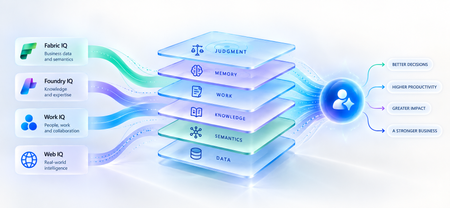
A strange thing happens when enterprises upgrade their AI models. The model gets smarter. The benchmarks improve. The demos become more impressive. And sometimes, the business outcome barely moves. The agent still asks questions the organization answered months ago. It recommends something policy doesn't allow. It treats a strategic customer like any other customer. It proposes an architecture your engineering team rejected six months ago. The problem isn't necessarily intelligence. It is ignorance of the business. That distinction matters because the world's most capable models are becoming available to almost everyone. Your competitors can increasingly access the same frontier intelligence you can. What they cannot access is your customer history, operating knowledge, organizational memory or understanding of how decisions actually get made. Models are becoming shared. Context remains proprietary. And that may be where the next enterprise AI advantage is built. Intelligence Without Context is Surprisingly Ordinary Consider a simple enterprise question: Can we offer this customer a larger discount? A powerful model can reason about discounts. But answering that question properly may require the customer's lifetime value, current contract, payment history, margins and approval thresholds and perhaps a conversation yesterday in which the account executive learned that a competitor had entered the deal. The model isn't missing intelligence. It is missing context. Humans rarely make important decisions from one piece of information. We combine data, experience, relationships, history and situational awareness almost unconsciously. Agents need a version of the same capability. That is why enterprise AI is moving from an era dominated by prompt engineering toward one increasingly shaped by context engineering. Satya Nadella recently described the emerging market simply as “a world of context engineering.” Prompt engineering asks: What should I tell the model? Context engineering asks the larger question: What does the model need to understand before it can act well? That difference becomes critical as AI moves from answering questions to performing work. The Enterprise Context Stack In discussions about enterprise agents, “context” can easily become shorthand for giving a model access to more data. That definition is too narrow. I think about enterprise context as a stack: DATA → SEMANTICS → KNOWLEDGE → WORK → MEMORY → JUDGMENT Data tells the agent what happened: orders, transactions, inventory, claims and customer records. Semantics tells it what that data means to the business: what constitutes a strategic customer, how margin is calculated, which assets belong to which production line. Knowledge tells it what the organization knows: policies, contracts, procedures, research and accumulated expertise. Work tells it what is happening now: who is involved, what has been discussed and which commitments already exist. Memory tells it what happened before: previous interactions, decisions, exceptions and outcomes. And judgment helps determine what should happen next. Memory deserves particular attention because it is context agents can accumulate through experience. Microsoft Foundry now distinguishes between session, user and procedural memory - moving agents beyond remembering a conversation toward remembering preferences and learning how work gets done across repeated interactions. Sometimes the cheapest way to make an agent meaningfully better may not be a bigger model. It may be a better memory. Not every agent needs every layer. But the more consequential its responsibility, the richer, and more carefully governed, its context usually needs to become. This is where context stops being a retrieval problem and starts becoming an enterprise architecture problem. Context Is Becoming Infrastructure This shift is now visible well beyond any one technology platform. Gartner increasingly describes a context layer as an architectural foundation for agentic AI - bringing together semantics, operational state, provenance and other enterprise signals so agents can act reliably. Anthropic, approaching the problem from AI engineering, argues that context should be treated as a finite resource that must be carefully curated rather than simply expanded. Microsoft's recent direction is particularly interesting through this lens. Work IQ, Fabric IQ, Foundry IQ and Web IQ increasingly form a shared intelligence layer across Microsoft's stack. Work IQ provides context about how work happens. Fabric IQ brings business semantics and relationships. Foundry IQ provides reusable enterprise knowledge and agentic retrieval. Web IQ extends that understanding with fresh external intelligence. The architectural implication matters more than the product names. Instead of every new agent rebuilding connectors, retrieval logic, semantic definitions and permissions, context becomes reusable infrastructure from which many agents can reason. Microsoft captured the shift particularly well: As agents become the new application model, context becomes critical infrastructure. Your Data Estate Is Not Automatically Your AI Moat For years, organizations have been told their data is a competitive advantage. Sometimes it is. But possessing data and making that data useful to an agent are very different things. Most enterprises don't suffer from a shortage of information. They suffer from an abundance of it -scattered across databases, documents, emails, meetings, applications and people's heads. The advantage doesn't come from connecting an agent to all of it. It comes from turning information into usable context: preserving business meaning, understanding relationships, distinguishing authoritative knowledge from convenient information, respecting permissions and retrieving what matters when a decision is being made. The enterprise with the most data may not build the best AI. The enterprise that makes its context most usable might. The Context Budget There is a trap on the other side too. If context improves AI, the natural instinct is to give the agent as much as possible. That is the wrong objective. Context consumes attention and compute. Irrelevant information creates noise. Stale information can mislead. Conflicting context can degrade reasoning rather than improve it. The objective should therefore not be maximum context. It should be minimum sufficient context the smallest trusted, relevant and permission-aware set of information required to produce the right outcome. In Beyond Tokens, I introduced the idea of an Intelligence Budget: How much intelligence does this outcome deserve? Enterprise agents increasingly need a companion concept. The Context Budget. How much context does this decision deserve? A scheduling agent may need calendars and preferences. A pricing agent may need customer economics, margins, commitments and approval policies. A clinical agent requires an entirely different level of completeness, provenance and governance. Every unnecessary token of context is cost. Every missing piece of necessary context is risk. Which gives us a useful way to think about enterprise agents: Right Intelligence × Right Context → Right Outcome Spend more intelligence where the outcome warrants it. Provide more context where the decision requires it. Do neither indiscriminately. What An Agent May Know Matters Too! There is another dimension to the Context Budget: permissions. Enterprise context belongs to someone. A system that retrieves the right answer but ignores whether the agent is entitled to see it isn't intelligent. It is a security problem. Enterprise context must therefore remain identity-aware and permission-aware as it moves from source systems into agent reasoning. This becomes especially important as agents gain persistent identities and greater autonomy. What an agent may know is as much a part of its job description as what it may do. Autonomy defines the boundary of action. Context defines the boundary of understanding. From RAG Projects To Context Architecture The first generation of enterprise GenAI often started with RAG: connect documents to a model and retrieve relevant passages. That was an important step. But an agentic enterprise cannot become a collection of hundreds of independent RAG pipelines, each separately rediscovering the organization's customers, products, policies, terminology and permissions. That risks creating another generation of technology fragmentation. The opportunity is to move from agent-specific retrieval toward reusable enterprise context. What knowledge should agents inherit? Which business entities should have common definitions? Which sources are authoritative? Which memories should persist—and which should be forgotten? And perhaps the hardest question: Who owns enterprise context? Today, responsibility is scattered across data teams, application teams, knowledge management, security, business functions and increasingly AI teams. In an agentic enterprise, context may need to be managed as a product, not everyone's side project. The Moat Is Not The Model Imagine two competing organizations using exactly the same frontier model. One connects it to fragmented documents and a handful of applications. The other has strong data foundations, shared business semantics, governed knowledge, connected workflows and organizational memory. They have access to the same AI. They do not have the same intelligence system. The second organization's agents understand customers more deeply, interpret signals more accurately and act with greater awareness of how the organization actually works. And that advantage compounds. Every workflow creates more context. Every interaction adds organizational memory. Every decision creates another signal from which future agents can reason. Models depreciate the moment a better one ships. Context appreciates every day you operate. That may be the most important strategic shift of all. Anyone can rent intelligence. No one can rent your context. Intelligence Is Becoming Abundant. Understanding Isn't. The first wave of enterprise AI taught us how powerful models could be. The next may teach us that models were only one part of the equation. An agent needs intelligence to reason. But it needs context to understand your business. As frontier intelligence becomes more accessible, enterprises may discover that their most defensible AI asset was never the model. It was everything the organization had learned before the model arrived: its data, semantics, knowledge, relationships, history, workflows and judgment. The organizations that turn those assets into trusted, reusable context will give every agent they build an advantage from day one. So perhaps the strategic question is no longer simply: Which model should we use? It is: What does our organization know that our competitors don't and can our AI actually use it? Because in a world where everyone can access intelligence, context may be what makes that intelligence uniquely yours. References Microsoft — FY2026 Q2 Earnings Conference Call Microsoft — FY2026 Q4 Earnings Conference Call Microsoft Learn — What is Foundry IQ? Microsoft Foundry — Foundry IQ: Build Smarter Agents Faster with Unified Knowledge and Serverless Retrieval Microsoft Foundry — What's New in Microsoft Foundry | Build 2026 Gartner — Context Engineering Is the New Prompt Engineering Gartner — Market Overview for AI Context Platforms Gartner — The 3 Core Components of the Context Layer for AI Agents40Views0likes1CommentLand Your Offer - Anatomy of Revenue Generating Partner Offer - Part 2 - Copilot Envisioning
In Part 1 we dissected Copilot in 30 — a $0 trial offer for SMB customers. This time the customer is larger, the engagement is funded rather than free, and the anatomy of revenue changes with it. It also lands when Microsoft just introduced the new Copilot — Home, Code and Autopilot, running on usage-based billing and governed through FinOps for AI — which makes a structured envisioning engagement the front door to a much bigger conversation. Most organisations with 300 or more seats already believe Copilot and agents matter. What they lack is a clear picture of where AI will pay off, what it will take to get ready, and how they'll prove it before committing budget. The Frontier Accelerate for Copilot: Envisioning & POC engagement gives you a pre-sales, partner-led answer to all three — funded by Microsoft and sized from a 10-hour readiness sprint to a 280-hour enterprise programme. Package it as a Microsoft Marketplace offer and you have a repeatable front door to every Copilot, Agent 365 and Microsoft 365 E7 opportunity in your territory. Start Here: Why Publishing on Microsoft Marketplace Matters Microsoft Marketplace is Microsoft's partner-focused business platform, designed to help you reach more customers and simplify how you sell. A published offer gives your practice a permanent, discoverable storefront in the place customers and Microsoft sellers already look for Copilot expertise. More importantly, an offer turns your expertise into something repeatable. Define the engagement once — phases, activities, deliverables, sizing — and run it across every qualified customer instead of scoping from scratch. Professional service and managed service offer types are available in Partner Center, so one listing can carry the envisioning engagement, the POC and the ongoing services that follow. The Enterprise Opportunity: Interest Is High, Direction Is Missing The customers for this offer are organisations with at least 300 Office 365 / Microsoft 365 seats — mid-market through to the largest enterprises. They are the customers with the most to gain from Copilot and agents, and the most complexity to work through first: security and governance, tenant and access dependencies, adoption and change, and a credible way to measure value. That gap between ambition and a plan is where partners win. Microsoft is investing in the full Copilot journey in FY27, from envisioning and proof of concept through deployment and adoption — and the envisioning stage is where you shape the roadmap, the scope and the commercial conversation before anyone else does. Why Copilot and Agents Are the Right Place to Start Microsoft 365 Copilot puts AI inside the apps people already use every day — Outlook, Teams, Word, Excel and PowerPoint — so value arrives without a platform change. For larger organisations, that is only the first layer: Agent 365, custom agents built with Copilot Studio, and Microsoft 365 E7 extend Copilot from personal productivity into role-based and process-level automation. The new Copilot adds a third layer. Cowork takes delegated work and returns a finished result; Code lets knowledge workers build apps, dashboards and automations in natural language, hosted on Copilot Managed Runtime; and Autopilot is a persistent agent with its own identity that keeps work moving without a prompt. All three run on usage-based billing rather than the per-user subscription, which means every customer now has to decide which users and which scenarios justify consumption spend — and how to govern it with FinOps for AI. Each layer brings its own questions — which personas, which scenarios, what governance, what consumption model, which capabilities are worth paying for by the task — and each question is an envisioning conversation a partner is best placed to lead. Meet the Offer: Envisioning & POC, Sized to the Customer The Frontier Accelerate for Copilot: Envisioning & POC engagement is a pre-sales, partner-led engagement that identifies personas and use cases and builds a business case for Microsoft 365 Copilot, Agent 365, Microsoft 365 E7 and/or agents — with an optional proof of concept. The essentials: Who qualifies: Customers with a minimum of 300 Office 365 / Microsoft 365 seats; larger tiers unlock at 500, 1,000, 1,500, 3,000 / 5,000 and 10,000+ seats How it's sized: Six tiers — XXS (10 hrs), XS (20 hrs), S (40 hrs), M (100 hrs), L/XL (150 hrs) and XXL (280 hrs) — with hours scaling with the seats in scope What it covers: Five phases — Assess, Inspire, Design, POC and Executive Summary — with a working POC and measured results from the S tier upward What Microsoft provides: A delivery guide, pre-engagement planning resources and Microsoft Commercial Incentives (MCI) funding tied to proof of execution What the customer gets: Readiness findings, a business case and value plan including usage-based billing and Copilot Credits, technical requirements and a remediation plan, an adoption roadmap, a working POC and an executive readout Microsoft funds the engagement. You own the scope, the relationship and everything that follows. Your Role: From Trusted Assessor to Transformation Partner An envisioning engagement is not a workshop; it is a guided decision. Your job is to move the customer from curiosity to a signed proposal, with evidence at every step. Assess — identify high-value scenarios, choose the right assessments, define what success looks like and deliver readiness findings the customer can act on. Inspire — show what Copilot and agents can do across roles; make security, governance, adoption and reporting concrete rather than abstract concerns. Design — turn findings into a business case and value plan (including usage-based billing), a remediation plan, technical requirements, an adoption roadmap and clear POC criteria with risks, owners and dates. Prove — scope the POC users and products, prepare the environment, build the agent or solution, train the users and measure results including Copilot Credits consumed. Summarise — deliver the executive readout on seat growth and consumption, then convert: trial to paid licences, commercial proposal and signature, and a named wave 2 expansion plan. Every phase produces something the customer keeps — and every deliverable positions you as the partner who should build what comes next. Inside the Offer: Activities and Hours by Engagement Size Below is the full activity plan behind the offer, with hours for each of the six engagement sizes. Use it to size your own offer plans and statements of work. ID Phase Activity XXS XS S M L/XL XXL — Pre-req Customer eligibility (min. O365/M365 seats) 300+ 500+ 1,000+ 1,500+ 3,000+ / 5,000+ 10,000+ A1 Assess Identify high-value scenarios 0.5 1 1.75 3.75 5.5 10.5 A2 Assess Select assessment(s) 0.5 0.5 1 2.25 3.5 6.25 A3 Assess Define success 0.5 0.75 1.5 3 4.5 8.5 A4 Assess Deliver readiness assessment(s) 1 1.75 2.75 6 9 16.75 I1 Inspire Product overviews & demos across Copilot and agent capabilities 1 1.5 2 4.5 6.75 12.5 I2 Inspire Security/governance overview, incl. tenant and access dependencies 0.5 1 1.5 3 4.5 8.5 I3 Inspire Adoption/change overview 0.5 0.75 1 2.25 3.5 6.25 I4 Inspire Reporting/analytics overview 0.5 0.75 1 2.25 3.5 6.25 I5 Inspire Stories & Scenario Library 0.5 1 1.5 3 4.25 8.5 D1 Design Business case/value plan, incl. usage-based billing (UBB) 1 1.75 2.75 6.25 9.5 17.5 D2 Design Remediation plan 0.5 1 1.75 3.75 5.5 10.5 D3 Design Technical/functional requirements 0.75 1.5 2.25 5 7.5 14 D4 Design Adoption roadmap 0.5 1 1.75 3.75 5.5 10.5 D5 Design POC success criteria & environment prep 0.5 1 1.75 3.75 5.5 10.5 D6 Design Recommendations/risks/owners/dates, incl. validation and next-step owners 0.25 0.75 0.75 2.5 4 7 P1 POC Scope/users/products/features 0 0.25 1 3.5 5.25 9.75 P2 POC Confirm requirements/design 0 0.25 1 3.5 5.25 9.75 P3 POC IT access & environment prep 0 0.25 1.75 5.25 8 14.75 P4 POC Trial licenses 0 0.25 1 3.5 5.25 9.75 P5 POC Build POC agent(s)/solution(s); confirm Copilot Credits consumption 0 0.5 3.75 12.25 18.5 34.25 P6 POC Train POC users 0 0.25 1 3.5 5.25 9.75 P7 POC Measure/evaluate results, incl. usage and Copilot Credits consumed 0 0.25 1.5 3.5 5 10 E1 Exec summary Executive readout: seat growth and consumption implications 1 2 4 10 15 28 TOTAL Hours 10 20 40 100 150 280 Land Your Offer: What One Customer Is Worth The table below is the revenue anatomy of one Envisioning & POC engagement at each of the six sizes — and it shows that the funded engagement is only the first of three revenue streams. They stack on top of each other: MCI engagement incentive — Microsoft funds the envisioning and POC work itself, from $2K for a 10-hour XXS engagement to $100K for a 280-hour XXL programme, paid against proof of execution. CSP incentive on the licences that follow — earned on the Copilot revenue the business case unlocks, from the trial-to-paid conversion (T1) through the wave 2 expansion (X1), and growing as agent consumption and Copilot Credits scale. Managed services and follow-on professional services — the recurring engagement described in After the Readout, which is where the largest and most durable share of revenue lives. Item XXS XS S M L/XL XXL Minimum customer seats 300+ 500+ 1,000+ 1,500+ 3,000+ / 5,000+ 10,000+ Engagement hours 10 20 40 100 150 280 Post-delivery outcomes: Copilot rev (K) | Agent consumption (K) | Agent MAU 10 | 6 | 300 25 | 15 | 500 50 | 30 | 1,000 125 | 75 | 1,500 250/375 | 150/225 | 3,000/5,000 500 | 300 | 10,000 MCI engagement incentive (K) $2K $5K $10K $25K $50K / $75K $100K CSP incentive on Copilot revenue (K)† $1.95K $4.88K $9.75K $24.38K $48.75K / $73.13K $97.5K † CSP incentive shown at a blended 19.5% of the Copilot revenue outcome (direct bill 2.5 + 7 + 10; indirect reseller 7 + 12.5). Illustrative estimates from the offer plan — confirm current MCI payouts, CSP rates, eligibility and proof-of-execution requirements in the Microsoft Commercial Partner Incentives Guide. Now multiply. Everything above is the anatomy of a single customer. Landing the offer means running it across every qualifying customer in your territory — and you don't need to guess who they are. Partner Center's growth insights reporting, available through the AI Business Solutions & Security Insights (ASPX) dashboard, gives you account-level Copilot eligibility and seat whitespace, E7 opportunity, data security maturity, MCI eligibility and potential earnings for the customers you already manage. How the Offer Fits Together: From Sizing to Proof of Execution The offer runs left to right in three layers: Sizing & value — six engagement sizes from XXS (10 hrs) to XXL (280 hrs). Hours scale with the seats in scope, and value is tracked in the customer's own metrics. Five phases — Assess (A1–A4), Inspire (I1–I5), Design (D1–D6), POC (P1–P7) and Executive Summary (E1, T1, T2, X1). Each phase produces a concrete output the sponsor can see. Proof of execution — readiness and assessment findings; a business case and value plan including usage-based billing and Copilot Credits; technical requirements and a remediation plan; an adoption roadmap; a working POC with measured results; an executive readout covering next steps and consumption implications — and a named wave 2 expansion beyond the pilot team. The highlighted activities — security & governance (I2), adoption & change (I3), remediation plan (D2), technical requirements (D3), adoption roadmap (D4), IT access & environment (P3), build POC solution (P5), train POC users (P6), trial-to-paid conversion (T1), commercial proposal (T2) and the wave 2 expansion plan (X1) — are where the engagement stops being a project and becomes an ongoing relationship: managed services, ongoing optimisation and follow-on professional services after the engagement closes. After the Readout: Managed Services That Keep Delivering The executive readout is the start of the real engagement. Package these as standing services in your offer. Each one is sized in partner days so you can price it, and each one is tied to a result the customer's sponsor will recognise without a glossary: Managed service Partner activity — what you deliver and measure Customer business outcome — what it drives (illustrative targets, 1,500-seat customer) Deployment and remediation delivery • Effort: 5–10 days per wave • Activity: Close every item on the remediation plan and technical requirements (D2, D3) against dated owners, then licence and activate the wave's users by the roadmap date • Reported as: Items closed on time; seats activated; days from readout to go-live • Wave 1 live within 30 days of the readout, not 90 — two extra months of value on every seat • ≥95% of paid seats assigned and active; 75 idle seats would waste ≈$27K a year • Roll-out delivered within ±5% of the business-case budget Security and governance management • Effort: 2 days a month • Activity: Maintain the admin-settings baseline and data-protection controls, review agent permissions and access dependencies, approve plugins through the plugin registry and govern apps hosted on Copilot Managed Runtime, act on every Admin Settings Recommendation • Reported as: Recommended settings enabled; findings opened and closed; agents, plugins and apps with a named owner • Zero Copilot-related oversharing incidents; one enterprise data breach averages $4M+ • 100% of recommended settings on; findings closed within 30 days • Audit evidence produced in hours, not weeks — Data Security Maturity at Advanced-Healthy Adoption and change management • Effort: 3–4 days a month • Activity: Run the adoption roadmap (D4): coach champions, deliver role-based training, refresh scenarios, hold the monthly Copilot Analytics business review • Reported as: Active users as a share of assigned seats; people trained; low-activity users re-engaged • ≥80% of assigned seats active every month • 2–4 hours saved per user a week (≈3,000–6,000 hours across 1,500 seats) • ≈$0.5–1M a month of staff time released at $40/hour Agent and solution build-out • Effort: 5–15 days per agent or solution, then half a day a month to tune • Activity: Take each POC agent (P5) into production with Copilot Studio and Agent 365; release new Copilot Studio agents, Code-built apps and Autopilot agents from the scenario backlog, hosted on Copilot Managed Runtime • Reported as: Agents and apps live; active users per agent; tasks completed; Copilot Credits per completed task • 20–40% of tier-1 tickets or cases deflected per automated process • Cycle time cut 30–50% on each agent-run workflow; 200–500 hours removed a month per agent • Cost per completed task tracked and falling quarter on quarter FinOps for AI: consumption and licence management • Effort: 1-2 days a month • Activity: Track Copilot Credits and usage-based billing across Cowork, Code and Autopilot; set budgets, limits and model-family policies per user group; route credit requests through the customer's approval workflow; forecast spend and align seat additions, renewals and terms to each wave • Reported as: Reported as: Forecast versus actual variance; credits per active user; spend per business outcome; seats added; renewals completed on schedule • AI spend held within ±10% of forecast — no unplanned overage • Zero unused seats at renewal; 100% of renewals on schedule • Cost per outcome down 10–20% a year as usage matures Quarterly value reviews • Effort: 2 days a quarter • Activity: Refresh the business case (D1) with actuals, capture proof points in the customer's own words, agree and date the next named expansion wave with the executive sponsor • Reported as: Realised versus forecast value; proof points captured; next wave scheduled • ROI in dollars: ≈$125K a year of Copilot seats vs. $6M+ of time released • ≥3 quantified proof points in the sponsor's words each quarter • Each review dates the next wave: +100–300 seats or +1–2 agents a quarter Effort shown is indicative for an M-tier customer (1,500+ seats) and scales with seats and agents in scope, exactly as the engagement hours above do. Add the recurring rows together and one M-tier customer with three agents in production sustains roughly 9–10 partner days a month after the readout, before wave deployments and new agent or solution builds are counted. Every row pairs a number you can invoice against with a result the customer already cares about, which is what turns a recurring service into a renewable one and keeps you positioned as the customer's AI transformation partner as their ambitions grow. Each of these is a recurring, outcome-based service rather than a one-off project — and each keeps you positioned as the customer's AI transformation partner as their ambitions grow. Ready to Build Your Envisioning & POC Offer? Read the engagement terms in the Microsoft Commercial Partner Incentives Guide and download the delivery guide and pre-engagement planning resources. Confirm your eligibility for Microsoft Commercial Incentives engagements in Partner Center and align your delivery team on the five-phase model. Publish your offer in Partner Center as a professional service (Envisioning & POC) with a managed service follow-on (deployment, adoption and optimisation). Pick your first cohort — customers with 300+ Microsoft 365 seats and no clear Copilot or agent roadmap yet, then size each one to the right tier. Book the executive readout before Assess begins — so the conversion, proposal and wave 2 conversation is already on the calendar. The customers are already in your base. Publish the offer and open the conversation. Resources Frontier Accelerate for Copilot: Envisioning & POC | Microsoft Commercial Partner Incentives Guide Copilot Envisioning & POC — Delivery Guide Copilot Envisioning & POC — Pre-Engagement Planning The new Copilot is here: the opportunity for Microsoft partners323Views1like0CommentsLand Your Offer - Anatomy of Revenue Generating Partner Offer - Part 1 - Copilot in 30
Copilot in 30: A Ready-Made Marketplace Offer to Grow Your SMB Practice Thirty days. Twenty-five users. One repeatable offer that turns AI curiosity into a long-term customer relationship. Small and medium businesses know AI matters. What they lack is a trusted guide and a low-risk way to start. Copilot in 30 gives you both: a $0, 25-user, 30-day Microsoft 365 Copilot Business trial from Microsoft, wrapped in a structured journey that only a partner can deliver. Package it as a Microsoft Marketplace offer and you have a scalable on-ramp to every SMB customer in your base — and to the managed services that follow. Start Here: Why Publishing on Microsoft Marketplace Matters Microsoft Marketplace is Microsoft's partner-focused business platform, designed to help you reach more customers and simplify how you sell. A published offer gives your practice a permanent, discoverable storefront in the place customers already look for Copilot help. More importantly, an offer turns your expertise into something repeatable. Instead of scoping every engagement from scratch, you define the journey once — activities, timeline, deliverables — and run it across dozens of customers. Professional service and managed service offer types are available in Partner Center, so the same offer can carry both the 30-day journey and what comes after it. The SMB Opportunity Hiding in Plain Sight SMB customer segment is still early in their AI journey. These are organisations with 300 or fewer users on Microsoft 365 Business Basic, Standard or Premium — typically without an in-house AI team. That combination is exactly where partners win: high demand, limited internal capacity, and a customer base large enough that a well-designed, repeatable offer scales far beyond what bespoke projects can. Why Copilot Is the Right First AI Step for SMBs Microsoft 365 Copilot Business is the cost-effective Copilot add-on built for SMB customers, delivering the same capabilities as Microsoft 365 Copilot inside the apps their people already use — Outlook, Teams, Word, Excel and PowerPoint. No platform overhaul, minimal training, immediate relevance. Copilot is also the on-ramp. Once a team works confidently with Copilot, the natural next steps are agents, automated workflows and Copilot Cowork — each one deepening the customer's dependence on the partner who guided them there. Meet Copilot in 30: 25 Users, 30 Days, $0 Copilot in 30 is a limited-time, CSP partner-led Microsoft 365 Copilot Business trial for SMB customers with fewer than 300 employees. The essentials: What the customer gets: 25 Microsoft 365 Copilot Business seats for 30 days at $0, transacted through CSP New Commerce (Product ID CFQ7TTC0MM8R · SKU 006Z) Who qualifies: Customers on Microsoft 365 Business Basic, Standard or Premium with no paid Microsoft 365 Copilot today — one trial per customer How long it runs: Available to transact until 31 December 2026 What happens at Day 30: The trial auto-converts to a paid subscription unless renewal settings are changed, with a 7-day cancellation window What Microsoft provides: A launch kit, campaign materials, setup guidance, the Copilot Success Planner and conversion guidance Microsoft supplies the licences and the assets. The offer — and the customer relationship — is yours. Your Role: The Guide Who Turns a Trial Into a Habit A trial alone rarely changes behaviour. A guided trial does. Your job across the 30 days is to make sure 25 people experience real value in real work, and that the sponsor can see it. Before Day 0 — pick the right customers, become "Customer Zero" by using Copilot in your own business, secure a named sponsor and Copilot admin, and build a 30-day success plan with agreed measures. Day 0 — transact the trial, set the paid renewal quantity and term, complete admin setup, assign all 25 licences and run the kick-off with starter prompts. Days 1–28 — lead a weekly scenario (Outlook, Teams, Apps, Agents), review Copilot Analytics, re-engage low-activity users and capture proof points in the customer's own words. Days 29–30 — run the outcome and ROI review, confirm the paid offer and open the expansion and consumption conversation. Every touchpoint is partner expertise the customer cannot get from a licence alone — and every one moves the decision at Day 30 from "should we?" to "how much more?" Inside the Offer: Activities, Timeline and Deliverables Below is the full activity plan behind the offer, ready to drop into your own offer description or statement of work. ID Stage Activity Trial day (of 30) Key deliverables — Pre-req Customer eligibility (Copilot Business trial) Before Day 0 Active M365 Business base licence; no paid M365 Copilot; one $0 trial per customer; CSP New Commerce transactable; offer open to 31 Dec 2026 I1 Identify Build the prioritised target list Pre-trial Tier A/B target list from ASPX and Cloud Ascent; 50–300 eligible seats I2 Identify Confirm eligibility and trial fit Pre-trial Eligibility check: M365 Business base licence, no paid Copilot, one trial I3 Identify Launch the acquisition campaign Pre-trial Campaign email sent; briefing delivered; responses triaged into pipeline I4 Identify Be Customer Zero: complete microskilling Pre-trial Microskilling complete; internal Copilot experience; team briefed P1 Plan Confirm sponsor and success measures Pre-trial Named sponsor and admin; 25 trial users; agreed success measures P2 Plan Build the 30-day success plan Pre-trial Personalised Success Planner output; weekly scenarios; admin and user views P3 Plan Confirm technical and compliance readiness Pre-trial Minimum requirements verified; data and compliance review; blocker log A1 Activate Transact the trial in CSP New Commerce Day 0 25-seat, 30-day, $0 trial ordered (CFQ7TTC0MM8R · SKU 006Z) A2 Activate Configure the paid renewal settings Day 0 Renewal quantity, term and billing set; Cowork usage-based billing if in scope A3 Activate Complete admin setup and assign licences Day 0 Recommended settings on; 25 licences assigned (starts the clock) A4 Activate Run the kick-off and share starter prompts Day 0 Kick-off email; starter prompts; four-week prompt series scheduled X1 Experience Week 1 · Outlook — catch up and communicate Days 1–7 Week 1 prompts landed; first-week activation rate reviewed X2 Experience Week 2 · Teams — meetings that run themselves Days 8–14 Copilot Analytics checkpoint; recaps adopted; low-activity users re-engaged X3 Experience Week 3 · Apps — create in minutes Days 15–21 App scenarios and proof points; week 3 training gate before day 30 X4 Experience Week 4 · Agents — unlock the next level Days 22–28 Role-built agents trialled; 30-day usage trends from the admin centre C1 Convert Outcome review, paid offer and expansion plan Days 29–30 ROI review; 50-seat offer confirmed in 7 days; wave 2 plan; consumption conversation opened Land Your Offer: What One Customer Is Worth The table below is the revenue anatomy of one Copilot in 30 engagement — and it shows that the money is not in the trial, but in what the trial sets up. Item Value Detail Offer duration 30 days Trial clock runs Days 1–30; identify, plan and Day 0 setup precede it Trial offer 25 seats M365 Copilot Business · 30 days · $0 · one per customer · to 31 Dec 2026 CSP incentive — 25 seats (K) $0.32K 5.0% direct bill (2.5% M365 CSP Core + 2.5% Strategic Product Accelerator Tier 1) on 25 M365 Copilot Business seats x $21/mo† ≈ $6.3K/yr; indirect reseller 2.5% ≈ $0.16K Conversion target 50 seats Lead with 50 paid seats at conversion; sets up the wave 2 expansion plan CSP incentive — 50 seats (K) $0.63K 5.0% direct bill (Core + SPA Tier 1) on 50 M365 Copilot Business seats x $21/mo† ≈ $12.6K/yr; indirect reseller 2.5% ≈ $0.32K Frontier Accelerate deployment funding (K) $2.5K Microsoft Commercial Incentives funding for the Copilot deployment engagement when the conversion lands with 50 paid seats†; funds the deployment and adoption work that leads into managed services † Illustrative estimates from the offer plan. Confirm current incentive rates, funding and eligibility in Partner Center. Three streams stack on top of each other: CSP incentive — earned on every paid Copilot Business seat from the moment the trial converts, and growing again when the customer expands from 25 to 50 seats. Frontier Accelerate deployment funding — $2,500 available when you lead the conversion with 50 paid seats, paying for the deployment work that makes the expansion stick. Managed services — the recurring engagement described in Day 31 and Beyond, which is where the largest and most durable share of revenue lives. Now multiply. Everything above is the anatomy of a single customer. Landing the offer means running it across every eligible customer in your base — and you don't need to guess who they are. Partner Center's growth insights reporting, available through the AI Business Solutions & Security Insights (ASPX) dashboard, gives you account-level Copilot eligibility, seat whitespace, free Copilot Chat usage and adoption signals for the customers you already manage. To turn that export into a ranked target list, my colleague Brian O'Shea has built a Copilot for 30 Power BI dashboard that sits over your ASPX data and scores each customer on a 0–100 priority scale from eligible seats, whitespace, free-to-paid potential and opportunity signals — so your first cohort is the ten customers most likely to convert, not the first ten who reply. How the Offer Fits Together: From Trial Inputs to Proof of Value The offer runs left to right in three layers: Trial inputs — 25 users, 30 days, $0 CSP trial SKU; an SMB with 50–300 eligible Microsoft 365 seats; no paid Copilot today; a Business Basic, Standard or Premium base; one trial per customer to 31 Dec 2026; a named sponsor and Copilot admin; auto-conversion to paid unless changed. Five stages — Identify (I1–I4), Plan (P1–P3), Activate (A1–A4), Experience (X1–X4) and Convert (C1, T1, T2, W2). Each stage produces a concrete output the sponsor can see. Proof of value — a prioritised list and campaign responses; agreed use cases and success measures; a provisioned trial with 25 licences assigned; weekly usage from the Microsoft 365 admin centre; adoption proof points in the customer's words; paid conversion confirmed in Partner Center — and a named wave 2 expansion beyond the first 25. The highlighted activities — admin setup (A3), Week 4 agents (X4), 25→50 paid seats (T1), Frontier Accelerate funding (T2) and the wave 2 expansion plan (W2) — are where the engagement stops being a project and starts becoming an ongoing relationship: managed services, agent build-out, Copilot Studio and Copilot Cowork follow-on once the trial converts. Day 31 and Beyond: Managed Services That Keep Delivering The end of the trial is the start of the real engagement. Package these as standing services in your offer: Copilot adoption management — monthly Copilot Analytics business reviews, prompt and scenario refreshes, champion programme and onboarding for each new wave of users Licence and expansion management — take the customer from 25 to 50 paid seats and on to wave 2, aligning renewals, terms and billing as the footprint grows Agent build-out — design, build and maintain role-based agents with Copilot Studio for sales, service, finance and operations scenarios surfaced in Week 4 Copilot Cowork enablement and governance — introduce consumption-based Cowork scenarios, set budgets and cost controls, and report on usage each month Security, compliance and readiness — keep data protection, permissions and governance in step with expanding AI use, including a path to Microsoft 365 Business Premium Quarterly value reviews — refresh success measures, capture new proof points and agree the next expansion plan with the sponsor Each of these is a recurring, outcome-based service rather than a one-off project — and each keeps you positioned as the customer's AI partner as their needs grow. Ready to Build Your Copilot in 30 Offer? Download the Copilot in 30 launch kit and Microsoft 365 Copilot Partner FAQ from the Microsoft AI Cloud Partner Program. Be Customer Zero — run Copilot and the microskilling series inside your own business first. Publish your offer in Partner Center as a professional service (the 30-day journey) with a managed service follow-on (Day 31 and beyond). Pick your first cohort — customers with 50–300 seats on a Microsoft 365 Business plan and no paid Copilot today. Transact your first trial through CSP New Commerce (Product ID CFQ7TTC0MM8R · SKU 006Z) and set the paid renewal on Day 0. Book the Day 30 review before Day 1 — so the conversion and expansion conversation is already on the calendar. The window closes on 31 December 2026. The customers are already in your base. Publish the offer and start the clock. Resources From AI curiosity to Copilot adoption in 30 days — Microsoft Partner Blog Copilot in 30 Launch Kit — partner GTM playbook, customer trial guide, invitation and weekly prompt emails, admin setup guidance Build Your 30-Day Copilot Success Plan Copilot Success Planner Walkthrough video Partner Skilling Hub | Microskilling for Copilot in 30 Power BI Dashboard that integrates with your ASPXi Partner Data · By Brian O'Shea Create compelling customer business cases666Views2likes1CommentWhen AI Stops Waiting for Instructions
Microsoft’s Autopilots mark a shift from AI that responds to prompts to persistent agents with identity, initiative and standing responsibilities. As AI begins to hold a “job,” the enterprise challenge moves beyond deploying agents to defining what they should own, how far their autonomy should extend, and where human accountability must remain.298Views1like0CommentsThree Tiers, One Platform: Building Agents Together with the Build-Along Series
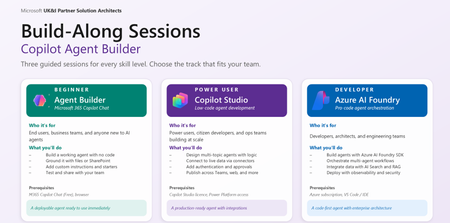
The Agentic Opportunity Every partner has agent ambition, but a single workshop format cannot serve every builder. Business makers want a fast win without writing code. Citizen developers want to orchestrate real processes across enterprise systems. Pro developers want a code-first surface with evaluations, tracing, and managed identity. Run the wrong session for the wrong audience, and engagement collapses - too abstract for one group, too constrained for another. The Agent Build-Along Series solves that by meeting builders exactly where they are, across three tiers of the Microsoft platform stack. Behind the series sits a self-serve GitHub repository - a curated library of build-along sessions with easy-to-follow, step-by-step instructions, scoped to specific industry scenarios and business functions. Partners pick the scenario that fits the room, clone the assets, and run the session. No bespoke content build, no facilitator guesswork. A Self-Serve Repository for Build-Along Sessions Diagram illustrating three tiers of agent building The repo at Agent Build-Along Github is a self-serve catalog of ready-to-run workshops. Every session is curated for a specific industry and business function, with easy-to-follow instructions a facilitator can pick up and deliver. Pick the combination that matches the room and run the session - the content, scenario, and assets are already there. Sessions are organised across three axes so partners can find the right fit fast: Industry - Financial Services, Healthcare, Retail, Manufacturing, Public Sector, Energy, Professional Services Business function - Sales, Marketing, Finance, HR, Operations, IT, Customer Service Workload - Agent Builder, Copilot Studio and Azure AI Foundry Each session in the repo includes a real-world scenario, step-by-step build instructions, sample data, prompts and configuration, and a facilitator narrative. Clone, brief the room, build the agent - that is the loop. Three Tiers - Meet Builders Where They Are The pyramid is intentional. Builders start where their skills are today and move up as confidence grows. The tier defines platform, audience, duration, and approach - content stays consistent. Tier Platform Audience Duration Approach 1 - Foundation Microsoft 365 Copilot Agent Builder Business makers, end users, departmental teams 60 min No-code 2 - Extend Copilot Studio Citizen developers, power users, ops teams 90 min Low-code 3 - Pro-Code Azure AI Foundry Pro developers, architects, AI engineers 180+ min Code-first Tier 1 - M365 Copilot Agent Builder Author your first agent - no code required. Microsoft 365 Copilot Agent Builder virtual workshop overview, What your customers will build A custom agent scoped to a real workplace scenario Grounded with knowledge sources (SharePoint sites, files, web URLs) Configured with custom instructions and conversation starters Tested in the preview pane and shared with a team Session flow Define → Ground → Refine → Test & Share Prerequisites Microsoft 365 Copilot licence (or Copilot Chat free) Modern browser (Edge / Chrome) A workplace scenario in mind, or use our template Outcome Attendees leave with a working agent they can use immediately, plus a repeatable pattern for future use cases. This is the right entry point for departmental teams who want to operationalise Copilot without engineering involvement. Tier 2 - Copilot Studio Orchestrate multi-step agents across enterprise systems. Microsoft Copilot Studio virtual workshop overview What your customers will build A copilot with generative answers and authored topics Custom actions that call APIs and Power Platform connectors Knowledge sources spanning SharePoint, Dataverse, public web, and enterprise data Channel deployment to Microsoft Teams and a public web embed Session flow Design → Connect → Author → Publish Prerequisites M365 Copilot license with access to Copilot Studio Familiarity with Power Platform helpful, not required A multi-step workflow or process in mind Outcome Attendees leave with a published copilot running in Teams or on the web, plus a pattern for connecting copilots to enterprise systems. This is where citizen developers and ops teams turn manual processes into orchestrated, agent-driven workflows. Tier 3 - Azure AI Foundry Ship a code-first agent with evaluations and observability. What your customers will build A code-first agent with custom tools and function calling Grounding via Azure AI Search and the customer's own data Model selection from the Foundry catalog, with optional fine-tuning Evaluations, tracing, and managed-identity deployment Session flow Provision → Build → Evaluate → Deploy Prerequisites Azure subscription with Azure AI Foundry access VS Code, plus Python or .NET familiarity Sample data or a use case ready to ground on Outcome Attendees leave with a deployed agent - code, evaluations, and tracing in place - plus reusable SDK templates. This is the right tier for architects and AI engineers shipping agents into production with the governance bar enterprise customers expect. How the Repository Works The repo removes the heaviest lift in running these workshops: content creation. Every session is curated against the same three axes - industry, business function, tier - and shipped with step-by-step instructions a facilitator can follow with minimum prep. Industry/Business Function × Tier → Ready-to-run Build-Along Each session in the repo ships with: A real-world scenario grounded in the chosen industry and business function Step-by-step build instructions tuned to the selected tier Sample data the agent can ground against Prompts, conversation starters, and configuration snippets Facilitator narrative so anyone can run the session Need an enterprise agent that can handle integrate with CRM data? There is a curated Copilot Studio session with a deal-desk scenario and sample CRM data. Need a pro-code health care agent? Choose the Foundry session with a patient-flow scenario and a grounded dataset. Same repo, different curated paths - at the right depth for the room. What Attendees Walk Away With Agent-Builder - A working agent in Microsoft 365 Copilot, ready to share with colleagues. Copilot Studio - A published copilot running in Teams or on the web, connected to enterprise systems. Foundry - A deployed Foundry agent with evaluations, tracing, and SDK templates for the next build. In all cases attendees leave with assets - not slides - and the confidence to build the next one without facilitation. Next Steps - Host a Build-Along Pick your tier - Start where your skills are today. Move up the pyramid as confidence grows. Drive Registration – Socialise your Build-Along session to maximise attendance. Show up and build. Bring a real scenario. Customers leave with a working agent to share. Where to Next Browse the self-serve repository of Build-Along sessions - curated by industry and business function, with step-by-step instructions ready to run: Agent Build Along.1.4KViews0likes1CommentHelp Shape the Future of Microsoft Teams for Small and Medium Businesses
Have you ever wished Microsoft Teams worked just a little better for the way your SMB customers run their business? Maybe you've thought: “It would be great if Teams could do this…” “This workflow would be so much simpler if…” “Why isn’t there a feature for…?” Now’s your chance to directly influence what comes next. Microsoft is inviting Small and Medium Business (SMB) partners to join the Teams SMB Partner Advisory Council (PAC) — a simple, low-effort way to share real-world feedback with the product team and help shape the Teams roadmap for SMB customers. What is Teams SMB PAC? Our Teams SMB Partner Advisory Council (PAC) brings together a Microsoft partners who: Work with SMB customers implementing Teams Have insights into the challenges SMBs face when adopting collaboration tools Want to help improve the products they rely on Through monthly virtual sessions, participants get the opportunity to: ✅ Preview upcoming features and improvements ✅ Provide feedback during early stages of product development ✅ Share what’s working well — and what isn’t ✅ Highlight real-world business scenarios that should be better supported ✅ Influence priorities for SMB-focused innovation in Teams This isn’t a sales call or a support channel — it’s a direct line to the Teams product team. What’s the Commitment? We know you are busy. That’s why participation is designed to be: Flexible – Virtual meetings combined with async conversation Low effort – No prep required for most sessions Conversational – Small-group discussions, not presentations Most sessions are informal and focused on understanding how Microsoft can better support you and your SMB customers. Your input helps ensure we build features that reflect how SMBs actually work — not just how software assumes they do. Why Join? Participants often tell us that one of the biggest benefits of joining the PAC is the opportunity to: Get early visibility into what’s coming next Understand where Teams development is headed Provide feedback that directly reaches the team building the product Help shape experiences that impact SMB customers worldwide Your perspective matters — and it can directly shape the future of Teams for SMB. Trusted by partners across regions including EMEA, APAC, and North America. Interested in Participating? If you'd like to be considered for the Microsoft Teams SMB Partner Advisory Council, simply fill out this short interest form: 👉 Express your interest to join the Teams SMB Advisory Board Once submitted, our team will review your response and follow up with more information on next steps.156Views0likes0CommentsMicrosoft Partners: Accelerate Your AI Journey at AgentCon 2026 (Free Community Event)
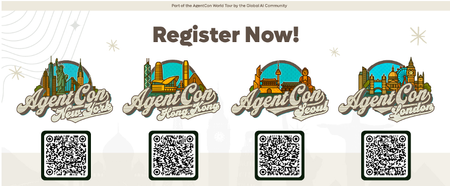
Recently, a customer asked me a question many Microsoft partners are hearing right now: “We have Copilot — how do we actually use AI to change the way we work?” That question captures where we are in the AI journey today. Organizations have moved past curiosity. Now they’re looking for trusted partners who can turn AI into real business outcomes. That’s why events like AgentCon 2026 matter. A free, community-led event built by practicioners AgentCon is not a traditional conference. It’s a free, community-driven global event organized by the Global AI Community together with Microsoft partners and ecosystem leaders. Simply put: it’s for the community, by the community. Across cities worldwide, developers, consultants, architects, and Microsoft partners come together to share practical experiences building with AI agents, Copilot, and the Microsoft platform. The focus isn’t theory — it’s implementation: What worked What didn’t What partners can apply immediately with customers This peer learning model reflects how many of us actually grow in the Microsoft ecosystem: by learning from other partners solving real problems. Why this matters for Microsoft partners The opportunity for partners is evolving quickly. Customers aren’t just asking about AI tools — they’re asking how to redesign processes, automate work, and unlock productivity using AI-powered solutions. The Microsoft AI Cloud Partner Program emphasizes partner skilling and helping customers realize value from AI investments. Community events like AgentCon accelerate that learning by bringing partners together to exchange proven approaches and practical insights. When partners upskill faster, customers succeed faster. Why attend AgentCon is designed to help partners move from AI awareness to AI delivery. As an attendee, you can expect: Practical sessions and demos from practitioners Real-world AI and agent scenarios Direct conversations with builders and peers New collaboration and co-sell opportunities You’ll leave with ideas and approaches you can bring directly into customer engagements. Why speak AgentCon thrives because partners share openly with one another. If you’ve implemented Copilot, explored AI agents, or learned lessons from customer deployments, your experience can help others accelerate their journey. Speaking at AgentCon allows you to: Share your expertise with the global partner community Build credibility within the Microsoft ecosystem Create new partnerships and opportunities Contribute to collective partner success You don’t need a perfect story — just an honest one others can learn from. Join the global AgentCon community AgentCon 2026 events takes place around the world including these upcoming events: March 9 - New York: https://aka.ms/AgentconNYC2026 April 11 - Hong Kong: https://aka.ms/AgentconHongKong2026 April 16 - Seoul: https://aka.ms/agentconLondon2026 April 22 - London: https://aka.ms/agentconSeoul2026 Each event is locally organized, community-led, and free to attend. Help shape the next phase of AI adoption AI transformation is happening now — and Microsoft partners play a critical role in guiding customers forward. AgentCon is an opportunity to learn together, share experiences, and strengthen the partner ecosystem driving AI innovation. 👉 Register or apply to speak: https://aka.ms/agentcon2026 We hope you’ll join us — and be part of the community helping customers turn AI potential into real impact.652Views0likes0CommentsLearn to maximize your productivity at the proMX Project Operations + AI Summit 2026
As organizations accelerate AI adoption across business applications, mastering how Microsoft Dynamics 365 solutions, Copilot, and agents work together is becoming a strategic priority. Fortunately, businesses no longer need to rely on speculation — they can gain practical insights with fellow industry professionals during a unique two-day event: On April 21-22, 2026, Microsoft and proMX will jointly host the fourth edition of proMX Project Operations Summit at the Microsoft office in Munich, but this time with an AI edge. The summit brings together Dynamics 365 customers and Microsoft and proMX experts to explore how AI is reshaping project delivery, resource management, and operational decision‑making across industries. On day one, participants will discover how Dynamics 365 Project Operations, Copilot, Project Online, proMX 365 PPM, and Contact Center can strategically transform business processes and drive organizational growth. On day two, they can explore the technical side of these solutions. Secure your spot! What to expect from the summit Expert-led, actionable insights Join interactive sessions led by Microsoft and proMX experts to learn practical AI and Dynamics 365 skills you can use right away. Inspiring keynotes Gain future-focused perspectives on Dynamics 365, Copilot, and AI to prepare your organization for what’s next. In between our special guests we have Microsoft's Rupa Mantravadi, Chief Product Officer, Dynamics 365 Project Operations, Rob Nehrbas, Head of AI Business Solutions, Archana Prasad, Worldwide FastTrack Leader for Project Operations, and Mathias Klaas, Partner Development Manager. Hands-on AI workshops Take part in workshops where Sebastian Sieber, Global Technology Director (proMX) and Microsoft MVP will show the newest AI features in Dynamics 365, giving you real-world experience with innovative tools. Connect with industry leaders Engage with experts through Q&A sessions, round tables, and personalized Connect Meetings for tailored guidance on your business needs. Real customer success stories Hear case studies from proMX customers who are already using Dynamics 365 solutions and learn proven strategies for successful digital transformation. Who should attend? This summit is tailored for business and IT decision-makers that are using Dynamics 365 solutions and want to drive more business impact with AI, but also for those who might be planning to move away from other project management solutions such as Project Online and need practical guidance grounded in real-life implementations. Date: Apr 21 & 22, 2026 | 2 -Days event Location: Microsoft Munich, Walter-Gropius Straße 5, Munich, Bavaria, DE, 80807 Ready to maximize your productivity? Register here.284Views1like0CommentsNow Generally Available: Azure Native Pure Storage Cloud for Azure VMware Solution
Co authored by: vjirovsky Azure Native Integrations enable you to easily provision, manage, and tightly integrate Independent Software Vendors (ISV) SaaS with a unified billing on Azure. By leveraging the power of Azure, Pure Storage Cloud Service offers you the same trusted Pure Storage capabilities in the cloud, without the complexity of refactoring or rearchitecting your VMware environments. You can easily discover and sign up for this via the Azure Marketplace. Azure Native Integrations enable you to easily provision, manage, and tightly integrate Independent Software Vendors (ISV) SaaS with a unified billing on Azure. By leveraging the power of Azure, Pure Storage Cloud Service offers you the same trusted Pure Storage capabilities in the cloud, without the complexity of refactoring or rearchitecting your VMware environments. You can easily discover and sign up for this via the Azure Marketplace. “We’re excited to announce Microsoft’s strengthened partnership with Pure Storage through the Azure Native Integrations program. With the service now generally available, customers can seamlessly deploy enterprise-grade block storage on Pure directly from the Azure portal. This seamless integration with Azure VMware Solution enables elastic capacity, flexible performance, and instant resizing – all while unlocking the full power of Azure’s cloud and AI capabilities.” - Scott Hunter, Vice President Product Management, Microsoft Developer Division Key Benefits of Azure Native Pure Storage Cloud on AVS Enterprise customers migrating VMware workloads to the cloud have long faced challenges with storage scalability, cost inefficiencies, and operational overhead. With this GA release, Pure Storage removes those barriers and delivers: Decoupled Scalability & Flexibility: across Compute and Storage solutions, so you pay only for what you need. Seamless Native Azure Experience: Provision Pure Storage Cloud resources via the client of your choice - Azure portal, CLI, PowerShell or SDK. Multi-Region support: Enjoy the support for your Pure Storage resource across East US, East US 2, West US 2, Central US and Australia East regions, with many more coming in shortly! Cost Efficiency: Achieve up to 40% Total Cost of Operations (TCO) savings through best-in-class data reduction and compression solutions. Streamlined VMware Migration: Simplify the transition of VMware workloads from on-premises or hybrid and multi-cloud environments onto Azure with consistent storage performance, nearly zero downtime, and minimal business disruption. Easy management: Perform all daily operations on AVS from a single VMware vSphere client directly via built-in plugin for Pure Storage Cloud Robust performance and reliability for mission-critical workloads with enterprise-grade Data protection and Data resilience support, with solutions such as Pure Snapshots and Hybrid Disaster Recovery in the pipeline. Fig 1: Pure Storage benefits of decoupled storage scalability. Why Pure Storage? Gartner report from Sept 2025 states that by 2029, consumption-based storage as a service (STaaS) will replace 50% of on-premises enterprise storage and data services infrastructure capital expenditure (capex), an increase from 15% in early 2025. Pure Storage® is a pivotal storage player among the Enterprise customers in revolutionizing the storage, management and resiliency while ensuring flexibility. From AI to archive, Pure Storage delivers a seamless cloud migration experience with one unified Storage as-a-Service (STaaS) platform across on-premises, private and public cloud, and hybrid environments. Pure has been named a Leader in the Gartner® Magic Quadrant™ for Enterprise Storage Platforms, with highest rating in Execution & Vision. An enterprise-favorite, some key customers for Pure Storage include ServiceNow, NASA, Comcast and many more! Fig 2: Magic Quadrant for Enterprise Storage Platforms, Sep 2025, Gartner Inc. Get Started with Azure Native Pure Storage Cloud Getting started is simple and fully integrated into the Azure experience. You can now start your journey quick and easy, and you pay only for the storage you use. For a detailed step-by-step visual guide, check out this YouTube playlist. Search and Provisioning the Pure Storage Cloud Resource Look for “Pure Storage Cloud” in the Azure portal or Azure Marketplace and sign up to subscribe. Select the service and create a new Pure Storage resource. Follow the instructions in the QuickStart to easily spin up your Pure Storage resource. Fig 3: Searching for Azure Native Pure Storage via Azure portal Create Storage Pools Using your Vnet and a delegated subnet to PureStorage.Block/storagePools, use the Overview blade navigation or the Action tile in the bottom to create and configure your storage pools. Fig 4: Newly created Pure Storage resource Overview in Azure portal Fig 5: Create Storage pool blade in Azure portal Connect to an Azure VMware Solution (AVS) resource Once created, you can use the Connect button up top to link your storage pool to AVS. In a few minutes, your storage pool is coupled with your VMware resource and ready to use! Fig 6: Connect AVS button establishes connection between storage pool and AVS resource Also, it automatically installs the Pure Storage Cloud plugin into your VMware resource, so you can manage everything, including the storage, from a single place, vSphere Client. Fig 7: Creation of a Datastore within the vSphere Client – this maps to a Storage container on your Pure Storage Cloud resource We’re excited for you to try out our solution! If you have suggestions or questions, contact us at azurenative@purestorage.com Resources Sign up for the service via Azure marketplace here. For a detailed visual guide on the step-by-step process to create a Pure Storage resource on Azure, check out this YouTube playlist. To learn more about the service, FAQ, and how to create your resource, check out the Microsoft docs as well as the Pure docs. Learn about how to create datastores and volumes and manage your Pure Storage here. Check out Azure Storage's blog and Pure’s press release for more excitement around the Pure-Microsoft partnership.542Views0likes0CommentsRegister for the Business Applications and Modern Work FY26 GTM Kickoff Event
Join us on July 22, 2025, at 8:00 AM Pacific Time—or watch on demand after 12:00 PM Pacific Time—to learn about the exciting go-to-market (GTM) priorities and initiatives planned for FY26 across the Business Applications and Modern Work solution areas. This year’s event will cover the investments we’re making to help you grow your business and deliver customer engagements that bring the value of AI to life. The event will be more accessible than ever before, with closed captions available in 32 languages. Plus, you’ll be able to: Engage with Business Applications and Modern Work leadership to understand the strategic initiatives planned for FY26. Align your business strategies with Microsoft to maximize your potential for success in FY26. Stay informed about the latest developments and resources available to support your business growth. Register early to reserve your spot—and get the agenda, session details, and updates sent directly to your inbox. Can’t attend the live event? Register anyway to get notified when the event content is available on demand. Register here!622Views1like0Comments