modern page
19 Topics
HTML code embed into SharePoint Online page
A colleague of mine is using a HTML code on the current SharePoint on-prem 2013 environment to place svg graphics onto another SVG image. Is it still possible to embed an HTML code into a SharePoint Online page? <!DOCTYPE html> <html> <body> <!-- insert width/height in line below to define picture size, makes sense to align with size of background image --> <svg id="screenshot1" width="500" height="400" xmlns="http://www.w3.org/2000/svg"> <!-- define path to background image below --> <image href="base-image.svg"/> <!--predefined marker symbols --> <symbol id="arrow-red-solid"><image href="./arrow_red_solid.svg"/></symbol> <symbol id="arrow-red-outline"><image href="./arrow_red_outline.svg"/></symbol> <symbol id="arrow-orange-solid"><image href="./arrow_orange_solid.svg"/></symbol> <symbol id="arrow-orange-outline"><image href="./arrow_orange_outline.svg"/></symbol> <symbol id="arrow-blue-solid"><image href="./arrow_blue_solid.svg"/></symbol> <symbol id="arrow-blue-outline"><image href="./arrow_blue_outline.svg"/></symbol> <!-- use picture markers, shapes, text as needed, follow SVG syntax https://developer.mozilla.org/en-US/docs/Web/SVG/Tutorial --> <!-- shape positions are expressed in pixel where the origin is the top left corner of the image, x=left-right, y=top-bottom --> <line x1="10" x2="50" y1="110" y2="150" stroke="black" stroke-width="5"/> <rect x="360" y="230" width="100" height="20" style="fill:none;stroke:blue;stroke-width:2" /> <rect x="320" y="300" rx="5" ry="5" width="100" height="20" style="fill:none;stroke:orange;stroke-width:2"/> <circle cx="50" cy="50" r="10" style="fill:none;stroke:red;stroke-width:2"/> <ellipse cx="150" cy="50" rx="30" ry="10" style="fill:none;stroke:red;stroke-width:2"/> <use x="80" y="180" href="#arrow-red-solid" /> <use x="60" y="250" href="#arrow-red-outline" /> <use x="100" y="200" href="#arrow-blue-outline" /> <use x="120" y="220" href="#arrow-orange-outline" /> <text x="380" y="220" font-size="24" fill="blue">Text1</text> </svg> </body> </html> Right now I'm not able to do that with the "embed" webpart. ThanksSolved13KViews0likes6Comments
Modern Pages treating Draft Pages as Published
Hi everyone, I discovered a weird issue on accident today when a user emailed a screenshot of our home page. The user (which only has Read level access) was viewing the draft of our home page, not the published home page. This is obviously a major issue for a number of reasons. The biggest being that a draft is just that, a draft that is more often than not unfinished and lacking functions, as is my case. Has anyone else experienced this? I've done some digging and found one other mention dated February of this year. Is there some related setting that is disabled that is allowing this? Or something I need to do differently? I checked every possible place I could think of and everywhere, the draft version was listed as such and the last time the page was published was listed as the current published version. So my draft was not the published version, which means the user should never have been able to view it. Thank you for any help you are able to give1KViews0likes1Comment
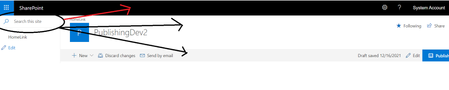
How to move Left Navigation Search box to Top Header in publishing site on SharePoint 2019 server
Hi, I have created a modern page in my publishing site on SharePoint 2019 server. I want to move the search box from the left navigation top to anywhere in the SharePoint page header. Please find the below images for reference. Thank you in advance748Views0likes0Comments
SharePoint Modern Page Connetion --> text to list
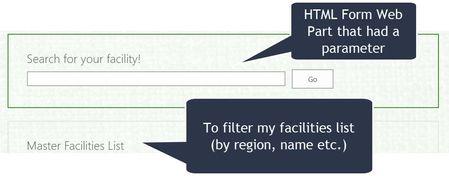
Hello SharePoint Community, My scenario: My organization just upgraded to SharePoint 2019. How I had it previously: I just recreated my pages it in the new environment in classic pages, but the handy https://platinumdogs.me/2014/02/12/showing-sharepoint-content-ratings-using-html-calculated-columns/ of changing a calculated column to a numeric (to dynamically generate a link) doesn't seem to be working anymore...(which I need to get to a facility page). So....instead of a classic page, I try and make the jump to the modern page (first time). I figure out a schema, and I've got my dynamic link back -- but I can't figure out how to create a similar dynamic search feature similar to what I had previously (using the HTML Form Web Part). Has anyone had any success using OOTB features to filter information in a list? I don't have access to put a PowerApps on my page (which looks like it can do it)...so I'm hoping I can use SharePoint alone. It looks like with embed, we may be able to get it close? https://support.microsoft.com/en-us/office/connect-web-parts-in-sharepoint-b457668c-d843-4b1b-8977-a6f9228a1dec?ui=en-us&rs=en-us&ad=us Also found a blog that talked about using "https://sharepoint.stackexchange.com/questions/270857/how-to-filter-list-items-and-documentsuseFiltersInViewXml=https://sharepoint.stackexchange.com/questions/270857/how-to-filter-list-items-and-documents". I don't have an IT background, but any recommendations would be helpful. Thank you!901Views0likes0Comments
C# ClientContext - Removing Image from Page Banner on Modern Page - SP 2019
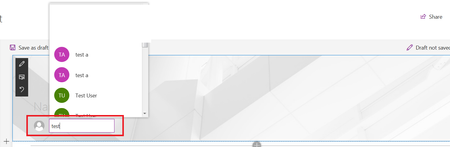
I am trying to create a ClientSidePage in C#. I have been able to make the page, but I can't figure out how to remove the image from the Page Banner. The option exists to remove the image and keep the banner when in the UI's edit mode. I know about the ClientSidePage.LayoutType to "Home", but that removes the entire banner, including the title. I have tried the following: clientSidePage.PageHeader.LayoutType = ClientSidePageHeaderLayoutType.NoImage; ... but that has no effect. How do I remove the image from the page banner without removing the entire banner? Thanks in advance, AS3.4KViews0likes6CommentsIs there a way to prevent users from autocomplete others' usernames inside the modern page header
When users create modern pages, they can auto-complete others' usernames, which will appear that the auto-completed username has actually created/published the page, as follow:- so is there a way to prevent this? so users can not auto-complete others' usernames? Thanks778Views0likes1Comment
Quick Edit mode (Date Sheet View) is not working while adding the Custom List Webpart in Modern Page
I have a list where I have created Data Sheet View, While clicking List, Quick edit mode is working fine. but When I add the same List as web part in Modern Page, it is showing as Standard View (not Datasheet View). Note : Default View Set it up as Data Sheet View Only.1.2KViews0likes1Comment