model catalog
88 TopicsIntroducing Grok 4.3 on Microsoft Foundry: Latest Generation Agentic Capabilities
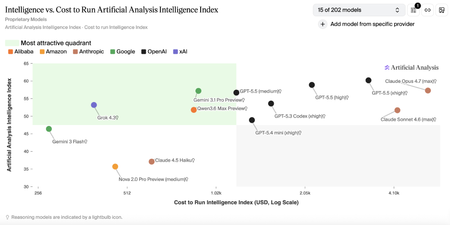
Customers building advanced AI systems increasingly need models that can reason deeply, act autonomously, and integrate reliably into real‑world workflows—all without compromising on governance or cost efficiency. Grok 4.3, xAI’s latest flagship model, is now available in Microsoft Foundry, giving developers and enterprises access to latest agentic intelligence within a production‑ready environment designed for scale. With Grok 4.3 on Microsoft Foundry, customers can more easily experiment with, evaluate, and deploy a powerful new option for agent‑based and domain‑specific applications—while benefiting from the safety controls, monitoring, and operational tooling needed to move from prototype to production with confidence. About Grok 4.3 Grok 4.3 is xAI’s latest flagship model, designed to support agent-based and productivity-focused workflows across a wide range of professional scenarios. Based on information provided by xAI and independent research conducted by Artificial Analysis, Grok 4.3 demonstrates strong performance across multiple benchmarks, reflecting a favorable balance between model capability and reported benchmark cost. *Benchmark data and cost metrics are provided by xAI and independently analyzed by Artificial Analysis. Source: https://artificialanalysis.ai Improved agentic capabilities Grok 4.3 is purpose‑built for agentic systems, improving in tool calling, instruction following, and lower hallucination, as reported by xAI. Grok 4.3 also enables policy‑aware support agents with reliable tool use and consistent behavior across extended conversations. On Microsoft Foundry, Grok 4.3 supports up to a 200k token context window, enabling extended multi‑turn reasoning and agent workflows. Multi-modal and domain‑specific strengths Grok 4.3 delivers strong performance across a range of professional and technical domains: Multimodal analysis: Native understanding across text, images, diagrams, and mixed data sources, enabling synthesis of visual and textual information for complex reasoning tasks. Web development: Excels in full‑stack web development, producing clean, production‑ready code with minimal guidance. Legal reasoning: supports interpretation of contracts, case law, and regulatory documents. Finance agents: supports financial analysis, modeling, and human decisions Built‑In Native Capabilities Grok 4.3 includes powerful native capabilities that simplify real‑world application development: Web search and X search for real‑time context Python code execution for analysis and automation File search (RAG) for enterprise knowledge grounding Excel, PDF, and PowerPoint generation for end‑to‑end workflows Together, these capabilities allow Grok 4.3 to function as a powerful agentic productivity engine, not just a language mode. Why Grok 4.3 on Microsoft Foundry Bringing Grok 4.3 to Microsoft Foundry delivers value beyond raw model performance. When deployed through Foundry, Azure AI Content Safety is enabled by default, adding an additional layer of protection for enterprise use. Customers can review the Microsoft Foundry model card for detailed safety and usage considerations. Microsoft Foundry also provides tools to support our customers with their responsible AI efforts, including model cards during selection, configurable guardrails such as jailbreak detection and content filtering, pre‑deployment evaluations and red teaming, and post‑deployment monitoring and governance. These capabilities help customers maintain output quality and deploy Grok 4.3 responsibly at scale. Pricing Model Deployment Input/1M Tokens Output/1M Tokens Availability Grok 4.3 Global Standard $1.25 $2.50 Public Preview Getting started Grok 4.3 is now available in Microsoft Foundry. Explore the model details in the Foundry model catalog, evaluate it using your own datasets, and start building and deployment in minutes.585Views0likes0Comments
Now in Foundry: Tongyi-MAI Z-Image-Turbo, with FLUX.1-schnell and SDXL base 1.0
This week's Model Mondays edition pairs three models available through the Hugging Face collection in Microsoft Foundry: Tongyi-MAI's Z-Image-Turbo, a new designed for lower latency on a single GPU and native bilingual text rendering; Black Forest Labs' FLUX.1-schnell, a 12B rectified flow transformer distilled to 1–4 step inference and one of the most adopted open-weight image models since its 2024 release; and Stability AI's stable-diffusion-xl-base-1.0 (SDXL), a latent diffusion research model that can be used to generate and modify images based on text prompts. Models of the week Tongyi-MAI: Z-Image-Turbo Model Specs Parameters / size: 6B (BF16) Resolution: Up to 1024×1024 native Primary task: Text-to-image generation (English and Chinese) Why it's interesting (Spotlight) Scalable Single-Stream Diffusion Transformer (S3-DiT) architecture: Z-Image concatenates text tokens, visual semantic tokens, and image VAE tokens into a single unified input stream rather than running text and image through separate branches. This single-stream design can improve parameter efficiency relative to dual-stream DiT architectures at the same capacity. See the Z-Image technical report for details. 8-step inference at sub-second latency, fits in 16GB VRAM: Z-Image-Turbo is distilled with Decoupled Distribution Matching Distillation (Decoupled-DMD) and further refined with DMDR, a method that fuses DMD with reinforcement learning during post-training. The result is a model that runs 8 Number-of-Function-Evaluations (NFE) per image with no Classifier-Free Guidance (CFG)—which roughly halves the per-step compute compared to CFG-based inference. See the Decoupled-DMD and DMDR papers. Native bilingual text rendering and strong instruction adherence: Unlike most open-weight image models, which struggle with legible in-image text, Z-Image-Turbo renders complex English and Chinese text accurately which is useful for posters, signage, packaging mockups, and marketing creative. Try it Imagine you're a community programs coordinator at your city's parks department, planning a new summer event series — a "Cake Picnic in the Park" — designed to bring neighbors together over food in shared green space. The event is a few weeks out. You haven't booked bakery partners yet, so no actual cake exists, and you need marketing assets this week to start driving sign-ups: a hero image for the registration page, a flyer for community centers and libraries, social tiles for the city's channels. Use the prompt below and a photorealistic image, that can now be scaled to become additional assets like printed flyers or social images in minutes using image editing tools (or another model). Prompt: A round layered cake displayed on a white ceramic cake stand, topped with glossy fresh red cherries and smooth pastel pink buttercream frosting piped in delicate rosettes around the edge. One generous slice has been cleanly cut and removed from the front, revealing a perfect cross-section: four distinct horizontal layers alternating between soft pink sponge cake and fluffy white vanilla cream frosting. Professional bakery photography, soft natural window light from the left, shallow depth of field, marble countertop, warm and inviting atmosphere, photorealistic detail on the cake texture, cherry highlights, and frosting swirls. Black Forest Labs: FLUX.1-schnell Model Specs Parameters / size: 12B (rectified flow transformer) Resolution: Flexible up to 2 megapixels Primary task: Text-to-image generation Why it's interesting (Spotlight) Rectified flow transformer with adversarial distillation for 1–4 step inference: FLUX.1-schnell is the distilled, Apache 2.0 sibling of the FLUX.1 family. It uses a rectified flow formulation (a diffusion variant that learns straight-line probability paths between noise and data, reducing the number of solver steps needed) and is further compressed with latent adversarial diffusion distillation. The model generates high quality images in for latency-sensitive workloads. Permissive licensing for commercial use: Released under Apache 2.0, FLUX.1-schnell can be used for personal, scientific, and commercial purposes. This has driven broad adoption across product features that need an open, redistributable image backbone. Strong prompt adherence at its parameter range: At 12B parameters, FLUX.1-schnell sits between the SDXL family and frontier proprietary image models, and it remains a common reference point for evaluating open image generation prompt following—particularly for complex compositional prompts and longer captions—roughly two years after its initial release. Try it Hugging Face Spaces give developers the ability to experiment and try new models before deploying them. Test out a few prompts here: https://black-forest-labs-flux-1-schnell.hf.space then when you are ready, deploy the model in Microsoft Foundry. Stability AI: stable-diffusion-xl-base-1.0 stabilityai/stable-diffusion-xl-base-1.0 · Hugging Face Model Specs Parameters / size: 2.6B UNet (≈3.5B total with text encoders) Resolution: 1024×1024 native Primary task: Text-to-image generation Why it's interesting (Spotlight) Dual text encoder design and an ensemble-of-experts pipeline: SDXL uses two pretrained text encoders—OpenCLIP-ViT/G and CLIP-ViT/L—concatenated to capture both broad semantic alignment and finer-grained token-level cues. It can be run standalone or paired with the SDXL refiner in an ensemble-of-experts pipeline where the base model handles early denoising and the refiner specializes in the final steps. See the SDXL report for the original training and architecture details. CreativeML Open RAIL++-M licensing for managed deployments: SDXL is distributed under the CreativeML Open RAIL++-M license, which permits commercial use and downstream fine-tuning with documented use restrictions. Try it To go deeper on SDXL, take a look at Stability AI's generative-models GitHub repository, which implements the most popular diffusion frameworks for both training and inference and continues to expand with new capabilities like distillation. Getting started You can deploy open-source Hugging Face models directly in Microsoft Foundry in two ways. The first by browsing the Hugging Face collection in the Foundry model catalog and deploying to managed endpoints in just a few clicks. The second way is direct through the Hugging Face Hub, select any supported model and then choose "Deploy on Microsoft Foundry", which brings you straight into Azure. Learn how to discover models and deploy them using Microsoft Foundry documentation: Follow along the Model Mondays series and access the GitHub to stay up to date on the latest Read Hugging Face on Azure docs Learn about one-click deployments from the Hugging Face Hub on Microsoft Foundry Explore models in Microsoft Foundry142Views0likes0CommentsA New Chapter for Realtime AI: Reasoning, Translation, and Real-Time Transcription
Voice can be one of the most direct and productive interfaces for AI — enabling customer support agents that may resolve issues without a single keystroke, live multilingual communication that can take on language barriers as conversations happen, and voice assistants capable of reasoning through complex requests in real time. Developers building these experiences need models that can keep pace with increasingly demanding latency, accuracy, and language coverage requirements. Today, OpenAI’s GPT-realtime-translate, GPT‑realtime‑2 and, GPT-realtime-whisper are rolling out into Microsoft Foundry starting today — together representing a significant step forward for the realtime model lineup available to developers on the platform. GPT-realtime-translate and GPT-realtime-whisper GPT-realtime-translate and GPT-realtime-whisper together extend the realtime stack for live multilingual audio workflows. GPT-realtime-translate is built for continuous, real-time translation, producing translated output as speech unfolds without relying on segmented pipeline processing, while GPT-realtime-whisper provides low-latency streaming transcription of the original audio in parallel. Used together, they help developers support scenarios such as live events, cross-language customer experiences, captions, monitoring, and archival workflows that require both translated output and visibility into the source speech. Continuous stream processing: This new model translates live audio without segmenting or buffering allowing for more natural interactions. New translation and transcription capabilities: Translate between languages in real time and observe faster text to speech. Available via the Realtime API GPT-realtime-2 GPT‑realtime‑2 is a generational upgrade to OpenAI's speech-to-speech model, bringing internal reasoning and an expanded context window to real-time voice applications. Where previous speech to speech models responded immediately, GPT‑realtime‑2 can work through a problem before speaking — making it well suited for voice applications that need to handle complex, multi-step queries entirely in the audio layer without routing to a separate text pipeline. Native reasoning capability: The newest realtime model introduces stronger reasoning capabilities. Now the model thinks internally before responding. Adjustable reasoning effort via {reasoning.effort}: Explicitly request the level of reasoning the model uses -- minimal, low, medium, high – to save on cost and latency. Audio in, audio out: No need for an intermediary text step, conversation stays fluid and natural. Available via the Realtime API This models is coming soon to Microsoft Foundry. Since, May 6, the models have been rolling out into the model catalog. We are excited for you to explore and build with our evolving collection of frontier models. Use cases These models work independently, but they're designed to complement each other in real-world pipelines: Live multilingual events. GPT-realtime-translate enables real-time translation of live audio, producing translated speech along with a transcript in the target language. GPT‑realtime‑whisper can be used in parallel to capture a transcription of the original speech for captions, monitoring, or archival purposes. Together, they enable multilingual live streaming with both translated experiences and visibility into the source language. Global customer support. Route inbound calls through GPT-realtime-translate to translate conversations in real time and provide a translated transcript for agents. Use GPT‑realtime‑whisper alongside it to capture the original conversation as text for compliance, quality review, or analytics. Then pass the interaction to an agent built with GPT‑realtime‑2 using {reasoning.effort}: high for complex issue resolution, all within a continuous audio pipeline. International voice assistants. Build once and deploy across languages. GPT-realtime-translate enables multilingual interaction and provides translated output with a target-language transcript, while GPT‑realtime‑whisper can optionally capture the original user input as text. GPT‑realtime‑2 manages reasoning and conversational context, supporting more complex voice interactions. Pricing Model Deployment Modality Pricing per 1M tokens Input Cached Input Output GPT-realtime-2 Global Standard Audio $32.00 $0.40 $64.00 Text $4.00 $0.40 $24.00 Image $5.00 $0.50 -- GPT-realtime-translate Global Standard Audio -- -- $2.04/hour GPT-realtime-whisper Global Standard Audio -- -- $1.02/hour *Pricing for GPT-realtime-translate and GPT-realtime-whisper will be done by the hour Getting Started Looking for ways to dive in? GPT-realtime-translate, GPT-realtime-whisper, and GPT‑realtime‑2 are rolling out into Microsoft Foundry today. Explore the model catalog and start building: https://ai.azure.com4.6KViews1like5CommentsNow in Foundry: IBM Granite 4.1, NVIDIA Nemotron Nano Omni, and Qwen3.6-35B-A3B
This week Microsoft Foundry adds two major model families alongside a reasoning powerhouse that spans the full spectrum from specialized speech and vision to general-purpose coding and long-context analysis. IBM's Granite 4.1 is a famiily of 10: six LLMs across 3B, 8B, and 30B sizes in both full-precision and FP8 variants, plus a safety model, a vision-language model for document extraction, and a multilingual speech recognition model. NVIDIA's Nemotron-3-Nano-Omni-30B-A3B-Reasoning brings multimodal capability—video, audio, image, and text—to a 31B Mamba2-Transformer Hybrid Mixture-of-Experts (MoE) architecture that activates only 3B parameters per forward pass; three variants are available in Foundry (BF16, FP8, and NVFP4), with the FP8 variant featured here. Qwen3.6-35B-A3B is designed for agentic coding among open models, with thinking preservation across conversation turns and a context window extensible to 1 million tokens. Models of the week IBM: granite-4.1-30b Model Specs Parameters / size: 30B (flagship of the Granite 4.1 family) Context length: 131,072 tokens Primary task: Text generation (multilingual instruction following, RAG, tool calling, code, summarization) Why it's interesting The Granite 4.1 release brings 10 models to Microsoft Foundry. The LLM lineup covers granite-4.1-3b-instruct, granite-4.1-8b-instruct, and granite-4.1-30b-instruct with FP8 variants for each, plus granite-guardian-4.1-8b for safety, granite-vision-4.1-4b for document and chart understanding, and granite-speech-4.1-2b for multilingual speech recognition. This is a deployment-ready stack where teams can mix and match model sizes and modalities from a single provider. Strong instruction following and reasoning at the 30B scale: granite-4.1-30b-instruct scores 80.16 on MMLU, 64.09 on MMLU-Pro, 83.74 on Big-Bench Hard (BBH), 77.80 on AGI Eval, 45.76 on GPQA (Graduate-Level Google-Proof Q&A, a graduate-level science reasoning benchmark), and 89.65 average on IFEval (instruction following). These results reflect SFT and reinforcement learning post-training focused specifically on instruction compliance, tool calling accuracy, and long-context retrieval. (View benchmarks here) Enhanced tool calling and 12-language support: Granite 4.1 models are trained for structured function calling and support 12 languages—Arabic, Chinese, Czech, Dutch, English, French, German, Italian, Japanese, Korean, Portuguese, and Spanish—with dialog, extraction, and summarization capabilities. Safety and multimodal coverage within the same family: The inclusion of granite-guardian-4.1-8b (a safety classifier for detecting harmful content and prompt injections), granite-vision-4.1-4b (a Vision Language Model optimized for document extraction from PDFs, charts, and tables), and granite-speech-4.1-2b (a 2B multilingual Automatic Speech Recognition model) means teams can address safety, document parsing, and audio ingestion within the same model family—reducing integration complexity across a full pipeline. Try it Use Case Prompt Pattern Multilingual RAG Submit retrieved document passages in any of 12 supported languages; ask model to synthesize and cite sources Agentic tool calling Provide function definitions + user goal; model plans and executes tool calls in structured format Document extraction (granite-vision-4.1-4b) Submit PDF page image; extract tables, key figures, or form fields as structured JSON Safety classification (granite-guardian-4.1-8b) Pass user input or model output; receive structured risk assessment before serving response Sample prompt for an enterprise document processing deployment: You are building a multilingual document intelligence pipeline for a global financial institution. Using the granite-4.1-30b-instruct endpoint deployed in Microsoft Foundry, submit each incoming policy or regulatory document with the following system instruction: "You are a compliance analysis assistant. Review the document and extract: (1) all regulatory requirements described, (2) the entities to which each requirement applies, (3) any compliance deadlines mentioned, and (4) any penalties or consequences for non-compliance. Return the output as a structured JSON array with one entry per requirement." For documents that include scanned pages, first route them through granite-vision-4.1-4b to extract text and table content before passing to the 30B model for compliance analysis. Pass all user-facing outputs through granite-guardian-4.1-8b to screen for sensitive information before returning results. NVIDIA: Nemotron-3-Nano-Omni-30B-A3B-Reasoning-FP8 Model Specs Parameters / size: 31B total, ~3B activated per forward pass (Mamba2-Transformer Hybrid Mixture-of-Experts) Context length: 256,000 tokens Primary task: Video-audio-image-text-to-text (Multimodal understanding, reasoning, tool calling) Why it's interesting Multimodal input from a single efficient endpoint: Nemotron-3-Nano-Omni-30B-A3B-Reasoning supports video (up to 2 minutes), audio (up to 1 hour), images (RGB), and text—all from a single model deployed in Microsoft Foundry. Three variants are available in Foundry: full-precision BF16, FP8, and NVFP4. Paper: Nemotron Nano Omni technical report. Strong results across vision, document, video, and audio benchmarks: With reasoning mode enabled, the model scores 82.8 on MathVista-MINI (visual math reasoning), 67.04 on OCRBenchV2-EN (document OCR), 63.6 on Charxiv Reasoning (chart understanding), 72.2 on Video MME (video Q&A), 74.52 on Daily Omni (video+audio omnimodal understanding), and 89.39 on VoiceBench (speech instruction following). On OSWorld (GUI agent benchmark measuring autonomous computer use), it scores 47.4—a notable result for a model at the 3B active parameter scale. (Please see above model cards for further benchmark data) Mamba2-Transformer Hybrid MoE for efficient long-context inference: The model's layers alternate between Mamba2 state-space blocks (which process sequences with linear rather than quadratic cost) and standard Transformer attention blocks, combined with Mixture-of-Experts feedforward layers. Only ~3B parameters are activated per token despite the 31B total, making the 256K context window practically usable at lower compute cost than a comparably sized dense model. Word-level timestamps, JSON output, and tool calling for structured media workflows: The model produces word-level timestamps from audio, enabling precise transcript-to-timecode alignment for review and indexing workflows. Combined with JSON-structured output, chain-of-thought reasoning, and native tool calling, it can serve as an agentic step that ingests raw media (meeting recordings, M&E assets, training videos) and produces structured outputs for downstream systems without requiring separate transcription or OCR preprocessing stages. Try it Use Case Prompt Pattern Meeting intelligence Submit audio recording (up to 1 hr); extract transcript with word-level timestamps, action items, and decisions as structured JSON Video content analysis Submit video clip (up to 2 min) + query; retrieve timestamped summary of key events or spoken content Document + audio joint analysis Submit scanned document image alongside narrated walkthrough audio; extract and reconcile information from both modalities Multimodal tool calling Provide tool definitions + combined image/audio input; model reasons over content and executes structured tool calls Sample prompt for a media and compliance deployment: You are building a broadcast compliance review system for a media company. Using the Nemotron-3-Nano-Omni-30B-A3B-Reasoning-FP8 endpoint deployed in Microsoft Foundry, submit each recorded segment as video input with the following instruction: "Review this video segment and produce a compliance report as a JSON object with the following fields: transcript (full text with word-level timestamps), flagged_segments (array of objects with start_time, end_time, content, and reason for flagging), speaker_count (estimated number of distinct speakers), and compliance_summary (overall assessment). Flag any content that includes unverified factual claims, restricted product categories, or regulatory disclosures that may be incomplete." Use the word-level timestamps from the compliance report to route flagged segments directly to the editorial review queue with precise timecode references. Qwen: Qwen3.6-35B-A3B Model Specs Parameters / size: 35B total, 3B activated (Mixture-of-Experts) Context length: 262,144 tokens natively, extensible to 1,010,000 tokens Primary task: Image-text-to-text (agentic coding, reasoning, vision) Why it's interesting Agentic coding improvements over Qwen3.5-35B-A3B: Qwen3.6-35B-A3B scores 73.4 on SWE-bench Verified (vs. 70.0 for Qwen3.5-35B-A3B and 52.0 for Gemma 4 31B), 67.2 on SWE-bench Multilingual (vs. 60.3 and 51.7), and 49.5 on SWE-bench Pro (vs. 44.6 and 35.7). Terminal-Bench 2.0 reaches 51.5 (vs. 40.5 and 42.9). The update targets frontend workflows and repository-level reasoning specifically, areas where earlier Qwen3.5 iterations showed gaps. Blog post: Qwen3.6-35B-A3B. Hybrid architecture: Gated DeltaNet and Mixture-of-Experts: The model's 40 layers alternate between Gated DeltaNet blocks (a form of linear attention that avoids the quadratic cost of standard self-attention), Gated Attention blocks (using Grouped Query Attention with 16 query heads and 2 key-value heads), and Mixture-of-Experts (MoE) feedforward layers with 256 experts (8 routed + 1 shared active per token). Only 3B parameters are activated per forward pass, keeping inference cost comparable to a 3B dense model while retaining the capacity of a 35B model for knowledge and specialization. Thinking preservation across conversation turns: Qwen3.6 introduces an option to retain reasoning context from previous messages in multi-turn conversations. In prior models, chain-of-thought traces were stripped between turns, requiring the model to re-derive context it had already reasoned through. With thinking preservation enabled, iterative coding workflows—such as debugging across multiple exchanges—benefit from accumulated reasoning without repeating earlier analysis. Natively extensible to 1 million token context: The 262K native context is already among the largest in open models at this size, and the architecture supports extension to 1,010,000 tokens. On GPQA Diamond (science reasoning), Qwen3.6-35B-A3B scores 86.0—above both Gemma 4 31B (84.3) and Qwen3.5-27B (85.5)—while matching Gemma 4 31B on MMLU Pro (85.2) and LiveCodeBench v6 (80.4 vs. 80.0). Try it Use Case Prompt Pattern Repository-level code change Provide repository structure + task description; model plans file edits and outputs unified diff Multi-turn iterative debugging Enable thinking preservation; submit failing test + code across multiple turns; accumulate reasoning context Frontend code generation Provide design spec or screenshot + existing codebase context; generate component implementation Long-document reasoning Submit technical specification (up to 262K tokens); ask model to identify ambiguities or implementation gaps Sample prompt for a software engineering deployment: You are building an automated code review and implementation assistant for a platform engineering team. Using the Qwen3.6-35B-A3B endpoint deployed in Microsoft Foundry, enable thinking preservation for multi-turn sessions. In the first turn, submit the repository file tree and a GitHub issue describing a required API endpoint change. Prompt the model: "Review the repository structure and describe your implementation plan, including which files need to change and why." In the second turn, submit the relevant source files and prompt: "Based on your earlier plan, implement the changes and produce a unified diff." In the third turn, submit the test suite and prompt: "Write additional unit tests for the new endpoint, covering edge cases identified in your reasoning." The thinking preservation feature ensures the model carries forward its understanding of the codebase across all three turns without re-explaining context. Getting started You can deploy open-source Hugging Face models directly in Microsoft Foundry by browsing the Hugging Face collection in the Foundry model catalog and deploying to managed endpoints in just a few clicks. You can also start from the Hugging Face Hub. First, select any supported model and then choose "Deploy on Microsoft Foundry", which brings you straight into Azure with secure, scalable inference already configured. Learn how to discover models and deploy them using Microsoft Foundry documentation. Follow along the Model Mondays series and access the GitHub to stay up to date on the latest Read Hugging Face on Azure docs Learn about one-click deployments from the Hugging Face Hub on Microsoft Foundry Explore models in Microsoft Foundry428Views0likes0CommentsIntroducing OpenAI's newest chat model in Microsoft Foundry
OpenAI's GPT-5.5 Instant (or Chat-latest in the API) begins rolling out in Microsoft Foundry today as GPT-chat-latest. Built on GPT-5.4 and GPT-5.3-chat, the new model delivers measurable gains in factual accuracy, tool calling, and response efficiency. These improvements translate directly into more reliable production deployments. GPT-chat-latest is designed for the workflows builders are actually shipping: multi-turn assistants, agentic systems that orchestrate tools, and retrieval-grounded applications where precision and grounding matter as much as conversational quality. Why the name is changing In Microsoft Foundry, we are introducing GPT-chat-latest as the product name for this release, while the model continues to follow the existing Preview lifecycle and standard notice periods. We are also evaluating ways to simplify how customers access continuously updated models over time, but current behavior remains unchanged as that work continue Smarter, more factually reliable GPT-chat-latest closes the factuality gap from prior iterations with significant reductions in hallucinations, especially in domains where accuracy matters most. According to OpenAI, the new model produces 52.5% fewer hallucinations and reduces hallucinated claims by 37.3% on conversations previously flagged for factual errors when compared to GPT-5.3-chat. These gains extend beyond text. GPT-chat-latest shows improvements in visual reasoning, expert multimodal understanding, and STEM tasks, with measurable lifts across standard benchmarks: Benchmark GPT-5.3-chat GPT-chat-latest CharXiv-reasoning Scientific Chart Reasoning 75.0 81.6 MMMU-Pro Expert multimodal reasoning 69.2 76.0 GPQA PhD-level science questions 78.5 85.6 AIME 2025 Competition math 65.4 81.2 *Data shown comes from OpenAI’s testing” For builders shipping into regulated workloads such as clinical decision support, legal research, financial advisory, and technical analysis, these improvements raise the bar on the kinds of applications GPT-chat-latest can assist with. More efficient outputs GPT-chat-latest produces responses that may be more to-the-point without losing substance. The model may reduce verbosity and over formatting, ask fewer follow-up questions, and avoid cluttered output patterns that often require post-processing in production UIs. For builders, this can translate to two concrete benefits: lower output token costs at scale, and cleaner responses that drop into product surfaces with less downstream cleanup. In comparative testing from OpenAI, GPT-chat-latest produced roughly 25–30% fewer words than GPT-5.3-chat across a range of common prompts while preserving response quality, and in many cases improving it. Improving intelligence and tool calling GPT-chat-latest introduces measurable improvements in how the model interacts with tools, including better judgment about when and how to invoke them. The model produces more structured and context-aware tool invocation outputs, which is particularly relevant for workflows that rely on function calling, retrieval-augmented generation, and multi-step reasoning. Equally important, the model is better at deciding whether a tool is needed in the first place, reducing unnecessary tool calls in scenarios where it already has the information to answer directly. Improved search and context handling GPT-chat-latest includes targeted improvements to how the model retrieves, interprets, and synthesizes information when search is involved, with enhancements to query formulation, result ranking, and filtering, plus more grounded synthesis of retrieved content into final responses. These changes improve handling of ambiguous or underspecified queries and reduce noise in answers that depend on retrieved content. The model also makes better use of the context developers pass in, including system prompts, conversation history, retrieved documents, and structured data. Applications that maintain long-running state or stitch together multiple retrieval steps produce more coherent, context-aware outputs without developers having to over-engineer prompt scaffolding. Use Cases: When to choose the chat model Developers typically choose a chat-optimized model like GPT-5.5-chat when the application needs to sustain multi-turn conversations while reliably following instructions and coordinating external tools. This is a fit for assistants and agentic workflows where the model must interpret user intent over time, decide when to retrieve additional context, and produce structured outputs for downstream systems rather than just generate free-form text. Customer support and contact centers: virtual agents that maintain conversational context across a case, retrieve policy or product documentation via search, and hand off to a ticketing or CRM system through tool calls when escalation is needed. Retail and e-commerce: shopping and service assistants that clarify preferences over multiple turns, reference catalogs and policies via retrieval, and generate structured actions such as returns, exchanges, and order lookups through integrated tools. Manufacturing and field service: technician-facing assistants that combine conversational guidance with retrieval of manuals and work instructions, plus structured task creation in maintenance systems. Use GPT-chat-latest Use GPT-5.5 Reasoning Multi-turn assistants and customer-facing chat experiences Harder problems that benefit from more deliberate, step-by-step thinking Agentic workflows that coordinate tools (search, retrieval, ticketing, CRM) and benefit from structured tool outputs Complex analysis, planning, or decision support where correctness matters more than conversational flow Interactive experiences where you want quick back-and-forth clarification and task completion Tasks involving multi-constraint reasoning (policy interpretation, detailed requirements, long-horizon plans) RAG-based apps where the model must decide when to retrieve and then synthesize grounded answers Offline or low-tool scenarios where the main value is deeper reasoning over provided context Pricing Model Input ($/1M tokens) Cached input ($/1M tokens) Output ($/1M tokens) GPT-chat-latest $5 $0.50 $30 Responsible AI in Microsoft Foundry At Microsoft, our mission to empower people and organizations remains constant. In the age of AI, trust is foundational to adoption, and earning that trust requires a commitment to transparency, safety, and accountability. Microsoft Foundry provides governance controls, monitoring, and evaluation capabilities to help organizations deploy models responsibly in production environments, aligned with Microsoft's Responsible AI principles. Getting started GPT-chat-latest is rolling out in Microsoft Foundry today.4.4KViews1like0CommentsIntroducing OpenAI's GPT-image-2 in Microsoft Foundry
Take a small design team running a global social campaign. They have the creative vision to produce localized imagery for every market, but not the resources to reshoot, reformat, or outsource that scale. Every asset needs to fit a different platform, a different dimension, a different cultural context, and they all need to ship at the same time. This is where flexible image generation comes in handy. OpenAI's GPT-image-2 is now generally available and rolling out today to Microsoft Foundry, introducing a step change in image generation. Developers and designers now get more control over image output, so a small team can execute with the reach and flexibility of a much larger one. What is new in GPT-image-2? GPT-image-2 brings real world intelligence, multilingual understanding, improved instruction following, increased resolution support, and an intelligent routing layer giving developers the tools to scale image generation for production workflows. Real world intelligence GPT-image-2 has a knowledge cut off of December 2025, meaning that it is able to give you more contextually relevant and accurate outputs. The model also comes with enhanced thinking capabilities that allow it to search the web, check its own outputs, and create multiple images from just one prompt. These enhancements shift image generation models away from being simple tools and runs them into creative sidekicks. Multilingual understanding GPT-image-2 includes increased language support across Japanese, Korean, Chinese, Hindi, and Bengali, as well as new thinking capabilities. This means the model can create images and render text that feels localized. Increased resolution support GPT-image-2 introduces 4K resolution support, giving developers the ability to generate rich, detailed, and photorealistic images at custom dimensions. Resolution guidelines to keep in mind: Constraint Detail Total pixel budget Maximum pixels in final image cannot exceed 8,294,400 Minimum pixels in final image cannot be less than 655,360 Requests exceeding this are automatically resized to fit. Resolutions 4K, 1024x1024, 1536x1024, and 1024x1536 Dimension alignment Each dimension must be a multiple of 16 Note: If your requested resolution exceeds the pixel budget, the service will automatically resize it down. Intelligent routing layer GPT-image-2 also includes an expanded routing layer with two distinct modes, allowing the service to intelligently select the right generation configuration for a request without requiring an explicitly set size value. Mode 1 — Legacy size selection In Mode 1, the routing layer selects one of the three legacy size tiers to use for generation: Size tier Description smimage Small image output image Standard image output xlimage Large image output This mode is useful for teams already familiar with the legacy size tiers who want to benefit from automatic selection without making any manual changes. Mode 2 — Token size bucket selection In Mode 2, the routing layer selects from six token size buckets — 16, 24, 36, 48, 64, 96 — which map roughly to the legacy size tiers: Token bucket Approximate legacy size 16, 24 smimage 36, 48 image 64, 96 xlimage This approach can allow for more flexibility in the number of tokens generated, which in turn helps to better optimize output quality and efficiency for a given prompt. See it in action GPT-image-2 shows improved image fidelity across visual styles, generating more detailed and refined images. But, don’t just take our word for it, let's see the model in action with a few prompts and edits. Here is the example we used: Prompt: Interior of an empty subway car (no people). Wide-angle view looking down the aisle. Clean, modern subway car with seats, poles, route map strip, and ad frames above the windows. Realistic lighting with a slight cool fluorescent tone, realistic materials (metal poles, vinyl seats, textured floor). As you can see, when using the same base prompt, the image quality and realism improved with each model. Now let’s take a look at adding incremental changes to the same image: Prompt: Populate the ad frames with a cohesive ad campaign for “Zava Flower Delivery” and use an array of flower types. And our subway is now full of ads for the new ZAVA flower delivery service. Let's ask for another small change: Prompt: In all Zava Flower Delivery advertisements, change the flowers shown to roses (red and pink roses). And in three simple prompts, we've created a mockup of a flower delivery ad. From marketing material to website creation to UX design, GPT-image-2 now allows developers to deliver production-grade assets for real business use cases. Image generation across industries These new capabilities open the door to richer, more production-ready image generation workflows across a range of enterprise scenarios: Retail & e-commerce: Generate product imagery at exact platform-required dimensions, from square thumbnails to wide banners, without post-processing. Marketing: Produce crisp, rich in color campaign visuals and social assets localized to different markets. Media & entertainment: Generate storyboard panels and scene at resolutions suited to production pipelines. Education & training: Create visual learning aids and course materials formatted to exact display requirements across devices. UI/UX design: Accelerate mockup and prototype workflows by generating interface assets at the precise dimensions your design system requires. Trust and safety At Microsoft, our mission to empower people and organizations remains constant. As part of this commitment, models made available through Foundry undergo internal reviews and are deployed with safeguards designed to support responsible use at scale. Learn more about responsible AI at Microsoft. For GPT-image-2, Microsoft applied an in-depth safety approach that addresses disallowed content and misuse while maintaining human oversight. The deployment combines OpenAI’s image generation safety mitigations with Azure AI Content Safety, including filters and classifiers for sensitive content. Pricing Model Offer type Pricing - Image Pricing - Text GPT-image-2 Standard Global Input Tokens: $8 Cached Input Tokens: $2 Output Tokens: $30 Input Tokens: $5 Cached Input Tokens: $1.25 Note: All prices are per 1M token. There is no billing for output tokens for the GPT-image-2 model. Getting started Whether you’re building a personalized retail experience, automating visual content pipelines or accelerating design workflows. GPT-image-2 gives your team the resolution control and intelligent routing to generate images that fit your exact needs. Try the GPT-image-2 in Microsoft Foundry today! Deploy the model in Microsoft Foundry Experiment with the model in the Image playground Read the documentation to learn more14KViews3likes3CommentsGemma 4 now available in Microsoft Foundry
Experimenting with open-source models has become a core part of how innovative AI teams stay competitive: experimenting with the latest architectures and often fine-tuning on proprietary data to achieve lower latencies and cost. Today, we’re happy to announce that the Gemma 4 family, Google DeepMind’s newest model family, is now available in Microsoft Foundry via the Hugging Face collection. Azure customers can now discover, evaluate, and deploy Gemma 4 inside their Azure environment with the same policies they rely on for every other workload. Foundry is the only hyperscaler platform where developers can access OpenAI, Anthropic, Gemma, and over 11,000+ models under a single control plane. Through our close collaboration with Hugging Face, Gemma 4 joining that collection continues Microsoft’s push to bring customers the widest selection of models from any cloud – and fits in line with our enhanced investments in open-source development. Frontier Intelligence, open-source weights Released by Google DeepMind on April 2, 2026, Gemma 4 is built from the same research foundation as Gemini 3 and packaged as open weights under an Apache 2.0 license. Key capabilities across the Gemma 4 family: Native multimodal: Text + image + video inputs across all sizes; analyze video by processing sequences of frames; audio input on edge models (E2B, E4B) Enhanced reasoning & coding capabilities: Multi-step planning, deep logic, and improvements in math and instruction-following enabling autonomous agents Trained for global deployment: Pretrained on 140+ languages with support for 35+ languages out of the box Long context: Context windows of up to 128K tokens (E2B/E4B) and 256K tokens (26B A4B/31B) allow developers to reason across extensive codebases, lengthy documents, or multi-session histories Why choose Foundry? Foundry is built to give developers breadth -- access to models from major model providers, open and proprietary, under one roof. Stay within Azure to work leading models. When you deploy through Foundry, models run inside your Azure environment and are subject to the same network policies, identity controls, and audit processes your organization already has in place. Managed online endpoints handle serving, scaling, and monitoring without manually setting up and managing the underlying infrastructure. Serverless deployment with Azure Container Apps allows developers to deploy and run containerized applications while reducing infrastructure management and saving costs. Gated model access integrates directly with Hugging Face user tokens, so models that require license acceptance stay compliant can be accessed without manual approvals. Foundry Local lets you run optimized Hugging Face models directly on your own hardware using the same model catalog and SDK patterns as your cloud deployments. Read the documentation here: https://aka.ms/foundrylocal and https://aka.ms/HF/foundrylocal Microsoft’s approach to Responsible AI is grounded in our AI principles of fairness, reliability and safety, privacy and security, inclusiveness, transparency, and accountability. Microsoft Foundry provides governance controls, monitoring, and evaluation capabilities to help organizations deploy new models responsibly in production environments. What are teams building with Gemma 4 in Foundry Gemma 4’s combination of multimodal input, agentic function calling, and long context offers a wide range of production use cases: Document intelligence: Processing PDFs, charts, invoices, and complex tables using native vision capabilities Multilingual enterprise apps: 140+ natively trained languages — ideal for multinational customer support, content platforms as well as language learning tools for grammar correction and writing practice Long-context analytics: Reasoning across entire codebases, legal documents, or multi-session conversation histories Getting started Try Gemma 4 in Microsoft Foundry today. New models from Hugging Face continue to roll out to Foundry on a regular basis through our ongoing collaboration. If there's a model you want to see added, let us know here. Stay connected to our developer community on Discord and stay up to date on what is new in Foundry through the Model Mondays series.2.2KViews1like0CommentsIntroducing MAI-Image-2-Efficient: Faster, More Efficient Image Generation
Building on our momentum Just last week, we celebrated a major milestone: the public preview launch of three new first-party Microsoft AI models in Microsoft Foundry: MAI-Image-2, MAI-Voice-1, and MAI-Transcribe-1. Together, they represent a comprehensive multimedia AI stack purpose-built for developers that spans image generation, natural speech synthesis, and enterprise-grade transcription across 25 languages. The response from the developer community has been incredible, and we're not slowing down. Fast on the heels of that launch, we're thrilled to introduce the next addition to the MAI image generation family: MAI-Image-2-Efficient – or Image-2e for short. It’s now available in public preview in Microsoft Foundry and MAI Playground. What makes MAI-Image-2-Efficient unique? MAI-Image-2-Efficient is built on the same architecture as MAI-Image-2 which is the model that debuted at #3 on the Arena.ai leaderboard for image model families. Based on customer feedback, we’ve now improved it and engineered for speed and efficiency. It’s up to 22% faster with 4x more efficiency compared to MAI-Image-2 when normalized by latency and GPU usage 1 . It also outpaces leading text-to-image models by 40% on average 2 . In short, MAI-Image-2-Efficient gives developers more output for less compute, unlocking a whole new category of use cases. Who is MAI-Image-2-Efficient for? MAI-Image-2-Efficient is designed for builders who need high-quality image generation at speed and scale. Here are the top use cases where Image-2-Efficient shines: High-volume production workflows: E-commerce platforms, media companies, and marketing teams often need to generate thousands of images per day, as part of their business processes to generate targeted advertisements, concept art and mood boards. MAI-Image-2-Efficient's superior efficiency means larger batches at lower GPU cost, so your team can think and iterate as fast as you want and reach the end-product faster. Real-time and conversational experiences: When users expect images to appear mid-conversation (in a chatbot, a creative copilot, or an AI-powered design tool), every millisecond counts. Thanks to its lower latency, MAI-Image-2-Efficient serves as an excellent backbone for interactive applications that require fast response times. Rapid prototyping and creative iteration: MAI-Image-2-Efficient enables your team to quickly and affordably test new pipelines, experiment with creative ideas, or refine prompts. You don't need the complete model to validate a concept; what you need is speed, and that's exactly what MAI-Image-2-Efficient provides. MAI-Image-2 vs. MAI-Image-2-Efficient — which should you use? MAI-Image-2-Efficient and MAI-Image-2 are built for different strengths, so choosing the right model depends on the needs of your workflow. MAI-Image-2-Efficient is the ideal choice for high-volume workflows where latency and speed are priorities. If your pipeline needs to generate images quickly and at scale, MAI-Image-2-Efficient delivers without compromise. MAI-Image-2 is the recommended option when your images require precise, detailed text rendering, or when scenes demand the deepest photorealistic contrast and smoothness. The two models also have distinct visual signatures: MAI-Image-2-Efficient renders with sharpness and defined lines, making it a strong choice for illustration, animation, and photoreal images designed to grab attention. MAI-Image-2 delivers smoother, more nuanced contrast, making it the go-to for photorealistic imagery that prioritizes depth and subtlety. Try it today MAI-Image-2-Efficient is available now in Microsoft Foundry and MAI Playground. For builders in Foundry, MAI-Image-2-Efficient starts at $5 USD per 1M tokens for text input and $19.50 USD per 1M tokens for image output. And this is just the beginning. We have more exciting announcements lined up; stay tuned for what we're bringing to Microsoft Build 2026. References: As tested on April 13, 2026. Compared to MAI-Image-2 when normalized by latency and GPU usage. Throughput per GPU vs MAI-Image-2 on NVIDIA H100 at 1024×1024; measured with optimized batch sizes and matched latency targets. Results vary with batch size, concurrency, and latency constraints. As tested on April 13, 2026. Compared to Gemini 3.1 Flash (high reasoning), Gemini 3.1 Flash Image and Gemini 3 Pro Image: Measured at p50 latency via AI Studio API (1:1, 1K images; minimal reasoning unless noted; web search disabled). MAI-Image-2, MAI-Image-2-Efficient, GPT-Image-1.5-High: Measured at p50 latency via Foundry API.3.9KViews0likes0CommentsBringing GigaTIME to Microsoft Foundry: Unlocking Tumor Microenvironment Insights with Multimodal AI
Expanding Microsoft Foundry for Scientific AI Workloads AI is increasingly being applied to model complex real-world systems, from climate and industrial processes to human biology. In healthcare, one of the biggest challenges is translating routinely available data into deeper biological insight at scale. GigaTIME is now available in Microsoft Foundry, bringing advanced multimodal capabilities to healthcare and life sciences. This brings advanced multimodal capabilities into Foundry, with Foundry Labs enabling early exploration and the Foundry platform supporting scalable deployment aligned to the model’s intended use. Read on to understand how GigaTIME works and how you can start exploring it in Foundry. From Routine Slides to Deep Biological Insight Understanding how tumors interact with the immune system is central to modern cancer research. While techniques like multiplex immunofluorescence provide these insights, they are expensive and difficult to scale across large patient populations. GigaTIME addresses this challenge by translating widely available hematoxylin and eosin pathology slides into spatially resolved protein activation maps. This allows researchers to infer biological signals such as immune activity, tumor growth, and cellular interactions at a much deeper level. Developed in collaboration with Providence and the University of Washington, GigaTIME enables analysis of tumor microenvironments across diverse cancer types, helping accelerate discovery and improve understanding of disease biology. Use cases for GigaTIME GigaTIME is designed to support research and evaluation workflows across a range of real-world scientific scenarios: Population-Scale Tumor Microenvironment Analysis: Enable large-scale analysis of tumor–immune interactions by generating virtual multiplex immunofluorescence outputs from routine pathology slides. Biomarker Association Discovery: Identify relationships between protein activation patterns and clinical attributes such as mutations, biomarkers, and disease characteristics. Patient Stratification and Cohort Analysis: Segment patient populations across cancer types and subtypes using spatial and combinatorial signals for research and hypothesis generation. Clinical Trial Retrospective Analysis: Apply GigaTIME to H&E archives from completed clinical trials to retrospectively characterize tumor microenvironment features associated with treatment outcomes, enabling new insights from existing trial data without additional tissue processing. Tumor–Immune Interaction Analysis: Assess whether immune cells are infiltrating tumor regions or being excluded by analyzing spatial relationships between tumor and immune signals. Immune System Structure Characterization: Understand how immune cell populations are organized within tissue to evaluate coordination or fragmentation of immune response. Immune Checkpoint Context Interpretation: Examine how immune activity may be locally regulated by analyzing overlap between immune markers and checkpoint signals. Tumor Proliferation Analysis: Identify actively growing tumor regions by combining proliferation signals with tumor localization. Stromal and Vascular Context Understanding: Analyze how tissue architecture, such as vascular density and desmoplastic stroma, shapes immune cell access to tumor regions, helping characterize mechanisms of immune exclusion or infiltration. Start with Exploration, Then Go Deeper Explore in Foundry Labs Foundry Labs provides a lightweight environment for early exploration of emerging AI capabilities. It allows developers and researchers to quickly understand how models like GigaTIME behave before integrating them into production workflows. With GigaTIME in Foundry Labs, you can engage with real-world healthcare scenarios and explore how multimodal models translate pathology data into meaningful biological insight. Through curated experiences, you can: Run inference on pathology images Visualize spatial protein activation patterns Explore tumor and immune interactions in context This helps you build intuition and evaluate how the model can be applied to your specific use cases. Go Deeper with GitHub Examples For advanced scenarios, you can access the underlying notebooks and workflows via GitHub. These examples provide flexibility to customize pipelines, extend workflows, and integrate GigaTIME into broader research and application environments. Together, Foundry Labs and GitHub provide a path from guided exploration to deeper customization. Discover and Deploy GigaTIME in Microsoft Foundry Discover in the Foundry Catalog GigaTIME is available in the Foundry model catalog alongside a growing set of domain-specific models across healthcare, geospatial intelligence, physical systems and more. Deploy for Research Workflows For advanced usage, GigaTIME can be deployed as an endpoint within Foundry to support research and evaluation workflows such as: Biomarker discovery Patient stratification Clinical research pipelines You can start with early exploration in Foundry Labs and transition to scalable deployment on the Foundry platform using the tools and workflows designed for each stage, in line with the intended use of the model. A New Class of AI for Scientific Discovery GigaTIME reflects a broader shift toward AI systems designed to model real-world phenomena. These systems are multimodal, deeply tied to domain-specific data, and designed to produce spatial and contextual outputs. They rely on workflows that combine data processing, model inference, and interpretation, which requires platforms that support the full lifecycle from exploration to production. Microsoft Foundry is built to support this evolution. Learn More and Get Started To explore GigaTIME in more detail: Read the Microsoft Research blog on the underlying research, and population-scale findings. Try hands-on scenarios in Foundry Labs Access GitHub examples for advanced workflows Explore and deploy the model through the Foundry catalog Looking Ahead As AI continues to expand into domains like healthcare, climate science, and industrial systems, the ability to connect models, data, and workflows becomes increasingly important. GigaTIME highlights what is possible when these elements come together, transforming routinely available data into actionable scientific insight. We are excited to see what you build next.265Views0likes0CommentsNow in Foundry: Microsoft Harrier and NVIDIA EGM-8B
This week's Model Mondays edition highlights three models that share a common thread: each achieves results comparable to larger leading models, as a result of targeted training strategies rather than scale. Microsoft Research's harrier-oss-v1-0.6b from achieves state-of-the-art results on the Multilingual MTEB v2 embedding benchmark at 0.6B parameters through contrastive learning and knowledge distillation. NVIDIA's EGM-8B scores 91.4 average IoU on the RefCOCO visual grounding benchmark by training a small Vision Language Model (VLM) with reinforcement learning to match the output quality of much larger models. Together they represent a practical argument for efficiency-first model development: the gap between small and large models continues to narrow when training methodology is the focus rather than parameter count alone. Models of the week Microsoft Research: harrier-oss-v1-0.6b Model Specs Parameters / size: 0.6B Context length: 32,768 tokens Primary task: Text embeddings (retrieval, semantic similarity, classification, clustering, reranking) Why it's interesting State-of-the-art on Multilingual MTEB v2 from Microsoft Research: harrier-oss-v1-0.6b is a new embedding model released by Microsoft Research, achieving a 69.0 score on the Multilingual MTEB v2 (Massive Text Embedding Benchmark) leaderboard—placing it at the top of its size class at release. It is part of the harrier-oss family spanning harrier-oss-v1-270m (66.5 MTEB v2), harrier-oss-v1-0.6b (69.0), and harrier-oss-v1-27b (74.3), with the 0.6B variant further trained with knowledge distillation from the larger family members. Benchmarks: Multilingual MTEB v2 Leaderboard. Decoder-only architecture with task-instruction queries: Unlike most embedding models that use encoder-only transformers, harrier-oss-v1-0.6b uses a decoder-only architecture with last-token pooling and L2 normalization. Queries are prefixed with a one-sentence task instruction (e.g., "Instruct: Retrieve relevant passages that answer the query\nQuery: ...") while documents are encoded without instructions—allowing the same deployed model to be specialized for retrieval, classification, or similarity tasks through the prompt alone. Broad task coverage across six embedding scenarios: The model is trained and evaluated on retrieval, clustering, semantic similarity, classification, bitext mining, and reranking—making it suitable as a general embedding backbone for multi-task pipelines rather than a single-use retrieval model. One endpoint, consistent embeddings across the stack. 100+ language support: Trained on a large-scale mixture of multilingual data covering Arabic, Chinese, Japanese, Korean, and 100+ additional languages, with strong cross-lingual transfer for tasks that span language boundaries. Try it Use Case Prompt Pattern Multilingual semantic search Prepend task instruction to query; encode documents without instruction; rank by cosine similarity Cross-lingual document clustering Embed documents across languages; apply clustering to group semantically related content Text classification with embeddings Encode labeled examples + new text; classify by nearest-neighbor similarity in embedding space Bitext mining Encode parallel corpora in source and target languages; align segments by embedding similarity Sample prompt for a global enterprise knowledge base deployment: You are building a multilingual internal knowledge base for a global professional services firm. Using the harrier-oss-v1-0.6b endpoint deployed in Microsoft Foundry, encode all internal documents—policy guides, project case studies, and technical documentation—across English, French, German, and Japanese. At query time, prepend the task instruction to each employee query: "Instruct: Retrieve relevant internal documents that answer the employee's question\nQuery: {question}". Retrieve the top-5 most similar documents by cosine similarity and pass them to a language model with the instruction: "Using only the provided documents, answer the question and cite the source document title for each claim. If no document addresses the question, say so." NVIDIA: EGM-8B Model Specs Parameters / size: ~8.8B Context length: 262,144 tokens Primary task: Image-text-to-text (visual grounding) Why it's interesting Preforms well on visual grounding compared to larger models even at its small size: EGM-8B achieves 91.4 average Intersection over Union (IoU) on the RefCOCO benchmark—the standard measure of how accurately a model localizes a described region within an image. Compared to its base model Qwen3-VL-8B-Thinking (87.8 IoU), EGM-8B achieves a +3.6 IoU gain through targeted Reinforcement Learning (RL) fine-tuning. Benchmarks: EGM Project Page. 5.9x faster than larger models at inference: EGM-8B achieves 737ms average latency. The research demonstrates that test-time compute can be scaled horizontally across small models—generating many medium-quality responses and selecting the best—rather than relying on a single expensive forward pass through a large model. Two-stage training: EGM-8B is trained first with Supervised Fine-Tuning (SFT) on detailed chain-of-thought reasoning traces generated by a proprietary VLM, then refined with Group Relative Policy Optimization (GRPO) using a reward function combining IoU accuracy and task success. The intermediate SFT checkpoint is available as nvidia/EGM-8B-SFT for developers who want to experiment with the intermediate stage. Addresses a root cause of small model grounding errors: The EGM research identifies that 62.8% of small model errors on visual grounding stem from complex multi-relational descriptions—where a model must reason about spatial relationships, attributes, and context simultaneously. By focusing test-time compute on reasoning through these complex prompts, EGM-8B closes the gap without increasing the underlying model size. Try it Use Case Prompt Pattern Object localization Submit image + natural language description; receive bounding box coordinates Document region extraction Provide scanned document image + field description; extract specific regions Visual quality control Submit product image + defect description; localize defect region for downstream classification Retail shelf analysis Provide shelf image + product description; return location of specified SKU Sample prompt for a retail and logistics deployment: You are building a visual inspection system for a logistics warehouse. Using the EGM-8B endpoint deployed in Microsoft Foundry, submit each incoming package scan image along with a natural language grounding query describing the region of interest: "Please provide the bounding box coordinate of the region this sentence describes: {description}". For example: "the label on the upper-left side of the box", "the barcode on the bottom face", or "the damaged corner on the right side". Use the returned bounding box coordinates to route each package to the appropriate inspection station based on the identified region. Getting started You can deploy open-source Hugging Face models directly in Microsoft Foundry by browsing the Hugging Face collection in the Foundry model catalog and deploying to managed endpoints in just a few clicks. You can also start from the Hugging Face Hub. First, select any supported model and then choose "Deploy on Microsoft Foundry", which brings you straight into Azure with secure, scalable inference already configured. Learn how to discover models and deploy them using Microsoft Foundry documentation: Follow along the Model Mondays series and access the GitHub to stay up to date on the latest Read Hugging Face on Azure docs Learn about one-click deployments from the Hugging Face Hub on Microsoft Foundry Explore models in Microsoft Foundry902Views0likes0Comments