model catalog
93 TopicsPost-Stream Refinement is now generally available in Microsoft Foundry
When we introduced Post-Stream Refinement in public preview earlier this year, it closed the oldest trade-off in real-time speech: you could finally keep instant streaming results and get a highly accurate final transcript, with no penalty to first-token latency. A second recognition pass runs in parallel with streaming and replaces each final segment with a more accurate version once the utterance completes. Today, Post-Stream Refinement reaches general availability for Azure AI Speech in Microsoft Foundry, backed by a production SLA. Just as important, it now ships with the capabilities production transcription actually depends on: diarization to preserve who said what, phrase lists for your product names and domain vocabulary, and a much wider footprint of 19 locales across 22 Azure regions. Everything you already know about Post-Stream Refinement still applies. The real-time contract is unchanged, your partial results stream exactly as before, and you enable refinement by setting a single property on your existing SpeechConfig. What changes at GA is that the refined transcript is now production-grade and speaker-aware. 📖 Read the Documentation What's new at general availability If you have already used Post-Stream Refinement in preview, here is exactly what changes at GA, and what stays the same. The streaming path and SDK contract are untouched; the refinement pass is now production-ready and gains speaker and vocabulary features. How Post-Stream Refinement works Real-time and final results serve different needs. Partial results must appear quickly so captions, voice interfaces, and agent turn-taking stay responsive. Final results need enough context to support storage, search, summarization, and business workflows. Post-Stream Refinement runs both at once: a fast streaming pass and a deeper refinement pass over the same audio, in parallel. Because the two passes share one input stream, enabling refinement does not require a second transcription job or a separate client pipeline. Your existing recognition events and partial-result handling stay exactly as they are. Speaker attribution with diarization New at GA, diarization is supported on the Post-Stream Refinement path, so the refined final transcript keeps its speaker labels. That makes the release a strong fit for meetings, contact centers, interviews, and any workflow where the transcript needs to identify who spoke, not just what was said. The refinement pass improves the wording, including proper nouns and named entities, while every utterance stays attributed to the right speaker. Phrase lists for your vocabulary Phrase lists let the recognizer prioritize the names and terms that matter to your application: product catalogs, medical and technical vocabulary, organization names, and acronyms that general speech models might not recognize consistently. At GA you can pair phrase lists with refinement so the second pass has both broad audio context and your domain vocabulary to draw on, which is where the largest accuracy gains on named entities show up. Quality impact In internal testing and partner evaluations across supported locales, Post-Stream Refinement reduced final-transcript word error rate by double-digit relative percentages compared with standard real-time transcription, with the largest gains on the hardest content: long utterances, proper nouns, and domain-specific speech. Pairing phrase lists with refinement improves named-entity accuracy further. Partial-result latency is unchanged; only the final transcript is refined. The refined final result may add a small amount of latency to the final segment because refinement happens after the segment audio is received. Partial results are unaffected. Supported languages and regions General availability supports 19 locales. You declare one locale per session, so the service is tuned to the language you expect. Alongside the Tier-1 languages, GA adds Indic locales, including Bengali, Marathi, Punjabi, and Telugu. Post-Stream Refinement is generally available in 22 Azure regions across the Americas, Europe, and Asia Pacific. Proven at Microsoft scale The technology behind Post-Stream Refinement already powers meeting transcription and Microsoft 365 Copilot experiences in Microsoft Teams, serving millions of users across meetings, webinars, and live events every day. General availability brings the same quality bar to every Azure AI Speech customer through a supported SDK integration, not a research prototype. Preview customers across industries, including automotive, consumer electronics, and aviation, reported positive gains in transcription quality, with the clearest improvements on the hardest content: proper nouns, long-form speech, and domain-specific audio. Several are now moving those workloads into production on the GA release. Get started Enabling Post-Stream Refinement is a small configuration change on your existing SpeechConfig. You will need: Speech SDK 1.50 or later. Earlier versions do not support the refinement path. A Speech resource in one of the supported regions listed above. The session locale you expect, set on the recognizer. Set the post-processing option to PostRefinement. The example below also shows the optional phrase list for your domain vocabulary. import azure.cognitiveservices.speech as speechsdk speech_config = speechsdk.SpeechConfig( subscription="YourSpeechKey", region="YourSpeechRegion") # Declare one locale for the session speech_config.speech_recognition_language = "en-US" # 1) Refine the final transcript (Post-Stream Refinement) speech_config.set_property( speechsdk.PropertyId.SpeechServiceResponse_PostProcessingOption, "PostRefinement") audio_config = speechsdk.AudioConfig(use_default_microphone=True) recognizer = speechsdk.SpeechRecognizer( speech_config=speech_config, audio_config=audio_config) # 2) (Optional) Phrase list for names, acronyms, and domain terms phrase_list = speechsdk.PhraseListGrammar.from_recognizer(recognizer) for term in ["Contoso", "Fabrikam", "Foundry", "OAuth"]: phrase_list.addPhrase(term) Your existing recognition events and partial-result handling remain unchanged. For speaker attribution, enable diarization through the established real-time diarization path; refinement applies to the final transcript while speaker labels are preserved. Choose the right release for your workload Post-Stream Refinement now has two paths. They are the same product family with a different feature boundary, so match the path to what your customer needs. Monolingual PSR — generally available Multilingual PSR — public preview Language selection One locale declared per session Automatic detection and code-switching in a single stream (open-range, no locale declared) Supported locales 19 locales, including Indic bn / mr / pa / te 25 languages / 29 locales, auto-detected Azure regions 22 Azure regions across the Americas, Europe, and Asia Pacific 6 Azure regions Phrase lists & diarization Supported Only diarization is supported Working across languages? If a single stream needs to handle multiple languages or code-switching without a declared locale, use Multilingual Post-Stream Refinement, now in public preview. For a known session locale with phrase lists and diarization, monolingual GA is the right path. Try Post-Stream Refinement Today Turn on higher-accuracy, language-aware transcription in your Azure AI Speech applications with a single configuration change. 📖 Read the Documentation We would love your feedback. Try Post-Stream Refinement in your applications and tell us how it improves your transcription quality.194Views0likes0CommentsFor the first time, real-time transcription goes multilingual
When we introduced Post-Stream Refinement earlier this year, it closed the oldest gap in real-time speech: you could finally get instant streaming results and a highly accurate final transcript, with no latency penalty. But it kept one hard requirement — you had to tell the service, up front, which single language to expect. Real-world speech does not work that way. People code-switch mid-sentence, product and brand names cross languages, and a global app serves users who simply speak differently from one session to the next. Today we remove that requirement. Multilingual Post-Stream Refinement enters public preview for Azure AI Speech in Microsoft Foundry, and for the first time ever a single real-time stream can transcribe multiple languages in one session — the spoken language is detected automatically, no locale is declared in advance, and the final transcript is refined for accuracy. Everything you already know about Post-Stream Refinement still applies; what changes is that the refinement pass itself is now multilingual. 📖 Read the Documentation What's New in This Release If you have already used Post-Stream Refinement, here is exactly what changes with the multilingual preview — and what stays the same: Quality Impact In internal testing and partner evaluations across Tier-1 locales, multilingual Post-Stream Refinement reduced word error rate (WER) by approximately 10% relative on average, with double-digit relative reductions on the hardest cases — long utterances, proper nouns, and multilingual or code-switched speech. Partial-result latency is unchanged; only the final transcript is refined. Gains are relative reductions versus the standard real-time model and vary by language, acoustic conditions, and content type. The refined final result may add a small amount of latency to the final segment; partial results are unaffected. Supported Languages and Regions The public preview supports 15 Tier-1 locales. Because language is detected automatically, a single stream can contain any mix of them: Available in these Azure regions: Real-World Impact Preview customers across industries — including travel, consumer electronics, automotive, aviation, and media — have reported positive gains in transcription quality. Customers testing multilingual and domain-specific audio have observed the clearest improvements on the hardest content: proper nouns, code-switching, and long-form speech. Several are actively validating the feature on their own audio ahead of general availability. Get Started Enabling multilingual Post-Stream Refinement is a small configuration change on your existing SpeechConfig. You will need: Speech SDK 1.50 or later. Earlier versions do not support the multilingual path. A Speech resource in one of the supported regions listed above. Auto-detect language configuration (open range) so the service identifies the language from the audio — no candidate list required. Set the post-processing option to PostRefinement and pass an open-range AutoDetectSourceLanguageConfig when you create the recognizer. Here is a complete, copy-paste Python example, including the optional end-of-utterance detection line: import azure.cognitiveservices.speech as speechsdk speech_config = speechsdk.SpeechConfig( subscription="YourSpeechKey", region="YourSpeechRegion") # 1) Refine the final transcript (Post-Stream Refinement) speech_config.set_property( speechsdk.PropertyId.SpeechServiceResponse_PostProcessingOption, "PostRefinement") # 2) Multilingual auto-detect - no candidate language list needed auto_detect_config = speechsdk.languageconfig.AutoDetectSourceLanguageConfig() audio_config = speechsdk.AudioConfig(use_default_microphone=True) recognizer = speechsdk.SpeechRecognizer( speech_config=speech_config, auto_detect_source_language_config=auto_detect_config, audio_config=audio_config) 💡 Tip: Refinement matters most for applications that store or process the final transcript — meeting notes, call analytics, compliance archives, AI summarization. If you only use partial results for a live display and discard them, your real-time UX (already fast) is unchanged, while any final transcript you keep improves. Try Multilingual Post-Stream Refinement Today Turn on higher-accuracy, language-aware transcription in your Azure AI Speech applications with a single configuration change. Available now in public preview in Microsoft Foundry. 📖 Read the Documentation We would love your feedback. Try Post-Stream Refinement in your applications and tell us how it improves your transcription quality.221Views0likes0CommentsIntroducing MAI-Transcribe-1, MAI-Voice-1, and MAI-Image-2 in Microsoft Foundry
Another Step Towards a Complete AI Platform Since inception, our goal with Microsoft Foundry has been to deliver the most complete AI and app agent factory; giving developers access to the latest frontier models, tools, infrastructure, security, and reliability to confidently build and scale their AI solutions. Today, we're taking another step towards that vision by announcing the public preview of three new models from Microsoft AI in Microsoft Foundry: MAI-Transcribe-1: Our first-generation speech recognition model, delivering enterprise-grade accuracy across 25 languages at approximately 50% lower GPU cost than leading alternatives. MAI-Voice-1: A high-fidelity speech generation model capable of producing 60 seconds of expressive audio in under one second on a single GPU. MAI-Image-2: Our highest-capability text-to-image model, which debuted on #3 on the Arena.ai leaderboard for image model families. These are the same models already powering our own products such as Copilot, Bing, PowerPoint, and Azure Speech, and now they're available exclusively on Foundry for developers to use. We can't wait to see what you create with these new multimedia AI models in public preview. Read on for a deeper look at each model's capabilities and how to start building with them in Foundry! MAI-Transcribe-1 & Voice-1: End-To-End Voice Experiences Voice and speech are rapidly becoming the primary interface for the next generation of AI agents, and building great voice experiences requires models that can both speak and listen with precision. With MAI-Voice-1 and MAI-Transcribe-1, Microsoft is delivering exactly that: a comprehensive, first-party audio AI stack purpose-built for developers. MAI-Voice-1 is a lightning-fast speech generation model capable of producing a full minute of audio in under a second on a single GPU; making it one of the most efficient speech systems available today. On the listening side, MAI-Transcribe-1 supports up to 25 languages and is engineered for enterprise-grade reliability across accents, languages, and real-world audio conditions. But what truly sets it apart is its efficiency: when benchmarked against leading transcription models, MAI-Transcribe-1 delivers competitive accuracy at nearly half the GPU cost; an advantage that translates directly into more predictable, scalable pricing for enterprises 1 . Use cases for MAI-Transcribe-1 and MAI-Voice-1 MAI-Voice-1 and MAI-Transcribe-1 are designed for production use across a broad set of real-world scenarios: Conversational AI & Agent Assist: Enable real‑time transcription for IVR systems, virtual assistants, and call‑center workflows to power voice‑driven interfaces, live agent assist, and post‑call summarization. Live Captioning & Accessibility: Deliver real‑time captions for large events, enterprise meetings, and digital communications to improve accessibility and inclusivity across spoken experiences. Media, Subtitling & Archiving: Automate video subtitling, dialogue indexing, and transcription to support scalable content production, searchability, and long‑term media archiving. Education & Training Platforms: Transcribe lectures, learning modules, and certification programs to enhance discoverability, reviewability, and knowledge retention in e‑learning environments. Customer & Market Insights: Convert spoken interactions across research interviews, focus groups, and support channels into structured data for downstream analytics and business intelligence. We're also applying these model capabilities inside Microsoft's own products. MAI-Voice-1 powers the expressive voice experiences in Copilot's Audio Expressions and podcast features. MAI-Transcribe-1 drives Copilot's Voice Mode transcriptions and the new dictation feature, connecting natural voice input with the generative power of Copilot's language models. Both models are available through Azure Speech, where developers can tap into first-party MAI model quality alongside the enterprise-grade reliability, scalability, and 700+ voice gallery of the Azure Speech ecosystem. Try MAI-Transcribe-1 & Voice-1 Today MAI-Transcribe-1 and Voice-1 are available now through Azure Speech. Here's how to get started: Experiment in MAI Playground: Speak, record, or upload audio to see the models in action at the MAI playground. Build in Foundry: deploy MAI-Transcribe-1 and MAI-Voice-1 in Azure Speech. MAI-Transcribe-1 starts at $0.36 USD per hour, while MAI-Voice-1 pricing starts at $22 USD per 1M characters. Developers looking to create custom voices using MAI-Voice-1 can do so through the Personal Voice feature in Azure Speech — including the ability to clone a voice from a short 10-second audio sample. Note that custom voice creation requires an approval process consistent with Microsoft's responsible AI policies. MAI-Image-2: Limitless Creativity For Every Builder Images are at the center of how developers build compelling AI-powered creative experiences; from marketing tools to content platforms to multimodal agents. MAI-Image-2 is Microsoft's answer to that demand. This model has been developed in close collaboration with photographers, designers, and visual storytellers and debuted in the top-3 text-to-image model families on the Arena.ai leaderboard. It raises the bar across the capabilities that matter most in real creative workflows; more natural, photorealistic image generation, stronger in-image text rendering for infographics and diagrams, and greater precision on complex layouts, detailed scenes, and cinematic visuals. Use cases for MAI-Image-2 Developers can integrate MAI-Image-2 across a range of high-impact workflows: Media & Creative Ideation: Designers, illustrators, and creative teams use text‑to‑image generation to explore visual directions, styles, and compositions early in the creative process—moving from concept to exploration faster. Enterprise Communications & Internal Branding: Organizations create custom visuals for internal campaigns, training materials, and executive communications directly from text, ensuring clarity, polish, and brand alignment without relying on stock imagery. UX & Product Concept Visualization: Product teams visualize interfaces, workflows, environments, and conceptual product scenarios from text descriptions, helping teams communicate ideas and align early—before engineering or design resources are engaged. WPP, one of the world's largest marketing and communications groups, is among the first enterprise partners building with MAI-Image-2 at scale, using it to power creative production workflows that previously required significant manual effort. "MAI-Image-2 is a genuine game-changer. It's a platform that not only responds to the intricate nuance of creative direction, but deeply respects the sheer craft involved in generating real-world, campaign-ready images. WPP has some of the best creative talent in the world and MAI-Image-2 is making them even better." -Rob Reilly, Global Chief Creative Officer, WPP We’re also implementing MAI-Image-2 to power image generation within Microsoft’s own products, including Copilot, Bing Image Creator, and PowerPoint, and now you have access to this powerful, cost effective model for your own apps. Try MAI-Image-2 Today Experiment in the MAI Playground: Preview MAI-Image-2 at MAI playground and share feedback directly with the team. Build in Foundry: deploy MAI-Image-2 via the API and start building your apps and agents! MAI-Image-2 starts at $5 USD per 1M tokens for text input and $33 USD per 1M tokens for image output. We look forward to your feedback on these models in Foundry. References: 1 1 st on overall WER on the FLEURS benchmark. Out of the top 25 global languages, MAI-Transcribe-1 ranks 1st by FLEURS in 11 core languages. It wins against Whisper-large-v3 on the remaining 14 and Gemini 3.1 Flash on 11 of those 14.21KViews1like1CommentWhat's New in Microsoft Foundry Labs – May 2026
Four new releases this month — a new benchmark for how agents interact, an experimental end-to-end agentic stack, a faster image model, and a first-party geospatial model. Last month we kicked off this series with a roundup of new Foundry Labs releases across speech, vision, and multimodal AI. This month, we're back with another update — read on to see learn what's new! SocialReasoning-Bench: measuring whether AI agents act in their user's best interest We are moving into a world where agents are interacting with other agents on behalf of their users, and thus, task completion is no longer a sufficient measure of usefulness. What matters is whether the agent advocates well for the person it represents. SocialReasoning-Bench, a new open-source benchmark from Microsoft Research AI Frontiers, measures exactly that. The benchmark currently supports two main scenarios — Calendar Coordination and Marketplace Negotiation — and scores them on two new metrics: Outcome Optimality (the share of available value the agent captures for its principal) and Due Diligence (the quality of the process used, scored against a deterministic reasonable-agent policy). Together they define an operational notion of duty of care. Learn more about SocialReasoning-Bench in Foundry Labs Try it on GitHub MagenticLite, Magentic Orchestrator & Fara 1.5: an end-to-end agentic stack Microsoft Research AI Frontiers also released a complete agentic stack: MagenticLite is the application layer — the next generation of Magentic-UI, with a redesigned chat-and-browser interface and a harness rebuilt for small models. It works across both your browser and your local file system in a single workflow, with browser sessions and code execution sandboxed by Quicksand, the project's open-source QEMU runtime. Transparency is baked in: you see what the agent is reasoning about, you can take direct control at any moment, and critical actions pause for explicit approval. MagenticBrain is the orchestrator of the stack — an orchestration model fine-tuned on Qwen 3 8B that plans, codes, and delegates. Critically, it was trained end-to-end inside the MagenticLite harness with the same tool schemas it sees at inference, eliminating the gap between training and execution. Fara1.5 is the next generation of Microsoft's computer-use model family — three models (4B, 9B, 27B) on Qwen 3.5, with the 9B as the recommended flagship. Fara1.5 sets a new state of the art among small computer-use models on the Online‑Mind2Web benchmark, nearly doubling the performance of the previously released Fara‑7B, and the 27B variant records 90+% on the same benchmark 1 . Together, they represent an open-source, end-to-end agentic stack that work together, so developers can build, plan, and run agents on infrastructure they control. Learn more about MagenticLite on Foundry Labs Try it on GitHub MAI-Image-2-Efficient: high-quality image generation at speed and scale MAI-Image-2-Efficient — Image‑2e for short — is Microsoft's latest text-to-image model, built on the same architecture as MAI-Image-2 (which debuted at #3 on the Arena.ai leaderboard for image model families) but engineered for the production workloads where every millisecond and every GPU hour matters. When normalized by latency and GPU usage, Image‑2e is up to 22% faster and 4x more efficient than MAI-Image-2 — and outpaces leading text-to-image models by 40% on average 1 . In short, it delivers more output for less compute, giving teams the headroom to iterate faster without blowing through their GPU budget. That efficiency unlocks new categories of work. E-commerce platforms, media companies, and marketing teams generating thousands of images per day for targeted ads, concept art, and mood boards translate it directly into larger batches at lower GPU cost. Chatbots, creative copilots, and AI-powered design tools translate it into latency low enough for real-time interaction. The model also has a distinct visual signature — sharp, defined lines that fit illustration, animation, and attention-grabbing photoreal imagery. Learn more about MAI-Image-2-Efficient in Foundry Labs Try it in Microsoft Foundry EO/OS Object Detection: production-grade earth observation Object detection on satellite and aerial imagery has historically required months of in-house computer vision engineering — bespoke models, custom labels, fragile pipelines. EO/OS Object Detection collapses that into a managed first-party endpoint in Microsoft Foundry. Built by the team behind Planetary Computer, EO/OS Object Detection is a model that identifies and localizes objects in overhead imagery and returns bounding-box detections optimized for batch processing of large image archives. It's part of a new GeoAI category in Microsoft Foundry, opening Microsoft's geospatial intelligence stack to anyone building on satellite or aerial data. Defense and intelligence teams analyzing satellite feeds, infrastructure operators monitoring assets at scale, agriculture and energy companies tracking change across vast landscapes, and disaster response teams triaging post-event imagery can all swap a custom one-off detector for a managed endpoint that fits inside their existing Foundry stack. Put simply, the work shifts from "build the detector" to "use the detector" — and the detection signal lands faster, more consistently, and inside the same Microsoft platform their broader AI work already runs on. Learn more about EO/OS Object Detection in Foundry Labs Try EO/OS Object Detection in Microsoft Foundry What's Next Foundry Labs is where Microsoft's most ambitious AI research becomes accessible to builders and where the products you'll rely on tomorrow are taking shape today. There's plenty more in the pipeline. Explore more AI innovations on Foundry Labs Join the Microsoft Foundry Discord community to shape the future of AI together References As tested on April 13, 2026. Compared to MAI-Image-2 when normalized by latency and GPU usage. Throughput per GPU vs MAI-Image-2 on NVIDIA H100 at 1024×1024; measured with optimized batch sizes and matched latency targets. Results vary with batch size, concurrency, and latency constraints.758Views2likes0CommentsIntroducing Grok 4.3 on Microsoft Foundry: Latest Generation Agentic Capabilities
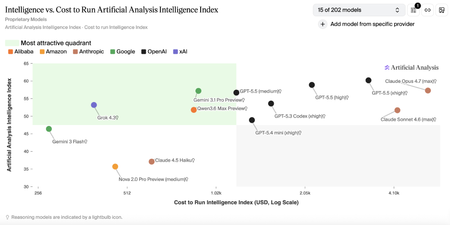
Customers building advanced AI systems increasingly need models that can reason deeply, act autonomously, and integrate reliably into real‑world workflows—all without compromising on governance or cost efficiency. Grok 4.3, xAI’s latest flagship model, is now available in Microsoft Foundry, giving developers and enterprises access to latest agentic intelligence within a production‑ready environment designed for scale. With Grok 4.3 on Microsoft Foundry, customers can more easily experiment with, evaluate, and deploy a powerful new option for agent‑based and domain‑specific applications—while benefiting from the safety controls, monitoring, and operational tooling needed to move from prototype to production with confidence. About Grok 4.3 Grok 4.3 is xAI’s latest flagship model, designed to support agent-based and productivity-focused workflows across a wide range of professional scenarios. Based on information provided by xAI and independent research conducted by Artificial Analysis, Grok 4.3 demonstrates strong performance across multiple benchmarks, reflecting a favorable balance between model capability and reported benchmark cost. *Benchmark data and cost metrics are provided by xAI and independently analyzed by Artificial Analysis. Source: https://artificialanalysis.ai Improved agentic capabilities Grok 4.3 is purpose‑built for agentic systems, improving in tool calling, instruction following, and lower hallucination, as reported by xAI. Grok 4.3 also enables policy‑aware support agents with reliable tool use and consistent behavior across extended conversations. On Microsoft Foundry, Grok 4.3 supports up to a 200k token context window, enabling extended multi‑turn reasoning and agent workflows. Multi-modal and domain‑specific strengths Grok 4.3 delivers strong performance across a range of professional and technical domains: Multimodal analysis: Native understanding across text, images, diagrams, and mixed data sources, enabling synthesis of visual and textual information for complex reasoning tasks. Web development: Excels in full‑stack web development, producing clean, production‑ready code with minimal guidance. Legal reasoning: supports interpretation of contracts, case law, and regulatory documents. Finance agents: supports financial analysis, modeling, and human decisions Built‑In Native Capabilities Grok 4.3 includes powerful native capabilities that simplify real‑world application development: Web search and X search for real‑time context Python code execution for analysis and automation File search (RAG) for enterprise knowledge grounding Excel, PDF, and PowerPoint generation for end‑to‑end workflows Together, these capabilities allow Grok 4.3 to function as a powerful agentic productivity engine, not just a language mode. Why Grok 4.3 on Microsoft Foundry Bringing Grok 4.3 to Microsoft Foundry delivers value beyond raw model performance. When deployed through Foundry, Azure AI Content Safety is enabled by default, adding an additional layer of protection for enterprise use. Customers can review the Microsoft Foundry model card for detailed safety and usage considerations. Microsoft Foundry also provides tools to support our customers with their responsible AI efforts, including model cards during selection, configurable guardrails such as jailbreak detection and content filtering, pre‑deployment evaluations and red teaming, and post‑deployment monitoring and governance. These capabilities help customers maintain output quality and deploy Grok 4.3 responsibly at scale. Pricing Model Deployment Input/1M Tokens Output/1M Tokens Availability Grok 4.3 Global Standard $1.25 $2.50 Public Preview Getting started Grok 4.3 is now available in Microsoft Foundry. Explore the model details in the Foundry model catalog, evaluate it using your own datasets, and start building and deployment in minutes.1.4KViews0likes0Comments
Now in Foundry: Tongyi-MAI Z-Image-Turbo, with FLUX.1-schnell and SDXL base 1.0
This week's Model Mondays edition pairs three models available through the Hugging Face collection in Microsoft Foundry: Tongyi-MAI's Z-Image-Turbo, a new designed for lower latency on a single GPU and native bilingual text rendering; Black Forest Labs' FLUX.1-schnell, a 12B rectified flow transformer distilled to 1–4 step inference and one of the most adopted open-weight image models since its 2024 release; and Stability AI's stable-diffusion-xl-base-1.0 (SDXL), a latent diffusion research model that can be used to generate and modify images based on text prompts. Models of the week Tongyi-MAI: Z-Image-Turbo Model Specs Parameters / size: 6B (BF16) Resolution: Up to 1024×1024 native Primary task: Text-to-image generation (English and Chinese) Why it's interesting (Spotlight) Scalable Single-Stream Diffusion Transformer (S3-DiT) architecture: Z-Image concatenates text tokens, visual semantic tokens, and image VAE tokens into a single unified input stream rather than running text and image through separate branches. This single-stream design can improve parameter efficiency relative to dual-stream DiT architectures at the same capacity. See the Z-Image technical report for details. 8-step inference at sub-second latency, fits in 16GB VRAM: Z-Image-Turbo is distilled with Decoupled Distribution Matching Distillation (Decoupled-DMD) and further refined with DMDR, a method that fuses DMD with reinforcement learning during post-training. The result is a model that runs 8 Number-of-Function-Evaluations (NFE) per image with no Classifier-Free Guidance (CFG)—which roughly halves the per-step compute compared to CFG-based inference. See the Decoupled-DMD and DMDR papers. Native bilingual text rendering and strong instruction adherence: Unlike most open-weight image models, which struggle with legible in-image text, Z-Image-Turbo renders complex English and Chinese text accurately which is useful for posters, signage, packaging mockups, and marketing creative. Try it Imagine you're a community programs coordinator at your city's parks department, planning a new summer event series — a "Cake Picnic in the Park" — designed to bring neighbors together over food in shared green space. The event is a few weeks out. You haven't booked bakery partners yet, so no actual cake exists, and you need marketing assets this week to start driving sign-ups: a hero image for the registration page, a flyer for community centers and libraries, social tiles for the city's channels. Use the prompt below and a photorealistic image, that can now be scaled to become additional assets like printed flyers or social images in minutes using image editing tools (or another model). Prompt: A round layered cake displayed on a white ceramic cake stand, topped with glossy fresh red cherries and smooth pastel pink buttercream frosting piped in delicate rosettes around the edge. One generous slice has been cleanly cut and removed from the front, revealing a perfect cross-section: four distinct horizontal layers alternating between soft pink sponge cake and fluffy white vanilla cream frosting. Professional bakery photography, soft natural window light from the left, shallow depth of field, marble countertop, warm and inviting atmosphere, photorealistic detail on the cake texture, cherry highlights, and frosting swirls. Black Forest Labs: FLUX.1-schnell Model Specs Parameters / size: 12B (rectified flow transformer) Resolution: Flexible up to 2 megapixels Primary task: Text-to-image generation Why it's interesting (Spotlight) Rectified flow transformer with adversarial distillation for 1–4 step inference: FLUX.1-schnell is the distilled, Apache 2.0 sibling of the FLUX.1 family. It uses a rectified flow formulation (a diffusion variant that learns straight-line probability paths between noise and data, reducing the number of solver steps needed) and is further compressed with latent adversarial diffusion distillation. The model generates high quality images in for latency-sensitive workloads. Permissive licensing for commercial use: Released under Apache 2.0, FLUX.1-schnell can be used for personal, scientific, and commercial purposes. This has driven broad adoption across product features that need an open, redistributable image backbone. Strong prompt adherence at its parameter range: At 12B parameters, FLUX.1-schnell sits between the SDXL family and frontier proprietary image models, and it remains a common reference point for evaluating open image generation prompt following—particularly for complex compositional prompts and longer captions—roughly two years after its initial release. Try it Hugging Face Spaces give developers the ability to experiment and try new models before deploying them. Test out a few prompts here: https://black-forest-labs-flux-1-schnell.hf.space then when you are ready, deploy the model in Microsoft Foundry. Stability AI: stable-diffusion-xl-base-1.0 stabilityai/stable-diffusion-xl-base-1.0 · Hugging Face Model Specs Parameters / size: 2.6B UNet (≈3.5B total with text encoders) Resolution: 1024×1024 native Primary task: Text-to-image generation Why it's interesting (Spotlight) Dual text encoder design and an ensemble-of-experts pipeline: SDXL uses two pretrained text encoders—OpenCLIP-ViT/G and CLIP-ViT/L—concatenated to capture both broad semantic alignment and finer-grained token-level cues. It can be run standalone or paired with the SDXL refiner in an ensemble-of-experts pipeline where the base model handles early denoising and the refiner specializes in the final steps. See the SDXL report for the original training and architecture details. CreativeML Open RAIL++-M licensing for managed deployments: SDXL is distributed under the CreativeML Open RAIL++-M license, which permits commercial use and downstream fine-tuning with documented use restrictions. Try it To go deeper on SDXL, take a look at Stability AI's generative-models GitHub repository, which implements the most popular diffusion frameworks for both training and inference and continues to expand with new capabilities like distillation. Getting started You can deploy open-source Hugging Face models directly in Microsoft Foundry in two ways. The first by browsing the Hugging Face collection in the Foundry model catalog and deploying to managed endpoints in just a few clicks. The second way is direct through the Hugging Face Hub, select any supported model and then choose "Deploy on Microsoft Foundry", which brings you straight into Azure. Learn how to discover models and deploy them using Microsoft Foundry documentation: Follow along the Model Mondays series and access the GitHub to stay up to date on the latest Read Hugging Face on Azure docs Learn about one-click deployments from the Hugging Face Hub on Microsoft Foundry Explore models in Microsoft Foundry563Views0likes0CommentsNow in Foundry: IBM Granite 4.1, NVIDIA Nemotron Nano Omni, and Qwen3.6-35B-A3B
This week Microsoft Foundry adds two major model families alongside a reasoning powerhouse that spans the full spectrum from specialized speech and vision to general-purpose coding and long-context analysis. IBM's Granite 4.1 is a famiily of 10: six LLMs across 3B, 8B, and 30B sizes in both full-precision and FP8 variants, plus a safety model, a vision-language model for document extraction, and a multilingual speech recognition model. NVIDIA's Nemotron-3-Nano-Omni-30B-A3B-Reasoning brings multimodal capability—video, audio, image, and text—to a 31B Mamba2-Transformer Hybrid Mixture-of-Experts (MoE) architecture that activates only 3B parameters per forward pass; three variants are available in Foundry (BF16, FP8, and NVFP4), with the FP8 variant featured here. Qwen3.6-35B-A3B is designed for agentic coding among open models, with thinking preservation across conversation turns and a context window extensible to 1 million tokens. Models of the week IBM: granite-4.1-30b Model Specs Parameters / size: 30B (flagship of the Granite 4.1 family) Context length: 131,072 tokens Primary task: Text generation (multilingual instruction following, RAG, tool calling, code, summarization) Why it's interesting The Granite 4.1 release brings 10 models to Microsoft Foundry. The LLM lineup covers granite-4.1-3b-instruct, granite-4.1-8b-instruct, and granite-4.1-30b-instruct with FP8 variants for each, plus granite-guardian-4.1-8b for safety, granite-vision-4.1-4b for document and chart understanding, and granite-speech-4.1-2b for multilingual speech recognition. This is a deployment-ready stack where teams can mix and match model sizes and modalities from a single provider. Strong instruction following and reasoning at the 30B scale: granite-4.1-30b-instruct scores 80.16 on MMLU, 64.09 on MMLU-Pro, 83.74 on Big-Bench Hard (BBH), 77.80 on AGI Eval, 45.76 on GPQA (Graduate-Level Google-Proof Q&A, a graduate-level science reasoning benchmark), and 89.65 average on IFEval (instruction following). These results reflect SFT and reinforcement learning post-training focused specifically on instruction compliance, tool calling accuracy, and long-context retrieval. (View benchmarks here) Enhanced tool calling and 12-language support: Granite 4.1 models are trained for structured function calling and support 12 languages—Arabic, Chinese, Czech, Dutch, English, French, German, Italian, Japanese, Korean, Portuguese, and Spanish—with dialog, extraction, and summarization capabilities. Safety and multimodal coverage within the same family: The inclusion of granite-guardian-4.1-8b (a safety classifier for detecting harmful content and prompt injections), granite-vision-4.1-4b (a Vision Language Model optimized for document extraction from PDFs, charts, and tables), and granite-speech-4.1-2b (a 2B multilingual Automatic Speech Recognition model) means teams can address safety, document parsing, and audio ingestion within the same model family—reducing integration complexity across a full pipeline. Try it Use Case Prompt Pattern Multilingual RAG Submit retrieved document passages in any of 12 supported languages; ask model to synthesize and cite sources Agentic tool calling Provide function definitions + user goal; model plans and executes tool calls in structured format Document extraction (granite-vision-4.1-4b) Submit PDF page image; extract tables, key figures, or form fields as structured JSON Safety classification (granite-guardian-4.1-8b) Pass user input or model output; receive structured risk assessment before serving response Sample prompt for an enterprise document processing deployment: You are building a multilingual document intelligence pipeline for a global financial institution. Using the granite-4.1-30b-instruct endpoint deployed in Microsoft Foundry, submit each incoming policy or regulatory document with the following system instruction: "You are a compliance analysis assistant. Review the document and extract: (1) all regulatory requirements described, (2) the entities to which each requirement applies, (3) any compliance deadlines mentioned, and (4) any penalties or consequences for non-compliance. Return the output as a structured JSON array with one entry per requirement." For documents that include scanned pages, first route them through granite-vision-4.1-4b to extract text and table content before passing to the 30B model for compliance analysis. Pass all user-facing outputs through granite-guardian-4.1-8b to screen for sensitive information before returning results. NVIDIA: Nemotron-3-Nano-Omni-30B-A3B-Reasoning-FP8 Model Specs Parameters / size: 31B total, ~3B activated per forward pass (Mamba2-Transformer Hybrid Mixture-of-Experts) Context length: 256,000 tokens Primary task: Video-audio-image-text-to-text (Multimodal understanding, reasoning, tool calling) Why it's interesting Multimodal input from a single efficient endpoint: Nemotron-3-Nano-Omni-30B-A3B-Reasoning supports video (up to 2 minutes), audio (up to 1 hour), images (RGB), and text—all from a single model deployed in Microsoft Foundry. Three variants are available in Foundry: full-precision BF16, FP8, and NVFP4. Paper: Nemotron Nano Omni technical report. Strong results across vision, document, video, and audio benchmarks: With reasoning mode enabled, the model scores 82.8 on MathVista-MINI (visual math reasoning), 67.04 on OCRBenchV2-EN (document OCR), 63.6 on Charxiv Reasoning (chart understanding), 72.2 on Video MME (video Q&A), 74.52 on Daily Omni (video+audio omnimodal understanding), and 89.39 on VoiceBench (speech instruction following). On OSWorld (GUI agent benchmark measuring autonomous computer use), it scores 47.4—a notable result for a model at the 3B active parameter scale. (Please see above model cards for further benchmark data) Mamba2-Transformer Hybrid MoE for efficient long-context inference: The model's layers alternate between Mamba2 state-space blocks (which process sequences with linear rather than quadratic cost) and standard Transformer attention blocks, combined with Mixture-of-Experts feedforward layers. Only ~3B parameters are activated per token despite the 31B total, making the 256K context window practically usable at lower compute cost than a comparably sized dense model. Word-level timestamps, JSON output, and tool calling for structured media workflows: The model produces word-level timestamps from audio, enabling precise transcript-to-timecode alignment for review and indexing workflows. Combined with JSON-structured output, chain-of-thought reasoning, and native tool calling, it can serve as an agentic step that ingests raw media (meeting recordings, M&E assets, training videos) and produces structured outputs for downstream systems without requiring separate transcription or OCR preprocessing stages. Try it Use Case Prompt Pattern Meeting intelligence Submit audio recording (up to 1 hr); extract transcript with word-level timestamps, action items, and decisions as structured JSON Video content analysis Submit video clip (up to 2 min) + query; retrieve timestamped summary of key events or spoken content Document + audio joint analysis Submit scanned document image alongside narrated walkthrough audio; extract and reconcile information from both modalities Multimodal tool calling Provide tool definitions + combined image/audio input; model reasons over content and executes structured tool calls Sample prompt for a media and compliance deployment: You are building a broadcast compliance review system for a media company. Using the Nemotron-3-Nano-Omni-30B-A3B-Reasoning-FP8 endpoint deployed in Microsoft Foundry, submit each recorded segment as video input with the following instruction: "Review this video segment and produce a compliance report as a JSON object with the following fields: transcript (full text with word-level timestamps), flagged_segments (array of objects with start_time, end_time, content, and reason for flagging), speaker_count (estimated number of distinct speakers), and compliance_summary (overall assessment). Flag any content that includes unverified factual claims, restricted product categories, or regulatory disclosures that may be incomplete." Use the word-level timestamps from the compliance report to route flagged segments directly to the editorial review queue with precise timecode references. Qwen: Qwen3.6-35B-A3B Model Specs Parameters / size: 35B total, 3B activated (Mixture-of-Experts) Context length: 262,144 tokens natively, extensible to 1,010,000 tokens Primary task: Image-text-to-text (agentic coding, reasoning, vision) Why it's interesting Agentic coding improvements over Qwen3.5-35B-A3B: Qwen3.6-35B-A3B scores 73.4 on SWE-bench Verified (vs. 70.0 for Qwen3.5-35B-A3B and 52.0 for Gemma 4 31B), 67.2 on SWE-bench Multilingual (vs. 60.3 and 51.7), and 49.5 on SWE-bench Pro (vs. 44.6 and 35.7). Terminal-Bench 2.0 reaches 51.5 (vs. 40.5 and 42.9). The update targets frontend workflows and repository-level reasoning specifically, areas where earlier Qwen3.5 iterations showed gaps. Blog post: Qwen3.6-35B-A3B. Hybrid architecture: Gated DeltaNet and Mixture-of-Experts: The model's 40 layers alternate between Gated DeltaNet blocks (a form of linear attention that avoids the quadratic cost of standard self-attention), Gated Attention blocks (using Grouped Query Attention with 16 query heads and 2 key-value heads), and Mixture-of-Experts (MoE) feedforward layers with 256 experts (8 routed + 1 shared active per token). Only 3B parameters are activated per forward pass, keeping inference cost comparable to a 3B dense model while retaining the capacity of a 35B model for knowledge and specialization. Thinking preservation across conversation turns: Qwen3.6 introduces an option to retain reasoning context from previous messages in multi-turn conversations. In prior models, chain-of-thought traces were stripped between turns, requiring the model to re-derive context it had already reasoned through. With thinking preservation enabled, iterative coding workflows—such as debugging across multiple exchanges—benefit from accumulated reasoning without repeating earlier analysis. Natively extensible to 1 million token context: The 262K native context is already among the largest in open models at this size, and the architecture supports extension to 1,010,000 tokens. On GPQA Diamond (science reasoning), Qwen3.6-35B-A3B scores 86.0—above both Gemma 4 31B (84.3) and Qwen3.5-27B (85.5)—while matching Gemma 4 31B on MMLU Pro (85.2) and LiveCodeBench v6 (80.4 vs. 80.0). Try it Use Case Prompt Pattern Repository-level code change Provide repository structure + task description; model plans file edits and outputs unified diff Multi-turn iterative debugging Enable thinking preservation; submit failing test + code across multiple turns; accumulate reasoning context Frontend code generation Provide design spec or screenshot + existing codebase context; generate component implementation Long-document reasoning Submit technical specification (up to 262K tokens); ask model to identify ambiguities or implementation gaps Sample prompt for a software engineering deployment: You are building an automated code review and implementation assistant for a platform engineering team. Using the Qwen3.6-35B-A3B endpoint deployed in Microsoft Foundry, enable thinking preservation for multi-turn sessions. In the first turn, submit the repository file tree and a GitHub issue describing a required API endpoint change. Prompt the model: "Review the repository structure and describe your implementation plan, including which files need to change and why." In the second turn, submit the relevant source files and prompt: "Based on your earlier plan, implement the changes and produce a unified diff." In the third turn, submit the test suite and prompt: "Write additional unit tests for the new endpoint, covering edge cases identified in your reasoning." The thinking preservation feature ensures the model carries forward its understanding of the codebase across all three turns without re-explaining context. Getting started You can deploy open-source Hugging Face models directly in Microsoft Foundry by browsing the Hugging Face collection in the Foundry model catalog and deploying to managed endpoints in just a few clicks. You can also start from the Hugging Face Hub. First, select any supported model and then choose "Deploy on Microsoft Foundry", which brings you straight into Azure with secure, scalable inference already configured. Learn how to discover models and deploy them using Microsoft Foundry documentation. Follow along the Model Mondays series and access the GitHub to stay up to date on the latest Read Hugging Face on Azure docs Learn about one-click deployments from the Hugging Face Hub on Microsoft Foundry Explore models in Microsoft Foundry873Views0likes0CommentsIntroducing OpenAI's newest chat model in Microsoft Foundry
OpenAI's GPT-5.5 Instant (or Chat-latest in the API) begins rolling out in Microsoft Foundry today as GPT-chat-latest. Built on GPT-5.4 and GPT-5.3-chat, the new model delivers measurable gains in factual accuracy, tool calling, and response efficiency. These improvements translate directly into more reliable production deployments. GPT-chat-latest is designed for the workflows builders are actually shipping: multi-turn assistants, agentic systems that orchestrate tools, and retrieval-grounded applications where precision and grounding matter as much as conversational quality. Why the name is changing In Microsoft Foundry, we are introducing GPT-chat-latest as the product name for this release, while the model continues to follow the existing Preview lifecycle and standard notice periods. We are also evaluating ways to simplify how customers access continuously updated models over time, but current behavior remains unchanged as that work continue Smarter, more factually reliable GPT-chat-latest closes the factuality gap from prior iterations with significant reductions in hallucinations, especially in domains where accuracy matters most. According to OpenAI, the new model produces 52.5% fewer hallucinations and reduces hallucinated claims by 37.3% on conversations previously flagged for factual errors when compared to GPT-5.3-chat. These gains extend beyond text. GPT-chat-latest shows improvements in visual reasoning, expert multimodal understanding, and STEM tasks, with measurable lifts across standard benchmarks: Benchmark GPT-5.3-chat GPT-chat-latest CharXiv-reasoning Scientific Chart Reasoning 75.0 81.6 MMMU-Pro Expert multimodal reasoning 69.2 76.0 GPQA PhD-level science questions 78.5 85.6 AIME 2025 Competition math 65.4 81.2 *Data shown comes from OpenAI’s testing” For builders shipping into regulated workloads such as clinical decision support, legal research, financial advisory, and technical analysis, these improvements raise the bar on the kinds of applications GPT-chat-latest can assist with. More efficient outputs GPT-chat-latest produces responses that may be more to-the-point without losing substance. The model may reduce verbosity and over formatting, ask fewer follow-up questions, and avoid cluttered output patterns that often require post-processing in production UIs. For builders, this can translate to two concrete benefits: lower output token costs at scale, and cleaner responses that drop into product surfaces with less downstream cleanup. In comparative testing from OpenAI, GPT-chat-latest produced roughly 25–30% fewer words than GPT-5.3-chat across a range of common prompts while preserving response quality, and in many cases improving it. Improving intelligence and tool calling GPT-chat-latest introduces measurable improvements in how the model interacts with tools, including better judgment about when and how to invoke them. The model produces more structured and context-aware tool invocation outputs, which is particularly relevant for workflows that rely on function calling, retrieval-augmented generation, and multi-step reasoning. Equally important, the model is better at deciding whether a tool is needed in the first place, reducing unnecessary tool calls in scenarios where it already has the information to answer directly. Improved search and context handling GPT-chat-latest includes targeted improvements to how the model retrieves, interprets, and synthesizes information when search is involved, with enhancements to query formulation, result ranking, and filtering, plus more grounded synthesis of retrieved content into final responses. These changes improve handling of ambiguous or underspecified queries and reduce noise in answers that depend on retrieved content. The model also makes better use of the context developers pass in, including system prompts, conversation history, retrieved documents, and structured data. Applications that maintain long-running state or stitch together multiple retrieval steps produce more coherent, context-aware outputs without developers having to over-engineer prompt scaffolding. Use Cases: When to choose the chat model Developers typically choose a chat-optimized model like GPT-5.5-chat when the application needs to sustain multi-turn conversations while reliably following instructions and coordinating external tools. This is a fit for assistants and agentic workflows where the model must interpret user intent over time, decide when to retrieve additional context, and produce structured outputs for downstream systems rather than just generate free-form text. Customer support and contact centers: virtual agents that maintain conversational context across a case, retrieve policy or product documentation via search, and hand off to a ticketing or CRM system through tool calls when escalation is needed. Retail and e-commerce: shopping and service assistants that clarify preferences over multiple turns, reference catalogs and policies via retrieval, and generate structured actions such as returns, exchanges, and order lookups through integrated tools. Manufacturing and field service: technician-facing assistants that combine conversational guidance with retrieval of manuals and work instructions, plus structured task creation in maintenance systems. Use GPT-chat-latest Use GPT-5.5 Reasoning Multi-turn assistants and customer-facing chat experiences Harder problems that benefit from more deliberate, step-by-step thinking Agentic workflows that coordinate tools (search, retrieval, ticketing, CRM) and benefit from structured tool outputs Complex analysis, planning, or decision support where correctness matters more than conversational flow Interactive experiences where you want quick back-and-forth clarification and task completion Tasks involving multi-constraint reasoning (policy interpretation, detailed requirements, long-horizon plans) RAG-based apps where the model must decide when to retrieve and then synthesize grounded answers Offline or low-tool scenarios where the main value is deeper reasoning over provided context Pricing Model Input ($/1M tokens) Cached input ($/1M tokens) Output ($/1M tokens) GPT-chat-latest $5 $0.50 $30 Responsible AI in Microsoft Foundry At Microsoft, our mission to empower people and organizations remains constant. In the age of AI, trust is foundational to adoption, and earning that trust requires a commitment to transparency, safety, and accountability. Microsoft Foundry provides governance controls, monitoring, and evaluation capabilities to help organizations deploy models responsibly in production environments, aligned with Microsoft's Responsible AI principles. Getting started GPT-chat-latest is rolling out in Microsoft Foundry today.9.6KViews1like0CommentsIntroducing OpenAI's GPT-image-2 in Microsoft Foundry
Take a small design team running a global social campaign. They have the creative vision to produce localized imagery for every market, but not the resources to reshoot, reformat, or outsource that scale. Every asset needs to fit a different platform, a different dimension, a different cultural context, and they all need to ship at the same time. This is where flexible image generation comes in handy. OpenAI's GPT-image-2 is now generally available and rolling out today to Microsoft Foundry, introducing a step change in image generation. Developers and designers now get more control over image output, so a small team can execute with the reach and flexibility of a much larger one. What is new in GPT-image-2? GPT-image-2 brings real world intelligence, multilingual understanding, improved instruction following, increased resolution support, and an intelligent routing layer giving developers the tools to scale image generation for production workflows. Real world intelligence GPT-image-2 has a knowledge cut off of December 2025, meaning that it is able to give you more contextually relevant and accurate outputs. The model also comes with enhanced thinking capabilities that allow it to search the web, check its own outputs, and create multiple images from just one prompt. These enhancements shift image generation models away from being simple tools and runs them into creative sidekicks. Multilingual understanding GPT-image-2 includes increased language support across Japanese, Korean, Chinese, Hindi, and Bengali, as well as new thinking capabilities. This means the model can create images and render text that feels localized. Increased resolution support GPT-image-2 introduces 4K resolution support, giving developers the ability to generate rich, detailed, and photorealistic images at custom dimensions. Resolution guidelines to keep in mind: Constraint Detail Total pixel budget Maximum pixels in final image cannot exceed 8,294,400 Minimum pixels in final image cannot be less than 655,360 Requests exceeding this are automatically resized to fit. Resolutions 4K, 1024x1024, 1536x1024, and 1024x1536 Dimension alignment Each dimension must be a multiple of 16 Note: If your requested resolution exceeds the pixel budget, the service will automatically resize it down. Intelligent routing layer GPT-image-2 also includes an expanded routing layer with two distinct modes, allowing the service to intelligently select the right generation configuration for a request without requiring an explicitly set size value. Mode 1 — Legacy size selection In Mode 1, the routing layer selects one of the three legacy size tiers to use for generation: Size tier Description smimage Small image output image Standard image output xlimage Large image output This mode is useful for teams already familiar with the legacy size tiers who want to benefit from automatic selection without making any manual changes. Mode 2 — Token size bucket selection In Mode 2, the routing layer selects from six token size buckets — 16, 24, 36, 48, 64, 96 — which map roughly to the legacy size tiers: Token bucket Approximate legacy size 16, 24 smimage 36, 48 image 64, 96 xlimage This approach can allow for more flexibility in the number of tokens generated, which in turn helps to better optimize output quality and efficiency for a given prompt. See it in action GPT-image-2 shows improved image fidelity across visual styles, generating more detailed and refined images. But, don’t just take our word for it, let's see the model in action with a few prompts and edits. Here is the example we used: Prompt: Interior of an empty subway car (no people). Wide-angle view looking down the aisle. Clean, modern subway car with seats, poles, route map strip, and ad frames above the windows. Realistic lighting with a slight cool fluorescent tone, realistic materials (metal poles, vinyl seats, textured floor). As you can see, when using the same base prompt, the image quality and realism improved with each model. Now let’s take a look at adding incremental changes to the same image: Prompt: Populate the ad frames with a cohesive ad campaign for “Zava Flower Delivery” and use an array of flower types. And our subway is now full of ads for the new ZAVA flower delivery service. Let's ask for another small change: Prompt: In all Zava Flower Delivery advertisements, change the flowers shown to roses (red and pink roses). And in three simple prompts, we've created a mockup of a flower delivery ad. From marketing material to website creation to UX design, GPT-image-2 now allows developers to deliver production-grade assets for real business use cases. Image generation across industries These new capabilities open the door to richer, more production-ready image generation workflows across a range of enterprise scenarios: Retail & e-commerce: Generate product imagery at exact platform-required dimensions, from square thumbnails to wide banners, without post-processing. Marketing: Produce crisp, rich in color campaign visuals and social assets localized to different markets. Media & entertainment: Generate storyboard panels and scene at resolutions suited to production pipelines. Education & training: Create visual learning aids and course materials formatted to exact display requirements across devices. UI/UX design: Accelerate mockup and prototype workflows by generating interface assets at the precise dimensions your design system requires. Trust and safety At Microsoft, our mission to empower people and organizations remains constant. As part of this commitment, models made available through Foundry undergo internal reviews and are deployed with safeguards designed to support responsible use at scale. Learn more about responsible AI at Microsoft. For GPT-image-2, Microsoft applied an in-depth safety approach that addresses disallowed content and misuse while maintaining human oversight. The deployment combines OpenAI’s image generation safety mitigations with Azure AI Content Safety, including filters and classifiers for sensitive content. Pricing Model Offer type Pricing - Image Pricing - Text GPT-image-2 Standard Global Input Tokens: $8 Cached Input Tokens: $2 Output Tokens: $30 Input Tokens: $5 Cached Input Tokens: $1.25 Note: All prices are per 1M token. There is no billing for output tokens for the GPT-image-2 model. Getting started Whether you’re building a personalized retail experience, automating visual content pipelines or accelerating design workflows. GPT-image-2 gives your team the resolution control and intelligent routing to generate images that fit your exact needs. Try the GPT-image-2 in Microsoft Foundry today! Deploy the model in Microsoft Foundry Experiment with the model in the Image playground Read the documentation to learn more17KViews3likes3CommentsGemma 4 now available in Microsoft Foundry
Experimenting with open-source models has become a core part of how innovative AI teams stay competitive: experimenting with the latest architectures and often fine-tuning on proprietary data to achieve lower latencies and cost. Today, we’re happy to announce that the Gemma 4 family, Google DeepMind’s newest model family, is now available in Microsoft Foundry via the Hugging Face collection. Azure customers can now discover, evaluate, and deploy Gemma 4 inside their Azure environment with the same policies they rely on for every other workload. Foundry is the only hyperscaler platform where developers can access OpenAI, Anthropic, Gemma, and over 11,000+ models under a single control plane. Through our close collaboration with Hugging Face, Gemma 4 joining that collection continues Microsoft’s push to bring customers the widest selection of models from any cloud – and fits in line with our enhanced investments in open-source development. Frontier Intelligence, open-source weights Released by Google DeepMind on April 2, 2026, Gemma 4 is built from the same research foundation as Gemini 3 and packaged as open weights under an Apache 2.0 license. Key capabilities across the Gemma 4 family: Native multimodal: Text + image + video inputs across all sizes; analyze video by processing sequences of frames; audio input on edge models (E2B, E4B) Enhanced reasoning & coding capabilities: Multi-step planning, deep logic, and improvements in math and instruction-following enabling autonomous agents Trained for global deployment: Pretrained on 140+ languages with support for 35+ languages out of the box Long context: Context windows of up to 128K tokens (E2B/E4B) and 256K tokens (26B A4B/31B) allow developers to reason across extensive codebases, lengthy documents, or multi-session histories Why choose Foundry? Foundry is built to give developers breadth -- access to models from major model providers, open and proprietary, under one roof. Stay within Azure to work leading models. When you deploy through Foundry, models run inside your Azure environment and are subject to the same network policies, identity controls, and audit processes your organization already has in place. Managed online endpoints handle serving, scaling, and monitoring without manually setting up and managing the underlying infrastructure. Serverless deployment with Azure Container Apps allows developers to deploy and run containerized applications while reducing infrastructure management and saving costs. Gated model access integrates directly with Hugging Face user tokens, so models that require license acceptance stay compliant can be accessed without manual approvals. Foundry Local lets you run optimized Hugging Face models directly on your own hardware using the same model catalog and SDK patterns as your cloud deployments. Read the documentation here: https://aka.ms/foundrylocal and https://aka.ms/HF/foundrylocal Microsoft’s approach to Responsible AI is grounded in our AI principles of fairness, reliability and safety, privacy and security, inclusiveness, transparency, and accountability. Microsoft Foundry provides governance controls, monitoring, and evaluation capabilities to help organizations deploy new models responsibly in production environments. What are teams building with Gemma 4 in Foundry Gemma 4’s combination of multimodal input, agentic function calling, and long context offers a wide range of production use cases: Document intelligence: Processing PDFs, charts, invoices, and complex tables using native vision capabilities Multilingual enterprise apps: 140+ natively trained languages — ideal for multinational customer support, content platforms as well as language learning tools for grammar correction and writing practice Long-context analytics: Reasoning across entire codebases, legal documents, or multi-session conversation histories Getting started Try Gemma 4 in Microsoft Foundry today. New models from Hugging Face continue to roll out to Foundry on a regular basis through our ongoing collaboration. If there's a model you want to see added, let us know here. Stay connected to our developer community on Discord and stay up to date on what is new in Foundry through the Model Mondays series.3.6KViews1like0Comments