model catalog
96 TopicsIntroducing GPT-6.1 Sol in Microsoft Foundry: Advanced intelligence, optimized for production agents
Today, OpenAI's GPT-6.1 Sol is generally available in Microsoft Foundry. GPT-6.1 Sol is an upgrade to GPT-6 Sol, delivering substantial improvements in agentic coding, computer use, and professional work, with performance approaching GPT-6 Astra across these evaluations. It offers a new balance of capability and cost for important work at higher frequency, making it more affordable for developers to build and run very capable agents at scale. Just one week after GPT-6 Sol and Luna joined our generally available lineup, this release continues the momentum of the GPT-6 series in Foundry: models that produce less noise and are more capable of completing full tasks with agents. GPT-6.1 Sol carries that progress forward for teams whose production workloads run all day, every day. What's new in GPT-6.1 Sol GPT-6.1 Sol advances the three capabilities that matter most for production agents: Agentic coding. GPT-6.1 Sol plans, edits, tests, and iterates across a codebase with improved performance on complex tasks and extended workflows involving multiple tool calls. More capable computer use. Improved reliability navigating real interfaces help agents operate the workflows that span multiple application steps, with permissions and human oversight suited to the task. Deeper Professional work. Stronger performance on the analysis, drafting, and multi-step knowledge tasks that make up daily enterprise work, with improvements in factual accuracy those workflows demand. GPT-6.1 Sol accepts text and image inputs and produces text, with a total context window of up to 1M tokens. This provides room to bring large codebases and document sets, within the model’s context limits. Flexible reasoning lets teams tailor the model’s depth of analysis to the needs of each task. This can help teams use tokens more efficiently by reserving deeper reasoning for the work that needs it. As in last Tuesday's announcement, the starting point is quality alongside cost per task, not model capability in isolation. Use that lens to evaluate GPT-6.1 Sol against the needs of your own production workloads. Where to put GPT-6.1 Sol to work Because these gains compound in agentic loops, valuable use cases include agent workloads that run frequently: Software engineering agents that triage issues, implement changes across a repository, respond to code review, and keep CI green, with costs that support running them on every pull request, not just the hard ones. Computer-use agents that complete back-office processes end to end: updating records across line-of-business systems, reconciling data between applications, and handling workflows in browsers. Professional work agents for research synthesis, contract and document review, financial analysis, and report generation, where work recurs weekly or daily and rewards consistent quality per task. High-frequency customer and employee workflows, where GPT-6.1 Sol's capability-cost balance lets teams upgrade the intelligence behind every interaction without upgrading the budget. The right intelligence behind every agent The right model for a job should be determined through evaluations. GPT-6.1 Sol joins GPT-6 Astra, GPT-6 Sol, and GPT-6 Luna in the Foundry model catalog: start with GPT-6 Astra for the most demanding reasoning, use GPT-6.1 Sol as the new default for production agents and complex workflows, and scale high-volume data and preparatory tasks with Luna. As with the rest of the GPT-6 series, look beyond price per token to cost per task, alongside quality and reliability. Foundry brings evaluation, tracing, and monitoring together so teams can make that call with evidence, then switch models without re-platforming. Deploy it your way With GPT-6.1 Sol in Microsoft Foundry, teams can choose how they scale and where processing takes place. Standard deployment offers flexible capacity billed by usage across Global regions and US, EU, and APAC Data Zones. Provisioned Throughput is available at launch through Global and US Data Zone deployments, providing reserved capacity for critical production workloads. Additional regions and deployment options will follow soon. That is the Foundry advantage: the flexibility to balance capacity, performance, and data residency requirements within one enterprise platform. Teams can match each workload to a supported combination of serving option and processing location, rather than apply the same deployment approach to every application. GPT-6.1 Sol Pricing* Model Deployment Context Length Pricing (USD $/million tokens) Input Cached Input Cached Writes Output GPT-6.1 Sol Global Standard Short context $2.00 $0.10 $2.50 $10.00 Long context $4.00 $0.20 $5.00 $15.00 Data Zone Standard (US) Short context $2.20 $0.11 $2.75 $11.00 Long context $4.40 $0.22 $5.50 $16.50 Data Zone Standard (EU) Short context $2.40 $0.12 $3.00 $12.00 Long context $4.80 $0.24 $6.00 $18.00 Data Zone Standard (APAC) Short context $2.40 $0.12 $3.00 $12.00 Long context $4.80 $0.24 $6.00 $18.00 *Prices shown are for Standard deployments. Provisioned Throughput pricing varies by deployment type. For each offer, the US Data Zone is priced at a 10% premium to Global, and the EU and APAC Data Zones are priced at a 20% premium to Global. For current rates and terms, see the Azure OpenAI pricing page., see the Azure OpenAI pricing page. Build safer agents on Foundry GPT-6.1 Sol runs with the same layered protections as the GPT-6 series in Foundry: alignment training in the model, content filters and guardrails on prompts and outputs, prompt injection mitigations on tool calls and responses, and enterprise identity and access controls governing what agents can reach. Microsoft Purview applies data policies and human checkpoints at every phase. Start building Your next agent needs more than a powerful model. Foundry pairs GPT-6.1 Sol with the deployment flexibility, observability, and enterprise controls to take it from first workload to production at scale. Explore GPT-6.1 Sol in the Microsoft Foundry model catalog and evaluate where it fits in your next agent.3KViews1like0CommentsModel router updates: new regions, a refreshed model pool, and understanding the hill climb
Across Microsoft, "hill climbing" has become shorthand for how real AI progress happens: not in one dramatic leap, but through a disciplined loop. Microsoft AI defines the hill climb as an organization that continuously improves, cycle after cycle, through more compute, better data, and sharper evaluation. Reinforcement fine-tuning in Foundry defines it as improving the deployable model package one measured step at a time across quality, latency, and cost. Different altitudes, same premise: progress is not a one-shot decision. It's a loop. For most teams, the decision of what model to use when is made manually or with custom routing tools. A developer picks a model based on benchmarks, familiarity, or the last launch that made headlines, ships it, and revisits the choice only when something breaks. In an ecosystem where the frontier moves monthly, that decision goes stale fast. Model router in Foundry Models brings the hill climb to the selection layer. What's new: a bigger pool, in more places This release expands where teams can deploy model router, broaden the supported model pool, and delivers updates through a stable endpoint. Together, these changes help teams run production workloads in more locations, match a wider range of tasks to suitable models, and adopt supported updates without changing the application integration. A refreshed model pool. The supported model list now includes Anthropic Claude Opus 4.8 — a high-capability model built for complex reasoning and long-form generation, for scenarios that demand depth, structure, and quality — and the GPT-5.6 family. Just as importantly, the pool is pruned: gpt-5-chat, gpt-5.2-chat, gpt-5.3-chat, Deepseek-V3.1 have been removed from the model router as models reach the end of their lifecycle and are deprecated in Foundry. New region availability. The model router is now available in 28 regions for global standard and 21 data zone regions. For many organizations, inference requests must stay within specific geographic boundaries for regulatory, governance, or customer-trust reasons — and intelligent routing shouldn't force a compromise on that. Find the full list of regions here. The most important detail is what you don't have to do: these updates occur automatically*. The endpoint remains stable as the supported model pool is refreshed, so teams do not need to redeploy the model router to receive the update. Applications can continue using the same integration while the model router evaluates requests against the current supported pool. Teams should continue monitoring routing traces and application outcomes to confirm that quality, cost, latency, and governance requirements are met. *Models from Anthropic still need to be deployed separately before they can be routed to through the model router. Interested in hearing more about what's new to the model router? Tune in for the next episode of Model Mondays with Sanjeev Jagtap and Lee Stott, where they talk all things model router from evaluations to hill climbing. Sign up here to watch live or view the replay: Model Mondays - Spotlight On Model router in Microsoft Foundry | Microsoft Reactor The selection-layer hill climb At the selection layer, a step is a routing decision. Each one is a micro-optimization against your objective, and each one is instrumented: every response from the model router includes a model field showing which underlying model was selected, so the climb leaves a complete, auditable trail. Model router supports three parts of the optimization loop: A/B testing to compare two router configurations to understand quality, cost, and latency tradeoffs; model decomposition to use routing results to decompose a single-model application into a multi-model or multi-agent design, and continuous routing to keep the router in production for continuous per-request selection. Each pattern turns model choice into a measured, repeatable process rather than a fixed decision. 1. A/B Testing Question: Which model or routing strategy should I use in production? A/B testing helps teams compare candidate models, model families, or router configurations against the same workload. Representative traffic is sent to competing deployments, and teams compare quality, cost, latency, and governance outcomes. The goal is to understand tradeoffs and identify the model or routing strategy that best meets workload requirements before promoting it to production. 2. Model Decomposition Question: What work is my application actually doing? Model decomposition uses model router as a diagnostic tool. By deploying the model router against a representative workload and examining routing telemetry, teams can see how requests naturally separate into different task classes. Simple retrieval, classification, and summarization requests may route to smaller models, while reasoning, planning, and agentic workflows may require more capable models. The goal is not to choose a winner, but to understand the structure of the workload and uncover opportunities for optimization, specialization, or architectural improvements. 3. Route continuously Question: Why choose a single model at all? Route continuously is the pattern model router was designed for but is not limited to. Rather than treating model selection as a one-time decision, teams leave the model router in production and allow the best-fit model to be selected for each request. As the supported model pool, regional availability, and platform capabilities evolve, teams can continue using the same endpoint while evaluating whether updates improve workload outcomes. Model selection becomes an ongoing optimization process rather than a project that must be repeated every time the model landscape changes. Together, these patterns illustrate a broader shift: the model router is more than a model. It is a tool for the optimization loop itself, helping teams evaluate tradeoffs, understand workload behavior, test hypotheses, and continuously refine model selection as requirements evolve. Whether used to compare candidate models, decompose applications into specialized tasks, or automate per-request routing in production, model router turns model selection into an observable, measurable, and repeatable process. As the model landscape continues to change, that optimization loop becomes a durable advantage. Getting Started Ready to start your own hill climb? Whether you're exploring the model router for the first time, evaluating routing strategies against your workload, or building a long-term optimization practice, these resources can help you move from experimentation to production with Microsoft Foundry. What's new in model router? Sign up for the next Model Mondays episode for a deep dive into new features, optimization patterns, and the latest model router updates. How do I build agents with model router? Check out the Model Router Agents Lab and build agent experiences with routing, retrieval, web search, tool calling, and multi-agent patterns. How do I evaluate model router? Compare model router against baseline models using your own prompts, then review quality, cost, latency, and routing decisions with the Auto Evaluation Toolkit. How do I optimize model router for my workload? Start your hill-climbing journey with the Model Mastery workshop, where you'll test one optimization lever at a time and measure how each change impacts workload outcomes. How do I build a model router optimization playbook? Explore the Model Releases repository to track new capabilities, understand the optimization question behind each release, and try focused notebooks that demonstrate one optimization lever at a time.2.8KViews2likes0CommentsIntroducing GPT-transcribe and GPT-live-transcribe in Microsoft Foundry
A transcription model hears “account number 8-4-7-2” but returns “account number eighty-four seventy-two.” A single error can break a downstream automation workflow. Developers building voice applications need transcription models that can handle real-world audio conditions, natural speech patterns, and business-critical details, including codes, dates, addresses, account numbers, mixed-language conversations, specialized terminology, and quiet or low-volume speech. GPT-transcribe and GPT-live-transcribe do just that and are available in Microsoft Foundry today. Two updates to the audio model family designed to improve automatic speech recognition across asynchronous transcription and live streaming scenarios. Built for More Accurate Transcription in Real-World Audio GPT-transcribe is the highest accuracy ASR model from Open AI, designed for asynchronous speech-to-text transcription of completed audio files and batch workloads. It accepts audio input and returns text output, making it a strong fit for workflows that process recorded, uploaded, or submitted audio, including meeting recordings, voicemails, and media files. GPT-live-transcribe is designed for low-latency streaming transcription through the Realtime API. It supports real-time audio input and text output, helping developers build live experiences where speech needs to be transcribed continuously as audio arrives. This model also introduces “tunable latency” where developers can adjust the latency/accuracy trade-off for streaming. It is a strong fit for live captions, voice assistants, contact center workflows, accessibility experiences, field service applications, real-time intake, and monitoring systems. Together, these models give developers transcription options in Microsoft Foundry for stored audio and live voice interactions. Their text output can support downstream workflows such as search, summarization, routing, analytics, automation, and quality review. What’s New in Both Models The features of the new transcription models focus on improving transcription quality in real-world audio environments where speech can be brief, noisy, accented, quiet, domain-specific, or mixed across languages. Key capabilities include: Background noise: Helps isolate speech in noisy environments so transcription quality can remain more reliable when audio conditions are not controlled. Short utterances: Improves recognition of brief commands, confirmations, interruptions, and clipped speech that can be difficult to capture accurately. Alphanumeric perception: Strengthens transcription of IDs, codes, phone numbers, dates, addresses, account numbers, and mixed letter-number sequences. Domain terminology understanding: Improves recognition of specialized vocabulary used in product, workflow, industry, and business-process contexts. Codemix: Improves understanding when speakers switch between languages within a conversation or utterance. Context awareness: Uses topic hints and past conversation context to improve transcription accuracy and help maintain consistency. Accent robustness: Improves handling of regional accents, non-native accents, dialects, and varied speaking styles. Whispering: Improves recognition of quiet or low-volume speech, including whispered commands and private dictation. Live captioning and accessibility experiences: Generate real-time captions for meetings, events, media experiences, and assistive applications. Contact center and voice workflows: Capture spoken details as conversations happen, supporting routing, quality review, summarization, and downstream automation. Monitoring, analytics, and compliance workflows: Provide text visibility into ongoing spoken input so teams can analyze, review, and act on conversation data. Also Available: GPT-realtime-2.1 and GPT-realtime-mini-2.1 gpt-realtime-2.1 and gpt-realtime-mini-2.1 are also available in Microsoft Foundry for developers building speech-to-speech applications. Unlike GPT-transcribe and GPT-live-transcribe, which return text, these models accept audio and generate audio for low-latency conversational experiences over the Realtime API. gpt-realtime-2.1 focuses on interaction quality and robustness, while gpt-realtime-mini-2.1 provides a smaller, faster, and more cost-efficient option for high-volume deployments. Together with GPT-transcribe and GPT-live-transcribe, these realtime audio updates give developers more flexibility to build voice applications that need both accurate transcription and responsive spoken interaction, whether the experience is centered on capturing speech as text, responding with audio, or combining both patterns in a single workflow. Use Cases by Model GPT-transcribe Use GPT-transcribe when the application needs accurate text transcripts from recorded, uploaded, or submitted audio. It is a strong fit for meeting and call transcription, media transcription, customer support intake, voicemail and message processing, quality review, compliance workflows, and domain-specific transcription where short utterances, structured alphanumeric details, specialized terminology, accents, background noise, code-mixed speech, or quiet audio can affect downstream accuracy. GPT-live-transcribe Use GPT-live-transcribe when the application needs live streaming transcription with low latency. It is designed for real-time captions, accessibility experiences, contact center transcription, voice-enabled workflows, live monitoring, operational dashboards, and agent-assist scenarios where spoken input needs to become text continuously as the interaction unfolds. Pricing The following pricing example shows Global Standard rates by model and modality. Rates for GPT-realtime-2.1 and GPT-realtime-mini-2.1 are listed per 1 million tokens. GPT-transcribe and GPT-live-transcribe are listed per audio hour. Model Deployment Modality Input Cached Input Output GPT-realtime-2.1 Global Standard Audio $32.00 $0.40 $64.00 Text $4.00 $0.40 $24.00 Image $5.00 $0.50 -- GPT-realtime-mini-2.1 Global Standard Audio $10.00 $0.30 $20.00 Text $0.60 $0.06 $2.40 Image $0.80 $0.08 -- GPT-live-transcribe Global Standard Audio -- -- $1.02/hour GPT-transcribe Global Standard Audio -- -- $0.27/hour Getting Started Choose GPT-transcribe when your application processes complete audio files asynchronously, or GPT-live-transcribe when it needs text continuously as speech arrives. Try the models in Microsoft Foundry, then use the resources below to explore the Realtime API, follow the audio quickstart, compare available models, and review Azure OpenAI in Foundry Models documentation. For asynchronous transcription, submit a complete audio file to GPT-transcribe and process the returned transcript after the request completes. This pattern works well for recordings, voicemails, and uploaded media. For streaming transcription, open a Realtime API session with GPT-live-transcribe, send audio as it is captured, and handle incremental transcript events. This pattern supports live captioning and agent-assist experiences that need text during an active interaction. Refer to the linked quickstart and Realtime API documentation for current SDK setup, authentication, request schemas, and supported audio formats. Explore Microsoft Learn documentation to learn more: Use GPT Realtime API for speech and audio with Azure OpenAI in Foundry Models GPT Realtime audio quickstart Azure OpenAI in Foundry Models overview3.5KViews0likes0CommentsPost-Stream Refinement is now generally available in Microsoft Foundry
When we introduced Post-Stream Refinement in public preview earlier this year, it closed the oldest trade-off in real-time speech: you could finally keep instant streaming results and get a highly accurate final transcript, with no penalty to first-token latency. A second recognition pass runs in parallel with streaming and replaces each final segment with a more accurate version once the utterance completes. Today, Post-Stream Refinement reaches general availability for Azure AI Speech in Microsoft Foundry, backed by a production SLA. Just as important, it now ships with the capabilities production transcription actually depends on: diarization to preserve who said what, phrase lists for your product names and domain vocabulary, and a much wider footprint of 19 locales across 22 Azure regions. Everything you already know about Post-Stream Refinement still applies. The real-time contract is unchanged, your partial results stream exactly as before, and you enable refinement by setting a single property on your existing SpeechConfig. What changes at GA is that the refined transcript is now production-grade and speaker-aware. 📖 Read the Documentation What's new at general availability If you have already used Post-Stream Refinement in preview, here is exactly what changes at GA, and what stays the same. The streaming path and SDK contract are untouched; the refinement pass is now production-ready and gains speaker and vocabulary features. How Post-Stream Refinement works Real-time and final results serve different needs. Partial results must appear quickly so captions, voice interfaces, and agent turn-taking stay responsive. Final results need enough context to support storage, search, summarization, and business workflows. Post-Stream Refinement runs both at once: a fast streaming pass and a deeper refinement pass over the same audio, in parallel. Because the two passes share one input stream, enabling refinement does not require a second transcription job or a separate client pipeline. Your existing recognition events and partial-result handling stay exactly as they are. Speaker attribution with diarization New at GA, diarization is supported on the Post-Stream Refinement path, so the refined final transcript keeps its speaker labels. That makes the release a strong fit for meetings, contact centers, interviews, and any workflow where the transcript needs to identify who spoke, not just what was said. The refinement pass improves the wording, including proper nouns and named entities, while every utterance stays attributed to the right speaker. Phrase lists for your vocabulary Phrase lists let the recognizer prioritize the names and terms that matter to your application: product catalogs, medical and technical vocabulary, organization names, and acronyms that general speech models might not recognize consistently. At GA you can pair phrase lists with refinement so the second pass has both broad audio context and your domain vocabulary to draw on, which is where the largest accuracy gains on named entities show up. Quality impact In internal testing and partner evaluations across supported locales, Post-Stream Refinement reduced final-transcript word error rate by double-digit relative percentages compared with standard real-time transcription, with the largest gains on the hardest content: long utterances, proper nouns, and domain-specific speech. Pairing phrase lists with refinement improves named-entity accuracy further. Partial-result latency is unchanged; only the final transcript is refined. The refined final result may add a small amount of latency to the final segment because refinement happens after the segment audio is received. Partial results are unaffected. Supported languages and regions General availability supports 19 locales. You declare one locale per session, so the service is tuned to the language you expect. Alongside the Tier-1 languages, GA adds Indic locales, including Bengali, Marathi, Punjabi, and Telugu. Post-Stream Refinement is generally available in 22 Azure regions across the Americas, Europe, and Asia Pacific. Proven at Microsoft scale The technology behind Post-Stream Refinement already powers meeting transcription and Microsoft 365 Copilot experiences in Microsoft Teams, serving millions of users across meetings, webinars, and live events every day. General availability brings the same quality bar to every Azure AI Speech customer through a supported SDK integration, not a research prototype. Preview customers across industries, including automotive, consumer electronics, and aviation, reported positive gains in transcription quality, with the clearest improvements on the hardest content: proper nouns, long-form speech, and domain-specific audio. Several are now moving those workloads into production on the GA release. Get started Enabling Post-Stream Refinement is a small configuration change on your existing SpeechConfig. You will need: Speech SDK 1.50 or later. Earlier versions do not support the refinement path. A Speech resource in one of the supported regions listed above. The session locale you expect, set on the recognizer. Set the post-processing option to PostRefinement. The example below also shows the optional phrase list for your domain vocabulary. import azure.cognitiveservices.speech as speechsdk speech_config = speechsdk.SpeechConfig( subscription="YourSpeechKey", region="YourSpeechRegion") # Declare one locale for the session speech_config.speech_recognition_language = "en-US" # 1) Refine the final transcript (Post-Stream Refinement) speech_config.set_property( speechsdk.PropertyId.SpeechServiceResponse_PostProcessingOption, "PostRefinement") audio_config = speechsdk.AudioConfig(use_default_microphone=True) recognizer = speechsdk.SpeechRecognizer( speech_config=speech_config, audio_config=audio_config) # 2) (Optional) Phrase list for names, acronyms, and domain terms phrase_list = speechsdk.PhraseListGrammar.from_recognizer(recognizer) for term in ["Contoso", "Fabrikam", "Foundry", "OAuth"]: phrase_list.addPhrase(term) Your existing recognition events and partial-result handling remain unchanged. For speaker attribution, enable diarization through the established real-time diarization path; refinement applies to the final transcript while speaker labels are preserved. Choose the right release for your workload Post-Stream Refinement now has two paths. They are the same product family with a different feature boundary, so match the path to what your customer needs. Monolingual PSR — generally available Multilingual PSR — public preview Language selection One locale declared per session Automatic detection and code-switching in a single stream (open-range, no locale declared) Supported locales 19 locales, including Indic bn / mr / pa / te 25 languages / 29 locales, auto-detected Azure regions 22 Azure regions across the Americas, Europe, and Asia Pacific 6 Azure regions Phrase lists & diarization Supported Only diarization is supported Working across languages? If a single stream needs to handle multiple languages or code-switching without a declared locale, use Multilingual Post-Stream Refinement, now in public preview. For a known session locale with phrase lists and diarization, monolingual GA is the right path. Try Post-Stream Refinement Today Turn on higher-accuracy, language-aware transcription in your Azure AI Speech applications with a single configuration change. 📖 Read the Documentation We would love your feedback. Try Post-Stream Refinement in your applications and tell us how it improves your transcription quality.762Views0likes0CommentsFor the first time, real-time transcription goes multilingual
When we introduced Post-Stream Refinement earlier this year, it closed the oldest gap in real-time speech: you could finally get instant streaming results and a highly accurate final transcript, with no latency penalty. But it kept one hard requirement — you had to tell the service, up front, which single language to expect. Real-world speech does not work that way. People code-switch mid-sentence, product and brand names cross languages, and a global app serves users who simply speak differently from one session to the next. Today we remove that requirement. Multilingual Post-Stream Refinement enters public preview for Azure AI Speech in Microsoft Foundry, and for the first time ever a single real-time stream can transcribe multiple languages in one session — the spoken language is detected automatically, no locale is declared in advance, and the final transcript is refined for accuracy. Everything you already know about Post-Stream Refinement still applies; what changes is that the refinement pass itself is now multilingual. 📖 Read the Documentation What's New in This Release If you have already used Post-Stream Refinement, here is exactly what changes with the multilingual preview — and what stays the same: Quality Impact In internal testing and partner evaluations across Tier-1 locales, multilingual Post-Stream Refinement reduced word error rate (WER) by approximately 10% relative on average, with double-digit relative reductions on the hardest cases — long utterances, proper nouns, and multilingual or code-switched speech. Partial-result latency is unchanged; only the final transcript is refined. Gains are relative reductions versus the standard real-time model and vary by language, acoustic conditions, and content type. The refined final result may add a small amount of latency to the final segment; partial results are unaffected. Supported Languages and Regions The public preview supports 15 Tier-1 locales. Because language is detected automatically, a single stream can contain any mix of them: Available in these Azure regions: Real-World Impact Preview customers across industries — including travel, consumer electronics, automotive, aviation, and media — have reported positive gains in transcription quality. Customers testing multilingual and domain-specific audio have observed the clearest improvements on the hardest content: proper nouns, code-switching, and long-form speech. Several are actively validating the feature on their own audio ahead of general availability. Get Started Enabling multilingual Post-Stream Refinement is a small configuration change on your existing SpeechConfig. You will need: Speech SDK 1.50 or later. Earlier versions do not support the multilingual path. A Speech resource in one of the supported regions listed above. Auto-detect language configuration (open range) so the service identifies the language from the audio — no candidate list required. Set the post-processing option to PostRefinement and pass an open-range AutoDetectSourceLanguageConfig when you create the recognizer. Here is a complete, copy-paste Python example, including the optional end-of-utterance detection line: import azure.cognitiveservices.speech as speechsdk speech_config = speechsdk.SpeechConfig( subscription="YourSpeechKey", region="YourSpeechRegion") # 1) Refine the final transcript (Post-Stream Refinement) speech_config.set_property( speechsdk.PropertyId.SpeechServiceResponse_PostProcessingOption, "PostRefinement") # 2) Multilingual auto-detect - no candidate language list needed auto_detect_config = speechsdk.languageconfig.AutoDetectSourceLanguageConfig() audio_config = speechsdk.AudioConfig(use_default_microphone=True) recognizer = speechsdk.SpeechRecognizer( speech_config=speech_config, auto_detect_source_language_config=auto_detect_config, audio_config=audio_config) 💡 Tip: Refinement matters most for applications that store or process the final transcript — meeting notes, call analytics, compliance archives, AI summarization. If you only use partial results for a live display and discard them, your real-time UX (already fast) is unchanged, while any final transcript you keep improves. Try Multilingual Post-Stream Refinement Today Turn on higher-accuracy, language-aware transcription in your Azure AI Speech applications with a single configuration change. Available now in public preview in Microsoft Foundry. 📖 Read the Documentation We would love your feedback. Try Post-Stream Refinement in your applications and tell us how it improves your transcription quality.735Views0likes0CommentsIntroducing MAI-Transcribe-1, MAI-Voice-1, and MAI-Image-2 in Microsoft Foundry
Another Step Towards a Complete AI Platform Since inception, our goal with Microsoft Foundry has been to deliver the most complete AI and app agent factory; giving developers access to the latest frontier models, tools, infrastructure, security, and reliability to confidently build and scale their AI solutions. Today, we're taking another step towards that vision by announcing the public preview of three new models from Microsoft AI in Microsoft Foundry: MAI-Transcribe-1: Our first-generation speech recognition model, delivering enterprise-grade accuracy across 25 languages at approximately 50% lower GPU cost than leading alternatives. MAI-Voice-1: A high-fidelity speech generation model capable of producing 60 seconds of expressive audio in under one second on a single GPU. MAI-Image-2: Our highest-capability text-to-image model, which debuted on #3 on the Arena.ai leaderboard for image model families. These are the same models already powering our own products such as Copilot, Bing, PowerPoint, and Azure Speech, and now they're available exclusively on Foundry for developers to use. We can't wait to see what you create with these new multimedia AI models in public preview. Read on for a deeper look at each model's capabilities and how to start building with them in Foundry! MAI-Transcribe-1 & Voice-1: End-To-End Voice Experiences Voice and speech are rapidly becoming the primary interface for the next generation of AI agents, and building great voice experiences requires models that can both speak and listen with precision. With MAI-Voice-1 and MAI-Transcribe-1, Microsoft is delivering exactly that: a comprehensive, first-party audio AI stack purpose-built for developers. MAI-Voice-1 is a lightning-fast speech generation model capable of producing a full minute of audio in under a second on a single GPU; making it one of the most efficient speech systems available today. On the listening side, MAI-Transcribe-1 supports up to 25 languages and is engineered for enterprise-grade reliability across accents, languages, and real-world audio conditions. But what truly sets it apart is its efficiency: when benchmarked against leading transcription models, MAI-Transcribe-1 delivers competitive accuracy at nearly half the GPU cost; an advantage that translates directly into more predictable, scalable pricing for enterprises 1 . Use cases for MAI-Transcribe-1 and MAI-Voice-1 MAI-Voice-1 and MAI-Transcribe-1 are designed for production use across a broad set of real-world scenarios: Conversational AI & Agent Assist: Enable real‑time transcription for IVR systems, virtual assistants, and call‑center workflows to power voice‑driven interfaces, live agent assist, and post‑call summarization. Live Captioning & Accessibility: Deliver real‑time captions for large events, enterprise meetings, and digital communications to improve accessibility and inclusivity across spoken experiences. Media, Subtitling & Archiving: Automate video subtitling, dialogue indexing, and transcription to support scalable content production, searchability, and long‑term media archiving. Education & Training Platforms: Transcribe lectures, learning modules, and certification programs to enhance discoverability, reviewability, and knowledge retention in e‑learning environments. Customer & Market Insights: Convert spoken interactions across research interviews, focus groups, and support channels into structured data for downstream analytics and business intelligence. We're also applying these model capabilities inside Microsoft's own products. MAI-Voice-1 powers the expressive voice experiences in Copilot's Audio Expressions and podcast features. MAI-Transcribe-1 drives Copilot's Voice Mode transcriptions and the new dictation feature, connecting natural voice input with the generative power of Copilot's language models. Both models are available through Azure Speech, where developers can tap into first-party MAI model quality alongside the enterprise-grade reliability, scalability, and 700+ voice gallery of the Azure Speech ecosystem. Try MAI-Transcribe-1 & Voice-1 Today MAI-Transcribe-1 and Voice-1 are available now through Azure Speech. Here's how to get started: Experiment in MAI Playground: Speak, record, or upload audio to see the models in action at the MAI playground. Build in Foundry: deploy MAI-Transcribe-1 and MAI-Voice-1 in Azure Speech. MAI-Transcribe-1 starts at $0.36 USD per hour, while MAI-Voice-1 pricing starts at $22 USD per 1M characters. Developers looking to create custom voices using MAI-Voice-1 can do so through the Personal Voice feature in Azure Speech — including the ability to clone a voice from a short 10-second audio sample. Note that custom voice creation requires an approval process consistent with Microsoft's responsible AI policies. MAI-Image-2: Limitless Creativity For Every Builder Images are at the center of how developers build compelling AI-powered creative experiences; from marketing tools to content platforms to multimodal agents. MAI-Image-2 is Microsoft's answer to that demand. This model has been developed in close collaboration with photographers, designers, and visual storytellers and debuted in the top-3 text-to-image model families on the Arena.ai leaderboard. It raises the bar across the capabilities that matter most in real creative workflows; more natural, photorealistic image generation, stronger in-image text rendering for infographics and diagrams, and greater precision on complex layouts, detailed scenes, and cinematic visuals. Use cases for MAI-Image-2 Developers can integrate MAI-Image-2 across a range of high-impact workflows: Media & Creative Ideation: Designers, illustrators, and creative teams use text‑to‑image generation to explore visual directions, styles, and compositions early in the creative process—moving from concept to exploration faster. Enterprise Communications & Internal Branding: Organizations create custom visuals for internal campaigns, training materials, and executive communications directly from text, ensuring clarity, polish, and brand alignment without relying on stock imagery. UX & Product Concept Visualization: Product teams visualize interfaces, workflows, environments, and conceptual product scenarios from text descriptions, helping teams communicate ideas and align early—before engineering or design resources are engaged. WPP, one of the world's largest marketing and communications groups, is among the first enterprise partners building with MAI-Image-2 at scale, using it to power creative production workflows that previously required significant manual effort. "MAI-Image-2 is a genuine game-changer. It's a platform that not only responds to the intricate nuance of creative direction, but deeply respects the sheer craft involved in generating real-world, campaign-ready images. WPP has some of the best creative talent in the world and MAI-Image-2 is making them even better." -Rob Reilly, Global Chief Creative Officer, WPP We’re also implementing MAI-Image-2 to power image generation within Microsoft’s own products, including Copilot, Bing Image Creator, and PowerPoint, and now you have access to this powerful, cost effective model for your own apps. Try MAI-Image-2 Today Experiment in the MAI Playground: Preview MAI-Image-2 at MAI playground and share feedback directly with the team. Build in Foundry: deploy MAI-Image-2 via the API and start building your apps and agents! MAI-Image-2 starts at $5 USD per 1M tokens for text input and $33 USD per 1M tokens for image output. We look forward to your feedback on these models in Foundry. References: 1 1 st on overall WER on the FLEURS benchmark. Out of the top 25 global languages, MAI-Transcribe-1 ranks 1st by FLEURS in 11 core languages. It wins against Whisper-large-v3 on the remaining 14 and Gemini 3.1 Flash on 11 of those 14.22KViews1like1CommentWhat's New in Microsoft Foundry Labs – May 2026
Four new releases this month — a new benchmark for how agents interact, an experimental end-to-end agentic stack, a faster image model, and a first-party geospatial model. Last month we kicked off this series with a roundup of new Foundry Labs releases across speech, vision, and multimodal AI. This month, we're back with another update — read on to see learn what's new! SocialReasoning-Bench: measuring whether AI agents act in their user's best interest We are moving into a world where agents are interacting with other agents on behalf of their users, and thus, task completion is no longer a sufficient measure of usefulness. What matters is whether the agent advocates well for the person it represents. SocialReasoning-Bench, a new open-source benchmark from Microsoft Research AI Frontiers, measures exactly that. The benchmark currently supports two main scenarios — Calendar Coordination and Marketplace Negotiation — and scores them on two new metrics: Outcome Optimality (the share of available value the agent captures for its principal) and Due Diligence (the quality of the process used, scored against a deterministic reasonable-agent policy). Together they define an operational notion of duty of care. Learn more about SocialReasoning-Bench in Foundry Labs Try it on GitHub MagenticLite, Magentic Orchestrator & Fara 1.5: an end-to-end agentic stack Microsoft Research AI Frontiers also released a complete agentic stack: MagenticLite is the application layer — the next generation of Magentic-UI, with a redesigned chat-and-browser interface and a harness rebuilt for small models. It works across both your browser and your local file system in a single workflow, with browser sessions and code execution sandboxed by Quicksand, the project's open-source QEMU runtime. Transparency is baked in: you see what the agent is reasoning about, you can take direct control at any moment, and critical actions pause for explicit approval. MagenticBrain is the orchestrator of the stack — an orchestration model fine-tuned on Qwen 3 8B that plans, codes, and delegates. Critically, it was trained end-to-end inside the MagenticLite harness with the same tool schemas it sees at inference, eliminating the gap between training and execution. Fara1.5 is the next generation of Microsoft's computer-use model family — three models (4B, 9B, 27B) on Qwen 3.5, with the 9B as the recommended flagship. Fara1.5 sets a new state of the art among small computer-use models on the Online‑Mind2Web benchmark, nearly doubling the performance of the previously released Fara‑7B, and the 27B variant records 90+% on the same benchmark 1 . Together, they represent an open-source, end-to-end agentic stack that work together, so developers can build, plan, and run agents on infrastructure they control. Learn more about MagenticLite on Foundry Labs Try it on GitHub MAI-Image-2-Efficient: high-quality image generation at speed and scale MAI-Image-2-Efficient — Image‑2e for short — is Microsoft's latest text-to-image model, built on the same architecture as MAI-Image-2 (which debuted at #3 on the Arena.ai leaderboard for image model families) but engineered for the production workloads where every millisecond and every GPU hour matters. When normalized by latency and GPU usage, Image‑2e is up to 22% faster and 4x more efficient than MAI-Image-2 — and outpaces leading text-to-image models by 40% on average 1 . In short, it delivers more output for less compute, giving teams the headroom to iterate faster without blowing through their GPU budget. That efficiency unlocks new categories of work. E-commerce platforms, media companies, and marketing teams generating thousands of images per day for targeted ads, concept art, and mood boards translate it directly into larger batches at lower GPU cost. Chatbots, creative copilots, and AI-powered design tools translate it into latency low enough for real-time interaction. The model also has a distinct visual signature — sharp, defined lines that fit illustration, animation, and attention-grabbing photoreal imagery. Learn more about MAI-Image-2-Efficient in Foundry Labs Try it in Microsoft Foundry EO/OS Object Detection: production-grade earth observation Object detection on satellite and aerial imagery has historically required months of in-house computer vision engineering — bespoke models, custom labels, fragile pipelines. EO/OS Object Detection collapses that into a managed first-party endpoint in Microsoft Foundry. Built by the team behind Planetary Computer, EO/OS Object Detection is a model that identifies and localizes objects in overhead imagery and returns bounding-box detections optimized for batch processing of large image archives. It's part of a new GeoAI category in Microsoft Foundry, opening Microsoft's geospatial intelligence stack to anyone building on satellite or aerial data. Defense and intelligence teams analyzing satellite feeds, infrastructure operators monitoring assets at scale, agriculture and energy companies tracking change across vast landscapes, and disaster response teams triaging post-event imagery can all swap a custom one-off detector for a managed endpoint that fits inside their existing Foundry stack. Put simply, the work shifts from "build the detector" to "use the detector" — and the detection signal lands faster, more consistently, and inside the same Microsoft platform their broader AI work already runs on. Learn more about EO/OS Object Detection in Foundry Labs Try EO/OS Object Detection in Microsoft Foundry What's Next Foundry Labs is where Microsoft's most ambitious AI research becomes accessible to builders and where the products you'll rely on tomorrow are taking shape today. There's plenty more in the pipeline. Explore more AI innovations on Foundry Labs Join the Microsoft Foundry Discord community to shape the future of AI together References As tested on April 13, 2026. Compared to MAI-Image-2 when normalized by latency and GPU usage. Throughput per GPU vs MAI-Image-2 on NVIDIA H100 at 1024×1024; measured with optimized batch sizes and matched latency targets. Results vary with batch size, concurrency, and latency constraints.1.1KViews2likes0CommentsIntroducing Grok 4.3 on Microsoft Foundry: Latest Generation Agentic Capabilities
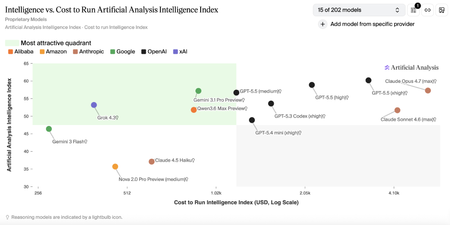
Customers building advanced AI systems increasingly need models that can reason deeply, act autonomously, and integrate reliably into real‑world workflows—all without compromising on governance or cost efficiency. Grok 4.3, xAI’s latest flagship model, is now available in Microsoft Foundry, giving developers and enterprises access to latest agentic intelligence within a production‑ready environment designed for scale. With Grok 4.3 on Microsoft Foundry, customers can more easily experiment with, evaluate, and deploy a powerful new option for agent‑based and domain‑specific applications—while benefiting from the safety controls, monitoring, and operational tooling needed to move from prototype to production with confidence. About Grok 4.3 Grok 4.3 is xAI’s latest flagship model, designed to support agent-based and productivity-focused workflows across a wide range of professional scenarios. Based on information provided by xAI and independent research conducted by Artificial Analysis, Grok 4.3 demonstrates strong performance across multiple benchmarks, reflecting a favorable balance between model capability and reported benchmark cost. *Benchmark data and cost metrics are provided by xAI and independently analyzed by Artificial Analysis. Source: https://artificialanalysis.ai Improved agentic capabilities Grok 4.3 is purpose‑built for agentic systems, improving in tool calling, instruction following, and lower hallucination, as reported by xAI. Grok 4.3 also enables policy‑aware support agents with reliable tool use and consistent behavior across extended conversations. On Microsoft Foundry, Grok 4.3 supports up to a 200k token context window, enabling extended multi‑turn reasoning and agent workflows. Multi-modal and domain‑specific strengths Grok 4.3 delivers strong performance across a range of professional and technical domains: Multimodal analysis: Native understanding across text, images, diagrams, and mixed data sources, enabling synthesis of visual and textual information for complex reasoning tasks. Web development: Excels in full‑stack web development, producing clean, production‑ready code with minimal guidance. Legal reasoning: supports interpretation of contracts, case law, and regulatory documents. Finance agents: supports financial analysis, modeling, and human decisions Built‑In Native Capabilities Grok 4.3 includes powerful native capabilities that simplify real‑world application development: Web search and X search for real‑time context Python code execution for analysis and automation File search (RAG) for enterprise knowledge grounding Excel, PDF, and PowerPoint generation for end‑to‑end workflows Together, these capabilities allow Grok 4.3 to function as a powerful agentic productivity engine, not just a language mode. Why Grok 4.3 on Microsoft Foundry Bringing Grok 4.3 to Microsoft Foundry delivers value beyond raw model performance. When deployed through Foundry, Azure AI Content Safety is enabled by default, adding an additional layer of protection for enterprise use. Customers can review the Microsoft Foundry model card for detailed safety and usage considerations. Microsoft Foundry also provides tools to support our customers with their responsible AI efforts, including model cards during selection, configurable guardrails such as jailbreak detection and content filtering, pre‑deployment evaluations and red teaming, and post‑deployment monitoring and governance. These capabilities help customers maintain output quality and deploy Grok 4.3 responsibly at scale. Pricing Model Deployment Input/1M Tokens Output/1M Tokens Availability Grok 4.3 Global Standard $1.25 $2.50 Public Preview Getting started Grok 4.3 is now available in Microsoft Foundry. Explore the model details in the Foundry model catalog, evaluate it using your own datasets, and start building and deployment in minutes.1.8KViews0likes0Comments
Now in Foundry: Tongyi-MAI Z-Image-Turbo, with FLUX.1-schnell and SDXL base 1.0
This week's Model Mondays edition pairs three models available through the Hugging Face collection in Microsoft Foundry: Tongyi-MAI's Z-Image-Turbo, a new designed for lower latency on a single GPU and native bilingual text rendering; Black Forest Labs' FLUX.1-schnell, a 12B rectified flow transformer distilled to 1–4 step inference and one of the most adopted open-weight image models since its 2024 release; and Stability AI's stable-diffusion-xl-base-1.0 (SDXL), a latent diffusion research model that can be used to generate and modify images based on text prompts. Models of the week Tongyi-MAI: Z-Image-Turbo Model Specs Parameters / size: 6B (BF16) Resolution: Up to 1024×1024 native Primary task: Text-to-image generation (English and Chinese) Why it's interesting (Spotlight) Scalable Single-Stream Diffusion Transformer (S3-DiT) architecture: Z-Image concatenates text tokens, visual semantic tokens, and image VAE tokens into a single unified input stream rather than running text and image through separate branches. This single-stream design can improve parameter efficiency relative to dual-stream DiT architectures at the same capacity. See the Z-Image technical report for details. 8-step inference at sub-second latency, fits in 16GB VRAM: Z-Image-Turbo is distilled with Decoupled Distribution Matching Distillation (Decoupled-DMD) and further refined with DMDR, a method that fuses DMD with reinforcement learning during post-training. The result is a model that runs 8 Number-of-Function-Evaluations (NFE) per image with no Classifier-Free Guidance (CFG)—which roughly halves the per-step compute compared to CFG-based inference. See the Decoupled-DMD and DMDR papers. Native bilingual text rendering and strong instruction adherence: Unlike most open-weight image models, which struggle with legible in-image text, Z-Image-Turbo renders complex English and Chinese text accurately which is useful for posters, signage, packaging mockups, and marketing creative. Try it Imagine you're a community programs coordinator at your city's parks department, planning a new summer event series — a "Cake Picnic in the Park" — designed to bring neighbors together over food in shared green space. The event is a few weeks out. You haven't booked bakery partners yet, so no actual cake exists, and you need marketing assets this week to start driving sign-ups: a hero image for the registration page, a flyer for community centers and libraries, social tiles for the city's channels. Use the prompt below and a photorealistic image, that can now be scaled to become additional assets like printed flyers or social images in minutes using image editing tools (or another model). Prompt: A round layered cake displayed on a white ceramic cake stand, topped with glossy fresh red cherries and smooth pastel pink buttercream frosting piped in delicate rosettes around the edge. One generous slice has been cleanly cut and removed from the front, revealing a perfect cross-section: four distinct horizontal layers alternating between soft pink sponge cake and fluffy white vanilla cream frosting. Professional bakery photography, soft natural window light from the left, shallow depth of field, marble countertop, warm and inviting atmosphere, photorealistic detail on the cake texture, cherry highlights, and frosting swirls. Black Forest Labs: FLUX.1-schnell Model Specs Parameters / size: 12B (rectified flow transformer) Resolution: Flexible up to 2 megapixels Primary task: Text-to-image generation Why it's interesting (Spotlight) Rectified flow transformer with adversarial distillation for 1–4 step inference: FLUX.1-schnell is the distilled, Apache 2.0 sibling of the FLUX.1 family. It uses a rectified flow formulation (a diffusion variant that learns straight-line probability paths between noise and data, reducing the number of solver steps needed) and is further compressed with latent adversarial diffusion distillation. The model generates high quality images in for latency-sensitive workloads. Permissive licensing for commercial use: Released under Apache 2.0, FLUX.1-schnell can be used for personal, scientific, and commercial purposes. This has driven broad adoption across product features that need an open, redistributable image backbone. Strong prompt adherence at its parameter range: At 12B parameters, FLUX.1-schnell sits between the SDXL family and frontier proprietary image models, and it remains a common reference point for evaluating open image generation prompt following—particularly for complex compositional prompts and longer captions—roughly two years after its initial release. Try it Hugging Face Spaces give developers the ability to experiment and try new models before deploying them. Test out a few prompts here: https://black-forest-labs-flux-1-schnell.hf.space then when you are ready, deploy the model in Microsoft Foundry. Stability AI: stable-diffusion-xl-base-1.0 stabilityai/stable-diffusion-xl-base-1.0 · Hugging Face Model Specs Parameters / size: 2.6B UNet (≈3.5B total with text encoders) Resolution: 1024×1024 native Primary task: Text-to-image generation Why it's interesting (Spotlight) Dual text encoder design and an ensemble-of-experts pipeline: SDXL uses two pretrained text encoders—OpenCLIP-ViT/G and CLIP-ViT/L—concatenated to capture both broad semantic alignment and finer-grained token-level cues. It can be run standalone or paired with the SDXL refiner in an ensemble-of-experts pipeline where the base model handles early denoising and the refiner specializes in the final steps. See the SDXL report for the original training and architecture details. CreativeML Open RAIL++-M licensing for managed deployments: SDXL is distributed under the CreativeML Open RAIL++-M license, which permits commercial use and downstream fine-tuning with documented use restrictions. Try it To go deeper on SDXL, take a look at Stability AI's generative-models GitHub repository, which implements the most popular diffusion frameworks for both training and inference and continues to expand with new capabilities like distillation. Getting started You can deploy open-source Hugging Face models directly in Microsoft Foundry in two ways. The first by browsing the Hugging Face collection in the Foundry model catalog and deploying to managed endpoints in just a few clicks. The second way is direct through the Hugging Face Hub, select any supported model and then choose "Deploy on Microsoft Foundry", which brings you straight into Azure. Learn how to discover models and deploy them using Microsoft Foundry documentation: Follow along the Model Mondays series and access the GitHub to stay up to date on the latest Read Hugging Face on Azure docs Learn about one-click deployments from the Hugging Face Hub on Microsoft Foundry Explore models in Microsoft Foundry803Views0likes0CommentsNow in Foundry: IBM Granite 4.1, NVIDIA Nemotron Nano Omni, and Qwen3.6-35B-A3B
This week Microsoft Foundry adds two major model families alongside a reasoning powerhouse that spans the full spectrum from specialized speech and vision to general-purpose coding and long-context analysis. IBM's Granite 4.1 is a famiily of 10: six LLMs across 3B, 8B, and 30B sizes in both full-precision and FP8 variants, plus a safety model, a vision-language model for document extraction, and a multilingual speech recognition model. NVIDIA's Nemotron-3-Nano-Omni-30B-A3B-Reasoning brings multimodal capability—video, audio, image, and text—to a 31B Mamba2-Transformer Hybrid Mixture-of-Experts (MoE) architecture that activates only 3B parameters per forward pass; three variants are available in Foundry (BF16, FP8, and NVFP4), with the FP8 variant featured here. Qwen3.6-35B-A3B is designed for agentic coding among open models, with thinking preservation across conversation turns and a context window extensible to 1 million tokens. Models of the week IBM: granite-4.1-30b Model Specs Parameters / size: 30B (flagship of the Granite 4.1 family) Context length: 131,072 tokens Primary task: Text generation (multilingual instruction following, RAG, tool calling, code, summarization) Why it's interesting The Granite 4.1 release brings 10 models to Microsoft Foundry. The LLM lineup covers granite-4.1-3b-instruct, granite-4.1-8b-instruct, and granite-4.1-30b-instruct with FP8 variants for each, plus granite-guardian-4.1-8b for safety, granite-vision-4.1-4b for document and chart understanding, and granite-speech-4.1-2b for multilingual speech recognition. This is a deployment-ready stack where teams can mix and match model sizes and modalities from a single provider. Strong instruction following and reasoning at the 30B scale: granite-4.1-30b-instruct scores 80.16 on MMLU, 64.09 on MMLU-Pro, 83.74 on Big-Bench Hard (BBH), 77.80 on AGI Eval, 45.76 on GPQA (Graduate-Level Google-Proof Q&A, a graduate-level science reasoning benchmark), and 89.65 average on IFEval (instruction following). These results reflect SFT and reinforcement learning post-training focused specifically on instruction compliance, tool calling accuracy, and long-context retrieval. (View benchmarks here) Enhanced tool calling and 12-language support: Granite 4.1 models are trained for structured function calling and support 12 languages—Arabic, Chinese, Czech, Dutch, English, French, German, Italian, Japanese, Korean, Portuguese, and Spanish—with dialog, extraction, and summarization capabilities. Safety and multimodal coverage within the same family: The inclusion of granite-guardian-4.1-8b (a safety classifier for detecting harmful content and prompt injections), granite-vision-4.1-4b (a Vision Language Model optimized for document extraction from PDFs, charts, and tables), and granite-speech-4.1-2b (a 2B multilingual Automatic Speech Recognition model) means teams can address safety, document parsing, and audio ingestion within the same model family—reducing integration complexity across a full pipeline. Try it Use Case Prompt Pattern Multilingual RAG Submit retrieved document passages in any of 12 supported languages; ask model to synthesize and cite sources Agentic tool calling Provide function definitions + user goal; model plans and executes tool calls in structured format Document extraction (granite-vision-4.1-4b) Submit PDF page image; extract tables, key figures, or form fields as structured JSON Safety classification (granite-guardian-4.1-8b) Pass user input or model output; receive structured risk assessment before serving response Sample prompt for an enterprise document processing deployment: You are building a multilingual document intelligence pipeline for a global financial institution. Using the granite-4.1-30b-instruct endpoint deployed in Microsoft Foundry, submit each incoming policy or regulatory document with the following system instruction: "You are a compliance analysis assistant. Review the document and extract: (1) all regulatory requirements described, (2) the entities to which each requirement applies, (3) any compliance deadlines mentioned, and (4) any penalties or consequences for non-compliance. Return the output as a structured JSON array with one entry per requirement." For documents that include scanned pages, first route them through granite-vision-4.1-4b to extract text and table content before passing to the 30B model for compliance analysis. Pass all user-facing outputs through granite-guardian-4.1-8b to screen for sensitive information before returning results. NVIDIA: Nemotron-3-Nano-Omni-30B-A3B-Reasoning-FP8 Model Specs Parameters / size: 31B total, ~3B activated per forward pass (Mamba2-Transformer Hybrid Mixture-of-Experts) Context length: 256,000 tokens Primary task: Video-audio-image-text-to-text (Multimodal understanding, reasoning, tool calling) Why it's interesting Multimodal input from a single efficient endpoint: Nemotron-3-Nano-Omni-30B-A3B-Reasoning supports video (up to 2 minutes), audio (up to 1 hour), images (RGB), and text—all from a single model deployed in Microsoft Foundry. Three variants are available in Foundry: full-precision BF16, FP8, and NVFP4. Paper: Nemotron Nano Omni technical report. Strong results across vision, document, video, and audio benchmarks: With reasoning mode enabled, the model scores 82.8 on MathVista-MINI (visual math reasoning), 67.04 on OCRBenchV2-EN (document OCR), 63.6 on Charxiv Reasoning (chart understanding), 72.2 on Video MME (video Q&A), 74.52 on Daily Omni (video+audio omnimodal understanding), and 89.39 on VoiceBench (speech instruction following). On OSWorld (GUI agent benchmark measuring autonomous computer use), it scores 47.4—a notable result for a model at the 3B active parameter scale. (Please see above model cards for further benchmark data) Mamba2-Transformer Hybrid MoE for efficient long-context inference: The model's layers alternate between Mamba2 state-space blocks (which process sequences with linear rather than quadratic cost) and standard Transformer attention blocks, combined with Mixture-of-Experts feedforward layers. Only ~3B parameters are activated per token despite the 31B total, making the 256K context window practically usable at lower compute cost than a comparably sized dense model. Word-level timestamps, JSON output, and tool calling for structured media workflows: The model produces word-level timestamps from audio, enabling precise transcript-to-timecode alignment for review and indexing workflows. Combined with JSON-structured output, chain-of-thought reasoning, and native tool calling, it can serve as an agentic step that ingests raw media (meeting recordings, M&E assets, training videos) and produces structured outputs for downstream systems without requiring separate transcription or OCR preprocessing stages. Try it Use Case Prompt Pattern Meeting intelligence Submit audio recording (up to 1 hr); extract transcript with word-level timestamps, action items, and decisions as structured JSON Video content analysis Submit video clip (up to 2 min) + query; retrieve timestamped summary of key events or spoken content Document + audio joint analysis Submit scanned document image alongside narrated walkthrough audio; extract and reconcile information from both modalities Multimodal tool calling Provide tool definitions + combined image/audio input; model reasons over content and executes structured tool calls Sample prompt for a media and compliance deployment: You are building a broadcast compliance review system for a media company. Using the Nemotron-3-Nano-Omni-30B-A3B-Reasoning-FP8 endpoint deployed in Microsoft Foundry, submit each recorded segment as video input with the following instruction: "Review this video segment and produce a compliance report as a JSON object with the following fields: transcript (full text with word-level timestamps), flagged_segments (array of objects with start_time, end_time, content, and reason for flagging), speaker_count (estimated number of distinct speakers), and compliance_summary (overall assessment). Flag any content that includes unverified factual claims, restricted product categories, or regulatory disclosures that may be incomplete." Use the word-level timestamps from the compliance report to route flagged segments directly to the editorial review queue with precise timecode references. Qwen: Qwen3.6-35B-A3B Model Specs Parameters / size: 35B total, 3B activated (Mixture-of-Experts) Context length: 262,144 tokens natively, extensible to 1,010,000 tokens Primary task: Image-text-to-text (agentic coding, reasoning, vision) Why it's interesting Agentic coding improvements over Qwen3.5-35B-A3B: Qwen3.6-35B-A3B scores 73.4 on SWE-bench Verified (vs. 70.0 for Qwen3.5-35B-A3B and 52.0 for Gemma 4 31B), 67.2 on SWE-bench Multilingual (vs. 60.3 and 51.7), and 49.5 on SWE-bench Pro (vs. 44.6 and 35.7). Terminal-Bench 2.0 reaches 51.5 (vs. 40.5 and 42.9). The update targets frontend workflows and repository-level reasoning specifically, areas where earlier Qwen3.5 iterations showed gaps. Blog post: Qwen3.6-35B-A3B. Hybrid architecture: Gated DeltaNet and Mixture-of-Experts: The model's 40 layers alternate between Gated DeltaNet blocks (a form of linear attention that avoids the quadratic cost of standard self-attention), Gated Attention blocks (using Grouped Query Attention with 16 query heads and 2 key-value heads), and Mixture-of-Experts (MoE) feedforward layers with 256 experts (8 routed + 1 shared active per token). Only 3B parameters are activated per forward pass, keeping inference cost comparable to a 3B dense model while retaining the capacity of a 35B model for knowledge and specialization. Thinking preservation across conversation turns: Qwen3.6 introduces an option to retain reasoning context from previous messages in multi-turn conversations. In prior models, chain-of-thought traces were stripped between turns, requiring the model to re-derive context it had already reasoned through. With thinking preservation enabled, iterative coding workflows—such as debugging across multiple exchanges—benefit from accumulated reasoning without repeating earlier analysis. Natively extensible to 1 million token context: The 262K native context is already among the largest in open models at this size, and the architecture supports extension to 1,010,000 tokens. On GPQA Diamond (science reasoning), Qwen3.6-35B-A3B scores 86.0—above both Gemma 4 31B (84.3) and Qwen3.5-27B (85.5)—while matching Gemma 4 31B on MMLU Pro (85.2) and LiveCodeBench v6 (80.4 vs. 80.0). Try it Use Case Prompt Pattern Repository-level code change Provide repository structure + task description; model plans file edits and outputs unified diff Multi-turn iterative debugging Enable thinking preservation; submit failing test + code across multiple turns; accumulate reasoning context Frontend code generation Provide design spec or screenshot + existing codebase context; generate component implementation Long-document reasoning Submit technical specification (up to 262K tokens); ask model to identify ambiguities or implementation gaps Sample prompt for a software engineering deployment: You are building an automated code review and implementation assistant for a platform engineering team. Using the Qwen3.6-35B-A3B endpoint deployed in Microsoft Foundry, enable thinking preservation for multi-turn sessions. In the first turn, submit the repository file tree and a GitHub issue describing a required API endpoint change. Prompt the model: "Review the repository structure and describe your implementation plan, including which files need to change and why." In the second turn, submit the relevant source files and prompt: "Based on your earlier plan, implement the changes and produce a unified diff." In the third turn, submit the test suite and prompt: "Write additional unit tests for the new endpoint, covering edge cases identified in your reasoning." The thinking preservation feature ensures the model carries forward its understanding of the codebase across all three turns without re-explaining context. Getting started You can deploy open-source Hugging Face models directly in Microsoft Foundry by browsing the Hugging Face collection in the Foundry model catalog and deploying to managed endpoints in just a few clicks. You can also start from the Hugging Face Hub. First, select any supported model and then choose "Deploy on Microsoft Foundry", which brings you straight into Azure with secure, scalable inference already configured. Learn how to discover models and deploy them using Microsoft Foundry documentation. Follow along the Model Mondays series and access the GitHub to stay up to date on the latest Read Hugging Face on Azure docs Learn about one-click deployments from the Hugging Face Hub on Microsoft Foundry Explore models in Microsoft Foundry1.1KViews0likes0Comments