mobile
33 Topics
Microsoft Teams and Authenticator lockdown
I’m having a very frustrating issue with Microsoft Teams. I am able to log in to teams using my normal personal email and account ONLY ON THE WEB BROWSER. From the web browser, I am not able to access the business channel that I am in. When attempting to log in on the downloaded mobile Teams App, I am sent directly to Microsoft Authenticator, which after waiting several hours, waiting even a full day, is still displaying a message about repeated verification attempt and to wait and try again later. I have accessed Microsoft support chat and they had no help for me. I need the authenticator lockdown to refresh and it will not.362Views0likes1Comment
Trapped in an Authenticator Loop
Dear Community, please help! I am trapped in an Authenticator Loop. I've got a microsoft workplace account, but if I want to log in, I have to type in a code from the microsoft authenticator app. I downloaded the app, but in order to use it, I have to log into my account and in order to do so, I also have to type in a code from the authenticator app, which I don't get, because to get the code I would have to log into the authenticator app, what I would need a code for... No matter which link I click, I can't open anything before I enter the code, which I can't get. I am using teams on mac, either on a firefox browser or on the desktop app and the authenticator on an Iphone. Please don't just tell me "don't use teams on a mac", this wasn't my choice. Unfortunately, my emplyer's IT support also is chronically unavailable. So is here anyone who could help me? I've already gone through the usual deleting the app, using another browser etc. options. Best Lukas2.3KViews0likes6CommentsAAD multiple accounts from same realm is not supported by clients.
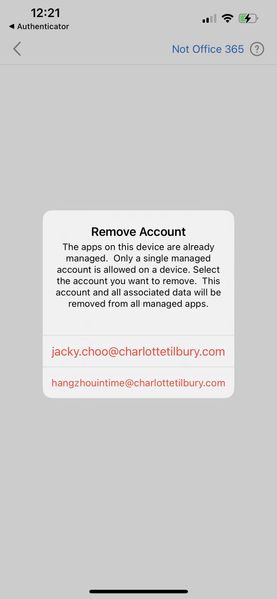
I've signed out of Excel for iPadOS 2.101.25100311. I've closed (not forced shutdown) and reopened the app. I'm trying to sign in with a different Microsoft account. However, it shows the error: "Another account from your organization is already signed in on this device". How can I completely sign out of that other account? The troubleshooting details are below. Correlation Id: 5520852a-4877-ec4c-97be-f3de2c079058 Timestamp: 2026-06-21T22:49:29.000Z DPTI: FAF41146-8AF4-425C-95EE-1654DD13C47C Message: AAD multiple accounts from same realm is not supported by clients. Tag: 5pzx9Solved535Views0likes1CommentTAP Question
Hi All I hope you are well. Anyway, I'm looking for some clarification over Temporary Access Passes (TAP) as our testing seems to reveal some different results from those listed in the MS documentation. Here's the scenario's. My understanding: Require MFA policy deployed via Conditional Access New user F3 user starts Issue TAP to user where they can then setup MFA themselves via My Security Info etc Testing results: Require MFA policy deployed via Conditional Access New user F3 user starts User can setup MFA themselves via MS Auth app on a mobile device or via My Security Info in a browser MS TAP Info page: "The most common use for a TAP is for a user to register authentication details during the first sign-in or device setup, without the need to complete extra security prompts." Ref: Configure a Temporary Access Pass in Microsoft Entra ID to register passwordless authentication methods - Microsoft Entra ID | Microsoft Learn Have I missed understood something here and if a new user can indeed still setup MFA is there any real need for a TAP for first time user? Info appreciated. SK245Views0likes1CommentWeb Sign-In: Alert QR Code/Code for Mobile
Had 2FA turned off in the work account, on the web login screen a reminder only a few logins allowed without the Authenticator. Fair enough so instead of logging in, got out the Android tablet and installed the Authenticator and logged in with the account there, no problems. A few minutes later attempted to log in to the account on web, this time it presented a QR code with the link "phonefactor:/activateaccount .... mobileappcommunicator.auth ..." which didn't seem to go well in Android using QR scanner or camera. The web login suggested an alternative to the QR code, an 8? digit code, but nothing in the Authenticator app seemed to want it. All of a sudden everything seems to work fine, the web login (with a note that 2FA was used in the login) and the Authenticator on the tablet, thus turning out as a good news ending to a slightly shaky start. :)544Views0likes2Comments
Microsoft Authenticator Passkeys for Entra ID on unmanaged devices
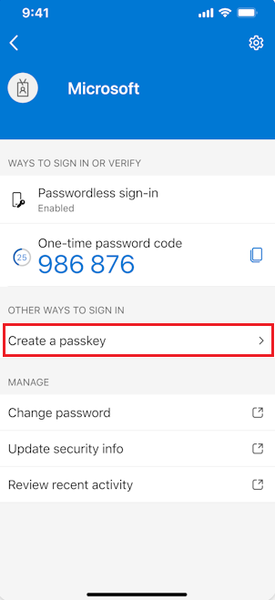
Hello, has anyone successfully registered passkeys on an unmanaged phone in an organisation with device compliance policies? Use case is to provide a phishing-resistant MFA option via Authenticator app for logging into apps on their desktop. Users already have authenticator app on their phone and do number matching MFA. https://learn.microsoft.com/en-us/entra/identity/authentication/how-to-register-passkey-authenticator?tabs=iOS When I select "Create a passkey" - I need to log into my account. However I'm blocked from successful authentication because I have conditional access policies to require compliant devices. As my mobile phone is not enrolled into Intune, I never get to the step where the passkey is created and registered. Based on the constraints - it seems like passkeys cannot be used for unmanaged/BYOD devices for organisations that have device compliance policies. It can only be used for users who have enrolled their mobile phone. Looking to see if anyone has tips or different experience using passkeys on unmanaged mobile phones to log into Entra?865Views0likes1Comment
Website Rendering Issue on Microsoft Edge - Seeking Assistance
Hello everyone, I've been encountering an unexpected problem with my website's rendering specifically on Microsoft Edge browser. The website displays perfectly fine on other browsers like Chrome, Firefox, and Safari, but when viewed on Microsoft Edge, certain elements seem to be misaligned or appear distorted. I've ensured that the website's code is compliant with web standards and has been validated. Despite this, the issue persists exclusively on Edge. I've also tested it across multiple devices running different versions of Edge, and the problem seems consistent. The https://capprocutapk.com/ is built using HTML5, CSS3, and JavaScript/jQuery for interactivity. I've used responsive design practices to ensure compatibility across various screen sizes. Has anyone encountered a similar problem before or have suggestions on how to address this issue specific to Microsoft Edge? Any insights, advice, or potential solutions would be greatly appreciated. Plz tell me how to fix as I am not a technical person. Thank you in advance for your help!Solved2.4KViews0likes4CommentsPassword-less authentication with using One-time passcode from Microsoft Authenticator App.
Recently one of my users was in Internet restricted zone and when he tried to sign-in with Password less method, He didn't get the code due to no internet in mobile and in addition to this, he forgot the user sign-in password. Is there any method or way to setup that we can be able to sign-in with using the 6-digit Microsoft Authenticator App Code instead of the push notification and password.7.1KViews0likes2CommentsCan I use Microsoft Authenticator to authenticate multiple GitHub accounts?
I have two personal GitHub accounts. One is a Pro account and the other is a free account. Each account is associated with different Microsoft Accounts. I've been getting emails to my free GitHub account, telling me that they are going to start requiring the use of 2FA to authenticate. And this will start soon, in just a few weeks. My question is, can I use Microsoft Authenticator for both GitHub accounts? I'm sure that at some point my GitHub Pro account will also require 2FA, I just haven't started getting any emails about that yet. And of course, I use only one phone number for both GitHub accounts. So, can I use Microsoft Authenticator for two GitHub accounts with different email addresses, but the same phone number as the secondary SMS authentication?1.6KViews0likes2Comments