mobile
13 Topics
Clipboard unavailable Word
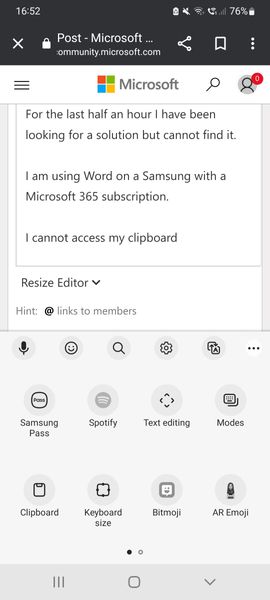
Hello For the last half an hour I have been looking for a solution but cannot find it. I am using Word on a Samsung with a Microsoft 365 subscription. I cannot access my clipboard (as shown in the screen). I can copy and paste the last item I copied in Word using the Copy, Paste & Cut options in the app, but the "Clipboard" icon is unavailable. I have tried to restart the app multiple times. It's very annoying. Thanks for your help5.2KViews3likes3Comments
Word fillable forms that are mobile device compatible
I can't find any recent info on how to make word fillable forms compatible for mobile devices (so they can be completed on mobile phone). I've set up forms, and they are restricted for fillable entry only. They send via email and work on PC, but on a mobile, if opened through mobile word app, you can select but not input anything. If this worked if would save so many issues for me, but I've no idea if or how it can be done. I have read some stuff on Infopath, but this is a little beyond me. Did try it but it would not import my word fillable template. Not really keen to redesign my many forms, if I don't need to and would rather reduce number of apps/add ons if possible. Any advice?2.5KViews1like2Comments