mobile application management (mam)
858 Topics
New MD-102 : Weird departure from course traditional design
The first slide deck is tremendously long. It takes me 5 hours of lecture to get students into the first lab. The slide decks are very repetitive and could often be replaced with Instructor Demonstration slides. The topics are far-ranging: it mixes identity administration, Intune RBAC, Android enrollment, LAPS, Windows enrollment, and Autopilot before students have a stable mental model of the fundamentals of: Device enrollment > Policy/app creation > Targeting assignment. The first lab is disjointed, with many configurations, such as Creating Administrative units, Assigning Scope tags, and Custom Intune Roles, not implemented until later in the week in Exercise 5. The delegation model, administrative-unit work, and Android restrictions obscure the basics students should understand first. The course design seems to be a big departure from most, if not all, Microsoft courses I have ever taught. No Entra Connect Lab and no real Autopilot lab are a disappointment to some students as well27Views0likes0Comments
Intune App Protection Policy Still Allows Access to iOS Files App
I'm testing a very restrictive Intune App Protection Policy for Microsoft Word on iOS. The policy successfully blocks actions such as saving company data to unmanaged locations, copy/paste, screenshots, printing, and data transfer to other apps. However, users can still open Word, browse the native iOS Files app, open personal/local documents, and modify them. Is this expected behavior? In other words, do App Protection Policies only protect organizational data, while still allowing access to personal files stored on the device? Has anyone found a way to prevent Word from browsing or opening local files through the iOS Files app, either with App Protection Policies, App Configuration Policies, or MDM restrictions? Thanks in advance for any insight.426Views0likes2Comments
Android 12 Sign-In Issue with HP Corporate Accounts via Intune Company Portal
Since yesterday, HP employees using older mobile operating systems (Ex. Android 12) have been unable to access Microsoft Outlook and Microsoft Teams on their smart devices. When launching Outlook or Teams, users are prompted to install the Microsoft Intune Company Portal app for authentication and device compliance. However, the latest version of this app appears to require a newer operating system version and is not supported on older devices. As a result, users with devices running Android 12 or earlier cannot complete the authentication process and are unable to use Outlook or Teams. ■ Please provide additional details 1) The issue started yesterday and affects employees using older Android and iOS versions. 2) On iOS devices, users can typically resolve the issue by upgrading to a newer iOS version. 3) However, some Android devices cannot be upgraded further due to manufacturer limitations. 4) For example, Samsung Galaxy Note 10 officially supports Android 12 as its final OS version and cannot be upgraded to Android 13 or later. 5) Because of this limitation, affected Android users are unable to install or use the required Microsoft Intune Company Portal app, which prevents access to Microsoft Outlook and Microsoft Teams. 6) This issue may impact multiple HP employees who are using Android devices that do not support Android 13 or later. Example affected device: Samsung Galaxy Note 10 (Android 12) Affected applications: Microsoft Outlook, Microsoft Teams, and Microsoft Intune Company Portal Business impact: Users cannot access corporate email, messaging, and collaboration services from their mobile devices. I have already posted this issue on the Microsoft Feedback Portal: https://feedbackportal.microsoft.com/feedback/idea/7bba2697-a2a2-f111-85ce-7c1e529382f4 However, this issue cannot be reproduced when using a personal Microsoft account. It only occurs when using an HP corporate email account because HP requires the use of the Microsoft Intune Company Portal app for authentication and device compliance. Since the problem appears to be related to the Intune Company Portal rather than Outlook or Teams themselves, I would like to post this issue here and seek guidance on resolving the Intune Company Portal authentication and compatibility issue affecting Android 12 devices.629Views0likes2Comments
Problems identifying managed iOS devices when using APP
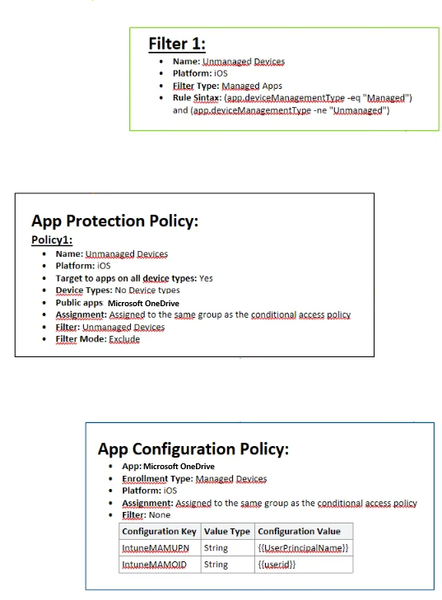
Hello, As the title says i am having a hard time getting this to work. We have been using APP for a long time, but it has not been necessary for us to have different policies for managed (we only use iOS) and unmanaged devices (all mobile device types). Now i want to remove APP from managed devices all together, and only enforce this on unmanaged devices (BYOD) Please see attached image of how it is configured today. I also have an CA policy which requires APP when using MS apps, where i have added and "Filter for devices" exclude with following syntax: device.enrollmentProfileName -contains "iOS standard profile" (which cover our enrollment profiles, both are fully managed) When enrolling a managed device, APP still is enforced. Does anyone have any tips? I wanted to try here before submitting a ticket to MS. As far as i have found out , the app.devicemanagmenttype is the only rule that can be used to filter managed devices when used with APP.621Views0likes1Comment
iOS Enrollment and Conditional Access
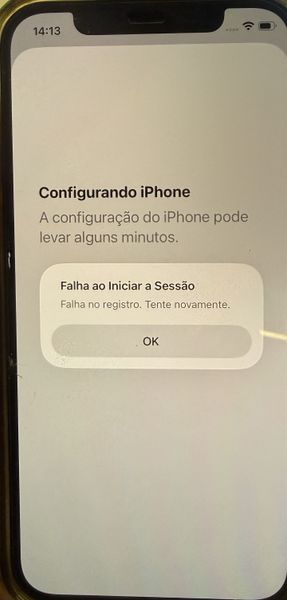
Hello everyone, I need some help! We are configuring Intune to allow BYOD on iOS devices using the Account Driven User Enrollment method. In this scenario, the user enrolls the device by following the path: Settings > General > VPN & Device Management > Sign in to your Work or School Account The enrollment process was working correctly until we configured a Conditional Access policy to ensure that only BYOD-managed devices can access company resources. In other words, only devices that have successfully completed enrollment and are marked as Compliant in Intune should be allowed to use corporate applications. However, after applying the policy, we are no longer able to complete the enrollment process. During one of the enrollment steps, the device displays the following message: Translate English "Setting Up iPhone iPhone setup may take a few minutes. Sign-In Failed Enrollment failed. Please try again. OK" 1. Target resources (Include) 2. Target resources (Exclude) 3. Device Platform: iOS 4. Filter for devices: device.mdmAppId -notIn ["0000000a-0000-0000-c000-000000000000"] 5. Grant: Require device to be marked as compliant This is our current Conditional Access policy configuration. Has anyone encountered this behavior before, or can identify whether there is any setting that might be blocking the enrollment process during the compliance validation stage?352Views0likes1CommentProtect org data on BYOD Windows / macOS devices
Hi All I hope you are well. Anyway, I have a need to protect org data on: Window personal / BYOD devices MacOS personal / BYOD devices What's the best way to achieve this? My thinking is: 1 X Conditional Access policy that blocks 1 X Conditional Access policy that allows via Edge, no persistent session, no downloads etc Device filter on both policies that target unmanaged devices Any other suggestions? SK163Views0likes3CommentsWhich Entra account are you supposed to use to connect to a managed Google Play account?
At Connect Intune account to managed Google Play account - Microsoft Intune | Microsoft Learn, it says: We recommend using the Microsoft Entra account you're signed into to create the Google Admin account. So I used my Entra account to set it up. Now, though, when I look at the Managed Google Play item in Intune under Devices > Android > Enrollment, it has my email address under "Linked account". Was I supposed to create a shared Entra account to make this connection? What happens when I leave the org?379Views0likes3Comments
App Protection: Custom app vs Partner app
Is there any functional difference in using an app protection policy to manage a public partner app versus a custom application? We have an app vendor that says they wrapped their app with the SDK but it is not on the partner list so we cannot pick it from the public app list. Which leaves us with the custom app option. Is the functionality the same? Will it show up on the app protection report, work with conditional access policies, other Microsoft solutions, etc.? Thank you - Jessie230Views0likes2Comments