migration tool
12 TopicsOnline Migration to PostgreSQL Flexible Server on Azure from Single Server
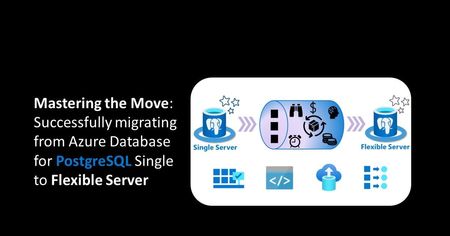
You can leverage PostgreSQL's online migration feature for seamless database transitions, ensuring minimal downtime during the process. By employing this capability, you can efficiently migrate data while simultaneously maintaining continuous access for users. This approach streamlines the migration process, enhances overall system reliability and reduces disruptions.3.1KViews2likes0Comments
Suggestion for how to Move user profile data and settings to Azure user accounts
Just started at a new customer who will move mainly laptop users (200+), who work externally, to a clean Azure account. All the laptop users currently have Domain profiles, with data stored locally, but will get a clean Azure Account as they will be in a separate org. My task is how can I create a setup to move their data and settings, browser favorites etc. over to their new Azure profile? This task needs to be simple enough for a group of supporters to be able to carry out. So far only briefly tested Laplink but it crashed Outlook, so it would not open at all. Also it is very expensive. In case you have suggestions for a tool, that you are experienced with (know is good!) and is simple to use for a big group of supporters it would be a big help. Thorough testing takes a really long time 😕 SBabicSolved1.2KViews1like3Comments
Migration Tool to migrate Google Workspace email to Hosted Exchange email
I recently got a Hosted Exchange email account, and I wanted it to have an exact copy of my Google Workspace email. Google advised me to use "Microsoft Migration Tool," but I have not been able to find it. Does any one know where to get it, or how to accomplish my goal? Thank you. Happy New Year to All.1.1KViews0likes2CommentsMove over User data, when reloading or replacing a PC
In a new consultant role at new customer who needs to replace many PCs. Some with redirected folders and some (laptops) without. I need a solid, efficient and easy way to move over user data, app settings from the old PCs to the new ones. The guy before me here have run tests with tools from Lablink and ForensIT but did not always succeed and had less than perfect results. Also they are extremely expensive as price for the licenses we would need is like ½ a years pay. In case you have suggestions for a tool, that you are experienced with (know is good!) and is simple to use for a big group of supporters it would be a big help. Thorough testing takes a really long time 😕 SBabicSolved932Views1like2CommentsQuestion regarding incremental migrations using MS SharePoint Migration Tool
Hello everyone! I had a question regarding the mechanics of incremental OneDrive migrations using the MS SharePoint Migration Tool. First off, I do understand that if a user runs a migration, saves that migration, then re-runs it again, that an incremental migration will be performed. What I don't know (and am hoping to get a definitive answer about), is whether or not a migration will be incremental if a different user runs a "new" migration on a user who has already been migrated by a different user. For example, the person who originally performed the migration is no longer available, and a new person runs a new migration of the exact same data, will the migration tool look at the destination, see data with the same file names, and skip those already existing files and only migrate new files? Please let me know if my question doesn't make sense. I tried to word it in a decently comprehend-able manner. 🙂 Thanks in advance, everyone!785Views0likes0Comments
SKUs not enabled for migration to NCE but need to be manually migrated
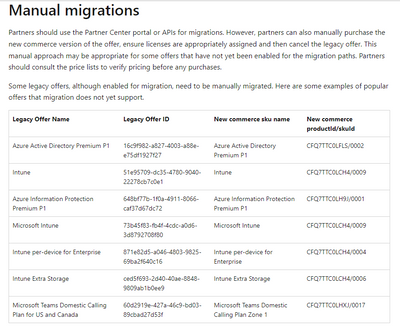
Hello. (Moved this post from another community) Azure Active Directory Premium P1 is currently on the list of SKUs "enabled for migration but need to be manually migrated". Can you explain what this means? https://learn.microsoft.com/en-us/partner-center/migrate-subscriptions-to-new-commerce#manual-migrations Also, it says that this is just a sample of the popular products that are enabled but need manual migration. How do we tell if other SKUs not listed here need to be manually migrated? Right now, in the case of AAD Premium P1, the migration tool looks like it's enabled - what happens if we try to proceed using the migration tool? Will there be an error message indicating that a new subscription needs to be purchased first and manually migrated? Thank you in advance.671Views0likes1CommentHacking the migration service in Azure Database for PostgreSQL
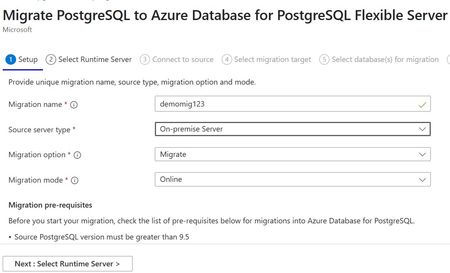
Introduction Azure Database for PostgreSQL offers a powerful and scalable database solution for developers and enterprises. Whether you're looking to change your networking configuration from VNET integration to Private Endpoint or downsizing storage, the Migration Service in Azure Database for PostgreSQL provides options for smooth migrations. Historically, migrating between flexible servers was manual—using pg_dump/pg_restore or third-party tools—which can be time-consuming and error-prone. This guide introduces an alternative workaround: utilizing the Migration Service to facilitate flex-to-flex migrations and outlines known networking scenarios where this workaround has been used. Note: While flex to flex migration isn't officially supported by the Azure Database for PostgreSQL product team, it has been observed to work successfully for many customers. Why migrate from Flex to Flex? There are several reasons common reason to migrate between Azure Database for PostgreSQL Flexible Servers: Change from VNET integration to Private Endpoint networking Downsizing the storage capacity of a server Consolidating databases to optimize costs Regardless of your specific reason, utilizing the Migration Service in supported scenarios simplifies the process and helps maintain data integrity. How the migration workaround works? In brief, select "On-Premise Server" as the migration source in the Migration Service, then provide the details of your existing flexible server. This approach leverages the standard migration tool, sidestepping some limitations. Restrictions & Limitations Keep in mind, the same restrictions outlined by Microsoft in their official documentation apply here: Known issues with the Migration Service Prerequisites for migration Migration of extensions Known Networking Scenarios (Unofficially Supported) PostgreSQL Flex source PostgreSQL Flex target Status Public Access Public Access Works Private Endpoint Private Endpoint Works Vnet Integrated Private Endpoint Works Vnet Integrated Vnet Integrated Not tested How to perform the migration? Step 1: Launch the Migration Service: Step 2: Enter Source Details Select “On-Premise” as the source server type Choose the migration option Choose the migration mode Include the Azure Database for PostgreSQL source server details - this is where we input the flexible server credentials Step 3: Connect to the Target Server Choose your target flexible server and complete the migration wizard Remember to review extension compatibility if you use extensions. Conclusion Migrating between Azure PostgreSQL Flexible Servers using this workaround is a practical option when supported scenarios don't fit your environment. Follow the outlined steps for a smooth, reliable migration with minimal disruption. With careful planning and validation, you’ll maintain data integrity and build a scalable database infrastructure on Azure. Happy migrating! Additional Tips & Resources If you encounter issues related to extensions or other limitations, consider exploring pgcopydbfor advanced migration options. Feedback: We welcome your thoughts and suggestions - as well as net new supported scenarios.580Views5likes0Comments