microsoft teams
17400 Topics
Teams auto selecting "Missed Calls"
I have the calls tab selected. On that tab I have "All" selected. I then click the Activity tab. Teams is selecting "Missed" on that tab. Why is it selecting "Missed"? The issue is when I click back to the calls tab Teams then selects the "Missed" on the calls area. Now if I click on "All" on the Activity tab and then click back to the Calls tab everything is fine. Seems like it is auto selecting stuff for me I didn't ask it to do.37Views0likes2Comments
MS Teams crashes *sometimes* during Video calls/meetings
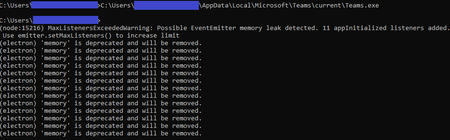
I've been researching an issue where several users are experiencing periodic Teams crashes always during a Video call/meeting. A call that crashes once is often successful right after, and the crashes don't follow any pattern. I haven't found any commonalities across hardware or drivers, and have been checking network quality pretty closely. It really seems like it's a Teams software issue. Is anyone else dealing with this kind of inconsistent stability? The errors in logs (that I've seen) are always: Renderer process crashed; rendererName=mainWindow; crashType=crashed; url=https://teams.microsoft.com; restarting app=YES Other forum threads haven't been useful; they usually point to a software glitch that has since been patched, or some common hardware issue with a specific laptop model (Surface) or webcam (Logitech). I tried to figure out if I could disable GPU rendering (just as a test) and that doesn't appear to be an option. Is there another test we could try? This seems to be related to graphics rendering, particularly since it always happens during a beginning of a Video call or meeting, and the detail in the error logs... I opened a Microsoft support case, but it's going no where fast, particularly since the issue isn't reproducible on-demand. In my various testing and research, I tried launching Teams from a command prompt window (thinking maybe "--disable-gpu" would be an option to launch with). It launched and then I stumbled upon this strange output; I eventually canceled with Ctrl+C and Teams closed. I think this is totally unrelated, but figured I'd share it in case it ends up being relevant. The messages sure look like Teams is experiencing a memory leak ("MaxListenersExceededWarning: Possible EventEmitter memory leak detected."). In any case, this output was on a system where Teams has never crashed as described before, so probably not the best clue.Solved124KViews0likes52Comments
Student chat disabled?
Hi there, I’ve started testing and setting up Teams for my education customer. I’ve gotten reports that teachers have a “This chat has been disabled. You can’t send send a message , but can view past messages.” Message when going to message a student. I have tried re-assigning policies but nothing that I’ve tried has worked. Any resolutions? Help is greatly appreciated. Thanks, Jessie M. Hadaller EDIT: This issue only appears on the iPad app version of Teams. Version#:3.10.02.4KViews0likes3CommentsSync unread notifications between desktop and mobile
Running iOS 15.5. In the actual Teams app on my phone, conversations that were read on desktop show as read, however the challenge I'm facing is related to the notification center on my phone (i.e. the notifications that show up on the lock screen). Even though the app knows those messages have been read, the notifications on the lock screen still show up. The challenge is if I'm working on my desktop for a few hours, the next time I look at my phone I'll have a slew of Teams notifications in the notification center for messages that have already been read and it's annoying and time consuming to clear them. I've already blocked notifications in the app using the "when active on desktop" setting, but it seems as though this doesn't always work and I still end up with notifications on my phone for conversations I've had on desktop. Is there anything I can do about this or is it a bug?3KViews0likes2CommentsMicrosoft Teams Takes Center Stage at the 2026 Microsoft 365 Community Conference
Microsoft Teams is where people, Microsoft 365 Copilot, and agents come together to collaborate, communicate, and get work done—before, during, and after every interaction. Contributing to and benefiting from Work IQ, Copilot in Teams understands the context, relationships, and signals behind real work, bringing meetings, calling, chat, and collaboration into a single, connected experience across Microsoft 365. At the 2026 Microsoft 365 Community Conference, Teams will be front and center with a broad set of sessions that reflect how teamwork is evolving. From everyday collaboration and meetings to frontline communications, external collaboration, and Copilot‑powered workflows, Teams is designed to help organizations move work forward with clarity and confidence. Register for the M365 Conference today and save $150 with code SAVE150. #M365Con26 Across the Teams sessions at the conference, you’ll see how AI‑powered capabilities—like intelligent meeting recap, real‑time language interpretation, AI‑assistance for calling, and collaborative agents—help teams stay aligned whether work happens in the office, on the front line, or across time zones. What to Expect from the Teams Track The Teams track at the M365 Community Conference offers a practical, end‑to‑end view of how Teams supports new ways work gets done and how organizations can continue their journey toward becoming a Frontier Firm by connecting communication, collaboration, intelligence, and governance in one AI-powered platform. Sessions span key areas including: Collaboration across meetings and events, chats and channels AI-powered communications and modern calling Enabling frontline teams Seamless and secure external collaboration Workplace collaboration and management Operational excellence for IT admins Protection against modern and evolving threats How Teams integrates across Microsoft 365 and contributes to Work IQ for Copilot Whether you’re deploying Teams, managing it at scale, building on it, or using it to drive business outcomes, the Teams track is designed to meet you where you are and help you plan what’s next. You can find the full list of sessions here. Start Here: The Teams Track Session You Shouldn’t Miss To set strategic context for the Teams track, start with Your Guide: What’s New in Teams — Collaboration, Communication, and Copilot. Led by Ilya Bukshteyn, Corporate Vice President, Microsoft Teams, and Chandra Chivukula, Vice President, Microsoft Teams Engineering, this session sets the foundation for the Teams track. You’ll get a high‑level view of where Teams is headed—how it’s becoming more intelligent, easier to manage, and increasingly shaped by Copilot across collaboration, meetings, and calling—before diving deeper into the rest of the Teams sessions throughout the conference. Women in Tech and Allies Lunch: featuring Lan Ye and Sumi Singh Lan Ye and Sumi Singh will join this year’s Women in Tech and Allies Lunch as featured panelists. As Corporate Vice Presidents leading Microsoft Teams product and engineering, they’ll share insights, experiences, and advice on fostering diversity and empowerment in technology. Their participation promises a dynamic and engaging discussion you won’t want to miss. Exclusive: Executive Teams Pre-Day Microsoft Teams will host an exclusive Teams Pre‑Day on Monday, April 20, 2026, in Orlando, FL., the day before the conference begins. This full‑day experience is designed for executive IT and business decision makers who shape productivity, collaboration, and communications strategy within their organizations. The day features direct engagement with Microsoft Teams leaders and product experts, with a focus on what’s next across Teams, including Copilot and AI within Teams, and how to maximize value across meetings, calling, devices, and collaboration. Space is limited, and attendance will be aligned to the intended audience for the day. If you’re interested in attending, connect with your Microsoft account team to see if there is still availability. Explore 1:1 Strategic Discussions at the Conference A limited number of 1:1 side meetings will be available during the conference for customers looking to discuss Teams strategy, roadmap alignment, and organizational priorities. These conversations are designed for higher‑level planning discussions and complement the technical depth available across breakout sessions and the Teams booth. Availability is limited. Connect with your Microsoft account team to explore options. Experience Teams Beyond the Sessions In addition to breakout sessions and lightning talks, visit the Microsoft Teams product demos in the Microsoft Innovation Hub on the show floor. It’s a great opportunity to see the latest Teams capabilities in action, explore real‑world scenarios, and connect directly with the product experts behind the experiences. Register for the M365 Conference today and save $150 with code SAVE150. We hope to see you there!363Views0likes0Comments
Teams availability status - admin way to manage this?
We have some staff here who seem to be abusing the Teams status feature: they indicate they are "available" when they are away from their desk/computer. Management here as inquired if there is a way to enforce the Teams feature where it normally shows inactive after a few minutes. Is this possible?37Views0likes3Comments
Group email addresses for Teams sometimes contain “+” or “/” characters
We are using Microsoft Teams in our organization. When creating multiple Teams with exactly the same team name, using ASCII alphanumeric characters only, we occasionally see that the automatically generated group email address contains unexpected characters such as “+” or “/”. I would like to know whether this behavior is expected or if it is specific to our environment. This issue seems to have been occurring since around August 2025. We manually create Teams using the Windows Teams client. For example, if we create several Teams with a simple name such as “example2026”, the corresponding group email addresses are generated in the following format: email address removed for privacy reasons However, in some cases, the XXXXXX portion includes characters like “+” or “/”. When creating around 50 Teams, this issue appears in a few of them. This causes two problems for us: A “+” character interferes with plus-addressing behavior. When a “/” is included, we cannot create events inside the Team. Has anyone else encountered this issue or knows why this happens? Any insights would be appreciated.58Views0likes3CommentsI built a free, open-source M365 security assessment tool - looking for feedback
I work as an IT consultant, and a good chunk of my time is spent assessing Microsoft 365 environments for small and mid-sized businesses. Every engagement started the same way: connect to five different PowerShell modules, run dozens of commands across Entra ID, Exchange Online, Defender, SharePoint, and Teams, manually compare each setting against CIS benchmarks, then spend hours assembling everything into a report the client could actually read. The tools that automate this either cost thousands per year, require standing up Azure infrastructure just to run, or only cover one service area. I wanted something simpler: one command that connects, assesses, and produces a client-ready deliverable. So I built it. What M365 Assess does https://github.com/Daren9m/M365-Assess is a PowerShell-based security assessment tool that runs against a Microsoft 365 tenant and produces a comprehensive set of reports. Here is what you get from a single run: 57 automated security checks aligned to the CIS Microsoft 365 Foundations Benchmark v6.0.1, covering Entra ID, Exchange Online, Defender for Office 365, SharePoint Online, and Teams 12 compliance frameworks mapped simultaneously -- every finding is cross-referenced against NIST 800-53, NIST CSF 2.0, ISO 27001:2022, SOC 2, HIPAA, PCI DSS v4.0.1, CMMC 2.0, CISA SCuBA, and DISA STIG (plus CIS profiles for E3 L1/L2 and E5 L1/L2) 20+ CSV exports covering users, mailboxes, MFA status, admin roles, conditional access policies, mail flow rules, device compliance, and more A self-contained HTML report with an executive summary, severity badges, sortable tables, and a compliance overview dashboard -- no external dependencies, fully base64-encoded, just open it in any browser or email it directly The entire assessment is read-only. It never modifies tenant settings. Only Get-* cmdlets are used. A few things I'm proud of Real-time progress in the console. As the assessment runs, you see each check complete with live status indicators and timing. No staring at a blank terminal wondering if it hung. The HTML report is a single file. Logos, backgrounds, fonts -- everything is embedded. You can email the report as an attachment and it renders perfectly. It supports dark mode (auto-detects system preference), and all tables are sortable by clicking column headers. Compliance framework mapping. This was the feature that took the most work. The compliance overview shows coverage percentages across all 12 frameworks, with drill-down to individual controls. Each finding links back to its CIS control ID and maps to every applicable framework control. Pass/Fail detail tables. Each security check shows the CIS control reference, what was checked, what the expected value is, what the actual value is, and a clear Pass/Fail/Warning status. Findings include remediation descriptions to help prioritize fixes. Quick start If you want to try it out, it takes about 5 minutes to get running: # Install prerequisites (if you don't have them already) Install-Module Microsoft.Graph, ExchangeOnlineManagement -Scope CurrentUser Clone and run git clone https://github.com/Daren9m/M365-Assess.git cd M365-Assess .\Invoke-M365Assessment.ps1 The interactive wizard walks you through selecting assessment sections, entering your tenant ID, and choosing an authentication method (interactive browser login, certificate-based, or pre-existing connections). Results land in a timestamped folder with all CSVs and the HTML report. Requires PowerShell 7.x and runs on Windows (macOS and Linux are experimental -- I would love help testing those platforms). Cloud support M365 Assess works with: Commercial (global) tenants GCC, GCC High, and DoD environments If you work in government cloud, the tool handles the different endpoint URIs automatically. What is next This is actively maintained and I have a roadmap of improvements: More automated checks -- 140 CIS v6.0.1 controls are tracked in the registry, with 57 automated today. Expanding coverage is the top priority. Remediation commands -- PowerShell snippets and portal steps for each finding, so you can fix issues directly from the report. XLSX compliance matrix -- A spreadsheet export for audit teams who need to work in Excel. Standalone report regeneration -- Re-run the report from existing CSV data without re-assessing the tenant. I would love your feedback I have been building this for my own consulting work, but I think it could be useful to the broader community. If you try it, I would genuinely appreciate hearing: What checks should I prioritize next? Which security controls matter most in your environment? What compliance frameworks are most requested by your clients or auditors? How does the report land with non-technical stakeholders? Is the executive summary useful, or does it need work? macOS/Linux users -- does it run? What breaks? I have tested it on macOS, but not extensively. Bug reports, feature requests, and contributions are all welcome on GitHub. Repository: https://github.com/Daren9m/M365-Assess License: MIT (free for commercial and personal use) Runtime: PowerShell 7.x Thanks for reading. Happy to answer any questions in the comments.50Views0likes0Comments