microsoft teams rooms
48 Topics
[MTRoW] How To Set Direct Guest Join instead of Cross Platform meeting via SIP?
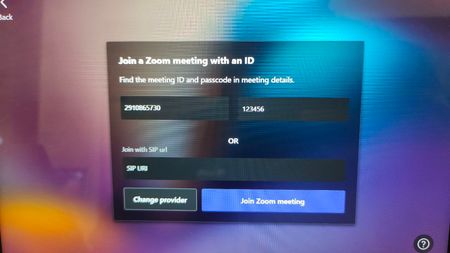
Hi All, I have a MTR on Windows device with App Version 5.3.111.0 When I want to Join to Zoom Meeting using meeting ID, apparently it is joined via SIP (zoomcrc). But because the Zoom Hosted Meeting did not have ZoomCRC license, the call can not established successfully. Can we set the default call for third-party meeting to Direct Guest Join (webrtc) instead of Cross Platform Meeting via SIP?86Views0likes0Comments
MTR account security best practices
When we set up Teams Rooms devices a few years ago, the best practice for account security at the time was to use individual resource accounts coupled with Conditional Access Policies that restrict the accounts to only be allowed to sign in on specific named/trusted network locations. At the time, MFA was discouraged as a complicating factor in the MTR authentication flow. With Microsoft's recent push to increase companywide security with a focus on MFA, have any best practices changed to include MFA for MTR accounts?608Views0likes0CommentsCan you find all your Teams Room System devices on Teams Client?
Hi, Hit to strange issue, when searching my room system devices on Teams client, I could not found all of them. Feeling is, I could find only the latest once, but not sure about that. Same issue with other users and Web App. The devices itself are working normally, but this search is lost. No help if I try to search by UPN or with display name. Any others has faced similar behavior?407Views0likes0CommentsCan you press "back" on Windows based room system?
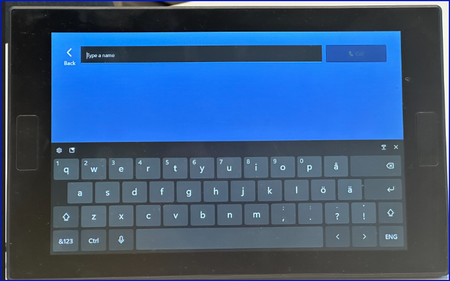
Hi, Have others noticed that if you press "call" on the screen, you end to the following screen: If you try to press "back" on here, that makes no action. Only option is to wait that device realize that you are not going to do anything, then it goes back to the main view. If you type name, and make the call, that is working fine.709Views0likes2Comments
MS Teams Room call status is missing from the log since 4.19.57.0
Dear All, Since today, we see that the log file below no longer contains Teams call status information. I suspect it is because of the 4.19.57.0 update, in which SfB support has been removed. C:\Users\Skype\AppData\Local\Packages\Microsoft.SkypeRoomSystem_8wekyb3d8bbwe\LocalCache\Roaming\Microsoft\Teams\logs.txt Could you please tell me in which file the Teams call related entries are placed? Thanks, Laszlo763Views0likes0CommentsMicrosoft Teams Rooms and Devices: Microsoft Ignite 2023
At Microsoft, we never stop looking for new ways to break down the barriers between those working in the office and those working remotely. This week at Ignite, we’re excited to share some of those innovations with you, our customers – whether you’re an end user or IT admin.53KViews3likes2CommentsLogitech Tap Scheduler
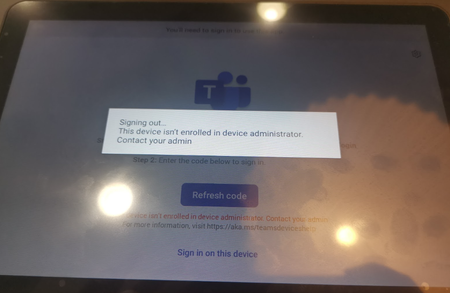
Hi, We're currently unable to log in to our Logi Schedulers with the attached error. We've previously been able to log in to these without having to do anything in Intune. Our config allows Azure device registration from Android devices. Are there any current issues that's affecting this or is there a fix? Logging in with MTR account with Team Room Pro licence. Thanks!7.1KViews0likes8CommentsWhat’s New for Microsoft Teams Rooms and Teams Meetings at InfoComm 2023
Teams never rests in our search for ways technology can bring everyone together in flexible work environments, even as those environments continue to evolve – thanks in large part to our customers who find new needs for the spaces they meet in, and our partners who work with them to find solutions. On that front, keep an eye out for some exciting updates from AVIXA soon. Meanwhile, we have a presence at InfoComm this week, where we look forward to meeting up with a ton of our partners. We’re excited to share some of the feature updates coming to Teams Rooms and Devices, and Teams Meetings that improve meeting experiences for everyone, including collaboration solutions that raise the bar for more inclusive and natural-feeling meeting experiences, and a big step towards easier, more streamlined device management.40KViews4likes14CommentsWhat's new in Microsoft Teams Rooms and Devices at Enterprise Connect
The audience that gathers for Enterprise Connect is obsessed with finding the best tools for communications and collaboration. So when we first introduced Microsoft Teams at Enterprise Connect six years ago, we knew we’d found our people. And Microsoft Teams Rooms was there too, meeting a need our customers had for easier-to-use meeting rooms that introduced innovative new solutions for inclusive collaboration, with audio and video that gave everyone a voice. Since then, we’ve continued to expand our vision for what it means to meet together in meeting rooms.69KViews12likes18Comments