microsoft sentinel
845 Topics
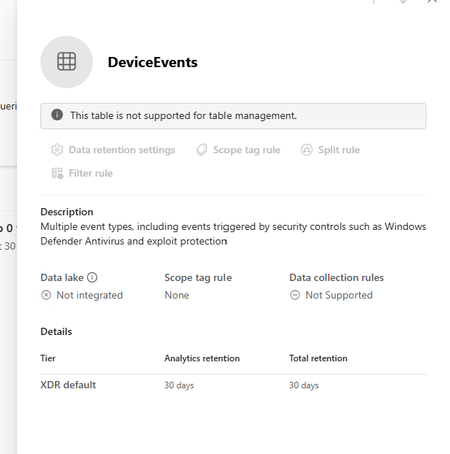
Defender XDR: Tables not supported for table management
I am trying to extend the table retention of specific tables to allow them to flow to Sentinel Analytics but keep getting the message "This table is not supported for table management" in the Sentinel > Configuration > Tables page. The Sentinel workspace is connected in System > Settings > Microsoft Sentinel. I can see the table type is XDR in the list which seems to be the reason why it can't be managed. Any ideas why this table is not able to be managed.8Views0likes0Comments
Building Microsoft Sentinel Connectors in Minutes with the Sentinel Connector Builder Agent
Overview We previously announced the public preview of the Microsoft Sentinel connector builder agent via VS code extension, that helps developers build Microsoft Sentinel codeless connectors faster with low-code and AI-assisted prompts. This post walks through a hands-on lab using a mock Network Log API to demonstrate how the Sentinel connector builder agent simplifies building Codeless Connector Framework (CCF) pull connectors. Instead of manually creating ingestion infrastructure and configuration files, you’ll use a guided, conversational workflow in VS Code to generate connector artifacts, test them against a live API, and deploy them into Microsoft Sentinel. The lab focuses on the end-to-end experience ranging from API setup to validated connector deployment so you can see how quickly a working integration can be produced. For additional guidance beyond this lab, refer to our MS Learn documentation. The Lab Environment This lab is built around a mock Network Log API hosted as an Azure Function App. The purpose of the lab environment is to give us a live API that we can use to build, validate, and test the Sentinel CCF connector builder agent against end to end. The API exposes 50 synthetic network activity records that look and behave like a real product data source, including web traffic, DNS requests, blocked remote access attempts, malware command-and-control blocks, VPN activity, and other common network events. That makes it a useful stand-in for the type of telemetry many teams want to onboard into Microsoft Sentinel. The API is intentionally shaped like the kind of source a customer might expose for telemetry retrieval. It uses API key authentication through the X-API-Key header, returns paginated results through a nextLink model, and provides a predictable response structure that the builder agent can map into a pull connector configuration. The repo contains everything needed for the walkthrough. There is an ARM template to deploy the Function App, reference documentation for the API, and a sample connector package showing the generated polling config, table schema, DCR, and connector definition. The end goal of the lab is straightforward: use the builder agent to generate a CCF pull connector that ingests this API into the custom NetworkLogAPIGetNetworkLogs_CL table in Sentinel. Prerequisites Before starting, make sure you have the following: Azure subscription -- with Contributor access on a resource group (for deploying the Function App) and Microsoft Sentinel Contributor access on a Sentinel-enabled workspace (for deploying the connector) Microsoft Sentinel workspace -- an existing Log Analytics workspace with Sentinel enabled. See Onboard Microsoft Sentinel to a Log Analytics workspace for more information. Azure CLI -- See How to install the Azure CLI for more information. VS Code with the Microsoft Sentinel for Visual Studio Code extension installed. GitHub Copilot -- with access to premium models. The connector builder agent requires Claude Sonnet 4.5 or 4.6, which uses Copilot premium model credits. Lab Repository -- Once the aforementioned prerequisites are met, you can access the lab repository here: Azure-Sentinel/Tools/CCF-Connector-Builder-Agent-Accelerator at master · Azure/Azure-Sentinel Deploying the Mock API The full CLI commands for this section are available in the repo. For a simpler option, you can use GitHub Copilot to handle the deployment. Enter this prompt: Follow the deployment instructions in Sentinel-CCF-Pull-Connector-Builder-Agent-Accelerator/agent-instructions.md. Let’s deploy the Network Log API and build a CCF pull connector. At a high level, the setup is four steps: clone the repo, create a resource group, ensure you have a Sentinel-enabled workspace, and deploy the Function App using the included ARM template. The template takes two parameters: an ApiKey of your choice (the secret the CCF connector will use to authenticate) and your Log Analytics workspace resource ID for Application Insights. Deployment takes about two to three minutes and outputs the FunctionAppName and endpoint URLs you will need later. Once deployed, verify the API is live: curl -s -H "X-API-Key: <your-api-key>" \ "https://<functionappname>.azurewebsites.net/api/GetNetworkLogs?page=1&pageSize=3" </functionappname></your-api-key> You should see a response like this: The API also exposes an /api/RefreshData endpoint that regenerates the 50 sample records with fresh timestamps. This is useful later in the walkthrough when you want to produce new events and trigger an immediate ingestion cycle without waiting for the next polling interval: curl -s -X POST -H "X-API-Key: <your-api-key>" \ "https://<functionappname>.azurewebsites.net/api/RefreshData" </functionappname></your-api-key> Building the Connector with the Sentinel Connector Builder Agent With the Microsoft Sentinel extension installed and GitHub Copilot running in agent mode, open a Copilot chat and enter a single prompt pointing at the API documentation file: That is the entire invocation. The agent takes it from there. It works through a structured seven-step sequence: preparation, polling config, table schema, DCR, connector definition, package validation, and summary. The agent produces four files in a sentinel-connectors/NetworkLogAPI_CCF/ output folder: NetworkLogAPI_PollingConfig.json – This is the API poller configuration. The agent reads the documentation and correctly identifies the GET /api/GetNetworkLogs endpoint, configures API Key authentication via the X-API-Key header, sets up NextPageUrl pagination using $.metadata.nextLink with a $.metadata.hasNextPage stop condition, and wires up the since query parameter for incremental delta pulls using the timestamp field. The RefreshData endpoint is correctly excluded, which the agent recognizes as a maintenance operation, not a security data stream. NetworkLogAPI_Table.json – This is the custom Log Analytics table schema for NetworkLogAPIGetNetworkLogs_CL . All 20 fields from the API response are mapped to the correct column types, with timestamp promoted to TimeGenerated as the standard Sentinel time column. NetworkLogAPI_DCR.json – This is the Data Collection Rule. This defines the stream declaration, the workspace destination, and the KQL transform that maps the raw snake_case API fields ( sourceIp , destinationIp , threatIndicator , etc.) to their PascalCase table columns. NetworkLogAPI_ConnectorDefinition.json – This is the connector UI configuration. This drives what the connector page looks like in Microsoft Sentinel: the title, description, prerequisite instructions, the BaseUrl and ApiKey input fields, sample KQL queries, and the connectivity status logic. The only point where the agent paused for input was to propose a connector description and ask for confirmation before writing it to the file. Everything else such as endpoint selection, auth type, pagination pattern, schema mapping, KQL transform, cross-file consistency was selected autonomously. To put that in perspective: without the agent, a developer building this connector from scratch would need to manually author four JSON files, understand the CCF schema for polling configs, DCRs, and connector definitions, write the KQL transform by hand, and validate that every cross-file reference lines up correctly. The agent compresses that work, typically hours of reading documentation, trial-and-error, and portal debugging, into a single prompt. Testing the Connector Before deploying anything to a Sentinel workspace, the Microsoft Sentinel connector builder agent lets you validate the generated polling config against the live API directly from your editor. Right-click the sentinel-connectors/NetworkLogAPI_CCF folder, select Microsoft Sentinel → Test Connector (Preview), and a Configuration Variables panel opens asking for the two template variables from the polling config: BaseUrl and apiKey . For other API patterns, there may be additional and different inputs. For example, apiKey input could be swapped with clientID and secret if the API supports OAUTH. Enter the Function App base URL and your API key, and the test runner connects immediately. The panel shows a live polling session. Poll #1 returns HTTP 200 with 50 events, and a countdown timer shows when the next poll will fire. Switching to the Events tab displays the ingested records in a tabular view with columns for timestamp , severity , action , bytesIn , bytesOut , category , and the rest of the mapped fields fresh from the API. Additionally, there are tabs for Headers, Payload, and Response, which can be useful for verifying that your pollerconfig.json configuration provides the expected request to your api with a working response. Data Extracted: The Test Connector feature can be used to visualize the response data in a table format to verify that data will land in a Sentinel table based on your configuration. Request from Poller: The Test Connector feature can be used to validate the request and response headers that will go out to the API based on the generated poller configuration. Request Response: The Test Connector feature shows you the live response from the API with respect to the request going to the API based on the poller configuration. This is a meaningful pre-flight check. It confirms that auth is working, the $.data events path resolves correctly, pagination is functional, and the polling interval fires as configured all before a single file is deployed to Azure. The most common connector configuration issues (wrong base URL, incorrect header name, mismatched JSON path) surface here in seconds rather than after a failed deployment and a 20-minute wait for Sentinel to attempt its first ingestion cycle. It is also the fastest way to troubleshoot if something goes wrong after deployment, far quicker than pushing changes to Azure and waiting for the connector to poll again. Deploying and Enabling the Connector With the connector tested and passing, deployment is the same right-click menu: right-click the sentinel-connectors/NetworkLogAPI_CCF folder, select Microsoft Sentinel → Deploy Connector (Preview). If you are not already signed in to Azure, the extension will prompt you to authenticate. The agent will also provide a clickbox in the chat window to invoke a connector deployment. Right Click Deploy Connector: UI Prompt Based Deploy Method: Once signed in, a workspace picker lists all available Log Analytics workspaces across your subscriptions. Select the one with Sentinel enabled and click Deploy. The extension deploys all four files to the workspace in the correct order: table schema first, then DCR, polling config, and connector definition. Once deployed, navigate to your Sentinel workspace via https://security.microsoft.com, go to Data Connectors, and find the Network Log API connector. The connector page shows the description, prerequisite notes, and the two credential fields generated by the agent: API Base URL and API Key. Enter your Function App base URL and API key and click Connect. The status updates to show the connector is connected and the deployment succeeded. Note: Data will appear in the workspace within 5 to 30 minutes depending on the polling interval. Run this query in Log Analytics to confirm ingestion. Note that the agent derives the table name from the vendor name and endpoint, so yours may differ slightly from the example below. Check the agent's summary output or the NetworkLogAPI_Table.json file for the exact name: NetworkLogAPIGetNetworkLogs_CL | sort by TimeGenerated desc | take 10 If you want to generate a fresh batch of events immediately rather than waiting for the next polling cycle, use the RefreshData endpoint to reset the sample records with new timestamps: curl -s -X POST -H "X-API-Key: " \ "https://.azurewebsites.net/api/RefreshData" Next Steps If you want to go further: Try it with your own API. The lab repo includes documentation on adapting the polling config, schema, and KQL transform to a real data source. Review the CCF connector schema documentation to understand the full range of supported configurations: pagination patterns, auth types, incremental pull strategies, and delta filter expressions. Explore the Microsoft Sentinel content hub to see how published connectors are structured and what the certification requirements look like for production submissions. Conclusion Following these steps, you saw how a working Sentinel connector can be generated, tested, and deployed in minutes rather than requiring days of manual configuration and infrastructure setup. If you are an ISV building a Sentinel integration and want hands-on support, Microsoft’s App Assure program is available to help. We partner with ISVs on connector development, validation, and deployment and provide guidance through implementation, testing, and readiness for production. You can get started by reaching out through our intake form. See our other Sentinel connector feature’s hands-on labs Building a CCF Nested API Pull Connector: A Technical Lab Walkthrough634Views0likes0CommentsMonthly News-August 2026
Microsoft Defender Monthly news - August 2026 Edition This is our monthly "What's new" blog post, summarizing product updates and various new assets we released over the past month across our Defender products. In this edition, we are looking at all the goodness from July 2026. We are now including news related to Defender for Cloud in the Defender portal. For all other Defender for Cloud news, have a look at the dedicated Defender for Cloud Monthly News here. 🚀 New Virtual Ninja Show episode: Redefining identity security for the modern enterprise One policy engine to govern them all: Securing agentic AI with Microsoft Purview Building a modern detection pipeline with ContentOps Securing local AI agents with Microsoft Defender Microsoft Defender: Extending critical protection for emerging threats in Team Actionable threat insights (find all of them here) Email threat landscape: Q2 2026 trends and insights Enhancing AI security through global AI red teaming Least privilege for AI agents: Identity, access, and tool binding Microsoft Defender (Public Preview) Microsoft Defender now assesses posture risk for AI agents, including enterprise agents and local agents discovered on endpoint devices. Risk levels are based on active risk indicators, such as configuration, access, runtime activity, endpoint and user context, and active alerts. Security teams can use posture risk and recommendations to prioritize risky agents and improve agent security posture. For more information, see AI agent posture risk in Microsoft Defender. (Generally available) The Domain investigation page allows you to investigate an Active Directory domain. It shows Active Directory domain security, including domain properties, deployment health, identity summary, service account breakdown, sensitive entities, active recommendations, group policies, and trust relationships. For more information, see Investigate a domain . (Generally available) With a Microsoft Agent 365 license, Microsoft Defender provides discovery, security posture, threat detection and investigation, and real-time protection for the AI agents in your tenant. Onboarding includes enabling data collection, connecting the Microsoft 365 app connector, and connecting Copilot Studio for real-time protection of Copilot Studio agents. For more information, see Protect AI agents using Microsoft Defender. (Generally available) Improved access to Playbook Generator: Following the GA release of Playbook Generator May 31st, the team focused on streamlining the onboarding experience and reducing friction related to Security Copilot wallet provisioning. Playbook Generator remains included with Microsoft Sentinel and does not consume SCUs for generating, testing, or running playbooks, yet customer feedback highlighted friction around Security Copilot wallet provisioning and initial setup requirements. The team worked on simplifying access and reducing onboarding barriers so organizations can more quickly take advantage of AI-assisted playbook creation, testing, and automation capabilities. For all other Sentinel News, have a look at the "What's new in Microsoft Sentinel blog post - July edition" Identity Security (Generally available) Migration of Defender for Identity sensors from v2.x to v3.x is now generally available. For more information, see Migrate to Defender for Identity sensor v3.x. Migration readiness reasons on the Sensors page: When a server is marked Not ready for migration on the Sensors page, you can now hover over the status to see a tooltip that lists the specific reasons the server doesn't meet the migration prerequisites. For more information, see Troubleshoot "Not ready for migration" status. (Public Preview) Expanded SaaS app support in Password protection. The Password protection page now includes password risks from SaaS apps connected through Defender for Cloud Apps, in addition to Active Directory, Microsoft Entra ID, and Okta. SaaS apps that support SaaS Security Posture Management (SSPM), such as Salesforce and ServiceNow, appear on the Password Hygiene and Password Policies tabs. Each SaaS app requires a Defender for Cloud Apps app connector. For more information, see Investigate identity password protection. Automatic RPC auditing on domain controllers: Defender for Identity now automatically enables RPC auditing on domain controllers when you upgrade to sensor version 3.0.8 or later. You no longer need to apply a tag manually to enable RPC auditing. For more information, see Configure RPC auditing. Microsoft Defender Experts MDR General Availability of Microsoft Defender Experts MDR P2: Microsoft Defender Experts MDR (formerly Microsoft Defender Experts for XDR) is expanding with new third-party and multi-cloud coverage powered by Microsoft Sentinel, with the launch of Defender Experts MDR P2 service. Defender Experts MDR provides a 24/7 managed detection and response service that reduces noise, adds expert context, and drives action. In addition to the Microsoft Defender products, this new service supports key non-Microsoft sources across cloud (AWS), identity (Okta), email (Proofpoint), network (Palo Alto Networks, Cisco, Fortinet, ZScaler), and endpoint (CrowdStrike) that are ingested in Microsoft Sentinel, providing E2E visibility and protection for customers operating heterogenous environments. Defender Experts will continue expanding our scope to other non-Microsoft products to deliver on this promise. For more information, see the Microsoft Defender Experts MDR documentation. Microsoft Security Exposure Management / Defender Vulnerability Management (Private Preview) Codename MDASH - Agentic code scanner is now available in private preview in Microsoft Security Exposure Management. Codename MDASH uses a multi-model agentic AI system to detect code vulnerabilities with greater depth and accuracy than traditional static analysis. Security teams can run scans from Defender CLI or through a GitHub connector, review findings in the Defender portal, and use results to help prioritize code security risks. For more information, see Agentic code security overview. (Private Preview) Codename MDASH - MAI-Augmented scan profile private preview. The MAI-Augmented scan profile is now available in preview as part of Codename MDASH. The MAI-Augmented profile can be used when triggering a scan through the Defender CLI. It includes MAI-Cyber-1-Flash, a new cyber-specialized model that extends the current agentic scanner in addition to the existing required models. Security teams can choose this profile when triggering a scan from Defender CLI or continue using a scan profile based on the existing models. For more information, see Scan with a scan profile. OT data connectors in Microsoft Security Exposure Management: Microsoft Security Exposure Management now supports operational technology (OT) data connectors for Armis, Dragos, and Forescout. OT data connectors bring OT asset and vulnerability data from supported third-party OT platforms into the Defender portal. This helps security teams view OT devices alongside other assets, enrich device inventory with OT context, and investigate vulnerabilities across IT and OT environments. For more information, see OT data connectors. Microsoft Defender for Endpoint (Public Preview) AI agent runtime protection includes these enhancements: - Vendor-supported agent event interfaces now work with standard platform and engine update channels, so no Beta channel configuration is required. Agent-native event inspection now supports Codex CLI and the GitHub Copilot app. - Network inspection is now supported for agents that don't expose vendor-supported event interfaces, including OpenClaw and similar Node.js-based Claw agents. For more information, see AI agent runtime protection with Defender for Endpoint. (Generally available) Available from Defender for Endpoint on Linux version 101.26042.0011 and later. The Defender Deployment Tool for Linux simplifies deployment by combining installation, onboarding, upgrades, and uninstallation into a single workflow. The tool automates prerequisite validation, supports custom installation paths, enables deployment of specific Defender versions from preferred update channels, and works seamlessly in environments that use local repositories. In addition to a simplified deployment experience, customers can now gain complete visibility into deployment progress through Device Timeline integration, providing step-by-step installation, upgrade, and onboarding status, Advanced Hunting queries for fleet-wide deployment monitoring, and detailed error reporting, including deployment stage, status, exit code, and failure reason to simplify troubleshooting. These capabilities help administrators quickly identify deployment issues, track onboarding progress, and understand deployment outcomes across their Linux estate. Microsoft Defender for Office 365 Unified RBAC is the default permission model for new Defender for Office 365 Plan 2 organizations. Starting July 2026, new Defender for Office 365 Plan 2 organizations use the Microsoft Defender unified role-based access control (Unified RBAC) model by default. For more information, see Configure Unified RBAC for Defender for Office 365 and MC1246006. Microsoft 365 E3 now includes Microsoft Defender for Office 365 Plan 1. For more information about what's included in each plan, see Microsoft Defender for Office 365 Plan 1 vs. Plan 2 cheat sheet. Prompt injection protection: Defender for Office 365 now detects prompt injection attacks hidden in inbound email. For more information, see Prompt injection protection in Defender for Office 365.1.8KViews1like0Comments
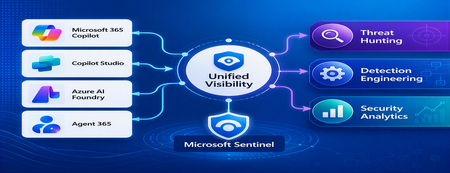
Securing Enterprise AI Agents with Microsoft Sentinel
1. Introduction Enterprise adoption of Generative AI is accelerating rapidly through Microsoft 365 Copilot, Copilot Studio, Azure AI Foundry Agents, Security Copilot, and custom AI agents integrated with business applications. Unlike traditional SaaS applications, AI agents can: Access enterprise data Query internal knowledge repositories Invoke APIs and MCP tools Execute workflows Interact with business applications Make decisions on behalf of users While these capabilities improve productivity, they introduce a new attack surface that security teams must monitor and secure. Common AI threats include: Prompt Injection Cross Prompt Injection Attacks (XPIA) Jailbreak Attempts Unauthorized Tool Invocation Data Exfiltration through AI Agents Agent Identity Abuse Excessive Data Access Malicious MCP Tool Execution Traditional SOC monitoring platforms were designed for users, devices, applications and infrastructure—not autonomous AI systems. To address this challenge, Microsoft provides a comprehensive AI security monitoring framework built around: Agent 365 Observability Microsoft Agent Identities Microsoft Copilot Logs Defender XDR Defender for AI Microsoft Sentinel Together these components provide end-to-end observability of: User prompts Agent execution paths Tool invocations Safety signal detections Agent identities Security alerts 2. Reference Architecture AI Security Monitoring Architecture 3. Integration Architecture Microsoft provides multiple telemetry sources that complement one another. 3.1 Agent Runtime Telemetry Sentinel Data Connector Agent 365 Data Connector Table UnifiedAgentObservability Captures runtime behavior of AI agents including: User prompts Session IDs Conversation IDs Agent identities MCP tool invocations Connector invocations Tool arguments Tool responses Request payloads Response payloads Execution errors This dataset provides the forensic trail of everything an AI agent performed. 3.2 Agent Governance and Asset Inventory Sentinel Data Connector Microsoft Agent Identities Provides visibility into: Agent inventory Agent blueprint inventory Ownership Relationships Governance metadata Risk context This allows SOC teams to answer: Who owns this agent? What permissions does it have? Which business unit deployed it? Which related agents exist? 3.3 Copilot Audit and Usage Monitoring Sentinel Data Connector Microsoft Copilot Logs Connector Table CopilotActivity Provides: Copilot usage auditing Operational visibility User interaction tracking Useful for governance, compliance and adoption reporting. 3.4 AI Safety Telemetry Sentinel Data Connector Microsoft Defender XDR Connector Table CloudAppEvents CloudAppEvents provides AI safety signals such as: Prompt Shield detections Prompt Injection attempts Cross Prompt Injection Attacks (XPIA) Jailbreak-related verdicts Unsafe prompt classifications Think of CloudAppEvents as answering: "Was the prompt malicious?" 3.5 AI Security Alerts Sentinel Data Connectors Microsoft Defender XDR Microsoft Defender for Cloud Tables SecurityAlert SecurityIncident Used for: AI attack detections Security incidents Correlated investigation workflows 4. Understanding the Two Most Important AI Tables CloudAppEvents Focuses on AI Safety Questions answered: Was Prompt Shield triggered? Was this a jailbreak attempt? Was XPIA detected? Was the prompt suspicious? UnifiedAgentObservability Focuses on Agent Runtime Behavior Questions answered: What tool was invoked? Which connector executed? What arguments were passed? What data was returned? What actions did the agent perform? 5. Advanced Threat Hunting Scenarios The Agent365 Observability hunting guide contains several investigation scenarios that can be used directly in Microsoft Sentinel. Reference: Agent 365 Observability — AI Agent Telemetry Hunting https://github.com/SCStelz/security-investigator/blob/main/queries/cloud/agent365_observability.md 5.1 Prompt Injection Detection Detect prompts containing indicators such as: Ignore previous instructions Reveal system prompt Developer mode Disregard safety controls Investigation workflow: Review Tool Activity This allows analysts to determine whether a suspicious prompt resulted in downstream actions. 5.2 Session Reconstruction One of the most powerful capabilities of UnifiedAgentObservability is session reconstruction. Analysts can correlate: This creates complete forensic timelines. 5.3 MCP Tool Auditing Monitor all MCP activity including: query_lake Graph API tools ServiceNow connectors SharePoint connectors Custom enterprise tools Questions answered: Which tool was used? Who triggered it? What parameters were supplied? What data was returned? 5.4 Sensitive Data Access Monitoring Monitor AI agent interaction with: Employee records Customer data Financial information SharePoint repositories HR databases Useful for identifying: Data exfiltration attempts Excessive access patterns Sensitive data exposure 5.5 Query Lake Monitoring The GitHub hunting guide introduces monitoring of: query_lake RunAdvancedHuntingQuery Analysts can inspect: Actual KQL submitted Target workspaces Data sources queried Scope of access This provides visibility into AI-driven security investigations. 5.6 New Tool Detection Identify newly observed tool usage. Examples: Unauthorized MCP servers Newly registered connectors Unapproved tools Unexpected integrations This use case is particularly useful for governance programs. 5.7 Tool Failure Monitoring Monitor: Permission failures Connector failures Application errors Access-denied responses A sudden increase in failures may indicate: Reconnaissance activity Misconfiguration Privilege abuse attempts 6. Detection Engineering Opportunities Organizations can create Sentinel Analytics Rules for: 6.1 Prompt Injection Detection Developer Mode prompts Prompt Override attempts System Prompt disclosure requests 6.2 Jailbreak Attempt Detection Safety bypass attempts Role manipulation prompts Instruction override patterns 6.3 Unauthorized Tool Usage New MCP tools High-risk connectors Rare tool executions 6.4 Sensitive Data Access HR data queries Identity information retrieval Large-volume exports 6.5 Agent Identity Abuse Ownership changes Unexpected agent activity Agent-to-agent anomalies 7. Data Lake Exploration and Long-Term Analytics Because agent telemetry resides within Sentinel Data Lake, organizations can perform: Long-term AI investigations Historical AI attack analysis Agent baselining Governance reporting Trend analysis Tool inventory reporting Example dashboards include: Top Prompt Injection Attempts Most Active Agents High-Risk MCP Tools Agent Ownership Analysis AI Security Incidents Sensitive Data Access Trends 8. Summary AI agents represent the next major computing platform, but they also introduce a completely new attack surface. To effectively secure enterprise AI solutions, organizations require visibility across: User interactions Agent execution paths MCP tool usage Prompt safety signals Agent identities Security detections Microsoft Sentinel provides this unified view by integrating: Agent 365 Observability UnifiedAgentObservability Microsoft Agent Identities Microsoft Copilot Logs CloudAppEvents Defender XDR Defender for AI By combining AI runtime telemetry with AI safety signals and Defender detections, security teams can move beyond traditional monitoring and build a modern SOC capability for threat hunting, incident response, governance and forensic investigations across Microsoft 365 Copilot, Copilot Studio, Azure AI Foundry and future AI agent ecosystems. Reference: https://github.com/SCStelz/security-investigator/blob/main/queries/cloud/agent365_observability.mdCustom Detection Rules as Code in Sentinel Repositories: What Your Pipeline Owns Now
While going through the June Sentinel updates I almost scrolled past this one, and I think that would have been a mistake: custom detection rules can now be managed as code in Sentinel Repositories, the same way analytics rules, playbooks, parsers and workbooks already are. You connect a GitHub or Azure DevOps repo, enable the Custom Detection Rules content type, and rules are synced on every commit. There is also a standalone path via the Bicep CLI for teams running their own pipelines. The feature is in preview per the Learn documentation, and in my view it matters more than the low-key rollout suggests. Microsoft has been positioning custom detections as the unified experience for building rules over both Defender XDR and Sentinel data since late 2025. If custom detections are becoming the primary detection type, then this preview is the moment your primary detection type becomes pipeline-managed. I spent some time in the documentation to understand what that actually means, and there is one implication I have not seen anyone talk about yet. How it works Custom detection rules use a different mechanism than every other content type in Repositories. Analytics rules deploy as Microsoft.OperationalInsights/workspaces/providers/alertRules resources, with the Microsoft.SecurityInsights provider sitting in the resource name. Custom detection rules instead use a dedicated Bicep extension. You declare it in a `bicepconfig.json` at the repo root: { "extensions": { "MicrosoftSecurity": "br:mcr.microsoft.com/bicep/extensions/microsoftsecurity:v1.0.1" } } The rule itself is a `Microsoft.Security/detectionRules` resource. This is the structure from the Microsoft documentation: extension MicrosoftSecurity resource detectionRule 'Microsoft.Security/detectionRules@2026-06-01-preview' = { id: 'custom-rule-id' displayName: 'Custom Rule Display Name' status: 'enabled' queryCondition: { queryText: 'DeviceProcessEvents | take 10 | project DeviceId, Timestamp, FileName' } schedule: { frequency: 'PT1H' } detectionAction: { alertTemplate: { title: '<ruleTitle>' description: 'Custom detection rule' severity: 'medium' tactics: [ { tactic: 'Execution' techniques: [ { technique: 'T1059' } ] } ] entityMappings: { hosts: [ { id: 'h' deviceIdColumn: 'DeviceId' } ] } } } } Rules are uniquely identified by the `id` property, which you provide in the template. Deployment is either the automatic Repositories sync or a plain `az deployment group create` against a resource group. That last part is what I like most about the design: any CI/CD system that can run Azure CLI can ship these rules. Prerequisites beyond the standard Repositories setup: a Microsoft 365 E5 license or equivalent that includes Defender XDR, and a Sentinel workspace onboarded to the Defender portal. Two preview limitations are documented: custom frequency for Sentinel-only data is not supported yet, and neither are custom details. The part that made me stop reading and think Repositories are designed as the single source of truth. The documentation is explicit that content in your repo overwrites changes made through the portal. That is the whole point of the feature, and for analytics rules it has been mostly harmless. For custom detections I see a wrinkle. When Microsoft renames tables or columns in the advanced hunting schema, those naming changes are applied automatically to queries saved in Microsoft Defender, including the queries inside custom detection rules. The docs are equally explicit that this automatic migration does not cover queries run via API or saved anywhere outside Defender. A Git repo is outside Defender. Play that forward with a current example. The `AIAgentsInfo` table stopped being accessible on July 1, 2026, replaced by the unified `AgentsInfo` table with a changed column set. A portal-managed custom detection referencing the old table got migrated automatically. The same rule managed as code did not, because the authoritative copy of the query now lives in your repo, and nothing in the sync path rewrites your Bicep files. Your repo is now the thing standing between Microsoft's server-side fix and your production detection. Either the sync starts failing, or the stale query gets reasserted over the migrated rule. The documentation does not say which of the two happens, and honestly, neither is good. No alert fires for either. And if smart deployments, which skip files that have not changed since the last deployment, apply to this content type the same way they do to the rest of Repositories, it gets slightly worse in a way I find almost funny: a stale rule would sit untouched until someone happens to edit it. What I would put in front of the merge To be clear, none of this is an argument against the feature. I want detections in Git, and I suspect most people reading this do too. It is an argument that moving custom detections into a repo moves the schema lifecycle responsibility into your review process, because the portal safety net explicitly does not reach into source control. Concretely, a PR touching detection content should be checked for references to deprecated or transitioning advanced hunting tables, for the result columns the custom detection docs recommend (`Timestamp` or `TimeGenerated`, plus `DeviceId` or `DeviceName` for Defender for Endpoint tables, plus `Timestamp` and `ReportId` from the same event for the other Defender tables), and for complete entity mappings, since entities drive how alerts group into incidents. One more detail from the custom detection docs that I suspect will trip up people coming from analytics rules, because it goes against years of muscle memory: avoid filtering on `Timestamp` or `TimeGenerated` in the query itself. The service prefilters data based on the detection lookback using ingestion time. The scheduled-analytics-rule reflex of always pinning a time window works against you here. Whether you enforce these checks with a homegrown script or a linting step in the pipeline matters less than doing it before merge rather than discovering it in the alert queue. The deployment mechanics are now solved. The content governance is yours. Full transparency: I have worked through the documentation and the sample content, but I have not yet run a retired-table scenario through the sync myself. So if you are testing the preview, I would genuinely like to hear how it behaves in your environment when a repo-managed rule references a table like `AIAgentsInfo`. That failure mode is the one I want to understand before this reaches GA. Beyond that specific case, I am curious where you all stand: are you moving custom detections into Git now, or waiting for GA? And if you already run detections as code for analytics rules, what checks have earned a permanent place in your PR pipeline? My used references: Manage content as code with Microsoft Sentinel repositories: https://learn.microsoft.com/en-us/azure/sentinel/ci-cd-custom-content Advanced hunting schema naming changes: https://learn.microsoft.com/en-us/defender-xdr/advanced-hunting-schema-changes Create custom detection rules in Microsoft Defender XDR: https://learn.microsoft.com/en-us/defender-xdr/custom-detection-rules Custom detections as the unified detection experience: https://techcommunity.microsoft.com/t5/microsoft-defender-threat-protection/custom-detections-are-now-the-unified-experience-for-creating/ba-p/4463875Solved
Looking for a simple deployment guide
MS Learn is a great starting point, but it just doesn't seem to cover the steps needed to get up and running safely. I have concerns about adding or setting something that suddenly creates a vulnerability or exposure. Where is the installation guide that installs and configures the solution then tells you, "You are now protected". Do I really want to set my own policies? Why aren't the default set of rules good enough, safe enough. I can't have a solution that is so complicated I need to hire a team to manage it 24 hours a day. I am okay investigating an alert and helping a user solve a pop-up question. Why is every major corporation around the world required to re-invent the same or similar policies the company next door is creating to make this tool work? I want to onboard all of our Intune devices and monitor anything that CAN'T be stopped by default security measures. Just the fact that Sentinel appears to be changing as an embedded tool within Defender gives me hope that this will be getting closer to a more manageable tool. But that still seems a way off. I am ready to do the reading and research to get this set up but I am hoping for a guide that is specific enough to achieve a final result. Thank for understanding my challenges here.134Views1like2CommentsMonthly news - July 2026
Microsoft Defender Monthly news - July 2026 Edition This is our monthly "What's new" blog post, summarizing product updates and various new assets we released over the past month across our Defender products. In this edition, we are looking at all the goodness from June 2026. We are now including news related to Defender for Cloud in the Defender portal. For all other Defender for Cloud news, have a look at the dedicated Defender for Cloud Monthly News here. 🚀 New Virtual Ninja Show episode: Redefining identity security for the modern enterprise One policy engine to govern them all: Securing agentic AI with Microsoft Purview Building a modern detection pipeline with ContentOps Securing local AI agents with Microsoft Defender Microsoft Defender: Extending critical protection for emerging threats in Team Weekly Security News: We publish a short 1ish minute video every week with updates across our Microsoft Security stack. Subscribe to our YouTube channel, so you don't miss the next episode. Actionable threat insights (find all of them here) Securing AI agents: When AI tools move from reading to acting Chromium extension uses AI‑related branding to redirect browser search Photo ZIP campaign targeting hospitality industry delivers Node.js implant for persistent access Microsoft Defender Two Workbooks capabilities in the unified Microsoft Defender portal moved to GA: Advanced Hunting connector - build custom dashboards directly on top of Advanced Hunting (XDR) dat. Query XDR tables and visualize them in Workbooks for richer investigations and reports. Workspace filter / multi-workspace experience - scope and filter workbooks by workspace, with workspace selection integrated into the workbook itself rather than relying on the global selector. MTO Tenant Groups let MSSPs and large enterprises organize their multitenant view in Microsoft Defender by grouping tenants logically (e.g., by region, business unit, or customer cohort). Learn more here. Custom Detections support in Microsoft Sentinel Repositories. Custom Detections can now be managed as code in Microsoft Sentinel Repositories, the same way customers already manage analytic rules, playbooks, parsers and workbooks. Detection engineers connect a GitHub or Azure DevOps repo to their workspace; Custom Detections placed in the repo are reconciled on every commit. A standalone Bicep path via the Microsoft Security Bicep extension lets teams deploy from any CI/CD pipeline (ADO Pipelines, GitHub Actions, custom runners). (General Availability) The following advanced hunting schema tables are now generally available: The CloudAuditEvents table contains information about cloud audit events for various cloud platforms protected by the organization's Defender for Cloud. The CloudDnsEvents table contains information about DNS activity events from cloud infrastructure environments. The CloudProcessEvents table contains information about process events in multicloud hosted environments. (Public Preview) The AgentsInfo table in advanced hunting is now available in preview. The AIAgentsInfo table is transitioning to this new table, which provides a unified schema that supports agent inventory and governance for all agent types, including Copilot Studio, Microsoft Foundry, Microsoft 365 Copilot, third-party, and endpoint-discovered agents. Microsoft Agent 365 customers should use the AgentsInfo table today. The AIAgentsInfo table remains accessible until July 1, 2026. Update your queries to use AgentsInfo before this date. For more information, see Advanced hunting schema - Naming changes. For all other Sentinel News, have a look at the "What's new in Microsoft Sentinel blog post - June edition" Identity Security (Public Preview) The Identity Security dashboard now includes a new Human identities card that shows your human identities by source (Entra ID, SaaS, and on-premises), giving you a single view of where your human identities live. For more information, see Identity Security dashboard. (Public Preview) On the Coverage and maturity page, the Review and improve coverage side panel for SaaS Identities now includes an Observed column and a Show Only Observed Applications toggle. By default, the panel shows only SaaS applications detected in your environment. Turn off the toggle to see other supported SaaS applications you can onboard to expand your identity coverage. For more information, see Coverage and maturity. New alerts were added to the Defender for Identity security alerts related to Microsoft Entra ID, Active Directory as well as other identity providers. For a full list of those new alerts, check out our documentation. Recent ShinyHunters attacks on Salesforce show how OAuth tokens and connected apps are being weaponized to bypass MFA at scale. The upgraded Salesforce connector for Defender for Cloud Apps helps detect these attacks faster, with richer connected-app context and investigation-ready signals. Customers already using the connector are advised to enable the additional events in the Salesforce console for tighter protection, and eligible customers not yet using it are advised to connect Salesforce. Learn more. Microsoft Defender for Endpoint / Microsoft Defender Vulnerability Management (Public Preview) Local AI agent discovery: as part of the Defender AI agents experience, Microsoft Defender now automatically discovers supported local AI agents running on onboarded Windows & macOS devices. Discovered agents appear as assets in the AI agent inventory, exposure map, and advanced hunting, giving security teams visibility into local AI agent usage across the organization. For more information, see Discover local AI agents. (Preview) Local AI agent runtime protection on Windows endpoints is now available in public preview. Microsoft Defender inspects the agent loop (user prompts, tool calls, and tool responses) and can block risky activity before it executes, helping stop prompt injection and unsafe agent actions at the device level. Blocked and audited events appear as alerts in Microsoft Defender to support incident correlation and investigation workflows. The new version of the Defender deployment tool for Windows streamlines onboarding and enhances security by: Bundling the onboarding package directly into the tool's executable. Generating a key during deployment package creation that is required for running the tool. Enabling users to configure an expiry date for the package to reduce the risk of unauthorized use. In addition: You have the option of downloading the package as either an .exe or a .zip file, whichever best suits your organization's needs. A new Deployment packages page in the Defender portal facilitates management of downloaded packages by providing centralized visibility into all the packages and their current status. Now generally available: Selective Response Actions enables organizations to tailor high-impact security operations on devices during onboarding. It provides precise control over how response actions are applied on Tier-0 systems and other high-value assets, helping maintain operational stability while delivering strong protection. The new exposure score model in Defender Vulnerability Management is now generally available. This model improves risk prioritization and recommendation impact accuracy by incorporating exploit prediction data (EPSS) and asset context factors such as internet-facing status and criticality. More details here. Microsoft Secure Score now includes the Reduce unnecessary inbound internet exposure on internet-facing devices recommendation, which helps identify devices that are accessible from the public internet and may represent unnecessary attack surface. This recommendation provides centralized visibility into internet-facing devices across the environment. Many predefined SaaS application classification rules were added to the critical assets list. Have a look at our documentation for the full list. These classifications require onboarding to Microsoft Defender for Cloud Apps.1.6KViews2likes6CommentsWhat’s new in Microsoft Sentinel: June 2026
Welcome back to What's new in Microsoft Sentinel. In June, Sentinel SIEM’s Advanced Security Information Model (ASIM) broadens its normalization, so one analytic rule can reach more sources with less per-source work and, additionally, two new ASIM schemas can now bring asset inventory and AI agent telemetry into common form. In Microsoft Sentinel data lake, the Agent Identities Asset Connector adds the identity context behind your AI agents, helping you see who owns an agent and what permissions it holds. In Sentinel MCP, graph tools help security teams investigate threats and optimize security coverage by visualizing relationships across identities, devices, alerts, and signals in a unified graph experience. Read on for the details, and explore the resources at the end to go deeper. Sentinel innovations: Sentinel SIEM Sentinel data lake Sentinel MCP Microsoft Security Store Sentinel SIEM Advanced Security Information Model (ASIM) parsers and schemas [Generally available] The Advanced Security Information Model (ASIM) in Sentinel normalizes logs into common schemas, so one analytic rule can cover many sources without managing each native schema. ASIM coverage has expanded across more Azure services, broader AWS CloudTrail activity, and a range of third-party firewall, identity, and proxy products, so your detections reach more of your environment with less per-source work. Two schemas also join ASIM: Asset Entities normalizes asset inventory so you can correlate files and assets across investigations, and AI Agent Events normalizes telemetry from AI-driven workflows and autonomous agents. Browse the ASIM parsers on GitHub to explore, file issues, or contribute. Learn more in our blog. Sentinel transition to Defender blog series By March 31, 2027, all Microsoft Sentinel customers transition to Defender. This six-part series guides you through moving your Sentinel experience from the Azure portal to Defender, where SIEM, XDR, threat intelligence, AI, and automation come together in one experience. Your analytics rules, playbooks, workbooks, log analytics workspace, and access assignments all carry forward while the operational layer becomes more connected and intelligent. Starting early matters because you realize the benefits sooner, including a unified incident queue, cross-product correlation, Security Copilot, Sentinel data lake, and SOC optimization. Across the six-part blog series you get 1) the strategic shift, 2) the anatomy of incident and data changes, 3) detection and automation, 4) the governance shift across roles and access, 5) a readiness playbook with the adoption helper and cost guidance, and 6) a look at the AI-first SOC. Each part stands alone, so you can read in order or jump to what matters most to you. Sentinel data lake Agent Identities Asset Connector [Public preview] The Agent Identities Asset Connector brings identity context for AI agents into Sentinel. Activity connectors like Agent 365 and Microsoft 365 Copilot already show you what AI agents do, but activity alone cannot tell you who owns an agent, what permissions it holds, or how it is governed. This connector fills that gap with four asset tables covering agent owners, agent identities, agent blueprints, and the service principals tied to those blueprints. Together they form a connected agent identity graph you can trace from owner to identity to blueprint to permissions to the resources an agent touches. Joining this asset data with activity data in Sentinel data lake lets you detect anomalous behavior relative to permissions, spot over-permissioned or misconfigured agents, and follow full execution chains for end-to-end traceability. To get started, install the Agent 365 and Microsoft 365 Copilot solutions in Content Hub and enable the asset and activity connectors. Learn more. Sentinel MCP Sentinel MCP graph tools [Public preview] Microsoft Security Graph MCP tools, recently introduced in the Microsoft Sentinel MCP Server data exploration collection helps security teams investigate threats by exploring relationships between identities and device assets, and threat and activity signals ingested by data connectors and surfaced by analytic rules. Starting from an alert, analysts can follow the exposure path across connected entities — tracing lateral movement, understanding blast radius, and identifying configuration gaps — all from a single, interactive workspace. The tool provides a clear graph view that highlights dependencies and makes it easier to understand how content interacts across your environment. This helps security teams assess coverage, optimize content deployment, and identify areas that may need tuning or additional data sources. Executing graph queries via the MCP tools will trigger the graph meter. Learn more. Microsoft Security Store Partner testimonials from Adaquest and Glueckkanja For partners like Adaquest and Glueckkanja, the Microsoft Security Store helps not only put their years of knowledge, understanding, and best practices into a scalable, packaged solution, it gives them the ability to democratize that expertise and take it to market globally. Security Store operationalizes their expertise as always-on defenses — discoverable, deployable, and driving real outcomes inside the tools that security teams rely on every day. See how the Security Store is helping security teams act on threats faster with the right solutions and to be ready when it matters most: Watch: Adaquest unlocks faster response times for customers (testimonial) Watch: Glueckkanja builds agents with purpose (testimonial) Additional resources Blogs and documentation: The Advanced Security Information Model (ASIM) Process Event normalization schema reference How BlueVoyant's ASIM-First Strategy Simplifies Threat Detection in Microsoft Sentinel Migrate Sentinel to Defender – Why It Is a Security Architecture Decision, Not Just a Portal Change Connect Microsoft Sentinel to the Microsoft Defender portal Agent 365 connector: Monitor, hunt, and investigate AI agent activity in Microsoft Sentinel Get started with Microsoft Sentinel MCP server Upcoming webinars and events: July 15–16: Microsoft Virtual Training Day: Predict and Defend Against Cybersecurity Threats July 22: Microsoft Security Immersion Event: Shadow Hunter July 23-24: Microsoft Virtual Training Day: Introduction to Microsoft Security July 28: Tech Brief: Modernize security operations with a unified platform July 29: Security Immersion Event: Into the Breach Stay connected Check back each month for the latest innovations, updates, and events to ensure you’re getting the most out of Microsoft Sentinel. We’ll see you in the next edition!873Views2likes0CommentsA guide to innovating threat hunting with Microsoft Sentinel custom graph
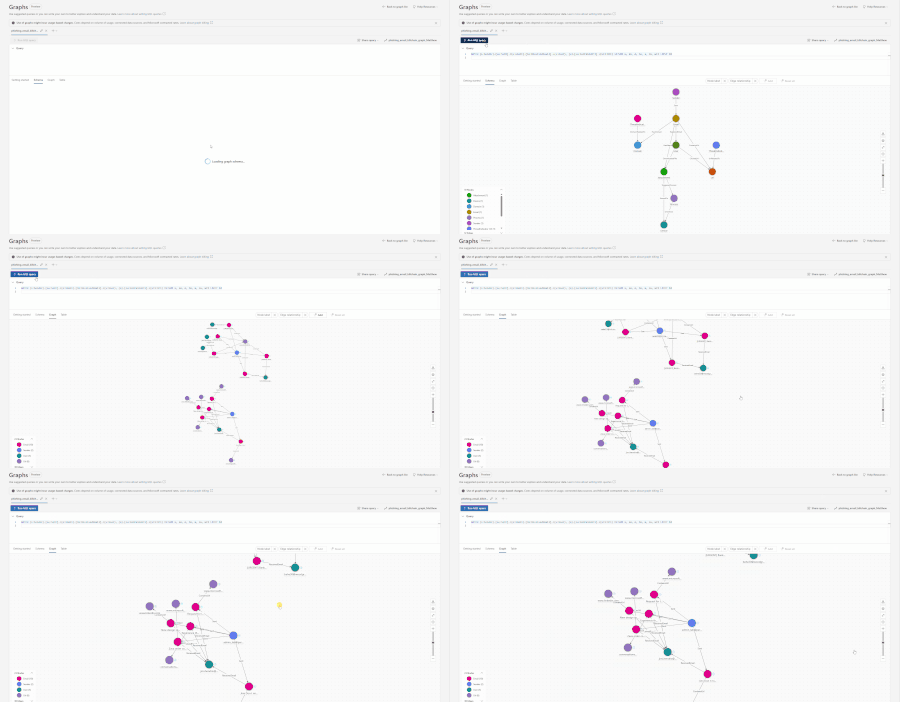
Microsoft Sentinel platform offers a growing list of tools and features, with graph being a cornerstone capability. Sentinel graph is a relationship-first method for organizing and querying data within Microsoft Sentinel data lake. Activities amongst entities (users, devices, emails, IPs, applications, etc.) become a navigable structure that avoids a complex table structure. Rather than stitching together data and evidence via complex joins, users can follow multi-hop connections in order to understand insights such as blast radius, unseen pivots in malicious behavior, and investigative details that may not be as obvious within regular logs, all while visualizing these paths to assist in communicating evidence and findings. This blog will walk through how to create custom graphs using GitHub Copilot chat experiences in Sentinel VS Code. And how to leverage out-of-the-box graph samples to build custom graphs addressing security outcomes. Custom graphs are available in public preview. Prerequisites and Tooling Sentinel data lake enabled in the tenant, this is where the data for the graph will be stored. Users will need read/write permissions on Sentinel data lake data. And either security operator or security admin permissions to save a custom graph in the tenant. Visual Studio Code (VS Code) will need to be installed, as it is essential for building and saving graphs. The Jupyter notebook extension, Microsoft Sentinel extension, and GitHub Copilot extension will need to be installed from within VS Code. These are key pieces for configuring and managing graphs. (Optional) Microsoft Sentinel MCP server if using MCP tools like the data exploration tool. Building a new custom graph The starting point is within Visual Studio Code (VS Code), where the custom graph will be built via GitHub Copilot and the Sentinel graph authoring tool. Make sure to have a GitHub account logged in within VS Code, then start a chat with Copilot via View > Chat. This will open a chat window on the right side of the screen. Determining security telemetry for investigation If unsure about which tables are available within the environment or the columns to focus on for hunting/investigations, turn to the Sentinel MCP server. With the Sentinel MCP server, users can explore the threat landscape within their environment as well as see which data sources currently exist within the Sentinel data lake. This process can be done using natural language with Copilot to obtain the information needed to perform the task at hand. “List the most important tables within my Microsoft Sentinel data lake environment that would build a blast radius for a compromised user account. List the best columns to use for this scenario. Format the response as a table” The tables and columns that can be used are now known. The next step is to use these tables to construct a custom graph with help from GitHub Copilot. For this example, a blast radius graph will be built to assist in reviewing the impact of compromised accounts within the environment: “List the top 5 compromised or targeted accounts within my environment. List which types of attacks are involved with those accounts. Summarize the information into a simple to read table” Given this response, there are a few options for going forward: Return to the Microsoft Defender portal and attempt threat hunting/review this with other analysts Ask Copilot to provide threat hunting queries or perform incident investigations for the top users who are most targeted Build custom graphs to visualize threat data around the most targeted accounts For this example, we will use option 3. Building graph mappings with GitHub Copilot To begin building a custom graph from scratch, a new prompt is submitted, this time tagging the Sentinel extension’s graph authoring tool. An example of the type of prompt to use is below: “@Sentinel /graph-authoring I want to investigate the blast radius of a compromised user and what systems/ app/ devices that they accessed based on users authentication activity. Please use at least SignInLogs, NonInteractivelogs, DeviceLogon, Onprem AD logs, IdentityInfo, and AADRiskyUsers. The graph should help investigate the following security outcomes: What is the user's current risk level and risk score from Identity Protection? Which applications and resources did a user authenticate to? Are there sign-ins from risky IP addresses, Tor exit nodes, or anonymizers? Are there non-interactive sign-ins from unexpected locations or devices? Which machines did a user log on to locally/remotely (RDP)? Which user accounts have been active on a compromised device? A few guidance for data ingestion: Ensure to filter out any data that has NULL or empty values for key Nodes and Edges Filter all data for last 14 days Do not map json arrays as Keys in Nodes or Edges” Note: To ensure that the graph that is written matches the desired scenario, it helps to provide outcomes or guidance to the graph authoring tool. If a Juypter notebook is not already open within the VS Code, Copilot will build a new notebook based on the prompt given. Once Copilot is done, select a kernel to run the notebook. This can be done from the top right of the Notebook: Click on Select Kernel. Click on Microsoft Sentinel. Choose a pool option for the compute cluster. Once a pool is picked, click on the run button next to one of the code cells to boot up the compute pool (this can take up to 5 minutes) Once connected, users can either go through and click the run button next to the code cell to run the code or click the Run All button at the top of the Notebook. For each cell in the Notebook: Cell 2 This section of the notebook is for mporting the sentinel_graph library and configures Spark settings. This is essentially setting up the notebook environment for executing the rest of the code. from sentinel_graph import notebook notebook.requires(sentinel_graph="0.3.8") spark.conf.set("spark.sql.parquet.datetimeRebaseModeInRead", "CORRECTED") Cell 3 This section is performing more Sentinel specific configurations by defining which Sentinel workspace to use, which timerange to use, which tables to use, etc. This is defining which data sources should be considered when building the graph. from pyspark.sql import functions as F from sentinel_lake.providers import MicrosoftSentinelProvider lake_provider = MicrosoftSentinelProvider(spark=spark) LOG_ANALYTICS_WORKSPACE = "Woodgrove-LogAnalyiticsWorkspace" # Auto-detected from the Microsoft Sentinel extension TARGET_USER = "ram723@int.zava-private.com" # Time filter — 7 days for broader blast radius context time_filter = F.col("TimeGenerated") >= F.expr("current_timestamp() - INTERVAL 7 DAYS") # --- IdentityInfo: user profile, roles, group memberships, risk --- df_identity_info = ( lake_provider.read_table("IdentityInfo", LOG_ANALYTICS_WORKSPACE) .filter(time_filter) .filter(F.lower(F.col("AccountUPN")) == TARGET_USER.lower()) ) # --- SigninLogs: interactive sign-ins to resources --- df_signins = ( lake_provider.read_table("SigninLogs", LOG_ANALYTICS_WORKSPACE) .filter(time_filter) .filter( (F.lower(F.col("UserPrincipalName")) == TARGET_USER.lower()) & (F.col("ResultType") == "0") # successful sign-ins ) ) Cell 4 This section is defining and building the nodes that will be used in the graph. The definitions include what events look like, which entities are involved, and how they are considered for each node type. # 1. User node (the target user) user_nodes = ( df_identity_info .select( F.col("AccountUPN"), F.col("AccountDisplayName"), F.col("RiskLevel"), F.col("RiskState"), F.col("AssignedRoles"), F.col("GroupMembership"), F.col("BlastRadius"), F.col("Department"), F.col("JobTitle"), F.col("IsMFARegistered"), F.col("IsAccountEnabled") ) .distinct() .withColumn("AccountUPN", F.lower(F.col("AccountUPN"))) ) Cell 5 This section is building out the schema for the graph. The schema for a graph is taking the columns and details from the tables in cell 3 while also tying them to the nodes and edges built in cell 4. # Build nodes first builder = ( GraphSpecBuilder.start() # === NODES === .add_node("User") .from_dataframe(user_nodes) .with_columns("AccountUPN", "AccountDisplayName", "RiskLevel", "RiskState", "AssignedRoles", "GroupMembership", "BlastRadius", "Department", "JobTitle", "IsMFARegistered", "IsAccountEnabled", key="AccountUPN", display="AccountUPN") # Then add edges and finalise into a GraphSpec spec = ( builder # === EDGES === .add_edge("AccessedInteractive") .from_dataframe(edge_user_resource_interactive) .source(id_column="UserUPN", node_type="User") .target(id_column="ResourceName", node_type="Resource") .with_columns("AppDisplayName", "TimeGenerated", "IPAddress", "ConditionalAccessStatus", "AccessType", "EdgeKey", key="EdgeKey", display="AccessType") Cell 6 This cell will take the schema from cell 5 and will load it into the graph visual builder. This will give a sample of what the graphs made with this Notebook will look like. These samples are fully interactive and will give an example of how it will look within the Defender portal. For example: Please note that the Authoring Agent may provide a different looking schema if following along with this example. The schema above is just meant to provide an example of what one will look like within a Notebook. Cell 7 This cell is taking each of the following steps performed and is going to compile and build the graph based on the data from the Sentinel data lake. This may take a few minutes to perform. With the custom graph built, the next step is to create a Graph Job to save the custom graph in the tenant for persistent use. If necessary, users can go back into the notebook to refine, expand, and improve the custom graph. Publishing graph Publishing a graph is the process of saving the graph in a tenant, allowing for the graph to be scheduled for recurring refreshes or as needed. This process saves the graph to the tenant and enables other SOC members to access this graph from within the Defender portal. To publish a custom graph, this must go through a Graph Job. This option is available within the Notebook experience as a button near the top: Clicking on the Create Scheduled Job button will open a new tab within VS Code with the jobs settings and the option to publish: There are two types of job schedules: On Demand: Saves the custom graph to the tenant and will persist the custom graph for 30 days. After 30 days, the graph will be auto deleted. Scheduled: Saves the custom graph to the tenant and will rebuild with new security telemetry based on a user defined schedule. Once everything is prepped, the custom graph can be published to the tenant by hitting the Submit button. Users can view and monitor the creation progress by finding the graph within the Sentinel extension navigation as it shows the graphs available for the environment: Finding and selecting the custom graph will open up a new tab that shows details around the graph. This includes details around the name, creation status (creating, ready, etc), author, and publishing date. Near the top, there are tabs for Job Details and Graph Query. These options allow the user to review the current Graph Job, make changes to the Graph Job, or query the graph within the notebook. Querying the graph in Defender Once the custom graph has been published and the creation status is Ready, users can query the new graph in the Defender Portal: Expand the Microsoft Sentinel navigation. Select Graphs. Either find the card with the graph title or search for it within the menu. Once found, click Query Graph to open it. The graph will open in the schema view. The schema here is a visual representation of which nodes, edges, and relations are part of the graph. This is what was built in the notebook. To query it, a user can write GQL queries or use ones that are provided. For this example, a query provided in the Getting Started tab will be used. This is a generic query that will show everything in a graph: // Visualize any graph MATCH (x)-[y]->(z) RETURN * LIMIT 100 More focused queries will yield more focused results. For example: MATCH (n_user:User)-[e_ip:SignedInFrom]->(n_ip:IPAddress) MATCH (n_user)-[e_signin:InteractiveSignIn]->(n_app:Application) WHERE n_user.UserPrincipalName = 'ENTERUSERNAMHERE' AND n_ip.IPAddress = 'IPADDRESSHERE' RETURN n_user, e_ip, n_ip, e_signin, n_app MATCH (n_user)-[x]->() MATCH (n_user)-[e_signin:InteractiveSignIn]->(n_app:Application) WHERE n_user.UserPrincipalName = 'ENTERUSERNAMEHERE' RETURN * From here, a user can continue the hunt, remediate the concerns, escalate this for further attention and remediation, or refine the graph as needed. Refining Graphs Throughout the process, the custom graph may need to be updated for various reasons, including: The scope of the hunt/investigation has expanded due to new information or the hypothesis being updated based on findings The original hypothesis of the hunt was incorrect or needs to be changed Important nodes are missing from the graph and need to be added To achieve this, return to VS Code and use the GitHub Copilot chat experience to add new telemetry, nodes, edges, or properties in the existing graph. The below example illustrates adding Azure resources as new assets by prompting the Sentinel graph authoring tool and instructing it on what needs to be added. Running the cells of the Notebook will yield an updated graph that includes the new changes: Graph samples in the Sentinel VS Code extension To help with learning, building, and using Sentinel graph, there are 5 graph samples included in the Sentinel extension within VS Code. These can be found by clicking on the Sentinel extension and looking under Notebook Samples > Graphs. Each graph included contains a Jupyter notebook containing the graph schema and mappings, as well as graph queries which can be run against the graph. These graphs ingest certain security telemetry and expect them to already exist within the Sentinel lake instance that is being used. If needed, the graph mapping can be updated to include/ exclude security telemetry as needed. These graph samples are also located within the Sentinel GitHub repository. Let’s look at one of the sample graphs – Phishing Email Killchain to understand how it can help during a security investigation. Using a graph: phishing email kill chain scenario Phishing is the number one initial access vector, yet investigating a phishing campaign requires correlating data across multiple Sentinel tables: EmailEvents, EmailUrlInfo, UrlClickEvents, EmailAttachmentInfo, DeviceFileEvents, and DeviceProcessEvents. Each table uses a different join key (NetworkMessageId, AccountUpn, SHA256, DeviceName), and analysts must stitch results together manually across several Defender portals. The core question every SOC analyst needs to answer is: “Who received the email, clicked the URL, downloaded the attachment, and executed it on their device?” In KQL, answering this requires 5+ sequential queries and 30–60 minutes of manual correlation. The Phishing Email Kill Chain graph fuses all of these tables into a single connected structure with 10 node types and 12 edge types, making it possible to answer that question in seconds with a single GQL traversal. SOC teams can create this graph in their tenant and start investigating phishing campaigns using graph-powered insights. Investigation with the Phishing Email Killchain graph Multi-hop traversal. The full kill chain from email to endpoint execution is a 4-hop path: Email → Attachment → Process → Device. In KQL, each hop is a separate join with a different key column. In the graph, it’s one MATCH clause. Structural detection. Campaign topology is visible as the graph’s shape — senders fanning out to emails, emails fanning out to users, shared URLs converging into hubs. These patterns are structural properties requiring no aggregation queries. Click-exposure overlay. The graph overlays email delivery and URL click paths in a single view. An analyst instantly sees which users received a phishing email AND clicked the embedded URL — no separate UrlClickEvents join needed. Example queries Below are three queries from the published phishing_email_killchain graph that demonstrate these capabilities. Each query is a single GQL statement that replaces multiple KQL joins. Query 1: Full Kill Chain — Email to Endpoint This query traces the complete attack path: phishing email → malicious attachment → process execution → endpoint device. In KQL, this requires joining 4 tables with different keys and temporal proximity filtering. MATCH (e:Email)-[ha:HasAttachment]->(att:Attachment) -[tp:TriggeredProcess]->(p:Process)-[od:OnDevice]->(d:Device) RETURN e, ha, att, tp, p, od, d LIMIT 10 Figure 1: Two complete kill chains — Invoice_Q3.xlsm → EXCEL.EXE → DESKTOP-FIN01 and DocuSign_Contract.pdf.exe → cmd.exe → DESKTOP-SALES02. Each path is one traversal replacing 4+ KQL joins. Query 2: Campaign Topology — Sender to Email to User to URL This query visualizes the full campaign structure: which senders sent which emails, who received them, and what URLs were embedded. The graph’s fan-out shape immediately reveals the blast radius and shared infrastructure. MATCH (s:Sender)-[se:Sent]->(e:Email)-[re:ReceivedEmail]->(u:User), (e)-[cu:ContainsUrl]->(url:Url) RETURN s, se, e, re, u, cu, url LIMIT 10 Figure 2: Campaign topology — 2 senders, 2 emails fanning out to 9 users and 2 URLs. The shared URL node (c0ntoso-share...) receiving edges from both emails reveals coordinated campaign infrastructure. Query 3: URL Click Exposure — Who Clicked the Phishing Links This query shows which emails contained URLs and which users clicked them. The Email → URL → User click chain is a single traversal that replaces joining EmailUrlInfo with UrlClickEvents. MATCH (e:Email)-[cu:ContainsUrl]->(url:Url)<-[cl:ClickedUrl]-(u:User) RETURN e, cu, url, cl, u LIMIT 10 Figure 3: Click exposure — 3 users clicked phishing URLs from 3 different emails. Each cluster shows Email → URL → User, instantly identifying click-through victims. These are just 3 examples of what is possible when using GQL on a graph. Users can author their own GQL queries to run on this graph to show other possibilities. Additional graph samples As mentioned, the Phishing Email Killchain graph is one of five graph samples that are available today for use within the VS Code Sentinel Extension. The remaining graphs are: Behavioral Attack Chain Ingests data from the SentinelBehaviorInfo, SentinelBehaviorEntities, AlertInfo, AlertEvidence, ThreatIntelIndicators, and BehaviorAnalytics tables to model the relationships between different detections, MITRE tactics/techniques, entities, and threat intel to high different traversals that are difficult to do with just KQL alone. Databricks Outbound Exfiltration Ingests data from the DatabricksNotebook, DatabricksSecrets, DatabricksDBFS, DatabricksClusters, DatabricksJobs, DatabricksSQLPermissions, IdentityInfo, AADUserRiskEvents, and BehaviorAnalytics tables to map Databricks notebook and cluster activities to the identities used in order to enable detections of unusual outbound data movement, privilege escalation, and data exfiltration patterns. DNS C2 Beaconing Ingests data from the DeviceNetworkEvents, DeviceInfo, and ThreatIntelIndicators to model DNS resolution patterns to detect C2 beaconing and other malicious patterns. OAuth Privilege Escalation Ingests data from the EntraServicePrincipals, AADRiskyServicePrincipals, and AADServicePrincipalSignInLogs tables to trace OAuth consent chains, credential abuse, and privilege escalation paths to identify hub users, over-permissions identities, and backdoor patterns that may exist. Closing This blog showcased an example of how a custom graph can be made with data within Microsoft Sentinel data lake and the help of GitHub Copilot, investigating a phishing email kill chain situation, and how to leverage the several graph templates that are provided in Sentinel. Get started today by using one of the template graphs, building your own graph, or by checking out the public documentation for Sentinel graph. Note: Custom graph API usage for creating graph and querying graph will be billed according to the Sentinel graph meter. Public Documentation: https://learn.microsoft.com/azure/sentinel/datalake/sentinel-graph-overview GQL Reference: Graph Query Language (GQL) reference for Microsoft Sentinel graph (Preview) | Microsoft Learn Planning graph Costs: Plan costs and understand pricing and billing - Microsoft Sentinel | Microsoft Learn1.1KViews1like1Comment
Introducing New Additions to Microsoft Sentinel Normalization and ASIM
TL;DR: New ASIM parsers for Azure Firewall, Key Vault, AWS CloudTrail (EC2, S3, IAM), and 10+ third-party products. Two new schemas — Asset Entities and AI Agent Events. Plus changelogs on GitHub and a heads-up on an upcoming breaking change in ProcessEvent parsers. What's New Security teams deal with logs from dozens of sources, each with its own schema. This painpoint makes it harder to write detections that work everywhere. The Advanced Security Information Model (ASIM) solves this by normalizing logs into a common schema, so a single analytic rule can cover a wide variety of sources without worrying about the source schema. Over the past few months, we have shipped a wave of new parsers, schemas, and improvements to ASIM. Here's everything you need to know. ASIM Parsers Azure Firewall Azure Firewall logs were previously only supported from the AzureDiagnostics table. Now, we support the dedicated resource-specific tables: Table ASIM Schema AZFWDnsQuery DNS AZFWNetworkRule NetworkSession AZFWApplicationRule WebSession Azure Key Vault Logs that are going to both AzureDiagnostics and resource-specific table AZKVAuditLogs are now normalized in the Audit Event schema. Azure Synapse SQL and Azure SQL Database Logs that are going to both AzureDiagnostics and resource-specific table SQLSecurityAuditEvents are now normalized to the Audit Event schema. Azure Traffic Analytics We have added support for the NTANetAnalytics table from Azure Traffic Analytics under the Network Session schema. AWS CloudTrail AWS CloudTrail previously only mapped to the Authentication schema. Now, you can correlate EC2, S3, and IAM activity through ASIM alongside your Azure telemetry: AuditEvent — Normalized EC2 events FileEvent — Normalized S3 events UserManagement — Normalized IAM and Cognito events Additional Parser Support We have also integrated the following third-party sources into ASIM: Authentication — Normalize sign-in and identity events for cross-source threat detection. CheckPoint Smart Defense Cisco IOS Cisco ISE Fortinet FortiGate Okta (OktaSystemLogs) Palo Alto — PAN-OS Palo Alto — Global Protect VMware vCenter Web Session — Normalize proxy and web gateway traffic. Cisco Umbrella Proxy Logs New ASIM Schemas We have created two new schemas to expand support new use cases. Asset Entities — Provides a normalized view of asset inventory data, enabling you to correlate files and assets across detections and investigations. AI Agent Events — Normalizes telemetry from AI-driven workflows and autonomous agents. Other Changes GitHub Changes Changelogs for every ASIM parser have been created to better help you understand updates and bug fixes we have implemented. As an example, here is the change log for the Authentication ASIM unifying parser. View Changelog Breaking Changes While aligning our ProcessEvent parsers to the official documentation, we found a naming inconsistency in the _Im_ProcessCreate function: Documentation specifies the parameter as targetusername_has Deployed parsers used targetusername What we changed: Both parameter names are now accepted. What you need to do: Update your analytic rules and queries to use targetusername_has. The legacy targetusername parameter will be deprecated in Summer 2026. What's Next We are continuing to expand ASIM with new parsers and schema capabilities to make detection authoring and log correlation even more powerful. BlueVoyant is also investing heavily in the ASIM ecosystem, building parsers that enhance detection coverage for their customers. See how they are using ASIM to operationalize detections. Want to get involved? Browse the ASIM parsers on GitHub, file issues, or contribute your own. We'd love to hear your feedback.775Views1like0Comments