microsoft sentinel
845 Topics
Defender XDR: Tables not supported for table management
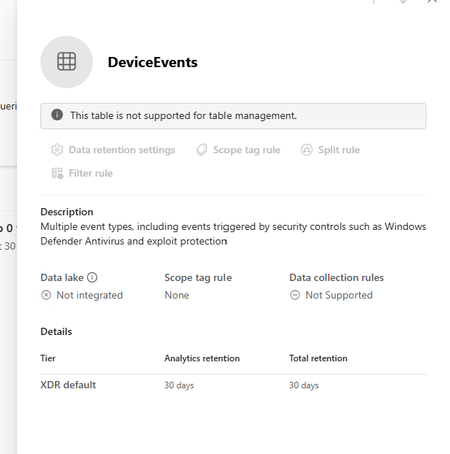
I am trying to extend the table retention of specific tables to allow them to flow to Sentinel Analytics but keep getting the message "This table is not supported for table management" in the Sentinel > Configuration > Tables page. The Sentinel workspace is connected in System > Settings > Microsoft Sentinel. I can see the table type is XDR in the list which seems to be the reason why it can't be managed. Any ideas why this table is not able to be managed.10Views0likes0CommentsHow Granular Delegated Admin Privileges (GDAP) allows Sentinel customers to delegate access
Simplifying Defender SIEM and XDR delegated access As Microsoft Sentinel and Defender converge into a unified experience, organizations face a fundamental challenge: the lack of a scalable, comprehensive, delegated access model that works seamlessly across Entra ID and Sentinel’s Azure Resource Manage creating a significant barrier for Managed Security Service Providers (MSSPs) and large enterprises with complex multi-tenant structures. Extending GDAP beyond CSPs: a strategic solution In response to these challenges, we have developed an extension to GDAP that makes it available to all Sentinel and Defender customers, including non-CSP organizations. This expansion enables both MSSPs and customers with multi-tenant organizational structures to establish secure, granular delegated access relationships directly through the Microsoft Defender portal. This is now available in public preview. The GDAP extension aligns with zero-trust security principles through a three-way handshake model requiring explicit mutual consent between governing and governed tenants before any relationship is established. This consent-based approach enhances transparency and accountability, reducing risks associated with broad, uncontrolled permissions. By integrating with Microsoft Defender, GDAP enables advanced threat detection and response capabilities across tenant boundaries while maintaining granular permission management through Entra ID roles and Unified RBAC custom permissions. Delivering unified management of delegated access across SIEM and XDR With GDAP, customers gain a truly unified way to manage access across both Microsoft Sentinel and Defender—using a single, consistent delegated access model for SIEM and XDR. For Sentinel customers, this brings parity with the Azure portal experience: where delegated access was previously managed through Azure Lighthouse, it can now be handled directly in the Defender portal using GDAP. More importantly, for organizations running SIEM and XDR together, GDAP eliminates the need to switch between portals—allowing teams to view, manage, and govern security access from one centralized experience. The result is simpler administration, reduced operational friction, and a more cohesive way to secure multi-tenant environments at scale. How GDAP for non-CSPs works: the three-step handshake The GDAP handshake model implements a security-first approach through three distinct steps, each requiring explicit approval to prevent unauthorized access. Step 1 begins with the governed tenant initiating the relationship, allowing the governing tenant to request GDAP access. Step 2 shifts control to the governing tenant, which creates and sends a delegated access request with specific requested permissions through the multi-tenant organization (MTO) portal. Step 3 returns to the governed tenant for final approval. The approach provides customers with complete visibility and control over who can access their security data and with what permissions, while giving MSSPs a streamlined, Microsoft-supported mechanism for managing delegated relationships at scale. Step 4 assigns Sentinel permissions. In Azure resource management, assign governing tenant’s groups with Sentinel workspaces permissions (in the governed tenant), selecting the governing tenant’s security groups used in the created relationship. Learn more here: Configure delegated access with governance relationships for multitenant organizations - Unified se…5.6KViews2likes24Comments
Building Microsoft Sentinel Connectors in Minutes with the Sentinel Connector Builder Agent
Overview We previously announced the public preview of the Microsoft Sentinel connector builder agent via VS code extension, that helps developers build Microsoft Sentinel codeless connectors faster with low-code and AI-assisted prompts. This post walks through a hands-on lab using a mock Network Log API to demonstrate how the Sentinel connector builder agent simplifies building Codeless Connector Framework (CCF) pull connectors. Instead of manually creating ingestion infrastructure and configuration files, you’ll use a guided, conversational workflow in VS Code to generate connector artifacts, test them against a live API, and deploy them into Microsoft Sentinel. The lab focuses on the end-to-end experience ranging from API setup to validated connector deployment so you can see how quickly a working integration can be produced. For additional guidance beyond this lab, refer to our MS Learn documentation. The Lab Environment This lab is built around a mock Network Log API hosted as an Azure Function App. The purpose of the lab environment is to give us a live API that we can use to build, validate, and test the Sentinel CCF connector builder agent against end to end. The API exposes 50 synthetic network activity records that look and behave like a real product data source, including web traffic, DNS requests, blocked remote access attempts, malware command-and-control blocks, VPN activity, and other common network events. That makes it a useful stand-in for the type of telemetry many teams want to onboard into Microsoft Sentinel. The API is intentionally shaped like the kind of source a customer might expose for telemetry retrieval. It uses API key authentication through the X-API-Key header, returns paginated results through a nextLink model, and provides a predictable response structure that the builder agent can map into a pull connector configuration. The repo contains everything needed for the walkthrough. There is an ARM template to deploy the Function App, reference documentation for the API, and a sample connector package showing the generated polling config, table schema, DCR, and connector definition. The end goal of the lab is straightforward: use the builder agent to generate a CCF pull connector that ingests this API into the custom NetworkLogAPIGetNetworkLogs_CL table in Sentinel. Prerequisites Before starting, make sure you have the following: Azure subscription -- with Contributor access on a resource group (for deploying the Function App) and Microsoft Sentinel Contributor access on a Sentinel-enabled workspace (for deploying the connector) Microsoft Sentinel workspace -- an existing Log Analytics workspace with Sentinel enabled. See Onboard Microsoft Sentinel to a Log Analytics workspace for more information. Azure CLI -- See How to install the Azure CLI for more information. VS Code with the Microsoft Sentinel for Visual Studio Code extension installed. GitHub Copilot -- with access to premium models. The connector builder agent requires Claude Sonnet 4.5 or 4.6, which uses Copilot premium model credits. Lab Repository -- Once the aforementioned prerequisites are met, you can access the lab repository here: Azure-Sentinel/Tools/CCF-Connector-Builder-Agent-Accelerator at master · Azure/Azure-Sentinel Deploying the Mock API The full CLI commands for this section are available in the repo. For a simpler option, you can use GitHub Copilot to handle the deployment. Enter this prompt: Follow the deployment instructions in Sentinel-CCF-Pull-Connector-Builder-Agent-Accelerator/agent-instructions.md. Let’s deploy the Network Log API and build a CCF pull connector. At a high level, the setup is four steps: clone the repo, create a resource group, ensure you have a Sentinel-enabled workspace, and deploy the Function App using the included ARM template. The template takes two parameters: an ApiKey of your choice (the secret the CCF connector will use to authenticate) and your Log Analytics workspace resource ID for Application Insights. Deployment takes about two to three minutes and outputs the FunctionAppName and endpoint URLs you will need later. Once deployed, verify the API is live: curl -s -H "X-API-Key: <your-api-key>" \ "https://<functionappname>.azurewebsites.net/api/GetNetworkLogs?page=1&pageSize=3" </functionappname></your-api-key> You should see a response like this: The API also exposes an /api/RefreshData endpoint that regenerates the 50 sample records with fresh timestamps. This is useful later in the walkthrough when you want to produce new events and trigger an immediate ingestion cycle without waiting for the next polling interval: curl -s -X POST -H "X-API-Key: <your-api-key>" \ "https://<functionappname>.azurewebsites.net/api/RefreshData" </functionappname></your-api-key> Building the Connector with the Sentinel Connector Builder Agent With the Microsoft Sentinel extension installed and GitHub Copilot running in agent mode, open a Copilot chat and enter a single prompt pointing at the API documentation file: That is the entire invocation. The agent takes it from there. It works through a structured seven-step sequence: preparation, polling config, table schema, DCR, connector definition, package validation, and summary. The agent produces four files in a sentinel-connectors/NetworkLogAPI_CCF/ output folder: NetworkLogAPI_PollingConfig.json – This is the API poller configuration. The agent reads the documentation and correctly identifies the GET /api/GetNetworkLogs endpoint, configures API Key authentication via the X-API-Key header, sets up NextPageUrl pagination using $.metadata.nextLink with a $.metadata.hasNextPage stop condition, and wires up the since query parameter for incremental delta pulls using the timestamp field. The RefreshData endpoint is correctly excluded, which the agent recognizes as a maintenance operation, not a security data stream. NetworkLogAPI_Table.json – This is the custom Log Analytics table schema for NetworkLogAPIGetNetworkLogs_CL . All 20 fields from the API response are mapped to the correct column types, with timestamp promoted to TimeGenerated as the standard Sentinel time column. NetworkLogAPI_DCR.json – This is the Data Collection Rule. This defines the stream declaration, the workspace destination, and the KQL transform that maps the raw snake_case API fields ( sourceIp , destinationIp , threatIndicator , etc.) to their PascalCase table columns. NetworkLogAPI_ConnectorDefinition.json – This is the connector UI configuration. This drives what the connector page looks like in Microsoft Sentinel: the title, description, prerequisite instructions, the BaseUrl and ApiKey input fields, sample KQL queries, and the connectivity status logic. The only point where the agent paused for input was to propose a connector description and ask for confirmation before writing it to the file. Everything else such as endpoint selection, auth type, pagination pattern, schema mapping, KQL transform, cross-file consistency was selected autonomously. To put that in perspective: without the agent, a developer building this connector from scratch would need to manually author four JSON files, understand the CCF schema for polling configs, DCRs, and connector definitions, write the KQL transform by hand, and validate that every cross-file reference lines up correctly. The agent compresses that work, typically hours of reading documentation, trial-and-error, and portal debugging, into a single prompt. Testing the Connector Before deploying anything to a Sentinel workspace, the Microsoft Sentinel connector builder agent lets you validate the generated polling config against the live API directly from your editor. Right-click the sentinel-connectors/NetworkLogAPI_CCF folder, select Microsoft Sentinel → Test Connector (Preview), and a Configuration Variables panel opens asking for the two template variables from the polling config: BaseUrl and apiKey . For other API patterns, there may be additional and different inputs. For example, apiKey input could be swapped with clientID and secret if the API supports OAUTH. Enter the Function App base URL and your API key, and the test runner connects immediately. The panel shows a live polling session. Poll #1 returns HTTP 200 with 50 events, and a countdown timer shows when the next poll will fire. Switching to the Events tab displays the ingested records in a tabular view with columns for timestamp , severity , action , bytesIn , bytesOut , category , and the rest of the mapped fields fresh from the API. Additionally, there are tabs for Headers, Payload, and Response, which can be useful for verifying that your pollerconfig.json configuration provides the expected request to your api with a working response. Data Extracted: The Test Connector feature can be used to visualize the response data in a table format to verify that data will land in a Sentinel table based on your configuration. Request from Poller: The Test Connector feature can be used to validate the request and response headers that will go out to the API based on the generated poller configuration. Request Response: The Test Connector feature shows you the live response from the API with respect to the request going to the API based on the poller configuration. This is a meaningful pre-flight check. It confirms that auth is working, the $.data events path resolves correctly, pagination is functional, and the polling interval fires as configured all before a single file is deployed to Azure. The most common connector configuration issues (wrong base URL, incorrect header name, mismatched JSON path) surface here in seconds rather than after a failed deployment and a 20-minute wait for Sentinel to attempt its first ingestion cycle. It is also the fastest way to troubleshoot if something goes wrong after deployment, far quicker than pushing changes to Azure and waiting for the connector to poll again. Deploying and Enabling the Connector With the connector tested and passing, deployment is the same right-click menu: right-click the sentinel-connectors/NetworkLogAPI_CCF folder, select Microsoft Sentinel → Deploy Connector (Preview). If you are not already signed in to Azure, the extension will prompt you to authenticate. The agent will also provide a clickbox in the chat window to invoke a connector deployment. Right Click Deploy Connector: UI Prompt Based Deploy Method: Once signed in, a workspace picker lists all available Log Analytics workspaces across your subscriptions. Select the one with Sentinel enabled and click Deploy. The extension deploys all four files to the workspace in the correct order: table schema first, then DCR, polling config, and connector definition. Once deployed, navigate to your Sentinel workspace via https://security.microsoft.com, go to Data Connectors, and find the Network Log API connector. The connector page shows the description, prerequisite notes, and the two credential fields generated by the agent: API Base URL and API Key. Enter your Function App base URL and API key and click Connect. The status updates to show the connector is connected and the deployment succeeded. Note: Data will appear in the workspace within 5 to 30 minutes depending on the polling interval. Run this query in Log Analytics to confirm ingestion. Note that the agent derives the table name from the vendor name and endpoint, so yours may differ slightly from the example below. Check the agent's summary output or the NetworkLogAPI_Table.json file for the exact name: NetworkLogAPIGetNetworkLogs_CL | sort by TimeGenerated desc | take 10 If you want to generate a fresh batch of events immediately rather than waiting for the next polling cycle, use the RefreshData endpoint to reset the sample records with new timestamps: curl -s -X POST -H "X-API-Key: " \ "https://.azurewebsites.net/api/RefreshData" Next Steps If you want to go further: Try it with your own API. The lab repo includes documentation on adapting the polling config, schema, and KQL transform to a real data source. Review the CCF connector schema documentation to understand the full range of supported configurations: pagination patterns, auth types, incremental pull strategies, and delta filter expressions. Explore the Microsoft Sentinel content hub to see how published connectors are structured and what the certification requirements look like for production submissions. Conclusion Following these steps, you saw how a working Sentinel connector can be generated, tested, and deployed in minutes rather than requiring days of manual configuration and infrastructure setup. If you are an ISV building a Sentinel integration and want hands-on support, Microsoft’s App Assure program is available to help. We partner with ISVs on connector development, validation, and deployment and provide guidance through implementation, testing, and readiness for production. You can get started by reaching out through our intake form. See our other Sentinel connector feature’s hands-on labs Building a CCF Nested API Pull Connector: A Technical Lab Walkthrough636Views0likes0CommentsMonthly News-August 2026
Microsoft Defender Monthly news - August 2026 Edition This is our monthly "What's new" blog post, summarizing product updates and various new assets we released over the past month across our Defender products. In this edition, we are looking at all the goodness from July 2026. We are now including news related to Defender for Cloud in the Defender portal. For all other Defender for Cloud news, have a look at the dedicated Defender for Cloud Monthly News here. 🚀 New Virtual Ninja Show episode: Redefining identity security for the modern enterprise One policy engine to govern them all: Securing agentic AI with Microsoft Purview Building a modern detection pipeline with ContentOps Securing local AI agents with Microsoft Defender Microsoft Defender: Extending critical protection for emerging threats in Team Actionable threat insights (find all of them here) Email threat landscape: Q2 2026 trends and insights Enhancing AI security through global AI red teaming Least privilege for AI agents: Identity, access, and tool binding Microsoft Defender (Public Preview) Microsoft Defender now assesses posture risk for AI agents, including enterprise agents and local agents discovered on endpoint devices. Risk levels are based on active risk indicators, such as configuration, access, runtime activity, endpoint and user context, and active alerts. Security teams can use posture risk and recommendations to prioritize risky agents and improve agent security posture. For more information, see AI agent posture risk in Microsoft Defender. (Generally available) The Domain investigation page allows you to investigate an Active Directory domain. It shows Active Directory domain security, including domain properties, deployment health, identity summary, service account breakdown, sensitive entities, active recommendations, group policies, and trust relationships. For more information, see Investigate a domain . (Generally available) With a Microsoft Agent 365 license, Microsoft Defender provides discovery, security posture, threat detection and investigation, and real-time protection for the AI agents in your tenant. Onboarding includes enabling data collection, connecting the Microsoft 365 app connector, and connecting Copilot Studio for real-time protection of Copilot Studio agents. For more information, see Protect AI agents using Microsoft Defender. (Generally available) Improved access to Playbook Generator: Following the GA release of Playbook Generator May 31st, the team focused on streamlining the onboarding experience and reducing friction related to Security Copilot wallet provisioning. Playbook Generator remains included with Microsoft Sentinel and does not consume SCUs for generating, testing, or running playbooks, yet customer feedback highlighted friction around Security Copilot wallet provisioning and initial setup requirements. The team worked on simplifying access and reducing onboarding barriers so organizations can more quickly take advantage of AI-assisted playbook creation, testing, and automation capabilities. For all other Sentinel News, have a look at the "What's new in Microsoft Sentinel blog post - July edition" Identity Security (Generally available) Migration of Defender for Identity sensors from v2.x to v3.x is now generally available. For more information, see Migrate to Defender for Identity sensor v3.x. Migration readiness reasons on the Sensors page: When a server is marked Not ready for migration on the Sensors page, you can now hover over the status to see a tooltip that lists the specific reasons the server doesn't meet the migration prerequisites. For more information, see Troubleshoot "Not ready for migration" status. (Public Preview) Expanded SaaS app support in Password protection. The Password protection page now includes password risks from SaaS apps connected through Defender for Cloud Apps, in addition to Active Directory, Microsoft Entra ID, and Okta. SaaS apps that support SaaS Security Posture Management (SSPM), such as Salesforce and ServiceNow, appear on the Password Hygiene and Password Policies tabs. Each SaaS app requires a Defender for Cloud Apps app connector. For more information, see Investigate identity password protection. Automatic RPC auditing on domain controllers: Defender for Identity now automatically enables RPC auditing on domain controllers when you upgrade to sensor version 3.0.8 or later. You no longer need to apply a tag manually to enable RPC auditing. For more information, see Configure RPC auditing. Microsoft Defender Experts MDR General Availability of Microsoft Defender Experts MDR P2: Microsoft Defender Experts MDR (formerly Microsoft Defender Experts for XDR) is expanding with new third-party and multi-cloud coverage powered by Microsoft Sentinel, with the launch of Defender Experts MDR P2 service. Defender Experts MDR provides a 24/7 managed detection and response service that reduces noise, adds expert context, and drives action. In addition to the Microsoft Defender products, this new service supports key non-Microsoft sources across cloud (AWS), identity (Okta), email (Proofpoint), network (Palo Alto Networks, Cisco, Fortinet, ZScaler), and endpoint (CrowdStrike) that are ingested in Microsoft Sentinel, providing E2E visibility and protection for customers operating heterogenous environments. Defender Experts will continue expanding our scope to other non-Microsoft products to deliver on this promise. For more information, see the Microsoft Defender Experts MDR documentation. Microsoft Security Exposure Management / Defender Vulnerability Management (Private Preview) Codename MDASH - Agentic code scanner is now available in private preview in Microsoft Security Exposure Management. Codename MDASH uses a multi-model agentic AI system to detect code vulnerabilities with greater depth and accuracy than traditional static analysis. Security teams can run scans from Defender CLI or through a GitHub connector, review findings in the Defender portal, and use results to help prioritize code security risks. For more information, see Agentic code security overview. (Private Preview) Codename MDASH - MAI-Augmented scan profile private preview. The MAI-Augmented scan profile is now available in preview as part of Codename MDASH. The MAI-Augmented profile can be used when triggering a scan through the Defender CLI. It includes MAI-Cyber-1-Flash, a new cyber-specialized model that extends the current agentic scanner in addition to the existing required models. Security teams can choose this profile when triggering a scan from Defender CLI or continue using a scan profile based on the existing models. For more information, see Scan with a scan profile. OT data connectors in Microsoft Security Exposure Management: Microsoft Security Exposure Management now supports operational technology (OT) data connectors for Armis, Dragos, and Forescout. OT data connectors bring OT asset and vulnerability data from supported third-party OT platforms into the Defender portal. This helps security teams view OT devices alongside other assets, enrich device inventory with OT context, and investigate vulnerabilities across IT and OT environments. For more information, see OT data connectors. Microsoft Defender for Endpoint (Public Preview) AI agent runtime protection includes these enhancements: - Vendor-supported agent event interfaces now work with standard platform and engine update channels, so no Beta channel configuration is required. Agent-native event inspection now supports Codex CLI and the GitHub Copilot app. - Network inspection is now supported for agents that don't expose vendor-supported event interfaces, including OpenClaw and similar Node.js-based Claw agents. For more information, see AI agent runtime protection with Defender for Endpoint. (Generally available) Available from Defender for Endpoint on Linux version 101.26042.0011 and later. The Defender Deployment Tool for Linux simplifies deployment by combining installation, onboarding, upgrades, and uninstallation into a single workflow. The tool automates prerequisite validation, supports custom installation paths, enables deployment of specific Defender versions from preferred update channels, and works seamlessly in environments that use local repositories. In addition to a simplified deployment experience, customers can now gain complete visibility into deployment progress through Device Timeline integration, providing step-by-step installation, upgrade, and onboarding status, Advanced Hunting queries for fleet-wide deployment monitoring, and detailed error reporting, including deployment stage, status, exit code, and failure reason to simplify troubleshooting. These capabilities help administrators quickly identify deployment issues, track onboarding progress, and understand deployment outcomes across their Linux estate. Microsoft Defender for Office 365 Unified RBAC is the default permission model for new Defender for Office 365 Plan 2 organizations. Starting July 2026, new Defender for Office 365 Plan 2 organizations use the Microsoft Defender unified role-based access control (Unified RBAC) model by default. For more information, see Configure Unified RBAC for Defender for Office 365 and MC1246006. Microsoft 365 E3 now includes Microsoft Defender for Office 365 Plan 1. For more information about what's included in each plan, see Microsoft Defender for Office 365 Plan 1 vs. Plan 2 cheat sheet. Prompt injection protection: Defender for Office 365 now detects prompt injection attacks hidden in inbound email. For more information, see Prompt injection protection in Defender for Office 365.1.9KViews1like0Comments
Securing Enterprise AI Agents with Microsoft Sentinel
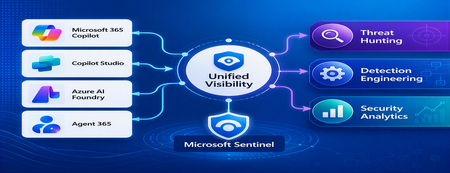
1. Introduction Enterprise adoption of Generative AI is accelerating rapidly through Microsoft 365 Copilot, Copilot Studio, Azure AI Foundry Agents, Security Copilot, and custom AI agents integrated with business applications. Unlike traditional SaaS applications, AI agents can: Access enterprise data Query internal knowledge repositories Invoke APIs and MCP tools Execute workflows Interact with business applications Make decisions on behalf of users While these capabilities improve productivity, they introduce a new attack surface that security teams must monitor and secure. Common AI threats include: Prompt Injection Cross Prompt Injection Attacks (XPIA) Jailbreak Attempts Unauthorized Tool Invocation Data Exfiltration through AI Agents Agent Identity Abuse Excessive Data Access Malicious MCP Tool Execution Traditional SOC monitoring platforms were designed for users, devices, applications and infrastructure—not autonomous AI systems. To address this challenge, Microsoft provides a comprehensive AI security monitoring framework built around: Agent 365 Observability Microsoft Agent Identities Microsoft Copilot Logs Defender XDR Defender for AI Microsoft Sentinel Together these components provide end-to-end observability of: User prompts Agent execution paths Tool invocations Safety signal detections Agent identities Security alerts 2. Reference Architecture AI Security Monitoring Architecture 3. Integration Architecture Microsoft provides multiple telemetry sources that complement one another. 3.1 Agent Runtime Telemetry Sentinel Data Connector Agent 365 Data Connector Table UnifiedAgentObservability Captures runtime behavior of AI agents including: User prompts Session IDs Conversation IDs Agent identities MCP tool invocations Connector invocations Tool arguments Tool responses Request payloads Response payloads Execution errors This dataset provides the forensic trail of everything an AI agent performed. 3.2 Agent Governance and Asset Inventory Sentinel Data Connector Microsoft Agent Identities Provides visibility into: Agent inventory Agent blueprint inventory Ownership Relationships Governance metadata Risk context This allows SOC teams to answer: Who owns this agent? What permissions does it have? Which business unit deployed it? Which related agents exist? 3.3 Copilot Audit and Usage Monitoring Sentinel Data Connector Microsoft Copilot Logs Connector Table CopilotActivity Provides: Copilot usage auditing Operational visibility User interaction tracking Useful for governance, compliance and adoption reporting. 3.4 AI Safety Telemetry Sentinel Data Connector Microsoft Defender XDR Connector Table CloudAppEvents CloudAppEvents provides AI safety signals such as: Prompt Shield detections Prompt Injection attempts Cross Prompt Injection Attacks (XPIA) Jailbreak-related verdicts Unsafe prompt classifications Think of CloudAppEvents as answering: "Was the prompt malicious?" 3.5 AI Security Alerts Sentinel Data Connectors Microsoft Defender XDR Microsoft Defender for Cloud Tables SecurityAlert SecurityIncident Used for: AI attack detections Security incidents Correlated investigation workflows 4. Understanding the Two Most Important AI Tables CloudAppEvents Focuses on AI Safety Questions answered: Was Prompt Shield triggered? Was this a jailbreak attempt? Was XPIA detected? Was the prompt suspicious? UnifiedAgentObservability Focuses on Agent Runtime Behavior Questions answered: What tool was invoked? Which connector executed? What arguments were passed? What data was returned? What actions did the agent perform? 5. Advanced Threat Hunting Scenarios The Agent365 Observability hunting guide contains several investigation scenarios that can be used directly in Microsoft Sentinel. Reference: Agent 365 Observability — AI Agent Telemetry Hunting https://github.com/SCStelz/security-investigator/blob/main/queries/cloud/agent365_observability.md 5.1 Prompt Injection Detection Detect prompts containing indicators such as: Ignore previous instructions Reveal system prompt Developer mode Disregard safety controls Investigation workflow: Review Tool Activity This allows analysts to determine whether a suspicious prompt resulted in downstream actions. 5.2 Session Reconstruction One of the most powerful capabilities of UnifiedAgentObservability is session reconstruction. Analysts can correlate: This creates complete forensic timelines. 5.3 MCP Tool Auditing Monitor all MCP activity including: query_lake Graph API tools ServiceNow connectors SharePoint connectors Custom enterprise tools Questions answered: Which tool was used? Who triggered it? What parameters were supplied? What data was returned? 5.4 Sensitive Data Access Monitoring Monitor AI agent interaction with: Employee records Customer data Financial information SharePoint repositories HR databases Useful for identifying: Data exfiltration attempts Excessive access patterns Sensitive data exposure 5.5 Query Lake Monitoring The GitHub hunting guide introduces monitoring of: query_lake RunAdvancedHuntingQuery Analysts can inspect: Actual KQL submitted Target workspaces Data sources queried Scope of access This provides visibility into AI-driven security investigations. 5.6 New Tool Detection Identify newly observed tool usage. Examples: Unauthorized MCP servers Newly registered connectors Unapproved tools Unexpected integrations This use case is particularly useful for governance programs. 5.7 Tool Failure Monitoring Monitor: Permission failures Connector failures Application errors Access-denied responses A sudden increase in failures may indicate: Reconnaissance activity Misconfiguration Privilege abuse attempts 6. Detection Engineering Opportunities Organizations can create Sentinel Analytics Rules for: 6.1 Prompt Injection Detection Developer Mode prompts Prompt Override attempts System Prompt disclosure requests 6.2 Jailbreak Attempt Detection Safety bypass attempts Role manipulation prompts Instruction override patterns 6.3 Unauthorized Tool Usage New MCP tools High-risk connectors Rare tool executions 6.4 Sensitive Data Access HR data queries Identity information retrieval Large-volume exports 6.5 Agent Identity Abuse Ownership changes Unexpected agent activity Agent-to-agent anomalies 7. Data Lake Exploration and Long-Term Analytics Because agent telemetry resides within Sentinel Data Lake, organizations can perform: Long-term AI investigations Historical AI attack analysis Agent baselining Governance reporting Trend analysis Tool inventory reporting Example dashboards include: Top Prompt Injection Attempts Most Active Agents High-Risk MCP Tools Agent Ownership Analysis AI Security Incidents Sensitive Data Access Trends 8. Summary AI agents represent the next major computing platform, but they also introduce a completely new attack surface. To effectively secure enterprise AI solutions, organizations require visibility across: User interactions Agent execution paths MCP tool usage Prompt safety signals Agent identities Security detections Microsoft Sentinel provides this unified view by integrating: Agent 365 Observability UnifiedAgentObservability Microsoft Agent Identities Microsoft Copilot Logs CloudAppEvents Defender XDR Defender for AI By combining AI runtime telemetry with AI safety signals and Defender detections, security teams can move beyond traditional monitoring and build a modern SOC capability for threat hunting, incident response, governance and forensic investigations across Microsoft 365 Copilot, Copilot Studio, Azure AI Foundry and future AI agent ecosystems. Reference: https://github.com/SCStelz/security-investigator/blob/main/queries/cloud/agent365_observability.mdCustom Detection Rules as Code in Sentinel Repositories: What Your Pipeline Owns Now
While going through the June Sentinel updates I almost scrolled past this one, and I think that would have been a mistake: custom detection rules can now be managed as code in Sentinel Repositories, the same way analytics rules, playbooks, parsers and workbooks already are. You connect a GitHub or Azure DevOps repo, enable the Custom Detection Rules content type, and rules are synced on every commit. There is also a standalone path via the Bicep CLI for teams running their own pipelines. The feature is in preview per the Learn documentation, and in my view it matters more than the low-key rollout suggests. Microsoft has been positioning custom detections as the unified experience for building rules over both Defender XDR and Sentinel data since late 2025. If custom detections are becoming the primary detection type, then this preview is the moment your primary detection type becomes pipeline-managed. I spent some time in the documentation to understand what that actually means, and there is one implication I have not seen anyone talk about yet. How it works Custom detection rules use a different mechanism than every other content type in Repositories. Analytics rules deploy as Microsoft.OperationalInsights/workspaces/providers/alertRules resources, with the Microsoft.SecurityInsights provider sitting in the resource name. Custom detection rules instead use a dedicated Bicep extension. You declare it in a `bicepconfig.json` at the repo root: { "extensions": { "MicrosoftSecurity": "br:mcr.microsoft.com/bicep/extensions/microsoftsecurity:v1.0.1" } } The rule itself is a `Microsoft.Security/detectionRules` resource. This is the structure from the Microsoft documentation: extension MicrosoftSecurity resource detectionRule 'Microsoft.Security/detectionRules@2026-06-01-preview' = { id: 'custom-rule-id' displayName: 'Custom Rule Display Name' status: 'enabled' queryCondition: { queryText: 'DeviceProcessEvents | take 10 | project DeviceId, Timestamp, FileName' } schedule: { frequency: 'PT1H' } detectionAction: { alertTemplate: { title: '<ruleTitle>' description: 'Custom detection rule' severity: 'medium' tactics: [ { tactic: 'Execution' techniques: [ { technique: 'T1059' } ] } ] entityMappings: { hosts: [ { id: 'h' deviceIdColumn: 'DeviceId' } ] } } } } Rules are uniquely identified by the `id` property, which you provide in the template. Deployment is either the automatic Repositories sync or a plain `az deployment group create` against a resource group. That last part is what I like most about the design: any CI/CD system that can run Azure CLI can ship these rules. Prerequisites beyond the standard Repositories setup: a Microsoft 365 E5 license or equivalent that includes Defender XDR, and a Sentinel workspace onboarded to the Defender portal. Two preview limitations are documented: custom frequency for Sentinel-only data is not supported yet, and neither are custom details. The part that made me stop reading and think Repositories are designed as the single source of truth. The documentation is explicit that content in your repo overwrites changes made through the portal. That is the whole point of the feature, and for analytics rules it has been mostly harmless. For custom detections I see a wrinkle. When Microsoft renames tables or columns in the advanced hunting schema, those naming changes are applied automatically to queries saved in Microsoft Defender, including the queries inside custom detection rules. The docs are equally explicit that this automatic migration does not cover queries run via API or saved anywhere outside Defender. A Git repo is outside Defender. Play that forward with a current example. The `AIAgentsInfo` table stopped being accessible on July 1, 2026, replaced by the unified `AgentsInfo` table with a changed column set. A portal-managed custom detection referencing the old table got migrated automatically. The same rule managed as code did not, because the authoritative copy of the query now lives in your repo, and nothing in the sync path rewrites your Bicep files. Your repo is now the thing standing between Microsoft's server-side fix and your production detection. Either the sync starts failing, or the stale query gets reasserted over the migrated rule. The documentation does not say which of the two happens, and honestly, neither is good. No alert fires for either. And if smart deployments, which skip files that have not changed since the last deployment, apply to this content type the same way they do to the rest of Repositories, it gets slightly worse in a way I find almost funny: a stale rule would sit untouched until someone happens to edit it. What I would put in front of the merge To be clear, none of this is an argument against the feature. I want detections in Git, and I suspect most people reading this do too. It is an argument that moving custom detections into a repo moves the schema lifecycle responsibility into your review process, because the portal safety net explicitly does not reach into source control. Concretely, a PR touching detection content should be checked for references to deprecated or transitioning advanced hunting tables, for the result columns the custom detection docs recommend (`Timestamp` or `TimeGenerated`, plus `DeviceId` or `DeviceName` for Defender for Endpoint tables, plus `Timestamp` and `ReportId` from the same event for the other Defender tables), and for complete entity mappings, since entities drive how alerts group into incidents. One more detail from the custom detection docs that I suspect will trip up people coming from analytics rules, because it goes against years of muscle memory: avoid filtering on `Timestamp` or `TimeGenerated` in the query itself. The service prefilters data based on the detection lookback using ingestion time. The scheduled-analytics-rule reflex of always pinning a time window works against you here. Whether you enforce these checks with a homegrown script or a linting step in the pipeline matters less than doing it before merge rather than discovering it in the alert queue. The deployment mechanics are now solved. The content governance is yours. Full transparency: I have worked through the documentation and the sample content, but I have not yet run a retired-table scenario through the sync myself. So if you are testing the preview, I would genuinely like to hear how it behaves in your environment when a repo-managed rule references a table like `AIAgentsInfo`. That failure mode is the one I want to understand before this reaches GA. Beyond that specific case, I am curious where you all stand: are you moving custom detections into Git now, or waiting for GA? And if you already run detections as code for analytics rules, what checks have earned a permanent place in your PR pipeline? My used references: Manage content as code with Microsoft Sentinel repositories: https://learn.microsoft.com/en-us/azure/sentinel/ci-cd-custom-content Advanced hunting schema naming changes: https://learn.microsoft.com/en-us/defender-xdr/advanced-hunting-schema-changes Create custom detection rules in Microsoft Defender XDR: https://learn.microsoft.com/en-us/defender-xdr/custom-detection-rules Custom detections as the unified detection experience: https://techcommunity.microsoft.com/t5/microsoft-defender-threat-protection/custom-detections-are-now-the-unified-experience-for-creating/ba-p/4463875Solved
Looking for a simple deployment guide
MS Learn is a great starting point, but it just doesn't seem to cover the steps needed to get up and running safely. I have concerns about adding or setting something that suddenly creates a vulnerability or exposure. Where is the installation guide that installs and configures the solution then tells you, "You are now protected". Do I really want to set my own policies? Why aren't the default set of rules good enough, safe enough. I can't have a solution that is so complicated I need to hire a team to manage it 24 hours a day. I am okay investigating an alert and helping a user solve a pop-up question. Why is every major corporation around the world required to re-invent the same or similar policies the company next door is creating to make this tool work? I want to onboard all of our Intune devices and monitor anything that CAN'T be stopped by default security measures. Just the fact that Sentinel appears to be changing as an embedded tool within Defender gives me hope that this will be getting closer to a more manageable tool. But that still seems a way off. I am ready to do the reading and research to get this set up but I am hoping for a guide that is specific enough to achieve a final result. Thank for understanding my challenges here.140Views1like2Comments
Exciting Announcements: New Data Connectors Released Using the Codeless Connector Framework
Microsoft Sentinel’s Codeless Connector Framework or ‘CCF’ (formerly called Codeless Connector Platform [CCP]) represents a paradigm shift in data ingestion, making it easier than ever for organisations to do more with Microsoft Sentinel by integrating diverse data sources seamlessly. Designed to simplify and expedite the onboarding of data sources, CCF eliminates the need for extensive coding expertise and maintaining additional services to facilitate ingestion, allowing security teams to focus on what truly matters – safeguarding their environment. Advantages of the Codeless Connector Framework The Codeless Connector Framework offers several compelling benefits: Ease of Use: CCF configuration-based templates allows advanced users to create data connectors without writing exhausting code, making the onboarding process quicker and more accessible to a broader audience. Flexibility: Users can customise data streams to meet their specific needs; optimizing efficacy while ensuring more control on the data being ingested. Scalability: The connectors built using CCF follows a true SaaS auto-expansion model making them highly scalable and natively reliable for large data volumes. Efficiency: By reducing the time and effort required to develop and deploy data connectors, CCF accelerates the availability of critical insights for security monitoring and more rapidly expands the value Microsoft Sentinel provides. What are we up to? We recognize that Codeless Connectors offer substantial advantages over Azure Function App based ingestion in Microsoft Sentinel in most cases. That motivates us to continue investing in modernizing our ingestion patterns for out-of-box connectors; one connector at a time. Another goal of modernizing these connectors is to replace the deprecated HTTP Data Collector API with the Log Ingestion API to send data to Microsoft Sentinel. Announcing the General Availability of New Data Connectors We are continually improving the Data Collection experience for our customers and are thrilled to announce that the following data connectors are now Generally Available (GA) on the Codeless Connector Framework. Atlassian Confluence Ingesting Confluence audit logs allows organizations to monitor collaboration activity, detect security risks, and troubleshoot configuration issues using Confluence audit records. Auth0 With the Auth0 Connector, organizations can effortlessly integrate authentication and authorization data from Auth0 into Microsoft Sentinel. This connector provides valuable insights into user activities and access patterns, bolstering identity security and compliance efforts. Azure DevOps Audit logs from Azure DevOps, allows security teams to monitor user activities, detect anomalous behavior, and investigate potential threats across DevOps environments. Box The Box Connector facilitates the ingestion of file storage and sharing data from Box into Microsoft Sentinel. By leveraging this connector, security teams can monitor file access and sharing activities, ensuring data integrity, and preventing unauthorized access. Google Cloud Platform Load Balancer With GCP Load Balancer and Web Application Firewall (Cloud Armor) logs, security teams can monitor inbound network activity, enforce security policies, and detect threats across GCP environments. Proofpoint POD The ingestion of email security logs allows organizations to monitor message traceability, detect threats, and investigate data exfiltration attempts by attackers and malicious insiders. Proofpoint TAP Email threat intelligence logs, including message and click events, provides visibility into malware and phishing activity to support custom alerts, dashboards, and threat investigation. SentinelOne The SentinelOne Connector enables seamless ingestion of threat intelligence and endpoint security data from SentinelOne into Microsoft Sentinel. This integration empowers security teams to enhance their threat detection capabilities and respond swiftly to potential threats. New Connectors in Public Preview CrowdStrike Falcon Data Replicator (S3 based Polling) Google Cloud Platform VPC Flow Google Cloud Platform DNS Google IAM These new additions are not new out-of-box sources in Microsoft Sentinel, but they do improve how data is collected. The previously Azure Function App based polling has now been upgraded to the Codeless Connector Framework for these products to ensure data collection adheres to the more scalable; advantageous pattern with CCF. As noted previously, the newer version of these connectors replaces the deprecated HTTP Data Collector API with the Log Ingestion API to send data to Microsoft Sentinel. Call to Action! Microsoft Sentinel customers collecting data from any of the mentioned sources using Azure Function Apps are advised to migrate their ingestion streams to newer versions to utilize the Codeless Connector Framework. While we continue to improve the data collection experience across all connectors, we encourage our customers and partners to join the Microsoft Security Communities to benefit from early insights about the latest and greatest with Microsoft Security. Call to Action for ISV Partners We invite our ISV partners to migrate their Azure Function App-based data connectors to the Codeless Connector Framework. By leveraging CCF for data ingestion, we can ensure that our mutual customers benefit from streamlined data integration and enhanced security monitoring in Microsoft Sentinel. We are committed to ensuring partners have all the support needed in this transformation. For any support, please reach out to us at Microsoft Sentinel Partners. Join us in this transformative journey to empower our customers by unlocking the full potential of their security investments with Microsoft Sentinel’s Codeless Connector Framework. References Create a codeless connector for Microsoft Sentinel Migrate from the HTTP Data Collector API to the Log Ingestion API to send data to Azure Monitor Logs2.4KViews0likes2CommentsRun agentless SAP connector cost-efficiently
The SAP agentless connector uses SAP Integration Suite (Cloud Integration/CPI) to fetch SAP audit log data and forward it to Microsoft Sentinel. Because SAP CPI billing typically reflects message counts and data volume, you can tune the connector to control costs—while preserving reliability and timeliness. Cost reductions primarily come from sending fewer CPI messages by increasing the polling interval. The max-rows parameter is a stability safeguard that caps events per run to protect CPI resources; it is not a direct cost-optimization lever. After any change, monitor CPI execution time and resource usage. ☝️Note: It may not be feasible to increase the polling interval on busy systems processing large data volumes. Larger intervals lengthen CPI execution time and cause truncation when event spikes exceed max-rows. Cost optimization via longer intervals generally works best on lower-utilization environments (for example, dev and test) where event volume is modest and predictable. Tunable parameters Setting Default Purpose Cost impact Risk / trade-off Polling interval 1 minute How often the connector queries SAP and triggers a CPI message. Lower message count at longer intervals → potential cost reduction. Larger batches per run can extend CPI execution time; spikes may approach max-rows after which message processing for that interval is truncated. max-rows 150,000 Upper bound on events packaged per run to protect CPI stability. None (safeguard)—does not reduce message count on its own. If too low, frequent truncation; if too high, runs may near CPI resource limits. Adjust cautiously and observe. ☝️Note: When event volume within one interval exceeds max-rows, the batch is truncated by design. Remaining events are collected on subsequent runs. Find the latest documentation on available customizing parameters always on Microsoft Learn. Recommended approach Start with defaults. Use a 1-minute polling interval and max-rows = 150,000. Measure your baseline. Understand average and peak ingestion per minute (see KQL below). Optimize the polling interval first to reduce message count when costs are a concern. Treat max-rows as a guardrail. Change only if you consistently hit the cap; increase in small steps. Monitor after each change. Track CPI run duration, CPU/memory, retries/timeouts, and connector health in both SAP CPI and Sentinel. 💡Aim for the lowest interval that keeps CPI runs comfortably within execution-time and resource limits. Change one variable at a time and observe for at least a full business cycle. 🧐Consider the Azure Monitor Log Ingestion API limits to close the loop on your considerations. Analyze ingestion profile (KQL) ABAPAuditLog | where TimeGenerated >= ago(90d) | summarize IngestedEvents = count() by bin(UpdatedOn, 1m) | summarize MaxEvents = max(IngestedEvents), AverageEvents = toint(avg(IngestedEvents)), P95_EventsPerMin = percentile(IngestedEvents, 95) How to use these metrics? AverageEvents → indicates typical per-minute volume. P95_EventsPerMin → size for spikes: choose a polling interval such that P95 × interval (minutes) remains comfortably below max-rows. If MaxEvents × interval approaches max-rows, expect truncation and catch-up behavior—either shorten the interval or, if safe, modestly raise max-rows. Operational guidance ⚠️❗Large jumps (for example, moving from a 1-minute interval to 5 minutes and raising max-rows simultaneously) can cause CPI runs to exceed memory/time limits. Adjust gradually and validate under peak workloads (e.g., period close, audit windows). Document changes (interval, max-rows, timestamp, rationale). Alert on CPI anomalies (timeouts, retries, memory warnings). Re-evaluate regularly in higher-risk periods when SAP event volume increases. Balancing Audit Log Tuning and Compliance in SAP NetWeaver: Risks of Excluding Users and Message Classes When tuning SAP NetWeaver audit logging via transaction SM19 (older releases) or RSAU_CONFIG (newer releases), administrators can filter by user or message class to reduce log volume - such as excluding high-volume batch job users or specific event types - but these exclusions carry compliance risks: omitting audit for certain users or classes may undermine traceability, violate regulatory requirements, or mask unauthorized activities, especially if privileged or technical users are involved. Furthermore, threat hunting in Sentinel for SAP gets "crippled" due to missing insights. Best practice is to start with comprehensive logging, only apply exclusions after a documented risk assessment, and regularly review settings to ensure that all critical actions remain auditable and compliant with internal and external requirements. Cost-Efficient Long-Term Storage for Compliance Microsoft Sentinel Data Lake enables organizations to retain security logs - including SAP audit data - for up to 12 years at a fraction of traditional SIEM storage costs, supporting compliance with regulations such as NIS2, DORA and more. By decoupling storage from compute, Sentinel Data Lake allows massive volumes of security data to be stored cost-effectively in a unified, cloud-native platform, while maintaining full query and analytics capabilities for forensic investigations and regulatory reporting. This approach ensures that organizations can meet strict data retention and auditability requirements without compromising on cost or operational efficiency. Summary Use the polling interval to reduce message count (primary cost lever). Keep max-rows as a safety cap to protect CPI stability. Measure → adjust → monitor to achieve a stable, lower-cost configuration tailored to your SAP workload. Use built-in mirroring to the Sentinel Data Lake to store the SAP audit logs cost-efficient for years Next Steps Explore agentless SAP deployment config and parameter guide on Microsoft Learn Expand deployment to SAP Business Technology Platform Use the insightful blog series by AryaG for details on how to move to production with the built-in SAP content of agentless794Views0likes0CommentsMonthly news - July 2026
Microsoft Defender Monthly news - July 2026 Edition This is our monthly "What's new" blog post, summarizing product updates and various new assets we released over the past month across our Defender products. In this edition, we are looking at all the goodness from June 2026. We are now including news related to Defender for Cloud in the Defender portal. For all other Defender for Cloud news, have a look at the dedicated Defender for Cloud Monthly News here. 🚀 New Virtual Ninja Show episode: Redefining identity security for the modern enterprise One policy engine to govern them all: Securing agentic AI with Microsoft Purview Building a modern detection pipeline with ContentOps Securing local AI agents with Microsoft Defender Microsoft Defender: Extending critical protection for emerging threats in Team Weekly Security News: We publish a short 1ish minute video every week with updates across our Microsoft Security stack. Subscribe to our YouTube channel, so you don't miss the next episode. Actionable threat insights (find all of them here) Securing AI agents: When AI tools move from reading to acting Chromium extension uses AI‑related branding to redirect browser search Photo ZIP campaign targeting hospitality industry delivers Node.js implant for persistent access Microsoft Defender Two Workbooks capabilities in the unified Microsoft Defender portal moved to GA: Advanced Hunting connector - build custom dashboards directly on top of Advanced Hunting (XDR) dat. Query XDR tables and visualize them in Workbooks for richer investigations and reports. Workspace filter / multi-workspace experience - scope and filter workbooks by workspace, with workspace selection integrated into the workbook itself rather than relying on the global selector. MTO Tenant Groups let MSSPs and large enterprises organize their multitenant view in Microsoft Defender by grouping tenants logically (e.g., by region, business unit, or customer cohort). Learn more here. Custom Detections support in Microsoft Sentinel Repositories. Custom Detections can now be managed as code in Microsoft Sentinel Repositories, the same way customers already manage analytic rules, playbooks, parsers and workbooks. Detection engineers connect a GitHub or Azure DevOps repo to their workspace; Custom Detections placed in the repo are reconciled on every commit. A standalone Bicep path via the Microsoft Security Bicep extension lets teams deploy from any CI/CD pipeline (ADO Pipelines, GitHub Actions, custom runners). (General Availability) The following advanced hunting schema tables are now generally available: The CloudAuditEvents table contains information about cloud audit events for various cloud platforms protected by the organization's Defender for Cloud. The CloudDnsEvents table contains information about DNS activity events from cloud infrastructure environments. The CloudProcessEvents table contains information about process events in multicloud hosted environments. (Public Preview) The AgentsInfo table in advanced hunting is now available in preview. The AIAgentsInfo table is transitioning to this new table, which provides a unified schema that supports agent inventory and governance for all agent types, including Copilot Studio, Microsoft Foundry, Microsoft 365 Copilot, third-party, and endpoint-discovered agents. Microsoft Agent 365 customers should use the AgentsInfo table today. The AIAgentsInfo table remains accessible until July 1, 2026. Update your queries to use AgentsInfo before this date. For more information, see Advanced hunting schema - Naming changes. For all other Sentinel News, have a look at the "What's new in Microsoft Sentinel blog post - June edition" Identity Security (Public Preview) The Identity Security dashboard now includes a new Human identities card that shows your human identities by source (Entra ID, SaaS, and on-premises), giving you a single view of where your human identities live. For more information, see Identity Security dashboard. (Public Preview) On the Coverage and maturity page, the Review and improve coverage side panel for SaaS Identities now includes an Observed column and a Show Only Observed Applications toggle. By default, the panel shows only SaaS applications detected in your environment. Turn off the toggle to see other supported SaaS applications you can onboard to expand your identity coverage. For more information, see Coverage and maturity. New alerts were added to the Defender for Identity security alerts related to Microsoft Entra ID, Active Directory as well as other identity providers. For a full list of those new alerts, check out our documentation. Recent ShinyHunters attacks on Salesforce show how OAuth tokens and connected apps are being weaponized to bypass MFA at scale. The upgraded Salesforce connector for Defender for Cloud Apps helps detect these attacks faster, with richer connected-app context and investigation-ready signals. Customers already using the connector are advised to enable the additional events in the Salesforce console for tighter protection, and eligible customers not yet using it are advised to connect Salesforce. Learn more. Microsoft Defender for Endpoint / Microsoft Defender Vulnerability Management (Public Preview) Local AI agent discovery: as part of the Defender AI agents experience, Microsoft Defender now automatically discovers supported local AI agents running on onboarded Windows & macOS devices. Discovered agents appear as assets in the AI agent inventory, exposure map, and advanced hunting, giving security teams visibility into local AI agent usage across the organization. For more information, see Discover local AI agents. (Preview) Local AI agent runtime protection on Windows endpoints is now available in public preview. Microsoft Defender inspects the agent loop (user prompts, tool calls, and tool responses) and can block risky activity before it executes, helping stop prompt injection and unsafe agent actions at the device level. Blocked and audited events appear as alerts in Microsoft Defender to support incident correlation and investigation workflows. The new version of the Defender deployment tool for Windows streamlines onboarding and enhances security by: Bundling the onboarding package directly into the tool's executable. Generating a key during deployment package creation that is required for running the tool. Enabling users to configure an expiry date for the package to reduce the risk of unauthorized use. In addition: You have the option of downloading the package as either an .exe or a .zip file, whichever best suits your organization's needs. A new Deployment packages page in the Defender portal facilitates management of downloaded packages by providing centralized visibility into all the packages and their current status. Now generally available: Selective Response Actions enables organizations to tailor high-impact security operations on devices during onboarding. It provides precise control over how response actions are applied on Tier-0 systems and other high-value assets, helping maintain operational stability while delivering strong protection. The new exposure score model in Defender Vulnerability Management is now generally available. This model improves risk prioritization and recommendation impact accuracy by incorporating exploit prediction data (EPSS) and asset context factors such as internet-facing status and criticality. More details here. Microsoft Secure Score now includes the Reduce unnecessary inbound internet exposure on internet-facing devices recommendation, which helps identify devices that are accessible from the public internet and may represent unnecessary attack surface. This recommendation provides centralized visibility into internet-facing devices across the environment. Many predefined SaaS application classification rules were added to the critical assets list. Have a look at our documentation for the full list. These classifications require onboarding to Microsoft Defender for Cloud Apps.1.6KViews2likes6Comments