microsoft publisher
14 Topics
Msn partner hub program Invitation code inquiry
Hi , I don't have access to any publisher of msn partner hub program. But I just wanted to join it at any cost. This is very important for me join it. Please send me an invite code for it. So, I can join it. Or send me the link of any publisher so I can contact him. Please help me out to join this program. It is very essential for life fulfill my life purpose. I will thankful to you. With my best Regards794Views0likes2Comments
Word/PowerPoint are not suitable replacements for Publisher
I’m writing following the guidance that Word and PowerPoint can be used as replacements for Publisher. This feedback is based on completing a real production document, not theoretical use Having just completed a fairly complex, layout-heavy technical document, I thought it only fair to share how that works in practice. In theory, I can see the logic: Word handles documents PowerPoint handles layouts Therefore, between the two, everything should be covered Unfortunately, in reality, this appears to be more of a theoretical exercise than a practical solution. Publisher was clearly designed for: Fixed, page-based layouts Precise positioning of objects Efficient alignment of mixed content (text, images, tables) Producing consistent, professional multi-page documents By comparison: Word is admirably committed to reminding you that it would prefer everything to flow freely, regardless of whether you want it to or not PowerPoint, while better behaved, does seem to assume every page is a standalone slide rather than part of a structured document Both tools can, with enough persistence, be persuaded into doing the job. However, this involves a level of manual intervention, workaround, and general negotiation with the software that feels somewhat at odds with modern productivity software. To put it simply: They are not replacements in any meaningful, real-world sense. The end result can be achieved, but the process is unnecessarily time-consuming, fragile, and prone to unexpected layout changes—particularly when precision actually matters. Replacing a purpose-built publishing tool with two applications that were never designed for that role gives the impression that this use case has been… optimistically simplified. I would strongly encourage Microsoft to either: Provide a genuine page-layout solution within the Office suite, or Enhance existing applications so they can support fixed-layout publishing without constant workarounds At present, the gap left by Publisher is very noticeable for anyone producing structured documents beyond basic text. I appreciate the direction of Microsoft 365 overall, but in this particular area, the experience feels less like an evolution and more like working around a missing tool. Regards Andy489Views1like2Comments
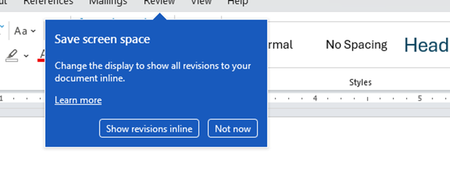
Disable incessant nagware popups
I don't know about everyone else, but I am sick and tired of the nagware pop ups in Word, Excel, PowerPoint, Outlook, etc. Every single product harasses me with pop ups trying to tell me "hey, did you know this feature was here?", "you can do this if you click that", "let me hold your hand through using products you've used for decades even though you don't want daddy Microslop to do that". This is a prime example. I keep getting the same ones again and again and again and everything I've read indicates they should only appear once. But they don't. They keep coming back like a psychotic stalker ex who wants alimony even though you were never married. How do I get this nagware to stop?!332Views1like1Comment
Microsoft Publisher end date.
Here is a novel idea. If Microsoft is going to terminate Publisher in 2026, it would make sense for the programmers of Word to actually create an import function for Publisher files that faithfully creates the file in word. This is the opposite of forcing the end user to find ALL the previous Publisher files and convert them to pdf or Word.215Views0likes1Comment
How to Backup Emails in Outlook?
If you want to backup emails in Outlook, the easiest and most reliable way is by using the Mails.Daddy Email Backup Tool. I’ve used it personally to export my Outlook.com emails to formats like PST, EML, and MBOX with zero data loss. It connects via IMAP and lets you back up selective folders or the entire mailbox. Whether you're planning to backup Outlook emails to a hard drive or migrate them to another email client, this tool is fast, secure, and beginner-friendly. For anyone asking how to backup emails in Outlook, I strongly recommend trying this — it’s a smooth experience and saves a lot of time.382Views0likes1Comment🚀 Mastering Microsoft Power Platform Fundamentals – My Learning Journey & Tips!
I recently completed the Power Platform Fundamentals Learning Plan and wanted to share my journey, key takeaways, and useful tips for anyone looking to get certified! 💡 What I learned: ✔ How Power Automate simplifies workflows ✔ Dataverse best practices ✔ Custom app-building insights Here’s the official Microsoft Learn Plan I followed: [https://learn.microsoft.com/en-us/plans/zkddhk2dw1d1op?tab=tab-created&learnerGroupId=3e83a52a-c570-48d8-ae9a-0436f7a79390&wt.mc_id=studentamb_444266] 📢 If you're preparing for the exam or just exploring Power Platform, let’s connect and discuss! Feel free to ask any questions. 🚀161Views0likes0CommentsCopilot
I am new to Copilot and I want to make a decision as to whether it is worthwhile to purchase it. I have seen that there is a Copilot that can be added to Microsoft Powerpoint and Microsoft Excel. I believe that there is also one for Microsoft Word. (All of these in Microsoft 365) Is there a Copilot for Microsoft Access and Microsoft Publisher in Microsoft 365? If so, how do I install it? If not has Microsoft any plans for either of these in the near future?1.3KViews0likes2Comments
Need help on Mail Merge to add multiple CC from MS Publisher
HI All I am using O365 version in my office laptop and posting this query from personal laptop. Objective: Employee has attended Training and we want to send email to Employee to get Certify now with an email message from MS PUBLISHER through Mail merge option and CC ( his project supervisor & competency SPOC) by using MS Publisher from Mail Merge option. Attached excel sheet with sample data for your reference. So if any one can help me with DETAILED steps how to send email to employee( Cell D2) and to CC ( E2 & F2 ) parallelly that would help. So do let me know if you need any further information.676Views0likes0Comments