microsoft ignite 2024
120 TopicsAutomating the Linux Quality Assurance with LISA on Azure
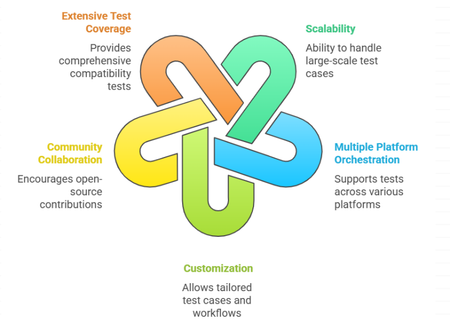
Introduction Building on the insights from our previous blog regarding how MSFT ensures the quality of Linux images, this article aims to elaborate on the open-source tools that are instrumental in securing exceptional performance, reliability, and overall excellence of virtual machines on Azure. While numerous testing tools are available for validating Linux kernels, guest OS images and user space packages across various cloud platforms, finding a comprehensive testing framework that addresses the entire platform stack remains a significant challenge. A robust framework is essential, one that seamlessly integrates with Azure's environment while providing the coverage for major testing tools, such as LTP and kselftest and covers critical areas like networking, storage and specialized workloads, including Confidential VMs, HPC, and GPU scenarios. This unified testing framework is invaluable for developers, Linux distribution providers, and customers who build custom kernels and images. This is where LISA (Linux Integration Services Automation) comes into play. LISA is an open-source tool specifically designed to automate and enhance the testing and validation processes for Linux kernels and guest OS images on Azure. In this blog, we will provide the history of LISA, its key advantages, the wide range of test cases it supports, and why it is an indispensable resource for the open-source community. Moreover, LISA is available under the MIT License, making it free to use, modify, and contribute. History of LISA LISA was initially developed as an internal tool by Microsoft to streamline the testing process of Linux images and kernel validations on Azure. Recognizing the value it could bring to the broader community, Microsoft open-sourced LISA, inviting developers and organizations worldwide to leverage and enhance its capabilities. This move aligned with Microsoft's growing commitment to open-source collaboration, fostering innovation and shared growth within the industry. LISA serves as a robust solution to validate and certify that Linux images meet the stringent requirements of modern cloud environments. By integrating LISA into the development and deployment pipeline, teams can: Enhance Quality Assurance: Catch and resolve issues early in the development cycle. Reduce Time to Market: Accelerate deployment by automating repetitive testing tasks. Build Trust with Users: Deliver stable and secure applications, bolstering user confidence. Collaborate and Innovate: Leverage community-driven improvements and share insights. Benefits of Using LISA Scalability: Designed to run large-scale test cases, from 1 test case to 10k test cases in one command. Multiple platform orchestration: LISA is created with modular design, to support run the same test cases on various platforms including Microsoft Azure, Windows HyperV, BareMetal, and other cloud-based platforms. Customization: Users can customize test cases, workflow, and other components to fit specific needs, allowing for targeted testing strategies. It’s like building kernels on-the-fly, sending results to custom database, etc. Community Collaboration: Being open source under the MIT License, LISA encourages community contributions, fostering continuous improvement and shared expertise. Extensive Test Coverage: It offers a rich suite of test cases covering various aspects of compatibility of Azure and Linux VMs, from kernel, storage, networking to middleware. How it works Infrastructure LISA is designed to be componentized and maximize compatibility with different distros. Test cases can focus only on test logic. Once test requirements (machines, CPU, memory, etc) are defined, just write the test logic without worrying about environment setup or stopping services on different distributions. Orchestration. LISA uses platform APIs to create, modify and delete VMs. For example, LISA uses Azure API to create VMs, run test cases, and delete VMs. During the test case running, LISA uses Azure API to collect serial log and can hot add/remove data disks. If other platforms implement the same serial log and data disk APIs, the test cases can run on the other platforms seamlessly. Ensure distro compatibility by abstracting over 100 commands in test cases, allowing focus on validation logic rather than distro compatibility. Pre-processing workflow assists in building the kernel on-the-fly, installing the kernel from package repositories, or modifying all test environments. Test matrix helps one run to test all. For example, one run can test different vm sizes on Azure, or different images, even different VM sizes and different images together. Anything is parameterizable, can be tested in a matrix. Customizable notifiers enable the saving of test results and files to any type of storage and database. Agentless and low dependency LISA operates test systems via SSH without requiring additional dependencies, ensuring compatibility with any system that supports SSH. Although some test cases require installing extra dependencies, LISA itself does not. This allows LISA to perform tests on systems with limited resources or even different operating systems. For instance, LISA can run on Linux, FreeBSD, Windows, and ESXi. Getting Started with LISA Ready to dive in? Visit the LISA project at aka.ms/lisa to access the documentation. Install: Follow the installation guide provided in the repository to set up LISA in your testing environment. Run: Follow the instructions to run LISA on local machine, Azure or existing systems. Extend: Follow the documents to extend LISA by test cases, data sources, tools, platform, workflow, etc. Join the Community: Engage with other users and contributors through forums and discussions to share experiences and best practices. Contribute: Modify existing test cases or create new ones to suit your needs. Share your contributions with the community to enhance LISA's capabilities. Conclusion LISA offers open-source collaborative testing solutions designed to operate across diverse environments and scenarios, effectively narrowing the gap between enterprise demands and community-led innovation. By leveraging LISA, customers can ensure their Linux deployments are reliable and optimized for performance. Its comprehensive testing capabilities, combined with the flexibility and support of an active community, make LISA an indispensable tool for anyone involved in Linux quality assurance and testing. Your feedback is invaluable, and we would greatly appreciate your insights.792Views1like0Comments
Announcing the General Availability of Event Hubs Data Explorer
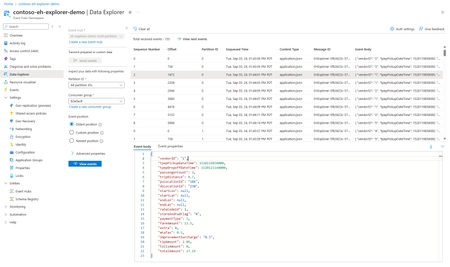
We are excited to announce the general availability of the Event Hubs Data Explorer in the Azure portal! Ever since our preview announcement in September, we've heard customers rave about how the Event Hubs Data Explorer has already made its way into their daily workflows to onboard, debug and review the data in their Event Hubs with very little effort. Customer-Centric Design We listened to your feedback and designed the Event Hubs Data Explorer to address your needs. We've had a lot of customers try this tool and share feedback on how its saving them significant time and effort when it comes to viewing their Event Hubs in action and performing basic debugging tasks. Simplified Onboarding and Debugging The Event Hubs Data Explorer is perfect for both new and experienced users. It provides a comprehensive view of event data, making it easy to test event producers and consumers. You can quickly validate your setup with custom workloads or predefined datasets, ensuring everything is configured correctly. Debugging is now more straightforward than ever. With the ability to inspect data at specific timestamps or offsets, you can quickly identify and resolve issues, optimizing your event processing workflows. Getting Started To start using the Event Hubs Data Explorer, navigate to your Event Hubs namespace in the Azure portal. From there, you can access the Data Explorer and begin sending and viewing events with just a few clicks. You can also check out the documentation here. We are excited to see how you leverage the Event Hubs Data Explorer to drive innovation and efficiency in your projects. Your feedback has been instrumental in shaping this tool, and we look forward to continuing to improve our offerings based on your insights.472Views1like0Comments
Azure Managed Redis (Preview): The Next Generation of Redis on Azure at Microsoft Ignite 2024
Azure Managed Redis (Preview): The Next Generation of Redis on Azure, announced at Microsoft Ignite 2024 We were excited to announce the preview of Azure Managed Redis at Microsoft Ignite 2024, a first party, in-memory database solution designed for developers building the next generation of GenAI applications.The Evolution of AI Frameworks: Understanding Microsoft's Latest Multi-Agent Systems
The landscape of artificial intelligence is undergoing a fundamental transformation in late 2024. Microsoft has unveiled three groundbreaking frameworks—AutoGen 0.4, Magentic-One, and TinyTroupe—that are revolutionizing how we approach AI development. Moving beyond single-model systems, these frameworks represent a shift toward collaborative AI, where multiple specialized agents work together to solve complex problems. Think of these frameworks as different but complementary systems, much like how a city needs infrastructure, service providers, and community organizations to function effectively. AutoGen 0.4 provides the robust foundation, Magentic-One orchestrates complex tasks through specialized agents, and TinyTroupe simulates human behavior for business insights. Together, they form a comprehensive ecosystem for building the next generation of intelligent systems. As we explore each framework in detail, we'll see how this coordinated approach is opening new possibilities in AI development, from enterprise-scale applications to sophisticated business simulations. Framework Comparison: A Deep Dive Before we explore each framework in detail, let's understand how they compare across key dimensions. These comparisons will help us understand where each framework excels and how they complement each other. Core Capabilities and Design Focus Aspect AutoGen 0.4 Magentic-One TinyTroupe Primary Architecture Layered & Event-driven Orchestrator-based Persona-based Core Strength Infrastructure & Scalability Task Orchestration Human Simulation Development Stage Beta Preview Early Release Target Users Enterprise Developers Automation Teams Business Analysts Key Innovation Cross-language Support Dual-loop Orchestration Persona Modeling Deployment Model Cloud/On-premise Container-based Local Main Use Case Enterprise Systems Task Automation Business Insights AutoGen 0.4: The Digital Infrastructure Builder Imagine building a modern city. Before any services can operate, you need robust infrastructure – roads, power grids, water systems, and communication networks. AutoGen 0.4 serves a similar foundational role in the AI ecosystem. It provides the essential infrastructure that allows Agentic systems to operate at enterprise scale. The framework's brilliance lies in its three-layer architecture: The Core Layer acts as the fundamental infrastructure, handling basic communication and resource management, much like a city's utility systems. The AgentChat Layer provides high-level interaction capabilities, similar to how city services interface with residents. The Extensions Layer enables specialized functionalities, comparable to how cities can add new services based on specific needs. What truly sets AutoGen 0.4 apart is its understanding of real-world enterprise needs. Modern organizations rarely operate with a single technology stack – they might use Python for data science, .NET for backend services, and other languages for specific needs. AutoGen 0.4 embraces this reality through its multi-language support, ensuring different components can communicate effectively while maintaining strict type safety to prevent errors. from autogen_agentchat.agents import AssistantAgent from autogen_agentchat.task import Console from autogen_ext.models import OpenAIChatCompletionClient async def enterprise_example(): # Create an enterprise agent with specific configuration agent = AssistantAgent( name="enterprise_system", model_client=OpenAIChatCompletionClient( model="gpt-4o-2024-08-06", api_key="YOUR_API_KEY" ) ) # Define a complex enterprise task task = { "objective": "Analyze sales data and generate insights", "data_source": "sales_database", "output_format": "report" } # Execute task with streaming output stream = agent.run_stream(task=task) await Console(stream) # Example usage: # asyncio.run(enterprise_example()) Magentic-One: The Master Orchestra Conductor If AutoGen 0.4 builds the city's infrastructure, Magentic-One acts as its management system. Think of it as a highly skilled orchestra conductor, coordinating various musicians (specialized agents) to create a harmonious performance (completed tasks). The framework's innovative dual-loop architecture demonstrates this orchestration: The Task Ledger works like a conductor's score, planning out what needs to be done. The Progress Ledger functions as the conductor's real-time monitoring, ensuring each section performs its part correctly. Magentic-One's specialized agents exemplify this orchestra metaphor: WebSurfer: Like the string section, handling intricate web interactions FileSurfer: Similar to the percussion section, managing rhythmic file operations Coder: Comparable to the brass section, producing powerful code outputs ComputerTerminal: Like the woodwinds, executing precise commands This specialization has proven its worth through impressive benchmark performances across GAIA, AssistantBench, and WebArena, showing that specialized expertise, when properly coordinated, produces superior results. from magentic_one import ( Orchestrator, WebSurfer, FileSurfer, Coder, ComputerTerminal ) def automation_example(): # Initialize specialized agents agents = { 'web': WebSurfer(), 'file': FileSurfer(), 'code': Coder(), 'terminal': ComputerTerminal() } # Create orchestrator with task and progress ledgers orchestrator = Orchestrator(agents) # Define complex automation task task = { "type": "web_automation", "steps": [ {"action": "browse", "url": "example.com"}, {"action": "extract", "data": "pricing_info"}, {"action": "save", "format": "csv"} ] } # Execute orchestrated task result = orchestrator.execute_task(task) return result # Example usage: # result = automation_example() TinyTroupe: The Social Behavior Laboratory TinyTroupe takes a fundamentally different approach, more akin to a sophisticated social simulation laboratory than a traditional AI framework. Instead of focusing on task completion, it seeks to understand and replicate human behavior, much like how social scientists study human interactions and decision-making. The framework creates detailed artificial personas (TinyPersons) with rich backgrounds, personalities, and behaviors. Think of it as creating a miniature society where researchers can observe how different personality types interact with products, services, or each other. These personas exist within controlled environments (TinyWorlds), allowing for systematic observation and analysis. Consider a real-world parallel: When automotive companies design new vehicles, they often create detailed driver personas to understand different user needs. TinyTroupe automates and scales this approach, allowing businesses to simulate thousands of interactions with different personality types, providing insights that would be impractical or impossible to gather through traditional focus groups. The beauty of TinyTroupe lies in its ability to capture the nuances of human behavior. Just as no two people are exactly alike, each TinyPerson brings its unique perspective, shaped by its programmed background, experiences, and preferences. This diversity enables more realistic and valuable insights for business decision-making. from tinytroupe import TinyPerson, TinyWorld, TinyPersonFactory from tinytroupe.utils import ResultsExtractor def simulation_example(): # Create simulation environment world = TinyWorld("E-commerce Platform") # Generate diverse personas factory = TinyPersonFactory() personas = [ factory.generate_person( "Create a tech-savvy professional who values efficiency" ), factory.generate_person( "Create a budget-conscious parent who prioritizes safety" ), factory.generate_person( "Create a senior citizen who prefers simplicity" ) ] # Add personas to simulation world for persona in personas: world.add_person(persona) # Define simulation scenario scenario = { "type": "product_evaluation", "product": "Smart Home Device", "interaction_points": ["discovery", "purchase", "setup"] } # Run simulation and extract insights results = world.run_simulation(scenario) insights = ResultsExtractor().analyze(results) return insights # Example usage: # insights = simulation_example() Framework Selection Guide To help you make an informed decision, here's a comprehensive selection matrix based on specific needs: Need Best Choice Reason Alternative Enterprise Scale AutoGen 0.4 Built for distributed systems Magentic-One Task Automation Magentic-One Specialized agents AutoGen 0.4 User Research TinyTroupe Persona simulation None High Performance AutoGen 0.4 Optimized architecture Magentic-One Quick Deployment TinyTroupe Minimal setup Magentic-One Complex Workflows Magentic-One Strong orchestration AutoGen 0.4 Practical Implications For organizations looking to implement these frameworks, consider the following guidance: For Enterprise Applications: Use AutoGen 0.4 as your foundation. Its robust infrastructure and cross-language support make it ideal for building scalable, production-ready systems. For Complex Automation: Implement Magentic-One for tasks requiring sophisticated orchestration. Its specialized agents and safety features make it perfect for automated workflows. For Business Intelligence: Deploy TinyTroupe for market research and user behavior analysis. Its unique simulation capabilities provide valuable insights for business decision-making. Conclusion Microsoft's three-pronged approach to multi-agent AI systems represents a significant leap forward in artificial intelligence. By addressing different aspects of the AI development landscape – infrastructure (AutoGen 0.4), task execution (Magentic-One), and human simulation (TinyTroupe) – these frameworks provide a comprehensive toolkit for building the next generation of AI applications. As these frameworks continue to evolve, we can expect to see even more sophisticated capabilities and tighter integration between them. Organizations that understand and leverage the strengths of each framework will be well-positioned to build powerful, scalable, and intelligent systems that drive real business value. Appendix Technical Implementation Details Feature AutoGen 0.4 Magentic-One TinyTroupe Language Support Python, .NET Python Python State Management Distributed Centralized Environment-based Message Passing Async Event-driven Task-based Simulation-based Error Handling Comprehensive Task-specific Simulation-bound Monitoring Enterprise-grade Task-focused Analysis-oriented Extensibility High Medium Framework-bound Performance and Scalability Metrics Metric AutoGen 0.4 Magentic-One TinyTroupe Response Time Milliseconds Seconds Variable Concurrent Users Thousands Hundreds Dozens Resource Usage Optimized Task-dependent Simulation-dependent Horizontal Scaling Yes Limited No State Persistence Distributed Cache Container Storage Local Files Recovery Capabilities Advanced Basic Manual Security and Safety Features Security Aspect AutoGen 0.4 Magentic-One TinyTroupe Access Control Role-based Container-based Environment-based Content Filtering Enterprise-grade Active Monitoring Simulation Bounds Audit Logging Comprehensive Action-based Simulation Logs Isolation Level Service Container Process Risk Assessment Dynamic Pre-execution Scenario-based Recovery Options Automated Semi-automated Manual Integration and Ecosystem Support Integration Type AutoGen 0.4 Magentic-One TinyTroupe API Support REST, gRPC REST Python API External Services Extensive Web-focused Limited Database Support Multiple Basic Simulation Only Cloud Services Full Support Container Services Local Only Custom Extensions Yes Limited Framework-bound Third-party Tools Wide Support Moderate Minimal4.8KViews2likes0CommentsRed Hat at Microsoft Ignite: Pioneering Innovation for the Cloud
Microsoft Ignite 2024 brought with it groundbreaking announcements, and Red Hat stood at the forefront, unveiling a series of innovations designed to empower businesses across industries. These announcements further strengthened the partnership between Red Hat and Microsoft, showcasing their joint commitment to delivering open-source solutions tailored for modern cloud workloads. In this blog, we’ll explore the key announcements made by Red Hat at Microsoft Ignite and how they align with the evolving needs of enterprises, from AI-driven workloads to high-performance computing, hybrid environments, and beyond. 1. Landing Zone for RHEL on Azure: Simplifying Migration One of the most exciting developments is the Landing Zone for Red Hat Enterprise Linux (RHEL) on Azure. This initiative provides organizations with a streamlined path to migrate their RHEL workloads to Azure. By leveraging the Landing Zone, businesses can: Simplify cloud adoption through pre-configured environments. Ensure compliance and best practices with built-in governance and security measures. Enhance operational efficiency by integrating with Azure-native tools. This offering caters to organizations at various stages of cloud adoption, empowering them to accelerate their journey to Azure with minimal friction. Learn more about this transformative capability here. 2. Red Hat JBoss EAP 8 on Azure: The Future of Java Workloads Red Hat also introduced Red Hat JBoss Enterprise Application Platform (EAP) 8 on Azure. This fully supported, jointly produced solution is a game-changer for Java developers aiming to modernize their applications in the cloud. Key benefits of this integration include: Seamless deployment of Java workloads in Azure environments. Enhanced support for microservices architecture. Access to Azure’s global scale, enabling developers to innovate faster and meet growing application demands. For developers and businesses relying on Java for critical workloads, this announcement solidifies Azure as a destination for innovation and modernization. Explore the details here. 3. HPC on Azure: Scaling Compute with RHEL The demand for high-performance computing (HPC) in industries like finance, healthcare, and engineering has never been greater. Addressing this, Red Hat has made significant strides in enabling RHEL for HPC on Azure. This development allows businesses to: Scale their compute capabilities dynamically. Leverage Azure’s robust infrastructure for intensive computational workloads. Integrate with RHEL’s ecosystem for consistent and secure performance. With this solution, Red Hat empowers organizations to meet the demands of data-heavy applications, ensuring they stay ahead in competitive markets. Dive deeper into RHEL for HPC on Azure here. 4. RHEL Meets Windows Subsystem for Linux (WSL): A New Era of Hybrid Environments In a landmark announcement, Red Hat Enterprise Linux is now available on Windows Subsystem for Linux (WSL). This collaboration bridges the gap between Linux and Windows environments, offering unprecedented flexibility to developers and IT professionals. Key highlights include: Access to RHEL’s trusted ecosystem on Windows devices. Streamlined development workflows for hybrid IT environments. Enhanced compatibility for organizations operating in multi-platform setups. This integration marks a significant step forward in breaking down barriers between operating systems, enabling developers to work seamlessly across their preferred environments. Learn more about this innovative solution here. 5. RHEL for SAP: Unlocking Value in Public Cloud Marketplaces SAP workloads demand stability, scalability, and high availability. Recognizing this, Red Hat announced RHEL for SAP in public cloud marketplaces, including Azure. With this offering, SAP customers can: Simplify procurement and deployment through Azure Marketplace. Leverage RHEL’s certified configurations for optimized performance. Reduce operational complexity with integrated support from Red Hat and Microsoft. This solution addresses the unique challenges of SAP workloads, empowering businesses to maximize their investment in SAP applications. More details can be found here. 6. RHEL AI: Empowering Generative AI Workloads As AI transforms industries, Red Hat unveiled RHEL AI, a solution designed to cater to generative AI workloads on Azure. This new offering provides enterprises with the flexibility and tools needed to harness the power of AI at scale. Key features include: Pre-configured RHEL environments optimized for AI/ML workloads. Integration with Azure AI services for accelerated deployment. A secure, scalable foundation for training and deploying AI models. This announcement underscores Red Hat’s commitment to staying at the forefront of innovation, empowering businesses to explore new frontiers in AI. Learn more about RHEL AI here. 7. Azure Red Hat OpenShift: Advancing Cloud Security with Confidential Containers Red Hat and Microsoft unveiled a significant advancement in cloud security with the public preview of Confidential Containers on Azure Red Hat OpenShift (ARO). This innovative solution brought hardware-based security measures to containerized workloads, offering unprecedented protection for sensitive data and applications. Key features included: Advanced memory encryption and secure workload execution using AMD SEV-SNP technology and Intel TDX capable instances Enhanced protection that safeguarded workloads even from cloud operator access Seamless integration with existing container deployment workflows and tools Zero additional costs during the preview period beyond standard Azure compute and ARO charges This solution was particularly valuable for organizations in healthcare, financial services, and regulated industries where data security is paramount. It also provided robust protection for sensitive AI/ML workloads. Organizations interested in enhancing their cloud security posture could explore this new capability through the preview program. To learn more, click here for more information. 8. Azure Red Hat OpenShift: Streamlining Enterprise AI Development Red Hat and Microsoft announced a significant advancement in their AI capabilities through Azure Red Hat OpenShift (ARO), addressing the challenges of deploying business-ready AI applications. This collaboration focused on integrating DevOps pipelines with data science workflows, enabling teams to prioritize AI model optimization over infrastructure management. Key features included: Pre-integrated DevOps and data science pipelines that streamlined deployment processes and accelerated time to value Enhanced AI performance capabilities through Red Hat OpenShift AI, Azure OpenAI, and RAG (retrieval-augmented generation) techniques GitOps deployment functionality utilizing ArgoCD templates for efficient production rollouts of AI models The integration demonstrated how organizations could leverage familiar tools and processes to accelerate their AI journey. To learn more, click here for more information. 9. Managed Identities Enhance Security in Azure Red Hat OpenShift Microsoft and Red Hat announced a significant security advancement for Azure Red Hat OpenShift (ARO) with the introduction of managed identity and workload identity support. This update marked a shift away from traditional long-lived credentials toward more secure, short-term privileged access mechanisms. Key features included: Implementation of eight distinct managed identities with built-in roles for different OpenShift components Short-lived credentials that eliminated the need for manual credential management Refined permission sets following the principle of least privilege Support for customer workload identities through Service Account Token Volume Projection and OIDC federation This enhancement addressed previous limitations where ARO required service principals with broad contributor-level access. The new approach provided granular control over permissions while improving security through time-bound access tokens. The announcement revealed plans for a preview release in early 2025, with multiple deployment options including an "all-in-one" command for streamlined implementation. To learn more, click here for more information. The announcements at Microsoft Ignite 2024 highlight the deepening collaboration between Red Hat and Microsoft. Together, they are shaping the future of enterprise IT by delivering innovative solutions that cater to the unique demands of modern workloads. To explore these innovations and how they can transform your IT landscape, visit Red Hat’s Ignite Page Stay tuned for more updates and insights as we continue to innovate together!572Views0likes0CommentsWe're moving!
Hello friends, Last week at Microsoft Ignite 2024 we introduced Azure Local, cloud infrastructure for distributed locations enabled by Azure Arc. Azure Local is an exciting new chapter for adaptive cloud. It replaces Azure Stack HCI and adds important new options like lower-cost edge devices (preview) and disconnected operations (preview). There is no action required for existing Azure Stack HCI customers: you'll transition seamlessly to Azure Local. If you haven’t already, check out the announcement blog. Azure Local is powered by Azure Arc, so it makes sense to unite the Tech Community blogs. Going forward, we’ll use the Azure Arc blog for Azure Local. We’ll migrate all the old content from the Azure Stack blog soon, to ensure that nothing is lost. On behalf of the team, I want to say a heartfelt thank you for all your enthusiasm, comments, and questions over the years. In the last decade, we’ve published more than 100 posts on this Azure Stack blog, and you’ve read them more than 1.3 million times! Technological progress is a journey with no end, but what really matters is the friends we made along the way. <3 Now… go follow the Azure Arc blog! We’re excited to keep the party going over there. - Cosmos and the Azure Local team1.4KViews2likes1CommentQuery Acceleration for Delta External Tables (Preview)
An external table is a schema entity that references data stored external to a Kusto database. Queries run over external tables can be less performant than on data that is ingested due to various factors such as network calls to fetch data from storage, the absence of indexes, and more. Query acceleration allows specifying a policy on top of external delta tables. This policy defines a number of days to cache data for high-performance queries. Query Acceleration policy allows customers to set a policy on top of external delta tables to define the number of days to cache. Behind the scenes, Kusto continuously indexes and caches the data for that period, allowing customers to run performant queries on top. QAP is supported by Azure Data Explorer (ADX) over ADLSgen2/blob storage and Eventhouse over OneLake/ADLSgen2/blob storage. Query Acceleration policy We are introducing a new policy to enable acceleration for delta external tables: Syntax .alter external table <TableName> policy query_acceleration 'Policy' Where: <TableName> is the name of a Delta Parquet external table. <Policy> is a string literal holding a JSON property bag with the following properties: IsEnabled : Boolean, required. - If true, query acceleration is enabled. Hot: TimeSpan, last 'N' days of data to cache. Steps to enable Query Acceleration Create a delta external table as described in this document: .create-or-alter external table <TableName> kind=delta ( h@'https://storageaccount.blob.core.windows.net/container;<credentials> ) Set a query acceleration policy .alter external table <TableName> policy query_acceleration ```{ "IsEnabled": true, "Hot": "36500d" }``` Query the table. external_table('TableName') Note: Indexing and caching might take some time depending on the volume of data and cluster size. For monitoring the progress, see Monitoring command Costs/Billing Enabling Query Acceleration does come with some additional costs. The accelerated data will be ingested in Kusto and count towards the SSD storage, similar to native Kusto tables. You can control the amount of data to accelerate by configuring number of days to cache. Conclusion Query Acceleration is a powerful feature designed to enhance your data querying capabilities on PetaBytes of data. By understanding when and how to use this feature, you can significantly improve the efficiency and speed of your data operations - whether you are dealing with large datasets, complex queries, or real-time analytics, Query Acceleration provides the performance boost you need to stay ahead. Get started with Azure Data Explorer. Get started with Eventhouse in Microsoft Fabric.967Views1like0CommentsEverything New in Azure Governance @ Ignite 2024
You've come to the right place if you're looking for everything happening with Azure Governance at Microsoft Ignite, November 19-22, 2024. Azure Governance is an ecosystem of neatly integrated services that provide the ability to ensure speed and control across your cloud environment. From enforcing rules in your cloud environment to querying the state of your resources at-scale, Azure Governance services keep your resources secure and compliant with corporate standards. The Azure Governance team is excited to share all the following new features across our product portfolio. For each of the features, you will find an accompanying announcement with scenario details, documentation and blog posts to follow along! Azure Change Analysis Change Actor – Generally Available We are excited to announce the General Availability of Change Actor in Azure, a feature that enhances Change Analysis by identifying who made changes to your resources and how. With this update, you can audit changes across all tenants and subscriptions, seeing who initiated changes and with which identity. Changes are available in under five minutes and are queryable for fourteen days, allowing for timely auditing and troubleshooting. Additionally, you can craft charts and pin results to Azure dashboards based on specific change queries through Azure Resource Graph, providing a comprehensive view of changes across your environment. Change Actor experience in Azure Portal Overview of change analysis: https://learn.microsoft.com/azure/governance/resource-graph/changes/get-resource-changes?tabs=azure-cli Change analysis portal experience: https://learn.microsoft.com/azure/governance/resource-graph/changes/view-resource-changes Change actor blog announcement: https://techcommunity.microsoft.com/blog/azuregovernanceandmanagementblog/announcing-the-general-availability-of-change-actor/4171801 Azure Policy Policy Versioning support Built-in Definitions – Public Preview With Versioning, you can now gradually ingest built-in definition changes with zero-gap in enforcement! All Azure Policy built-in definitions will now follow a standardized version pattern: at assignment time, simply specify the version number of the built-in definition to enforce on your environment. Have a previous definition version already assigned? Leverage assignment-level selectors and overrides property to gradually update the assignment to the latest version of the built-in definition. Additionally, versioning awareness is displayed in compliance logs on a per-resource basis, enhancing your ability to govern and evolve your cloud governance policies with greater agility. Tech Community Blog: https://techcommunity.microsoft.com/blog/azuregovernanceandmanagementblog/public-preview-announcement-azure-policy-built-in-versioning/4186105 MS Learn Documentation: https://learn.microsoft.com/azure/governance/policy/concepts/definition-structure-basics#version-preview Query Component-level policy compliance in Azure Resource Graph Effortlessly query policy compliance down to the component-level across your AKS, Key Vault, and Managed HSM resources in Azure Resource Graph! With component-level granularity of AKS Policy compliance, you verify if your pods are using approved base images, audit the labelling of your namespaces or ensure your Managed HSM instances to configure the required security settings—all through ARG. Through a unified experience with Azure Policy and Azure Resource Graph, you can gain deeper insights into the compliance state of each AKS component with precision, ensuring your resources are always in line with your organization’s standards. AKS Policy component-level compliance in ARG CEL-based support for AKS Policy (preview) Introducing CEL and VAP support in AKS Policy! Common Expression Language (CEL) is a Kubernetes-native expression language that can be used to declare validation rules of a policy. Validating Admission Policy (VAP) feature provides in-tree policy evaluation, reduces admission request latency, and improves reliability and availability. The supported validation actions include Deny, Warn, and Audit. Custom policy authoring for CEL/VAP is allowed, and existing users won't need to convert their Rego to CEL as they will both be supported and be used to enforce policies. You'll be able to view violation messages at request time and audit results in the portal just like with Rego. MS Learn documentation: https://learn.microsoft.com/azure/governance/policy/concepts/policy-for-kubernetes#171 Support for Expansion in AKS Policy Introducing expansion, a shift left feature that lets you know up front whether your workload resources (Deployments, ReplicaSets, Jobs, etc.) will produce admissible pods. Expansion shouldn't change the behavior of your policies; rather, it just shifts Gatekeeper's evaluation of pod-scoped policies to occur at workload admission time rather than pod admission time. To enable expansion for a given policy definition, set.policyRule.then.details.source to All, and if needed, use a mutation with source Generated to mutate the what-if pods for evaluation purposes. MS Learn documentation: https://learn.microsoft.com/en-us/azure/governance/policy/concepts/policy-for-kubernetes#170 Expanded list of Policy for AKS Built-In Definitions – Generally Available Azure Policy has expanded the list of mutation built-in definitions for Azure Kubernetes Service (AKS). These new definitions allow you to automatically remediate the configuration of your AKS pods and containers at scale across your cluster. With this update, you can manage and enforce configuration changes more efficiently, ensuring consistency and compliance within your AKS environment. With Mutation policies, you can: Enforcing Resource Limits: Automatically set resource limits on pods and containers to prevent any single workload from consuming too many resources. Injecting Sidecars: Mutate pod specifications to include sidecar containers for logging, monitoring, or security purposes, without requiring changes to the original pod definitions. Setting Environment Variables: Specify the environment variables set in containers, which can be used for configuration or to pass secrets securely. MS Learn documentation: https://learn.microsoft.com/azure/aks/policy-reference Azure Machine Configuration Support for User Assigned Identity Based Access for Configuration Packages – Generally Available User Assigned Identity support for configuration package access in Azure Machine Configuration is now Generally Available, reinforcing our commitment to security and simplicity in at-scale server management for all Azure customers. This feature enhances your server configuration management lifecycle by providing a secure and straightforward alternative to the use of Shared Access Signature (SAS) Tokens for anonymous access. With User Assigned Identities, you can now privately access configuration packages stored in Azure Storage Blobs, ensuring that your server management operations are both secure and efficient. Tech Community Blog: Securely store your Machine Configuration packages in Azure Storage using User Assigned Identities MS Learn Documentation: https://learn.microsoft.com/azure/governance/machine-configuration/how-to/create-policy-definition SSH Posture control through Machine Configuration – Generally Available Additional built-in capabilities to enhance your Linux management scenarios are now generally available through Azure policy and Machine Configuration! Through new built-in policies, you can manage your SSH configuration settings declaratively at-scale. SSH Posture Control also provides detailed Reasons describing how compliance or non-compliance was determined. These Reasons help you to document compliance for auditors with confidence and evidence. They also enable you to take action when non-compliance is observed. MS Learn documentation: https://learn.microsoft.com/azure/osconfig/overview-ssh-posture-control-mc Azure Resource Graph ARG PowerBI – Generally Available We are pleased to announce General Availability of the Azure Resource Graph Power BI connector! Now, you can run queries against your Azure resources and visualize the results directly in Power BI. With seamless integration, you can connect Azure Resource Graph with Power BI Desktop or Power BI service to analyze your Azure resources, and the connector has an optional setting to return all records if your query results exceed 1,000 records. This feature provides deeper insights and more control over your Azure resources, enhancing your ability to manage and govern your cloud infrastructure. Learn documentation: https://learn.microsoft.com/azure/governance/resource-graph/power-bi-connector-quickstart?tabs=power-bi-desktop Azure Resource Graph Copilot – Public Preview With the release of the Azure Resource Graph (ARG) skill within Copilot, customers can access the ARG query skill through Azure Portal or Github Copilot. Questions about resource governance like “how many Linux VMs do I own” will be sent to the ARG Skill. With this release, customers can easily turn natural language questions into ARG queries. ARG Copilot helps users create queries to quickly surface insights about resources and simplify operational investigations. ARG Copilot in Azure Portal ARG Copilot in Github Copilot MS Learn documentation: https://learn.microsoft.com/azure/copilot/get-information-resource-graph ARG GET/LIST API - Private preview Now available for private preview is the Azure Resource Graph GET/LIST API, a highly scalable, fast, and performant alternative to existing control plane GET and List API calls within the Azure ecosystem. This API allows you to mitigate issues related to throttling, such as performance degradation and failed requests offering a 10X higher Read throttling quota to callers, ensuring faster and more efficient read operations for your critical cloud native workload. Contact argpms@microsoft.com to join the private preview program! Azure Resource Manager All New Azure Resource Manager Throttling Experience We are thrilled to announce the modernization of Azure Resource Manager throttling. This upgrade introduces a revamped throttling experience for Azure subscriptions, bringing increased limits and a token bucket algorithm for managing API requests! Throttling limits have increased by roughly 30 times for writes, 2.4 times for deletes, and 7.5 times for reads. Tech Community Blog: https://azure.microsoft.com/updates?id=azure-resource-manager-throttling Learn documentation: https://learn.microsoft.com/azure/azure-resource-manager/management/request-limits-and-throttling Azure Resource Notification ContainerserviceEventresources System Topic for AKS - Public Preview We are excited to announce public preview of the Azure Resource Notification ContainerServiceEventResources system topic that empowers customers with proactive notifications for critical AKS cluster maintenance events, covering statuses such as scheduled, started, and completed. By enhancing planning capabilities, this feature reduces operational disruptions and minimizes costs, allowing you to manage maintenance with greater confidence and efficiency. MS Learn documentation: https://learn.microsoft.com/azure/event-grid/event-schema-containerservice-resources Stay Updated Keep in touch with Azure Governance products, announcements, and key scenarios. Bookmark the Azure Governance Tech Community Blog, then follow us @AzureGovernance on X (previously known as Twitter) Share Product feedback/ideas with us here- Azure Governance · Community For questions, you can reach us at: Azure Policy: policypm@microsoft.com Azure Resource Graph: argpms@microsoft.com