microsoft graph
487 TopicsWhy the Microsoft Graph PowerShell SDK has Two Cmdlets to Add Group Members
It’s a consequence of how the Microsoft Graph PowerShell SDK is built that two cmdlets are available to add members to Entra ID groups (the same is true for group owners). The reason why the New-MgGroupMember and New-MgGroupMemberByRef cmdlets exist is down to how the Graph SDK build process constructs cmdlets from Graph metadata. The Graph exposes two ways to add new group members, so the SDK follows suit. https://office365itpros.com/2026/10/20/group-member-sdk-cmdlets/21Views0likes0CommentsTracking File-Level Archiving Activity in SharePoint Online with PowerShell
File-level archiving is now generally available and can be applied to files automatically, by users through the SharePoint browser UX, or via a Graph API. The big problem with Purview retention processing is its black box nature, so to discover how effective retention labels with an archiving step are, we use the Microsoft Graph PowerShell SDK to check the archiving status of files and report the results via email. All in a nice script, of course. https://office365itpros.com/2026/10/14/file-level-archiving-report/62Views0likes0CommentsHow to Retrieve SharePoint Sites with the Microsoft Graph PowerShell SDKh sites
If you use the Microsoft Graph PowerShell SDK, you might know that the Graph APIs for SharePoint sites sometimes need a little help. For instance, finding a set of sites to process can be problematic because the APIs do not support extensive filtering capabilities. The solution is to use other Microsoft 365 cmdlets to find objects associated with sites. Inserting an intermediate step might seem crazy, but it can be the most effective way of solving the problem. https://office365itpros.com/2026/10/13/get-sharepoint-sites/34Views0likes0CommentsMaintaining Stable Azure Automation Runtime Environments
The problem with V2.41 of the Microsoft Graph PowerShell SDK that stopped runbooks executing in PowerShell V7 runtime environments was disappointing. However, it was also a good wake-up call for tenant administrators to pay attention to maintaining healthy Azure Automation custom runtime environments. This article proposes a separation between current and production environments and explains how to use PowerShell to get the right modules to the right place. https://office365itpros.com/2026/10/12/maintain-runtime-environments-ps/41Views0likes0CommentsI built a free, open-source M365 security assessment tool - looking for feedback
I work as an IT consultant, and a good chunk of my time is spent assessing Microsoft 365 environments for small and mid-sized businesses. Every engagement started the same way: connect to five different PowerShell modules, run dozens of commands across Entra ID, Exchange Online, Defender, SharePoint, and Teams, manually compare each setting against CIS benchmarks, then spend hours assembling everything into a report the client could actually read. The tools that automate this either cost thousands per year, require standing up Azure infrastructure just to run, or only cover one service area. I wanted something simpler: one command that connects, assesses, and produces a client-ready deliverable. So I built it. What M365 Assess does https://github.com/Daren9m/M365-Assess is a PowerShell-based security assessment tool that runs against a Microsoft 365 tenant and produces a comprehensive set of reports. Here is what you get from a single run: 57 automated security checks aligned to the CIS Microsoft 365 Foundations Benchmark v6.0.1, covering Entra ID, Exchange Online, Defender for Office 365, SharePoint Online, and Teams 12 compliance frameworks mapped simultaneously -- every finding is cross-referenced against NIST 800-53, NIST CSF 2.0, ISO 27001:2022, SOC 2, HIPAA, PCI DSS v4.0.1, CMMC 2.0, CISA SCuBA, and DISA STIG (plus CIS profiles for E3 L1/L2 and E5 L1/L2) 20+ CSV exports covering users, mailboxes, MFA status, admin roles, conditional access policies, mail flow rules, device compliance, and more A self-contained HTML report with an executive summary, severity badges, sortable tables, and a compliance overview dashboard -- no external dependencies, fully base64-encoded, just open it in any browser or email it directly The entire assessment is read-only. It never modifies tenant settings. Only Get-* cmdlets are used. A few things I'm proud of Real-time progress in the console. As the assessment runs, you see each check complete with live status indicators and timing. No staring at a blank terminal wondering if it hung. The HTML report is a single file. Logos, backgrounds, fonts -- everything is embedded. You can email the report as an attachment and it renders perfectly. It supports dark mode (auto-detects system preference), and all tables are sortable by clicking column headers. Compliance framework mapping. This was the feature that took the most work. The compliance overview shows coverage percentages across all 12 frameworks, with drill-down to individual controls. Each finding links back to its CIS control ID and maps to every applicable framework control. Pass/Fail detail tables. Each security check shows the CIS control reference, what was checked, what the expected value is, what the actual value is, and a clear Pass/Fail/Warning status. Findings include remediation descriptions to help prioritize fixes. Quick start If you want to try it out, it takes about 5 minutes to get running: # Install prerequisites (if you don't have them already) Install-Module Microsoft.Graph, ExchangeOnlineManagement -Scope CurrentUser Clone and run git clone https://github.com/Daren9m/M365-Assess.git cd M365-Assess .\Invoke-M365Assessment.ps1 The interactive wizard walks you through selecting assessment sections, entering your tenant ID, and choosing an authentication method (interactive browser login, certificate-based, or pre-existing connections). Results land in a timestamped folder with all CSVs and the HTML report. Requires PowerShell 7.x and runs on Windows (macOS and Linux are experimental -- I would love help testing those platforms). Cloud support M365 Assess works with: Commercial (global) tenants GCC, GCC High, and DoD environments If you work in government cloud, the tool handles the different endpoint URIs automatically. What is next This is actively maintained and I have a roadmap of improvements: More automated checks -- 140 CIS v6.0.1 controls are tracked in the registry, with 57 automated today. Expanding coverage is the top priority. Remediation commands -- PowerShell snippets and portal steps for each finding, so you can fix issues directly from the report. XLSX compliance matrix -- A spreadsheet export for audit teams who need to work in Excel. Standalone report regeneration -- Re-run the report from existing CSV data without re-assessing the tenant. I would love your feedback I have been building this for my own consulting work, but I think it could be useful to the broader community. If you try it, I would genuinely appreciate hearing: What checks should I prioritize next? Which security controls matter most in your environment? What compliance frameworks are most requested by your clients or auditors? How does the report land with non-technical stakeholders? Is the executive summary useful, or does it need work? macOS/Linux users -- does it run? What breaks? I have tested it on macOS, but not extensively. Bug reports, feature requests, and contributions are all welcome on GitHub. Repository: https://github.com/Daren9m/M365-Assess License: MIT (free for commercial and personal use) Runtime: PowerShell 7.x Thanks for reading. Happy to answer any questions in the comments.5.7KViews2likes4CommentsUsing the Exchange Import-Export Graph API to Access Group Mailboxes
After saying that the Graph didn’t offer much support for group mailboxes, I was promptly countered with an article explaining how to use the Exchange Import-Export API to access folders and items in group mailboxes that wasn’t limited to just the Inbox. Well, the good news is that the approach works, as seen in a complete script written to prove the case, but whether I would ever use this API for a purpose it was never designed for is quite another matter. https://office365itpros.com/2026/10/07/group-mailbox-folder-items/71Views0likes0CommentsMicrosoft Graph PowerShell SDK V2.41 Finally Fixes Assembly Clash
The Microsoft Graph PowerShell SDK has long been plagued by assembly clashes that meant it couldn’t be used in the same session as other Microsoft 365 modules. After Microsoft engineering groups looked at the problem for 18 months, a solution was found by MVP Stephen van Rooij and is now available in V2.41. Apart from an issue with old PowerShell V7 versions (which affects Azure Automation runtime environments), the fix looks solid and the SDK can once again be loaded into PowerShell sessions alongside the Exchange Online and Teams modules. https://office365itpros.com/2026/10/05/microsoft-graph-powershell-sdk-fix/85Views0likes0CommentsFrom Domain Lists to Decisions: Scaling WHOIS Threat Intelligence with MDTI and Microsoft Graph
The real problem isn't WHOIS. It's what WHOIS costs you at scale. Ask any SOC analyst whether WHOIS data is useful and they'll say yes without hesitation. Registrant emails, creation dates, registrars, and nameservers are among the most durable pivots in domain-based threat intelligence — the threads that tie a single phishing domain back to an entire adversary campaign. Now ask them how often they actually pull WHOIS for every suspicious domain in an alert. The honest answer is: not always. And that gap is the real problem. Here's why. When a campaign surfaces two hundred lookalike domains, manual WHOIS becomes a losing game: It's slow. One-domain-at-a-time portal lookups don't finish before the incident clock runs out. It's inconsistent. Different analysts capture different fields, so the data can't be compared or correlated. It's un-auditable. Screenshots and copy-paste don't hold up in an investigation review months later. It loses the pattern. By the time you've checked twenty domains by hand, the shared registrant email that connected them has scrolled off the screen. The outcome of all this friction is the part that should worry a security leader: analysts quietly stop enriching, or enrich only a sample. The pivot that would have collapsed twenty alerts into one campaign never happens. The newly registered domain that should have been escalated gets triaged as routine. The intelligence exists — the process just can't reach it fast enough. The outcome we're actually after Reframe the goal. This isn't a project to "run WHOIS." It's a project to produce a specific set of outcomes: Every suspicious domain gets enriched — not a hand-picked sample. Enrichment is consistent and structured, so patterns across domains become visible instead of buried. The output is audit-ready — defensible in an investigation and reusable in a report. The whole thing is fast enough to happen inside the incident, not the day after. Get-MDTIWhois.ps1 exists to deliver exactly those outcomes. It reads a list of domains, calls Microsoft Defender Threat Intelligence (MDTI) through Microsoft Graph, and returns both a normalized CSV for immediate triage and the raw JSON for deep investigation — in one pass, read-only, with nothing changed in your environment. What changes for the analyst The clearest way to see the value is the before-and-after. Before: An alert fires on a suspected phishing campaign with two hundred candidate domains. The analyst opens a portal, checks a handful of domains, eyeballs a few registrant fields, and makes a judgment call on incomplete data. Correlation is mental and fragile. Twenty related alerts stay twenty separate alerts. After: The analyst drops the domains into a text file, runs one command, and gets a spreadsheet where all two hundred are enriched with the same fields. Sorting by registrant email instantly reveals that forty of them share one address, one budget registrar, and creation dates in the same week. Twenty alerts become one campaign. One judgment call becomes one defensible conclusion. That's the outcome: not "we ran WHOIS," but "we saw the campaign the manual process would have missed." Where the value shows up This translates into concrete wins across several SOC workflows: Faster campaign triage. Shared registrant emails and nameservers collapse dozens of alerts into a single adversary-infrastructure story — directly reducing mean-time-to-respond. Better newly-registered-domain hunting. Enrich domains from DNS or proxy logs, sort by registration date, and surface the freshly registered domains that are disproportionately malicious — before they're clicked. Enrichment that feeds the platform. The normalized CSV drops straight into a Sentinel watchlist, or the same Graph call can be wrapped in a Logic App / Azure Function playbook to auto-enrich domain entities the moment an incident is created. Reusable intelligence. Registrant and nameserver pivots become custom indicators and hunting queries — value that compounds over time instead of being thrown away after each investigation. Why this approach, specifically There are other ways to get WHOIS. A few reasons this approach earns its place in a modern, Defender-portal-centric SOC: It uses first-party intelligence. MDTI is Microsoft's own threat-intelligence graph, queried natively through Microsoft Graph — no third-party data broker, no separate contract, no data leaving your Microsoft trust boundary. It's read-only by design. The script cannot modify Sentinel, Defender, tenant settings, or domain records. Enrichment tooling should never be able to change the environment it observes — and this one can't. It's built to survive real-world APIs. Throttling (HTTP 429) and transient 5xx errors are retried with backoff; permanent misses (404) aren't retried needlessly; a single failed domain never aborts the run. You always get a complete, dependable result set. It handles secrets the way you'd want. Client secrets come from an environment variable or a secure prompt — never hard-coded, never committed to source control. The engineering exists to protect the outcome: a complete, consistent, trustworthy enrichment set every single time, even when the input list is messy or the API is having a bad day. The output is built for decisions, not just data Two files, two jobs: The normalized CSV is the decision surface. One row per domain, every registrant/registrar/date/nameserver field an analyst pivots on — sortable, filterable, watchlist-ready. This is where twenty alerts become one campaign. The raw JSON is the safety net. Full API fidelity per domain, preserved for the audit trail and for the registrar-specific edge cases the normalized view can't anticipate. Together they answer both questions a SOC actually asks: "What do I do right now?" (CSV) and "Can I stand behind it later?" (JSON). What it takes to get there The barrier to entry is low: An Entra ID app registration with the Graph application permission ThreatIntelligence.Read.All (admin-consented), on a tenant with MDTI API access. A text file of domains, one per line. One command: $env:MDTI_CLIENT_SECRET = "<client-secret>" .\Get-MDTIWhois.ps1 ` -TenantId "<tenant-id>" ` -ClientId "<client-id>" ` -InputTxt ".\domains.txt" Under the covers it authenticates with a client-credentials grant, normalizes and de-duplicates the input, calls GET /security/threatIntelligence/hosts/{domain}/whois per domain, and writes both outputs. Minutes of setup; a repeatable capability afterward. Use it responsibly The project is provided as-is, for educational and demonstration purposes, and is not intended for production use without independent review, validation, and monitoring. Keep in mind: A 404 means MDTI has no current WHOIS record for that host — not that the domain is safe. WHOIS fields vary by registrar — always retain the raw JSON for anything you'll act on. WHOIS can contain personal data — validate your storage and sharing obligations before distributing enrichment output. Never commit secrets — use the environment-variable or secure-prompt path. The bottom line The value here isn't that WHOIS is difficult. It's that the friction of doing WHOIS well, for everything, quietly erodes detection quality — analysts under time pressure enrich less, correlate by memory, and miss the campaign hiding in plain sight. Get-MDTIWhois.ps1 removes that friction. It turns a flat list of domains into structured, audit-ready intelligence in a single read-only pass, so the pivot that reveals the adversary's infrastructure actually happens — inside the incident, not after it. That's the outcome worth automating. Disclaimer This article and the referenced tooling are provided “as-is,” for educational and demonstration purposes only, without warranties of any kind, express or implied. They are not intended for production, safety-critical, or regulated use without independent review, testing, validation, and appropriate safeguards. The views expressed are the author’s own and do not necessarily represent those of any employer or of Microsoft. You are solely responsible for how you deploy, modify, or adapt this tooling, and for ensuring compliance with all applicable laws, regulations, licensing terms, privacy obligations, and organizational security policies. Source: MDTI-WHOIS in the Microsoft Security Operations Toolkit. Provided as-is for educational purposes; test in a controlled environment before production use.How to Use Separate Apps to Control Access to the Microsoft Graph PowerShell SDK
Administrators know how to use the default Microsoft Graph Command Line Tools app for delegated interactive Graph sessions. In this article, we cover the topic of using custom Entra ID apps to enable granular access for selected users who need some, but not all, Graph permissions to get their work done. Some changes have taken place in this area due to the advent of WAM, but the concepts and implementation steps are straightforward. https://office365itpros.com/2026/09/24/interactive-graph-sessions-apps/73Views0likes0Comments
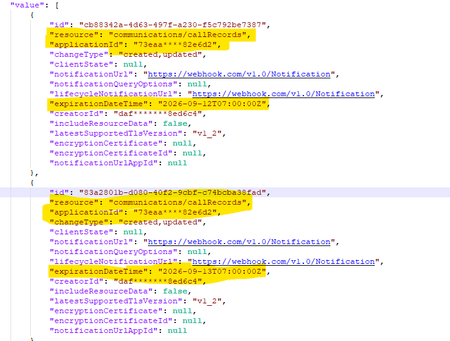
Duplicate subscriptions for a specific resource
Hello, Previously, we were not allowed to create duplicate subscriptions for the same resource. But now we can create duplicate subscriptions for a specific resource. Could you please confirm whether this functionality has been newly enabled or supported? Why duplicate subscriptions are now allowed for the same resource like (/users, /groups & communications/callRecords). Whether this is a change or a bug. We would appreciate clarification on the expected behavior and the supported use cases.447Views0likes2Comments