microsoft graph
26 Topics
Duplicate subscriptions for a specific resource
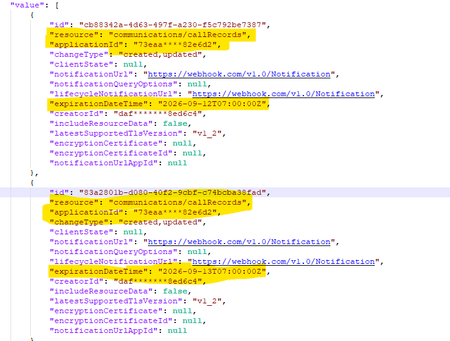
Hello, Previously, we were not allowed to create duplicate subscriptions for the same resource. But now we can create duplicate subscriptions for a specific resource. Could you please confirm whether this functionality has been newly enabled or supported? Why duplicate subscriptions are now allowed for the same resource like (/users, /groups & communications/callRecords). Whether this is a change or a bug. We would appreciate clarification on the expected behavior and the supported use cases.431Views0likes2Comments
Graph /users query with mailboxSettings filters/expands excludes unlicensed users
Hello Microsoft Graph team, I would like to report what appears to be a bug in Microsoft Graph user queries involving mailboxSettings. Issue summary: When mailboxSettings is used in a filter or expand clause on /users, unlicensed users are not returned, even when they should match the filter. Example scenario: Filter used: mailboxSettings/userPurpose ne 'room' Observed behavior: Users without Exchange license/mailbox are excluded from results (or result set appears truncated to mailbox-enabled users). Expected behavior: All users should be considered in /users query evaluation. If a user has no mailbox settings, behavior should be consistent and documented (for example null handling), but those users should not be silently dropped from /users results unless explicitly filtered out by query semantics. Reproduction steps: In a tenant with mixed users: Licensed mailbox users Unlicensed users without mailbox Run a /users query that includes mailboxSettings in filter and/or expand. Compare returned users with a baseline /users query without mailboxSettings conditions. Notice unlicensed users disappear when mailboxSettings is involved. Sample request patterns: GET https://graph.microsoft.com/v1.0/users?$filter=mailboxSettings/userPurpose ne 'room' GET https://graph.microsoft.com/v1.0/users?$expand=mailboxSettings&$filter=mailboxSettings/userPurpose ne 'room'447Views0likes1Comment
Retrieve all Teams transcripts a bot has attended to using Graph API
Hi there, I've been struggling for a lot of time trying to get this done. Has anyone been able to achieve something like this ? I wanted to : 1- Get all the meetings and transcripts of the tenant 2- Filter on those where the bot was attending 3- Get the transcripts when available. 4- Add rules to restrict the bot's access Right now I am stuck with the OAuth : The application 'bot-transcript' asked for scope 'OnlineMeetings.Read.All' that doesn't exist on the resource '00000003-0000-0000-c000-000000000000'. But this permission was added, and really seems to exist. Right ? Thanks in advance for any kind of help you could give me.478Views0likes1CommentMicrosoft Graph: Private channel SharePoint site URL naming appears to have changed
📄 Question We are creating private channels using the Microsoft Graph API: POST https://graph.microsoft.com/v1.0/teams/{team-id}/channels With the following payload: { "@odata.type": "#microsoft.graph.channel", "displayName": "Project-Channel-001", "description": "Sample private channel for testing", "membershipType": "private", "members": [ { "@odata.type": "#microsoft.graph.aadUserConversationMember", "******@odata.bind": "https://graph.microsoft.com/v1.0/users/{user-id}", "roles": ["owner"] } ] } 🔍 Observed Behavior When the private channel is created, the associated SharePoint site is provisioned automatically (as expected). However, the URL format appears to have changed. Previously observed behavior: https://{tenant}.sharepoint.com/sites/ProjectTeamURL-Project-Channel-001 Current behavior: https://{tenant}.sharepoint.com/sites/ProjectTeamName-Project-Channel-001 ❗ Impact This change introduces several issues: Breaks deterministic URL generation logic Produces longer and less predictable URLs Introduces dependency on display name, which is mutable and may contain unexpected characters Impacts existing automation and integrations relying on the previous pattern ❓ Questions Has there been a recent change in how SharePoint site URLs are generated for private channels? Is this behavior intentional and documented, or a regression? Is there any way (via Graph or otherwise) to: Control the generated SharePoint site URL, or Retrieve the final site URL deterministically without relying on pattern assumptions? Is the previous {ParentTeamUrl}-{ChannelName} format still expected in some scenarios, or has it been deprecated? 🧪 Additional Notes This behavior is observed when creating channels via Microsoft Graph (v1.0) The issue is reproducible across multiple test scenarios 🙏 Any clarification from Microsoft or others encountering this would be appreciated.268Views0likes0Comments
Is principalId Always a GUID in Microsoft Graph ??
{ "error": { "code": "Request_BadRequest", "message": "Invalid GUID:HR", "innerError": { "date": "2026-02-13T06:44:24", "request-id": "87678d90-1d94-4131-a705-4356ad3568a4", "client-request-id": "63569c7b-1dea-42d4-8d72-aa3668c78418" } } } We’re encountering an issue with the Microsoft Graph API response for directoryRole Recently, one of our Graph API calls started returning a response where the principalId value appears to be a custom string instead of the expected GUID. In our code, we loop through each id from the delta response, assuming it will always be a valid GUID. However, we are now getting errors because one of the returned principalId values does not match the expected format. Our questions: Is it possible for Microsoft Graph API to return a custom string instead of a GUID for principalId? Has anyone experienced similar behavior with delta queries for directoryRole or any other object? Are there any known scenarios where the principalId format differs from the standard GUID? Any insights would be appreciated.256Views0likes0CommentsResource not found while trying to access the available resource
I am attempting to automate CRUD operations on Microsoft Entra objects using the Microsoft Graph API. However, I am encountering a Resource not found error when accessing a resource programmatically, even though the same resource is accessible without issue when invoking the API endpoint via Postman.484Views0likes2CommentsMissing types in personType resource type documentation
Hi, Some time ago, I was working with the Microsoft Graph People endpoint and wanted to filter by personType properties. I’d like to suggest listing all possible values for personType in the documentation for the resource type. Here’s the documentation I’ve been using: personType resource type - Microsoft Graph v1.0 | Microsoft Learn After some research, I found this blog post that seems to contain relevant information: https://devblogs.microsoft.com/microsoft365dev/people-api-available-in-microsoft-graph-v1/ Is this list still valid? If so, perhaps it could be included directly in the resource type documentation. ThanksSolved181Views0likes2Comments
Difficulty with Auto-Answering VOIP Calls via Microsoft Graph API
Description: I'm working on a PowerShell script to initiate and auto-answer VOIP calls using the Microsoft Graph API. I have successfully set up my Azure App Registration, including a callback URI. However, I'm encountering issues when trying to auto-answer calls Details: Call Initiation: The script successfully initiates a call using the New-MgCommunicationCall endpoint. Call Status: The call transitions from "establishing" to "established" status as expected. Error on Auto-Answer: Upon attempting to auto-answer the call with the Invoke-RestMethod to the answer endpoint, I receive a 404 Not Found error. The output indicates that the call ID is valid, but it seems the call resource is not found at the time of answering. Current Script Setup: I'm using a callback URI (https://kyncomdigiwasusdev.onmicrosoft.com/callback) configured for handling call events. I have ensured the necessary permissions are granted in Azure for the app. I have tried various delays (currently set to 5 seconds) between establishing the call and answering it, but I still receive the 404 error. Questions: Are there any known issues with the auto-answer feature in the Microsoft Graph API for VOIP calls? What additional steps should I take to troubleshoot this error?290Views0likes2Comments
Downloading word file as PDF from SharePoint using graph api looses sensitivity-label
I have a word file in SharePoint Online document library, this file has Sensitivity label assigned to it. I am downloading this file using Graph SDK with query parameter 'format=pdf'. The file is successfully downloaded and saved as pdf, however, the sensitivity labels are lost. Graph url: https://graph.microsoft.com/v1.0/drives/b!blTHg...nEk/root:/test03/document.docx:/content?format=pdf I opened the same file in browser (Open in browser) and clicked on File --> Save as --> Download as PDF; this step retain the sensitivity labels. Why is the file when downloading from API loosing its labels? Note: I tried downloading directly using SharePoint URL and there too Label information is lost. The sensitivity labels does not carry any control mechanisms i.e., they are used for information classification.360Views0likes0CommentsSharepoint Delta API 429 error due to unknow reasons
Hi All, We are getting 429 rate-limited responses from Graph API when fetching SharePoint via Delta APIs. The rate limited requests don’t resolve even after waiting for specified time and retrying for 3 times, so such requests fail causing data losses. If we are sending more requests than the allowed rate limit, we will get that reason in headers, but here no such reason is given which suggests that we don’t exceed rate limits and its some other unknown issue. As mentioned in the document highlighted in the this link; https://learn.microsoft.com/en-us/sharepoint/dev/general-development/how-to-avoid-getting-throttled-or-blocked-in-sharepoint-online#ratelimit-headers---preview there could be other reasons that could lead to rate limits. We make sure that we don't request the calls that exceed the count mentioned in RateLimit-Limit header. This makes it even harder to identify the exact cause. Any support related to this is appreciated!!418Views0likes0Comments