microsoft foundry
98 TopicsBeyond text: Returning images and interactive apps from MCP servers
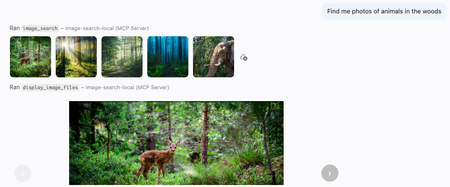
The Model Context Protocol (MCP) is becoming a richer foundation for agent experiences. Though most servers return plain text from their tool calls, MCP servers can also return binary results and provide interactive apps in clients that support those features, like VS Code. In this post, I'll use both capabilities to build an MCP server that searches a collection of nature photos with natural language, lets the model inspect the matching images, and presents selected results in an interactive gallery. The same approach can be adapted to product catalogs, digital asset managers, photo archives, and other multimedia libraries. Searching the image library Let's start with the search experience from a user's perspective, then dive into the code behind it. After connecting VS Code to the deployed MCP server, I can ask a question in GitHub Copilot about the images: Find landscape photos that show dramatic terrain and water. Show me the strongest options for a nature gallery. The GitHub Copilot agent realizes that it can use the image search MCP tool to answer that question. Here's what it looks like in the chat interface: The tool results include rendered thumbnails. I can click a thumbnail to inspect it directly in VS Code, much like a file in the workspace, while the Copilot agent can review both the image binary data and their textual descriptions. Behind the scenes, the agent called the image_search tool with these arguments: { "query": "dramatic natural landscapes with mountains and water", "max_results": 5 } The tool call returned a mix of binary files and structured data: a thumbnail for each matching image, plus JSON containing its filename, display name, and generated description. The thumbnails let a multimodal model inspect the actual pixels, while the structured content gives the agent compact metadata it can reference in later tool calls. { "results": [ { "filename": "Picture1.jpg", "display_name": "Picture1.jpg", "description": "A clear mountain lake surrounded by pine forest and steep rocky peaks." }, ...] } Returning images from MCP tools Now let's look at the code powering that tool call. I built the server with FastMCP, a popular Python framework for writing MCP servers. I declare each tool by decorating a function with mcp.tool() and annotating its arguments with types and helpful descriptions. FastMCP converts the function signature into a JSON Schema that helps GitHub Copilot decide when and how to call image_search : @mcp.tool(annotations={"readOnlyHint": True}) async def image_search( query: Annotated[ str, "Text description of images to find (e.g., 'sunlit mountain lake')" ], max_results: Annotated[int, "Maximum number of images to return (1-20)"] = 5) -> ToolResult: """ Search for images matching a natural language query. Returns the image data and descriptions. """ Inside the function, I use Azure AI Search to perform hybrid retrieval, combining the text query with its vector embedding. The target index contains multimodal image embeddings and LLM-generated descriptions. Then I retrieve the image from Azure Blob Storage and resize it to a thumbnail. The tool returns both the binary image data for the thumbnails and structured metadata with image details. results = await search_client.search(search_text=query, top=max_results, vector_queries=[VectorizableTextQuery(k_nearest_neighbors=max_results, fields="embedding", text=query)], select=["metadata_storage_path", "verbalized_image"]) blob_service_client = get_blob_service_client() files: list[File] = [] image_results: list[dict[str, str]] = [] async for result in results: url = result["metadata_storage_path"] description = result.get("verbalized_image") container_name, blob_name = get_blob_reference_from_url(url) blob_client = blob_service_client.get_blob_client(container=container_name, blob=blob_name) stream = await blob_client.download_blob() image_bytes = await stream.readall() image_format = get_image_format(url) display_name = os.path.basename(blob_name) file_basename = Path(display_name).stem thumbnail_bytes = resize_image_bytes(image_bytes, image_format) files.append(File(data=thumbnail_bytes, format=image_format, name=file_basename)) image_results.append({"filename": blob_name, "display_name": display_name, "description": description}) return ToolResult( content=files, structured_content={ "query": query, "results": image_results, }, ) Displaying selected images Finding the right images is only the first half of the experience. Once the agent has review the thumbnails and their generated descriptions, it needs a better way to present its favorite selected images to the user. That is where MCP apps come in. An MCP app renders an interactive webpage inside a sandboxed iframe in the MCP client. For this server, the app is a small, JavaScript-powered carousel for browsing the selected images. GitHub Copilot calls the display_image_files tool when it wants to render the carousel app: Returning apps from MCP tools Let's check out the code that powers that MCP carousel app. An app is associated with a tool, so I once again decorate a Python function with mcp.tool() . This time, I pass an AppConfig that points to the image viewer's HTML resource. @mcp.tool( app=AppConfig(resource_uri=IMAGE_VIEW_URI), annotations={"readOnlyHint": True}, ) async def display_image_files( filenames: Annotated[list[str], "List of image filenames to retrieve and display in a carousel."], descriptions: Annotated[list[str], "Image descriptions, in the same order as filenames."] ) -> ToolResult: """Fetch images by filename and render in carousel with filenames, descriptions, and file details.""" Inside the function, I fetch the selected images from Azure Blob Storage by filename, then return both the binary image data and structured content describing each image—its filename, generated description, MIME type, dimensions, format, and size. blob_service_client = get_blob_service_client() image_blocks: list[types.ImageContent] = [] image_results: list[dict[str, str | int]] = [] for image_index, filename in enumerate(filenames): blob_client = blob_service_client.get_blob_client(container=IMAGE_CONTAINER_NAME, blob=filename) stream = await blob_client.download_blob() image_bytes = await stream.readall() mime_type = get_image_mime_type(filename) with Image.open(io.BytesIO(image_bytes)) as image: width, height = image.size image_format = image.format image_blocks.append(types.ImageContent( type="image", data=base64.b64encode(image_bytes).decode("utf-8"), mimeType=mime_type)) image_results.append( { "filename": filename, "description": descriptions[image_index], "mimeType": mime_type, "width": width, "height": height, "format": image_format, "sizeBytes": len(image_bytes), } ) return ToolResult( content=image_blocks, structured_content={ "images": image_results, }, ) Next, I define the resource that serves the image viewer HTML page. I decorate a Python function with @mcp.resource , assign it a ui:// URL that is unique to the MCP server, and use its Content Security Policy (CSP) to declare which external domains the app may load resources from: @mcp.resource(IMAGE_VIEW_URI, app=AppConfig(csp=ResourceCSP(resource_domains=["https://unpkg.com"]))) def image_view() -> str: """Render images returned by display_image_files as an MCP App.""" return load_image_viewer_html() The final piece is the HTML that renders inside the app's iframe. This small page imports ext-apps, a JavaScript package that manages bidirectional communication with the MCP client. The JavaScript creates an App instance, defines the ontoolresult callback, and connects the app. That callback receives images from the tool result and renders them in the carousel. MCP apps can also send messages back to the host, although this read-only viewer does not need to. <!DOCTYPE html> <html lang="en"> <body> <div id="carousel"> <button id="prev" type="button" aria-label="Previous">‹</button> <div id="frame"></div> <button id="next" type="button" aria-label="Next">›</button> <span id="counter" aria-live="polite"></span> </div> <script type="module"> import { App } from "https://unpkg.com/@modelcontextprotocol/ext-apps@0.4.0/app-with-deps"; const app = new App({ name: "Image Viewer", version: "1.0.0", }); let images = []; let index = 0; const frame = document.getElementById("frame"); const prevBtn = document.getElementById("prev"); const nextBtn = document.getElementById("next"); const counter = document.getElementById("counter"); function show(i) { index = i; const img = images[index]; frame.innerHTML = ""; const el = document.createElement("img"); el.src = `data:${img.mimeType || "image/jpeg"};base64,${img.data}`; el.alt = "Blob image"; frame.appendChild(el); prevBtn.disabled = index === 0; nextBtn.disabled = index === images.length - 1; counter.textContent = images.length > 1 ? `${index + 1} / ${images.length}` : ""; } prevBtn.addEventListener("click", () => { if (index > 0) { show(index - 1); } }); nextBtn.addEventListener("click", () => { if (index < images.length - 1) { show(index + 1); } }); app.ontoolresult = ({ content }) => { images = (content || []).filter((block) => block.type === "image"); if (images.length > 0) { show(0); } }; await app.connect(); </script> </body> </html> Try it yourself! The full MCP server code is available in Azure-Samples/image-search-aisearch, along with a minimal image search website and an Azure AI Search indexing pipeline. The indexer uses an Azure OpenAI model to describe each image and Azure AI Vision to create multimodal embeddings. The repository includes a sample nature dataset, but you can replace it with any image collection. Here are more ways you could extend it it: Support more media types: add transcript search and a video or audio player app, while keeping the same search-then-display tool pattern. Enrich the metadata: index dates, locations, creators, accessibility text, or domain-specific tags alongside generated descriptions and embeddings. Optimize token consumption: images require many tokens, so returning too many thumbnails can quickly consume the model's context window. Experiment with smaller previews, higher compression, metadata-only search results, or a two-stage retrieval flow. Add authentication: many media libraries contain private or licensed assets. You can add key-based authentication or OAuth with the FastMCP auth providers, as I described in the MCP auth livestream. Once search results can carry both structured metadata and real media, an agent can do more than locate files: it can compare, curate, and present them in the same conversation. I hope you'll try the sample with a multimedia collection of your own!Creating Autonomous Teams Agents Using OpenClaw, MCP, and Azure Container Apps
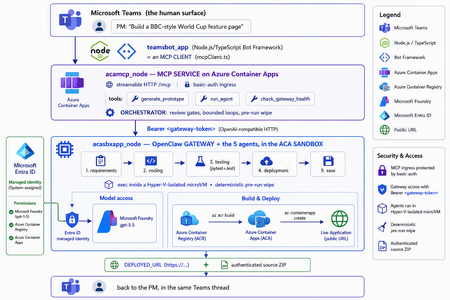
The one shift that changes everything For two years, "AI coding" meant autocomplete. A suggestion appears in your editor, you hit tab, you move on. The agent only existed while you were actively typing. That is no longer the only model. A new category of tools runs asynchronously and autonomously: you message the agent from a chat window — Teams, Slack, Telegram — describe what you want, and walk away. The agent plans, writes code, runs tests, deploys, and hands you back a result. Some of them never sleep: they hold a persistent memory, load their own skills, and act on a schedule without being prompted. This is the world of OpenClaw, Hermes Agent, and the other long-running autonomous agents that exploded across developer culture in 2026. OpenClaw alone crossed 377,000 GitHub stars and millions of active users, becoming — for a while — the most-starred project on GitHub. You install it with one line, connect a channel, and start delegating from your phone. The workflow moves from pair programming to delegation and review. The interactive copilot asks, "What should I write next?" The autonomous agent asks, "What do you need done?" And that reframing is exactly why three questions now keep architects awake: Is it safe? You are handing a self-driving process the ability to run shell commands, touch files, and call APIs. One community report memorably described these agents as a teammate in your group chat who happens to have root access to your codebase. That is not a compliment — it is a threat model. Can it fit into real multi-agent work? A single agent is a demo. Production is a fleet — specialists that hand off to each other with gates in between. Is it flexible and controllable? Autonomy is thrilling right up until the agent packages last week's stale files into this week's deliverable, or loops forever on a failing test. This post answers all three — not with hand-waving, but with a working reference implementation you can clone today: CustomCodingAgentApp in the Multi-AI-Agents-Cloud-Native repo, an "Agentic Prototype Factory" that turns a plain-language idea into a tested, live-on-Azure prototype without leaving the chat window. A product manager types "Build a BBC-style World Cup feature page" in Microsoft Teams. Minutes later they get back a running HTTPS URL and a downloadable source ZIP. Under the hood, five specialized OpenClaw agents powered by Microsoft Foundry gpt-5.5 collaborate in a shared sandbox, run real pytest/Jest suites, and ship the result to Azure Container Apps — all orchestrated behind a Model Context Protocol (MCP) service so any MCP client (GitHub Copilot, Claude, the Teams bot) can drive it. We'll build up to that architecture in the order you should learn it. Part 1 — Long-running autonomous agents, and their two hard problems What actually makes them different A traditional chatbot is text in, text out. It waits for you. An autonomous agent inverts that: Property Traditional chatbot Long-running autonomous agent Execution Responds to a prompt Acts proactively (a "heartbeat" wakes it on a schedule) Scope Words Files, shell, browser, APIs — the real machine Memory This session only Persistent across sessions Interface A web box Any chat channel + the terminal Autonomy None Plans and takes multi-step action on its own Architecturally, OpenClaw is not a library you import — it's a runtime. A single long-running process (the Gateway) bridges your messaging channels to an LLM backend, keeps sessions alive, queues work in ordered lanes, and drives the classic agent loop: call the model → execute the tool calls it asks for → feed results back → repeat until done. There is no rigid step-planner; the model itself steers. That is what makes it feel magical — and what makes it hard to contain. That containment problem has two faces. Hard problem #1 — Security The same properties that make an autonomous agent useful make it dangerous. Full system access + proactive execution + a 32,000-server tool ecosystem is a large, self-driving attack surface. OpenClaw's own short history is the cautionary tale: a critical one-click remote-code-execution CVE early in its life, hundreds of malicious community "skills" discovered on its marketplace, and tens of thousands of gateways found exposed on the open internet. None of this means "don't use autonomous agents." It means: never run one with ambient credentials on a machine you care about. The agent belongs in a box with a hard wall around it. Hard problem #2 — Persistence and continuity Real agent work is long. Refactoring a codebase, researching across dozens of pages, building-testing-deploying an app — these take minutes to hours, far past a single request/response. So the runtime needs durable sessions, a place to keep state, and a workspace that survives across steps. But a persistent workspace that is reused creates its own hazard: state leakage. Files from yesterday's task can contaminate — or get shipped inside — today's result. Continuity and cleanliness pull in opposite directions, and you have to engineer the tension out. One agent is a demo; production is a fleet A single monolithic agent asked to "gather requirements, write the code, test it, deploy it, and package it" will do all four mediocrely and blur the boundaries between them. The production pattern is orchestrator-worker: specialized agents, each with one job, handing off to the next through explicit gates. OpenClaw supports exactly this — it can spawn sub-agents and even dispatch external coding harnesses, acting as a meta-orchestrator rather than a single model. The open question is never whether to go multi-agent; it's where the seams and the guardrails go. The answer to "is it safe?": put the agent in a microVM If the agent needs root to be useful, then give it root — inside a disposable microVM, not on your host. In 2026 there are several credible ways to do this: Kata Containers on AKS — each pod gets its own lightweight VM boundary and guest kernel. Hyperlight Wasm — per-call, snapshot-restored Wasm microVMs for running LLM-generated code. Azure Container Apps dynamic sessions — prewarmed, Hyper-V-isolated sandboxes that start in milliseconds, scale to thousands, and are purpose-built for "secure execution of custom code" and "running LLM-generated scripts." That last one — the ACA sandbox — is the sweet spot for a chat-driven agent factory: strong isolation without you operating a Kubernetes cluster, and an exec API to run commands inside the box. It's what the reference implementation uses. Part 2 — Putting OpenClaw into the ACA sandbox Here is where the repo stops being a diagram and becomes running code. The Agentic Prototype Factory decomposes the "idea → live app" job into five specialized OpenClaw agents that run in sequence, all inside the sandbox: requirements → coding → testing → deployment → save Each is addressable as its own model target on the OpenClaw gateway's OpenAI-compatible API: model value Routes to openclaw / openclaw/default Default agent openclaw/requirements-agent Requirement Agent openclaw/coding-agent Coding Agent openclaw/testing-agent Testing Agent openclaw/deployment-agent Deployment Agent openclaw/save-agent Save & download Agent Control, not vibes: review gates with feedback loops Autonomy without gates is how you get an agent that confidently deploys a broken app. The orchestrator wires the five agents into a graph with hard, bounded gates: Every knob is explicit and lives in server.py: _MAX_TEST_ROUNDS = 3, _MAX_DEPLOY_REVIEW = 2, _DEPLOY_POLL_ATTEMPTS = 12, _DEPLOY_POLL_DELAY_S = 20. The Testing Agent must end each turn with a literal TESTS_PASSED / TESTS_FAILED verdict; the orchestrator won't declare success until it HTTP-checks the deployed URL and inspects the response body — because a ResourceNotFound can happily return an HTTP 200. That is what "flexible and controllable" looks like in practice: the LLM drives creatively inside a deterministic state machine. The deterministic pre-run wipe (solving state leakage) Because the sandbox is reused across runs (fast, cheap), the orchestrator does something disciplined before every run: it wipes all lingering agent workspaces. Stale files from a previous task can never leak into — or be packaged as — the new result. This is the engineered answer to Hard Problem #2. Working with the sandbox's limits, not against them The ACA sandbox exec API is hard-capped at ~120 seconds — shorter than a cold az acr build plus az containerapp create. A naive agent would time out and report failure. The clever bit: those commands finish server-side on Azure even after the client exec disconnects. So deployment is split in two: deploy-build <dir> <app> — installs the deploy helpers, writes a tight .dockerignore, and kicks off the ACR build tagged <app>:latest. If the client drops at ~120s, the image still lands in ACR. deploy-finish <app> — idempotent, polled up to 12×. It reports STILL_BUILDING until the image exists, then fires a --no-wait containerapp create, and finally returns DEPLOYED_URL=https://<fqdn>. This is the single most important lesson of the whole sample: an autonomous agent doesn't need a longer timeout — it needs to understand the durability semantics of the platform it runs on. Part 3 — MCP, and why its security is the whole ballgame The five-agent workflow is powerful, but it would be a silo if the only way to reach it were a bespoke API. Instead, the repo wraps the entire orchestration as a Model Context Protocol (MCP) service (acamcp_node) exposed over streamable HTTP at /mcp, with a tiny, legible tool surface: MCP tool What it does generate_prototype Run the full five-agent workflow end to end run_agent Invoke a single named agent check_gateway_health Liveness / readiness of the OpenClaw gateway The payoff is enormous: any MCP client can now drive the factory — GitHub Copilot, Claude, or the Teams bot we're about to meet. One protocol, many front-ends. But MCP is not just an integration convenience — it's a control plane, and every MCP tool is a privileged capability. In an ecosystem with 32,000+ community servers, "just add an MCP server" is a supply-chain decision. A tool call is code execution by another name. So the security posture has to be deliberate. Here is how the reference implementation hardens it — and the principles are portable to any MCP deployment: Auth in front of the protocol. The MCP ingress sits behind basic auth (MCP_BASIC_AUTH_PASSWORD); the gateway itself requires the gateway token as a bearer credential (Authorization: Bearer <token>). No anonymous tool calls. A tiny, named allowlist — not a blank check. The gateway routes only to six explicit model targets. There is no "run arbitrary agent" escape hatch; the routing table is the allowlist. No secrets in the workload. There are no model API keys anywhere in the running containers — model access is brokered entirely through Entra ID managed identities. The gateway token is stored as a Kubernetes secret and never baked into an image. Private by default. The gateway's OpenAI-compatible endpoint is operator-level access — it stays on private ingress, with TLS and authentication added before anything is ever exposed publicly. Least privilege at the identity layer. The gateway is granted exactly the Foundry roles it needs (Cognitive Services User / Cognitive Services OpenAI User) on the Foundry resource — nothing more. The takeaway for MCP is the same as for the agent itself: treat the protocol as a doorway, and put a guard on the door. Authentication, an explicit allowlist, private ingress, and brokered identity turn MCP from an open blast radius into a governed control plane. Part 4 — The complete solution: Teams + MCP on ACA + OpenClaw on the ACA sandbox Now assemble the three deployable components into one loop: The request lifecycle, end to end A PM sends one sentence in Teams. The teamsbot_app bot — acting as an MCP client via mcpClient.ts — opens an MCP handshake and calls generate_prototype. The MCP service on ACA (acamcp_node) runs the orchestrator: pre-run wipe, then requirements → coding → testing. The OpenClaw gateway in the ACA sandbox (acasbxapp_node) executes each agent, talking to Foundry gpt-5.5 through a managed identity — no keys in the box. Real pytest + Jest suites run inside the sandbox. Fail → loop back (bounded). Pass → deploy. Deployment uses the build + poll split to survive the ~120s exec cap; the app lands in Azure Container Apps and is health-checked body-aware at its live URL. The Save Agent produces an authenticated ZIP download URL. The bot streams each agent's progress back into the Teams thread and returns the running HTTPS URL + source ZIP — optionally auto-opening the project in VS Code Insiders. How the architecture answers the three questions The question How this solution answers it Is it safe? The autonomous agent runs in a Hyper-V-isolated ACA sandbox, not on anyone's laptop. No model keys in the workload — Entra ID managed identity brokers Foundry. MCP behind basic auth; gateway behind a bearer token on private ingress; token as a secret, never in an image. A deterministic pre-run wipe removes cross-run leakage. Does it fit multi-agent work? It is a multi-agent system — five specialist OpenClaw agents with A2A hand-offs and review gates — and because it's exposed via MCP, any client (Copilot, Claude, Teams) can orchestrate it. Is it flexible and controllable? Creativity lives inside a deterministic state machine: explicit TESTS_PASSED/FAILED verdicts, bounded retry loops (_MAX_TEST_ROUNDS, _MAX_DEPLOY_REVIEW), body-aware health checks, and a human approving in the Teams thread. Deploy it yourself The repo ships scripts for all three tiers (the gateway uses the platform's managed identity to reach Foundry — no key handling, no image rebuild): # 1) OpenClaw gateway + the 5 agents (acasbxapp_node) cd acasbxapp_node cp .env.example .env # gateway token, Foundry endpoint, sandbox ids ./scripts/build-openclaw-image.sh # build + push the OpenClaw image to ACR ./scripts/deploy-aks-gateway.sh # grant Foundry roles + deploy # 2) MCP service (acamcp_node) cd ../acamcp_node cp .env.example .env # ACR + cluster; gateway token read from ../acasbxapp_node/.env ./scripts/build-images.sh # build + push the MCP image ./scripts/deploy-aks.sh # secret + manifests to the openclaw namespace ./scripts/smoke-check.sh # verify the MCP handshake # 3) Teams bot (teamsbot_app) — Node.js/TypeScript MCP client cd ../teamsbot_app # configure + run per the folder README, then sideload the Teams app package The reference implementation targets Azure (ACA + AKS) — the OpenClaw gateway and MCP service run as containers, and the code-execution sandbox uses the ACA dynamic-sessions exec API. Keep the gateway on private ingress and add TLS before any public exposure. Final thought Strip away the World Cup demo and a reusable pattern remains — a blueprint for running any long-running autonomous agent in the enterprise: A message-driven agent (OpenClaw / Hermes) + a microVM sandbox (Azure Container Apps dynamic sessions) + an MCP control plane with auth + enterprise identity (Entra ID managed identity) + a human surface (Microsoft Teams). The autonomy that made these agents go viral is the same autonomy that makes security teams nervous. You don't resolve that tension by slowing the agent down — you resolve it by giving it a box with a hard wall, a control plane with a guard on the door, an identity instead of a secret, and a human in the loop. Do that, and "your PM types a sentence, Azure ships an app" stops being a scary demo and becomes something you can actually put in production. Clone it, break it, harden it further: kinfey/Multi-AI-Agents-Cloud-Native → code/CustomCodingAgentApp The chat window is the new terminal. Let's make it a safe one.285Views2likes0CommentsEnterprise-ready Claude Desktop with Entra ID, APIM, and Microsoft Foundry (No Backend Required)
How I put corporate sign-in in front of Claude Desktop without writing a single line of backend code. TL;DR — In this post, I show how to securely enable Claude Desktop in enterprise environments using Microsoft Entra ID, Azure API Management, and Microsoft Foundry — without deploying a custom backend. This approach removes API keys from endpoints, enforces per-user identity, and aligns fully with Zero Trust principles. Who this is for: Enterprise architects evaluating secure AI client patterns Developers enabling Claude Desktop in regulated environments Platform teams standardizing identity and governance for LLM access Why this post exists: Microsoft Learn's Configure Claude Desktop with Foundry Models only shows the API-key path — a shared key pasted into every user's Claude Desktop config. That's fine for a quick demo, but it's a non-starter for most enterprises (no per-user identity, no MFA / Conditional Access, hard to revoke, hard to audit). This post fills that gap: same Foundry backend, but with Microsoft Entra ID SSO in front via Azure API Management, so each user signs in with their corporate identity and zero secrets land on the laptop. The problem For many teams experimenting with Claude Desktop, the blocker isn't capability — it's enterprise readiness. How do you enforce identity, eliminate shared secrets, and apply governance without standing up a custom backend service to sit in front of the model? If your team wants to use Claude Desktop with your own Anthropic deployment running on Microsoft Foundry, but with a few non-negotiable requirements: No shared API keys floating around on developer laptops. Per-user identity — every request must be attributable to a real person. MFA and Conditional Access must apply, the same way they do for every other internal app. Central rate-limiting and logging — a centralized control plane for governance. Claude Desktop 1.5+ supports a "Gateway SSO" mode where it can sign each user in with OpenID Connect and forward their token to a custom LLM gateway. Azure API Management (APIM) is a perfect fit for that gateway role: it validates the user's Entra ID token, then re-authenticates itself to Foundry behind the scenes. APIM acts as a centralized policy enforcement layer, enabling identity validation, traffic governance, and secure re-authentication to backend AI services without custom code. The end-to-end flow looks like this: %%{init: {'flowchart': {'nodeSpacing': 60, 'rankSpacing': 80, 'useMaxWidth': true}, 'themeVariables': {'fontSize':'16px'}} }%% flowchart TB User([Corporate user]) Claude["Claude Desktop"] Entra["Microsoft Entra ID<br/>(OIDC + MFA + Conditional Access)"] APIM["Azure API Management<br/>validate-jwt → rewrite headers<br/>(policy gateway)"] Foundry["Microsoft Foundry<br/>Claude deployment"] User -- "1. Sign in (browser PKCE)" --> Entra Entra -- "2. ID token" --> Claude Claude -- "3. POST /v1/messages<br/>Authorization: Bearer ID token" --> APIM APIM -- "4. OIDC discovery / JWKS" --> Entra APIM -- "5. x-api-key (or Managed Identity)" --> Foundry Foundry -- "6. Response" --> APIM APIM -- "7. Response" --> Claude classDef azure fill:#0a4d8c,stroke:#0a3a6b,color:#ffffff; classDef client fill:#f3f3f3,stroke:#888,color:#222; class Entra,APIM,Foundry azure; class Claude,User client; Or in plain text: Claude Desktop │ Authorization: Bearer <Entra ID token from the user's browser sign-in> ▼ Azure API Management (<your-apim>) │ ① validate-jwt → verifies user's Entra ID token │ ② re-auths to Foundry with an API key from a Named value │ Authorization stripped, x-api-key injected ▼ Microsoft Foundry /anthropic/v1/messages │ runs Claude (<your-deployment>) ▼ Response back to the user There are no API keys on user devices. Foundry's key lives only inside APIM. And every request carries the user's oid claim, so I can build dashboards and per-user quotas later. What you need before starting An Azure subscription with a Microsoft Foundry (AI Services) account and a Claude deployment. (Throughout this post I'll just call it Foundry.) An API Management instance, any tier. Permission to register applications in Entra ID for your tenant. Claude Desktop 1.5.0 or later. Azure CLI installed locally. Throughout this post I'll use placeholders for resource names: <apim-name> — your API Management service name <resource-group> — the resource group that holds it <foundry-account> — your Foundry account name <deployment-name> — the name of the Claude model deployment on Foundry Step 1 — Register an Entra ID app for Claude Desktop This is the OIDC client Claude Desktop signs users into. Claude Desktop requires a single-tenant, public PKCE client (no client secret) with a loopback redirect URI, configured under the Mobile and desktop applications platform in Entra ID — the only platform that allows any loopback port. I scripted it so the setup is one command and idempotent: # scripts/register-claude-entra-app.ps1 [CmdletBinding()] param( [string] $TenantId = '<your-tenant-id>', [string] $SubscriptionId = '<your-subscription-id>', [string] $ResourceGroup = '<resource-group>', [string] $ApimName = '<apim-name>', [string] $AppDisplayName = 'Claude Cowork gateway', [string] $RedirectUri = 'http://127.0.0.1/callback' ) az account set --subscription $SubscriptionId | Out-Null # 1. Create (or reuse) the app registration $appId = az ad app list --display-name $AppDisplayName --query "[0].appId" -o tsv if (-not $appId) { $appId = az ad app create --display-name $AppDisplayName ` --sign-in-audience AzureADMyOrg --query appId -o tsv } # 2. Configure as public PKCE client with the Mobile/Desktop redirect URI $objectId = az ad app show --id $appId --query id -o tsv $patch = @{ publicClient = @{ redirectUris = @($RedirectUri) } isFallbackPublicClient = $true } | ConvertTo-Json -Depth 5 -Compress az rest --method PATCH ` --uri "https://graph.microsoft.com/v1.0/applications/$objectId" ` --headers "Content-Type=application/json" --body $patch | Out-Null # 3. Ensure a service principal exists $sp = az ad sp list --filter "appId eq '$appId'" --query "[0].id" -o tsv if (-not $sp) { az ad sp create --id $appId | Out-Null } # 4. Push two Named values into APIM for the validate-jwt policy az apim nv create -g $ResourceGroup --service-name $ApimName ` --named-value-id entra-tenant-id --display-name entra-tenant-id ` --value $TenantId --secret false az apim nv create -g $ResourceGroup --service-name $ApimName ` --named-value-id entra-client-id --display-name entra-client-id ` --value $appId --secret false "Client ID: $appId" Run it once. The output prints the client ID you'll need in Claude Desktop later, and it leaves two Named values in APIM ( entra-tenant-id , entra-client-id ) that the gateway policy will reference. ⚠️ Common pitfall: if the redirect URI ends up under the Web platform instead of Mobile and desktop applications, Entra will demand a client secret on token exchange — Claude won't send one and you'll get Token exchange failed (HTTP 401) . The app type can't be changed after creation, so create a new app if that happens. Step 2 — Create the API in APIM In the portal under APIM → APIs → + Add API → HTTP: Field Value Display name Anthropic API Name anthropicapi Web service URL https://<foundry-account>.services.ai.azure.com/anthropic API URL suffix claude Subscription required Off (Entra ID is our only credential) Add two operations under it: Method URL Display name POST /v1/messages Create message GET /v1/models List models The /v1/models operation isn't strictly needed (Foundry's Anthropic surface doesn't implement it), but having it registered means you can decide later whether to stub it out or proxy it. Step 3 — Add an API key for Foundry as a Named value APIM → Named values → + Add: Name: foundry-key Type: Secret Value: paste a key from the Foundry account's Keys and Endpoint blade. This is the only place the key ever lives. Clients never see it. Alternative — keyless with Entra ID (managed identity): If you prefer not to manage a Foundry key at all, enable the APIM instance's system-assigned managed identity (APIM → Identity → System assigned → On), then grant that identity the Foundry User role on the Foundry account (role ID 53ca6127-db72-4b80-b1b0-d745d6d5456d — previously named Azure AI User; Microsoft renamed it but the ID and permissions are unchanged). In Step 4, replace the set-header that injects x-api-key with: <authentication-managed-identity resource="https://cognitiveservices.azure.com" output-token-variable-name="foundry-token" /> <set-header name="Authorization" exists-action="override"> <value>@("Bearer " + (string)context.Variables["foundry-token"])</value> </set-header> Then you can skip the foundry-key Named value entirely. Don't use the legacy Cognitive Services User role — per the Foundry RBAC doc, roles starting with Cognitive Services don't apply to Foundry scenarios. Step 4 — Write the gateway policy This is the core enforcement layer in the architecture. Open APIs → anthropicapi → All operations → Inbound processing → </> and paste: <policies> <inbound> <base /> <!-- USER → APIM: verify Entra ID token from Claude Desktop --> <validate-jwt header-name="Authorization" failed-validation-httpcode="401" failed-validation-error-message="Unauthorized" require-scheme="Bearer"> <openid-config url="https://login.microsoftonline.com/{{entra-tenant-id}}/v2.0/.well-known/openid-configuration" /> <audiences> <audience>{{entra-client-id}}</audience> </audiences> <issuers> <issuer>https://login.microsoftonline.com/{{entra-tenant-id}}/v2.0</issuer> </issuers> </validate-jwt> <!-- APIM → Foundry --> <set-backend-service base-url="https://<foundry-account>.services.ai.azure.com/anthropic" /> <set-header name="x-api-key" exists-action="override"> <value>{{foundry-key}}</value> </set-header> <set-query-parameter name="api-version" exists-action="skip"> <value>2024-05-01-preview</value> </set-query-parameter> </inbound> <backend><base /></backend> <outbound><base /></outbound> <on-error><base /></on-error> </policies> Two things to notice: validate-jwt uses the OIDC discovery URL — JWKS keys are fetched and cached automatically. It rejects any token whose aud claim is not the client ID of our Entra app, which is exactly what we want. The Authorization header from the user is not forwarded — once validate-jwt succeeds, the request is re-authenticated to Foundry with x-api-key . No user token ever leaves APIM. APIM becomes the security boundary — user identity is validated at the edge, and downstream services never see or rely on user tokens. Step 5 — Configure Claude Desktop Open Claude Desktop → Configure third-party inference and fill it in like this: Field Value Connection Gateway Credential kind Interactive sign-in Gateway base URL https://<apim-name>.azure-api.net/claude Client ID (the appId your script printed) Issuer URL https://login.microsoftonline.com/<tenant-id>/v2.0 Authorization URL / Token URL leave empty Bearer token ID token (default) Scopes leave default ( openid profile email offline_access ) Redirect port leave empty (ephemeral) Model discovery Off Model list → Model ID <deployment-name> (your Foundry deployment name) ℹ️ Why Model discovery is Off — Claude Desktop's discovery uses GET /v1/models , and the Foundry /anthropic surface doesn't implement that endpoint, so it 404s. Listing the model manually skips the call entirely. If you want to leave Model discovery On, stub /v1/models in APIM. Add a GET /v1/models operation to your API and give it this inbound policy that returns an Anthropic-shaped response without ever hitting the backend: <policies> <inbound> <base /> <return-response> <set-status code="200" reason="OK" /> <set-header name="Content-Type" exists-action="override"> <value>application/json</value> </set-header> <set-body>@{ return new JObject( new JProperty("data", new JArray( new JObject( new JProperty("id", "<deployment-name>"), new JProperty("type", "model"), new JProperty("display_name", "Claude on Foundry"), new JProperty("created_at", "2026-01-01T00:00:00Z") ) )), new JProperty("has_more", false), new JProperty("first_id", "<deployment-name>"), new JProperty("last_id", "<deployment-name>") ).ToString(); }</set-body> </return-response> </inbound> <backend><base /></backend> <outbound><base /></outbound> <on-error><base /></on-error> </policies> Add one entry per deployment you want to expose. The benefit of stubbing rather than turning discovery off is that adding new models becomes a policy edit — no need to re-export and redeploy Claude Desktop config to every user. Click Apply Changes then Sign in to your organization. Your browser opens to the normal Entra sign-in page; once approved you're returned to the app, and a quick connection test runs. The success indicator is a small green banner: ✅ Inference — 1-token completion in 1449 ms · via identity provider For broader rollout, hit the Export button at the top of the configuration window — it produces a .mobileconfig (macOS) or .reg (Windows) you can push via Intune / Jamf to every user's machine. Step 6 — Verify both hops In APIM → APIs → anthropicapi → Test → POST /v1/messages I sent: Headers: anthropic-version: 2023-06-01 Body: { "model": "<deployment-name>", "max_tokens": 64, "messages": [{"role":"user","content":"hi"}] } Click Send → Trace, and look at two places: Inbound → validate-jwt: should say succeeded and show the decoded claims (your oid , email , etc.). Backend → Request: outbound URL is https://<foundry-account>.services.ai.azure.com/anthropic/v1/messages?api-version=2024-05-01-preview , with x-api-key: **** present and Authorization absent. Backend → Response: 200, with a Claude message JSON body. That confirms both halves of the chain. Bumps I hit along the way A few common issues encountered during setup — sharing so you can skip them: Symptom Cause Fix Claude shows "Your provider's model list hasn't loaded yet" and /v1/models returns 404 Foundry's Anthropic surface doesn't implement that endpoint Turn Model discovery OFF in Claude Desktop and add the deployment name manually Claude shows "Authentication failed" even though sign-in worked The APIM API still had Subscription required = ON, blocking the call before validate-jwt ran with 401: Access denied due to missing subscription key Uncheck Subscription required on the API Portal Test panel shows "Cannot read properties of undefined (reading 'statusCode')" The test console doesn't attach an Entra token, so validate-jwt 401s and the panel's JavaScript crashes Comment out <validate-jwt> temporarily for portal testing, or test via curl with a real token OIDC discovery failed (HTTP 404) in Claude Desktop Pasted the metadata URL into Issuer URL Issuer must end at /v2.0 , not at /.well-known/openid-configuration Token exchange failed (HTTP 401) App registered under Web platform instead of Mobile and desktop applications Create a new app with the right platform — it can't be changed Where this leaves us This pattern is small in moving parts but has outsized architectural impact: Zero secrets on endpoints. Eliminates API-key sprawl across laptops, MDM profiles, and shared vaults. The Foundry key lives only inside APIM — or disappears entirely when you switch APIM to managed identity. Identity, not credentials. Every Claude Desktop user authenticates against Entra ID in their browser, the same as Office or Teams. MFA, Conditional Access, and Entra ID Protection apply automatically — no parallel auth story to maintain. Per-user observability built in. APIM logs carry the user's Entra oid , email , and group claims. That unlocks per-user dashboards, cost allocation, and abuse detection without any client-side instrumentation. Aligned with Zero Trust. Strong identity at the edge, no implicit trust between hops, single policy chokepoint for inspection and rate-limiting, and full revocability through a single Enterprise Application. Optional but trivial keyless path. Flip APIM to system-assigned managed identity + <authentication-managed-identity resource="https://cognitiveservices.azure.com" /> and one Foundry User role assignment (role ID 53ca6127-db72-4b80-b1b0-d745d6d5456d , formerly Azure AI User) on the Foundry account. See the Foundry RBAC doc — don't use any Cognitive Services * roles for Foundry. What I'd add next llm-token-limit and llm-emit-token-metric policies for per-user quotas and cost visibility. App Insights wiring on the API, with a workbook that pivots on the oid claim. Assignment required = Yes on the Entra Enterprise Application + a security group, so only approved users can sign in. Intune deployment of the exported .reg / .mobileconfig so the gateway URL and client ID land on devices automatically. But that's all incremental. The hard part — getting Claude Desktop, Entra ID, APIM, and Foundry to agree on who's allowed to talk to whom — is done. Total elapsed: about an afternoon, most of it spent learning where each portal hides its switches. Useful links Gateway single sign-on with your identity provider — Claude.ai Documentation Configure Claude Desktop with Foundry Models — Microsoft Learn Role-based access control for Microsoft Foundry — Microsoft Learn1.4KViews0likes3Comments
Weird problem when comparing the answers from chat playground and answer from api
I'm running into a weird issue with Azure AI Foundry (gpt-4o-mini) and need help. I'm building a chatbot that classifies each user message into: follow-up to previous message repeat of an earlier message brand-new query The classification logic works perfectly in the Azure AI Foundry Chat Playground. But when I use the exact same prompt in Python via: AzureChatOpenAI() (LangChain) or the official Azure OpenAI code from "View Code" (client.chat.completions.create()) …I get totally different and often wrong results. I’ve already verified: same deployment name (gpt-4o-mini) same temperature / top_p / max_tokens same system and user messages even tried copy-pasting the full system prompt from the Playground But the API version still behaves very differently. It feels like Azure AI Foundry’s Chat Playground is using some kind of hidden system prompt, invisible scaffolding, or extra formatting that is NOT shown in the UI and NOT included in the “View Code” snippet. The Playground output is consistently more accurate than the raw API call. Question: Does the Chat Playground apply hidden instructions or pre-processing that we can’t see? And is there any way to: view those hidden prompts, or replicate Playground behavior exactly through the API or LangChain? If anyone has run into this or knows how to get identical behavior outside the Playground, I’d really appreciate the help.231Views0likes2CommentsFoundry IQ: Improve recall by up to 54% with knowledge bases
Foundry IQ: Improve recall by up to 54% with knowledge bases. Foundry IQ (Azure AI Search) has improved its agentic retrieval engine resulting in better answer quality and improved token cost savings. We compared standalone retrieval tools to knowledge bases using the challenging BrowseComp-Plus benchmark and found: Replacing single-shot RAG with a knowledge base improves evidence recall by up to 46%. Combining a smaller agent model with agentic retrieval improves evidence recall by up to 54% while controlling costs and increasing agent responsiveness. In both cases, the amount of retrieval tool calls your agent makes is reduced, resulting in 34% token cost savings.2.2KViews4likes1CommentIntroducing MAI-Transcribe-1, MAI-Voice-1, and MAI-Image-2 in Microsoft Foundry
Another Step Towards a Complete AI Platform Since inception, our goal with Microsoft Foundry has been to deliver the most complete AI and app agent factory; giving developers access to the latest frontier models, tools, infrastructure, security, and reliability to confidently build and scale their AI solutions. Today, we're taking another step towards that vision by announcing the public preview of three new models from Microsoft AI in Microsoft Foundry: MAI-Transcribe-1: Our first-generation speech recognition model, delivering enterprise-grade accuracy across 25 languages at approximately 50% lower GPU cost than leading alternatives. MAI-Voice-1: A high-fidelity speech generation model capable of producing 60 seconds of expressive audio in under one second on a single GPU. MAI-Image-2: Our highest-capability text-to-image model, which debuted on #3 on the Arena.ai leaderboard for image model families. These are the same models already powering our own products such as Copilot, Bing, PowerPoint, and Azure Speech, and now they're available exclusively on Foundry for developers to use. We can't wait to see what you create with these new multimedia AI models in public preview. Read on for a deeper look at each model's capabilities and how to start building with them in Foundry! MAI-Transcribe-1 & Voice-1: End-To-End Voice Experiences Voice and speech are rapidly becoming the primary interface for the next generation of AI agents, and building great voice experiences requires models that can both speak and listen with precision. With MAI-Voice-1 and MAI-Transcribe-1, Microsoft is delivering exactly that: a comprehensive, first-party audio AI stack purpose-built for developers. MAI-Voice-1 is a lightning-fast speech generation model capable of producing a full minute of audio in under a second on a single GPU; making it one of the most efficient speech systems available today. On the listening side, MAI-Transcribe-1 supports up to 25 languages and is engineered for enterprise-grade reliability across accents, languages, and real-world audio conditions. But what truly sets it apart is its efficiency: when benchmarked against leading transcription models, MAI-Transcribe-1 delivers competitive accuracy at nearly half the GPU cost; an advantage that translates directly into more predictable, scalable pricing for enterprises 1 . Use cases for MAI-Transcribe-1 and MAI-Voice-1 MAI-Voice-1 and MAI-Transcribe-1 are designed for production use across a broad set of real-world scenarios: Conversational AI & Agent Assist: Enable real‑time transcription for IVR systems, virtual assistants, and call‑center workflows to power voice‑driven interfaces, live agent assist, and post‑call summarization. Live Captioning & Accessibility: Deliver real‑time captions for large events, enterprise meetings, and digital communications to improve accessibility and inclusivity across spoken experiences. Media, Subtitling & Archiving: Automate video subtitling, dialogue indexing, and transcription to support scalable content production, searchability, and long‑term media archiving. Education & Training Platforms: Transcribe lectures, learning modules, and certification programs to enhance discoverability, reviewability, and knowledge retention in e‑learning environments. Customer & Market Insights: Convert spoken interactions across research interviews, focus groups, and support channels into structured data for downstream analytics and business intelligence. We're also applying these model capabilities inside Microsoft's own products. MAI-Voice-1 powers the expressive voice experiences in Copilot's Audio Expressions and podcast features. MAI-Transcribe-1 drives Copilot's Voice Mode transcriptions and the new dictation feature, connecting natural voice input with the generative power of Copilot's language models. Both models are available through Azure Speech, where developers can tap into first-party MAI model quality alongside the enterprise-grade reliability, scalability, and 700+ voice gallery of the Azure Speech ecosystem. Try MAI-Transcribe-1 & Voice-1 Today MAI-Transcribe-1 and Voice-1 are available now through Azure Speech. Here's how to get started: Experiment in MAI Playground: Speak, record, or upload audio to see the models in action at the MAI playground. Build in Foundry: deploy MAI-Transcribe-1 and MAI-Voice-1 in Azure Speech. MAI-Transcribe-1 starts at $0.36 USD per hour, while MAI-Voice-1 pricing starts at $22 USD per 1M characters. Developers looking to create custom voices using MAI-Voice-1 can do so through the Personal Voice feature in Azure Speech — including the ability to clone a voice from a short 10-second audio sample. Note that custom voice creation requires an approval process consistent with Microsoft's responsible AI policies. MAI-Image-2: Limitless Creativity For Every Builder Images are at the center of how developers build compelling AI-powered creative experiences; from marketing tools to content platforms to multimodal agents. MAI-Image-2 is Microsoft's answer to that demand. This model has been developed in close collaboration with photographers, designers, and visual storytellers and debuted in the top-3 text-to-image model families on the Arena.ai leaderboard. It raises the bar across the capabilities that matter most in real creative workflows; more natural, photorealistic image generation, stronger in-image text rendering for infographics and diagrams, and greater precision on complex layouts, detailed scenes, and cinematic visuals. Use cases for MAI-Image-2 Developers can integrate MAI-Image-2 across a range of high-impact workflows: Media & Creative Ideation: Designers, illustrators, and creative teams use text‑to‑image generation to explore visual directions, styles, and compositions early in the creative process—moving from concept to exploration faster. Enterprise Communications & Internal Branding: Organizations create custom visuals for internal campaigns, training materials, and executive communications directly from text, ensuring clarity, polish, and brand alignment without relying on stock imagery. UX & Product Concept Visualization: Product teams visualize interfaces, workflows, environments, and conceptual product scenarios from text descriptions, helping teams communicate ideas and align early—before engineering or design resources are engaged. WPP, one of the world's largest marketing and communications groups, is among the first enterprise partners building with MAI-Image-2 at scale, using it to power creative production workflows that previously required significant manual effort. "MAI-Image-2 is a genuine game-changer. It's a platform that not only responds to the intricate nuance of creative direction, but deeply respects the sheer craft involved in generating real-world, campaign-ready images. WPP has some of the best creative talent in the world and MAI-Image-2 is making them even better." -Rob Reilly, Global Chief Creative Officer, WPP We’re also implementing MAI-Image-2 to power image generation within Microsoft’s own products, including Copilot, Bing Image Creator, and PowerPoint, and now you have access to this powerful, cost effective model for your own apps. Try MAI-Image-2 Today Experiment in the MAI Playground: Preview MAI-Image-2 at MAI playground and share feedback directly with the team. Build in Foundry: deploy MAI-Image-2 via the API and start building your apps and agents! MAI-Image-2 starts at $5 USD per 1M tokens for text input and $33 USD per 1M tokens for image output. We look forward to your feedback on these models in Foundry. References: 1 1 st on overall WER on the FLEURS benchmark. Out of the top 25 global languages, MAI-Transcribe-1 ranks 1st by FLEURS in 11 core languages. It wins against Whisper-large-v3 on the remaining 14 and Gemini 3.1 Flash on 11 of those 14.20KViews1like1CommentJoin our free livestream series on using Microsoft IQ with Python
Join us for a new 3-part livestream series where we take a deep technical look at Microsoft IQ, the knowledge layer for the next generation of AI experiences. You'll learn how Foundry IQ, Work IQ, and Fabric IQ can be used to ground AI systems in organizational knowledge, workplace context, and structured business data. Our series will cover: Foundry IQ for multi-source agentic retrieval on search indexes, SharePoint, websites, and more Work IQ for user-specific retrieval of M365 data, like Teams chats, emails, and calendar events Fabric IQ for retrieval of data stored in OneLake, via Fabric ontologies and data agents Building agents with Microsoft Agent Framework to connect to Foundry IQ, Fabric IQ, and Work IQ Throughout the series, we’ll use Python for all examples and share full code so you can run everything yourself in your own Foundry projects. 👉 Register for the full series. In addition to the live streams, you can also join the Microsoft Foundry Discord to ask follow-up questions after each stream. If you are new to generative AI with Python, start with our 9-part Python + AI series, which covers topics such as LLMs, embeddings, RAG, tool calling, MCP, and agents. If you are new to Microsoft Agent Framework, watch our 6-part Python + Agent series which dives deep into agents and workflows. To learn more about each live stream or register for individual sessions, scroll down: Day 1: Foundry IQ 28 July, 2026 | 5:00 PM - 6:00 PM (UTC) Coordinated Universal Time Register for the stream on Reactor In the first session of our Microsoft IQ Deep Dive with Python series, we’ll kick things off with an introduction to the Microsoft IQ family: Foundry IQ, Work IQ, Fabric IQ, and Web IQ. We’ll then take a deeper look at Foundry IQ (Azure AI Search), exploring how it helps agents and applications work with curated knowledge and organizational context. We'll build a knowledge base and connect it to multiple knowledge sources, including the new IQs, MCP servers, and search indexes built from ingested data. Then we'll perform multi-source agentic retrieval on the knowledge base, which executes queries in parallel and merges the results with state-of-the-art ranking models. Finally, we will build an agent in Python using Microsoft Agent Framework and ground the agent's responses in results from the Foundry IQ knowledge base. All code demos will use Python and will be available in an open-source repository for you to deploy yourself. After the stream, join office hours in the Microsoft Foundry Discord to ask follow-up questions. Day 2: Work IQ 29 July, 2026 | 5:00 PM - 6:00 PM (UTC) Coordinated Universal Time Register for the stream on Reactor In the second session of our Microsoft IQ Deep Dive with Python series, we’ll focus on Work IQ and how it brings workplace context into AI-powered experiences. We’ll explore how developers can use Work IQ through APIs, A2A patterns, MCP integration, and tool-based workflows. We’ll look at two practical tool examples, then show how Work IQ can be used from Copilot and from a Microsoft Agent Framework agent. All code demos will use Python and will be available in an open-source repository for you to deploy yourself. After the stream, join office hours in the Microsoft Foundry Discord to ask follow-up questions. Day 3: Fabric IQ 30 July, 2026 | 5:00 PM - 6:00 PM (UTC) Coordinated Universal Time Register for the stream on Reactor In the final session of our Microsoft IQ Deep Dive with Python series, we’ll explore Fabric IQ and how it connects AI experiences to structured business data. We’ll introduce the key concepts behind Fabric IQ, including ontologies and data agents, and show how they help describe, organize, and reason over operational data stored in OneLake. We’ll use the Microsoft Fabric API SDK in Python to connect to Fabric IQ, so that we can programmatically configure ontologies and answer questions about our data. All code demos will use Python and will be available in an open-source repository for you to deploy yourself. After the stream, join office hours in the Microsoft Foundry Discord to ask follow-up questions.Auto-Generated Rubric Evaluators: Building Context-Aware Evaluators for AI Agents
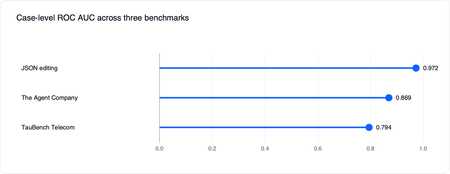
Authors: Shuo Qiu, Sydney Lister, Ilya Matiach, Ali Mahmoudzadeh, Salma Elshafey, José Santos, Vivek Bhadauria, Morteza Ziyadi, April Kwong Why Your Agent Needs a Task-Specific Evaluator Picture a customer-service agent for a telecom company. A customer messages in asking to switch plans and get a refund for last month's overcharge. The agent needs to verify the customer's identity and confirm the new plan before ending the conversation. Miss the verification step and you have a security incident. Those success criteria are specific to this one scenario. The auto-generated rubric evaluator is designed to help address this: use the context you already have to generate a task-specific rubric evaluator that returns a weighted score with per-dimension explanations, then can be reused across iterations. How We Validated Evaluator Quality We validate auto-generated rubric evaluators across four aspects: Verdict Validity — whether judgments on real cases reflect what a competent reviewer would conclude. Rubric Validity — whether generated rubrics capture the task requirements and failure modes. Manual Quality Inspection — whether judgments on real cases look right to a human reviewer. Reliability and Separability — whether judgments are stable across repeated runs and distinguish stronger from weaker candidate agents. Validation Results 1. Agreement with Trusted Reference Signals We first validate the auto-generated rubric evaluator end-to-end: we use the rubric generator to produce the rubric's dimensions, then the rubric evaluator scores each case against them. We use GPT-5.4 for both rubric generator and rubric evaluator. The first question is whether those end-to-end scores move with signals teams already trust. For example, does the rubric evaluator give lower scores to failed cases, and higher scores to successful ones? We start by choosing benchmarks the community already uses as reference points: Dataset What It Tests JSON Editing Deterministic structured-editing tasks where outputs can be checked exactly. TauBench Telecom Customer-service agent tasks requiring policy following, tool use, and task completion. The Agent Company Long-horizon workplace-agent tasks with multi-step tool use. We InspectAI’s 10-case subset. BFCL Multi-Turn Tool Calling Multi-turn function-calling behavior across realistic tool-use scenarios. LiveClawBench Open-ended web-agent tasks that require browsing, interaction, and judgment. Retail-Agent Customer Service Real production-style retail support conversations. We then ask the generation pipeline to generate rubric evaluators for each scenario, and measure the correlation between the evaluator's scores and the trusted reference signals. For the three datasets with per-case reference signals, we can directly check whether the evaluator gives higher scores to successful cases than failed ones. We then create traces from different candidate agents. In these experiments, each candidate agent uses the same task setup and prompt but a different underlying model, which gives us a controlled range of stronger and weaker agent behaviors. Because the evaluator returns a continuous score, we use receiver operating characteristic area under the curve (ROC AUC) when the trusted case-level signal can be read as success versus failure. It measures how often, when comparing a successful case with a failed case, the evaluator assigns the successful case the higher score. In these experiments, generated rubric evaluators align well with trusted signals at the case level, with ROC AUC of 0.794 on TauBench Telecom, 0.869 on The Agent Company, and 0.972 on JSON Editing. An important goal of evaluation is to score candidate agents that perform better on the reference signal also higher by the evaluator. This is more directly relevant when choosing among candidate agents, and it is a more forgiving test of alignment because aggregated scores are less sensitive to noise in individual judgments. We measure this with aggregate candidate-agent Spearman ρ, which checks whether the evaluator ranks candidate agents the same way as the oracle — a ρ of 1.0 means the evaluator's ranking is perfectly aligned with the oracle's, while 0 means no relationship. For BFCL and LiveClawBench, the oracle ranking comes from their official leaderboard scores. At the aggregate candidate-agent level, Spearman ρ ranges from 0.69 on The Agent Company to 0.98 on JSON Editing across all five benchmarks. Aggregation reduces per-case noise, so the candidate-agent ranking is the more relevant view when the goal is agent selection. 2. Rubric Quality on GDPVal GDPVal is a benchmark that measures how well AI models perform real-world, economically valuable work in sectors such as government, manufacturing, and technical services. This benchmark includes a rubric for each task, authored by a domain expert, which is useful for rubric-validity measurement. We ask the rubric generator to produce a rubric for each test case, then use a separate matching judge to match the generated dimensions to the expert dimensions. This gives us two metrics for rubric quality: Recall. For each annotated dimension, did at least one generated dimension express a similar requirement? Precision. For each generated dimension, did at least one annotated dimension express a similar requirement? Under this setup, the generated rubric achieved 72.1% recall and 86.4% precision against the expert dimensions on GDPVal tasks. 3. Manual Quality on Retail-Agent Conversations For a real-world retail-agent customer-service dataset, we generated a rubric with six dimensions, then graded 12 conversations over those dimensions, and manually inspected every case-by-dimension judgment. In this small sample (12 conversations), the reviewer disagreed with only one of the 72 case-by-dimension judgments. Most neutral cases involved applicability questions that the evaluator flagged inconsistently. Reliability and Separability Another key question is how reliable the evaluator's scores are. We look at two things: reliability (does the same case get the same score next time?) and separability (can the evaluator confidently rank two candidate agents against each other?). Reliability If you re-grade the same case tomorrow, do you get the same score? We measure this two ways: single-measure intraclass correlation, ICC(3,1) measures how much of the score variance comes from real case differences rather than repeat noise, and Kendall's W measures rank reliability across repeats — 1.0 means the evaluator ranks cases in the same order every time. On JSON Editing, single-measure intraclass correlation, ICC(3,1), is 0.852 and Kendall's W is 0.767, which means re-running the evaluator on the same case gives similar numbers under repeated runs in this experimental setup. TauBench Telecom shows similarly strong reliability, with ICC(3,1) of 0.85 and Kendall's W of 0.89 under the same recommended configuration. Separability Separability measures whether the score is decisive: when you put two candidate agents side by side, can the evaluator confidently say which one is better? We report mean pairwise bootstrap confidence, which measures ranking stability. For each pair of candidate agents, we resample cases and recompute each agent's mean evaluator score. The pair confidence is the fraction of bootstrap samples supporting the more common ordering: a value near 0.5 means the ordering is unstable, while a value near 1.0 means the evaluator consistently separates that pair. We average this across all candidate-agent pairs. The candidate-agent intervals are tight on JSON Editing and TauBench Telecom. Mean pairwise bootstrap confidence is 0.96 on JSON Editing dataset and 0.95 on TauBench Telecom dataset. Get Started The auto-generated rubric evaluator's results may vary depending on task design, input quality, and evaluation setup. Start with a clear, well-defined description for your evaluation in the prompt field, include as much high-quality context as possible, such as the agent definition and examples, and review the generated rubric carefully before using it. Run it against a small set of known-good and known-bad cases to understand how the score reflects different failure modes. Try the workflow in the Foundry portal and follow the rubric evaluator tutorial. For a demo that covers Rubric in the broader observability workflow, watch the Build breakout session From observability to ROI for AI agents on any framework. For the full set of Build observability announcements, read Build 2026: From observability to ROI for AI agents on any framework.597Views0likes0CommentsDeploying Foundry Hosted Agents from Source Code
Introduction At Microsoft Build, it was announced that Foundry Hosted Agents now support source-code deployments. Previously, Hosted Agents required application code to be packaged in a container for deployment. This new functionality allows you to deploy the agent from a `.zip` file instead of from a container image. This post walks through the process of deploying a source-code Hosted Agent, briefly compares that approach to container-based Hosted Agent deployment, and provides a reusable GitHub Action for CI/CD deployments. It is part of a series of post whose source code is housed in simple-hosted-agent-responses repository. If Hosted Agents are new to you, read the previous posts, "Deploying Foundry Hosted Agents via REST API" and "GitHub Actions for Deploying Hosted Agents." Background A Foundry Hosted Agent helps abstract the management of the compute tier for your agent. It runs in a self-contained Micro-VM sandbox, meaning the Hosted Agent sandbox provides the CPU and memory allocation used to run your agent. Previously, this Micro-VM would download your code from an Azure Container Registry (ACR) and run it on the virtualized platform. Not all customers use container-based workloads today and, let's face it, not everything needs to be a container. So how do those customers and platforms take advantage of Foundry Hosted Agents? The answer is through source-code deployments of Foundry Hosted Agents. What is a Source Code Agent? Source Code Agents are like other Foundry Hosted Agents. The key deployment difference is that the code asset is a .zip file instead of a container image. This also changes the Agent Development Lifecycle compared with the containerized version of Foundry Hosted Agents. An important point of clarity: the way the agent is configured is a data plane operation. As such, taking advantage of Source Code Agent functionality does not require changes to the Foundry infrastructure itself when your Infrastructure as Code (IaC) is only provisioning the supporting resources in Bicep, Terraform, or PowerShell. The deployment change happens through the Foundry data plane. First, let's look at a container-based Foundry Hosted Agent: Now, let's compare it to the source-code version: Deployment Process Now that we've looked at the end result, let's talk through the steps required to deploy a Foundry Hosted Agent via source code. So in Foundry, what does the difference between a container-based and a source-code-based Foundry Hosted Agent look like? The Microsoft Learn docs outline this well: Every source-code deployment follows the same sequence: package -> create or update -> poll until active -> invoke. The source-code path uses `code_configuration` in the agent definition; the image-based path uses `container_configuration` instead--the two are mutually exclusive on a single version. If wanting to confirm and see in more detail one can refer to the Foundry Agent REST API documentation. The source layout can stay familiar, but the deployed artifact changes to a `.zip` file. Packaging the source code into a ZIP is the piece that differs from the container-image flow. The agent deployment to Foundry is also slightly different because it uses source-code configuration instead of container configuration. You can run this via `azd` with a command structured like the following: azd ai agent init --no-prompt --project-id "<project-resource-id>" --deploy-mode code --runtime python_3_13 --entry-point main.py This assumes `azd` is installed and authenticated, and that the authenticated identity has access to the Foundry project. The command initializes a code deployment for the project. However, we recognize that the majority of enterprise organizations will want to use other deployment methods. As such, REST API deployments are supported, as are the Python and C# SDKs for creating the agent. Taking this a step further, and similar to "GitHub Actions for Deploying Hosted Agents," let's create a reusable GitHub Action for deploying source-code-based Hosted Agents. GitHub Action If you are wanting to see the entire action it is part of the repository simple-hosted-agent-responses, which contains source code, IaC, and deployment options. Background First, we need to understand that we cannot reuse the GitHub Action from "GitHub Actions for Deploying Hosted Agents" because, as noted above, the REST API uses mutually exclusive options. In theory, we could add conditional logic across the parameters; however, it is cleaner to create a separate action. Before invoking this action, the workflow must authenticate to Azure because the action calls `az account get-access-token` to acquire a token for the Foundry data plane. Inputs inputs: project_endpoint: description: Foundry project endpoint URL required: true agent_name: description: Name of the hosted agent required: true source_code_zip: description: Path to the local source-code zip artifact required: true model_deployment_name: description: Name of the AI model deployment required: true cpu: description: CPU allocation for the hosted agent container required: false default: '0.25' memory: description: Memory allocation for the hosted agent container required: false default: '0.5Gi' runtime: description: Source-code runtime for the hosted agent required: false default: 'python_3_13' entry_point: description: Source-code entry point command for the hosted agent required: false default: '["python", "main.py"]' dependency_resolution: description: How Agent Service resolves dependencies for the source-code deployment required: false default: 'remote_build' max_polling_seconds: description: Maximum time to wait for the source-code deployment to reach active status required: false default: '600' For our inputs, `project_endpoint`, `agent_name`, `source_code_zip`, and `model_deployment_name` are required. The CPU, memory, runtime, entry point, dependency resolution, and max polling values are configurable properties with defaults set in the action. The source-code-specific inputs populate the `code_configuration` properties of the REST payload. These include `source_code_zip`, `runtime`, `entry_point`, and `dependency_resolution`. This information tells Foundry how to run the code from the `.zip` package. Outputs We should output values that make sense for downstream workflows. Every workflow may not use them, but it is useful to expose non-secret values when they can support later steps. In this case, we are creating a new version of the agent, so let's output that version ID. outputs: agent_version: description: Version ID returned by the Foundry data plane value: ${{ steps.post.outputs.agent_version }} Action The action maps the inputs to environment variables as the first step. After that, it gets an access token from Azure and calls the REST API endpoint. Once we have this, we prepare the body of the call. Verify against the API for all valid properties. For this example, I chose not to set `rai_config` and `tools` to keep things simple. runs: using: composite steps: - name: Create source-code metadata id: metadata shell: bash env: AGENT_NAME: ${{ inputs.agent_name }} MODEL_DEPLOYMENT_NAME: ${{ inputs.model_deployment_name }} CPU: ${{ inputs.cpu }} MEMORY: ${{ inputs.memory }} RUNTIME: ${{ inputs.runtime }} ENTRY_POINT: ${{ inputs.entry_point }} DEPENDENCY_RESOLUTION: ${{ inputs.dependency_resolution }} run: | METADATA_FILE=$(mktemp) ENTRY_POINT_JSON=$(python3 -c 'import json,sys; print(json.dumps(json.loads(sys.argv[1])))' "$ENTRY_POINT") jq -n \ --arg model "$MODEL_DEPLOYMENT_NAME" \ --arg cpu "$CPU" \ --arg memory "$MEMORY" \ --arg runtime "$RUNTIME" \ --arg dep_resolution "$DEPENDENCY_RESOLUTION" \ --argjson entry_point "$ENTRY_POINT_JSON" \ '{ description: "Hosted agent deployed from source code", definition: { kind: "hosted", protocol_versions: [{protocol: "responses", version: "1.0.0"}], cpu: $cpu, memory: $memory, code_configuration: { runtime: $runtime, entry_point: $entry_point, dependency_resolution: $dep_resolution }, environment_variables: {AZURE_AI_MODEL_DEPLOYMENT_NAME: $model} } }' > "$METADATA_FILE" echo "metadata_file=${METADATA_FILE}" >> "$GITHUB_OUTPUT" echo "Metadata file created at ${METADATA_FILE}" - name: Post source-code agent deployment to Foundry data plane id: post shell: bash env: PROJECT_ENDPOINT: ${{ inputs.project_endpoint }} AGENT_NAME: ${{ inputs.agent_name }} SOURCE_CODE_ZIP: ${{ inputs.source_code_zip }} METADATA_FILE: ${{ steps.metadata.outputs.metadata_file }} MAX_POLLING_SECONDS: ${{ inputs.max_polling_seconds }} run: | if [[ ! -f "$SOURCE_CODE_ZIP" ]]; then echo "Error: Source code zip not found at ${SOURCE_CODE_ZIP}" exit 1 fi CODE_ZIP_SHA256=$(sha256sum "$SOURCE_CODE_ZIP" | awk '{print $1}') echo "Source code SHA256: ${CODE_ZIP_SHA256}" FOUNDRY_TOKEN=$(az account get-access-token \ --resource "https://ai.azure.com/" \ --query accessToken -o tsv) # POST /agents/{name}/versions auto-creates the agent if it doesn't # exist and adds a new version if it does, so a single call covers # both first-deploy and update scenarios (matches update-agent). HTTP_STATUS=$(curl -s -o /tmp/source_code_response.json \ -w "%{http_code}" \ -X POST \ "${PROJECT_ENDPOINT}/agents/${AGENT_NAME}/versions?api-version=2025-11-15-preview" \ -H "Authorization: Bearer ${FOUNDRY_TOKEN}" \ -H "Accept: application/json" \ -H "Foundry-Features: CodeAgents=V1Preview,HostedAgents=V1Preview" \ -H "x-ms-agent-name: ${AGENT_NAME}" \ -H "x-ms-code-zip-sha256: ${CODE_ZIP_SHA256}" \ -F "metadata=@${METADATA_FILE};type=application/json" \ -F "code=@${SOURCE_CODE_ZIP};type=application/zip;filename=${AGENT_NAME}.zip") echo "HTTP ${HTTP_STATUS}: $(cat /tmp/source_code_response.json)" if [[ "$HTTP_STATUS" -lt 200 || "$HTTP_STATUS" -ge 300 ]]; then echo "Error: Foundry data plane returned HTTP ${HTTP_STATUS}" exit 1 fi RESPONSE=$(cat /tmp/source_code_response.json) AGENT_VERSION=$(echo "$RESPONSE" | python3 -c 'import sys,json; print(json.load(sys.stdin)["version"])') echo "agent_version=${AGENT_VERSION}" >> "$GITHUB_OUTPUT" echo "Agent version resolved as ${AGENT_VERSION}" START_TIME=$(date +%s) while true; do ELAPSED=$(($(date +%s) - START_TIME)) if [[ $ELAPSED -gt $MAX_POLLING_SECONDS ]]; then echo "Error: Agent version did not reach active state within ${MAX_POLLING_SECONDS} seconds" exit 1 fi VERSION_STATUS=$(curl -s \ -X GET \ "${PROJECT_ENDPOINT}/agents/${AGENT_NAME}/versions/${AGENT_VERSION}?api-version=2025-11-15-preview" \ -H "Authorization: Bearer ${FOUNDRY_TOKEN}" \ -H "Accept: application/json" \ -H "Foundry-Features: CodeAgents=V1Preview,HostedAgents=V1Preview" \ | python3 -c 'import sys,json; data=json.load(sys.stdin); print(data.get("status", "unknown"))' 2>/dev/null) echo "Current status: ${VERSION_STATUS} (elapsed ${ELAPSED}s)" if [[ "$VERSION_STATUS" == "active" ]]; then echo "Agent version ${AGENT_VERSION} is active" break fi if [[ "$VERSION_STATUS" == "failed" ]]; then echo "Error: Agent version reached failed status" exit 1 fi sleep 5 done Building the Source-Code Artifact Before calling the source-code Hosted Agent action, create the ZIP artifact that will be passed into `source_code_zip`. source-code: name: Build source-code artifact runs-on: ubuntu-latest permissions: contents: read steps: - name: Checkout uses: actions/checkout@v6 - name: Create source-code zip artifact run: | git archive --format=zip --output=source-code.zip HEAD:src/agent-framework/responses/basic - name: Upload source-code artifact uses: actions/upload-artifact@v7 with: name: source-code path: source-code.zip Calling the Action Now that we have the action, how can we scale this across multiple workflows? We pass in the required parameters and the ZIP artifact path. - name: Update agent with source code uses: ./.github/actions/update-agent-source-code with: project_endpoint: ${{ needs.deploy-iac.outputs.project_endpoint }} # Source-code agent shares the same Foundry project as the image-based # agent; the `-src` suffix keeps them as distinct agent versions. agent_name: ${{ inputs.agent_name }}-src source_code_zip: ./.artifacts/source-code/source-code.zip model_deployment_name: ${{ needs.deploy-iac.outputs.model_deployment_name }} And just to show we can call the same action multiple times, here are two examples that do just that: Deploy (Bicep) and Deploy (Terraform). Conclusion Source-code deployments give Foundry Hosted Agents another deployment path for teams that do not want, or do not need, to package every agent as a container image. By using a .zip artifact, teams can keep a familiar source-code packaging flow while still taking advantage of the managed compute abstraction that Hosted Agents provide. The reusable GitHub Action shown in this post turns that deployment process into a repeatable CI/CD step: package the source code, post the deployment to the Foundry data plane, poll until the new version is active, and expose the resulting agent version for downstream workflow steps. This keeps the deployment flexible while fitting into existing enterprise pipeline patterns. For organizations already using container-based Hosted Agents, source-code deployments do not replace that model; they expand the options available. Choose the deployment approach that best fits how your teams package, govern, and operate their agent workloads.Foundry Toolkit for VS Code at //build: Hosted Agents End-to-End, a Smarter Toolbox, and More
We’re excited to share what’s new for Foundry Toolkit for Visual Studio Code at //build 2026. Since going generally available, the toolkit has kept moving fast, and this release is a big one. The headline: a complete, end-to-end Hosted Agent experience, scaffold, run, deploy, and observe without ever leaving VS Code. On top of that, we’ve expanded the Toolbox with native enterprise integrations and shipped a wave of LangGraph samples so every developer has a clear path from idea to production. From your first prompt to a production-grade, observable agent, Foundry Toolkit meets you where you are. Hosted Agents, End to End Building an agent is the easy part; getting it from a first draft to a production-grade, observable service is what matters. This release makes the full Hosted Agent lifecycle available in VS Code, and it follows the way you actually work — scaffold, run, deploy, observe. Scaffold — start from a rich set of samples Hosted Agent creation now opens with a refreshed scaffolding experience and a rich sample selection, so you start from a working, framework-appropriate template instead of a blank file. Creation is smarter, too: we auto-select your subscription when there’s only one, gate tabs more clearly, and tightened spacing for a cleaner setup flow. Run (F5) — inspect as you build Press F5 and your agent runs locally with the Agent Inspector, now aligned with the rest of the extension and featuring Copilot SDK visualization so you can see what the Inspector visualizes as the agent executes. It’s the fastest loop from change to verification before anything leaves your machine. Deploy — a new UX and new ways to ship Different teams ship differently, so deployment got a refreshed UX and two new options for Hosted Agents: ZIP Code Deploy: Package your agent source as a ZIP and deploy it directly to Microsoft Foundry Agent Service. Bring-Your-Own-Image (BYOI): Already have a pre-built container in your own Azure Container Registry? Deploy straight from it. Observe — know it works in production Once deployed, the full observability story is now available: Hosted Agent Tracing: Inspect end-to-end traces of Hosted Agent invocations directly from VS Code — tool calls, delegation chains, and timing for real debugging instead of guesswork. Continuous Evaluation Settings: A new page to configure ongoing evaluation for deployed Hosted Agents, so quality is measured continuously — not just at ship time. Evaluations Node: One-click access to evaluation runs and results right from the Foundry project tree. A Smarter, More Connected Toolbox What it is, and why it matters A Toolbox is how your agent gets its capabilities — the curated set of tools, knowledge sources, and integrations it can call at runtime. Instead of hand-wiring each connection, you assemble a Toolbox once and your agent consumes it consistently across local runs and production. The result: agents that can act on real enterprise data and systems, with the connections managed in one place. From what to how: create, connect, consume Create: Start a new Toolbox from the Foundry Toolkit sidebar “Tools Catalog” and pick the capabilities your agent needs. Connect: Configure and wire in enterprise systems through native, first-class connections once, and use it for all your agents. Consume: Reference the Toolbox from your Hosted Agent so its tools are available the moment the agent runs, locally (F5) and once deployed. New this release Building on that flow, the Toolbox is now richer and more enterprise-ready: WorkIQ as a Built-in Tool: A first-class WorkIQ experience powered by A2A connections — no MCP fallback required. End-to-end toolbox creation with WorkIQ works out of the box. Fabric IQ (OneLake Catalog) Integration: Connect your agents to Microsoft Fabric OneLake catalogs directly from the Toolbox. Toolbox Guardrails: Apply content-safety guardrails to your Toolbox for safer agent execution. Faster discovery: A new Toolbox Search Toggle and Agent Tool Multi-Select let you find and wire in multiple tools in a single action. LangGraph Reaches Parity LangGraph developers, this one is for you. We’ve added five new Hosted Agent samples that bring LangGraph to full parity with the Agent Framework Responses learning path — so you get an equivalent, end-to-end walkthrough no matter which framework you prefer: MCP — tool loading from a remote MCP server (defaults to GitHub Copilot MCP) via MultiServerMCPClient. Workflows — a custom StateGraph chaining three specialized LLM nodes: slogan writer, legal reviewer, and formatter. Files — local filesystem tools plus the Foundry-Toolbox code_interpreter working over session-uploaded files. Human-in-the-Loop — a StateGraph that drafts a proposal and pauses for approval via langgraph.types.interrupt. Observability — GenAI OpenTelemetry tracing with enable_auto_tracing(); spans, metrics, and logs flow to Application Insights. We’ve also refreshed the existing bring-your-own LangGraph samples against the new hosting layer (chat with local tools, Foundry-managed Toolbox loading, and SSE-streamed multi-turn sessions backed by a MemorySaver checkpointer), so every sample reflects how Hosted Agents work today. Polish Across the Board A release is more than headline features. This one also includes a redesigned Prompt Builder “Improve an Instruction” dialog for faster iteration, fixes for MCP toolbox tool icons, clearer ZIP-deploy error surfacing, and assorted Agent Builder and Playground regression fixes — the whole experience feels tighter end to end. Get Started Today Install: Foundry Toolkit on the VS Code Marketplace Quick Start: Follow our getting-started tutorial to build your first Hosted Agent Deep Dive: Explore the documentation, samples, and LangGraph parity walkthroughs Join the Community Share your projects, file issues, or suggest features on our GitHub repository. We can’t wait to see what you build. Welcome to the next chapter of AI development!257Views0likes0Comments