microsoft foundry
98 TopicsCI/CD for AI Agents on Microsoft Foundry
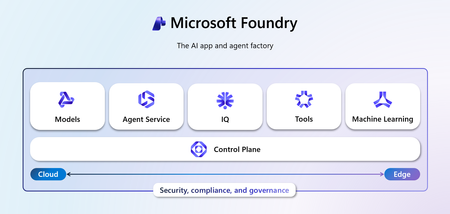
Introduction Building an AI agent is the straightforward part. Shipping it reliably to production with version control, evaluation-driven quality gates, multi-environment promotion, and enterprise governance is where most teams run into friction. Microsoft Foundry changes this. It is Microsoft's AI app and agent factory: a fully managed platform for building, deploying, and governing AI agents at scale. It provides a first-class agent runtime with built-in lifecycle management, making it possible to apply the same CI/CD rigour you already use for application software to AI agents — regardless of whether you are building containerised hosted agents or declarative prompt-based agents. This post walks through a complete, production-ready reference architecture for doing exactly that. You will find the GitHub Actions workflow, the Azure DevOps pipeline YAML, and the architecture diagram linked throughout. Reference implementation repository: foundry-agents-lifecycle and CI/CD for AI Agents on Microsoft Foundry Why Agent CI/CD Is Different Traditional software pipelines gate releases on test pass/fail. Agent pipelines require an additional, critical layer: evaluation-driven quality gates. Before any agent version can be promoted to the next environment, it must pass three categories of evaluation: Quality — answer correctness, task completion rate, hallucination rate Safety — grounded responses, policy compliance, tool usage validation Performance — token usage per query, p95 response latency A second key difference is the deployment unit. You are not deploying a binary or a container tag in isolation. You are deploying an agent version — an immutable artefact that bundles the model selection, system instructions, tool definitions, and configuration together. This is what enables deterministic promotion and full auditability across environments. "Agents follow a standard CI/CD pattern, but with a critical shift: promotion happens at the agent version level, and release gates are driven by evaluation outcomes, not just test results." Reference Architecture Figure 1: End-to-end CI/CD reference architecture for hosted and prompt-based agents on Microsoft Foundry. The architecture has five logical layers, flowing from developer commit to production monitoring: Layer 1 — Developer Layer The developer layer is a standard source-controlled repository in GitHub or Azure DevOps. It contains: Agent code written in Python or .NET agent.yaml or prompt definition files for prompt-based agents Tool configurations: MCP servers, REST API connectors, or other integrations Infrastructure as Code: Bicep or ARM templates for provisioning the Foundry project and dependencies Layer 2 — CI Pipeline (Build · Validate · Evaluate) Every push or pull request triggers the CI pipeline. It performs five steps: Docker build — for hosted agents, build and tag the container image Static checks — lint with ruff , security scan with bandit , agent YAML schema validation Unit and tool tests — pytest suites covering agent logic and tool integrations Evaluation gate — run evaluation datasets; fail the pipeline if thresholds are breached Image push — push the validated container to Azure Container Registry (ACR) Prompt-based agents skip the Docker build step. Instead, the YAML definition and prompt bundle are validated against schema and evaluated against golden datasets. Layer 3 — CD Pipeline (Multi-stage Promotion) A single agent version is promoted through three Foundry project environments: Stage Environment Activities Gate Stage 1 Dev Foundry Project Deploy vNext version, smoke tests, developer evals Eval quality thresholds Stage 2 Test / QA Foundry Project Scenario tests, HITL validation, safety evaluation Eval gates + human approval Stage 3 Production Foundry Project Promote version, enable endpoint, post-deploy smoke test Required reviewer approval Rollback is straightforward: switch the active version pointer back to the previous agent version. No re-deployment is needed. Layer 4 — Microsoft Foundry Agent Service The Foundry Agent Service runtime provides: Hosted agent runtime — managed container execution supporting Agent Framework, LangGraph, Semantic Kernel, or custom code Prompt-based agent runtime — declarative agent definitions, no container required Built-in lifecycle operations — version, start, stop, rollback Entra Agent Identity — each deployed version receives a dedicated Microsoft Entra managed identity RBAC and policy enforcement — Azure role-based access controls per project Observability — distributed traces, structured logs, and evaluation signals Layer 5 — Monitoring, Governance, and Control Plane Foundry control plane: agent registry, environment configuration, version history OpenTelemetry forwarded to Azure Monitor and Application Insights Continuous evaluation pipelines for ongoing quality, grounding, and safety monitoring Azure Policy and RBAC enforcement at the platform level Environment Topology There are two topology options. We recommend Option A for all production workloads: Option Structure Best for Trade-off A — Recommended Dev Project → Test Project → Prod Project (separate Foundry projects) Enterprise workloads Full isolation, clean RBAC boundaries, easier governance B — Lightweight Single Foundry project with agent version tags (dev/test/prod) Small teams, prototyping Simpler setup, but weaker environment separation Separate projects mean separate RBAC policies, separate connection strings, and separate evaluation signals. A developer service principal has access only to the Dev project; the CI/CD identity has restricted access to promote to Test and Production. Evaluation Gates — The Core Difference Evaluation gates transform a standard software pipeline into an AI-safe deployment pipeline. They run at two points: pre-merge (CI) and pre-promotion (CD). Defining the Gates Category Metric CI threshold Prod threshold Quality Hallucination rate < 5% < 3% Quality Task completion rate > 90% > 95% Safety Grounded response rate > 95% > 98% Safety Policy violations 0 0 Performance p95 latency < 4 000 ms < 3 000 ms Cost Token usage per query Track only Alert on > 20% regression Gate Enforcement (Python) import json import sys def check_gates(results_path: str) -> None: with open(results_path) as f: results = json.load(f) failures = [] if results["hallucination_rate"] > 0.05: failures.append(f"Hallucination rate {results['hallucination_rate']:.1%} exceeds 5% threshold") if results["task_completion_rate"] < 0.90: failures.append(f"Task completion {results['task_completion_rate']:.1%} below 90% threshold") if results["latency_p95_ms"] > 4000: failures.append(f"p95 latency {results['latency_p95_ms']}ms exceeds 4000ms threshold") if results.get("policy_violations", 0) > 0: failures.append(f"Policy violations detected: {results['policy_violations']}") if failures: for f in failures: print(f"GATE FAILED: {f}", file=sys.stderr) sys.exit(1) print("All evaluation gates passed — proceeding to deployment") if __name__ == "__main__": check_gates(sys.argv[1]) Hosted vs Prompt-Based Agents — Pipeline Differences Capability Hosted Agents Prompt-Based Agents Deployment unit Container image + agent definition YAML / prompt configuration bundle Build step required Yes — Docker build + ACR push No — YAML validation only Supported frameworks Agent Framework, LangGraph, Semantic Kernel, custom Foundry declarative runtime Promotion artefact Versioned agent with container image reference Versioned prompt/config bundle CI focus Code quality, tool tests, evaluation Prompt schema validation, evaluation Rollback mechanism Switch active agent version Switch active agent version Runtime management Foundry manages container lifecycle Foundry manages declarative runtime CI Pipeline Walkthrough The following steps are representative of the full GitHub Actions workflow available in github-actions-pipeline.yml alongside this post. Hosted Agent CI # 1. Static checks ruff check . bandit -r src/ -ll python scripts/validate_agent_config.py --config agent.yaml # 2. Tests pytest tests/unit/ -v --tb=short pytest tests/tools/ -v --tb=short # 3. Evaluation gate python scripts/run_evaluations.py \ --dataset eval/datasets/golden_set.jsonl \ --output eval/results/results.json python scripts/check_eval_gates.py \ --results eval/results/results.json \ --max-hallucination 0.05 \ --min-task-completion 0.90 \ --max-latency-p95 4000 # 4. Push container image az acr build \ --registry myregistry.azurecr.io \ --image "myagent:$SHA" \ --file Dockerfile . Prompt-Based Agent CI # Validate YAML / prompt definitions python scripts/validate_agent_config.py --config agent.yaml # Evaluation against golden dataset python scripts/run_evaluations.py \ --dataset eval/datasets/golden_set.jsonl \ --output eval/results/results.json python scripts/check_eval_gates.py \ --results eval/results/results.json CD Pipeline Walkthrough Stage 1 — Dev Deployment python scripts/deploy_agent.py \ --env dev \ --image "myregistry.azurecr.io/myagent:$SHA" \ --foundry-endpoint $FOUNDRY_ENDPOINT_DEV \ --agent-config agent.yaml # Returns the new agent version ID, stored for promotion AGENT_VERSION=$(python scripts/get_active_version.py --env dev) Stage 2 — Promote to Test (after approval gate) python scripts/promote_agent.py \ --from-env dev \ --to-env test \ --agent-version $AGENT_VERSION \ --foundry-endpoint $FOUNDRY_ENDPOINT_TEST # Run scenario tests and safety evaluation python scripts/run_evaluations.py \ --dataset eval/datasets/scenario_set.jsonl \ --output eval/results/test-results.json python scripts/check_eval_gates.py \ --results eval/results/test-results.json \ --max-hallucination 0.03 \ --min-task-completion 0.95 Stage 3 — Promote to Production (after required reviewer approval) python scripts/promote_agent.py \ --from-env test \ --to-env prod \ --agent-version $AGENT_VERSION \ --foundry-endpoint $FOUNDRY_ENDPOINT_PROD # Enable the production endpoint python scripts/enable_agent_endpoint.py \ --agent-version $AGENT_VERSION \ --foundry-endpoint $FOUNDRY_ENDPOINT_PROD Rollback # Switch the active version to the previous known-good version python scripts/promote_agent.py \ --from-env prod \ --to-env prod \ --agent-version $PREVIOUS_AGENT_VERSION \ --foundry-endpoint $FOUNDRY_ENDPOINT_PROD # OR delete the failing version python scripts/delete_agent_version.py \ --agent-version $AGENT_VERSION \ --foundry-endpoint $FOUNDRY_ENDPOINT_PROD Deployment Using the Azure AI Projects SDK The azure-ai-projects SDK provides programmatic control over the full agent lifecycle. This is the recommended approach for CI/CD scripts where you need deterministic, scriptable deployment. from azure.identity import DefaultAzureCredential from azure.ai.projects import AIProjectClient # Connect to the Foundry project client = AIProjectClient( endpoint=FOUNDRY_PROJECT_ENDPOINT, credential=DefaultAzureCredential() ) # List existing agents (useful for idempotent deploy scripts) for agent in client.agents.list(): print(f"Agent: {agent.name} version: {agent.id}") # Create a new agent version (hosted agent) agent = client.agents.create_agent( model="gpt-4o", name="my-enterprise-agent", instructions="You are a helpful assistant ...", tools=[...], # tool definitions metadata={"version": GIT_SHA, "environment": "dev"} ) print(f"Created agent version: {agent.id}") For hosted agents, the SDK call also references the container image pushed to ACR. Refer to the Deploy a hosted agent — Microsoft Foundry documentation for the full SDK flow including container image registration and version polling. Reference Implementation Stack Concern Technology Source control and pipelines GitHub Actions or Azure DevOps Pipelines Infrastructure and agent deployment Azure Developer CLI ( azd up ) Programmatic agent lifecycle azure-ai-projects Python SDK Agent evaluation azure-ai-evaluation Python SDK Agent runtime Microsoft Foundry Agent Service Container registry Azure Container Registry (hosted agents only) Observability OpenTelemetry, Azure Monitor, Application Insights Identity and access Microsoft Entra (Agent ID, OIDC workload identity federation) Governance Azure Policy, RBAC, Foundry control plane Governance and Responsible AI Shipping AI agents at enterprise scale requires governance beyond what a traditional CI/CD pipeline provides. Microsoft Foundry addresses this at the platform level: RBAC per environment — each Foundry project has independent access controls. Developers deploy to Dev; only CI/CD service principals (with audited OIDC tokens) can promote to Test and Production. Agent registry and audit trail — the Foundry control plane records which agent version is active in each environment, who deployed it, and when. This satisfies enterprise audit requirements without additional tooling. Content safety and policy enforcement — Azure Policy governs model access, data handling, and content safety rules at the infrastructure level, not just at the application code level. Policy violations block deployment automatically. Entra Agent Identity — each deployed agent version receives a dedicated, short-lived managed identity. Agents authenticate to downstream services using least-privilege credentials scoped to that specific deployment. Continuous evaluation in production — evaluation pipelines run on sampled production traffic, alerting when quality, safety, or cost metrics drift from their baseline. A key trade-off to be transparent about: evaluation datasets must be maintained and updated as the agent's tasks evolve. Stale datasets produce misleading pass/fail signals. Treat your golden evaluation set as a first-class engineering artefact alongside the agent code itself. Pipeline Files Two pipeline files accompany this reference architecture. Both implement the same four-stage pipeline (CI Build, CI Evaluate, CD Dev, CD Test, CD Production) with environment-appropriate approval gates. github-actions-pipeline.yml — GitHub Actions workflow. Uses GitHub Environments for approval gates and OIDC Workload Identity Federation for passwordless Azure authentication. No stored Azure credentials required. azure-devops-pipeline.yml — Azure DevOps multi-stage YAML pipeline. Uses ADO Environments with required approvers and variable groups per environment. Both pipelines share these security practices: OIDC / Workload Identity Federation — no long-lived Azure credentials stored in pipeline secrets Per-environment variable groups, each with scoped connection strings and endpoints Evaluation quality gates enforced before every promotion step Mandatory human approval before production deployment Summary The full pipeline in one view: Developer commit | CI Pipeline ├── Docker build (hosted agents) / YAML validation (prompt agents) ├── Static checks + unit tests + tool tests └── Evaluation gate ← quality · safety · performance | Agent Version created ← immutable, versioned artefact | CD Pipeline ├── Deploy to Dev → smoke tests + eval gate ├── Promote to Test → scenario tests + HITL + approval gate └── Promote to Prod → enable endpoint + monitoring | Microsoft Foundry Agent Service └── Versioned runtime · Entra identity · RBAC · Observability | Control Plane └── Agent registry · Governance · Continuous evaluation Microsoft Foundry provides the platform primitives — versioned agent deployments, multi-environment Foundry projects, built-in lifecycle management, and an enterprise observability stack — needed to operate AI agents with the same confidence as any production software system. The key takeaway: treat the agent version as your deployment artefact, and evaluation outcomes as your release gate. The rest follows familiar CI/CD patterns you already know and trust. Next Steps Clone the CI/CD Repo at leestott/foundry-cicd Clone the reference demo: foundry-agents-lifecycle on GitHub Set up your environment: Set up your environment for Foundry Agent Service Deploy your first hosted agent: Quickstart: Deploy your first hosted agent Understand hosted agent concepts: Foundry Hosted Agents concepts Automate deployments in CI/CD: Automate deployment of Microsoft Foundry agents Manage agent versions: Manage hosted agents — Microsoft Foundry Deploy via SDK: Deploy a hosted agent — Microsoft Foundry SDK and endpoint reference: Microsoft Foundry SDK and Endpoints reference Azure AI Projects SDK: azure-ai-projects Python SDK Azure Developer CLI: Azure Developer CLI (azd) overview Microsoft Foundry documentation hub: Microsoft Foundry on Microsoft Learn13KViews7likes0CommentsStop Drawing Architecture Diagrams Manually: Meet the Open-Source AI Architecture Review Agents
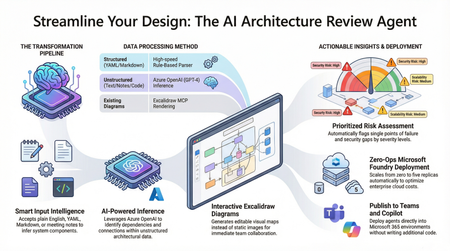
Designing and documenting software architecture is often a battle against static diagrams that become outdated the moment they are drawn. The Architecture Review Agent changes that by turning your design process into a dynamic, AI-powered workflow. In this post, we explore how to leverage Microsoft Foundry Hosted Agents, Azure OpenAI, and Excalidraw to build an open-source tool that instantly converts messy text descriptions, YAML, or README files into editable architecture diagrams. Beyond just drawing boxes, the agent acts as a technical co-pilot, delivering prioritized risk assessments, highlighting single points of failure, and mapping component dependencies. Discover how to eliminate manual diagramming, catch security flaws early, and deploy your own enterprise-grade agent with zero infrastructure overhead.16KViews7likes5CommentsBeyond the Model: Empower your AI with Data Grounding and Model Training
Discover how Microsoft Foundry goes beyond foundational models to deliver enterprise-grade AI solutions. Learn how data grounding, model tuning, and agentic orchestration unlock faster time-to-value, improved accuracy, and scalable workflows across industries.1.1KViews6likes4CommentsIntroducing Cohere Rerank 4.0 in Microsoft Foundry
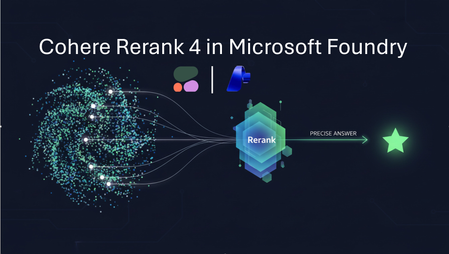
These new retrieval models deliver state-of-the-art accuracy, multilingual coverage across 100+ languages, and breakthrough performance for enterprise search and retrieval-augmented generation (RAG) systems. With Rerank 4.0, customers can dramatically improve the quality of search, reduce hallucinations in RAG applications, and strengthen the reasoning capabilities of their AI agents, all with just a few lines of code. Why Rerank Models Matter for Enterprise AI Retrieval is the foundation of grounded AI systems. Whether you are building an internal assistant, a customer-facing chatbot, or a domain-specific knowledge engine, the quality of the retrieved documents determines the quality of the final answer. Traditional embeddings get you close, but reranking is what gets you the right answer. Rerank improves this step by reading both the query and document together (cross-encoding), producing highly precise semantic relevance scores. This means: More accurate search results More grounded responses in RAG pipelines Lower generative model usage , reducing cost Higher trust and quality across enterprise workloads Introducing Cohere Rerank 4.0 Fast and Rerank 4.0 Pro Microsoft Foundry now offers two versions of Rerank 4.0 to meet different enterprise needs: Rerank 4.0 Fast Best balance of speed and accuracy Same latency as Cohere Rerank 3.5, with significantly higher accuracy Ideal for high-traffic applications and real-time systems Rerank 4.0 Pro Highest accuracy across all benchmarks Excels at complex, reasoning-heavy, domain-specific retrieval Tuned for industries like finance, healthcare, manufacturing, government, and energy Multilingual & Cross-Domain Performance Rerank 4.0 delivers unmatched multilingual and cross-domain performance, supporting more than 100 languages and enabling powerful cross-lingual search across complex enterprise datasets. The models achieve state-of-the-art accuracy in 10 of the world’s most important business languages, including Arabic, Chinese, French, German, Hindi, Japanese, Korean, Portuguese, Russian, and Spanish, making them exceptionally well suited for global organizations with multilingual knowledge bases, compliance archives, or international operations. Effortless Integration: Add Rerank to Any System One of the biggest benefits of Rerank 4.0 is how easy it is to adopt. You can add reranking to: Existing enterprise search Vector DB pipelines Keyword search systems Hybrid retrieval setups RAG architectures Agent workflows No infrastructure changes required. Just a few lines of code.This makes it one of the fastest ways to meaningfully upgrade grounding, precision, and search quality in enterprise AI systems. Better RAG, Better Agents, Better Outcomes In Foundry, customers can pair Cohere Rerank 4.0 with Azure Search, vector databases, Agent Service, Azure Functions, Foundry orchestration, and any LLM—including GPT-4.1, Claude, DeepSeek, and Mistral—to deliver more grounded copilots, higher-fidelity agent actions, and better reasoning from cleaner context windows. This reduces hallucinations, lowers LLM spend, and provides a foundational upgrade for mission-critical AI systems. Built for Enterprise: Security, Observability, Governance As a direct from Azure model, Rerank 4.0 is fully integrated with: Azure role-based access control (RBAC) Virtual network isolation Customer-managed keys Logging & observability Entra ID authentication Private deployments You can run Rerank 4.0 in environments that meet the strictest enterprise security and compliance needs. Optimized for Enterprise Models & High-Value Industries Rerank 4.0 is built for sectors where accuracy matters: Finance - Delivers precise retrieval for complex disclosures, compliance documents, and regulatory filings. Healthcare- Accurately retrieves clinical notes, biomedical literature, and care protocols for safer, more reliable insights. Manufacturing- Surfaces the right engineering specs, manuals, and parts data to streamline operations and reduce downtime. Government & Public Sector - Improves access to policy documents, case archives, and citizen service information with semantic precision. Energy- Understands industrial logs, safety manuals, and technical standards to support safer and more efficient operations. Pricing Model Name Deployment Type Azure Resource Region Price /1K Search Units Availability Cohere Rerank 4.0 Pro Global Standard All regions (Check this page for region details) $2.50 Public Preview, Dec 11, 2025 Cohere Rerank 4.0 Fast Global Standard All regions (Check this page for region details) $2.00 Public Preview, Dec 11, 2025 Get Started Today Cohere Rerank 4.0 Fast and Rerank 4.0 Pro are now available in Microsoft Foundry. Rerank 4.0 is one of the simplest and highest impact upgrades you can make to your enterprise AI stack, bringing better retrieval, better agents, and more trustworthy AI to every application.11KViews5likes0CommentsFoundry IQ: Improve recall by up to 54% with knowledge bases
Foundry IQ: Improve recall by up to 54% with knowledge bases. Foundry IQ (Azure AI Search) has improved its agentic retrieval engine resulting in better answer quality and improved token cost savings. We compared standalone retrieval tools to knowledge bases using the challenging BrowseComp-Plus benchmark and found: Replacing single-shot RAG with a knowledge base improves evidence recall by up to 46%. Combining a smaller agent model with agentic retrieval improves evidence recall by up to 54% while controlling costs and increasing agent responsiveness. In both cases, the amount of retrieval tool calls your agent makes is reduced, resulting in 34% token cost savings.2.2KViews4likes1CommentIntroducing GPT-5.4 in Microsoft Foundry
Today, we’re thrilled to announce that OpenAI’s GPT‑5.4 is now generally available in Microsoft Foundry: a model designed to help organizations move from planning work to reliably completing it in production environments. As AI agents are applied to longer, more complex workflows; consistency and follow‑through become as important as raw intelligence. GPT‑5.4 combines stronger reasoning with built in computer use capabilities to support automation scenarios, and dependable execution across tools, files, and multi‑step workflows at scale. GPT-5.4: Enhanced Reliability in Production AI GPT-5.4 is designed for organizations operating AI in real production environments, where consistency, instruction adherence, and sustained context are critical to success. The model brings together advances in reasoning, coding, and agentic workflows to help AI systems not only plan tasks but complete them with fewer interruptions and reduced manual oversight. Compared with earlier generations, GPT-5.4 emphasizes stability across longer interactions, enabling teams to deploy agentic AI with greater confidence in day-to-day production use. GPT-5.4 introduces advancements that aim for production grade AI: More consistent reasoning over time, helping maintain intent across multi‑turn and multi‑step interactions Enhanced instruction alignment to reduce prompt tuning and oversight Latency improved performance for responsive, real-time workflows Integrated computer use capabilities for structured orchestration of tools, file access, data extraction, guarded code execution, and agent handoffs More dependable tool invocation reducing prompt tuning and human oversight Higher‑quality generated artifacts, including documents, spreadsheets, and presentations with more consistent structure Together, these improvements support AI systems that behave more predictably as tasks grow in length and complexity. From capability to real-world outcomes GPT‑5.4 delivers practical value across a wide range of production scenarios where follow‑through and reliability are essential: Agent‑driven workflows, such as customer support, research assistance, and business process automation Enterprise knowledge work, including document drafting, data analysis, and presentation‑ready outputs Developer workflows, spanning code generation, refactoring, debugging support, and UI scaffolding Extended reasoning tasks, where logical consistency must be preserved across longer interactions Teams benefit from reduced task drift, fewer mid‑workflow failures, and more predictable outcomes when deploying GPT‑5.4 in production. GPT-5.4 Pro: Deeper analysis for complex decision workflows GPT‑5.4 Pro, a premium variant designed for scenarios where analytical depth and completeness are prioritized over latency. Additional capabilities include: Multi‑path reasoning evaluation, allowing alternative approaches to be explored before selecting a final response Greater analytical depth, supporting problems with trade‑offs or multiple valid solutions Improved stability across long reasoning chains, especially in sustained analytical tasks Enhanced decision support, where rigor and thoroughness outweigh speed considerations Organizations typically select GPT‑5.4 Pro when deeper analysis is required such as scientific research and complex problems, while GPT‑5.4 remains the right choice for workloads that prioritize reliable execution and agentic follow‑through. Microsoft Foundry: Enterprise‑Grade Control from Day One GPT‑5.4 and GPT‑5.4 Pro are available through Microsoft Foundry, which provides the operational controls organizations need to deploy AI responsibly in production environments. Foundry supports policy enforcement, monitoring, version management, and auditability, helping teams manage AI systems throughout their lifecycle. By deploying GPT‑5.4 through Microsoft Foundry, organizations can integrate advanced agentic capabilities into existing environments while aligning with security, compliance, and operational requirements from day one. Customer Spotlight Get Started with GPT-5.4 in Microsoft Foundry GPT‑5.4 sets a new bar for production‑ready AI by combining stronger reasoning with dependable execution. Through enterprise‑grade deployment in Microsoft Foundry, organizations can move beyond experimentation and confidently build AI systems that complete complex work at scale. Computer use capabilities will be introduced shortly after launch. GPT‑5.4 <272K input tokens context length in Microsoft Foundry is priced at $2.50 per million input tokens, $0.25 per million cached input tokens, and $15.00 per million output tokens. The GPT‑5.4 >272K input tokens context length in Microsoft Foundry is priced at $5.00 per million input tokens, $0.50 per million cached input tokens, and $22.50 per million output tokens. The GPT-5.4 is available at launch in Standard Global and Standard Data Zone (US), with additional deployment options coming soon. GPT‑5.4 Pro is priced at $30.00 per million input tokens, and $180.00 per million output tokens, and is available at launch in Standard Global. Build agents for real-world workloads. Start building with GPT‑5.4 in Microsoft Foundry today.24KViews4likes2CommentsUnified AI Weather Forecasting Pipeline thru Aurora, Foundry, and Microsoft Planetary Computer Pro
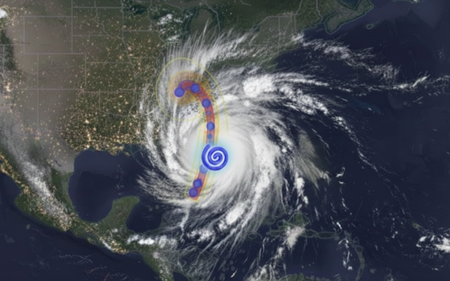
Weather shapes some of the most critical decisions we make, from protecting our critical infrastructure and global supply chains, to keeping communities safe during extreme events. As climate variability becomes more volatile, an organization’s ability to predict, assess, and plan their response to extreme weather is a defining capability for modern infrastructure owners & operators. This is especially true for the energy and utility sector — even small delays in preparations and response can cascade into massive operational risk and financial impacts, including widespread outages and millions in recovery costs. Operators of critical power infrastructure are increasingly turning to AI-powered solutions to reduce their operational and service delivery risk. “As the physical risks to our grid systems grow, so too does our technological capacity to anticipate them. Artificial intelligence has quietly reached a maturity point in utility operations-not just as a tool for optimization, about as a strategic foresight engine. The opportunity is clear: with the right data, infrastructure, and operational alignment, AI outage prediction utility grid strategies can now forecast vulnerabilities with precision and help utilities transition from reactive to preventive risk models.” – Article by Think Power Solutions Providing direct control of their data and AI analytics allows providers to make better, more actionable insights for their operations. Today, we’ll demonstrate and explore how organizations can use the state-of-the-art Aurora weather model in Microsoft Foundry with weather data provided by Microsoft Planetary Computer (MPC), an Azure based geospatial data management platform, to develop a utility industry-specific impact prediction capability. Taking Control of your Weather Prediction Microsoft Research first announced Aurora in June 2024, a cutting-edge AI foundation model enabling locally executed, on-demand, global weather forecasting, and storm-trajectory prediction generated from publicly available weather data. Two months later, Aurora became available on Microsoft Foundry elevating on-demand weather forecasting from a self-hosted experience to managed deployments, readying Aurora for broader enterprise and public adoption. Aurora’s scientific foundations and forecasting performance were peer‑reviewed and published in Nature, providing independent validation across global benchmarks. Its evolution continues with a strong commitment to openness and interoperability: In November 2025, Microsoft announced plans to open-source Aurora to accelerate innovation across the global research and developer community. Building upon the innovation and continued development of Aurora, today we are showcasing how organizations can operationalize this state-of-the-art capability with Microsoft Planetary Computer and Microsoft Planetary Computer Pro. By bringing together the vast public geospatial data stores in Planetary Computer, with the private data managed by Planetary Computer Pro, organizations can unify their weather prediction and geospatial data in a single platform, simplifying data processing pipelines and data management. This advancement allows enterprise customers to take control of their own weather forecasting on their own timeline. A Unified Weather Prediction Data Pipeline In addition, a key pain-point for energy and utility companies is the inability to reliably ingest, store, and operationalize high-volume weather data. Model inputs and outputs often sit scattered across fragmented pipelines and platforms, making decisions difficult to trace, reproduce, and reference over time. For example, referenced in articles, many utility companies have to pull public data from various silos, maintain GIS layers in another, and run operational planning in a separate environment—forcing teams to manually stitch together forecasts, assets, and risk assessments, introducing delays exactly when rapid decisions matter most. With the MPC Pro + Microsoft Foundry pipeline, utility companies transition from fragmented, manual workflows to a single operating platform – where the value lies in a seamless end-to-end data-to-model pipeline. Users can leverage Aurora on Microsoft Foundry alongside Microsoft Planetary Computer Pro’s geospatial data platform to unlock the following unified workflow: Source near real time weather data from Planetary Computer Run Aurora in Microsoft Foundry Fuse weather prediction results with geospatial data in Planetary Computer Pro for rapid assessment and post processing A Ready-to-use reference architecture This reference architecture provides a reusable pattern for operationalizing frontier weather models with Microsoft Planetary Computer Pro and Microsoft Foundry. Our architecture feeds updated global weather data, hosted by Microsoft Planetary Computer, to the Microsoft Foundry hosted model, then fuses those prediction results with enterprise geospatial context for analysis, decision-making, and action. Each component plays a distinct role in ensuring forecasts are timely, scalable, and directly usable within operational workflows. Near Real-Time Weather Data Microsoft Planetary Computer automatically ingests, indexes, and distributes up-to-date global weather data from the European Centre for Medium-Range Weather Forecasts (ECMWF) four times per day. This fully managed data pipeline ensures that the latest atmospheric datasets are continuously refreshed, standardized, and readily accessible, eliminating the need for manual data acquisition or preprocessing. Storing and Centralizing Public and Private Geospatial Data on Microsoft Planetary Computer Pro Microsoft Planetary Computer Pro enables utility operators to store, manage, and access both public and private geospatial datasets within a single Azure platform. With a Microsoft Planetary Computer Pro GeoCatalog, organizations can centralize ECMWF weather data alongside infrastructure and location data to support downstream analyses. Microsoft Foundry Hosts and Runs Weather Prediction Model on Demand Microsoft Foundry provides model access and the infrastructure required to support execution of Aurora and other weather forecasting models. Users can provision Aurora inference endpoints on their own dedicated compute. After provisioned, the user would be able to open the python notebook and run the model to execute weather forecasts on demand. Weather Forecast Outputs are Fused with Existing Data Sources on Microsoft Planetary Computer Pro Aurora’s weather prediction outputs are seamlessly integrated back into Microsoft Planetary Computer Pro, where they are fused with existing public or private geospatial datasets. This makes forecast results immediately accessible for visualization, post-processing, and analysis—such as identifying assets at risk, estimating localized impact, informing operational response plans, or pre-positioning needed assets for quick recovery. By combining AI-driven forecasts with geospatial context, organizations can move from raw predictions to actionable insights in a single workflow. This solution also provides organizations with a centralized platform to store and catalog geospatial data for future traceability. Unified Weather Prediction Demonstration This demonstration visualizes the forecast storm track (Figure 2), along with projected damage impact along the storm path and associated coastal surge areas (Figure 3 & 4). This enables users to assess asset exposure, anticipate damage due to winds, pre-position crews, and proactively protect critical infrastructure—helping reduce outage duration, lower operational costs, and improve grid resilience. & Powerplants) Getting Started The python notebook supports tracking of historical storm events, forecasting real-time storm trajectories, and overlaying critical power infrastructure structure data from OpenStreetMap to visualize overlap. To get started, deploy this solution in your Azure environment to begin generating weather forecasts and storm-track predictions. The code and documentation for running this notebook are available in the linked GitHub Repo. Sample output for you to explore are linked within this HTML. For additional resources, visit the following MS Learn pages: Microsoft Planetary Computer Pro Microsoft Foundry The interoperability between ‘GeoAI models + data platform’ extends far beyond weather prediction. It empowers organizations to take control of their geospatial data; to generate actionable insights on their own timeline, and to meet their own specific needs. With Microsoft Planetary Computer and Microsoft Foundry together, organizations will unify their enterprise geospatial data, and unlock its value with powerful, and state of the art AI solutions.1.7KViews4likes0CommentsIntroducing OpenAI's GPT-image-2 in Microsoft Foundry
Take a small design team running a global social campaign. They have the creative vision to produce localized imagery for every market, but not the resources to reshoot, reformat, or outsource that scale. Every asset needs to fit a different platform, a different dimension, a different cultural context, and they all need to ship at the same time. This is where flexible image generation comes in handy. OpenAI's GPT-image-2 is now generally available and rolling out today to Microsoft Foundry, introducing a step change in image generation. Developers and designers now get more control over image output, so a small team can execute with the reach and flexibility of a much larger one. What is new in GPT-image-2? GPT-image-2 brings real world intelligence, multilingual understanding, improved instruction following, increased resolution support, and an intelligent routing layer giving developers the tools to scale image generation for production workflows. Real world intelligence GPT-image-2 has a knowledge cut off of December 2025, meaning that it is able to give you more contextually relevant and accurate outputs. The model also comes with enhanced thinking capabilities that allow it to search the web, check its own outputs, and create multiple images from just one prompt. These enhancements shift image generation models away from being simple tools and runs them into creative sidekicks. Multilingual understanding GPT-image-2 includes increased language support across Japanese, Korean, Chinese, Hindi, and Bengali, as well as new thinking capabilities. This means the model can create images and render text that feels localized. Increased resolution support GPT-image-2 introduces 4K resolution support, giving developers the ability to generate rich, detailed, and photorealistic images at custom dimensions. Resolution guidelines to keep in mind: Constraint Detail Total pixel budget Maximum pixels in final image cannot exceed 8,294,400 Minimum pixels in final image cannot be less than 655,360 Requests exceeding this are automatically resized to fit. Resolutions 4K, 1024x1024, 1536x1024, and 1024x1536 Dimension alignment Each dimension must be a multiple of 16 Note: If your requested resolution exceeds the pixel budget, the service will automatically resize it down. Intelligent routing layer GPT-image-2 also includes an expanded routing layer with two distinct modes, allowing the service to intelligently select the right generation configuration for a request without requiring an explicitly set size value. Mode 1 — Legacy size selection In Mode 1, the routing layer selects one of the three legacy size tiers to use for generation: Size tier Description smimage Small image output image Standard image output xlimage Large image output This mode is useful for teams already familiar with the legacy size tiers who want to benefit from automatic selection without making any manual changes. Mode 2 — Token size bucket selection In Mode 2, the routing layer selects from six token size buckets — 16, 24, 36, 48, 64, 96 — which map roughly to the legacy size tiers: Token bucket Approximate legacy size 16, 24 smimage 36, 48 image 64, 96 xlimage This approach can allow for more flexibility in the number of tokens generated, which in turn helps to better optimize output quality and efficiency for a given prompt. See it in action GPT-image-2 shows improved image fidelity across visual styles, generating more detailed and refined images. But, don’t just take our word for it, let's see the model in action with a few prompts and edits. Here is the example we used: Prompt: Interior of an empty subway car (no people). Wide-angle view looking down the aisle. Clean, modern subway car with seats, poles, route map strip, and ad frames above the windows. Realistic lighting with a slight cool fluorescent tone, realistic materials (metal poles, vinyl seats, textured floor). As you can see, when using the same base prompt, the image quality and realism improved with each model. Now let’s take a look at adding incremental changes to the same image: Prompt: Populate the ad frames with a cohesive ad campaign for “Zava Flower Delivery” and use an array of flower types. And our subway is now full of ads for the new ZAVA flower delivery service. Let's ask for another small change: Prompt: In all Zava Flower Delivery advertisements, change the flowers shown to roses (red and pink roses). And in three simple prompts, we've created a mockup of a flower delivery ad. From marketing material to website creation to UX design, GPT-image-2 now allows developers to deliver production-grade assets for real business use cases. Image generation across industries These new capabilities open the door to richer, more production-ready image generation workflows across a range of enterprise scenarios: Retail & e-commerce: Generate product imagery at exact platform-required dimensions, from square thumbnails to wide banners, without post-processing. Marketing: Produce crisp, rich in color campaign visuals and social assets localized to different markets. Media & entertainment: Generate storyboard panels and scene at resolutions suited to production pipelines. Education & training: Create visual learning aids and course materials formatted to exact display requirements across devices. UI/UX design: Accelerate mockup and prototype workflows by generating interface assets at the precise dimensions your design system requires. Trust and safety At Microsoft, our mission to empower people and organizations remains constant. As part of this commitment, models made available through Foundry undergo internal reviews and are deployed with safeguards designed to support responsible use at scale. Learn more about responsible AI at Microsoft. For GPT-image-2, Microsoft applied an in-depth safety approach that addresses disallowed content and misuse while maintaining human oversight. The deployment combines OpenAI’s image generation safety mitigations with Azure AI Content Safety, including filters and classifiers for sensitive content. Pricing Model Offer type Pricing - Image Pricing - Text GPT-image-2 Standard Global Input Tokens: $8 Cached Input Tokens: $2 Output Tokens: $30 Input Tokens: $5 Cached Input Tokens: $1.25 Note: All prices are per 1M token. There is no billing for output tokens for the GPT-image-2 model. Getting started Whether you’re building a personalized retail experience, automating visual content pipelines or accelerating design workflows. GPT-image-2 gives your team the resolution control and intelligent routing to generate images that fit your exact needs. Try the GPT-image-2 in Microsoft Foundry today! Deploy the model in Microsoft Foundry Experiment with the model in the Image playground Read the documentation to learn more16KViews3likes3CommentsAnnouncing GPT‑5.2‑Codex in Microsoft Foundry: Enterprise‑Grade AI for Secure Software Engineering
Enterprise developers know the grind: wrestling with legacy code, navigating complex dependency challenges, and waiting on security reviews that stall releases. OpenAI’s GPT‑5.2‑Codex flips that equation and helps engineers ship faster without cutting corners. It’s not just autocomplete; it’s a reasoning engine for real-world software engineering. Generally available starting today through Azure OpenAI in Microsoft Foundry Models, GPT‑5.2‑Codex is built for the realities of enterprise codebases, large repos, evolving requirements, and security constraints that can’t be overlooked. As OpenAI’s most advanced agentic coding model, it brings sustained reasoning, and security-aware assistance directly into the workflows enterprise developers already rely on with Microsoft’s secure and reliable infrastructure. GPT-5.2-Codex at a Glance GPT‑5.2‑Codex is designed for how software gets built in enterprise teams. You start with imperfect inputs including legacy code, partial docs, screenshots, diagrams, and work through multi‑step changes, reviews, and fixes. The model helps keep context, intent, and standards intact across that entire lifecycle, so teams can move faster without sacrificing quality or security. What it enables Work across code and artifacts: Reason over source code alongside screenshots, architecture diagrams, and UI mocks — so implementation stays aligned with design intent. Stay productive in long‑running tasks: Maintain context across migrations, refactors, and investigations, even as requirements evolve. Build and review with security in mind: Get practical support for secure coding patterns, remediation, reviews, and vulnerability analysis — where correctness matters as much as speed. Feature Specs (quick reference) Context window: 400K tokens (approximately 100K lines of code) Supported languages: 50+ including Python, JavaScript/TypeScript, C#, Java, Go, Rust Multimodal inputs: Code, images (UI mocks, diagrams), and natural language API compatibility: Drop-in replacement for existing Codex API calls Use cases where it really pops Legacy modernization with guardrails: Safely migrate and refactor “untouchable” systems by preserving behavior, improving structure, and minimizing regression risk. Large‑scale refactors that don’t lose intent: Execute cross‑module updates and consistency improvements without the typical “one step forward, two steps back” churn. AI‑assisted code review that raises the floor: Catch risky patterns, propose safer alternatives, and improve consistency, especially across large teams and long‑lived codebases. Defensive security workflows at scale: Accelerate vulnerability triage, dependency/path analysis, and remediation when speed matters, but precision matters more. Lower cognitive load in long, multi‑step builds: Keep momentum across multi‑hour sessions: planning, implementing, validating, and iterating with context intact. Pricing Model Input Price/1M Tokens Cached Input Price/1M Tokens Output Price/1M Tokens GPT-5.2-Codex $1.75 $0.175 $14.00 Security Aware by Design, not as an Afterthought For many organizations, AI adoption hinges on one nonnegotiable question: Can this be trusted in security sensitive workflows? GPT-5.2-Codex meaningfully advances the Codex lineage in this area. As models grow more capable, we’ve seen that general reasoning improvements naturally translate into stronger performance in specialized domains — including defensive cybersecurity. With GPT‑5.2‑Codex, this shows up in practical ways: Improved ability to analyze unfamiliar code paths and dependencies Stronger assistance with secure coding patterns and remediation More dependable support during code reviews, vulnerability investigations, and incident response At the same time, Microsoft continues to deploy these capabilities thoughtfully balancing access, safeguards, and platform level controls so enterprises can adopt AI responsibly as capabilities evolve. Why Run GPT-5.2-Codex on Microsoft Foundry? Powerful models matter — but where and how they run matters just as much for enterprise. Organizations choose Microsoft Foundry because it combines Foundry frontier AI with Azure enterprise grade fundamentals: Integrated security, compliance, and governance Deploy GPT-5.2-Codex within existing Azure security boundaries, identity systems, and compliance frameworks — without reinventing controls. Enterprise ready orchestration and tooling Build, evaluate, monitor, and scale AI powered developer experiences using the same platform teams already rely on for production workloads. A unified path from experimentation to scale Foundry makes it easier to move from proof of concept to real deployment —without changing platforms, vendors, or operating assumptions. Trust at the platform level For teams working in regulated or security critical environments, Foundry and Azure provide assurances that go beyond the model itself. Together with GitHub Copilot, Microsoft Foundry provides a unified developer experience — from in‑IDE assistance to production‑grade AI workflows — backed by Azure’s security, compliance, and global scale. This is where GPT-5.2-Codex becomes not just impressive but adoptable. Get Started Today Explore GPT‑5.2‑Codex in Microsoft today. Start where you already work: Try GPT‑5.2‑Codex in GitHub Copilot for everyday coding and scale the same model to larger workflows using Azure OpenAI in Microsoft Foundry. Let’s build what’s next with speed and security.18KViews3likes1CommentOpen AI’s GPT-5.1-codex-max in Microsoft Foundry: Igniting a New Era for Enterprise Developers
Announcing GPT-5.1-codex-max: The Future of Enterprise Coding Starts Now We’re thrilled to announce the general availability of OpenAI's GPT-5.1-codex-max in Microsoft Foundry Models; a leap forward that redefines what’s possible for enterprise-grade coding agents. This isn’t just another model release; it’s a celebration of innovation, partnership, and the relentless pursuit of developer empowerment. At Microsoft Ignite, we unveiled Microsoft Foundry: a unified platform where businesses can confidently choose the right model for every job, backed by enterprise-grade reliability. Foundry brings together the best from OpenAI, Anthropic, xAI, Black Forest Labs, Cohere, Meta, Mistral, and Microsoft’s own breakthroughs, all under one roof. Our partnership with Anthropic is a testament to our commitment to giving developers access to the most advanced, safe, and high-performing models in the industry. And now, with GPT-5.1-codex-max joining the Foundry family, the possibilities for intelligent applications and agentic workflows have never been greater. GPT 5.1-codex-max is available today in Microsoft Foundry and accessible in Visual Studio Code via the Foundry extension . Meet GPT-5.1-codex-max: Enterprise-Grade Coding Agent for Complex Projects GPT-5.1-codex-max is engineered for those who build the future. Imagine tackling complex, long-running projects without losing context or momentum. GPT-5.1-codex-max delivers efficiency at scale, cross-platform readiness, and proven performance with top scores on SWE-Bench (77.9), the gold standard for AI coding. With GPT-5.1-codex-max, developers can focus on creativity and problem-solving, while the model handles the heavy lifting. GPT-5.1-codex-max isn’t just powerful; it’s practical, designed to solve real challenges for enterprise developers: Multi-Agent Coding Workflows: Automate repetitive tasks across microservices, maintaining shared context for seamless collaboration. Enterprise App Modernization: Effortlessly refactor legacy .NET and Java applications into cloud-native architectures. Secure API Development: Generate and validate secure API endpoints, with `compliance checks built-in for peace of mind. Continuous Integration Support: Integrate GPT-5.1-codex-max into CI/CD pipelines for automated code reviews and test generation, accelerating delivery cycles. These use cases are just the beginning. GPT-5.1-codex-max is your partner in building robust, scalable, and secure solutions. Foundry: Platform Built for Developers Who Build the Future Foundry is more than a model catalog—it’s an enterprise AI platform designed for developers who need choice, reliability, and speed. • Choice Without Compromise: Access the widest range of models, including frontier models from leading model providers. • Enterprise-Grade Infrastructure: Built-in security, observability, and governance for responsible AI at scale. • Integrated Developer Experience: From GitHub to Visual Studio Code, Foundry connects with tools developers love for a frictionless build-to-deploy journey. Start Building Smarter with GPT-5.1-codex-max in Foundry The future is here, and it’s yours to shape. Supercharge your coding workflows with GPT-5.1-codex-max in Microsoft Foundry today. Learn more about Microsoft Foundry: aka.ms/IgniteFoundryModels. Watch Ignite sessions for deep dives and demos: ignite.microsoft.com. Build faster, smarter, and with confidence on the platform redefining enterprise AI.5.5KViews3likes5Comments